rev-dep v2.19.0
أداة تحليل وتحسين التبعيات لقواعد كود JavaScript وTypeScript الحديثة. فرض نظافة رسم التبعيات وإزالة الكود غير المستخدم باستخدام واجهة سطر أوامر سريعة جداً.
Rev-dep

القدرات • التثبيت • التوثيق • مجموعة الأدوات الاستكشافية • مرجع CLI
مجموعة أدوات لتحليل التبعيات وتحسينها لقواعد أكواد JavaScript و TypeScript الحديثة.
فرض نظافة مخطط التبعيات وإزالة الكود غير المستخدم عبر واجهة CLI سريعة جدًا.
حول 📣
مع توسّع قواعد الأكواد، يصبح الحفاظ على خريطة ذهنية للتبعيات مستحيلًا. Rev-dep هي أداة تحليل ساكن عالية السرعة مصمّمة لفرض سلامة البنية ونظافة التبعيات في مشاريع JS/TS واسعة النطاق.
فكّر في Rev-dep باعتبارها أداة فحص (linter) فائقة السرعة لمخطط التبعيات لديك.
وحّد الفحوصات المجزّأة والمتسلسلة من أدوات بطيئة متعددة في محرك واحد عالي الأداء. ينفّذ Rev-dep مجموعة كاملة من فحوصات الحوكمة - بما في ذلك الاستدارات (circularity)، واليتامى (orphans)، وحدود الوحدات (module boundaries) وغيرها - في تمرير واحد متوازٍ. وبفضل بنائه بلغة Go لتجاوز اختناقات أداء التحليل القائم على Node، يمكنه تدقيق مشروع بحجم أكثر من 500 ألف سطر في حوالي 150 مللي ثانية. شاهد مقارنة الأداء
الحوكمة الآلية لقاعدة الأكواد
يتجاوز Rev-dep الفحص السلبي إلى فرض فعّال، مجيبًا عن الأسئلة الصعبة (ومُسقطًا اختبارات CI عند مخالفتها):
- سلامة البنية: "هل تقوم 'النطاق A' باستيراد من 'النطاق B' بشكل غير قانوني؟".
- الكود الميت والتضخم: "هل هذه الملفات غير قابلة للوصول؟ وهل وحدات
node_modulesغير مستخدمة؟". - أمان إعادة البنية: "أي نقاط دخول تستخدم هذه الأداة فعليًا، وهل توجد سلاسل استدارية؟".
- نظافة مساحة العمل: "هل وارداتي متسقة وهل جميع التبعيات مُعلنة؟".
يعمل Rev-dep كـ حارس بوابة عالي السرعة لخط CI الخاص بك، مما يضمن بقاء مخطط التبعيات خفيفًا وبقاء بنيتك سليمة أثناء التكرار.
لماذا Rev-dep؟ 🤔
🏗️ دعم من الدرجة الأولى للمونوريبو
مصمم لمساحات العمل الحديثة (pnpm، yarn، npm). يحل Rev-dep أصلاً خرائط exports/imports في package.json، وأسماء TypeScript المستعارة (aliases)، ويتتبع التبعيات عبر حدود الحزم.
🛡️ الحوكمة القائمة على الإعدادات لقاعدة الأكواد
تجاوز الفحص السلبي. استخدم محرك الإعدادات لفرض حدود الوحدات واصطلاحات الاستيراد. نفّذ مجموعة كاملة من فحوصات النظافة (الاستدارات، اليتامى، الوحدات غير المستخدمة والمزيد) في تمرير واحد متوازٍ يعمل كحارس بوابة عالي السرعة لخط CI لديك.
🔍 مجموعة الأدوات الاستكشافية
أدوات CLI تساعد في تصحيح مشكلات التبعيات بين الملفات. افهم العلاقات غير المباشرة بين الملفات وأصلح المشكلات.
⚡ مصمم للسرعة وكفاءة CI
مُنفَّذ بلغة Go لإزالة كلفة الأداء الناتجة عن التحليل القائم على Node. من خلال معالجة الملفات بالتوازي، يوفر Rev-dep تنفيذًا أسرع بنسبة 17x إلى 90x مقارنة بالبدائل، مما يقلل بشكل كبير تكاليف CI وفترات انتظار المطورين.
يمكن لـ Rev-dep تدقيق مشروع بأكثر من 500 ألف سطر في حوالي 150 مللي ثانية. شاهد مقارنة الأداء
القدرات 🚀
الحوكمة والصيانة (قائمة على الإعدادات) 🛡️
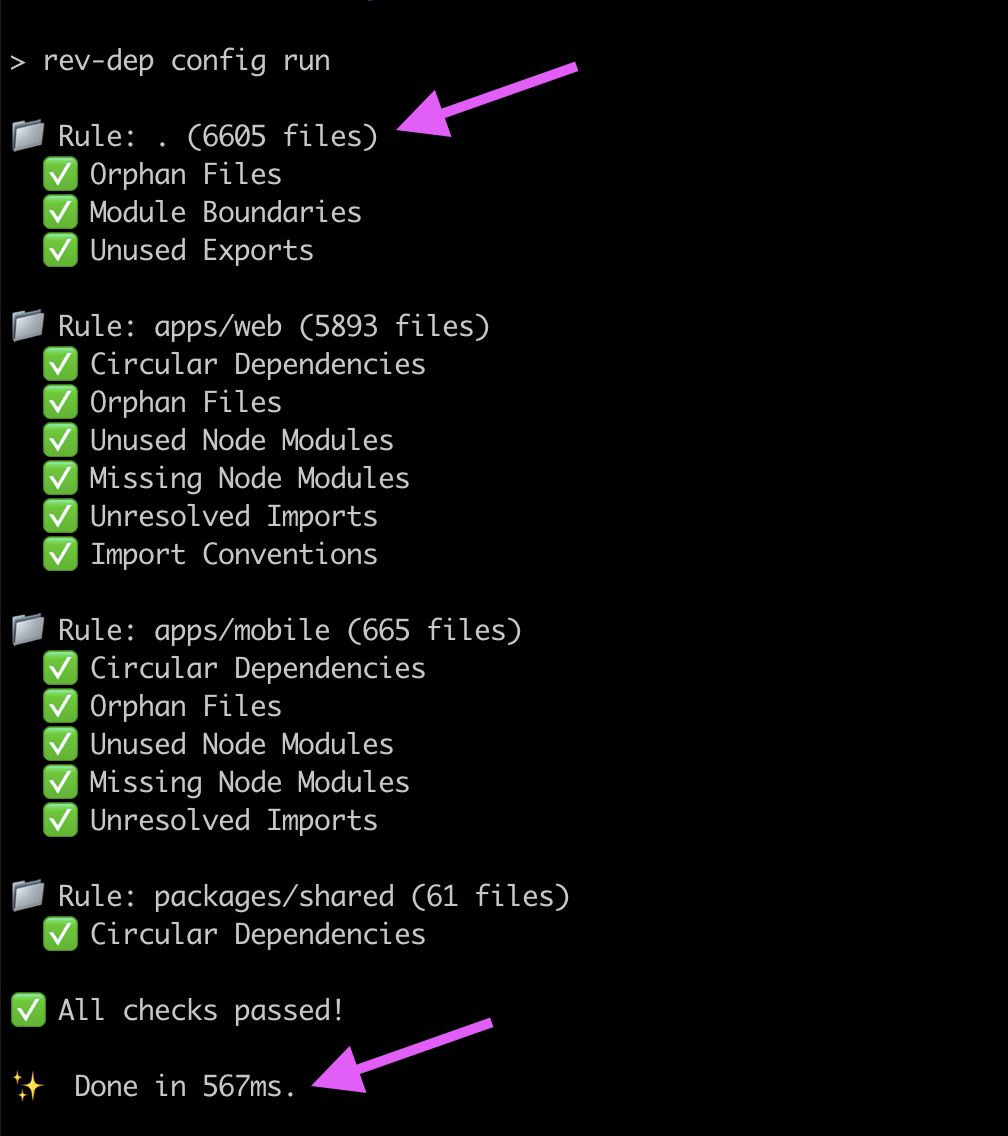
استخدم rev-dep config run لتنفيذ عدة فحوصات في تمرير واحد لجميع الحزم.
الفحوصات المتاحة:
moduleBoundaries- فرض حدود معمارية بين الوحدات.importConventions- فرض اصطلاحات نمط الاستيراد (يوفر إصلاحًا تلقائيًا).unusedExportsDetection- كشف الصادرات غير المستخدمة أبدًا (يوفر إصلاحًا تلقائيًا).orphanFilesDetection- كشف الملفات الميتة/اليتيمة (يوفر إصلاحًا تلقائيًا).unusedNodeModulesDetection- كشف التبعيات المُعلنة ولكن غير المستخدمة.missingNodeModulesDetection- كشف الواردات الناقصة من package json.unresolvedImportsDetection- كشف طلبات الاستيراد غير المحلولة.circularImportsDetection- كشف الاستيراد الدائري.duplicatedCodeDetection- كشف الكود المنسوخ (الكتل المتكررة وعناصر JSX).devDepsUsageOnProdDetection- كشف التبعيات الخاصة بالتطوير (dev dependencies) المستخدمة في كود الإنتاج.restrictedImportsDetection- منع استيراد ملفات/وحدات محظورة من نقاط دخول محددة.restrictedImportersDetection- قائمة بيضاء لنقاط الدخول التي قد تصل بشكل غير مباشر إلى مجموعة من الملفات/الوحدات.restrictedDirectImportersDetection- تقييد الملفات التي قد تستورد مباشرةً مجموعة من الملفات/الوحدات (غير مباشر).
التحليل الاستكشافي (قائم على CLI) 🔍
استخدم أوامر CLI لاستكشاف التبعيات حسب الحاجة:
entry-points- اكتشاف نقاط دخول المشروع.files- عرض ملفات شجرة التبعيات لنقطة دخول معينة.resolve- تتبع مسارات التبعيات بين الملفات (من يستورد هذا الملف).imported-by- عرض المستوردين المباشرين لملف ما.circular- عرض سلاسل التبعية الدائرية.duplicated-code- العثور على كتل الكود المنسوخة وعناصر JSX.node-modules- فحص وحدات node modules التالية:used,unused,missing, وinstalled.lines-of-code- حساب عدد أسطر الكود الفعلية (LOC).unresolved- عرض الواردات التي تعذّر حلها، مجمعة حسب الملف.list-cwd-files- عرض جميع ملفات الكود المصدري في دليل العمل الحالي (CWD).debug- فحص ما يوزّعه ويحلّه ويكتشفه rev-dep داخليًا.
التثبيت 📦
التوثيق الكامل: rev-dep.com/docs/intro
ثبّت محليًا لإعداد سكربتات فحص المشروع``` yarn add -D rev-dep
لم يتم تضمين أي محتوى في الإدخال. يرجى توفير نص القطعة المراد ترجمتها.```
npm install -D rev-dep
لا يوجد محتوى للإدخال.``` pnpm add -D rev-dep
أنشئ ملف إعداد للبدء السريع:```
npx rev-dep config init
التثبيت عالميًا لاستخدامه كأداة CLI:``` yarn global add rev-dep
Please provide the Markdown content to translate.```
npm install -g rev-dep
I don't see any source text in the INPUT section — it appears to be empty. Please provide the actual Markdown content for chunk 13 so I can translate it.``` pnpm global add rev-dep
### أدلة التكامل خطوة بخطوة
اتبع الدليل المطابق لمشروعك للانتقال من الصفر إلى إعداد يعمل:
- [Monorepo integration guide](https://rev-dep.com/docs/monorepo-integration-guide) - لمساحات عمل `pnpm`/`yarn`/`npm`.
- [Single workspace integration guide](https://rev-dep.com/docs/single-workspace-integration-guide) - لمشاريع الحزمة الواحدة.
## **أمثلة سريعة 💡**
بعض الأمثلة الجاهزة للاستخدام الفوري للتعرف على الأداة:```bash
# Detect circular imports/dependencies
rev-dep circular
# Find copy-pasted code
rev-dep duplicated-code
# Detect unused node modules
rev-dep node-modules unused
# List all entry points in the project
rev-dep entry-points
# Check which files an entry point imports
rev-dep files --entry-point src/index.ts
# Find every entry point that depends on a file
rev-dep resolve --file src/utils/math.ts
# Resolve dependency path between files
rev-dep resolve --file src/utils/math.ts --entry-point src/index.ts
الفحوصات المستندة إلى الإعدادات 🛡️
يوفر Rev-dep نظامًا لإعدادات تنسيق فحوصات المشروع. نهج الإعدادات مصمم للسرعة ويمثل الطريقة المفضلة لتنفيذ فحوصات المشروع لأنه يمكنه تنفيذ جميع الفحوصات في تمريرة واحدة، بشكل أسرع بكثير من تشغيل أوامر فردية متعددة بشكل منفصل.
الفحوصات المتاحة هي:
moduleBoundaries- فرض حدود البنية بين الوحدات.importConventions- فرض اصطلاحات نمط الاستيراد (يوفر إصلاحًا تلقائيًا).unusedExportsDetection- اكتشاف الصادرات التي لا تُستخدم أبدًا (يوفر إصلاحًا تلقائيًا).orphanFilesDetection- اكتشاف الملفات الميتة/اليتيمة (يوفر إصلاحًا تلقائيًا).unusedNodeModulesDetection- اكتشاف التبعيات المُعلنة ولكن غير المستخدمة.missingNodeModulesDetection- اكتشاف الاستيرادات المفقودة من package json.unresolvedImportsDetection- اكتشاف طلبات الاستيراد غير المحلولة.circularImportsDetection- اكتشاف الاستيرادات الدائرية.duplicatedCodeDetection- اكتشاف كتل الأكواد وعناصر JSX المنسوخة والمكررة.devDepsUsageOnProdDetection- اكتشاف التبعيات التطويرية المستخدمة في كود الإنتاج.restrictedImportsDetection- حظر استيراد الملفات/الوحدات المرفوضة من نقاط الدخول المحددة.restrictedImportersDetection- وضع قائمة بيضاء لنقاط الدخول التي قد تصل بشكل عابر إلى مجموعة من الملفات/الوحدات.restrictedDirectImportersDetection- تقييد الملفات التي قد تستورد مباشرةً مجموعة من الملفات/الوحدات (غير عابر).
تُجمَّع الفحوصات في مساحات عمل. يمكن أن يكون لديك مساحات عمل متعددة، مثل كل حزمة من حزم monorepo.
البدء
قم بتهيئة ملف إعدادات في مشروعك:```bash
Create a default configuration file
rev-dep config init
سلوك `rev-dep config init`:
- جذر Monorepo: تشغيل `rev-dep config init` في جذر مساحة العمل ينشئ مساحة عمل جذر ومساحة عمل لكل حزمة workspace مكتشفة.
- حزمة workspace من Monorepo أو المشاريع العادية: تشغيل `rev-dep config init` داخل دليل ينشئ إعدادًا بمساحة عمل واحدة مع `path: "."` لهذا الدليل.
شغّل جميع الفحوصات المكوّنة (تشغيل تجريبي، دون تطبيق الإصلاحات بعد):```bash
# Execute all workspaces and checks defined in the config
rev-dep config run
اسرد جميع المشكلات المكتشفة:```bash
Lists all detected issues, by default lists first five issues for each check
rev-dep config run --list-all-issues
أصلح جميع الفحوصات القابلة للإصلاح:```bash
# Fix checks configured with autofix
rev-dep config run --fix
بنية التكوين
يتيح لك ملف التكوين (rev-dep.config.json(c) أو .rev-dep.config.json(c)) تعريف مساحات عمل متعددة، تستهدف كل منها أجزاءً مختلفة من قاعدة الشيفرة البرمجية مع تفعيل فحوصات محددة.
تكوين البدء السريع```jsonc
{ "configVersion": "2.0", "$schema": "https://github.com/jayu/rev-dep/blob/master/config-schema/2.0.schema.json?raw=true", "nodeModulesResolution": { "resolutionType": "entry-package", "includeDevDepsFromRoot": false }, "workspaces": [ { "path": ".", "prodEntryPoints": ["src/main.tsx", "src/pages//*.tsx"], "devEntryPoints": ["scripts/", "**/.test."], "unusedExportsDetection": { "enabled": true, "autofix": true }, "orphanFilesDetection": { "enabled": true, "autofix": true }, "unusedNodeModulesDetection": { "enabled": true }, "circularImportsDetection": { "enabled": true }, "devDepsUsageOnProdDetection": { "enabled": true, "ignoreTypeImports": true } } ] }
#### مثال إعداد شامل
إليك مثالاً شاملاً يعرض جميع الخصائص المتاحة:```jsonc
{
"configVersion": "1.10",
"$schema": "https://github.com/jayu/rev-dep/blob/master/config-schema/1.10.schema.json?raw=true", // enables json autocompletion
"conditionNames": ["import", "default"],
"ignoreFiles": ["**/*.test.*"],
"nodeModulesResolution": { "resolutionType": "entry-package", "includeDevDepsFromRoot": false },
"workspaces": [
{
"path": ".",
"followMonorepoPackages": true,
"prodEntryPoints": ["src/main.tsx", "src/pages/**/*.tsx", "src/server.ts"],
"devEntryPoints": ["scripts/**", "**/*.test.*"],
"ignoreEntryPoints": ["src/legacy/oldDashboard.tsx"],
"moduleBoundaries": [
{
"name": "ui-components",
"pattern": "src/components/**/*",
"allow": ["src/utils/**/*", "src/types/**/*"],
"deny": ["src/api/**/*"]
},
{
"name": "api-layer",
"pattern": "src/api/**/*",
"allow": ["src/utils/**/*", "src/types/**/*"],
"deny": ["src/components/**/*"]
}
],
"importConventions": [
{
"rule": "relative-internal-absolute-external",
"autofix": true,
"domains": [
{
"path": "src/features/auth",
"alias": "@auth",
"enabled": true
},
{
"path": "src/shared/ui",
"alias": "@ui-kit",
"enabled": false // checks disabled for this domain, but alias is still used for absolute imports from other domains
}
]
}
],
"circularImportsDetection": {
"enabled": true,
"ignoreTypeImports": true
},
"orphanFilesDetection": {
"enabled": true,
"ignoreTypeImports": true,
"graphExclude": ["**/*.test.*", "**/stories/**/*"],
"autofix": true
},
"unusedNodeModulesDetection": {
"enabled": true,
"includeModules": ["@myorg/**"],
"excludeModules": ["@types/**"],
"pkgJsonFieldsWithBinaries": ["scripts", "bin"],
"filesWithBinaries": ["scripts/check-something.sh"],
"filesWithModules": [".storybook/main.ts"],
"outputType": "groupByModule"
},
"missingNodeModulesDetection": {
"enabled": true,
"includeModules": ["lodash", "axios"],
"excludeModules": ["@types/**"],
"outputType": "groupByFile"
},
"unusedExportsDetection": {
"enabled": true,
"autofix": true,
"ignoreTypeExports": true,
"graphExclude": ["**/*.stories.tsx"],
"ignore": {
"src/types.ts": "B*",
"**/generated/**/*.ts": "*"
},
"ignoreFiles": ["**/*.generated.ts"],
"ignoreExports": ["default", "unused*"],
},
"unresolvedImportsDetection": {
"enabled": true,
"ignore": {
"src/index.ts": "legacy-*"
},
"ignoreFiles": ["**/*.generated.ts"],
"ignoreImports": ["@internal/*"]
},
"devDepsUsageOnProdDetection": {
"enabled": true,
"ignoreTypeImports": true
},
"restrictedImportsDetection": {
"enabled": true,
"entryPoints": ["src/server.ts", "src/server/**/*.ts"],
"graphExclude": ["some-file-coupling-other-files.ts"],
"denyFiles": ["**/*.tsx"],
"denyModules": ["react", "react-*"],
"ignoreMatches": ["src/server/allowed-view.tsx", "react-awsome-lib"],
"ignoreTypeImports": true
}
}
]
}
الخصائص المتاحة
خصائص المستوى الجذر
configVersion(مطلوب): سلسلة نصية لإصدار الإعدادات$schema(اختياري): مرجع مخطط JSON للتحققconditionNames(اختياري): مصفوفة أسماء شروط لتحليل التصديراتcustomAssetExtensions(اختياري): امتدادات أصول إضافية تُعامل كاستيرادات قابلة للحل (مثل["glb", "mp3"]). القائمة الافتراضية تغطي الامتدادات الشائعة للخطوط والصور وملفات الإعدادات.ignoreFiles(اختياري): أنماط ملفات عامة لتجاهلها عبر جميع مساحات العمل. الملفات المتجاهلة بواسطة Git تُتخطى افتراضيًا.processIgnoredFiles(اختياري): أنماط ملفات عامة لتجهيزها حتى لو كانت تطابق gitignore أوignoreFiles.nodeModulesResolution(اختياري): أيpackage.jsonيتم التحقق من كل استيراد تابع لجهة خارجية مقابله لفحوصاتmissingNodeModulesوunusedNodeModulesوunresolvedImports. قم بإعداده ككائن{ "resolutionType": ..., "includeDevDepsFromRoot": ... }- وهو النموذج الذي يولّدهrev-dep config init.resolutionTypeهي"entry-package"(الافتراضي، يتحقق مقابلpackage.jsonالخاص بنقطة دخول مساحة العمل) أو"nearest-package"(يتحقق مقابلpackage.jsonالمالك لكل ملف - استخدمه لتخطيط pnpm الافتراضي، حيث يحل كل حزمة تبعياته الخاصة فقط).includeDevDepsFromRoot(الافتراضيfalse) يسمح لرمز الحزمة باستخدام تبعيات التطوير المُعلنة فقط في جذر monorepo دون أن يقومmissingNodeModulesأوunresolvedImportsبوضع علامة عليها. كما يتم قبول سلسلة نصية بسيطة (مثل"nearest-package") كاختصار متوافق مع الإصدارات السابقة لـresolutionType. ينطبق على جميع مساحات العمل. انظر الوثائق.workspaces(مطلوب): مصفوفة كائنات مساحات العمل
خصائص مساحة العمل
يمكن أن تحتوي كل مساحة عمل على الخصائص التالية:
path(مطلوب): مسار الدليل المستهدف لمساحة العمل هذه (إما.أو مسار يبدأ باسم دليل فرعي)followMonorepoPackages(اختياري): التحكم في حل حزم monorepo.trueيتبع جميع حزم مساحة العمل (الافتراضي)،falseيعطّله، والمصفوفة تتبع أسماء الحزم المحددة فقط.prodEntryPoints(اختياري): أنماط نقاط دخول الإنتاج على مستوى مساحة العمل لافتراضيات الكاشفdevEntryPoints(اختياري): أنماط نقاط دخول التطوير على مستوى مساحة العمل لافتراضيات الكاشفignoreEntryPoints(اختياري): أنماط على مستوى مساحة العمل لنقاط الدخول المتبقية التي لم تعد تهتم بها. الملفات المطابقة لهذه الأنماط لا تُعالج كمشكلات - لا يتم الإبلاغ عنها أبدًا كملفات يتيمة، ولا يتم الإبلاغ عن تصديراتها غير المستخدمة. مفيد للملفات التي يجب أن تبقى ملتزمة في المستودع ولكنها لم تعد موصولة بالتطبيق.moduleBoundaries(اختياري): مصفوفة قواعد حدود الوحداتcircularImportsDetection(اختياري): إعداد كشف الاستيراد الدائري (كائن واحد أو مصفوفة كائنات)duplicatedCodeDetection(اختياري): إعداد كشف الكود المكرر (كائن واحد أو مصفوفة كائنات)orphanFilesDetection(اختياري): إعداد كشف الملفات اليتيمة (كائن واحد أو مصفوفة كائنات)unusedNodeModulesDetection(اختياري): إعداد كشف وحدات node غير المستخدمة (كائن واحد أو مصفوفة كائنات)missingNodeModulesDetection(اختياري): إعداد كشف وحدات node المفقودة (كائن واحد أو مصفوفة كائنات)unusedExportsDetection(اختياري): إعداد كشف التصديرات غير المستخدمة (كائن واحد أو مصفوفة كائنات)unresolvedImportsDetection(اختياري): إعداد كشف الاستيرادات غير المحلولة (كائن واحد أو مصفوفة كائنات)devDepsUsageOnProdDetection(اختياري): إعداد كشف استخدام تبعيات التطوير المقيدة (كائن واحد أو مصفوفة كائنات)restrictedImportsDetection(اختياري): تقييد استيراد الملفات/الوحدات الممنوعة من نقاط دخول محددة (كائن واحد أو مصفوفة كائنات)restrictedImportersDetection(اختياري): قائمة بيضاء لنقاط الدخول التي قد تصل بشكل غير مباشر إلى مجموعة ملفات/وحدات (كائن واحد أو مصفوفة كائنات)restrictedDirectImportersDetection(اختياري): تقييد الملفات التي قد تستورد مباشرة مجموعة ملفات/وحدات؛ دون اعتبار التابعية غير المباشرة (كائن واحد أو مصفوفة كائنات)importConventions(اختياري): مصفوفة قواعد اصطلاحات الاستيراد
خصائص حدود الوحدة
name(مطلوب): اسم الحدودpattern(مطلوب): نمط Glob للملفات ضمن هذه الحدودallow(اختياري): مصفوفة أنماط الاستيراد المسموح بهاdeny(اختياري): مصفوفة أنماط الاستيراد الممنوعة (تتجاوز allow)
خصائص اصطلاح الاستيراد
rule(مطلوب): نوع القاعدة، حاليًا فقطrelative-internal-absolute-externalautofix(اختياري): ما إذا كان سيتم إصلاح مخالفات اصطلاح الاستيراد تلقائيًا (الافتراضي: false)domains(مطلوب): مصفوفة تعريفات النطاقات. يمكن أن تكون سلسلة نصية (نمط glob) أو كائنًا يحتوي على:path(مطلوب): الدليل الذي يحتوي على ملفات النطاقalias(اختياري): اسم مستعار يُستخدم للاستيرادات المطلقة للكود من هذا النطاقenabled(اختياري): اضبطه علىfalseلتخطي الفحوصات لهذا النطاق (الافتراضي: true)
خصائص خيارات الكشف
يمكن إعداد كل خاصية كشف:
- ككائن واحد (مثيل كاشف واحد)، أو
- كمصفوفة كائنات (عدة مثيلات كاشف يتم تقييمها داخل نفس مساحة العمل).
CircularImportsDetection:
enabled(مطلوب): تفعيل/تعطيل كشف الاستيراد الدائريignoreTypeImports(اختياري): استبعاد استيرادات الأنواع فقط عند بناء الرسم البياني (الافتراضي: false)
DuplicatedCodeDetection:
enabled(مطلوب): تفعيل/تعطيل كشف الكود المكررblindIdentifiers(اختياري): التعامل مع الأسماء كبدائل عشوائية (wildcards)، بحيث تظل النسخة المعاد تسميتها مُحتسبة (الافتراضي: false)blindStrings(اختياري): التعامل مع محتويات النصوص والقوالب كبدائل عشوائية (الافتراضي: false)blindNumbers(اختياري): التعامل مع القيم الرقمية الحرفية كبدائل عشوائية (الافتراضي: false)minTokens(اختياري): أصغر تكرار يتم الإبلاغ عنه، بالرموز (الافتراضي: 50)minLines(اختياري): أصغر تكرار يتم الإبلاغ عنه، بالأسطر (الافتراضي: 3)minDepth(اختياري): أصغر عمق تداخل، مع احتساب الكتلة نفسها. القيمة 2 تتطلب مستوى تداخلًا واحدًا على الأقل (الافتراضي: 0)minStatements(اختياري): أصغر عدد عبارات؛ ينطبق فقط على كتل العبارات (الافتراضي: 0)minDuplicates(اختياري): عدد النسخ التي يجب أن تمتلكها القطعة قبل الإبلاغ عنها (الافتراضي: 2)skipObjects(اختياري): عدم الإبلاغ عن التكرارات التي هي مجرد كائنات حرفية (الافتراضي: false)ignoreFiles(اختياري): أنماط Glob لاستبعادها من التحليلsnapshotPath(اختياري): مسار إلى خط أساس ملتزم في المستودع للتكرارات المعترف بها، نسبيًا إلى مساحة العمل. معه يبلغ الفحص بما تغيّر بدلاً من الإجمالي
OrphanFilesDetection:
enabled(مطلوب): تفعيل/تعطيل كشف الملفات اليتيمةvalidEntryPoints(اختياري): مصفوفة أنماط نقاط دخول صالحة. إذا تم حذفها، فالقيمة الافتراضية هيprodEntryPoints + devEntryPointsمن مستوى مساحة العمل.ignoreTypeImports(اختياري): استبعاد استيرادات الأنواع فقط عند بناء الرسم البياني (الافتراضي: false)graphExclude(اختياري): أنماط ملفات لاستبعادها من تحليل الرسم البيانيautofix(اختياري): حذف الملفات اليتيمة المكتشفة تلقائيًا عند تشغيلrev-dep config run --fix(الافتراضي: false)
UnusedNodeModulesDetection:
enabled(مطلوب): تفعيل/تعطيل كشف الوحدات غير المستخدمةincludeModules(اختياري): أنماط وحدات لتضمينها في التحليلexcludeModules(اختياري): أنماط وحدات لاستبعادها من التحليلpkgJsonFieldsWithBinaries(اختياري): حقول Package.json التي تحتوي على مراجع ثنائية (مثل lint-staged). يقوم ببحث نصي عاديfilesWithBinaries(اختياري): أنماط ملفات للبحث عن استخدام الثنائيات. يقوم ببحث نصي عاديfilesWithModules(اختياري): أنماط ملفات غير JS/TS للبحث عن استيرادات الوحدات (مثل سكربتات shell). يقوم ببحث نصي عاديoutputType(اختياري): تنسيق المخرجات - "list" أو "groupByModule" أو "groupByFile"
MissingNodeModulesDetection:
enabled(مطلوب): تفعيل/تعطيل كشف الوحدات المفقودةincludeModules(اختياري): أنماط وحدات لتضمينها في التحليلexcludeModules(اختياري): أنماط وحدات لاستبعادها من التحليلoutputType(اختياري): تنسيق المخرجات - "list" أو "groupByModule" أو "groupByFile" أو "groupByModuleFilesCount"
UnusedExportsDetection:
enabled(مطلوب): تفعيل/تعطيل كشف التصديرات غير المستخدمةvalidEntryPoints(اختياري): أنماط Glob للملفات التي لا يتم الإبلاغ عن تصديراتها أبدًا كغير مستخدمة. إذا تم حذفها، فالقيمة الافتراضية هيprodEntryPoints + devEntryPointsمن مستوى مساحة العمل.ignoreTypeExports(اختياري): تخطيexport type/export interfaceمن التحليل (الافتراضي: false)graphExclude(اختياري): أنماط ملفات لاستبعادها من تحليل التصديرات غير المستخدمةignore(اختياري): خريطة من أنماط glob لمسارات الملفات (نسبيًا إلى دليل مسار مساحة العمل) إلى glob لاسم/محدد التصدير المراد كتمه؛ يمكن أن تكون كل قيمة سلسلة نصية أو مصفوفة سلاسل نصيةignoreFiles(اختياري): أنماط glob لمسارات الملفات؛ يتم كتم جميع التصديرات غير المستخدمة من الملفات المطابقةignoreExports(اختياري): أسماء/محددات التصدير (أو globs) لكتمها عالميًا (يدعم"default")autofix(اختياري): تطبيق تغييرات التصديرات غير المستخدمة القابلة للإصلاح تلقائيًا عند تشغيلrev-dep config run --fix(الافتراضي: false)
UnresolvedImportsDetection:
enabled(مطلوب): تفعيل/تعطيل كشف الاستيرادات غير المحلولةignore(اختياري): خريطة من أنماط glob لمسارات الملفات (نسبيًا إلى دليل مسار مساحة العمل) إلى glob لطلبات الاستيراد المراد كتمها؛ يمكن أن تكون كل قيمة سلسلة نصية أو مصفوفة سلاسل نصيةignoreFiles(اختياري): أنماط glob لمسارات الملفات؛ يتم كتم جميع الاستيرادات غير المحلولة من الملفات المطابقةignoreImports(اختياري): طلبات الاستيراد (أو globs) لكتمها عالميًا في نتائج الاستيرادات غير المحلولة
DevDepsUsageOnProdDetection:
enabled(مطلوب): تفعيل/تعطيل كشف استخدام تبعيات التطوير المقيدةprodEntryPoints(اختياري): أنماط نقاط دخول الإنتاج لتتبع التبعيات منها. إذا تم حذفها، فالقيمة الافتراضية هيprodEntryPointsعلى مستوى مساحة العمل.ignoreTypeImports(اختياري): استبعاد استيرادات الأنواع فقط من اجتياز الرسم البياني ومطابقة الوحدات (الافتراضي: false)
RestrictedImportsDetection:
enabled(مطلوب): تفعيل/تعطيل كشف الاستيرادات المقيدةentryPoints(مطلوب عند التفعيل): أنماط نقاط الدخول المستخدمة لبناء رسم بياني للاعتماديات القابلة للوصول (لا يتم تطبيق نقاط دخول مستوى مساحة العمل هنا)graphExclude(اختياري): أنماط ملفات لاستبعادها من تحليل رسم الاستيرادات المقيدةdenyFiles(اختياري): أنماط مسارات ملفات ممنوعة (مثل ["**/*.tsx"])denyModules(اختياري): أنماط وحدات ممنوعة (مثل ["react", "react-*"])ignoreMatches(اختياري): أنماط ملفات/وحدات لكتمها من نتائج الاستيراد المقيدignoreTypeImports(اختياري): استبعاد استيرادات الأنواع فقط من الاجتياز (الافتراضي: false)
فوائد الأداء
يوفر نهج الإعدادات مزايا أداء كبيرة:
- بناء شجرة اعتماديات واحدة: بناء شجرة اعتماديات شاملة واحدة لجميع مساحات العمل
- تنفيذ مساحات العمل بالتوازي: معالجة عدة مساحات عمل في وقت واحد
- تنفيذ الفحوصات بالتوازي: تشغيل جميع الفحوصات المفعّلة داخل كل مساحة عمل بالتوازي
- اكتشاف الملفات المحسّن: اكتشاف الملفات مرة واحدة وإعادة استخدامها عبر جميع الفحوصات
هذا يجعل الفحوصات القائمة على الإعدادات أسرع من تشغيل الأوامر الفردية بالتسلسل، خاصةً لقواعد الأكواد الكبيرة التي تحتوي على حزم فرعية متعددة.
عدة الاستكشاف 🔧
تعرض أمثلة عملية كيفية استخدام أوامر rev-dep CLI لاستكشاف أو تصحيح أو بناء فحوصات جودة الكود لمشروعك.
كيفية تحديد أين يُستخدم ملف في المشروع```
rev-dep resolve --file path/to/file.ts
سترى جميع نقاط الدخول التي تتطلب هذا الملف ضمنيًا، بالإضافة إلى مسارات الحل.
### **كيفية التحقق من استخدام ملف**```
rev-dep resolve --file path/to/file.ts --compact-summary
يوضح عدد نقاط الدخول التي تعتمد على الملف بشكل غير مباشر.
كيفية تحديد الملفات الميتة```
rev-dep entry-points
استبعد نقاط دخول الإطار (framework) إذا لزم الأمر باستخدام `--result-exclude`.
على سبيل المثال، استبعد نقاط الدخول الصالحة لـ Next.js عند استخدام pages router، واستبعد دليل scripts - فالسكربتات تُعد نقاط دخول صالحة - واستبعد جميع ملفات الاختبار:```
rev-dep entry-points --result-exclude "pages/**","scripts/**","**/*.test.*"
كيفية سرد جميع الملفات المستوردة بواسطة نقطة دخول```
rev-dep files --entry-point path/to/file.ts
مفيد لتحديد المكونات الثقيلة أو التبعيات غير المقصودة.
### **كيفية تقليل الاستيرادات غير الضرورية لنقطة دخول**
1. قم بإدراج جميع الملفات المستوردة: ```
rev-dep files --entry-point path/to/entry.ts
- حدد الملفات المشبوهة.
- تتبع سبب تضمينها: ```
rev-dep resolve --file path/to/suspect --entry-points path/to/entry.ts --all
كيفية اكتشاف التبعيات الدائرية```
rev-dep circular
### **كيفية اكتشاف الكود المكرر**```
rev-dep duplicated-code
يُبلغ عن كتل التعليمات البرمجية المتكررة وعناصر JSX - وهي وحدات يمكنك استخراجها - بدلاً من الأسطر المتكررة. أضف --blind-identifiers لالتقاط النسخ التي تمت إعادة تسمية متغيراتها.
كيفية العثور على وحدات Node غير المستخدمة```
rev-dep node-modules unused
### **كيفية العثور على node modules المفقودة**```
rev-dep node-modules missing
كيفية التحقق من استخدام مساحة node_modules```
rev-dep node-modules dirs-size
### **كيفية اكتشاف تبعيات التطوير المستخدمة في كود الإنتاج**```
rev-dep config run
عندما يكون devDepsUsageOnProdDetection مفعّلاً في إعداداتك، سيقوم rev-dep بـ:
- تتبّع الرسوم البيانية للاعتماديات من نقاط الدخول الإنتاجية المحددة لديك
- تحديد جميع الملفات التي يمكن الوصول إليها من نقاط الدخول تلك
- التحقق من وجود أي وحدات مستورَدة مدرجة ضمن
devDependenciesفي package.json - الإبلاغ عن المخالفات مع إظهار أي اعتماديات تطوير تُستخدم وأين
مثال على المخرجات:``` ❌ Restricted Dev Dependencies Usage Issues (2): lodash (dev dependency) - src/components/Button.tsx (from entry point: src/pages/index.tsx) - src/utils/helpers.ts (from entry point: src/pages/index.tsx) eslint (dev dependency) - src/config/eslint-config.js (from entry point: src/server.ts)
**ملاحظات هامة:**
- يتم تجاهل استيرادات الأنواع فقط (مثل `import type { ReactNode } from 'react'`) عند تفعيل `ignoreTypeImports`
- يتم تمييز التبعيات الموجودة في `devDependencies` فقط في package.json
- يُسمح بالتبعيات الإنتاجية الموجودة في `dependencies`
- يساعد في منع فشل وقت التشغيل في بنيات الإنتاج
## العمل مع Monorepo 🏗️
توفر Rev-dep دعمًا من الدرجة الأولى لمشاريع monorepo، مما يتيح تحليلًا دقيقًا للتبعيات عبر حزم مساحة العمل.
### خيار followMonorepoPackages
يتيح خيار `--follow-monorepo-packages` حلّ الواردات من حزم مساحة عمل monorepo. افتراضيًا، يتم تعيين هذا الخيار إلى `false` للحفاظ على التوافق مع المشاريع ذات الحزمة الواحدة.```bash
# Enable monorepo package resolution
rev-dep circular --follow-monorepo-packages
rev-dep resolve --file src/utils.ts --follow-monorepo-packages
rev-dep entry-points --follow-monorepo-packages
عند التفعيل، سيقوم rev-dep بما يلي:
- اكتشاف حزم مساحة العمل تلقائيًا عبر فحص إعدادات المستودع الأحادي (monorepo)
- حل الاستيرادات بين الحزم داخل مساحة العمل
- اتباع
exportsفي package.json لتحقيق دقة تحليل الوحدات
دعم خريطة الصادرات (Exports Map)
يدعم rev-dep بشكل كامل حقل exports في ملفات package.json، وهو الطريقة المعيارية لتحديد نقاط دخول الحزم في مشاريع Node.js الحديثة.
يشمل دعم خريطة الصادرات ما يلي:
- الصادرات الشرطية باستخدام شروط مثل
nodeوimportوdefaultوالشروط المخصصة - أنماط أحرف البدل (wildcard) لتعيين مسارات فرعية مرنة
- صيغة مختصرة لتعريفات التصدير الرئيسية البسيطة
- الشروط المتداخلة لسيناريوهات الحل المعقدة
علامة أسماء الشروط (Condition Names Flag)
للتحكم في أي الصادرات الشرطية يتم حلها، استخدم العلامة --condition-names. يتيح لك ذلك تحديد أولوية الشروط عند حل صادرات الحزم:```bash
Resolve exports for different environments
rev-dep circular --condition-names=node,import,default rev-dep resolve --file src/utils.ts --condition-names=import,node rev-dep entry-points --condition-names=default,node,import
تتم معالجة الشروط بالترتيب المحدد، مع استخدام أول شرط مطابق. تتضمن الشروط الشائعة:
- `node` - بيئة Node.js
- `import` - وحدات ES
- `require` - وحدات CommonJS
- `default` - شرط احتياطي
- شروط مخصصة خاصة بمشروعك أو أدوات البناء
مثال على package.json مع exports:```json
{
"name": "@myorg/utils",
"exports": {
".": {
"import": "./dist/index.mjs",
"require": "./dist/index.js",
"default": "./dist/index.js"
},
"./helpers": "./dist/helpers.js",
"./types/*": "./dist/types/*.d.ts"
}
}
كيفية عمل تحليل المستودعات الأحادية (Monorepo)
-
اكتشاف المستودع الأحادي: عند تمكين
followMonorepoPackages، يفحص rev-dep إعدادات مساحة العمل (pnpm-workspace.yaml، package.json workspaces، إلخ.) -
تحليل الحزم: يتم تحليل الاستيرادات إلى حزم مساحة العمل باستخدام إعداد exports الخاص بالحزمة، مع الرجوع إلى حقلي main/module عندما لا تكون exports معرّفة
-
التحقق من التبعيات: تتحقق الأداة من أن الاستيرادات عبر الحزم مسموحة فقط عندما تكون الحزمة الهدف مدرجة في dependencies أو devDependencies الخاصة بالمستهلك
-
تحليل المسارات: يتم تحليل جميع المسارات بالنسبة إلى جذور الحزم الخاصة بها، مما يضمن تتبعًا دقيقًا للتبعيات عبر المستودع الأحادي بأكمله
هذا يجعل rev-dep فعّالًا بشكل خاص لمشاريع المستودعات الأحادية واسعة النطاق حيث يُعد فهم التبعيات عبر الحزم أمرًا بالغ الأهمية للحفاظ على جودة الكود والبنية المعمارية.
مقارنة الأداء ⚡
يمكن لـ rev-dep تنفيذ فحوصات متعددة على مستودع أحادي بأكثر من 500 ألف سطر برمجي (LoC) يحتوي على عدة حزم فرعية في حوالي 150 مللي ثانية.
يتفوق على Madge وdpdm وdependency-cruiser وskott وknip وdepcheck وغيرها من الأدوات المماثلة.
فيما يلي مقارنة أداء لمهام محددة بين rev-dep والبدائل:
| المهمة | وقت التنفيذ [مللي ثانية] | البديل | وقت البديل [مللي ثانية] | أبطأ من rev-dep |
|---|---|---|---|---|
| البحث عن التبعيات الدائرية | 151 | knip | 3 040 | 20x |
| البحث عن الصادرات غير المستخدمة | 186 | knip | 3 176 | 17x |
| البحث عن الملفات غير المستخدمة | 168 | knip | 3 006 | 18x |
| البحث عن وحدات node غير المستخدمة | 170 | knip | 3 069 | 18x |
| البحث عن وحدات node المفقودة | 160 | knip | 3 076 | 19x |
| سرد جميع الملفات المستوردة بواسطة نقطة دخول | 81 | madge | 6 591 | 81x |
| اكتشاف نقاط الدخول | 149 | madge | 13 632 | 92x |
| فرض حدود الوحدات | 164 | dependency-cruiser | 8 140 | 50x |
| العثور على الاستيرادات المقيدة | 170 | dependency-cruiser | 10 995 | 65x |
| العثور على المستوردين المقيدين | 179 | dependency-cruiser | 9 234 | 52x |
| حل مسار التبعية بين الملفات | 221 | يرجى الاقتراح | ||
| حساب أسطر الكود | 251 | يرجى الاقتراح | ||
| تحليل أحجام دليل node_modules | 561 | يرجى الاقتراح |
المنصة: WSL Linux Debian Intel(R) Core(TM) i9-14900KF CPU
القياسات:
hyperfine -w 4 -r 8(4 عمليات إحماء + 8 عمليات قياس)المشروع: 580 ألف سطر من الكود، 6024 ملف كود مصدري لتطبيق next.js
مقارنة أداء فحص التبعيات الدائرية
يعرض الجدول أدناه مقارنة أداء بين أدوات مختلفة تؤدي اكتشاف الاستيرادات الدائرية.
فحص التبعيات الدائرية في rev-dep أسرع بحوالي 20 مرة من أسرع بديل.
| الأداة | الإصدار | الوقت [مللي ثانية] |
|---|---|---|
| 🥇 rev-dep | 3.0.0 | 154 |
| 🥈 knip * | 6.29.0 | 3 040 |
| 🥉 circular-dependency-scanner | 3.0.1 | 3 355 |
| dpdm-fast | 1.0.14 | 6 070 |
| dpdm | 4.2.0 | 6 667 |
| dependency-cruiser | 18.1.0 | 8 258 |
| madge | 8.0.0 | 13 569 |
| skott | 0.35.11 | 61 613 |
* يتجاهل knip دائمًا حواف الاستيراد الخاصة بالأنواع فقط ولا يوفر أي خيار (flag) لتضمينها. تحتوي كل دورة في
قاعدة الأكواد هذه على واحدة على الأقل، لذلك يبلغ knip عن 0 دورات - وقته البالغ 3,040 مللي ثانية هو تحليل
كامل حقيقي، لكنه لرسم بياني أصغر. أمر rev-dep circular -t، الذي يطبق نفس القاعدة، يتفق
تمامًا (0 دورات) في 143.3 مللي ثانية ± 10.3.
المنصة: WSL Linux Debian Intel(R) Core(TM) i9-14900KF CPU
القياسات:
hyperfine -w 4 -r 8(4 عمليات إحماء + 8 عمليات قياس)المشروع: 580 ألف سطر من الكود، 6024 ملف كود مصدري لتطبيق next.js
راجع القياسات التفصيلية مع متوسط الوقت والأوامر المستخدمة في PERFORMANCE.md.
مرجع CLI 📖
rev-dep circular
اكتشاف التبعيات الدائرية في مشروعك
الملخص
يحلل المشروع للعثور على التبعيات الدائرية بين الوحدات. يمكن أن تسبب التبعيات الدائرية مشكلات يصعب تصحيحها ويجب عمومًا تجنبها.``` rev-dep circular [flags]
#### أمثلة```
rev-dep circular --ignore-types-imports
الخيارات```
--condition-names strings List of conditions for package.json imports resolution (e.g. node, imports, default)
-c, --cwd string Working directory for the command (default "$PWD") --follow-monorepo-packages strings Enable resolution of imports from monorepo workspace packages. Pass without value to follow all, or pass package names -h, --help help for circular -t, --ignore-type-imports Exclude type imports from the analysis --process-ignored-files strings Glob patterns to process even if they are ignored by gitignore or exclude patterns --tsconfig-json string Path to tsconfig.json (default: ./tsconfig.json) -v, --verbose Show warnings and verbose output
### rev-dep config
إنشاء وتنفيذ ملفات إعداد rev-dep
#### Synopsis
أوامر لإنشاء وتنفيذ ملفات إعداد rev-dep.
#### Options```
-c, --cwd string Working directory (default "$PWD")
-h, --help help for config
rev-dep config run
نفّذ جميع الفحوصات المعرّفة في (.)rev-dep.config.json(c)
الموجز
عالج (.)rev-dep.config.json(c) ونفّذ جميع الفحوصات الممكّنة (الاستيرادات الدائرية، الملفات اليتيمة، حدود الوحدات، اصطلاحات الاستيراد، وحدات العقد، الصادرات غير المستخدمة، الاستيرادات غير المحلولة، الاستيرادات المقيدة واستخدام التبعيات التنموية المقيدة) لكل مساحة عمل.``` rev-dep config run [flags]
#### الخيارات```
-c, --cwd string Working directory (default "$PWD")
--fix Automatically fix fixable issues
--format string Output format (json, issues-list)
-h, --help help for run
--lint-config Also lint the config after running; prints only error/warning counts and fails (non-zero exit) on any lint error. Use 'config lint' for details and --fix
--lint-config-rules strings Which lint rules to run with --lint-config (comma-separated). Default: all. Implies --lint-config
--list-all-issues List all issues instead of limiting output
--recheck Run all checks again after '--fix' to validate the final state
--update-snapshot Rewrite every configured duplicated-code snapshot from this run, acknowledging what it found.
-v, --verbose Show warnings and verbose output
--workspaces strings Subset of workspaces to run (comma-separated list of workspace paths)
rev-dep config init
تهيئة ملف rev-dep.config.json جديد
الملخص
إنشاء ملف إعدادات rev-dep.config.json جديد في الدليل الحالي مع الإعدادات الافتراضية.``` rev-dep config init [flags]
#### الخيارات```
-c, --cwd string Working directory (default "$PWD")
-h, --help help for init
rev-dep config lint
الإبلاغ عن (وإزالة اختياريًا) أنماط glob/المسارات في الإعداد التي لا تطابق أي شيء
ملخص
افحص ملف (.)rev-dep.config.json(c) بحثًا عن أنماط glob والمسارات "الميتة" - أنماط التجاهل، أنماط نقاط الدخول، مسارات مساحات العمل، استثناءات الرسم البياني، الملفات/الوحدات المحظورة وما شابه - التي لم تعد تطابق أي ملف أو وحدة مكتشفة. بمرور الوقت، تتراكم في الإعدادات أنماط لملفات تمت إعادة تسميتها أو حذفها؛ يُبرزها هذا الأمر ليبقى الإعداد خفيفًا.
مع --fix، تتم إزالة الأنماط الميتة في مكانها، مع الحفاظ على جميع التعليقات والتنسيق. يتم الإبلاغ عن بعض الأنماط ولكن لا تتم إزالتها تلقائيًا أبدًا لأن حذفها قد يغيّر سلوك أحد الفحوصات أو يجعل الإعداد غير صالح - مسارات مساحات العمل، نقاط الدخول / الملفات / الوحدات المطلوبة، ومحددات حدود الوحدات. تُعلَّم هذه الأنماط "لا تتم إزالتها تلقائيًا"؛ قم بحلّها يدويًا.``` rev-dep config lint [flags]
#### الخيارات```
-c, --cwd string Working directory (default "$PWD")
--fix Remove dead patterns from the config file (preserves comments and formatting)
-h, --help help for lint
--rules strings Lint rules to run (comma-separated): orphan-file-globs, orphan-module-globs, overlapping-globs, trailing-commas, compact. Default: all. orphan-file-globs/overlapping-globs use file discovery; orphan-module-globs parses the dependency tree; trailing-commas and compact only read the config file.
-v, --verbose Show warnings and verbose output
rev-dep config migrate
قم بترقية إعدادات v2 إلى مخطط v3 (2.0)
الملخص
قم بترقية ملف (.)rev-dep.config.json(c) من مخطط v2 إلى مخطط v3 (إصدار الإعدادات 2.0).
يقوم بتطبيق التغييرات الآمنة التي لا لبس فيها مباشرةً (إعادة تسمية المصفوفة 'rules' على المستوى الأعلى إلى 'workspaces'، ورفع 'configVersion' إلى 2.0، وإزالة الخيار المتوقف 'algorithm' من كاشفات circular-imports)، مع الحفاظ على جميع التعليقات والتنسيق. راجع التغيير باستخدام git قبل الالتزام به.
ثم يسرد ما لم يستطع تغييره نيابةً عنك: أنماط glob التي ربما تغيّرت مجموعة مطابقتها في ظل قواعد v3 الأكثر صرامةً والمتوافقة مع gitignore، وتغييرات السلوك التي لا يمكن لأي تعديل في الإعدادات معالجتها. راجع هذه الأمور يدويًا - راجع دليل التغييرات الكسرية للإصدار v3.``` rev-dep config migrate [flags]
#### الخيارات```
-c, --cwd string Working directory (default "$PWD")
-h, --help help for migrate
rev-dep debug
أدوات تصحيح أخطاء لفحص دواخل المحلل (parser) والمحلل (resolver)
ملخص
أدوات تصحيح أخطاء لفحص كيفية قيام rev-dep بتحليل الملفات وحلّ التبعيات. المخرجات لا تتبع semver.
الخيارات```
-h, --help help for debug
### rev-dep debug get-tree-for-cwd
تصحيح: عرض شجرة التبعيات الكاملة للتحليل
#### الملخص
أداة تصحيح لفحص شجرة التبعيات الكاملة. لا يتبع الإخراج نمط semver.```
rev-dep debug get-tree-for-cwd [flags]
الخيارات```
--condition-names strings List of conditions for package.json imports resolution (e.g. node, imports, default)
--cwd string Working directory for the command (default "$PWD")
--follow-monorepo-packages strings Enable resolution of imports from monorepo workspace packages. Pass without value to follow all, or pass package names
-h, --help help for get-tree-for-cwd -t, --ignore-type-imports Exclude type imports from the analysis --include-dev-deps-from-root Treat the monorepo root package.json devDependencies as available to package code, so they are not reported as missing or unresolved. Mirrors config nodeModulesResolution.includeDevDepsFromRoot --node-modules-resolution string Which package.json each import is validated against: 'entry-package' (the cwd package.json, default) or 'nearest-package' (each file's own nearest package.json) (default "entry-package") --tsconfig-json string Path to tsconfig.json (default: ./tsconfig.json) -v, --verbose Show warnings and verbose output
### rev-dep debug list-cwd-files
سرد جميع الملفات في دليل العمل الحالي
#### الملخص
يسرد بشكل متكرر جميع الملفات في الدليل المحدد،
مع خيارات لتصفية النتائج.```
rev-dep debug list-cwd-files [flags]
أمثلة```
rev-dep debug list-cwd-files --include='.ts' --exclude='.test.ts'
#### خيارات```
--count Only display the count of matching files
--cwd string Directory to list files from (default "$PWD")
--exclude strings Exclude files matching these glob patterns
-h, --help help for list-cwd-files
--include strings Only include files matching these glob patterns
rev-dep debug parse-file
تصحيح الأخطاء: عرض الاستيرادات المُحلَّلة لملف واحد
الملخص
أداة تصحيح أخطاء لفحص كيفية معالجة المُحلِّل لملف معيّن. المخرجات لا تتبع semver.``` rev-dep debug parse-file [flags]
#### الخيارات```
--condition-names strings List of conditions for package.json imports resolution (e.g. node, imports, default)
--cwd string Working directory for the command (default "$PWD")
--file string file to parse
--follow-monorepo-packages strings Enable resolution of imports from monorepo workspace packages. Pass without value to follow all, or pass package names
-h, --help help for parse-file
--include-dev-deps-from-root Treat the monorepo root package.json devDependencies as available to package code, so they are not reported as missing or unresolved. Mirrors config nodeModulesResolution.includeDevDepsFromRoot
--node-modules-resolution string Which package.json each import is validated against: 'entry-package' (the cwd package.json, default) or 'nearest-package' (each file's own nearest package.json) (default "entry-package")
--tsconfig-json string Path to tsconfig.json (default: ./tsconfig.json)
-v, --verbose Show warnings and verbose output
rev-dep debug parse-tsconfig
تصحيح: عرض الأسماء المستعارة لإعدادات TypeScript التي تم تحليلها
الملخص
أداة تصحيح لفحص كيفية تحليل إعدادات TypeScript وما الأسماء المستعارة التي يتم استخراجها. المخرجات لا تتبع semver.``` rev-dep debug parse-tsconfig [flags]
#### الخيارات```
-h, --help help for parse-tsconfig
--tsconfig string Path to TypeScript configuration file
rev-dep كود مكرر
ابحث عن كود مكرر عبر ملفات المشروع (وداخلها)
ملخص
يفحص كل ملف مصدر بحثًا عن أجزاء قابلة للنسخ - كتل الأقواس وعناصر JSX، على كل مستوى من مستويات التداخل - ويُبلغ عن تلك التي تظهر أكثر من مرة.
تتجاهل المقارنة التنسيق والتعليقات تمامًا، لذا فإن النسخ المُعاد ترتيبها لا تزال متطابقة.
تحدد أربعة عوامل تصفية ما يستحق الإبلاغ عنه. يقيس كل من --min-tokens و--min-lines
الحجم؛ ويقيس كل من --min-depth و--min-statements التعقيد، وهو ما
يفصل بين كائن إعدادات مكرر بثلاثة مفاتيح وبين منطق مكرر - لا يمكن لأي حد أدنى
للحجم أن يفعل ذلك، لأن مفاتيح الكائن وقيم النصوص قد تكون طويلة. يحدد --min-duplicates
عدد النسخ المطلوب لاستيفاء الشرط.
افتراضيًا، يجب أن يطابق الكود كما هو مكتوب. كل علم --blind-* يُسقط فئة واحدة
من الرموز من المقارنة، ويمكن دمجها بحرية:
--blind-identifiers الأسماء أحرف بدل، لذا فإن النسخة التي أُعيدت تسمية متغيراتها أو دوالها أو مكوناتها لا تزال مُبلَّغًا عنها --blind-strings محتويات النصوص والقالب أحرف بدل --blind-numbers القيم الرقمية الحرفية أحرف بدل``` rev-dep duplicated-code [flags]
#### أمثلة```
rev-dep duplicated-code --cwd ./src --blind-identifiers
الخيارات```
--blind-identifiers Ignore the spelling of names, so a copy whose variables, functions or components were renamed still counts as duplication.
--blind-numbers Ignore the value of numeric literals, so a copy with different constants still counts
--blind-strings Ignore the text of string and template literals, so a copy with different messages or keys still counts
-c, --cwd string Working directory for the command (default "$PWD") -f, --format string Output format: "human" or "json". JSON reports every finding with its canonical hash and the byte and line range of each occurrence, for comparing against another run or another tool (default "human") -h, --help help for duplicated-code --ignore-files strings Glob patterns of files to leave out of the analysis. --json-snippets Include the source of each finding in JSON output. Off by default because snippets dominate the file size and a comparison keyed on ranges does not need them --min-depth int Smallest duplication to report, in nesting levels counting the block itself. 1 admits everything; 2 requires at least one nested level, which is what filters out flat objects and single JSX elements however long their keys or strings are --min-duplicates int How many copies a chunk needs before it is reported. Raise to 3 to ignore code that has only been copied once (default 2) --min-lines int Smallest duplication to report, in lines of the first occurrence (default 3) --min-statements int Smallest duplication to report, in statements directly inside the block. Applies only to statement blocks (function and control-flow bodies); object literals and JSX elements are expressions and are not filtered by it - use --min-depth for those --min-tokens int Smallest duplication to report, in tokens. Tokens rather than characters because the count does not change when a --blind-* flag is applied, so one number means the same amount of code whatever is being ignored (default 50) --process-ignored-files strings Glob patterns to analyse even when gitignore excludes them. --skip-objects Do not report duplications that are only object literals. --snapshot string Path to a JSON snapshot of acknowledged duplications. With it, the command reports what changed since the snapshot instead of everything that exists, and exits non-zero on any difference --update-snapshot Rewrite the --snapshot file from this run, acknowledging everything it found. Always explicit: nothing updates a snapshot on its own
### rev-dep entry-points
اكتشف وسرد جميع نقاط الدخول في المشروع
#### ملخص
تحلل بنية المشروع لتحديد جميع نقاط الدخول المحتملة.
مفيد لفهم بنية تطبيقك والتبعيات.```
rev-dep entry-points [flags]
أمثلة```
rev-dep entry-points --print-deps-count
#### الخيارات```
--condition-names strings List of conditions for package.json imports resolution (e.g. node, imports, default)
-n, --count Only display the number of entry points found
-c, --cwd string Working directory for the command (default "$PWD")
--follow-monorepo-packages strings Enable resolution of imports from monorepo workspace packages. Pass without value to follow all, or pass package names
--graph-exclude strings Exclude files matching these glob patterns from analysis
-h, --help help for entry-points
-t, --ignore-type-imports Exclude type imports from the analysis
--print-deps-count Show the number of dependencies for each entry point
--process-ignored-files strings Glob patterns to process even if they are ignored by gitignore or exclude patterns
--result-exclude strings Exclude files matching these glob patterns from results
--result-include strings Only include files matching these glob patterns in results
--tsconfig-json string Path to tsconfig.json (default: ./tsconfig.json)
-v, --verbose Show warnings and verbose output
ملفات rev-dep
سرد جميع الملفات في شجرة التبعيات لنقطة الإدخال
الملخص
يعثر بشكل متكرر على جميع الملفات المطلوبة بواسطة نقطة الإدخال المحددة ويسردها.``` rev-dep files [flags]
#### أمثلة```
rev-dep files --entry-point src/index.ts
الخيارات```
--condition-names strings List of conditions for package.json imports resolution (e.g. node, imports, default)
-n, --count Only display the count of files in the dependency tree -c, --cwd string Working directory for the command (default "$PWD") -p, --entry-point string Entry point file to analyze (required) --follow-monorepo-packages strings Enable resolution of imports from monorepo workspace packages. Pass without value to follow all, or pass package names -h, --help help for files -t, --ignore-type-imports Exclude type imports from the analysis --process-ignored-files strings Glob patterns to process even if they are ignored by gitignore or exclude patterns --tsconfig-json string Path to tsconfig.json (default: ./tsconfig.json) -v, --verbose Show warnings and verbose output
### rev-dep imported-by
سرد كل الملفات التي تستورد الملف المحدد مباشرةً
#### الملخص
يعثر على جميع الملفات في المشروع التي تستورد الملف المحدد مباشرةً ويسردها.
هذا مفيد لفهم تأثير التغييرات على ملف معيّن.```
rev-dep imported-by [flags]
أمثلة```
rev-dep imported-by --file src/utils/helpers.ts
#### الخيارات```
--condition-names strings List of conditions for package.json imports resolution (e.g. node, imports, default)
-n, --count Only display the count of importing files
-c, --cwd string Working directory for the command (default "$PWD")
-f, --file string Target file to find importers for (required)
--follow-monorepo-packages strings Enable resolution of imports from monorepo workspace packages. Pass without value to follow all, or pass package names
-h, --help help for imported-by
--list-imports List the import identifiers used by each file
--process-ignored-files strings Glob patterns to process even if they are ignored by gitignore or exclude patterns
--tsconfig-json string Path to tsconfig.json (default: ./tsconfig.json)
-v, --verbose Show warnings and verbose output
rev-dep lines-of-code
عدّ سطور الكود الفعلية في المشروع باستثناء التعليقات والأسطر الفارغة``` rev-dep lines-of-code [flags]
#### أمثلة```
rev-dep lines-of-code
الخيارات```
-c, --cwd string Directory to analyze (default "$PWD") -h, --help help for lines-of-code
### rev-dep list-cwd-files
سرد جميع الملفات في دليل العمل الحالي
#### الملخص
يسرد جميع الملفات بشكل تكراري في الدليل المحدد، مع خيارات لتصفية النتائج.```
rev-dep list-cwd-files [flags]
أمثلة```
rev-dep list-cwd-files --include='.ts' --exclude='.test.ts'
#### الخيارات```
--count Only display the count of matching files
--cwd string Directory to list files from (default "$PWD")
--exclude strings Exclude files matching these glob patterns
-h, --help help for list-cwd-files
--include strings Only include files matching these glob patterns
rev-dep unresolved
سرد الاستيرادات غير المحلولة في المشروع
الملخص
كشف وسرد الاستيرادات التي تعذّر حلها أثناء عملية حل الاستيرادات. تجميع الاستيرادات حسب الملف.``` rev-dep unresolved [flags]
#### الخيارات```
--condition-names strings List of conditions for package.json imports resolution (e.g. node, imports, default)
--custom-asset-extensions strings Additional asset extensions treated as resolvable (e.g. glb,mp3)
-c, --cwd string Working directory for the command (default "$PWD")
--follow-monorepo-packages strings Enable resolution of imports from monorepo workspace packages. Pass without value to follow all, or pass package names
-h, --help help for unresolved
--ignore stringToString Map of file path (relative to cwd) to exact import request to ignore (e.g. --ignore src/index.ts=some-module) (default [])
--ignore-files strings File path glob patterns to ignore in unresolved output
--ignore-imports strings Import requests to ignore globally in unresolved output
--include-dev-deps-from-root Treat the monorepo root package.json devDependencies as available to package code, so they are not reported as missing or unresolved. Mirrors config nodeModulesResolution.includeDevDepsFromRoot
--node-modules-resolution string Which package.json each import is validated against: 'entry-package' (the cwd package.json, default) or 'nearest-package' (each file's own nearest package.json) (default "entry-package")
--process-ignored-files strings Glob patterns to process even if they are ignored by gitignore or exclude patterns
--tsconfig-json string Path to tsconfig.json (default: ./tsconfig.json)
-v, --verbose Show warnings and verbose output
rev-dep node-modules
تحليل وإدارة تبعيات Node.js
الملخص
أدوات لتحليل وإدارة تبعيات وحدات Node.js. تساعد في تحديد التبعيات غير المستخدمة أو المفقودة أو المكررة في مشروعك.
أمثلة```
rev-dep node-modules used -p src/index.ts rev-dep node-modules unused --exclude-modules=@types/* rev-dep node-modules missing --entry-points=src/main.ts
#### الخيارات```
-h, --help help for node-modules
rev-dep node-modules analyze-size
تحليل استخدام مساحة القرص في node_modules
ملخص
يوفر تحليلًا مفصلاً لحجم دليل node_modules. يساعد في تحديد التبعيات التي تستهلك مساحة كبيرة.``` rev-dep node-modules analyze-size [flags]
#### أمثلة```
rev-dep node-modules analyze-size
الخيارات```
-c, --cwd string Working directory for the command (default "$PWD") -h, --help help for analyze-size
### rev-dep node-modules dirs-size
تحسب الحجم التراكمي للملفات في مجلدات node_modules
#### ملخص
تحسب وتعرض حجم مجلدات node_modules
في الدليل الحالي والمجلدات الفرعية. ستكون الأحجام أصغر من حجم الملف الفعلي المستخدم على القرص. الأداة تحسب حجم الملف الفعلي بدلاً من حجم الملف على القرص (مرتبط باستخدام كتل القرص).```
rev-dep node-modules dirs-size [flags]
أمثلة```
rev-dep node-modules dirs-size
#### الخيارات```
-c, --cwd string Working directory for the command (default "$PWD")
-h, --help help for dirs-size
rev-dep node-modules installed-duplicates
اكتشاف وتحسين تثبيتات الحزم المكررة
ملخص
تحديد الحزم المثبتة عدة مرات في node_modules. يمكن تحسين التخزين عن طريق إنشاء روابط رمزية بين الحزم المكررة.``` rev-dep node-modules installed-duplicates [flags]
#### أمثلة```
rev-dep node-modules installed-duplicates --optimize --size-stats
الخيارات```
-c, --cwd string Working directory for the command (default "$PWD") -h, --help help for installed-duplicates --isolate Create symlinks only within the same top-level node_module directories. By default optimize creates symlinks between top-level node_module directories (eg. when workspaces are used). Needs --optimize flag to take effect --optimize Automatically create symlinks to deduplicate packages --size-stats Print node modules dirs size before and after optimization. Might take longer than optimization itself --verbose Show detailed information about each optimization
### rev-dep node-modules installed
سرد جميع حزم npm المثبتة في المشروع
#### ملخص
يفحص مجلدات node_modules بشكل تكراري لسرد جميع الحزم المثبتة.
مفيد لتدقيق التبعيات عبر مستودعات monorepos.```
rev-dep node-modules installed [flags]
أمثلة```
rev-dep node-modules installed --include-modules=@myorg/*
#### الخيارات```
-c, --cwd string Working directory for the command (default "$PWD")
-e, --exclude-modules strings list of modules to exclude from the output
-h, --help help for installed
-i, --include-modules strings list of modules to include in the output
rev-dep node-modules missing
ابحث عن الحزم المستوردة غير المدرجة في ملف package.json
الملخص
تحديد الحزم المستوردة في الكود الخاص بك ولكنها غير معلنة في تبعيات package.json الخاصة بك.``` rev-dep node-modules missing [flags]
#### أمثلة```
rev-dep node-modules missing --entry-points=src/main.ts
الخيارات```
--condition-names strings List of conditions for package.json imports resolution (e.g. node, imports, default)
-n, --count Only display the count of modules -c, --cwd string Working directory for the command (default "$PWD") -p, --entry-points strings Entry point file(s) to start analysis from (default: auto-detected) -e, --exclude-modules strings list of modules to exclude from the output -b, --files-with-binaries strings Additional files to search for binary usages. Use paths relative to cwd -m, --files-with-node-modules strings Additional files to search for module imports. Use paths relative to cwd --follow-monorepo-packages strings Enable resolution of imports from monorepo workspace packages. Pass without value to follow all, or pass package names --group-by-file Organize output by project file path --group-by-module Organize output by npm package name --group-by-module-files-count Organize output by npm package name and show count of files using it -h, --help help for missing -t, --ignore-type-imports Exclude type imports from the analysis --include-dev-deps-from-root Treat the monorepo root package.json devDependencies as available to package code, so they are not reported as missing or unresolved. Mirrors config nodeModulesResolution.includeDevDepsFromRoot -i, --include-modules strings list of modules to include in the output --node-modules-resolution string Which package.json each import is validated against: 'entry-package' (the cwd package.json, default) or 'nearest-package' (each file's own nearest package.json) (default "entry-package") --pkg-fields-with-binaries strings Additional package.json fields to check for binary usages --tsconfig-json string Path to tsconfig.json (default: ./tsconfig.json) -v, --verbose Show warnings and verbose output --zero-exit-code Use this flag to always return zero exit code
### rev-dep node-modules prune-docs
إزالة ملفات markdown/المستندات المشابهة من حزم node_modules المثبّتة
#### ملخص
يزيل الملفات من حزم node_modules المثبّتة بناءً على أنماط glob.
مفيد لتقليص ملفات README/LICENSE والمستندات لتقليل حجم التبعيات.```
rev-dep node-modules prune-docs [flags]
أمثلة```
rev-dep node-modules prune-docs --defaults rev-dep node-modules prune-docs --patterns ".md,README.md,docs/**" rev-dep node-modules prune-docs --defaults --patterns ".txt"
#### الخيارات```
-c, --cwd string Working directory for the command (default "$PWD")
--defaults Use default prune patterns: LICENSE, README.md, docs/**
-h, --help help for prune-docs
--pattern strings Alias for --patterns
-p, --patterns strings Glob patterns (relative to each package root) of files to remove, e.g. "*.md,README.md,docs/**"
rev-dep node-modules unused
ابحث عن الحزم المثبتة التي ليست مستوردة في الكود الخاص بك
ملخص
يقارن تبعيات package.json مع الاستيرادات الفعلية في قاعدة الكود الخاصة بك لتحديد الحزم غير المستخدمة المحتملة.``` rev-dep node-modules unused [flags]
#### أمثلة```
rev-dep node-modules unused --exclude-modules=@types/*
الخيارات```
--condition-names strings List of conditions for package.json imports resolution (e.g. node, imports, default)
-n, --count Only display the count of modules -c, --cwd string Working directory for the command (default "$PWD") -p, --entry-points strings Entry point file(s) to start analysis from (default: auto-detected) -e, --exclude-modules strings list of modules to exclude from the output -b, --files-with-binaries strings Additional files to search for binary usages. Use paths relative to cwd -m, --files-with-node-modules strings Additional files to search for module imports. Use paths relative to cwd --follow-monorepo-packages strings Enable resolution of imports from monorepo workspace packages. Pass without value to follow all, or pass package names -h, --help help for unused -t, --ignore-type-imports Exclude type imports from the analysis --include-dev-deps-from-root Treat the monorepo root package.json devDependencies as available to package code, so they are not reported as missing or unresolved. Mirrors config nodeModulesResolution.includeDevDepsFromRoot -i, --include-modules strings list of modules to include in the output --node-modules-resolution string Which package.json each import is validated against: 'entry-package' (the cwd package.json, default) or 'nearest-package' (each file's own nearest package.json) (default "entry-package") --pkg-fields-with-binaries strings Additional package.json fields to check for binary usages --tsconfig-json string Path to tsconfig.json (default: ./tsconfig.json) -v, --verbose Show warnings and verbose output --zero-exit-code Use this flag to always return zero exit code
### rev-dep node-modules المستخدمة
تعرض جميع حزم npm المستوردة في الكود الخاص بك
#### ملخص
يحلل الكود الخاص بك لتحديد حزم npm المستخدمة فعليًا.
يساعد في تتبع تبعيات مشروعك وقت التشغيل.```
rev-dep node-modules used [flags]
أمثلة```
rev-dep node-modules used -p src/index.ts --group-by-module
#### الخيارات```
--condition-names strings List of conditions for package.json imports resolution (e.g. node, imports, default)
-n, --count Only display the count of modules
-c, --cwd string Working directory for the command (default "$PWD")
-p, --entry-points strings Entry point file(s) to start analysis from (default: auto-detected)
-e, --exclude-modules strings list of modules to exclude from the output
-b, --files-with-binaries strings Additional files to search for binary usages. Use paths relative to cwd
-m, --files-with-node-modules strings Additional files to search for module imports. Use paths relative to cwd
--follow-monorepo-packages strings Enable resolution of imports from monorepo workspace packages. Pass without value to follow all, or pass package names
--group-by-entry-point Organize output by entry point file path
--group-by-entry-point-modules-count Organize output by entry point and show count of unique modules
--group-by-file Organize output by project file path
--group-by-module Organize output by npm package name
--group-by-module-entry-points-count Organize output by npm package name and show count of entry points using it
--group-by-module-files-count Organize output by npm package name and show count of files using it
--group-by-module-show-entry-points Organize output by npm package name and list entry points using it
-h, --help help for used
-t, --ignore-type-imports Exclude type imports from the analysis
--include-dev-deps-from-root Treat the monorepo root package.json devDependencies as available to package code, so they are not reported as missing or unresolved. Mirrors config nodeModulesResolution.includeDevDepsFromRoot
-i, --include-modules strings list of modules to include in the output
--node-modules-resolution string Which package.json each import is validated against: 'entry-package' (the cwd package.json, default) or 'nearest-package' (each file's own nearest package.json) (default "entry-package")
--pkg-fields-with-binaries strings Additional package.json fields to check for binary usages
--tsconfig-json string Path to tsconfig.json (default: ./tsconfig.json)
-v, --verbose Show warnings and verbose output
rev-dep resolve
تتبّع وعرض مسار التبعيات بين الملفات في مشروعك
الملخص
تحليل وعرض سلسلة التبعيات بين الملفات المحددة. يساعد على فهم كيفية ارتباط الأجزاء المختلفة من قاعدة الشيفرة الخاصة بك.``` rev-dep resolve [flags]
#### أمثلة```
rev-dep resolve -p src/index.ts -f src/utils/helpers.ts
الخيارات```
-a, --all Show all possible resolution paths, not just the first one --compact-summary Display a compact summary of found paths --condition-names strings List of conditions for package.json imports resolution (e.g. node, imports, default) -c, --cwd string Working directory for the command (default "$PWD") -p, --entry-points strings Entry point file(s) or glob pattern(s) to start analysis from (default: auto-detected) -f, --file string Target file to check for dependencies --follow-monorepo-packages strings Enable resolution of imports from monorepo workspace packages. Pass without value to follow all, or pass package names --graph-exclude strings Glob patterns to exclude files from dependency analysis -h, --help help for resolve -t, --ignore-type-imports Exclude type imports from the analysis --include-dev-deps-from-root Treat the monorepo root package.json devDependencies as available to package code, so they are not reported as missing or unresolved. Mirrors config nodeModulesResolution.includeDevDepsFromRoot --module string Target node module name to check for dependencies --node-modules-resolution string Which package.json each import is validated against: 'entry-package' (the cwd package.json, default) or 'nearest-package' (each file's own nearest package.json) (default "entry-package") --process-ignored-files strings Glob patterns to process even if they are ignored by gitignore or exclude patterns --tsconfig-json string Path to tsconfig.json (default: ./tsconfig.json) -v, --verbose Show warnings and verbose output
<!-- cli-docs-end -->
## مسرد المصطلحات 📚
قد تكون بعض المصطلحات المستخدمة في مجال المشكلة الذي يغطّيه **rev-dep** مربكة.
فيما يلي مسرد صغير لمساعدتك على التنقل بين المفاهيم.
### التبعية (Dependency)
يمكن فهم *التبعية* حرفيًا. في سياق الرسم البياني لتبعيات المشروع، قد تشير إلى:
* **وحدة / حزمة node** (الحزمة هي تبعية لمشروع أو ملف)، أو
* **ملف كود مصدري** (الملف هو تبعية لملف آخر إذا كان يستورد منه).
### نقطة الدخول (Entry point)
*نقطة الدخول* هي ملف مصدري **لا يتم استيراده بواسطة أي ملف آخر**.
يمكن أن تمثل:
* نقطة الدخول الرئيسية للتطبيق
* صفحة أو ميزة فردية
* ملفات إعداد التهيئة أو تشغيل الاختبارات
- اعتمادًا على بنية المشروع.
### ملف غير مستخدم / ميت (Unused / Dead file)
يُعتبر الملف *غير مستخدم* أو *ميتًا* عندما:
* يكون **نقطة دخول** (لا شيء يستورده)، **و**
* تشغيله **لا يُنتج أي مخرجات ذات معنى** أو تأثير جانبي.
عمليًا، يمكن غالبًا حذف هذه الملفات بأمان.
### التبعية الدائرية (Circular dependency)
تحدث *التبعية الدائرية* عندما يقوم ملف **باستيراد نفسه بشكل مباشر أو غير مباشر** عبر سلسلة من الاستيرادات.
يمكن أن يؤدي هذا إلى سلوك غير متوقع في وقت التشغيل، أو قيم غير مهيأة، أو أخطاء خفية.
ومع ذلك، فإن التبعيات الدائرية بين **استيرادات الأنواع فقط في TypeScript** عادة ما تكون غير ضارة.
### التبعية العكسية (أو "الملفات المعتمدة")
الملفات التي *تستورد* ملفًا معينًا.
مفيدة للإجابة على: "ما الذي سينكسر إذا غيّرت أو حذفت هذا الملف؟"
### الرسم البياني للاستيرادات / الرسم البياني للتبعيات
تمثيل مرئي لكيفية استيراد الملفات أو الوحدات لبعضها البعض.
### تبعية مفقودة / وحدة node غير مستخدمة
وحدة يستوردها الكود الخاص بك ولكنها **غير مدرجة في package.json**.
### تبعية غير مستخدمة / وحدة node غير مستخدمة
تبعية مدرجة في **package.json** ولكنها **لا تُستورد أبدًا** في الكود المصدري.
### الدليل الجذر / جذر المشروع
الدليل الأعلى مستوى الذي يُستخدم كنقطة بداية لتحليل التبعيات.
## القياس عن بُعد (Telemetry)
يجمع Rev-Dep حدثًا **مجهول الهوية** واحدًا فقط، أثناء تنفيذ `rev-dep config run`. اقرأ المزيد في [وثائق القياس عن بُعد](https://rev-dep.com/docs/telemetry).
يمكنك إلغاء الاشتراك تمامًا عن طريق تعيين `REV_DEP_TELEMETRY_OFF=true`.
## صُنع في 🇵🇱 و 🇯🇵 بـ 🧠 بواسطة [@jayu](https://github.com/jayu)
آمل أن تساعدك هذه الأداة البرمجية الصغيرة على اكتشاف وفهم تعقيد مشروعك، وبالتالي تمنحك ثقة أكبر أثناء إعادة الهيكلة. إذا كانت هذه الأداة مفيدة، فلا تتردد في منحها ⭐!
### مشاريعي الأخرى
- [CodeQue - بحث بنيوي في الكود](https://codeque.co)
- [بحث بنيوي في الكود لـ VSCode](https://marketplace.visualstudio.com/items?itemName=CodeQue.codeque)