
一个用 Golang 编写的开源项目,用于评估不同的 API 安全工具和 WAF 的检测逻辑及绕过方法。

GoTestWAF 是一个用于 API 和 OWASP 攻击模拟的工具,支持多种 API 协议,包括 REST、GraphQL、gRPC、SOAP、XMLRPC 以及其他。
它旨在评估 Web 应用程序安全解决方案,例如 API 安全代理、Web 应用防火墙、IPS、API 网关以及其他。
GoTestWAF 使用编码后的负载生成恶意请求,这些负载放置在 HTTP 请求的不同部分:请求体、请求头、URL 参数等。生成的请求会被发送到 GoTestWAF 启动时指定的应用安全解决方案 URL。安全解决方案的评估结果会记录在您机器上创建的报告文件中。
请求生成的默认条件定义在 testcases 文件夹中的 YAML 文件中,格式如下:```yaml
payload:
* `payload` 是恶意攻击样本(如 XSS payload ```<script>alert(111)</script>``` 或更复杂的内容)。由于 payload 需要以 YAML 字符串格式表示,因此必须[编码为二进制数据](https://yaml.org/type/binary.html)。
* `encoder` 是在将 payload 放入 HTTP 请求前应用的编码器。可能的编码器有:
* Base64
* Base64Flat
* JSUnicode
* URL
* Plain(保持 payload 字符串原样)
* XML Entity
* `placeholder` 是编码后的 payload 在 HTTP 请求中的放置位置。可能的占位符有:
* gRPC
* Header
* UserAgent
* RequestBody
* JSONRequest
* JSONBody
* HTMLForm
* HTMLMultipartForm
* SOAPBody
* XMLBody
* URLParam
* URLPath
* RawRequest
`RawRequest` 占位符允许你执行任意 HTTP 请求。payload 通过替换 URL 路径、Headers 或 body 中的字符串 `{{payload}}` 来代入。`RawRequest` 占位符的字段:
* `method`
* `path`
* `headers`
* `body`
`RawRequest` 占位符的必填字段:
* `method` 字段
示例:
```yaml
payload:
- test
encoder:
- Plain
placeholder:
- RawRequest:
method: "POST"
path: "/"
headers:
Content-Type: "multipart/form-data; boundary=boundary"
body: |
--boundary
Content-disposition: form-data; name="field1"
Test
--boundary
Content-disposition: form-data; name="field2"
Content-Type: text/plain; charset=utf-7
Knock knock.
{{payload}}
--boundary--
type: RawRequest test
```
* `type` 是文件中整个 payload 组的名称。可以是任意值,但应反映文件中攻击类型的类别。
请求生成是一个三步过程,涉及 payload 数量乘以编码器和占位符数量。
假设你定义了 2 个 **payload**、3 个 **encoders**(Base64、JSUnicode 和 URL)和 1 个 **placeholder**(URLParameter - HTTP GET 参数)。
在这种情况下,GoTestWAF 将在一次测试用例中发送 2x3x1 = 6 个请求。
在 GoTestWAF 启动时,你也可以在两种内置测试用例之间选择:OWASP Top-10、OWASP-API,
或你自己的测试用例(通过使用[配置选项](#configuration-options) `testCasePath`)。
## 要求
* GoTestwaf 支持所有主流操作系统(Linux、Windows、macOS),如果系统中安装了 [Go](https://golang.org/doc/install),则可原生构建。如果你想原生运行 GoTestWaf,请确保拥有 Chrome 网络浏览器以便生成 PDF 报告。如果没有 Chrome,你可以创建 HTML 格式的报告。
* 如果以 Docker 容器运行 GoTestWAF,请确保已[安装并配置 Docker](https://docs.docker.com/get-docker/),并且 GoTestWAF 与被评估的应用安全解决方案连接到同一个 [Docker 网络](https://docs.docker.com/network/)。
* 为成功启动 GoTestWAF,请确保运行 GoTestWAF 的机器的 IP 地址已被运行应用安全解决方案的机器列入白名单。
## 使用 Docker 快速开始
以下步骤演示了在 Docker 上以最小配置下载并启动 GoTestWAF。
1. 从 Docker Hub 拉取 [GoTestWAF 镜像](https://hub.docker.com/r/wallarm/gotestwaf):
```
docker pull wallarm/gotestwaf
```
2. 启动 GoTestWAF 镜像:
```sh
docker run --rm --network="host" -it -v ${PWD}/reports:/app/reports \
wallarm/gotestwaf --url=<被评估的安全解决方案URL>
```
如果需要,可以将 `${PWD}/reports` 替换为用于存放评估报告的其他文件夹路径。
如果你不想选择性发送报告邮件,只需在出现邮件请求消息后按 Enter 键,或者使用 `--noEmailReport` 跳过此消息:
```sh
docker run --rm --network="host" -v ${PWD}/reports:/app/reports \
wallarm/gotestwaf --url=<被评估的安全解决方案URL> --noEmailReport
```
如果被评估的安全工具可从外部访问,可以跳过 `--network="host"` 选项。此选项允许 Docker 容器在 127.0.0.1 上交互。
要执行 gRPC 测试,必须有一个工作端点并使用 `--grpcPort <port>` CLI 选项。
```sh
docker run --rm --network="host" -it -v ${PWD}/reports:/app/reports \
wallarm/gotestwaf --grpcPort 9000 --url=http://my.grpc.endpoint
```
3. 检查邮箱以获取报告。
你已经通过使用 GoTestWAF 以最小配置成功评估了你的应用安全解决方案。
要了解高级配置选项,请使用此[链接](#configuration-options)。
## 检查评估结果
检查通过 `STDOUT` 和 `STDERR` 服务记录的评估结果。例如:```
INFO[0000] GoTestWAF started version=v0.5.6-7-g48e6959
INFO[0000] Test cases loading started
INFO[0000] Test cases loading finished
INFO[0000] Test cases fingerprint fp=c6d14d6138601d19d215bb97806bcda3
INFO[0000] Try to identify WAF solution
INFO[0000] WAF was not identified
INFO[0000] gohttp is used as an HTTP client to make requests http_client=gohttp
INFO[0000] WAF pre-check url="http://host.docker.internal:8080"
INFO[0000] WAF pre-check blocked=true code=403 status=done
INFO[0000] gRPC pre-check status=started
INFO[0000] gRPC pre-check connection="not available" status=done
INFO[0000] GraphQL pre-check status=started
INFO[0000] GraphQL pre-check connection="not available" status=done
INFO[0000] Scanning started url="http://host.docker.internal:8080"
INFO[0005] Scanning finished duration=5.422700876s
True-Positive Tests:
┌────────────┬───────────────────────────┬──────────────────────┬─────────────────────┬──────────────────────┬────────────────────┬─────────────┬─────────────────┐
│ TEST SET │ TEST CASE │ PERCENTAGE , % │ BLOCKED │ BYPASSED │ UNRESOLVED │ SENT │ FAILED │
├────────────┼───────────────────────────┼──────────────────────┼─────────────────────┼──────────────────────┼────────────────────┼─────────────┼─────────────────┤
│ community │ community-128kb-rce │ 0.00 │ 0 │ 0 │ 1 │ 1 │ 0 │
│ community │ community-128kb-sqli │ 0.00 │ 0 │ 0 │ 1 │ 1 │ 0 │
│ community │ community-128kb-xss │ 0.00 │ 0 │ 0 │ 1 │ 1 │ 0 │
│ community │ community-16kb-rce │ 100.00 │ 1 │ 0 │ 0 │ 1 │ 0 │
│ community │ community-16kb-sqli │ 100.00 │ 1 │ 0 │ 0 │ 1 │ 0 │
│ community │ community-16kb-xss │ 100.00 │ 1 │ 0 │ 0 │ 1 │ 0 │
│ community │ community-32kb-rce │ 100.00 │ 1 │ 0 │ 0 │ 1 │ 0 │
│ community │ community-32kb-sqli │ 100.00 │ 1 │ 0 │ 0 │ 1 │ 0 │
│ community │ community-32kb-xss │ 100.00 │ 1 │ 0 │ 0 │ 1 │ 0 │
│ community │ community-64kb-rce │ 100.00 │ 1 │ 0 │ 0 │ 1 │ 0 │
│ community │ community-64kb-sqli │ 100.00 │ 1 │ 0 │ 0 │ 1 │ 0 │
│ community │ community-64kb-xss │ 100.00 │ 1 │ 0 │ 0 │ 1 │ 0 │
│ community │ community-8kb-rce │ 100.00 │ 1 │ 0 │ 0 │ 1 │ 0 │
│ community │ community-8kb-sqli │ 100.00 │ 1 │ 0 │ 0 │ 1 │ 0 │
│ community │ community-8kb-xss │ 100.00 │ 1 │ 0 │ 0 │ 1 │ 0 │
│ community │ community-lfi │ 100.00 │ 8 │ 0 │ 0 │ 8 │ 0 │
│ community │ community-lfi-multipart │ 0.00 │ 0 │ 0 │ 2 │ 2 │ 0 │
│ community │ community-rce │ 50.00 │ 2 │ 2 │ 0 │ 4 │ 0 │
│ community │ community-rce-rawrequests │ 100.00 │ 3 │ 0 │ 0 │ 3 │ 0 │
│ community │ community-sqli │ 100.00 │ 12 │ 0 │ 0 │ 12 │ 0 │
│ community │ community-user-agent │ 66.67 │ 6 │ 3 │ 0 │ 9 │ 0 │
│ community │ community-xss │ 88.46 │ 92 │ 12 │ 0 │ 104 │ 0 │
│ community │ community-xxe │ 0.00 │ 0 │ 1 │ 1 │ 2 │ 0 │
│ owasp │ crlf │ 85.71 │ 6 │ 1 │ 0 │ 7 │ 0 │
│ owasp │ ldap-injection │ 8.33 │ 2 │ 22 │ 0 │ 24 │ 0 │
│ owasp │ mail-injection │ 12.50 │ 3 │ 21 │ 0 │ 24 │ 0 │
│ owasp │ nosql-injection │ 24.00 │ 12 │ 38 │ 0 │ 50 │ 0 │
│ owasp │ path-traversal │ 30.00 │ 6 │ 14 │ 0 │ 20 │ 0 │
│ owasp │ rce │ 33.33 │ 2 │ 4 │ 0 │ 6 │ 0 │
│ owasp │ rce-urlparam │ 33.33 │ 3 │ 6 │ 0 │ 9 │ 0 │
│ owasp │ rce-urlpath │ 0.00 │ 0 │ 3 │ 0 │ 3 │ 0 │
│ owasp │ shell-injection │ 18.75 │ 6 │ 26 │ 0 │ 32 │ 0 │
│ owasp │ sql-injection │ 29.17 │ 14 │ 34 │ 0 │ 48 │ 0 │
│ owasp │ ss-include │ 50.00 │ 12 │ 12 │ 0 │ 24 │ 0 │
│ owasp │ sst-injection │ 29.17 │ 7 │ 17 │ 0 │ 24 │ 0 │
│ owasp │ xml-injection │ 0.00 │ 0 │ 7 │ 0 │ 7 │ 0 │
│ owasp │ xss-scripting │ 39.91 │ 89 │ 134 │ 1 │ 224 │ 0 │
│ owasp-api │ graphql │ 0.00 │ 0 │ 0 │ 0 │ 0 │ 0 │
│ owasp-api │ graphql-post │ 0.00 │ 0 │ 0 │ 0 │ 0 │ 0 │
│ owasp-api │ grpc │ 0.00 │ 0 │ 0 │ 0 │ 0 │ 0 │
│ owasp-api │ non-crud │ 100.00 │ 2 │ 0 │ 0 │ 2 │ 0 │
│ owasp-api │ rest │ 42.86 │ 3 │ 4 │ 0 │ 7 │ 0 │
│ owasp-api │ soap │ 20.00 │ 1 │ 4 │ 0 │ 5 │ 0 │
├────────────┼───────────────────────────┼──────────────────────┼─────────────────────┼──────────────────────┼────────────────────┼─────────────┼─────────────────┤
│ Date: │ Project Name: │ True-Positive Score: │ Blocked (Resolved): │ Bypassed (Resolved): │ Unresolved (Sent): │ Total Sent: │ Failed (Total): │
│ 2025-07-14 │ generic │ 45.36% │ 303/668 (45.36%) │ 365/668 (54.64%) │ 7/675 (1.04%) │ 675 │ 0/675 (0.00%) │
└────────────┴───────────────────────────┴──────────────────────┴─────────────────────┴──────────────────────┴────────────────────┴─────────────┴─────────────────┘
True-Negative Tests:
┌────────────┬───────────────┬──────────────────────┬─────────────────────┬──────────────────────┬────────────────────┬─────────────┬─────────────────┐
│ TEST SET │ TEST CASE │ PERCENTAGE , % │ BLOCKED │ BYPASSED │ UNRESOLVED │ SENT │ FAILED │
├────────────┼───────────────┼──────────────────────┼─────────────────────┼──────────────────────┼────────────────────┼─────────────┼─────────────────┤
│ false-pos │ texts │ 90.78 │ 13 │ 128 │ 0 │ 141 │ 0 │
├────────────┼───────────────┼──────────────────────┼─────────────────────┼──────────────────────┼────────────────────┼─────────────┼─────────────────┤
│ Date: │ Project Name: │ True-Negative Score: │ Blocked (Resolved): │ Bypassed (Resolved): │ Unresolved (Sent): │ Total Sent: │ Failed (Total): │
│ 2025-07-14 │ generic │ 90.78% │ 13/141 (9.22%) │ 128/141 (90.78%) │ 0/141 (0.00%) │ 141 │ 0/141 (0.00%) │
└────────────┴───────────────┴──────────────────────┴─────────────────────┴──────────────────────┴────────────────────┴─────────────┴─────────────────┘
Summary:
┌──────────────────────┬───────────────────────────────┬──────────────────────────────┬─────────┐
│ TYPE │ TRUE - POSITIVE TESTS BLOCKED │ TRUE - NEGATIVE TESTS PASSED │ AVERAGE │
├──────────────────────┼───────────────────────────────┼──────────────────────────────┼─────────┤
│ API Security │ 42.86% │ n/a │ 42.86% │
│ Application Security │ 45.41% │ 90.78% │ 68.10% │
├──────────────────────┼───────────────────────────────┼──────────────────────────────┼─────────┤
│ │ │ Score │ 55.48% │
└──────────────────────┴───────────────────────────────┴──────────────────────────────┴─────────┘
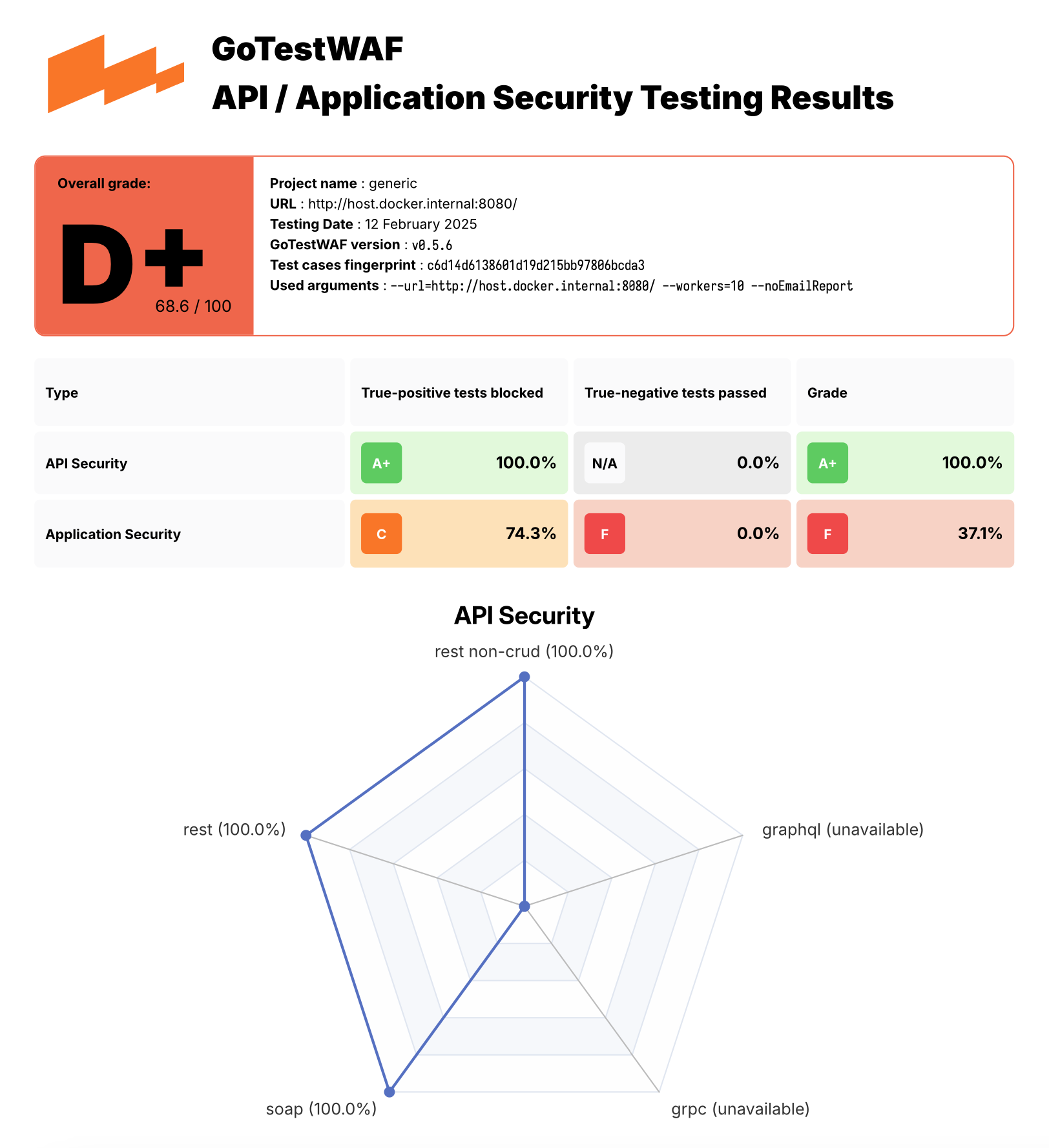
报告文件 waf-evaluation-report-<date>.pdf 位于用户目录的 reports 文件夹中。您也可以通过 reportPath 参数指定保存报告的目录,以及通过 reportName 参数指定报告文件的名称。要了解高级配置选项,请使用此 链接。
您可以在此处找到 PDF 报告示例 here。

您可以通过运行演示环境来试用 GoTestWAF,该环境部署了基于 NGINX 的 ModSecurity (使用 OWASP 核心规则集) 以及评估 ModSecurity 运行在 Docker 上的 GoTestWAF。
要运行演示环境:
克隆此仓库并进入克隆的目录:
git clone https://github.com/wallarm/gotestwaf.git
cd gotestwaf
使用以下 make 命令从 Docker 镜像 启动 ModSecurity:
make modsec
运行 ModSecurity Docker 容器的设置定义在克隆的 Makefile 中的 modsec 规则中。它使用克隆文件 ./resources/default.conf.template 中定义的最小配置,并将 PARANOIA 值设为 1,在端口 8080 上运行 ModSecurity Docker 容器。
如果需要,您可以通过编辑克隆的 Makefile 中的 modsec 规则来更改这些设置。ModSecurity 配置的可用选项在 Docker Hub 中描述。
要停止 ModSecurity 容器,请使用以下命令:
make modsec_down
使用以下方法之一以最小配置启动 GoTestWAF:
使用以下 docker pull 和 docker run 命令启动 Docker 镜像:
docker pull wallarm/gotestwaf
docker run --rm --network="host" -v ${PWD}/reports:/app/reports \
wallarm/gotestwaf --url=http://127.0.0.1:8080 --noEmailReport
除了运行从 Docker Hub 下载的 GoTestWAF Docker 镜像外,您还可以使用以下选项运行 GoTestWAF:
克隆此仓库并从 Dockerfile 构建 GoTestWAF Docker 镜像,例如:
git clone https://github.com/wallarm/gotestwaf.git
cd gotestwaf
DOCKER_BUILDKIT=1 docker build --force-rm -t gotestwaf .
docker run --rm --network="host" -it -v ${PWD}/reports:/app/reports \
gotestwaf --url=<EVALUATED_SECURITY_SOLUTION_URL>
如果被评估的安全工具可从外部访问,您可以跳过 --network="host" 选项。此选项允许运行在 127.0.0.1 上的 Docker 容器之间的交互。
克隆此仓库并使用 go 运行 GoTestWAF,例如:
git clone https://github.com/wallarm/gotestwaf.git
cd gotestwaf
go run ./cmd --url=<EVALUATED_SECURITY_SOLUTION_URL>
克隆此仓库并将 GoTestWAF 构建为 Go 模块:
git clone https://github.com/wallarm/gotestwaf.git
cd gotestwaf
go build -mod vendor -o gotestwaf ./cmd
支持的 GoTestWAF 配置选项如下所述。
Usage: ./gotestwaf [OPTIONS] --url
Options: --addDebugHeader Add header "X-GoTestWAF-Test" with a hash of the test information in each request --addHeader string An HTTP header to add to requests --blockConnReset If present, connection resets will be considered as block --blockRegex string Regex to detect a blocking page with the same HTTP response status code as a not blocked request --blockStatusCodes ints HTTP status code that WAF uses while blocking requests (default [403]) --configPath string Path to the config file (default "config.yaml") --email string E-mail to which the report will be sent --followCookies If present, use cookies sent by the server. May work only with --maxIdleConns=1 (gohttp only) --graphqlURL string GraphQL URL to check --grpcPort uint16 gRPC port to check --hideArgsInReport If present, GoTestWAF CLI arguments will not be displayed in the report --httpClient string Which HTTP client use to send requests: chrome, gohttp (default "gohttp") --idleConnTimeout int The maximum amount of time a keep-alive connection will live (gohttp only) (default 2) --ignoreUnresolved If present, unresolved test cases will be considered as bypassed (affect score and results) --includePayloads If present, payloads will be included in HTML/PDF report --logFormat string Set logging format: text, json (default "text") --logLevel string Logging level: panic, fatal, error, warn, info, debug, trace (default "info") --maxIdleConns int The maximum number of keep-alive connections (gohttp only) (default 2) --maxRedirects int The maximum number of handling redirects (gohttp only) (default 50) --noEmailReport Save report locally --nonBlockedAsPassed If present, count requests that weren't blocked as passed. If false, requests that don't satisfy to PassStatusCodes/PassRegExp as blocked --openapiFile string Path to openAPI file --passRegex string Regex to a detect normal (not blocked) web page with the same HTTP status code as a blocked request --passStatusCodes ints HTTP response status code that WAF uses while passing requests (default [200,404]) --proxy string Proxy URL to use --quiet If present, disable verbose logging --randomDelay int Random delay in ms in addition to the delay between requests (default 400) --renewSession Renew cookies before each test. Should be used with --followCookies flag (gohttp only) --reportFormat strings Export report in the following formats: none, json, html, pdf (default [pdf]) --reportName string Report file name. Supports `time' package template format (default "waf-evaluation-report-2006-January-02-15-04-05") --reportPath string A directory to store reports (default "reports") --sendDelay int Delay in ms between requests (default 400) --skipWAFBlockCheck If present, WAF detection tests will be skipped --skipWAFIdentification Skip WAF identification --testCase string If set then only this test case will be run --testCasesPath string Path to a folder with test cases (default "testcases") --testSet string If set then only this test set's cases will be run --tlsVerify If present, the received TLS certificate will be verified --url string URL to check --version Show GoTestWAF version and exit --wafName string Name of the WAF product (default "generic") --workers int The number of workers to scan (default 5)
GoTestWAF 支持两种用于执行请求的 HTTP 客户端,可通过 `--httpClient` 选项进行选择。默认客户端是标准的 Golang HTTP 客户端。第二种是 Chrome,可以通过 `--httpClient=chrome` CLI 参数来使用。请注意,在 Linux 系统上,必须在 Docker 参数中添加 `--cap-add=SYS_ADMIN` 参数,才能让 GoTestWAF 以 Chrome 作为请求执行器运行。
### 基于 OpenAPI 文件的扫描
为了获得更好的扫描效果,GTW 支持通过有效的应用程序请求发送恶意向量。GoTestWAF 不会构建结构简单的请求并将其发送到启动时指定的 URL,而是根据应用程序在 OpenAPI 3.0 格式中的 API 描述来创建有效的请求。
工作原理如下:
1. GoTestWAF 加载一个 OpenAPI 文件,并构建请求模板。所有模板随后根据其支持的占位符类型被分成不同的组(例如,如果请求路径中存在一个字符串参数,则该请求将被分配到支持 URLPath 占位符的请求组中)。
2. 从发送队列中选择下一个恶意向量。根据为其指定的占位符,选择所有可以将该向量替换进去的查询模板。接着,将向量替换到模板中,并发送请求。
3. 根据 OpenAPI 文件中指定的可能响应,判断请求是被 WAF 阻止了,还是成功到达了应用程序。如果响应码的状态及其模式与 OpenAPI 文件中描述的相符,则该请求被标记为已绕过。否则,将被标记为已阻止。也有可能应用程序仅以状态码响应,并且该状态码与 WAF 的响应相匹配。在这种情况下,该请求将被标记为未解决。
支持的 OpenAPI 特性包括:
* 请求头、路径、查询参数和请求体中的数字和字符串参数;
* 请求体支持以下内容类型:`application/json`、`application/xml`、`application/x-www-form-urlencoded`、`text/plain`;
* XML 支持以下修饰符:`name`、`wrapped`、`attribute`、`prefix`、`namespace`;
* 通过 `minLength` 和 `maxLength` 参数支持字符串的长度限制;
* 通过 `minimum`、`maximum`、`exclusiveMinimum` 和 `exclusiveMaximum` 支持数字的值限制;
* 通过 `minItems` 和 `maxItems` 支持数组长度限制;
* 通过 `oneOf`、`anyOf`、`allOf` 支持模式组合。
根据上述工作原理,OpenAPI 文件正确表示已实现的应用程序 API 至关重要。因此,例如,不能使用 `default` 来描述对查询的可能响应。
注意:需要将包含 OpenAPI 规范的卷挂载到 GoTestWAF 容器中。```sh
-v ${PWD}/api.yaml:/app/api.yaml
完整的 Docker 示例:```sh docker run --rm --network="host" -it -v ${PWD}/reports:/app/reports -v ${PWD}/api.yaml:/app/api.yaml wallarm/gotestwaf --wafName your_waf_name --url=https://example.com/v1 --openapiFile api.yaml
## 使用 OWASP Core Rule Set 回归测试套件运行
GoTestWAF 支持轻松集成额外的测试套件。
在本示例中,我们将演示如何从 OWASP Core Rule Set 回归测试套件中添加测试。
由于这些测试的格式与 GoTestWAF 格式不同,需要进行转换。为此,提供了脚本 **misc/modsec_regression_testset_converter.rb**。
要转换测试,请运行 `make modsec_crs_regression_tests_convert`。
然后,使用更新后的测试集构建一个容器。
`make gotestwaf`
请注意,默认情况下,仅转换规则子集的测试。已选择以下类别:
- REQUEST-932-APPLICATION-ATTACK-RCE
- REQUEST-933-APPLICATION-ATTACK-PHP
- REQUEST-941-APPLICATION-ATTACK-XSS
- REQUEST-930-APPLICATION-ATTACK-LFI
- REQUEST-931-APPLICATION-ATTACK-RFI
- REQUEST-942-APPLICATION-ATTACK-SQLI
- REQUEST-944-APPLICATION-ATTACK-JAVA
- REQUEST-934-APPLICATION-ATTACK-GENERIC
- REQUEST-913-SCANNER-DETECTION
如果需要,修改变量 "crs_testcases" 在 misc/modsec_regression_testset_converter.rb 中,以添加或删除测试类别。
从 Dockerfile 构建 GoTestWAF Docker 镜像,并使用以下 make 命令运行该镜像(确保 ModSec 在端口 8080 上运行;如果没有,请更新 Makefile 中的端口值):
make gotestwaf
make scan_local_from_docker
使用 go 原生启动 GoTestWAF,使用以下 make 命令:
(确保 ModSec 在端口 8080 上运行;如果没有,请更新 Makefile 中的端口值):
make scan_local
在您映射到容器内 /app/reports 的 reports 文件夹中查找 报告 文件 waf-evaluation-report-<date>.pdf。