通过暴力破解锁屏PIN来解锁安卓手机(或设备)。
将您的Kali NetHunter手机变成安卓设备的PIN暴力破解工具!
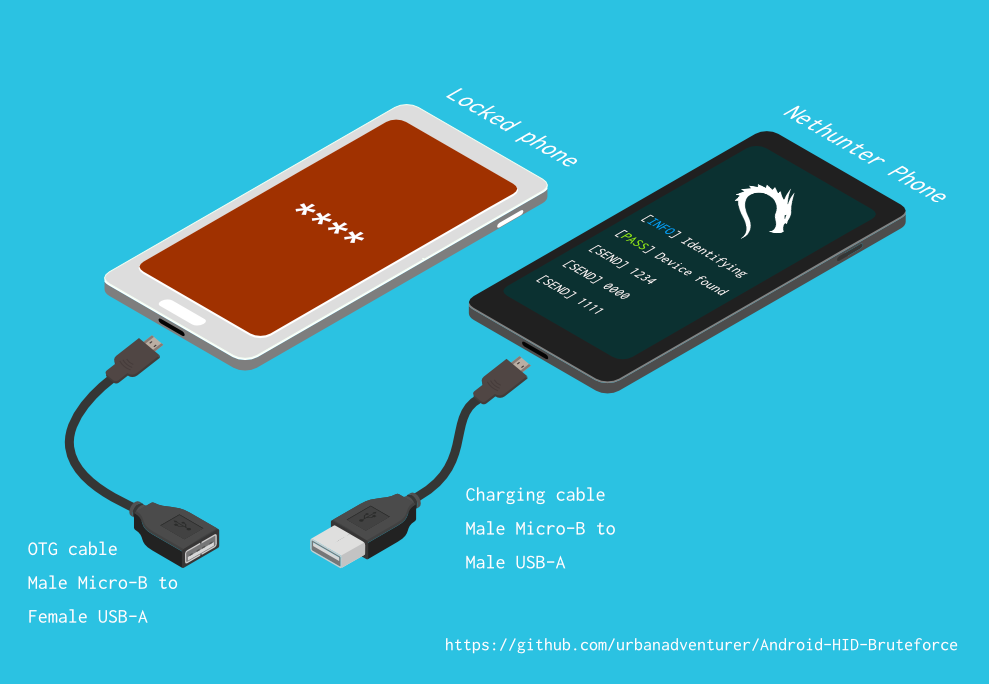
它使用USB OTG线将锁定的手机连接到NetHunter设备。该设备模拟键盘,自动尝试PIN码,并在多次错误尝试后等待。
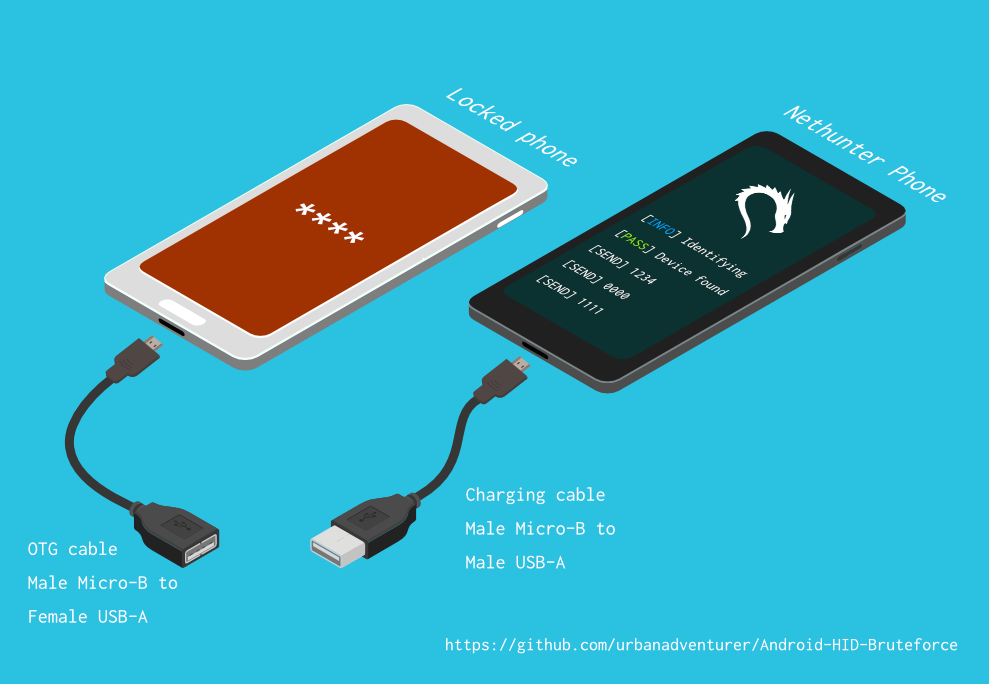
[NetHunter手机] <--> [USB线] <--> [USB OTG适配器] <--> [锁定的安卓手机]
USB HID Gadget驱动提供USB人机交互设备(HID)的模拟功能。这使得安卓NetHunter设备能够模拟键盘输入到锁定的手机上,就像直接把键盘插到锁定手机上并按键一样。
⏱ 使用三星S5尝试所有可能的4位PIN码大约需要16.6小时,但使用优化过的PIN列表,时间会大大缩短。
待定
如果您已将脚本安装到/sdcard/,可以使用以下命令执行。bash ./android-pin-bruteforce
Note that Android mounts /sdcard with the noexec flag. You can verify this with mount.
Android-PIN-Bruteforce (0.2) 用于通过暴力破解锁屏PIN来解锁Android手机(或设备)。
更多信息请访问:https://github.com/urbanadventurer/Android-PIN-Bruteforce
命令:
crack 开始破解PIN码
resume 从选定的PIN码恢复
rewind 从选定的PIN码反向破解
diag 显示诊断信息
version 显示版本信息并退出
选项:
-f, --from PIN 从此PIN码恢复
-a, --attempts 从NUM次错误尝试开始
-m, --mask REGEX 使用掩码表示PIN中已知的数字
-t, --type TYPE 选择PIN或图案破解
-l, --length NUM 破解NUM长度的PIN码
-c, --config FILE 指定要加载的配置文件
-p, --pinlist FILE 指定自定义PIN列表
-d, --dry-run 用于测试的空运行。不会发送任何按键。
-v, --verbose 输出详细日志
用法:
android-pin-bruteforce <command> [options]```
## Supported Android Phones/Devices
This has been successfully tested with various phones including the Samsung S5, S7, Motorola G4 Plus and G5 Plus.
It can unlock Android versions 6.0.1 through to 10.0. The ability to perform a bruteforce attack doesn't depend on the Android version in use. It depends on how the device vendor developed their own lockscreen.
Check the Phone Database for more details
https://github.com/urbanadventurer/Android-PIN-Bruteforce/wiki/Phone-Database
## 🎳 PIN Lists
Optimised PIN lists are used by default unless the user selects a custom PIN list.
### Cracking PINs of different lengths
Use the `--length` commandline option.
Use this command to crack a 3 digit PIN,
`./android-pin-bruteforce crack --length 3`
Use this command to crack a 6 digit PIN
`./android-pin-bruteforce crack --length 6`
### Where did the optimised PIN lists come from?
The optimised PIN lists were generated by extracting numeric passwords from database leaks then sorting by frequency. All PINs that did not appear in the password leaks were appended to the list.
The optimised PIN lists were generated from *Ga$$Pacc DB Leak* (21GB decompressed, 688M Accounts, 243 Databases, 138920 numeric passwords).
#### The 4 digit PIN list
The reason that the 4 digit PIN list is used from a different source is because it gives better results than the generated list from *Ga$$Pacc DB Leak*.
`optimised-pin-length-4.txt` is an optimised list of all possible 4 digit PINs, sorted by order of likelihood.
It can be found with the filename `pinlist.txt` at https://github.com/mandatoryprogrammer/droidbrute
This list is used with permission from Justin Engler & Paul Vines from Senior Security Engineer, iSEC Partners,
and was used in their Defcon talk, [Electromechanical PIN Cracking with Robotic Reconfigurable Button Basher (and C3BO)](https://www.defcon.org/html/defcon-21/dc-21-speakers.html#Engler)
### Cracking with Masks
Masks use regular expressions with the standard grep extended format.
`./android-pin-bruteforce crack --mask "...[45]" --dry-run`
- To try all years from 1900 to 1999, use a mask of `19..`
- To try PINs that have a 1 in the first digit, and a 1 in the last digit, use a mask of `1..1`
- To try PINs that end in 4 or 5, use `...[45]`
## 📱 Configuration for different phones
Device manufacturers create their own lock screens that are different to the default or stock Android.
To find out what keys your phone needs, plug a keyboard into the phone and try out different combinations.
Load a different configuration file, with the `--config FILE` commandline parameter.
Example:
`./android-pin-bruteforce --config ./config.samsung.s5 crack`
You can also edit the `config` file by customising the timing and keys sent.
The following configuration variables can be used to support a different phone's lockscreen.
DELAY_BETWEEN_KEYS=0.25
PROGRESSIVE_ARRAY_ATTEMPT_COUNT__________=(1 11 41) PROGRESSIVE_ARRAY_ATTEMPTS_UNTIL_COOLDOWN=(5 1 1) PROGRESSIVE_ARRAY_COOLDOWN_IN_SECONDS____=(30 30 60)
SEND_KEYS_DISMISS_POPUPS_N_SECONDS_BEFORE_COOLDOWN_END=5
SEND_KEYS_DISMISS_POPUPS_AT_COOLDOWN_END="enter enter enter"
KEYS_BEFORE_EACH_PIN="escape enter"
KEYS_STAY_AWAKE_DURING_COOLDOWN="enter"
SEND_KEYS_STAY_AWAKE_DURING_COOLDOWN_EVERY_N_SECONDS=5
DELAY_BEFORE_STARTING=2
KEYS_BEFORE_STARTING="enter"```
We send keys before the end of the cooldown period, or optionally during the cooldown period. This is to keep the lockscreen app active and to dismiss any popups about the number of incorrect PIN attempts or a low battery warning.
Use ssh from your laptop to the NetHunter phone, and use this command to test sending keys:
In this example, the enter key is sent.
echo "enter" | /system/xbin/hid-keyboard /dev/hidg0 keyboard
In this example, ctrl-escape is sent.
echo "left-ctrl escape" | /system/xbin/hid-keyboard /dev/hidg0 keyboard
Note: Sending combinations of keys in config file variables is different. Currently only ctrl_escape is supported.
In this example, keys a, b, c are sent.
echo a b c | /system/xbin/hid-keyboard /dev/hidg0 keyboard
This Android app is a virtual USB Keyboard that you can use to test sending keys.
https://store.nethunter.com/en/packages/remote.hid.keyboard.client/
Use this list for the following variables:
To send special keys use the following labels. This list can be found in the hid_gadget_test source code.
To send more than one key at the same time, use the following list:
If you need more key combinations please open a new issue in the GitHub issues list.
The following section of the config file controls the progressive cooldown.
## PROGRESSIVE_COOLDOWN_ARRAY 变量作为多维数组,用于自定义渐进式冷却
## PROGRESSIVE_ARRAY_ATTEMPT_COUNT__________ 是尝试次数
## PROGRESSIVE_ARRAY_ATTEMPTS_UNTIL_COOLDOWN 是在冷却前尝试的次数
## PROGRESSIVE_ARRAY_COOLDOWN_IN_SECONDS____ 是冷却时间(秒)
PROGRESSIVE_ARRAY_ATTEMPT_COUNT__________=(1 11 41)
PROGRESSIVE_ARRAY_ATTEMPTS_UNTIL_COOLDOWN=(5 1 1)
PROGRESSIVE_ARRAY_COOLDOWN_IN_SECONDS____=(30 30 60)```
The array is the same as this table.
| attempt number | attempts until cooldown | cooldown |
| ---------------- | ------------------------ | ---------- |
| 1 | 5 | 30 |
| 11 | 1 | 30 |
| 41 | 1 | 60 |
### Why can't you use a laptop, or is a Windows or Linux version coming soon?
This script works by emulating USB Human Interface Devices (HID), in this case it is keyboard and mouse input. Laptops have uni-directional USB ports and an Android mobile device/ phone has a bi-directional USB port. A bi-directional port is required to emulate a keyboard.
This might change in the future as USB-C is supposed to be uni-directional.
### How Android emulates a keyboard
Keys are sent using `/system/xbin/hid-keyboard`. To test this and send the key 1 you can use `echo 1 | /system/xbin/hid-keyboard dev/hidg0 keyboard`
In Kali Nethunter, `/system/xbin/hid-keyboard` is a compiled copy of `hid_gadget_test.c`. This is a small program for testing the HID gadget driver that is included in the Linux Kernel. The source code for this file can be found at https://www.kernel.org/doc/html/latest/usb/gadget_hid.html and https://github.com/aagallag/hid_gadget_test.
## 🔧 Troubleshooting
### If it is not bruteforcing PINs
#### Check the orientation of the cables
The Nethunter phone should have a regular USB cable attached, while the locked phone should have an OTG adaptor attached.
The OTG cable should be connected to the locked Android phone. The regular USB cable should be connected to the Nethunter phone.
Refer to the graphic on how to connect the phones.
#### Check it is emulating a keyboard
You can verify that the NetHunter phone is succesfully emulating a keyboard by connecting it to a computer using a regular charging/data USB cable. Open a text editor like Notepad while it is cracking and you should see it entering PIN numbers into the text editor.
Note that you will not need an OTG cable for this.
#### Try restarting the phones
Try powering off the phones and even taking out the batteries if that is possible.
#### Try new cables
Try using new cables/adaptors as you may have a faulty cable/adaptor.
### If it doesn't unlock the phone with a correct PIN
You might be sending keys too fast for the phone to process. Increase the DELAY_BETWEEN_KEYS variable in the config file.
💡 If you don't see 4 dots come up on the phone's screen then maybe it is not receiving 4 keys.
### 🔋 Managing Power Consumption
If your phone runs out of power too soon, follow these steps:
- Make sure both phones are fully charged to 100% before you begin
- Reduce the screen brightness on both the victim phone and NetHunter phone if possible
- Place both phones into Airplane mode, however you may want to enable WiFi to access the NetHunter phone via SSH.
- The locked phone will power the NetHunter phone, because it appears as a keyboard accessory
- Use a USB OTG cable with a Y splitter for an external power supply, to allow charging of the NetHunter phone while cracking
- Take breaks to charge your devices. Pause the script with CTRL-Z and resume with the `fg` shell command.
- Avoid the SEND_KEYS_STAY_AWAKE_DURING_COOLDOWN_EVERY_N_SECONDS configuration option. This will cause the locked phone to use more battery to keep the screen powered. Instead use the SEND_KEYS_DISMISS_POPUPS_N_SECONDS_BEFORE_COOLDOWN_END option (Default).
### Check the Diagnostics Report
Use the command `diag` display diagnostic information.
```bash ./android-pin-bruteforce diag```
如果您在插入USB线缆时收到此消息,请尝试从已锁定的安卓手机中取出电池并重新开机。```[FAIL] HID USB device not ready. Return code from /system/xbin/hid-keyboard was 5.```
### How the usb-devices command works
The diagnostics command uses the `usb-devices` script but it is only necessary as part of determining whether the USB cables are incorrectly connected. This can be downloaded from
https://github.com/gregkh/usbutils/blob/master/usb-devices
### Use verbose output
Use the `--verbose` option to check the configuration is as expected. This is especially useful when you are modifying the configuration.
### Use the dry-run
Use the `--dry-run` option to check how it operates without sending any keys to a device. This is especially useful when you are modifying the configuration or during development.
Dry run will:
- Not send any keys
- Will continue instead of aborting if the `KEYBOARD_DEVICE` or `HID_KEYBOARD` is missing.
### HID USB Mode
Try this command in a shell on the NetHunter phone:
```/system/bin/setprop sys.usb.config hid```
## 💣 已知问题
- 无法检测何时猜中正确 PIN 码并解锁手机。
- 手机可能在找到正确 PIN 码之前 🔋 电量耗尽。
- 不要轻信来自未知来源的手机配置文件,使用前请先审核。配置文件是 shell 脚本,可能包含恶意命令。
## 🚀 路线图
- [已完成] 可用
- [已完成] 检测 USB HID 失败
- [已完成] 改进用法、命令行选项及配置文件
- [已完成] 添加对 n 位 PIN 的暴力破解
- [已完成] 已知数字掩码
- [已完成] 反向破解 PIN 列表(找出哪个最近 PIN 解锁了设备)
- [已完成] 实现可配置的锁屏提示
- [已完成] 10 次尝试后实现冷却时间变更
- [进行中] 查找/测试更多可暴力破解的设备
- 添加进度条
- 添加预计剩余时间
- ASCII 艺术
- 更美观的 NetHunter GUI
- 实现针对 iPhone 的支持
- 检测手机是否解锁(使用 Nethunter 摄像头作为传感器?)
- 破解 Android 图案锁(先尝试常见图案)
## 🙋 贡献
欢迎提交拉取请求。对于重大更改,请先开一个问题讨论您希望更改的内容。
请确保适当地更新测试。
## 😎 作者与致谢
由 Andrew Horton (@urbanadventurer) 开发。
👏 以下人员提供了大力帮助:
- Vlad Filatov (@v1adf):为 Wiki 手机数据库测试了大量手机
### 动机
我最初开发这个工具是为了解锁一部三星 S5 Android 手机。这部手机属于一位已故用户,其家人需要访问其中的数据。由于手头没有 USB Rubber Ducky 或其他硬件,我尝试了多种方法,最终意识到必须开发一些新的工具。
### 致谢
优化后的 PIN 列表来自 Justin Engler (@justinengler) 和 Paul Vines(iSEC Partners 高级安全工程师),并在他们的 Defcon 演讲《Electromechanical PIN Cracking with Robotic Reconfigurable Button Basher (and C3BO)》中使用。
### 图形设计
由 Andrew Horton 设计,并感谢使用以下免费矢量素材包:
- [USB Ports Isometric Free Vector by VisionHeldup](https://www.vecteezy.com/vector-art/159576-usb-ports-isometric-free-vector)
- [HDMI and USB Vector Set by Mary Winkler](https://www.vecteezy.com/vector-art/107006-hdmi-and-usb-vector-set)
- [Isometric Data Security Illustration by Rizal.Medanguide](https://www.vecteezy.com/vector-art/661831-isometric-data-security-illustration)
- Kali NetHunter 徽标
## 🗿 与其他解锁 Android 手机项目及方法的比较
### 本项目有何独特之处?
常有人问,当已有其他开源 Android PIN 破解项目时,本项目有何独特之处。
Android-PIN-Bruteforce 的独特之处在于,它通过一部 NetHunter 手机破解 Android 手机的 PIN,且无需提前破解被锁手机。
它的工作方式:
- 无需购买专用硬件,如 Rubber Ducky、Celebrite 或 XPIN Clip。
- 无需 ADB 或 root 权限(手机无需预先破解)。
| 项目 | ADB/USB 调试 | 需要 root | 需要付费硬件 | 商业 |
| -------------------------------------------------- | -------------- | --------- | ------------ | ---- |
| ⭐ Android-PIN-Bruteforce | 否 | 否 | Nethunter 手机 | 否 |
| github.com/PentesterES/AndroidPINCrack | 是 | 是 | 否 | 否 |
| github.com/ByteRockstar1996/Cracking-Android-Pin-Lock | 是 | 是 | 否 | 否 |
| github.com/sch3m4/androidpatternlock | 是 | 是 | 否 | 否 |
| github.com/georgenicolaou/androidlockcracker | 是 | 是 | 否 | 否 |
| github.com/MGF15/P-Decode | 是 | 是 | 否 | 否 |
| github.com/BitesFor/ABL | 是 | 是 | 否 | 否 |
| github.com/wuseman/WBRUTER | 是 | 否 | 否 | 否 |
| github.com/Gh005t/Android-BruteForce | 是 | 否 | 否 | 否 |
| github.com/mandatoryprogrammer/droidbrute | 否 | 否 | Rubber Ducky $ | 否 |
| github.com/hak5darren/USB-Rubber-Ducky | 否 | 否 | Rubber Ducky $ | 是 |
| github.com/bbrother/stm32f4androidbruteforce | 否 | 否 | STM32F4 开发板 $ | 否 |
| hdb-team.com/product/hdbox/ | 否 | 否 | HDBOX $$ | 是 |
| xpinclip.com | 否 | 否 | XPINClip $$ | 是 |
| cellebrite.com/en/ufed/ | 否 | 否 | Cellebrite UFED $$$ | 是 |
其中一些项目/产品确实非常棒,但它们与 Android-PIN-Bruteforce 的目标不同。
如果某个项目需要 gestures.key 或 password.key,我将其列为需要 root。
如果某个项目需要自定义引导加载程序,我将其列为同时需要 ADB 和 root。
如果您希望自己的项目也列在此表中,请打开一个新 issue。
本表中每个项目的链接均位于 📚 相关项目与扩展阅读 部分。
### 😭 普通手机用户
- 尝试 [DataGenetics PIN 分析](https://datagenetics.com/blog/september32012/index.html) 中的前 20 个 PIN,据说可以解锁 26.83% 的手机。
- 使用 SMS 锁屏绕过应用(需在手机锁定前安装应用)
- 使用三星查找我的手机(需在手机锁定前设置好)
- 使锁屏界面崩溃(Android 5.0 和 5.1)
- 使用 Google 忘记图案、忘记 PIN 或忘记密码(Android 4.4 KitKat 及更早版本)
- 恢复出厂设置(会丢失所有数据 😭)
### 🤖 已更换 Android ROM 的用户
如果手机已 root、已启用 USB 调试或已启用 adb。
- 使用自定义恢复(需要 TWRP、CMW、Xrec 等)刷入 `Pattern Password Disable` ZIP 包
- 删除 `/data/system/gesture.key` 或 `password.key`(需要在锁定设备上拥有 root 和 adb 权限)
- 破解 `/data/system/gesture.key` 和 `password.key`(需要在锁定设备上拥有 root 和 adb 权限)
- 更新 sqlite3 数据库 `settings.db`(需要在锁定设备上拥有 root 和 adb 权限)
### 🔬 取证调查人员
这些方法可能非常昂贵,通常仅由专业手机取证调查人员使用。
按难度和费用排序:
- 利用已启用的 USB 调试(Oxygen Forensic Suite)
- 通过键盘模拟进行暴力破解(⭐ Android-PIN-Bruteforce、RubberDucky 攻击、XPIN Clip、HBbox)
- JTAG(与设备板上的 TAP(测试访问端口)接口)
- 系统内编程(ISP)(直接连接设备板上闪存芯片的引脚)
- 芯片剥离(从设备上拆焊并移除闪存芯片)
- 时钟毛刺/电压故障注入(硬件 CPU 时序攻击以绕过 PIN 限制)
- 引导加载程序漏洞(攻击引导加载程序的零日漏洞。Grayshift 的 GrayKey 和 Cellebrite)
由于现在大多数设备都加密了,JTAG、ISP 和芯片剥离技术不太有用。我不知道任何实用的时钟毛刺攻击手机 PIN 的方法。如果您知道使用该技术的产品,请告诉我,以便我将其包含在内。
### 🕵 安全专业人员和技术型手机用户
使用 USB HID 键盘暴力破解并配合专用硬件。
- 使用 RubberDucky 和 Darren Kitchen 的 Hak5 暴力破解脚本
- 为 USB Teensy 编写脚本
- 购买昂贵的取证硬件
- 或使用您的 NetHunter 手机配合 Android-PIN-Bruteforce!
尝试使用另一个出色的项目 Duck Hunter 模拟用于 Android PIN 破解的 RubberDucky 载荷,但失败了。可能由于载荷长度过长,导致手机崩溃。
## 📚 相关项目与扩展阅读
### 无 NetHunter 的 USB HID 硬件
hak5 12x17: 使用 USB Rubber Ducky 在 16 小时内破解任意 4 位 Android PIN
https://archive.org/details/hak5_12x17
Hak5: USB Rubber Ducky
https://shop.hak5.org/products/usb-rubber-ducky-deluxe
USB-Rubber-Ducky 载荷
https://github.com/hak5darren/USB-Rubber-Ducky/wiki/Payloads
Teensy
https://www.pjrc.com/teensy/
使用 STM32F4Discovery 开发板暴力破解 Android 手机
https://github.com/bbrother/stm32f4androidbruteforce
https://hackaday.com/2013/11/10/brute-forcing-an-android-phone/
针对 Mac EFI PIN 的自动化暴力破解攻击(使用 Teensy)
https://orvtech.com/atacar-efi-pin-macbook-pro-en.html
https://hackaday.io/project/2196-efi-bruteforcer
Droidbrute:一种 Android PIN 破解 USB Rubber Ducky 载荷,通过统计生成的词表提高效率。
https://github.com/mandatoryprogrammer/droidbrute
关于 hak5 剧集及 Android 暴力破解 4 位 PIN 的讨论论坛
https://forums.hak5.org/topic/28165-payload-android-brute-force-4-digit-pin/
### NetHunter HID 键盘攻击
NetHunter HID 键盘攻击
https://www.kali.org/docs/nethunter/nethunter-hid-attacks/
### Linux 内核 HID 支持
人机接口设备 (HID)
https://www.kernel.org/doc/html/latest/hid/index.html#
Linux USB HID 小工具驱动及 hid-keyboard 程序
https://www.kernel.org/doc/html/latest/usb/gadget_hid.html
https://github.com/aagallag/hid_gadget_test
usb-devices 脚本
https://github.com/gregkh/usbutils/blob/master/usb-devices
### 破解 Android PIN 和图案文件
AndroidPINCrack - 根据哈希和盐值暴力破解 Android 密码(需要在手机上拥有 root 权限)
https://github.com/PentesterES/AndroidPINCrack
Android 图案锁破解器 - 根据 SHA1 哈希暴力破解 Android 图案(需要在手机上拥有 root 权限)
https://github.com/sch3m4/androidpatternlock
### 一般恢复方法
[Android][指南] 破解和绕过 Android 密码/图案/人脸/PI
https://forum.xda-developers.com/showthread.php?t=2620456
使用 ADB 和 Shell 脚本暴力破解 Android
https://github.com/Gh005t/Android-BruteForce
### 取证方法与硬件
PATCtech 数字取证:绕过 Android 密码
http://patc.com/online/a/Portals/965/Android%20Passcode.pdf
XPIN Clip
https://xpinclip.com/
HDB 团队的 HDBox
https://hdb-team.com/product/hdbox/
Cellebrite UFED
https://www.cellebrite.com/en/ufed/
Grayshift 的 GrayKey
https://www.grayshift.com/graykey/
### PIN 分析
使用机器人可重构按钮按压器(及 C3BO)进行机电 PIN 破解
https://www.defcon.org/html/defcon-21/dc-21-speakers.html#Engler
DataGenetics PIN 分析 https://datagenetics.com/blog/september32012/index.html
| Key label | Key label |
|---|
| left-ctrl | f6 |
| right-ctrl | f7 |
| left-shift | f8 |
| right-shift | f9 |
| left-alt | f10 |
| right-alt | f11 |
| left-meta | f12 |
| right-meta | insert |
| return | home |
| esc | pageup |
| bckspc | del |
| tab | end |
| spacebar | pagedown |
| caps-lock | right |
| f1 | left |
| f2 | down |
| f3 | kp-enter |
| f4 | up |
| f5 | num-lock |