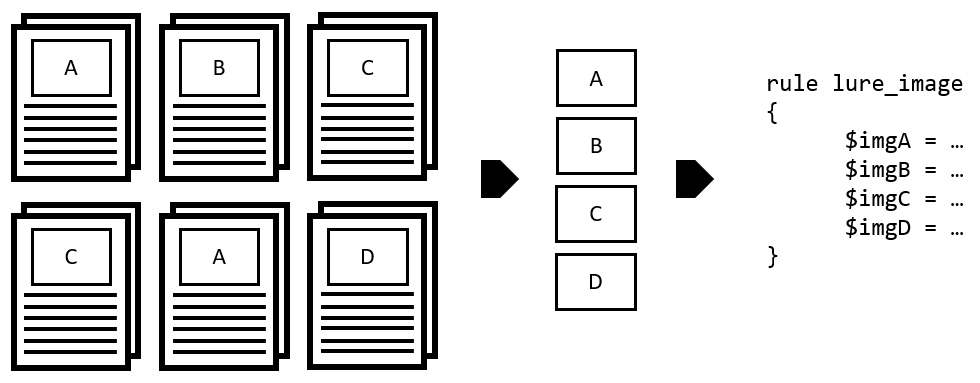
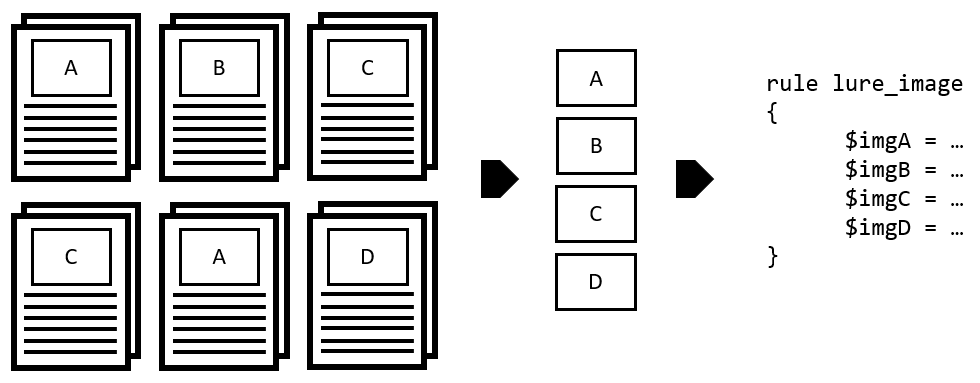
Halogen是一个自动化工具,用于根据恶意文档中嵌入的图像文件创建yara规则。它可以帮助网络安全专业人员编写针对恶意威胁的检测规则,并帮助响应者识别他们正在处理的特定威胁。目前,Halogen能够基于JPG和PNG文件创建规则。
python3 halogen.py -h
usage: halogen.py [-h] [-f FILE] [-d DIR] [-n NAME] [--png-idat] [--jpg-sos] [--jpg-sof2sos] [--jpg-jump] [-c CONTAINER] [--clam] [--rprefix RPREFIX]

Halogen: Automatically create yara rules based on images embedded in office documents.

optional arguments:
  -h, --help            show this help message and exit
  -f FILE, --file FILE  File to parse
  -d DIR, --directory DIR
                        directory to scan for image files.
  -n NAME, --rule-name NAME
                        specify a custom name for the rule file
  --png-idat            For PNG matches, instead of starting with the PNG file header, start with the IDAT chunk.
  --jpg-sos             For JPG matches, skip over the header and look for the Start of Scan marker, and begin the match there.
  --jpg-sof2sos         for JPG matches, skip over the header and match the SOF all the way to the SOS + 45 bytes of the data within the SOS.
  --jpg-jump            for JPG matches, skip over the header and identify the sof, the sos and then read the actual image data take that data and look for repeated bytes. Skip those bytes and then
                        create 45 bytes of raw image data.
  -c CONTAINER, --container CONTAINER
                        specify a clamav container type defaults to CL_TYPE_MSOLE2, CL_TYPE_OOXML_WORD, CL_TYPE_OOXML_XL, CL_TYPE_OOXML_PPT
  --clam                generate a clam rule instead of a yara rule
  --rprefix RPREFIX     specify a clamav ruleset prefix
我们包含了一些带有嵌入图像的测试文档文件,供您测试使用。运行 python3 halogen/halogen.py -d tests/ > /tmp/halogen_test.yara 将生成测试yara文件,其中包含 tests/ 目录下所有文件中找到的图像。
然后您可以运行 yara -d /tmp/halogen_test.yara tests/ 并观察哪些图像匹配哪些文件。
--png-idat 从PNG文件中的IDAT块开始。我们还减少了在匹配IDAT块时返回的字节数。--jpg-sos 标志从扫描开始标记处开始JPG匹配。--jpg-sof2sos 标志,它从帧开始(SOF)标记读取,直到找到SOS,然后额外读取45个字节。如果标准的 --jpg-sos 导致误报,这可能很有用。--jpg-jump 标志,它读取压缩的图像数据,如果发现重复的图像字节,则在yara输出中创建一个十六进制跳转。这使我们能够匹配文件的SOF和SOS,以及图像中一些更独特的数据。请使用python3提交拉取请求,并将您发现的任何错误提交为问题。