<div align="center">
:octocat:
</div>
<h1 align="center">
octoscan
</h1>
<p align="center">
Octoscan 是一个用于 GitHub Actions 工作流的静态漏洞扫描器。
</p>
<div align="center">
<img src="https://assets.kitploit.com/production/public/readmes/44835/a43217e53bb5f2a640d674b9161607ad21f70df1393fd7110796ec2f573a7e0c.png"/>
</div>
<br />
## 目录
- [目录](#table-of-contents)
- [安装](#installation)
- [用法](#usage)
- [下载远程工作流](#download-remote-workflows)
- [分析](#analyze)
- [GitHub Action](#github-action)
- [规则](#rules)
- [dangerous-checkout](#dangerous-checkout)
- [dangerous-action](#dangerous-action)
- [dangerous-write](#dangerous-write)
- [expression-injection](#expression-injection)
- [runner-label](#runner-label)
- [repo-jacking](#repo-jacking)
- [unsecure-commands](#unsecure-commands)
- [bot-check](#bot-check)
- [known-vulnerability](#known-vulnerability)
- [dangerous-artefact](#dangerous-artefact)
- [credentials](#credentials)
- [shellcheck](#shellcheck)
- [local-action](#local-action)
- [oidc-action](#oidc-action)
- [致谢](#credits)
- [资源](#resources)
## 安装
```
$ go mod tidy
$ go build
```
或者使用 Docker:
```
$ docker pull ghcr.io/synacktiv/octoscan:latest
```
## 用法
### 下载远程工作流
Octoscan 可以针对本地 git 仓库运行,也可以使用 `dl` 操作下载所有工作流:
```sh
$ octoscan dl -h
Octoscan.
Usage:
octoscan dl [options] --org <org> [--repo <repo> --token <pat> --default-branch --max-branches <num> --path <path> --output-dir <dir> --include-archives]
Options:
-h, --help Show help
-d, --debug Debug output
--verbose Verbose output
--org <org> Organizations to target
--repo <repo> Repository to target
--token <pat> GHP to authenticate to GitHub
--default-branch Only download workflows from the default branch
--max-branches <num> Limit the number of branches to download
--path <path> GitHub file path to download [default: .github/workflows]
--output-dir <dir> Output dir where to download files [default: octoscan-output]
--include-archives Also download archived repositories
```
```sh
./octoscan dl --token ghp_<token> --org apache --repo incubator-answer
```
### 分析
如果你不知道该运行什么,直接运行以下命令:
```sh
./octoscan scan path/to/repos/ --disable-rules shellcheck,local-action --filter-triggers external
```
这会减少误报并给出最有趣的结果。
如果你使用 [dl](#download-remote-workflows) 命令下载了工作流,可能会得到重复的工作流,因为默认情况下 octoscan 会下载所有分支的所有工作流。要删除重复的工作流并加快分析速度,可以在运行分析之前使用 `fdupes` 命令:
```sh
fdupes -n -r -N -d path/to/repo
```
```sh
$ octoscan scan -h
octoscan
Usage:
octoscan scan [options] --list-rules
octoscan scan [options] <target>
octoscan scan [options] <target> [--debug-rules --filter-triggers=<triggers> --filter-run --ignore=<pattern> ((--disable-rules | --enable-rules ) <rules>) --config-file <config>]
Options:
-h, --help
-v, --version
-d, --debug
--verbose
--format <format> Output format, json, sarif or custom template to format error messages in Go template syntax. See https://github.com/rhysd/actionlint/tree/main/docs/usage.md#format
--oneline Use one line per one error. Useful for reading error messages from programs
Args:
<target> Target File or directory to scan
--filter-triggers <triggers> Scan workflows with specific triggers (comma separated list: "push,pull_request_target" or pre-configured: external/allnopr)
--filter-run Search for expression injection only in run shell scripts.
--ignore <pattern> Regular expression matching to error messages you want to ignore.
--disable-rules <rules> Disable specific rules. Split on ","
--enable-rules <rules> Enable specific rules, this will disable all other rules. Split on ","
--debug-rules Enable debug rules.
--config-file <config> Config file.
Examples:
$ octoscan scan ci.yml --disable-rules shellcheck,local-action --filter-triggers external
```
### GitHub Action
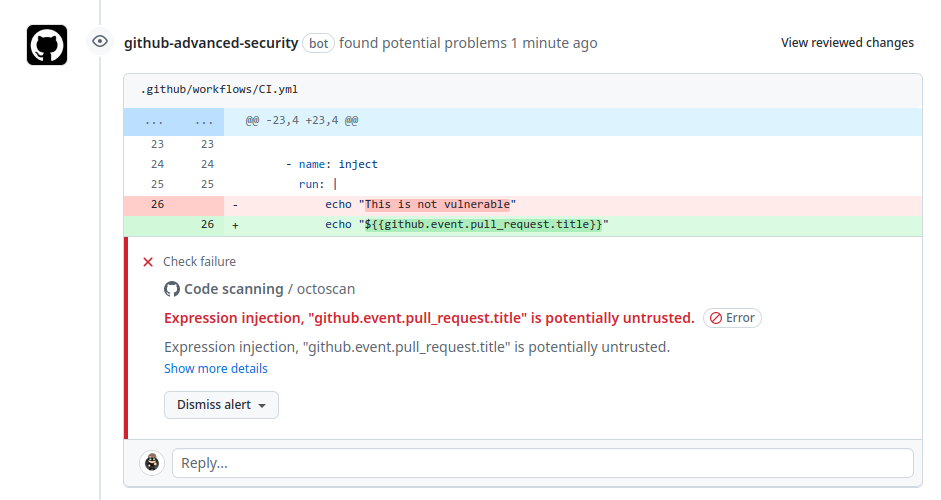
此工具也可以直接作为 GitHub Action 使用,在 `push`/`pull_request` 事件时扫描你的仓库。更多信息请查看[这个仓库](https://github.com/synacktiv/action-octoscan)。
<div align="center">
<img src="https://raw.githubusercontent.com/synacktiv/action-octoscan/main/img/action-octoscan.png"/>
</div>
## 规则
可通过以下命令查看完整的规则列表:
```
$ octoscan scan --list-rules
2024/08/07 16:50:48 [INFO] Available rules
- shellcheck
Checks for shell script sources in "run:" using shellcheck
- credentials
Checks for credentials in "services:" configuration
- dangerous-action
Check for dangerous actions.
- dangerous-checkout
Check for dangerous checkout.
- expression-injection
Check for expression injection.
- dangerous-write
Check for dangerous write operation on $GITHUB_OUTPUT or $GITHUB_ENV.
- local-action
Check for local actions.
- runner-label
Checks for GitHub-hosted and preset self-hosted runner labels in "runs-on:"
- unsecure-commands
Check 'ACTIONS_ALLOW_UNSECURE_COMMANDS' env variable.
- known-vulnerability
Check for known vulnerabilities.
- bot-check
Check for if statements that are based on a bot identity.
- dangerous-artefact
Check for workflow that upload artefacts containing sensitive files.
- debug-external-trigger
Check for workflow that can be externally triggered.
- debug-artefacts
Check for workflow that upload artefacts.
- debug-js-exec
Check for workflow that execute system commands in JS scripts.
- debug-oidc-action
Check for OIDC actions.
- repo-jacking
Verify that external actions are pointing to a valid GitHub user or organization.
```
### dangerous-checkout
像 `workflow_run` 或 `pull_request_target` 这类触发器在特权上下文中运行,因为它们可以读取 secrets,并且可能对目标仓库拥有写权限。在此上下文中对不受信任的代码执行显式 checkout,会导致攻击者的代码被下载。

#### 示例
- [FreeRDP](https://github.com/FreeRDP/FreeRDP/pull/10209)
- [Excalidraw](https://www.synacktiv.com/publications/github-actions-exploitation-untrusted-input)
- [AutoGPT](https://www.synacktiv.com/publications/github-actions-exploitation-untrusted-input)
- [Cypress](https://www.synacktiv.com/publications/github-actions-exploitation-untrusted-input)
- [Apache Doris](https://www.synacktiv.com/publications/github-actions-exploitation-untrusted-input)
- [Angular](https://github.com/angular/angular/blob/6b20561e1d6810e867c0ee7692d9fae64426a876/.github/workflows/ci-privileged.yml#L4)
### dangerous-action
该规则在使用了危险 action 时向用户发出警告,主要关注不受信任的 artifacts。
使用 artifacts 在不同工作流之间传递数据是一种常见做法。在处理 `workflow_run` 触发器时经常遇到这种情况:触发方工作流会准备一些数据,然后将其发送给被触发的工作流。鉴于这些 artifact 数据的不可信性质,务必谨慎对待并将其视为潜在威胁。该漏洞的产生源于外部实体(例如恶意行为者)可以影响 artifact 数据的内容。

#### 示例
- [ant-design](https://www.synacktiv.com/publications/github-actions-exploitation-untrusted-input)
- [Swagger-editor](https://www.synacktiv.com/publications/github-actions-exploitation-repo-jacking-and-environment-manipulation)
- [Firebase](https://www.synacktiv.com/publications/github-actions-exploitation-repo-jacking-and-environment-manipulation)
- [Firebase](https://www.legitsecurity.com/blog/github-privilege-escalation-vulnerability-0)
- [Rust](https://www.legitsecurity.com/blog/artifact-poisoning-vulnerability-discovered-in-rust)
### dangerous-write
GitHub 会创建默认环境变量,可在工作流的每个步骤中使用。其中 `GITHUB_ENV` 和 `GITHUB_OUTPUT` 变量尤其值得关注。可以在一个步骤中定义环境变量,然后在另一个步骤中使用该变量。这可以通过将其写入关联的变量来实现。如果用户可以控制被设置变量的内容,就可能导致任意代码执行。

#### 示例
- [Swagger-editor](https://www.synacktiv.com/publications/github-actions-exploitation-repo-jacking-and-environment-manipulation)
- [dgraph-io/badger](https://github.com/dgraph-io/badger/blob/6acc8e801739f6702b8d95f462b8d450b9a0455b/.github/workflows/ci-badger-tests-coverage.yml#L17-L18)
- [Firebase](https://www.legitsecurity.com/blog/github-privilege-escalation-vulnerability-0)
- [microsoft/vscode-github-triage-actions](https://bugs.chromium.org/p/project-zero/issues/detail?id=2070)
### expression-injection
每个工作流触发器都带有相应的 GitHub 上下文,提供关于触发事件的全面信息,包括触发事件的用户、分支名称以及其他相关上下文信息。该事件数据的某些组成部分(例如基础仓库名称或拉取请求编号)无法被触发事件的用户(例如在拉取请求场景下)操纵或用于注入。这确保了工作流执行期间 GitHub 上下文所提供信息具备一定的可控性和安全性。
然而,某些元素可能被攻击者控制,在使用之前应进行清理。以下是此类元素的列表:
- `github.event.issue.title`
- `github.event.issue.body`
- `github.event.pull_request.title`
- `github.event.pull_request.body`
- `github.event.comment.body`
- `github.event.review.body`
- `github.event.pages.*.page_name`
- `github.event.commits.*.message`
- `github.event.head_commit.message`
- `github.event.head_commit.author.email`
- `github.event.head_commit.author.name`
- `github.event.commits.*.author.email`
- `github.event.commits.*.author.name`
- `github.event.pull_request.head.ref`
- `github.event.pull_request.head.label`
- `github.event.pull_request.head.repo.default_branch`
- `github.head_ref`
- `env.*`
- `steps.*.outputs.*`
- `needs.*.outputs.*`

#### 示例
- [AutoGPT](https://www.synacktiv.com/publications/github-actions-exploitation-untrusted-input)
- [microsoft/generative-ai-for-beginners](https://www.synacktiv.com/publications/github-actions-exploitation-untrusted-input)
### runner-label
GitHub 支持托管自己的 runner,并自定义工作流中用于运行作业的环境。这些 runner 称为自托管 runner。
自托管 runner 分为两种类型:临时(ephemeral)和非临时(non-ephemeral)。默认情况下,runner 是非临时的,这意味着作业完成后不会清理 runner 使用的环境。如果攻击者设法在非临时 runner 上执行代码,他们可以通过在后台添加进程来植入后门,并窃取敏感 secrets。因此这类 runner 非常敏感。

可以通过查看运行日志来识别非临时 runner。可使用名为 [gato](https://github.com/praetorian-inc/gato) 的工具来自动化这一过程。
#### 示例
- [Haskell](https://www.synacktiv.com/publications/github-actions-exploitation-self-hosted-runners)
- [lovell/Sharp](https://www.synacktiv.com/publications/github-actions-exploitation-self-hosted-runners)
- [WasmEdge](https://www.synacktiv.com/publications/github-actions-exploitation-self-hosted-runner)
- [Scroll](https://www.synacktiv.com/publications/github-actions-exploitation-self-hosted-runners)
- [Akash Network](https://www.synacktiv.com/publications/github-actions-exploitation-self-hosted-runners)
- [actions/runner-images](https://adnanthekhan.com/2023/12/20/one-supply-chain-attack-to-rule-them-all)
- [tensorflow](https://www.praetorian.com/blog/tensorflow-supply-chain-compromise-via-self-hosted-runner-attack/)
- [pytorch](https://johnstawinski.com/2024/01/11/playing-with-fire-how-we-executed-a-critical-supply-chain-attack-on-pytorch/)
### repo-jacking
仓库劫持(repo jacking)漏洞由 Asi Greenholts 在 DEFCON 31 上进行了[展示](https://media.defcon.org/DEF%20CON%2031/DEF%20CON%2031%20presentations/Asi%20Greenholts%20-%20The%20GitHub%20Actions%20Worm%20Compromising%20GitHub%20repositories%20through%20the%20Actions%20dependency%20tree.pdf)。当某个 GitHub action 引用了不存在的 GitHub 组织或用户下的 action 时,就会产生此漏洞。

请注意,此规则需要联网才能判断攻击是否可行。所有其他检查均在离线状态下执行。
#### 示例
- [Azure/bicep-registry-modules](https://www.synacktiv.com/publications/github-actions-exploitation-repo-jacking-and-environment-manipulation)
- [HangfireIO/Hangfire](https://www.paloaltonetworks.com/blog/prisma-cloud/github-actions-worm-dependencies/)
### unsecure-commands
Actions 具备与 runner 机器交互的能力,可以设置环境变量、定义供其他 action 使用的输出值、在输出日志中加入调试消息,以及执行各种其他任务。然而,在 2020 年之前,可以通过向 `STDOUT` 写入数据来控制环境变量,如下所示:
```yaml
run: |
echo "##[set-env name=ENV_NAME;]value"
# or
echo "echo "::set-env name=ENV_NAME::value"
```
由于普遍存在将日志输出到 STDOUT 的做法,已实现的工作流命令本身就不安全。此漏洞为潜在攻击打开了通道,使恶意负载能够被轻易注入并触发 `set-env` 命令。修改环境变量的能力引入了多条远程代码执行路径,其中前面演示的负载尤其明显。该漏洞最初由 Project Zero 的一位安全研究员[报告](https://bugs.chromium.org/p/project-zero/issues/detail?id=2070)。
尽管 `set-env` 命令已弃用且默认不可用,但如果开发者在工作流中设置了 `ACTIONS_ALLOW_UNSECURE_COMMANDS` 环境变量,`set-env` 命令就会变得可用并可被使用:

#### 示例
- [alibaba/nacos](https://www.synacktiv.com/publications/github-actions-exploitation-repo-jacking-and-environment-manipulation)
### bot-check
可以绕过以下检查:
```yaml
jobs:
merge-dependabot-pr:
runs-on: ubuntu-latest
if: github.actor == 'dependabot[bot]'
steps:
...
```
攻击思路是:在 fork 的仓库上以某种方式触发 Dependabot,使 fork 仓库上的 PR 由 Dependabot 创建;然后在存在漏洞的仓库上打开来自 Dependabot 分支的 PR;最后再次触发 Dependabot 以启动存在漏洞的工作流。

你可以在这里找到所有利用细节:https://www.synacktiv.com/publications/github-actions-exploitation-dependabot
#### 示例
- [spring-projects/spring-security](https://www.synacktiv.com/publications/github-actions-exploitation-dependabot)
- [spring-projects/spring-session](https://www.synacktiv.com/publications/github-actions-exploitation-dependabot)
- [trpc/trpc](https://www.synacktiv.com/publications/github-actions-exploitation-dependabot)
### known-vulnerability
基于 [osv.dev](https://osv.dev/list?ecosystem=GitHub+Actions&q=) 搜索已知存在漏洞的 actions。
### dangerous-artefact
检查上传包含敏感文件(如 `.git/config`)的 artifacts 的工作流。此规则基于[这篇文章](https://unit42.paloaltonetworks.com/github-repo-artifacts-leak-tokens/)。
### credentials
检查 `services:` 配置中是否存在凭据(credentials)。此规则来自 [actionlint](https://github.com/rhysd/actionlint)。

### shellcheck
对所有 bash 任务运行 shellcheck。此规则来自 [actionlint](https://github.com/rhysd/actionlint)。
### local-action
如果使用了本地 GitHub action,则发出警报。目前该工具无法解析本地 action 文件,因此会发出警报,因为它们也可能包含漏洞。
### oidc-action
检测 OIDC actions。使用 OIDC actions 的工作流可能是访问某些云提供商的好目标。此规则本身不关联具体漏洞,但如果该工具没有发现某个漏洞,仔细检查此类 action 可能会很有价值。
💡 这现在是一条调试规则,需要添加 `--debug-rules` 才能搜索到它。
## 致谢
如果没有 [actionlint](https://github.com/rhysd/actionlint),就不可能开发出这个工具。非常感谢 [@rhysd](https://github.com/rhysd)。
## 资源
- [GitHub Actions 利用:入门](https://www.synacktiv.com/publications/github-actions-exploitation-introduction)
- [GitHub Actions 利用:不受信任的输入](https://www.synacktiv.com/publications/github-actions-exploitation-untrusted-input)
- [GitHub Actions 利用:仓库劫持与环境操纵](https://www.synacktiv.com/publications/github-actions-exploitation-repo-jacking-and-environment-manipulation)
- [GitHub Actions 利用:自托管 runner](https://www.synacktiv.com/publications/github-actions-exploitation-self-hosted-runners)
- [GitHub Actions 利用:Dependabot](https://www.synacktiv.com/publications/github-actions-exploitation-dependabot)
- https://0xn3va.gitbook.io/cheat-sheets/ci-cd/github/actions
- https://cloud.hacktricks.xyz/pentesting-ci-cd/github-security
- https://unit42.paloaltonetworks.com/github-repo-artifacts-leak-tokens