Skip to content
KitploitKITPLOIT
工具博客
提交
工具博客
提交

黑客、渗透测试和网络安全工具,武装您的安全武器库!

Kitploit 是一个黑客、网络安全和渗透测试工具的目录。发现最新的项目更新,查找漏洞、分析系统、自动化测试并加强你的安全。

··订阅源·联系·隐私·© 2026 Kitploit

工具目录

分类

查看所有分类
Loading categories
iblessing — iblessing是一个iOS安全利用工具包,主要包括应用信息收集、静态分析和动态分析。可用于逆向工程、二进制分析和漏洞挖掘。 | Kitploit
工具/GitHubGitHub/soulghost/iblessing
静态分析动态分析 (沙盒)iOS安全漏洞分析漏洞利用逆向工程移动安全二进制分析iOS安全 分类第 10 名
GitHubsoulghost/iblessing
6849594年前Kitploit 审核通过

最受欢迎

查看全部 →

发现我们社区最常用的工具。

探索所有工具

浏览我们的工具集合

查看所有工具 →
分享

iblessing

iblessing是一个iOS安全利用工具包,主要包括应用信息收集、静态分析和动态分析。可用于逆向工程、二进制分析和漏洞挖掘。

查看仓库

☠️ ██╗██████╗ ██╗ ███████╗███████╗███████╗██╗███╗ ██╗ ██████╗ ██║██╔══██╗██║ ██╔════╝██╔════╝██╔════╝██║████╗ ██║██╔════╝ ██║██████╔╝██║ █████╗ ███████╗███████╗██║██╔██╗ ██║██║ ███╗ ██║██╔══██╗██║ ██╔══╝ ╚════██║╚════██║██║██║╚██╗██║██║ ██║ ██║██████╔╝███████╗███████╗███████║███████║██║██║ ╚████║╚██████╔╝ ╚═╝╚═════╝ ╚══════╝╚══════╝╚══════╝╚══════╝╚═╝╚═╝ ╚═══╝ ╚═════╝

Build Status Releases

iblessing

  • iblessing 是一个 iOS 安全利用工具包,主要包括应用信息收集、静态分析和动态分析。
  • iblessing 基于 unicorn engine、capstone engine 和 keystone engine。

特性

  • 🔥 跨平台:已在 macOS 和 Ubuntu 上测试。

  • iOS 应用静态信息提取,包括元数据、深层链接、URL 等。

  • Mach-O 解析器和 dyld 符号绑定模拟器

  • Objective-C 类实现和解析

  • 扫描器对 arm64 汇编代码进行动态分析,发现关键信息或攻击面

  • 扫描器使用 unicorn 部分模拟 Mach-O arm64 代码执行并发现一些特征

  • 生成器可以对扫描器的报告进行二次处理,启动查询服务器或为 IDA 生成脚本

  • 超级 objc_msgSend 交叉引用扫描器 😄

    • objc 方法和子程序(如块)模拟,生成类似 flare-emu 的交叉引用
    • objc 函数包装检测和 IDA 用户调用生成
    • objc_msgSend 子函数分析
    • objc 块到 objc_msgSend 在参数和捕获列表中的交叉引用
    • 报告格式包括 JSON 等
    • Swift 类和方法的解析
    • 跟踪分支和调用
    • 外部符号的模拟过程
  • 测试

  • Android 扫描器支持

  • 诊断日志

  • 更灵活的扫描器基础设施以支持新的扫描器插件

支持

如果需要关于 iblessing 或其任何相关内容的支持,你可以:

  • 创建一个 issue 并提供必要信息
  • 在 Twitter 上联系 Sou1gh0st
  • 发送邮件至 xiuyutong1994#163.com
  • 发送邮件至 xiuyutong1994#gmail.com

变更日志

  • 2021.06.27 - 新架构(Shell 程序 + 核心库)和插件支持(beta)
  • 2021.01.23 - 添加系统库(Foundation, UIKit)的方法签名,进一步增强分析能力(https://github.com/Soulghost/iblessing/wiki/System-Libraries-(Foundation,-UIKit)-Simple-SimProcedure)
  • 2020.11.30 - Objc 反射信息(https://github.com/Soulghost/iblessing/wiki/Objc-Reflection-Info)
  • 2020.10.24 - Objc 调用快照(https://github.com/Soulghost/iblessing/wiki/Objc-Call-Snapshots)
  • 2020.10.04 - Objc 类别列表支持
  • 2020.09.28 - 静态库和 fat mach-o 支持
  • 2020.09.22 - 基础程序状态和条件分支
  • 2020.09.04 - 方法验证、推断,objc_msgSendSuper 支持
  • 2020.08.11 - 现在 iblessing 是一个跨平台工具,同时支持 macOS 和 Linux 😆
  • 2020.08.08 - 改进 objc_msgSend 交叉引用扫描器,添加子交叉引用支持,包括块参数和捕获列表
  • 2020.07.30 - 改进符号包装扫描器,并为符号包装重命名和原型修改添加 IDA 脚本
  • 2020.07.21 - 首次发布

快速开始

⚠️⚠️⚠️ 二进制扫描器需要 12GB 的虚拟内存空间来加载 mach-o 文件,但不会消耗这么多。因此你需要确保工作机器的物理内存大于 12GB,或者通过交换文件机制确保可分配的虚拟内存大于 12GB。

  1. 你可以下载 预发布的 iblessing 二进制文件 并直接使用。
  2. 运行 chmod +x 给二进制文件添加执行权限。
  3. 更多教程请查看下面的 文档与帮助。

如何使用

  • 发行版 https://github.com/Soulghost/iblessing/releases

一体化二进制文件

  • iblessing-darwin-all/iblessing-linux

Shell 程序 + Dylib

  • 解压 iblessing-framework.tar.gz
  • iblessing-darwin/iblessing-linux + libiblessing-core.dylib/libiblessing-core.so

基于 iblessing 框架开发自己的工具

  • 解压 iblessing-framework.tar.gz
  • 你的二进制文件 + libiblessing-core.dylib/libiblessing-core.so + include/iblessing-core
  • 示例代码:iblessing-core/otool.cpp

如何构建

CMake

  • 平台:macOS, Linux

要开始编译 iblessing,请按照以下步骤操作:``` git clone --recursive -j4 https://github.com/Soulghost/iblessing cd iblessing ./compile-cmake.sh

root@kitploit:~
## 快捷方式
- [基本概念](https://github.com/Soulghost/iblessing#basic-concepts)
- 扫描器
  - [扫描应用信息](https://github.com/Soulghost/iblessing#scan-for-appinfos) ⚠️ 目前在 Linux 上不可用
  - [扫描类引用](https://github.com/Soulghost/iblessing#scan-for-class-xrefs)
  - [扫描所有 objc_msgSend 引用](https://github.com/Soulghost/iblessing#scan-for-all-objc_msgsend-xrefs)
  - [扫描简单符号包装器](https://github.com/Soulghost/iblessing/blob/features/anti_wrapper/README.md#scan-for-symbol-wrappers)
- 生成器
  - [生成 objc_msgSend 引用查询服务器](https://github.com/Soulghost/iblessing#generate-objc_msgsend-xrefs-query-server)
  - [生成 objc_msgSend 引用的 IDA 脚本](https://github.com/Soulghost/iblessing#generate-ida-scripts-for-objc_msgsend-xrefs)
  - [生成 objc 函数包装器重命名和原型修改的 IDA 脚本](https://github.com/Soulghost/iblessing/blob/features/anti_wrapper/README.md#genereate-ida-script-for-objc-runtime-function-rename-and-prototype-modification)

***如果出现任何错误,你可以手动编译 capstone 和 unicorn,然后将 libcapstone.a 和 libunicorn.a 拖入 Xcode 项目的 vendor/libs 目录。***

如果一切运行成功,你可以在构建目录中找到二进制文件:```
> ls ./build
iblessing

> file ./build/iblessing
./build/iblessing: Mach-O 64-bit executable x86_64

文档与帮助

预览```

$ iblessing -h

root@kitploit:~
       ☠️
       ██╗██████╗ ██╗     ███████╗███████╗███████╗██╗███╗   ██╗ ██████╗
       ██║██╔══██╗██║     ██╔════╝██╔════╝██╔════╝██║████╗  ██║██╔════╝
       ██║██████╔╝██║     █████╗  ███████╗███████╗██║██╔██╗ ██║██║  ███╗
       ██║██╔══██╗██║     ██╔══╝  ╚════██║╚════██║██║██║╚██╗██║██║   ██║
       ██║██████╔╝███████╗███████╗███████║███████║██║██║ ╚████║╚██████╔╝
       ╚═╝╚═════╝ ╚══════╝╚══════╝╚══════╝╚══════╝╚═╝╚═╝  ╚═══╝ ╚═════╝

[] iblessing iOS Security Exploiting Toolkit Beta 0.1.1 (http://blog.asm.im) [] Author: Soulghost (高级页面仔) @ (https://github.com/Soulghost)

Usage: iblessing [options...] Options: -m, --mode mode selection: * scan: use scanner * generator: use generator -i, --identifier choose module by identifier: * : use specific scanner * : use specific generator -f, --file input file path -o, --output output file path -l, --list list available scanners -d, --data extra data -h, --help Shows this page

root@kitploit:~
## 基本概念
### 扫描器
扫描器是一种通过静态和动态分析二进制文件来输出分析报告的组件,例如,objc-msg-xref 扫描器可以动态分析大多数 objc_msgSend 交叉引用。```
[*] Scanner List:
    - app-info: extract app infos
    - objc-class-xref: scan for class xrefs
    - objc-msg-xref: generate objc_msgSend xrefs record
    - predicate: scan for NSPredicate xrefs and sql injection surfaces
    - symbol-wrapper: detect symbol wrappers

生成器

生成器是一种对扫描器生成的报告进行二次处理的组件,例如,它可以基于 objc-msg-xref 扫描器的交叉引用报告生成 IDA 脚本。``` [*] Generator List: - ida-objc-msg-xref: generator ida scripts to add objc_msgSend xrefs from objc-msg-xref scanner's report - objc-msg-xref-server: server to query objc-msg xrefs - objc-msg-xref-statistic: statistics among objc-msg-send reports

root@kitploit:~
## 基本用法
### 扫描应用信息
⚠️ **由于部分对Cocoa的依赖尚未解除(例如bplist解析器),目前无法在Linux上使用。**```
> iblessing -m scan -i app-info -f <path-to-app-bundle>

让我们以微信为例:```

iblessing -m scan -i app-info -f WeChat.app [] set output path to /opt/one-btn/tmp/apps/WeChat/Payload [] input file is WeChat.app [] start App Info Scanner [+] find default plist file Info.plist! [] find version info: Name: 微信(WeChat) Version: 7.0.14(18E226) ExecutableName: WeChat [] Bundle Identifier: com.tencent.xin [] the app allows HTTP requests without exception domains! [+] find app deeplinks |-- wechat:// |-- weixin:// |-- fb290293790992170:// |-- weixinapp:// |-- prefs:// |-- wexinVideoAPI:// |-- QQ41C152CF:// |-- wx703:// |-- weixinULAPI:// [] find app callout whitelist |-- qqnews:// |-- weixinbeta:// |-- qqnewshd:// |-- qqmail:// |-- whatsapp:// |-- wxwork:// |-- wxworklocal:// |-- wxcphonebook:// |-- mttbrowser:// |-- mqqapi:// |-- mqzonev2:// |-- qqmusic:// |-- tenvideo2:// ... [+] find 507403 string literals in binary [] process with string literals, this maybe take some time [+] find self deeplinks URLs: |-- weixin://opennativeurl/devicerankview |-- weixin://dl/offlinepay/?appid=%@ |-- weixin://opennativeurl/rankmyhomepage ... [+] find other deeplinks URLs: |-- wxpay://f2f/f2fdetail |-- file://%@?lang=%@&fontRatio=%.2f&scene=%u&version=%u&type=%llu&%@=%d&qqFaceFolderPath=%@&platform=iOS&netType=%@&query=%@&searchId=%@&isHomePage=%d&isWeAppMore=%d&subType=%u&extParams=%@&%@=%@&%@=%@ ... [*] write report to path /opt/one-btn/tmp/apps/WeChat/Payload/WeChat.app_info.iblessing.txt

ls -alh -rw-r--r--@ 1 soulghost wheel 29K Jul 23 14:01 WeChat.app_info.iblessing.txt

root@kitploit:~
### 扫描类交叉引用
***注意:仅 ARM64 二进制文件***```
iblessing -m scan -i objc-class-xref -f <path-to-binary> -d 'classes=<classname_to_scan>,<classname_to_scan>,...'

(无内容,输入为空)```

restore-symbol WeChat -o WeChat.restored iblessing -m scan -i objc-class-xref -f WeChat.restored -d 'classes=NSPredicate' [] set output path to /opt/one-btn/tmp/apps/WeChat/Payload [] input file is WeChat [+] detect mach-o header 64 [+] detect litten-endian [] start Objc Class Xref Scanner [] try to find OBJC_CLASS$_NSPredicate [] Step 1. locate class refs [+] find OBJC_CLASS$_NSPredicate at 0x108eb81d8 [] Step 2. find __TEXT,__text [+] find __TEXT,__text at 0x4000 [] Step 3. scan in __text [] start disassembler at 0x100004000 [] \ 0x1002e1a50/0x1069d9874 (2.71%) [+] find OBJC_CLASS$_NSPredicate ref at 0x1002e1a54 ... [] Step 4. symbolicate ref addresses [+] OBJC_CLASS$_NSPredicate -| [+] find OBJC_CLASS$_NSPredicate ref -[WCWatchNotificationMgr addYoCount:contact:type:] at 0x1002e1a54 [+] find OBJC_CLASS$_NSPredicate ref -[NotificationActionsMgr handleSendMsgResp:] at 0x1003e0e28 [+] find OBJC_CLASS$_NSPredicate ref -[FLEXClassesTableViewController searchBar:textDidChange:] at 0x1004a090c [+] find OBJC_CLASS$_NSPredicate ref +[GameCenterUtil parameterValueForKey:fromQueryItems:] at 0x1005a823c [+] find OBJC_CLASS$_NSPredicate ref +[GameCenterUtil getNavigationBarColorForUrl:defaultColor:] at 0x1005a8cd8 ...

root@kitploit:~
### 扫描所有 objc_msgSend XREF
***注意:仅适用于 ARM64 二进制文件***

#### 简单模式```
iblessing -m scan -i objc-msg-xref -f <path-to-binary>

反封装模式```

iblessing -m scan -i objc-msg-xref -f WeChat -d 'antiWrapper=1'

root@kitploit:~
反包装模式将检测objc_msgSend包装器并进行转换,例如:```arm
; __int64 __usercall objc_msgSend_X0_X22_X20@<X0>(void *obj@<X0>, const char *sel@<X22>, id anyObj@<X20>, ...)
objc_msgSend_X0_X22_X20:
MOV             X1, X22
MOV             X2, X20
B               objc_msgSend

使用示例:```

iblessing -m scan -i objc-msg-xref -f WeChat -d 'antiWrapper=1' [] set output path to /opt/one-btn/tmp/apps/WeChat/Payload [] input file is WeChat [+] detect mach-o header 64 [+] detect litten-endian

[] !!! Notice: enter anti-wrapper mode, start anti-wrapper scanner [] start Symbol Wrapper Scanner [] try to find wrappers for_objc_msgSend [] Step1. find __TEXT,__text [+] find __TEXT,__text at 0x100004000 [+] mapping text segment 0x100000000 ~ 0x107cb0000 to unicorn engine [] Step 2. scan in __text [] start disassembler at 0x100004000 [] / 0x1069d986c/0x1069d9874 (100.00%) [] reach to end of __text, stop [+] anti-wrapper finished

[] start ObjcMethodXrefScanner Exploit Scanner [] Step 1. realize all app classes [] realize classes 14631/14631 (100.00%) [+] get 667318 methods to analyze [] Step 2. dyld load non-lazy symbols [] Step 3. track all calls [] progress: 667318 / 667318 (100.00%) [] Step 4. serialize call chains to file [] saved to /opt/one-btn/tmp/apps/WeChat/Payload/WeChat_method-xrefs.iblessing.txt

ls -alh WeChat_method-xrefs.iblessing.txt -rw-r--r-- 1 soulghost wheel 63M Jul 23 14:46 WeChat_method-xrefs.iblessing.txt

head WeChat_method-xrefs.iblessing.txt iblessing methodchains,ver:0.2; chainId,sel,prefix,className,methodName,prevMethods,nextMethods 182360,0x1008a0ab8,+[A8KeyControl initialize],+,A8KeyControl,initialize,[],[4429#0x1008a1064@4376#0x1008a1050@13769#0x1008a10d0] 182343,0x1008a0ad0,+[A8KeyControl_QueryStringTransferCookie initialize],+,A8KeyControl_QueryStringTransferCookie,initialize,[],[4429#0x1008a1064@4376#0x1008a1050@13769#0x1008a10d0] 145393,0x1008c2220,+[A8KeyResultCookieWriter initWithDomain:weakWebView:andCompleteBlock:],+,A8KeyResultCookieWriter,initWithDomain:weakWebView:andCompleteBlock:,[145386#0x10036367c],[] 145396,0x1008c3df8,+[A8KeyResultCookieWriter setA8KeyCookieExpireTime:],+,A8KeyResultCookieWriter,setA8KeyCookieExpireTime:,[145386#0x1003636e8],[] 145397,0x1008c27e8,+[A8KeyResultCookieWriter writeCompleteMarkerCookieValue:forKey:],+,A8KeyResultCookieWriter,writeCompleteMarkerCookieValue:forKey:,[145386#0x10036380c],[] 253456,0x0,+[AAOperationReq init],+,AAOperationReq,init,[253455#0x1039a9d30],[] 253457,0x0,+[AAOperationReq setBaseRequest:],+,AAOperationReq,setBaseRequest:,[253455#0x1039a9d8c],[] 186847,0x0,+[AAOperationRes length],+,AAOperationRes,length,[186845#0x10342aa54],[]

root@kitploit:~
报告可以被生成器使用,现在开始吧。

### Generate objc_msgSend Xrefs Query Server
你可以通过 iblessing 的 objc-msg-xref-server 生成器启动一个服务器,来查询所有的 objc_msgSend 交叉引用。```
iblessing -m generator -i objc-msg-xref-server -f <path-to-report-generated-by-objc-msg-xref-scanner>

指定监听主机和端口

默认监听地址为 127.0.0.1:2345,你可以通过 -d 选项指定它。``` iblessing -m generator -i objc-msg-xref-server -f WeChat_method-xrefs.iblessing.txt -d 'host=0.0.0.0;port=12345'

root@kitploit:~
#### 使用示例
***注意:objc-msg-xref 基于 unicorn,为了加快分析速度,我们不跟踪任何调用,因此结果会部分缺失。***```
> iblessing -m generator -i objc-msg-xref-server -f WeChat_method-xrefs.iblessing.txt
[*] set output path to /opt/one-btn/tmp/apps/WeChat/Payload
[*] input file is WeChat_method-xrefs.iblessing.txt
[*] start ObjcMsgXREFServerGenerator
  [*] load method-chain db for version iblessing methodchains,ver:0.2;
  [*] table keys chainId,sel,prefix,className,methodName,prevMethods,nextMethods
	[-] bad line 104467,0x0,+[TPLock P,	],+,TPLock,P,	,[104426#0x1043b9904],[]
	[-] bad line 114905,0x0,?[0x108ce1578 (,],?,0x108ce1578,(,,[114900#0x1011e8c68],[]
	[-] bad line 104464,0x0,?[? P,	],?,?,P,	,[104426#0x1043b98a8],[]
	[-] bad line 139234,0x0,?[? X
	[-] bad line ],?,?,X
	[-] bad line ,[139205#0x1013c222c],[]
	[+] load storage from disk succeeded!
  [*] listening on http://127.0.0.1:2345

接下来,你可以用浏览器打开 http://127.0.0.1:2345 来查询你想要的任何 objc_msgSend 交叉引用:

生成 objc_msgSend 交叉引用的 IDA 脚本

你可以添加由 objc-msg-xref 扫描器生成的 objc_msgSend 交叉引用,使逆向工程之旅更快速、更舒适。``` iblessing -m generator -i ida-objc-msg-xref -f

root@kitploit:~
#### 使用示例
***注意:objc-msg-xref 基于 unicorn,为了加速分析,我们不跟踪任何调用,因此结果部分缺失。***```
> iblessing -m generator -i ida-objc-msg-xref -f WeChat_method-xrefs.iblessing.txt
[*] set output path to /opt/one-btn/tmp/apps/WeChat/Payload
[*] input file is WeChat_method-xrefs.iblessing.txt
[*] start IDAObjMsgXREFGenerator
  [*] load method-chain db for version iblessing methodchains,ver:0.2;
  [*] table keys chainId,sel,prefix,className,methodName,prevMethods,nextMethods
	[-] bad line 104467,0x0,+[TPLock P,	],+,TPLock,P,	,[104426#0x1043b9904],[]
	[-] bad line 114905,0x0,?[0x108ce1578 (,],?,0x108ce1578,(,,[114900#0x1011e8c68],[]
	[-] bad line 104464,0x0,?[? P,	],?,?,P,	,[104426#0x1043b98a8],[]
	[-] bad line 139234,0x0,?[? X
	[-] bad line ],?,?,X
	[-] bad line ,[139205#0x1013c222c],[]
	 [+] load storage from disk succeeded!
  [*] Generating XREF Scripts ...
  [*] saved to /opt/one-btn/tmp/apps/WeChat/Payload/WeChat_method-xrefs.iblessing.txt_ida_objc_msg_xrefs.iblessing.py
  
> ls -alh WeChat_method-xrefs.iblessing.txt_ida_objc_msg_xrefs.iblessing.py
-rw-r--r--  1 soulghost  wheel    23M Jul 23 16:16 WeChat_method-xrefs.iblessing.txt_ida_objc_msg_xrefs.iblessing.py

> head WeChat_method-xrefs.iblessing.txt_ida_objc_msg_xrefs.iblessing.py
def add_objc_xrefs():
    ida_xref.add_cref(0x10036367c, 0x1008c2220, XREF_USER)
    ida_xref.add_cref(0x1003636e8, 0x1008c3df8, XREF_USER)
    ida_xref.add_cref(0x10036380c, 0x1008c27e8, XREF_USER)
    ida_xref.add_cref(0x103add16c, 0x700006e187a8, XREF_USER)
    ida_xref.add_cref(0x102cbee0c, 0x101143ee8, XREF_USER)
    ida_xref.add_cref(0x10085c92c, 0x1005e9360, XREF_USER)
    ida_xref.add_cref(0x10085c8bc, 0x1005e9274, XREF_USER)
    ida_xref.add_cref(0x10085c8dc, 0x1005e92bc, XREF_USER)
    ida_xref.add_cref(0x10085c8cc, 0x1005e9298, XREF_USER)

接下来,打开你的IDA -> 文件 -> 脚本文件,加载脚本,这一步可能需要很长时间。完成后,你可以找到许多objc方法的交叉引用:

扫描符号包装器

一个Mach-O文件可能包含多个常用动态库导入符号的包装器,例如:```arm __text:00000001003842D8 sub_1003842CC ; CODE XREF: -[BDARVLynxTracker eventV3:params:adExtraData:]+168↑p __text:00000001003842D8 ; -[BDARVLynxTracker eventV3:params:adExtraData:]+214↑p ... __text:00000001003842D8 MOV X1, X27 __text:00000001003842DC MOV X2, X19 __text:00000001003842E0 B objc_msgSend

root@kitploit:~
我们可以通过 usercall 转换包装器:```arm
__text:00000001003842CC ; id __usercall objc_msgSend_61@<X0>(id@<X23>, const char *@<X28>, ...)
__text:00000001003842CC _objc_msgSend_61                        ; CODE XREF: -[BDARVLynxTracker eventV3:params:adExtraData:]+2CC↑p
__text:00000001003842CC                                         ; -[BDARVLynxTracker eventV3:params:adExtraData:]+320↑p ...
__text:00000001003842CC                 MOV             X0, X23
__text:00000001003842D0                 MOV             X1, X28
__text:00000001003842D4                 B               objc_msgSend

扫描器可以生成报告来记录所有封装器,然后您可以使用 ida-symbol-wrapper-naming 生成器来生成 IDA 脚本,并实现封装器重命名和原型更改。

如何使用```

iblessing -m scan -i symbol-wrapper -f -d 'symbols=_objc_msgSend,_objc_retain,_objc_release' iblessing -m scan -i symbol-wrapper -f -d 'symbols=*'

root@kitploit:~
#### 使用示例
我们将以抖音(中国版)为例:```
> iblessing -m scan -i symbol-wrapper -f /opt/one-btn/tmp/apps/抖音短视频/Payload/Aweme -d 'symbols=*'
[*] set output path to /Users/soulghost/Desktop/git/iblessing-public/iblessing/build/Debug
[*] input file is /opt/one-btn/tmp/apps/抖音短视频/Payload/Aweme
[+] detect mach-o header 64
[+] detect litten-endian
[*] start Symbol Wrapper Scanner
  [*] try to find wrappers for_objc_autoreleaseReturnValue, _objc_msgSend, _objc_release, _objc_releaseAndReturn, _objc_retain, _objc_retainAutorelease, _objc_retainAutoreleaseAndReturn, _objc_retainAutoreleaseReturnValue, _objc_retainAutoreleasedReturnValue
  [*] Step1. find __TEXT,__text
	[+] find __TEXT,__text at 0x100004000
	[+] mapping text segment 0x100000000 ~ 0x106da0000 to unicorn engine
  [*] Step 2. scan in __text
	[*] start disassembler at 0x100004000
	[*] / 0x106b68a54/0x106b68a58 (100.00%)
	[*] reach to end of __text, stop

  [*] Step 3. serialize wrapper graph to file
	[*] saved to /Users/soulghost/Desktop/git/iblessing-public/iblessing/build/Debug/Aweme_wrapper-graph.iblessing.txt

> head Aweme_wrapper-graph.iblessing.txt
iblessing symbol-wrappers,ver:0.1;
wrapperId;address;name;prototype
0;0x100022190;_objc_retainAutoreleasedReturnValue;id __usercall f@<x0>(id@<x0>)
1;0x100022198;_objc_retainAutoreleasedReturnValue;id __usercall f@<x0>(id@<x0>)
2;0x1000221a0;_objc_release;id __usercall f@<x0>(id@<x22>)
3;0x1000221a8;_objc_msgSend;id __usercall f@<x0>(id@<x0>, const char*@<x20>, ...)
4;0x100022448;_objc_release;id __usercall f@<x0>(id@<x21>)
5;0x10009c19c;_objc_autoreleaseReturnValue;id __usercall f@<x0>(id@<x0>)
6;0x1000b6f94;_objc_msgSend;id __usercall f@<x0>(id@<x0>, const char*@<x1>, ...)
7;0x100100248;_objc_autoreleaseReturnValue;id __usercall f@<x0>(id@<x0>)

接下来,我们可以从这个报告生成IDA脚本。

生成用于Objc运行时函数重命名和原型修改的IDA脚本```

iblessing -m generator -i ida-symbol-wrapper-naming -f

root@kitploit:~
#### 使用示例```
> iblessing -m generator -i ida-symbol-wrapper-naming -f Aweme_wrapper-graph.iblessing.txt
[*] set output path to /Users/soulghost/Desktop/git/iblessing-public/iblessing/build/Debug
[*] input file is Aweme_wrapper-graph.iblessing.txt
[*] start IDAObjMsgXREFGenerator
  [*] load symbol-wrappers db for version iblessing symbol-wrappers,ver:0.1;
  [*] table keys wrapperId;address;name;prototype
  [*] Generating Naming Scripts ...
  [*] saved to /Users/soulghost/Desktop/git/iblessing-public/iblessing/build/Debug/Aweme_wrapper-graph.iblessing.txt_ida_symbol_wrapper_naming.iblessing.py
  
> head Aweme_wrapper-graph.iblessing.txt_ida_symbol_wrapper_naming.iblessing.py
def namingWrappers():
    idc.set_name(0x100022190, '_objc_retainAutoreleasedReturnValue', ida_name.SN_FORCE)
    idc.apply_type(0x100022190, idc.parse_decl('id __usercall f@<x0>(id@<x0>)', idc.PT_SILENT))
    idc.set_name(0x100022198, '_objc_retainAutoreleasedReturnValue', ida_name.SN_FORCE)
    idc.apply_type(0x100022198, idc.parse_decl('id __usercall f@<x0>(id@<x0>)', idc.PT_SILENT))
    idc.set_name(0x1000221a0, '_objc_release', ida_name.SN_FORCE)
    idc.apply_type(0x1000221a0, idc.parse_decl('id __usercall f@<x0>(id@<x22>)', idc.PT_SILENT))
    idc.set_name(0x1000221a8, '_objc_msgSend', ida_name.SN_FORCE)
    idc.apply_type(0x1000221a8, idc.parse_decl('id __usercall f@<x0>(id@<x0>, const char*@<x20>, ...)', idc.PT_SILENT))
    idc.set_name(0x100022448, '_objc_release', ida_name.SN_FORCE)

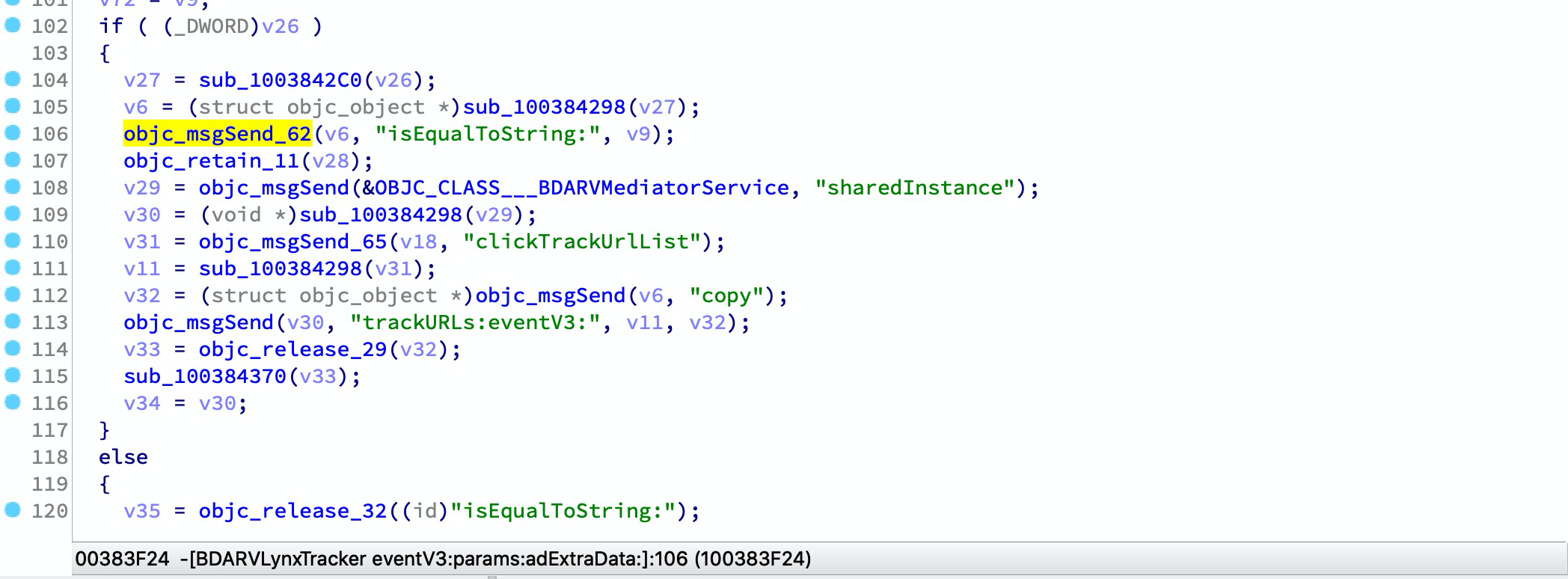
接下来打开IDA -> 文件 -> 脚本文件并加载该脚本,此步骤可能需要较长时间。完成后,您可以观察到一些反编译代码的变化:

⬇️ ⬇️ ⬇️

待续

下载工具

