<p align="center">
<picture>
<source media="(prefers-color-scheme: dark)" srcset="https://s13.gifyu.com/images/b7mxd.webp">
<source media="(prefers-color-scheme: light)" srcset="https://s13.gifyu.com/images/b7mxl.webp">
<img alt="The cottage logo" width="600" src="https://assets.kitploit.com/production/public/readmes/7490/2c8e4c6f8fa352cb9dcf2d8f22c3d84926c09a69fca9a6632d008c61b5417c28.webp">
</picture>
</p>
[](https://github.com/sayanarijit/cottage/actions/workflows/cottage-verify.yml)
[](https://crates.io/crates/cottage)
[](https://pypi.org/project/cottage/)
[](https://www.npmjs.com/package/@sayanarijit/cottage)
[](https://hub.docker.com/r/sayanarijit/cottage)
**cott*age*** 是一款 GitOps 工具,供团队在 git 仓库中管理 [age 加密](https://age-encryption.org/)的机密信息。
它提供了一套简单的工作流,用于加密/解密机密、管理接收者,并将机密排除在仓库之外,同时仍能通过 VCS 轻松共享。cottage 还会为加密机密生成脱敏预览,以提高可见性,并支持持久化和临时解密工作流,同时确保机密绝不会以明文形式提交。

1. [功能特性](#features)
2. [安装](#installation)
3. [编辑器集成](#editor-integrations)
1. [VS Code 扩展](#vs-code-extension)
2. [Cursor 和 Eclipse 扩展](#cursor-and-eclipse-extension)
3. [Vim 插件](#vim-plugin)
4. [AI 代理集成](#ai-agent-integrations)
1. [Claude Code 集成](#claude-code-integration)
2. [GitHub Copilot 集成](#github-copilot-integration)
3. [Codex 集成](#codex-integration)
4. [Antigravity (agy) 集成](https://github.com/sayanarijit/cottage/blob/main/%3C#antigravity-(agy)-integration>)
5. [Cursor 集成](#cursor-integration)
5. [快速开始](#quick-start)
6. [GitOps](#gitops)
7. [Git 钩子](#git-hooks)
8. [访问控制](#access-control)
1. [规则](#rules)
2. [验证](#verification)
9. [任意提供者作为上游](#any-provider-as-upstream)
1. [示例插件](#example-plugins)
10. [与任意设备同步](#sync-with-any-device)
11. [了解更多](#learn-more)
12. [故障排查](#troubleshooting)
13. [对比](#comparison)
1. [age 与其他加密方案](#age-vs-other-encryption)
2. [cottage 与 SOPS](#cottage-vs-sops)
3. [cottage 与 dotenvx](#cottage-vs-dotenvx)
4. [cottage 与 agebox](#cottage-vs-agebox)
## 功能特性
- **防泄露**:利用 Rust 的类型系统确保 bug 绝不会意外泄露机密。
- **团队友好**:在仓库中共享公钥(接收者),将私钥(身份)保留在本地。
- **访问控制**:简单的允许/拒绝规则,控制哪些机密为哪些接收者加密。
- **管理 .gitignore**:自动更新 `.gitignore`,将未加密的机密排除在仓库之外。
- **预览**:为加密机密生成带时间戳的脱敏预览,以提高可见性。
- **丰富的差异**:保持 git diff 干净且易于审查,同时 `ctg diff` 显示本地修改的机密与已跟踪的加密对应文件之间的差异。
- **校验和验证**:通过验证加密机密和接收者列表与元数据是否匹配,防止篡改。
- **Git 钩子**:轻松设置 git 钩子,在提交前自动检查/加密机密,并在检出后解密。
- **持久化机密工作流**:`ctg decrypt/sync` 将解密后的机密保留在磁盘上。
- **智能清理生命周期**:`ctg run`(快捷方式 `ctgx`)和 `ctg edit` 在操作前解密机密,如果之前已存在则保留在磁盘上,否则在操作后自动清理。
- **完成后清理**:`ctg encrypt --clean`、`ctg run --clean` 和 `ctg edit --clean` 确保即使解密文件之前已存在,也会从磁盘上清理掉。
- **环境变量注入工作流**:`ctg env` 将解密后的机密作为环境变量注入以运行命令,完全不写入磁盘。
- **安全的机密管道**:`ctg cat PATH` 在内存中解密并打印到 stdout,以便直接通过 stdin 管道传递给其他工具。
- **清理**:`ctg clean` 从本地仓库删除所有解密后的机密,让你运行 AI 代理时少一分担忧。
- **支持 jj 和非 git 目录**:`ctg init` 可将任意目录变为机密存储库。
- **与任意提供者同步**:让你配置任何具有 API 的提供者作为上游,并像 `git pull/diff/push` 一样开始使用 `ctg pull/diff/push`。
- **与任意设备同步**:使用 cottage 加密并在 git 仓库中管理的机密,可通过 [Cottage Sync](https://cottage-sync.github.io) 在设备间同步。
## 安装
```bash
# rust: cargo-binstall/cargo
cargo binstall --locked cottage
cargo install --locked cottage
# python: pip/uv/uvx
pip install cottage
uv pip install cottage
uvx --from cottage ctg --version
# node: yarn/pnpm/npx
yarn global add @sayanarijit/cottage
pnpm add -g @sayanarijit/cottage
npx -p @sayanarijit/cottage ctg --version
```
也可作为 docker 镜像使用:
```bash
# Docker
docker run --rm -v $PWD:/app sayanarijit/cottage --version
# Podman
podman run --rm -v $PWD:/app quay.io/sayanarijit/cottage --version
```
或从 [GitHub](https://github.com/sayanarijit/cottage/releases) 下载最新版本。
## 编辑器集成
### VS Code 扩展
使用 [Cottage VS Code 扩展](https://github.com/sayanarijit/vscode-plugin-cottage)来安装 `ctg`、添加 Copilot 安全钩子、从资源管理器加密文件,并通过编辑器工作流打开 `.cott.age` 文件。
[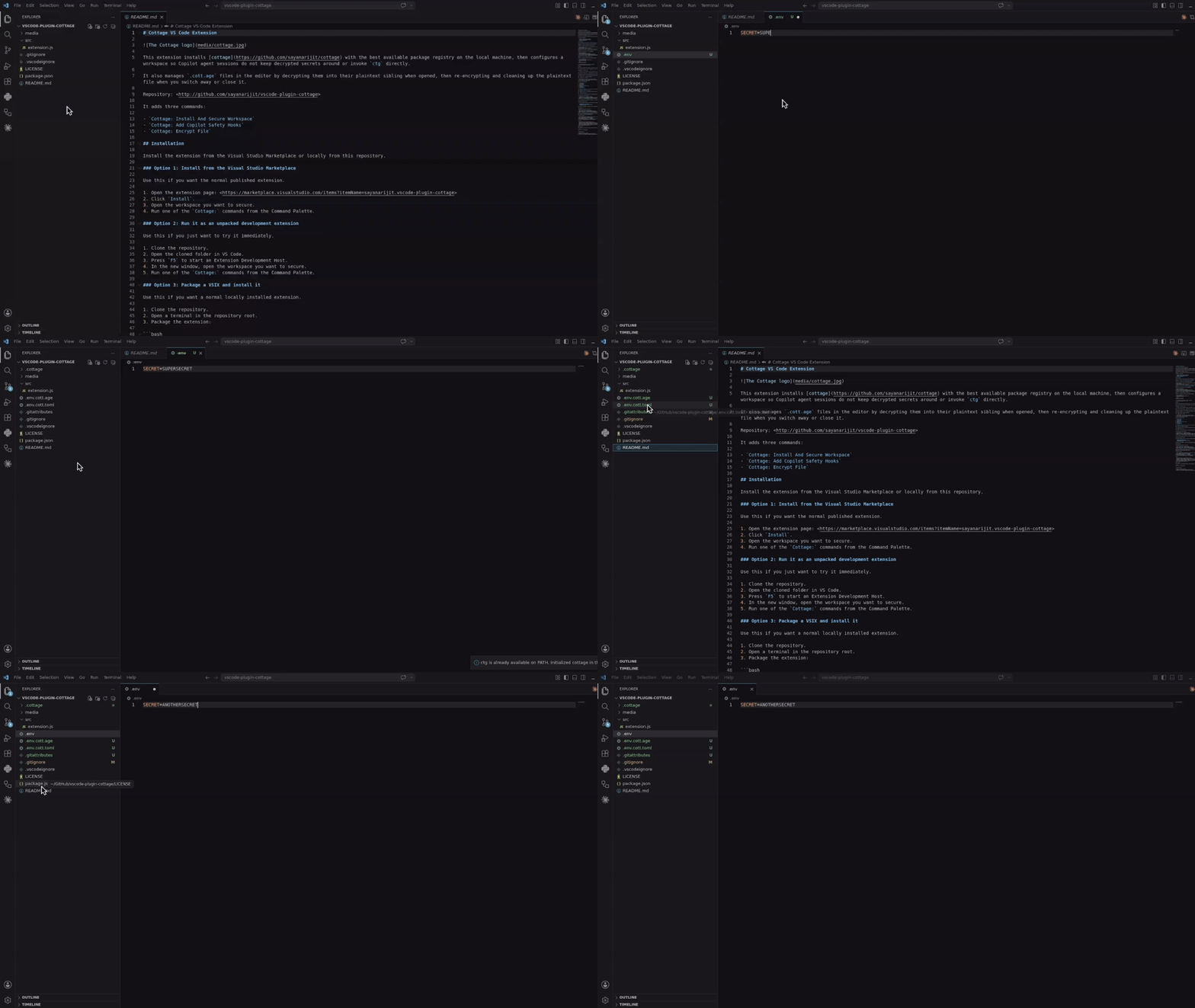](https://marketplace.visualstudio.com/items?itemName=sayanarijit.vscode-plugin-cottage)
从 [Visual Studio Marketplace](https://marketplace.visualstudio.com/items?itemName=sayanarijit.vscode-plugin-cottage) 安装,或从 [`vscode-plugin-cottage`](https://github.com/sayanarijit/vscode-plugin-cottage) 本地构建并安装。
### Cursor 和 Eclipse 扩展
下载 [VSX 文件](https://open-vsx.org/extension/sayanarijit/vscode-plugin-cottage)并在你的 Cursor 或 Eclipse IDE 中安装。其工作方式与 VS Code 扩展类似。
### Vim 插件
使用 [cottage.vim](https://github.com/sayanarijit/cottage.vim) 插件从 Vim 或 Neovim 加密/解密机密。
[](https://asciinema.org/a/1264076)
## AI 代理集成
以下所有集成都会阻止 AI 代理直接运行 `ctg`/`ctgx`,以及查看或编辑机密文件:`.cottage/` 内的任何内容、任何 `*.cott.*` 文件(加密的 `*.cott.age` 二进制块和脱敏的 `*.cott.toml` 预览),以及磁盘上仍存在 `*.cott.age` 对应文件的任何已解密文件。
### Claude Code 集成
如果你使用 Claude Code,请将 [`.claude/settings.json`](https://github.com/sayanarijit/cottage/blob/main/.claude/settings.json) 和 [`.claude/hooks/deny-secrets.py`](https://github.com/sayanarijit/cottage/blob/main/.claude/hooks/deny-secrets.py) 添加到含有密机的仓库中,以便 Claude Code 会话安全地处理机密,或安装 [claude-plugin-cottage](https://github.com/sayanarijit/claude-plugin-cottage) 插件。
### GitHub Copilot 集成
如果你在 VS Code 中使用 GitHub Copilot,请将 [`.github/hooks/ctg-policy.json`](https://github.com/sayanarijit/cottage/blob/main/.github/hooks/ctg-policy.json) 和 [`.github/hooks/scripts/deny_ctg_command.py`](https://github.com/sayanarijit/cottage/blob/main/.github/hooks/scripts/deny_ctg_command.py) 添加到含有密机的仓库中,以便 Copilot 会话清理解密文件、阻止直接的 `ctg` shell 命令,并阻止访问机密文件,或安装 [vscode-plugin-cottage](https://github.com/sayanarijit/vscode-plugin-cottage) 扩展以从 VS Code 进行设置。
VS Code 也会加载 [`.claude/settings.json`](https://github.com/sayanarijit/cottage/blob/main/.claude/settings.json) 钩子定义。如果你在同一仓库中同时保留 Claude 和 Copilot 钩子文件,请确保不要意外运行两次相同的清理钩子。
### Codex 集成
如果你使用 Codex,请将 [`.codex/hooks.json`](https://github.com/sayanarijit/cottage/blob/main/.codex/hooks.json) 和 [`.codex/hooks/deny-ctg.py`](https://github.com/sayanarijit/cottage/blob/main/.codex/hooks/deny-ctg.py) 添加到含有密机的仓库中,以便 Codex 会话安全地处理机密,或安装 [codex-plugin-cottage](https://github.com/sayanarijit/codex-plugin-cottage) 插件。
Codex 要求本地钩子在运行前经过审查。添加文件后,在仓库中启动 Codex 并使用 `/hooks` 审查并信任项目钩子。
### Antigravity (agy) 集成
如果你使用 Antigravity(`agy`),请将 [`.agents/hooks.json`](https://github.com/sayanarijit/cottage/blob/main/.agents/hooks.json) 和 [`.agents/scripts/deny-ctg.py`](https://github.com/sayanarijit/cottage/blob/main/.agents/scripts/deny-ctg.py) 添加到含有密机的仓库中,以便 Antigravity 会话安全地处理机密,或安装 [agy-plugin-cottage](https://github.com/sayanarijit/agy-plugin-cottage) 插件。
### Cursor 集成
如果你使用 Cursor,请将 [`.cursor/hooks.json`](https://github.com/sayanarijit/cottage/blob/main/.cursor/hooks.json)、[`.cursor/hooks/deny-ctg.py`](https://github.com/sayanarijit/cottage/blob/main/.cursor/hooks/deny-ctg.py)、[`.cursor/hooks/deny-read-secrets.py`](https://github.com/sayanarijit/cottage/blob/main/.cursor/hooks/deny-read-secrets.py)、[`.cursor/rules/deny-ctg.mdc`](https://github.com/sayanarijit/cottage/blob/main/.cursor/rules/deny-ctg.mdc) 和 [`.cursorignore`](https://github.com/sayanarijit/cottage/blob/main/.cursorignore) 添加到含有密机的仓库中,以便 Cursor 会话安全地处理机密。
Cursor 要求先启用钩子。打开 Cursor 设置 > 钩子并启用钩子,然后重启代理会话以使项目钩子生效。`.cursorignore` 还会将机密文件排除在 Cursor 的索引和代理上下文之外。
## 快速开始
初始化项目:
```bash
mkdir project && cd project
git init # Optional, cottage works better with git but it's not required
ctg init # Sets up the .cottage directory and necessary files
tree -a
# .
# ├ .cottage/ <- Auto-generated by `ctg init`
# │ └ recipients/ <- This is where your team keeps the public keys of all the recipients.
# │ └ sayanarijit <- Your public key. Commit it. To use an existing public key, just copy that key here.
# ├ .git/...
# └ .gitattributes <- Added `*.cott.age binary linguist-generated filter=cottage-encrypted -diff` to avoid polluting git diff
# Your private key is stored safely in `~/.config/cottage/identity/<dirname>/<timestamp>.key`.
# You can run `ctg clean --all` anytime to clean up everything cottage ever did.
```
创建或编辑机密:
```bash
# `ctg edit` decrypts the file before opening in $EDITOR and re-encrypts upon save.
# If the decrypted file was not present on disk before running `ctg edit`, it is cleaned up afterwards.
# If it was already present, it is kept on disk.
ctg edit secret.yml
# Use `--clean` with `ctg edit` or `ctg encrypt` to ensure decrypted files are deleted even if present before
ctg edit secret.yml --clean # Opens in $EDITOR, encrypts on save, and cleans up
ctg encrypt secret.yml --clean # Encrypts secret.yml and cleans up
# encrypt secret.yml
# into secret.yml.cott.age
# edit secret.yml.cott.toml
# edit .gitignore
# delete secret.yml
```
使用解密后的机密运行命令:
```bash
cat secret.yml
# cat: secret.yml: No such file or directory
# `ctg run` (or shortcut `ctgx`) decrypts secrets before running the command.
# If the decrypted files were not present on disk beforehand, they are automatically cleaned up after the command finishes.
# If they were already present beforehand, they are kept on disk.
ctg run -- kubectl apply -f secret.yml # decrypts secret.yml.cott.age to secret.yml and runs the command
ctg run -- kubectl apply -f secret.yml.cott.age # also replaces the path argument with the decrypted file path
ctg run -- kubectl apply -f . # decrypts all .cott.age files in . and runs the command
ctg run -- ./deploy.sh # decrypts all .cott.age files in repo and runs the command
cat secret.yml
# cat: secret.yml: No such file or directory
# Use `--clean` to ensure decrypted files are cleaned up even if they were present before
ctg run --clean ./deploy.sh
```
或使用快捷方式:
```bash
ctgx -- ./deploy.sh
ctgx --clean -- ./deploy.sh
```
读取并管道传递解密后的机密,而不写入磁盘:
```bash
ctg cat secret.yml.cott.age
ctg cat secret.yml | kubectl apply -f -
ctg cat .env.prod | docker run --rm --env-file /dev/stdin my-image:latest
```
以环境变量注入机密运行命令,完全不写入磁盘:
```bash
ctg env -- ./deploy.sh # Export secrets from .env.cott.age (default) without writing them to disk, then run deploy.sh
ctg env -F .env.prod.cott.age -- ./deploy.sh # exports from .env.prod.cott.age instead of .env.cott.age
ctg env -F secrets.json.cott.age -- printenv COTTAGE_SECRET # Also supports non-dotenv files.
```
## GitOps
要与团队成员共享机密,只需推送到 git 仓库。
```bash
git add .
git commit -m "Add secret.yml"
git push origin main
```
让你的队友将他们的公钥添加到 `.cottage/recipients` 并推送更改。然后你可以拉取并为他们重新加密机密。
```bash
git pull origin main
ctg decrypt --skip-verify-recipients # Decrypt missing secrets for re-encryption
ctg encrypt # Re-encrypt all secrets
# encrypt secret.yml
# into secret.yml.cott.age
# edit secret.yml.cott.toml
ctg clean # optional
# delete secret.yml
# review changes, commit and push
git add .
git commit -m "Add new recipient to secrets"
git push origin main
```
现在你的队友可以拉取最新更改并自行解密机密。
## Git 钩子
你可以使用 [prek](https://github.com/j178/prek) 或 [pre-commit](https://pre-commit.com/) 设置 git 钩子,在提交前自动检查/加密机密,并在检出后解密。
参见[此处的示例 prek 配置](https://github.com/sayanarijit/cottage/blob/main/examples/prek.toml)。
添加 `prek.toml` 文件后,运行:
```bash
prek install
prek install --hook-type post-checkout
prek install --hook-type post-merge
prek install --hook-type post-rewrite
```
## 访问控制
### 规则
在元数据文件中,你可以标注该机密应为哪些接收者加密。这允许你为不同环境(例如 staging 与 production)设置不同的机密,并仅为其相关接收者加密。
```toml
# secret.yml.cott.toml
[secret]
allow = ["sayanarijit"] # Only encrypt for sayanarijit
```
```toml
# secret.yml.cott.toml
[secret]
deny = ["sayanarijit"] # Encrypt for everyone except sayanarijit
```
```toml
# secret.yml.cott.toml
[secret]
allow = ["env/staging/*"] # Supports glob patterns, only encrypt for recipients in env/staging
deny = ["env/staging/badservice"] # Encrypt for everyone in env/staging except badservice
```
拒绝规则优先于允许规则。
更多详情参见[元数据规范](https://github.com/sayanarijit/cottage/blob/main/SPECIFICATION.md#secretmetadata)。
### 验证
你可以在 CI 中运行 `ctg verify`,验证加密机密和接收者列表是否与元数据规则匹配,以防止篡改。
```yaml
# .github/workflows/cottage-verify.yml
name: Cottage Verify
on: [push, pull_request]
permissions:
contents: read
jobs:
verify-secrets:
runs-on: ubuntu-latest
steps:
- uses: actions/checkout@v3
- name: Verify secrets
run: docker run --rm -v "${{ github.workspace }}:/app" ghcr.io/sayanarijit/cottage verify
```
## 任意提供者作为上游
使用 cottage,你可以与任何具有 API 的提供者同步机密,而不仅仅是 git。
为此,在项目根目录创建一个名为 `cottage.toml` 的文件并配置上游设置。
参见[此处的示例 `cottage.toml`](https://github.com/sayanarijit/cottage/blob/main/cottage.toml) 和[此处的机密特定上游配置](https://github.com/sayanarijit/cottage/blob/main/examples/secrets/secret.json.cott.toml)。
参见[此处的示例插件实现](https://github.com/sayanarijit/cottage/blob/main/examples/plugins/cottage-plugin-vault-in-kubernetes.py)。
工作流与 git 类似,但不是 `git pull` 和 `git push`,而是运行 `ctg pull` 和 `ctg push` 来与配置的上游同步机密。
示例:
```bash
# Pull latest changes into local encrypted secrets
# Similar to `git pull origin`
ctg pull myvault
# Compare diff with local decrypted secrets
ctg diff
# Sync local decrypted secrets with local encrypted secrets
ctg sync
# Push changes from local encrypted secrets to upstream
# Similar to `git push origin main`
ctg push myvault
```
更多详情参见[上游配置规范](https://github.com/sayanarijit/cottage/blob/main/SPECIFICATION.md#upstreamconfig)。
### 示例插件
Cottage 支持各种插件提供者来同步你的机密。可直接使用的插件脚本位于 [examples/plugins](https://github.com/sayanarijit/cottage/blob/main/examples/plugins) 目录中:
- [1Password](https://github.com/sayanarijit/cottage/blob/main/examples/plugins/cottage-plugin-onepassword.py)
- [AWS Secrets Manager](https://github.com/sayanarijit/cottage/blob/main/examples/plugins/cottage-plugin-aws-secretsmanager.py)
- [Azure Key Vault](https://github.com/sayanarijit/cottage/blob/main/examples/plugins/cottage-plugin-azure-keyvault.py)
- [Bitwarden](https://github.com/sayanarijit/cottage/blob/main/examples/plugins/cottage-plugin-bitwarden.py)
- [Dashlane](https://github.com/sayanarijit/cottage/blob/main/examples/plugins/cottage-plugin-dashlane.py)
- [Doppler](https://github.com/sayanarijit/cottage/blob/main/examples/plugins/cottage-plugin-doppler.py)
- [ejson](https://github.com/sayanarijit/cottage/blob/main/examples/plugins/cottage-plugin-ejson.py)
- [GitHub Secrets](https://github.com/sayanarijit/cottage/blob/main/examples/plugins/cottage-plugin-github-secrets.py)
- [Google Cloud Secret Manager](https://github.com/sayanarijit/cottage/blob/main/examples/plugins/cottage-plugin-gcp-secretmanager.py)
- [HashiCorp Vault](https://github.com/sayanarijit/cottage/blob/main/examples/plugins/cottage-plugin-vault.py)(另见 [Vault in Kubernetes](https://github.com/sayanarijit/cottage/blob/main/examples/plugins/cottage-plugin-vault-in-kubernetes.py))
- [Keeper Security](https://github.com/sayanarijit/cottage/blob/main/examples/plugins/cottage-plugin-keeper.py)
- [KeePass (Passhole)](https://github.com/sayanarijit/cottage/blob/main/examples/plugins/cottage-plugin-passhole.py)
- [LastPass](https://github.com/sayanarijit/cottage/blob/main/examples/plugins/cottage-plugin-lastpass.py)
- [pass (password-store)](https://github.com/sayanarijit/cottage/blob/main/examples/plugins/cottage-plugin-pass.py)
- [Proton Pass](https://github.com/sayanarijit/cottage/blob/main/examples/plugins/cottage-plugin-protonpass.py)
- [System Keyring](https://github.com/sayanarijit/cottage/blob/main/examples/plugins/cottage-plugin-keyring.py)
- [Zoho Vault](https://github.com/sayanarijit/cottage/blob/main/examples/plugins/cottage-plugin-zoho-vault.py)
## 与任意设备同步
使用 [Cottage Sync](https://cottage-sync.github.io) 在设备间同步你的机密,无需 CLI 即可浏览。
## 了解更多
更多用法示例参见 [examples](https://github.com/sayanarijit/cottage/blob/main/examples) 目录。
## 故障排查
```bash
# See debug logs with -v, -vv or -vvv
ctg run -vvv -- ./deploy.sh
```
## 对比
### age 与其他加密方案
[age](https://age-encryption.org) 使用现代、简单的算法,针对安全文件加密进行了优化,注重可用性和最小攻击面。它还[支持 SSH RSA 和 Ed25519 密钥](https://words.filippo.io/using-ed25519-keys-for-encryption/),不过建议为不同用途和范围使用不同的密钥。
### cottage 与 SOPS
虽然 [SOPS](https://getsops.io/) 和 cottage 有许多重叠的功能,但 cottage 具有以下优势:
- 自动管理 .gitignore,确保未加密的机密绝不会提交到 git。
- 加密机密是纯 age 加密的 .age 文件,可与更广泛的工具生态系统更好地互操作。
- 更干净的差异——与 SOPS 不同(SOPS 会为每个机密的每个值生成差异,即使实际更改只是添加/删除一个接收者),cottage 每个文件只生成一个差异,明确指岀接收者校验和的变化。
### cottage 与 dotenvx
cottage 从 [dotenvx](https://dotenvx.com) 借鉴了 `ctg env` API。
- 支持任何文件类型,而不仅仅是 dotenv 文件。
- 在仓库中管理多个机密。
- 访问控制规则,为特定接收者加密机密。
- 更干净的差异——参见 [cottage 与 SOPS](#cottage-vs-sops)。
### cottage 与 agebox
[agebox](https://github.com/slok/agebox) 在核心理念上与 cottage 非常相似,但缺少许多[功能](#features)。