# sbomlyze
**为你的 SBOM 提供 `git diff` 功能。** 比较两份软件物料清单,查看构建、版本和发布之间的变化。
sbomlyze 比较的是组件哈希,而不仅仅是版本字符串。当攻击者在不提升版本号的情况下替换软件包时,sbomlyze 会将其标记出来。生成器和漏洞扫描器会漏掉这种情况。
[![CI][ci-img]][ci]
[![GitHub Marketplace][marketplace-img]][marketplace]
[![GitHub Release][release-img]][release]
[![Go Report Card][go-report-img]][go-report]
[![OpenSSF Scorecard][scorecard-img]][scorecard]
[![OpenSSF Best Practices][best-practices-img]][best-practices]
[![License: Apache-2.0][license-img]][license]
[![Downloads][download-img]][download]
[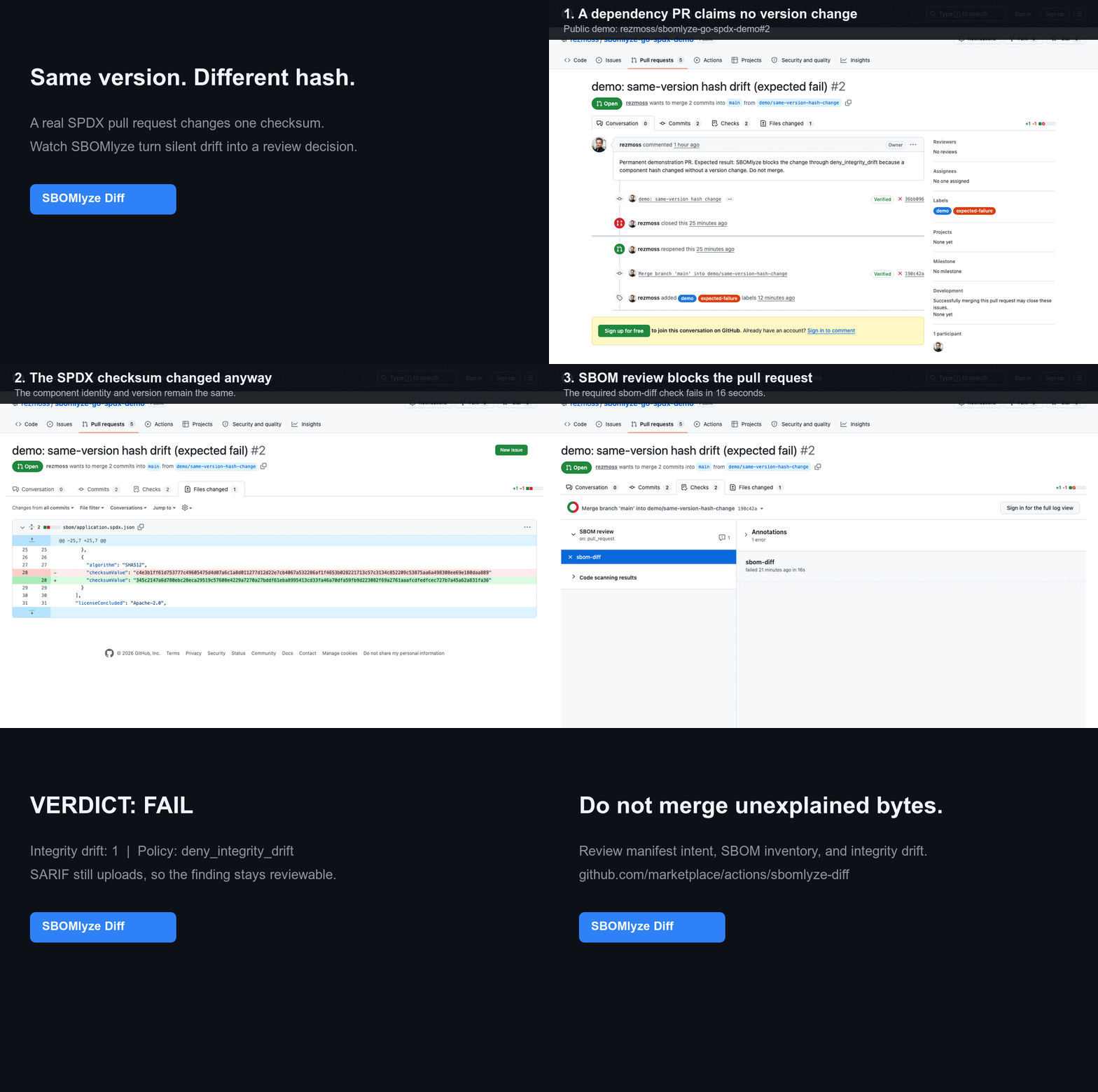](https://github.com/rezmoss/sbomlyze-go-spdx-demo/pull/2)
了解为什么这一信号与清单差异或普通组件差异不同,请参阅
[清单差异 vs. SBOM 差异 vs. 完整性漂移](https://github.com/rezmoss/sbomlyze/blob/main/docs/manifest-vs-sbom-vs-integrity-drift.md)。
> 生成器负责制作 SBOM,扫描器负责发现 CVE。sbomlyze 告诉你两份 SBOM 之间发生了什么变化,以及是否应该信任它。
> 在你的生成器之后运行它:`syft image:tag -o cyclonedx-json | sbomlyze - --compliance` 无需临时文件即可分析并评分生成的 SBOM。将其与基线进行比较,以分类漂移并控制你的流水线。
## GitHub Action 快速开始
添加 [来自 GitHub Marketplace 的 SBOMlyze Diff][marketplace],将已检入或单独生成的 SBOM 与其 git 基线进行比较。下面的不可变 SHA 是已发布的 `v0.5.1` Action:```yaml
steps:
- uses: actions/checkout@3d3c42e5aac5ba805825da76410c181273ba90b1 # v7.0.1
with:
fetch-depth: 0
- uses: rezmoss/sbomlyze@31503690611fda8ebba4ed2bd186eda000442594 # v0.5.1
with:
sbom-path: build/sbom.cdx.json
```
Action 默认会写入 Job Summary,并且可以强制执行策略、报告完整性漂移、上传 SARIF,或维护单条 pull-request 评论。有关输入、输出、权限和安全指南,请参阅[完整的 Action 参考](https://github.com/rezmoss/sbomlyze/blob/main/ACTION.md)。有关通过的依赖更新和被阻止的同版本哈希变更(包含公开的工作流运行和 SARIF 证据),请参阅[实时演示仓库](https://github.com/rezmoss/sbomlyze-action-demo)。
如需针对特定格式的 dogfood,请使用公开的 [Go + SPDX](https://github.com/rezmoss/sbomlyze-go-spdx-demo)、[Node + CycloneDX](https://github.com/rezmoss/sbomlyze-node-cyclonedx-demo) 或[容器](https://github.com/rezmoss/sbomlyze-container-demo)示例。每个示例都包含五个可复现的审查场景。[10 分钟 beta 指南](https://github.com/rezmoss/sbomlyze/blob/main/BETA.md)收集了四个聚焦的激活和信号质量问题。
生成的 SBOM 无需提交:`baseline: workflow-artifact` 会从成功的默认分支运行中检索最近匹配的 artifact。一个[固定版本的 Syft 配套工作流](https://github.com/rezmoss/sbomlyze/blob/main/examples/workflows/syft-companion.yml)展示了生成和基线发布,而 SBOMlyze 仍负责审查和策略。
## 为什么选择 sbomlyze?
许多工具可以生成 SBOM。但很少有工具能比较它们,更少有工具能告诉你某个变更是常规操作还是供应链危险信号。sbomlyze 填补了这一空白。
| 能力 | **sbomlyze** | cyclonedx-cli | sbomqs | syft / trivy |
|---|:---:|:---:|:---:|:---:|
| SBOM 到 SBOM 的**差异** | ✅ | 基础 | ❌ | ❌ |
| **完整性 / 篡改**漂移(哈希变更但版本未变) | ✅ | ❌ | ❌ | ❌ |
| 依赖图差异 + 传递深度风险 | ✅ | ❌ | ❌ | ❌ |
| **NTIA / CISA / BSI** 合规评分 | ✅ | ❌ | ✅ | ❌ |
| 格式转换(Syft / CycloneDX / SPDX) | ✅ | ✅ | ❌ | 部分 |
| **TUI + Web UI** 浏览器 | ✅ | ❌ | ❌ | ❌ |
| 策略门禁 + SARIF / JUnit / Markdown / HTML / Patch | ✅ | 部分 | 部分 | 部分 |
## 功能
- **SBOM 差异比较**:比较两个 SBOM,一目了然地查看新增、移除和变更的组件
- **漂移分类**:区分版本漂移与**完整性漂移**(哈希变更但版本未变,表明存在篡改)以及元数据漂移
- **合规评分**:根据 **NTIA**、**CISA 2025** 和 **BSI TR-03183** 最低要素对任意 SBOM 进行评分
- **依赖图差异**:跟踪传递依赖和供应链深度
- **多格式支持**:Syft、CycloneDX、SPDX(JSON)
- **格式转换**:在 CycloneDX、SPDX 和 Syft 格式之间转换
- **强身份匹配**:PURL → CPE → BOM-ref → namespace/name 优先级
- **统计模式**:分析单个 SBOM 的许可证、依赖和完整性指标
- **交互式 TUI 模式**:通过键盘导航和搜索探索 SBOM
- **Web UI 模式**:基于浏览器的 SBOM 浏览器,支持拖放上传
- **策略引擎**:在 CI 流水线中强制执行漂移、许可证和合规评分规则
- **GitHub Marketplace Action**:通过 Job Summary、SARIF 和可选评论输出,基于 SBOM 漂移对 pull request 进行门禁
- **重复与冲突检测**:查找同一包的多个版本以及模糊的身份匹配
- **多种输出格式**:Text、JSON、SARIF、JUnit XML、Markdown、HTML、JSON Patch
- **容错解析**:遇到错误时继续,并给出结构化警告
## 安装
### Homebrew(macOS/Linux)```bash
brew install rezmoss/sbomlyze/sbomlyze
```
### 安装脚本
安装脚本会为您的操作系统/架构下载正确的二进制文件:```bash
# Install to ./bin
curl -sSfL https://raw.githubusercontent.com/rezmoss/sbomlyze/main/install.sh | sh
# Install to /usr/local/bin (requires sudo)
curl -sSfL https://raw.githubusercontent.com/rezmoss/sbomlyze/main/install.sh | sudo sh -s -- -b /usr/local/bin
# Install specific version
curl -sSfL https://raw.githubusercontent.com/rezmoss/sbomlyze/main/install.sh | sh -s -- -v 0.4.0
```
**安装选项:**
| 选项 | 描述 |
|--------|-------------|
| `-b <dir>` | 安装目录(默认:`./bin`) |
| `-d` | 启用调试输出 |
| `-v <ver>` | 安装指定版本(默认:最新版) |
安装程序始终会验证发布版本的校验和。当安装了兼容的 GitHub CLI 时,它还会验证发布版本的构建来源,如果验证未成功,则会以失败关闭。
### Go 安装```bash
go install github.com/rezmoss/sbomlyze/cmd/sbomlyze@latest
```
### 从二进制发布版安装
从 [GitHub Releases](https://github.com/rezmoss/sbomlyze/releases) 下载最新的二进制文件。
从 v0.3.7 开始,发布归档文件附带 GitHub 工件
证明。使用以下命令独立验证下载内容:```bash
gh attestation verify ./sbomlyze_0.4.0_Linux_x86_64.tar.gz \
--repo rezmoss/sbomlyze \
--signer-workflow rezmoss/sbomlyze/.github/workflows/release.yml
```
未签名的 apt、rpm 和 apk 仓库安装说明已被移除,直到这些仓库支持包管理器原生的签名验证。
**macOS 用户:** 下载后请移除隔离标记:```bash
xattr -d com.apple.quarantine ./sbomlyze
chmod +x ./sbomlyze
```
### 从源码构建```bash
git clone https://github.com/rezmoss/sbomlyze.git
cd sbomlyze
go build -o sbomlyze ./cmd/sbomlyze
```
## 快速开始```bash
# Compare two SBOMs (the headline use case)
sbomlyze before.json after.json
# Analyze a single SBOM
sbomlyze image.json
# Read an SBOM from standard input
syft image:tag -o cyclonedx-json | sbomlyze -
# Use standard input on either side of a diff
syft image:tag -o cyclonedx-json | sbomlyze baseline.json -
# Score an SBOM against NTIA / CISA / BSI minimum elements
sbomlyze image.json --compliance
# Interactive TUI explorer
sbomlyze image.json -i
# Web UI (opens browser)
sbomlyze -web
# Convert between SBOM formats
sbomlyze convert syft.json --to spdx
sbomlyze convert cdx.json --to syft -o output.json
# JSON output for CI integration
sbomlyze before.json after.json --json
# SARIF output for GitHub Code Scanning
sbomlyze before.json after.json --format sarif
# Markdown report for PR comments
sbomlyze before.json after.json --format markdown
# Apply policy checks
sbomlyze before.json after.json --policy policy.json
```
## 用法```
sbomlyze <sbom1|-> [sbom2|-] [options]
sbomlyze convert <sbom|-> --to <format> [-o output]
Modes:
Single file: sbomlyze <sbom> [--json] Show statistics
Interactive: sbomlyze <sbom> -i Interactive explorer
Convert: sbomlyze convert <sbom> --to <fmt> Convert SBOM format
Web server: sbomlyze -web [--port 8080] Web UI explorer
Two files: sbomlyze <sbom1> <sbom2> [...] Show diff
Use `-` in place of one SBOM path to read it from standard input.
Options:
-i, --interactive Interactive TUI explorer
-web, --web Start web UI server
--port <port> Web server port (default 8080)
--json Output in JSON format (shortcut for --format json)
--format <format> Output format: text, json, sarif, junit, markdown, html, patch
--compliance Show NTIA/CISA/BSI compliance scoring
--policy <file> Policy file for CI checks
--strict Fail on parse warnings
--tolerant Continue on parse warnings (default)
--no-pager Disable automatic paging of output
--to <format> Target format for convert: cyclonedx (cdx), spdx, syft
-o, --output <file> Output file for convert (default: stdout)
--version, -v Show version information
--help, -h Show this help message
```
## 命令
### 统计模式(单文件)
分析 SBOM 以获取有关组件、许可证和依赖项的洞察。```bash
sbomlyze image.json
```
输出包含扫描上下文、自动检测的关键发现和统计信息:```
Scan Context:
Tool: syft 1.40.1
Schema: 16.0.18
Scan Scope: all-layers
Source Type: image
Source: alpine:latest
Key Findings:
💻 OS/Distro: Alpine Linux v3.21
📦 Dominated by apk: 71 of 71 packages (100.0%)
📂 8,542 files tracked on filesystem
🔗 Relationships: 71 containment + 64 dependency
📜 License profile: 72% permissive, 20% copyleft
⚠️ Low hash coverage: 0.0% (71 of 71 missing)
🔍 Top catalogers: apkdb-cataloger (71)
📦 SBOM Statistics
==================
Total Components: 71
By Package Type:
apk 71
Licenses:
With license: 71
Without license: 0
Top Licenses:
MIT 17
BSD-3-Clause 8
GPL-2.0-only 8
Integrity:
With hashes: 0
Without hashes: 71
Dependencies:
Components with deps: 65
Total dep relations: 176
```
#### 关键发现
sbomlyze 会自动生成关于你的 SBOM 的洞察。对于单文件分析,这些包括:
| 发现项 | 描述 |
|---------|-------------|
| **操作系统/发行版检测** | 从 SBOM 元数据中识别操作系统或发行版 |
| **主导生态系统** | 当某一包类型占主导地位(占所有包的 >60%)时报告 |
| **文件系统足迹** | 文件系统上被跟踪的文件数量 |
| **关系密度** | 包含关系和依赖关系的计数 |
| **位置热点** | 发现组件的顶级目录 |
| **许可证风险概况** | 宽松/著佐权/未知许可证百分比的细分 |
| **数据质量警告** | 当许可证(<50%)、哈希(<50%)或 PURL(<80%)覆盖率较低时发出警报 |
| **重复警告** | 标记重复的组件组 |
| **编目器细分** | 检测到组件的顶级扫描器/编目器(Syft SBOM) |
#### 覆盖率指标
统计模式计算覆盖率百分比以进行数据质量评估:
| 指标 | 描述 |
|--------|-------------|
| **PURL 覆盖率** | 具有包 URL 的组件百分比 |
| **CPE 覆盖率** | 具有 CPE 的组件百分比(漏洞扫描就绪度) |
| **许可证覆盖率** | 至少具有一个许可证的组件百分比 |
| **哈希覆盖率** | 具有完整性哈希的组件百分比 |
#### 许可证分类
许可证会自动分类为:
| 类别 | 示例 |
|----------|----------|
| **著佐权** | GPL、LGPL、AGPL、MPL、EPL、CDDL |
| **宽松** | MIT、BSD、Apache、ISC、Zlib、Unlicense |
| **公共领域** | 公共领域奉献 |
| **未知** | 未识别或缺失的许可证 |
### 转换模式
在 CycloneDX、SPDX 和 Syft JSON 格式之间转换 SBOM。输入格式会自动检测。```bash
# CycloneDX to SPDX
sbomlyze convert image.cdx.json --to spdx
# Syft to CycloneDX (cdx is an alias for cyclonedx)
sbomlyze convert syft-output.json --to cdx
# SPDX to Syft, writing to a file
sbomlyze convert spdx-output.json --to syft -o converted.json
```
#### 支持的目标格式
| 格式 | `--to` 值 | 输出 |
|--------|-------------|--------|
| CycloneDX 1.5 | `cyclonedx` 或 `cdx` | 包含元数据、依赖关系和属性的 CycloneDX JSON |
| SPDX 2.3 | `spdx` | 包含包、关系和外部引用的 SPDX JSON |
| Syft | `syft` | 包含工件、关系、来源和发行版信息的 Syft JSON |
#### 保留的内容
转换会保留组件名称、版本、PURL、CPE、许可证、哈希、供应商信息和依赖关系。格式特定的字段(例如 Syft 的 language、foundBy、locations)在转换为 CDX 时会通过 CycloneDX 属性保留。
### 差异模式(两个文件)
比较两个 SBOM,查看版本之间的变化。```bash
sbomlyze v1.0.json v2.0.json
```
#### 差异概览
差异比较首先进行并排的元数据对比(文件名、大小、操作系统信息、工具信息、组件数量),随后在可用时显示扫描上下文详情。
#### 输出```
📊 Drift Summary:
📦 Version drift: 58 components
⚠️ Integrity drift: 1 component (hash changed without version change!)
📝 Metadata drift: 2 components
🔑 Key Findings:
📈 Attack surface: +5 packages (7.0%), +120 files (3.2%)
🚨 2 version downgrades detected: openssl 3.1.4→3.0.2, curl 8.5.0→8.4.0
🔄 56 version upgrades (2 major, 12 minor, 42 patch) among 65 shared packages
⚠️ Integrity drift (1 total): 1 npm (review recommended)
❌ python ecosystem entirely removed (15 → 0 packages)
➕ New ecosystem: golang (8 packages)
✅ Core system packages stable: apk (71) unchanged
+ Added (2):
+ libgcrypt 1.10.3-r0
+ libgpg-error 1.49-r0
- Removed (3):
- libapk 3.0.3-r1
- libgcc 15.2.0-r2
- nghttp3 1.13.1-r0
~ Changed (58):
~ nginx
version: 1.29.4-r1 -> 1.27.3-r1
~ suspicious-pkg ⚠️ [INTEGRITY]
hash[SHA256]: abc123 -> def456
>> Added dependencies:
pkg:apk/alpine/libxslt: +[so:libgcrypt.so.20]
<< Removed dependencies:
pkg:apk/alpine/libcurl: -[so:libnghttp3.so.9]
🔗 New transitive dependencies (3):
+ pkg:npm/lodash (depth 2)
via: [pkg:npm/my-app pkg:npm/express pkg:npm/lodash]
+ pkg:npm/underscore (depth 3)
via: [pkg:npm/my-app pkg:npm/express pkg:npm/lodash pkg:npm/underscore]
📊 New deps by depth:
Depth 2: 1
Depth 3+ (risky): 2 ⚠️
```
#### Diff 关键发现
在 diff 模式下,sbomlyze 会自动生成更丰富的洞察,对比两个 SBOM:
| 发现项 | 描述 |
|---------|-------------|
| **扫描上下文不匹配** | 当 schema 版本或扫描范围在 SBOM 之间发生变化时发出警告 |
| **攻击面增量** | 包、文件和关系数量的变化及百分比 |
| **消失/新增的生态系统** | 完全出现或消失的包类型 |
| **操作系统/发行版迁移** | 检测扫描之间操作系统的变化 |
| **版本变更分析** | 统计升级与降级,将变更分类为 major/minor/patch |
| **版本降级** | 将降级标记为安全信号,并附上组件详情 |
| **完整性漂移上下文** | 按包类型细分完整性漂移,并提供风险指引 |
| **主导路径模式** | 按类型和文件系统路径集中展示变更 |
| **移除/新增热点** | 受变更影响最大的目录 |
| **稳定类型** | 数量完全相同的包类型(未变化的核心) |
| **许可证类别变化** | copyleft/permissive 平衡的变化 |
| **编目器缺口** | 在 Before 中发现了包但在 After 中未发现的扫描器 |
#### 按类型划分的包样本
新增和移除的组件按包类型分组,并附上样本列表,便于查看每个生态系统中发生了什么变化。
## 合规评分
根据三大最低要素框架对任意 SBOM 进行评分,以回答审计人员和采购团队不断提出的问题:**“这个 SBOM 足够完整吗?”**```bash
# Score a single SBOM
sbomlyze image.json --compliance
# Score alongside a diff
sbomlyze before.json after.json --compliance
# As JSON for CI
sbomlyze image.json --compliance --json
```
### 已评估的框架
| 框架 | 检查项 | 显著要求 |
|-----------|--------|----------------------|
| **NTIA 最低要素** (2021) | 7 | 名称、版本、供应商、唯一标识符(PURL/CPE)、依赖关系、SBOM 作者、时间戳 |
| **CISA 2025 最低要素**(2025 年 8 月草案) | 10 | 在 NTIA 基础上增加软件生产者、许可证信息、**组件哈希**和工具名称 |
| **BSI TR-03183-2**(v2.1.0,2025) | 9 | 要求组件创建者联系方式、**SHA-512 哈希**、SPDX 格式许可证以及 SBOM 创建者联系方式 |
### 评分展示
每个框架报告一个百分比(通过检查数 / 总检查数)以及一个总体评分(各框架的平均值),并带有状态指示器:
| 指示器 | 评分 |
|-----------|-------|
| 🟢 | ≥ 90% |
| 🟡 | 70–89% |
| 🟠 | 50–69% |
| 🔴 | < 50% |
JSON 输出(`--compliance --json`)包含完整报告及每项检查的通过/失败详情;HTML 格式将合规报告嵌入报告页面。
### 在 CI 中控制合规性
通过[策略引擎](#policy-engine)强制执行合规阈值。设置任何阈值都会触发合规评估,无需 `--compliance` 标志:```json
{
"min_ntia_score": 85,
"min_cisa_score": 70,
"min_bsi_score": 80,
"min_overall_compliance": 75
}
```
- **`--proxy`**:设置代理(例如 `http://127.0.0.1:8080`)
- **`--timeout`**:请求超时时间(秒)
- **`--user-agent`**:自定义 User-Agent 字符串
- **`--headers`**:自定义请求头(JSON 格式)
- **`--cookies`**:自定义 Cookie(JSON 格式)
- **`--follow-redirects`**:跟随 HTTP 重定向
- **`--verify-ssl`**:验证 SSL 证书
- **`--threads`**:并发线程数
- **`--delay`**:请求之间的延迟(秒)
- **`--retries`**:失败请求的重试次数
- **`--output`**:输出文件路径
- **`--format`**:输出格式(`json`、`csv`、`html`、`txt`)
- **`--verbose`**:启用详细输出
- **`--quiet`**:抑制所有输出
- **`--no-color`**:禁用彩色输出
- **`--config`**:配置文件路径
- **`--version`**:显示版本信息
- **`--help`**:显示帮助信息```bash
sbomlyze image.json --policy compliance-policy.json
```
## 依赖图差异
sbomlyze 超越了简单的组件列表差异,能够分析完整的依赖图,检测通过传递依赖引入的供应链风险。
### 功能特性
| 功能 | 描述 |
|---------|-------------|
| **边差异** | 新增/移除的直接依赖(A 依赖于 B) |
| **传递可达性** | 通过依赖图出现的新的间接依赖 |
| **传递丢失追踪** | 被移除的传递依赖 |
| **路径追踪** | 精确显示每个新增传递依赖是如何被引入的 |
| **深度追踪** | 每个新增依赖距离你的代码有多少跳 |
| **风险摘要** | 深度 3+ 的依赖被标记为更高风险 |
### 为什么深度很重要
在依赖图中引入得越深的依赖:
- 越难以审计和审查
- 通常未经明确批准就被引入
- 是供应链攻击的常见途径(例如 event-stream 事件)
深度摘要有助于确定审查优先级:
| 深度 | 风险等级 | 描述 |
|-------|------------|-------------|
| **1** | 低 | 直接依赖(由你选择) |
| **2** | 中 | 你的依赖的依赖 |
| **3+** | 高 ⚠️ | 深层传递依赖——请仔细审查 |
### 示例:检测深层传递依赖```bash
# Before: app -> express (simple, 1 dep)
# After: app -> express -> lodash -> underscore -> deep-lib (chain of 4)
sbomlyze before.json after.json
```
```markdown
| 参数 | 描述 |
|-----------|-------------|
| `-h`, `--help` | 显示帮助信息并退出 |
| `-u URL`, `--url URL` | 目标 URL |
| `-p PROXY`, `--proxy PROXY` | 代理地址,例如 `http://127.0.0.1:8080` |
| `-t TIMEOUT`, `--timeout TIMEOUT` | 请求超时时间(秒),默认 10 |
| `-o OUTPUT`, `--output OUTPUT` | 输出文件路径 |
| `-v`, `--verbose` | 详细输出模式 |
``````
🔗 New transitive dependencies (3):
+ lodash (depth 2)
via: [app express lodash]
+ underscore (depth 3)
via: [app express lodash underscore]
+ deep-lib (depth 4)
via: [app express lodash underscore deep-lib]
📊 New deps by depth:
Depth 2: 1
Depth 3+ (risky): 2 ⚠️
```
### 依赖图的 JSON 输出```json
{
"dependencies": {
"added_deps": {
"pkg:npm/express": ["pkg:npm/lodash", "pkg:npm/body-parser"]
},
"removed_deps": {},
"transitive_new": [
{
"target": "pkg:npm/underscore",
"via": ["pkg:npm/my-app", "pkg:npm/express", "pkg:npm/lodash", "pkg:npm/underscore"],
"depth": 3
}
],
"transitive_lost": [],
"depth_summary": {
"depth_1": 0,
"depth_2": 2,
"depth_3_plus": 2
}
}
}
```
## 漂移检测
sbomlyze 将组件变更分为三种漂移类型,帮助您区分正常更新与潜在可疑变更。
### 漂移类型
| 类型 | 指示符 | 描述 | 严重性 |
|------|-----------|-------------|----------|
| **版本** | 📦 | 版本号已更改 | 正常 |
| **完整性** | ⚠️ | 哈希值更改但版本未变 | 高 - 需调查! |
| **元数据** | 📝 | 仅元数据(许可证等)更改 | 低 |
### 完整性漂移(安全信号)
完整性漂移发生在组件的哈希值更改但其版本保持不变时。这可能表明:
- **供应链攻击**:软件包被替换为恶意版本
- **未提升版本号的重建**:合法但不良实践
- **不同的构建环境**:可复现性问题```bash
# Example output with integrity drift
~ suspicious-pkg ⚠️ [INTEGRITY]
hash[SHA256]: abc123 -> def456
```
**建议**:始终调查完整性漂移。它可能是良性的,但它是供应链安全的关键信号。
### 漂移的 JSON 输出
漂移摘要位于 `diff` 对象内部:```json
{
"diff": {
"changed": [
{
"id": "pkg:npm/suspicious-pkg",
"name": "suspicious-pkg",
"changes": ["hash[SHA-256]: abc123 -> def456"],
"drift": {
"type": "integrity",
"hash_changes": {
"changed": {
"SHA-256": {"before": "abc123", "after": "def456"}
}
}
}
}
],
"drift_summary": {
"version_drift": 55,
"integrity_drift": 1,
"metadata_drift": 2
}
}
}
```
**提取漂移摘要:**```bash
# Get drift summary
sbomlyze before.json after.json --json | jq '.diff.drift_summary'
# Check for integrity drift in CI
sbomlyze before.json after.json --json | jq -e '.diff.drift_summary.integrity_drift > 0'
```
## 重复与冲突检测
### 重复检测
sbomlyze 识别 SBOM 中具有相同标识但版本不同的组件:```
⚠️ Duplicates Found: 2
lodash: [4.17.20, 4.17.21]
express: [4.18.0, 4.19.2]
```
在 diff 模式下,重复版本差异跟踪:
- **新增重复项**:在新 SBOM 中变为重复的组件
- **已解决重复项**:已合并的重复组
- **版本添加/移除**:现有重复组内的版本变更
### 冲突检测
冲突是模糊的身份匹配,即组件共享相同的 ID 但具有相互矛盾的特征:
| 类型 | 描述 |
|------|-------------|
| **名称不匹配** | 不同的组件名称映射到相同的身份 ID |
| **哈希不匹配** | 同一版本的组件具有不同的哈希值(可能存在篡改) |
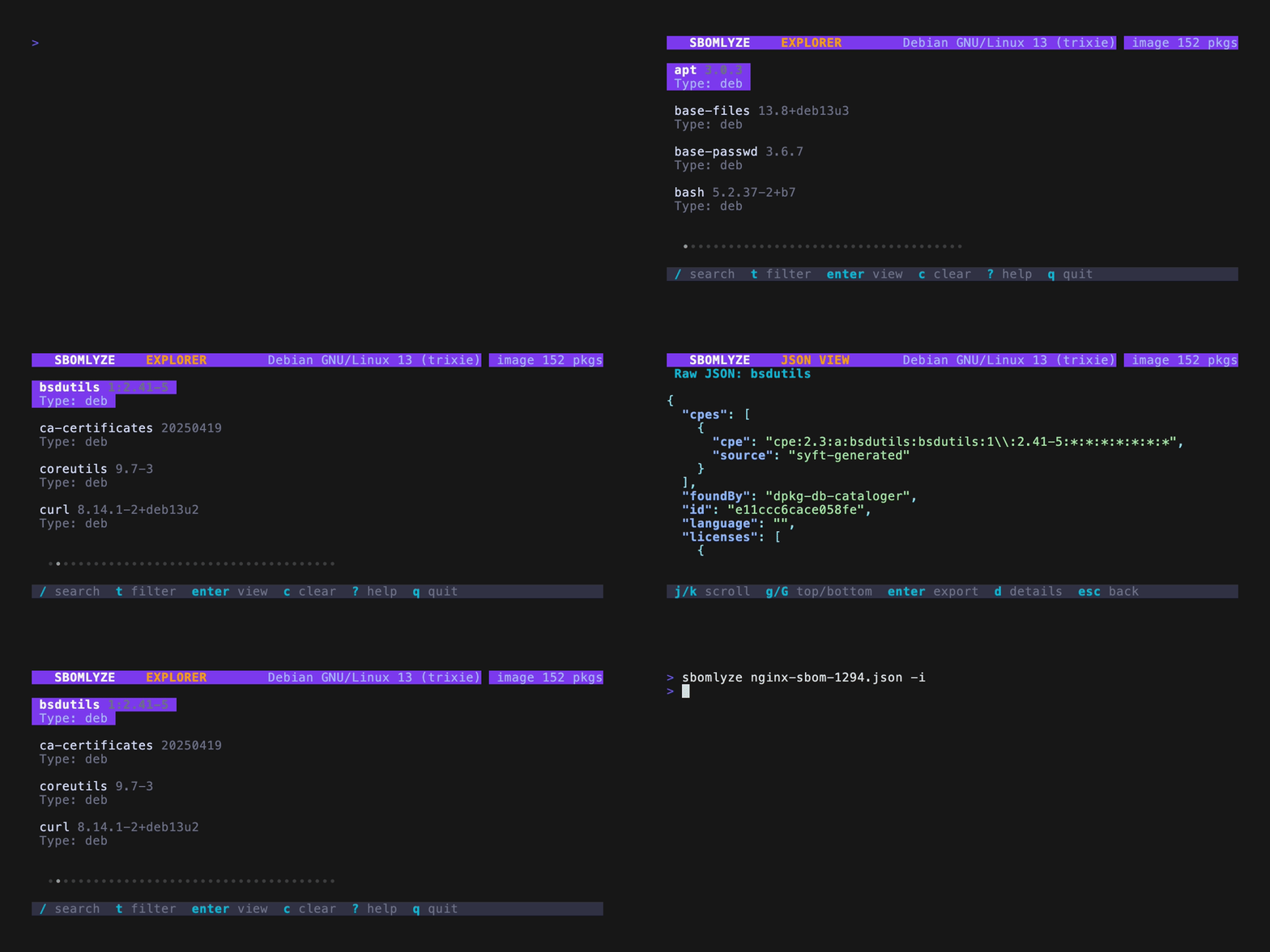
## SBOMlyze SBOM 浏览器(TUI)```bash
sbomlyze sbom.json -i
```
### TUI 键盘快捷键
#### 导航
| 按键 | 操作 |
|-----|--------|
| `↑` / `k` | 上移 |
| `↓` / `j` | 下移 |
| `PgUp` / `Ctrl+u` | 上翻半页 |
| `PgDn` / `Ctrl+d` | 下翻半页 |
| `Home` / `g` | 跳转到顶部 |
| `End` / `G` | 跳转到底部 |
| `Enter` | 查看组件详情 |
| `Esc` / `Backspace` | 返回 |
| `q` / `Ctrl+c` | 退出 |
#### 搜索与过滤
| 按键 | 操作 |
|-----|--------|
| `/` | 跨所有字段深度搜索(名称、PURL、许可证、原始 JSON) |
| `t` | 按包类型过滤(npm、apk、golang、pypi 等) |
| `c` | 清除所有活动过滤器 |
#### 视图
| 按键 | 上下文 | 操作 |
|-----|---------|--------|
| `j` | 详情视图 | 查看带语法高亮的原始组件 JSON |
| `d` | JSON 视图 | 切换回详情视图 |
| `Enter` | JSON 视图 | 将组件 JSON 导出到文件 |
| `?` | 任意视图 | 显示包含所有键绑定的帮助 |
### 组件详情视图
详情视图显示全面的组件信息:
- 包信息(名称、版本、PURL、命名空间、供应商)
- 带视觉指示器的许可证
- 完整性哈希
- CPE(通用平台枚举)
- 依赖列表
- 标识符(ID、BOM-ref、SPDX-ID)
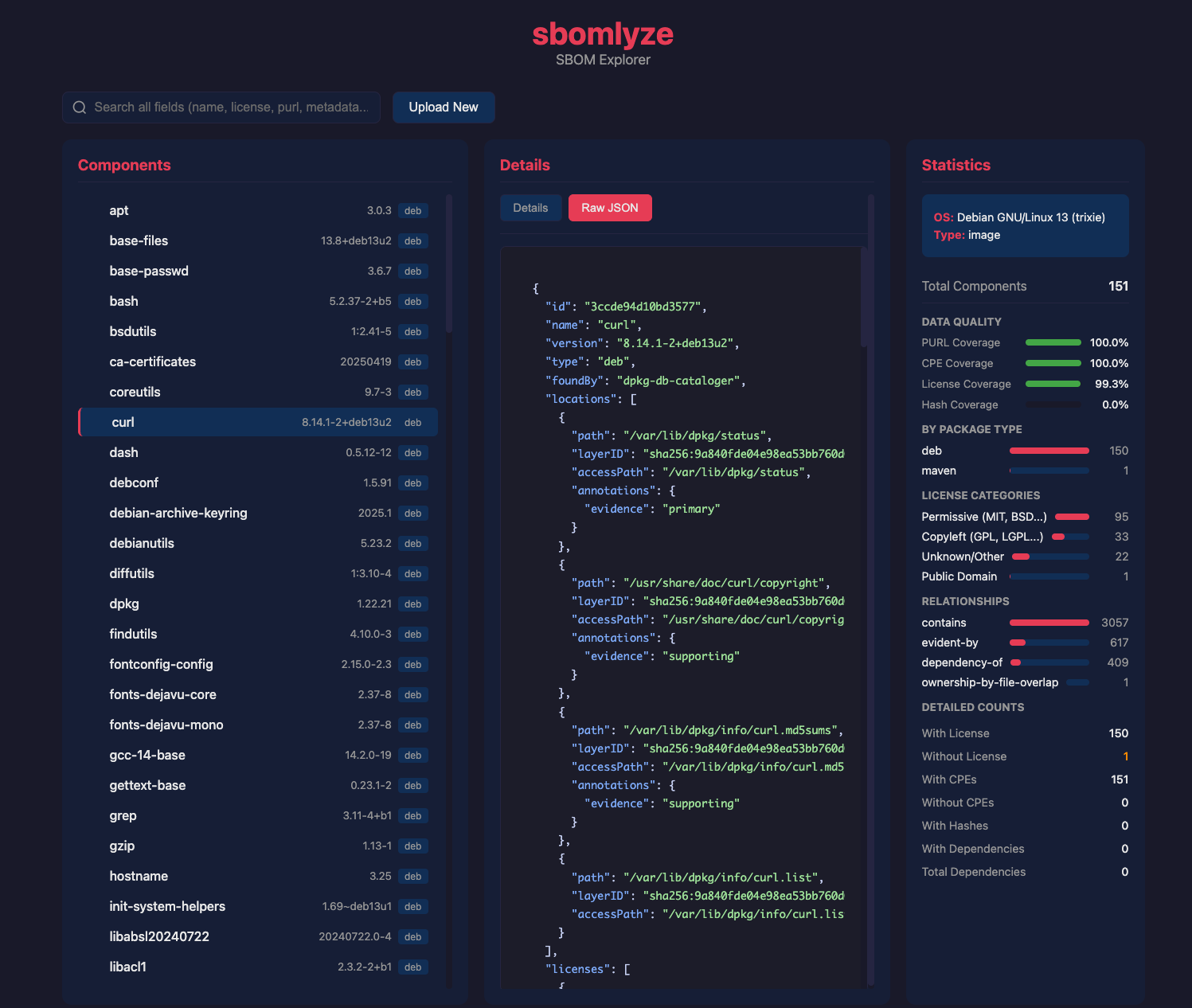
## Web UI 模式
启动基于浏览器的 SBOM 浏览器,支持拖放文件上传:```bash
# Start web server on default port 8080
sbomlyze -web
# Start on custom port
sbomlyze -web --port 3000
```
然后在浏览器中打开 http://localhost:8080。
<img width="1497" height="1266" alt="Screenshot 2026-02-06 at 17 08 13" src="https://assets.kitploit.com/production/public/readmes/12637/57bcd50bc9b9955714b9078d1de37fc8152be02845a5c25b74a8fd14ff587bf4.png" />
### Web UI 功能
| 功能 | 描述 |
|---------|-------------|
| **拖放上传** | 将任意 SBOM 文件(Syft、CycloneDX、SPDX)拖放到页面上(最大 500MB) |
| **依赖树** | 具有展开/折叠导航的交互式树视图(超过 5000 个组件时分页显示) |
| **组件详情** | 查看许可证、哈希、依赖项、供应商信息、文件数量 |
| **原始 JSON 视图** | 为每个组件提供语法高亮的 JSON |
| **深度搜索** | 跨所有字段(包括原始 JSON 数据)进行搜索 |
| **统计仪表板** | 覆盖率指标、许可证类别、语言分布 |
| **文件系统浏览器** | 通过目录导航、搜索和层过滤浏览 SBOM 中的文件 |
### 显示的统计信息
Web UI 显示全面的统计信息,包括:
- 按包类型(npm、apk、pypi 等)统计的**组件数量**
- 带有类别细分(copyleft、permissive、public domain)的**许可证分布**
- 带有可视化进度条的**覆盖率指标**:
- PURL 覆盖率(包 URL 存在情况)
- CPE 覆盖率(漏洞扫描就绪情况)
- 许可证覆盖率
- 哈希/完整性覆盖率
- **语言细分**(适用于 Syft 生成的 SBOM)
- **关系统计**(contains、dependency-of、evident-by)
- **重复检测**警告
### 使用场景
**安全审查**
- 上传 SBOM 并探索完整的依赖树
- 检查 CPE 覆盖率以确保漏洞扫描正常工作
- 审查没有许可证或哈希的组件
**合规审计**
- 在所有组件中搜索特定许可证
- 查看许可证类别分布(copyleft 与 permissive)
- 导出原始 JSON 用于文档记录
**开发调试**
- 探索镜像中包含哪些包
- 检查传递依赖项
- 验证包元数据是否正确
### 文件系统浏览器
Web UI 包含一个完整的文件系统浏览器,用于探索 SBOM 中的文件(对于带有文件元数据的 Syft 生成的 SBOM 特别有用):
- 带有面包屑导航的**目录树导航**
- **文件搜索**,支持子字符串和 glob 模式(例如 `*.so`、`/usr/lib/**/*.conf`)
- 针对容器镜像 SBOM 的**层过滤**(按镜像层浏览文件)
- **组件到文件的关系**(哪个组件拥有哪些文件)
- 按类型、MIME 类型、扩展名和层统计的**文件统计信息**
- **无主文件检测**(未与任何组件关联的文件)
## 选项
### `-i`(交互模式)
启动基于终端的 TUI 浏览器,使用键盘控制来导航 SBOM。```bash
sbomlyze image.json -i
```
功能:树形导航、组件详情、搜索、许可证/哈希检查。
### `-web`(Web 服务器模式)
启动 Web 服务器以进行基于浏览器的 SBOM 探索。```bash
# Default port 8080
sbomlyze -web
# Custom port
sbomlyze -web --port 3000
```
Web UI 提供拖拽上传、交互式树视图、深度搜索和统计仪表板。
### `--compliance`
根据 NTIA、CISA 2025 和 BSI TR-03183 最低要素框架对 SBOM 进行评分。参见[合规性评分](#compliance-scoring)。```bash
sbomlyze image.json --compliance
sbomlyze image.json --compliance --json
```
### `--format` / `-f`
选择输出格式。共有七种格式可用:
| 格式 | 标志 | 描述 | 适用场景 |
|--------|------|-------------|----------|
| **text** | `--format text`(默认) | 人类可读的终端输出 | 本地检查 |
| **json** | `--json` 或 `--format json` | 结构化 JSON | CI 流水线、脚本编写 |
| **sarif** | `--format sarif` | 用于 GitHub Code Scanning 的 SARIF 2.1.0 | GitHub 集成 |
| **junit** | `--format junit` | JUnit XML 测试结果 | CI 测试仪表板 |
| **markdown** | `--format markdown` | 可直接用于 PR 评论的 Markdown 报告 | 拉取请求评论 |
| **html** | `--format html` | 自包含 HTML 报告(内联 CSS/JS) | 审计人员、可分享报告 |
| **patch** | `--format patch` | RFC 6902 JSON Patch 操作 | 程序化补丁 |```bash
# SARIF output for GitHub Code Scanning
sbomlyze before.json after.json --format sarif > results.sarif
# JUnit output for CI test dashboards
sbomlyze before.json after.json --format junit > results.xml
# Markdown report for PR comments
sbomlyze before.json after.json --format markdown > report.md
# Self-contained HTML report
sbomlyze before.json after.json --format html > report.html
# JSON Patch operations
sbomlyze before.json after.json --format patch > changes.json
```
#### SARIF 格式
生成适用于 GitHub Code Scanning 的 [SARIF 2.1.0](https://sarifweb.azurewebsites.net/) 报告。检测到的规则包括:
- `integrity-drift`(错误):哈希值变更但版本未变
- `deep-dependency`(警告):深度 3 级及以上的新依赖项
- `new-component` / `removed-component`(提示):组件新增/移除
- `version-change`(提示):组件版本更新
- `policy-violation`(错误/警告):策略规则违规
#### JUnit 格式
生成包含以下测试用例的 JUnit XML:
- 无完整性漂移
- 无深层传递依赖(深度 3 级及以上)
- 策略合规性(每个违规项一个测试用例)
- SBOM 差异摘要
#### Markdown 格式
生成包含以下内容的 Markdown 报告:
- 并排 SBOM 对比表(文件、大小、操作系统、覆盖率指标)
- 扫描上下文详情
- 关键发现
- 按类型分组的已添加/已移除软件包(位于可折叠区域中)
- 漂移摘要、依赖深度和策略违规
#### HTML 格式
生成单个自包含的 HTML 文件(内联 CSS 和 JavaScript,无外部资源),适合通过电子邮件发送给审计人员或附加到发布版本中。当设置 `--compliance` 时,它包含统计仪表板、依赖树、漂移摘要以及嵌入的合规报告。
#### Patch 格式
生成表示差异的 RFC 6902 JSON Patch 操作数组(`add`、`remove`、`replace`)。
### `--json`
`--format json` 的简写。以 JSON 格式输出结果,供程序化使用。```bash
# Stats as JSON
sbomlyze image.json --json
# Diff as JSON
sbomlyze before.json after.json --json
```
**统计 JSON 结构:**```json
{
"stats": {
"total_components": 71,
"by_type": {"apk": 71},
"by_license": {"MIT": 17, "BSD-3-Clause": 8},
"without_license": 0,
"with_hashes": 0,
"without_hashes": 71,
"total_dependencies": 176,
"with_dependencies": 65,
"duplicate_count": 0,
"by_language": {"go": 45, "python": 12},
"by_found_by": {"apk-db-cataloger": 71},
"license_categories": {
"copyleft": 8,
"permissive": 55,
"public_domain": 0,
"unknown": 8
},
"with_cpes": 71,
"without_cpes": 0,
"with_purl": 71,
"without_purl": 0
},
"warnings": []
}
```
### `--policy <file>`
应用策略规则,若违反则使 CI 失败。```bash
sbomlyze before.json after.json --policy policy.json
```
详见 [Policy Engine](#policy-engine)
```
---
[Read more](https://github.com/rezmoss/sbomlyze)