 projectdiscovery/httpx
快速、多探针HTTP工具包,用于侦察和信息收集。探测TLS、CSP、标头、技术栈和CDN。支持匹配器、过滤器和JSON输出,用于自动化安全测试。
<h1 align="center">
  <img src="https://assets.kitploit.com/production/public/readmes/405/4dc5206927fe161f6f2bb22d21326c0518dc3d5cb655fda1739b30b6bd29dec9.png" alt="httpx" width="200px">
  <br>
</h1>


<p align="center">
<a href="https://opensource.org/licenses/MIT"><img src="https://img.shields.io/badge/license-MIT-_red.svg"></a>
<a href="https://goreportcard.com/badge/github.com/projectdiscovery/httpx"><img src="https://goreportcard.com/badge/github.com/projectdiscovery/httpx"></a>
<a href="https://github.com/projectdiscovery/httpx/releases"><img src="https://img.shields.io/github/release/projectdiscovery/httpx"></a>
<a href="https://hub.docker.com/r/projectdiscovery/httpx"><img src="https://img.shields.io/docker/pulls/projectdiscovery/httpx.svg"></a>
<a href="https://twitter.com/pdiscoveryio"><img src="https://img.shields.io/twitter/follow/pdiscoveryio.svg?logo=twitter"></a>
<a href="https://discord.gg/projectdiscovery"><img src="https://img.shields.io/discord/695645237418131507.svg?logo=discord"></a>
</p>

<p align="center">
  <a href="#features">功能特性</a> •
  <a href="#installation-instructions">安装</a> •
  <a href="#usage">使用方法</a> •
  <a href="https://docs.projectdiscovery.io/tools/httpx/">文档</a> •
  <a href="#notes">说明</a> •
  <a href="https://discord.gg/projectdiscovery">加入 Discord</a>
</p>


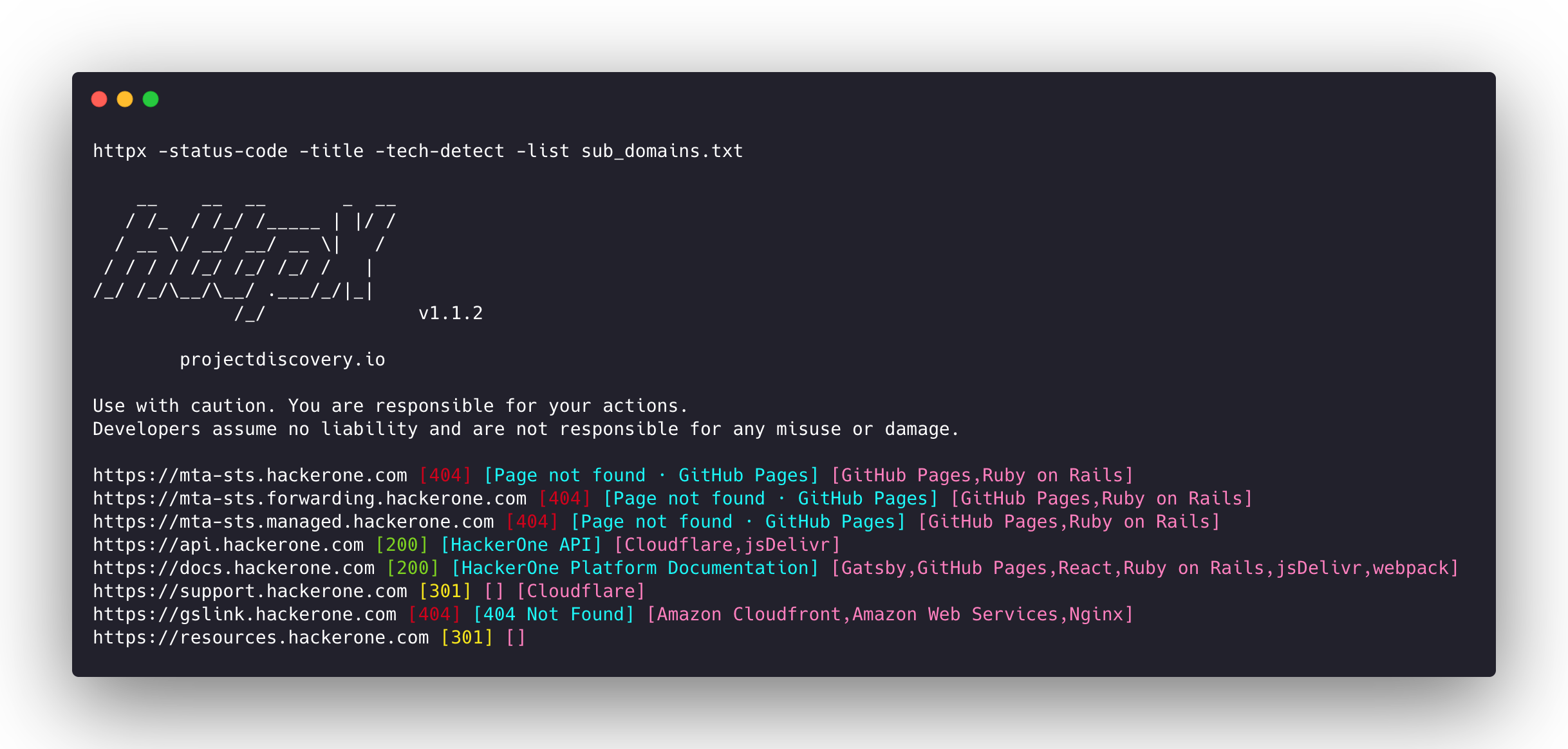
`httpx` 是一个快速、多用途的 HTTP 工具包,它使用 [retryablehttp](https://github.com/projectdiscovery/retryablehttp-go) 库来运行多种探测。它旨在通过增加线程数来保持结果的可靠性。

# 功能特性

<h1 align="center">
  <img src="https://assets.kitploit.com/production/public/readmes/405/844a8c468c1b9ef257f46c2bf9f9efe0d2e5b1b676a3ac5be70918d44c9e7403.png" alt="httpx" width="700px">
  <br>
</h1>

 - 代码库简单且模块化,便于贡献。
 - 快速且完全可配置的标志,用于探测多个元素。
 - 支持多种基于 HTTP 的探测。
 - 默认情况下智能地自动从 https 回退到 http。
 - 支持主机、URL 和 CIDR 作为输入。
 - 处理边缘情况,执行重试、退避等操作以应对 WAF。

### 支持的探测

| 探测项          | 默认检查 | 探测项         | 默认检查 |
|-----------------|---------------|----------------|---------------|
| URL             | true          | IP             | true          |
| 标题           | true          | CNAME          | true          |
| 状态码     | true          | 原始 HTTP       | false         |
| 内容长度  | true          | HTTP2          | false         |
| TLS 证书 | true          | HTTP 流水线  | false         |
| CSP 头      | true          | 虚拟主机   | false         |
| 行数      | true          | 单词数     | true          |
| Location 头 | true          | CDN            | false         |
| Web 服务器    | true          | 路径          | false         |
| Web Socket      | true          | 端口          | false         |
| 响应时间   | true          | 请求方法 | true          |
| Favicon 哈希    | false         | 探测状态  | false         |
| 正文哈希       | true          | 头部哈希   | true          |
| 重定向链  | false         | URL 方案     | true          |
| JARM 哈希       | false         | ASN            | false         |

# 安装说明

`httpx` 需要 **go >=1.26.10** 才能成功安装。运行以下命令获取仓库:

```sh
go install -v github.com/projectdiscovery/httpx/cmd/httpx@latest
```

要了解有关安装 httpx 的更多信息,请参阅 https://docs.projectdiscovery.io/tools/httpx/install。

| :exclamation:  **免责声明**  |
|---------------------------------|
| **本项目正在积极开发中**。发布版本可能会出现破坏性变更。更新前请查看变更日志。 |
| 本项目主要作为独立 CLI 工具构建。**将其作为服务运行可能会带来安全风险。** 建议谨慎使用并采取额外的安全措施。 |

# 用法

```sh
httpx -h
```

这将显示该工具的帮助信息。以下是它支持的所有开关。


```console
httpx is a fast and multi-purpose HTTP toolkit that allows running multiple probes using the retryablehttp library.

Usage:
  ./httpx [flags]

Flags:
INPUT:
   -l, -list string              input file containing list of hosts to process
   -rr, -request string          file containing raw request
   -u, -target string[]          input target host(s) to probe
   -im, -input-mode string       mode of input file (burp)

PROBES:
   -sc, -status-code                      display response status-code
   -cl, -content-length                   display response content-length
   -ct, -content-type                     display response content-type
   -location                              display response redirect location
   -favicon                               display mmh3 hash for '/favicon.ico' file
   -hash string                           display response body hash (supported: md5,mmh3,simhash,sha1,sha256,sha512)
   -jarm                                  display jarm fingerprint hash
   -rt, -response-time                    display response time
   -lc, -line-count                       display response body line count
   -wc, -word-count                       display response body word count
   -title                                 display page title
   -bp, -body-preview                     display first N characters of response body (default 100)
   -server, -web-server                   display server name
   -td, -tech-detect                      display technology in use based on wappalyzer dataset
   -cff, -custom-fingerprint-file string  path to a custom fingerprint file for technology detection
   -kb, -knowledge-base                   enable knowledge base classification
   -method                                display http request method
   -ws, -websocket                        display server using websocket
   -ip                                    display host ip
   -cname                                 display host cname
   -extract-fqdn, -efqdn                  get domain and subdomains from response body and header in jsonl/csv output
   -asn                                   display host asn information
   -cdn                                   display cdn/waf in use (default true)
   -probe                                 display probe status

HEADLESS:
   -ss, -screenshot                 enable saving screenshot of the page using headless browser
   -system-chrome                   enable using local installed chrome for screenshot
   -ho, -headless-options string[]  start headless chrome with additional options
   -esb, -exclude-screenshot-bytes  enable excluding screenshot bytes from json output
   -ehb, -exclude-headless-body     enable excluding headless header from json output
   -no-screenshot-full-page         disable saving full page screenshot
   -st, -screenshot-timeout value   set timeout for screenshot in seconds (default 10s)
   -sid, -screenshot-idle value     set idle time before taking screenshot in seconds (default 1s)
   -jsc, -javascript-code string[]  execute JavaScript code after navigation

MATCHERS:
   -mc, -match-code string            match response with specified status code (-mc 200,302)
   -ml, -match-length string          match response with specified content length (-ml 100,102)
   -mlc, -match-line-count string     match response body with specified line count (-mlc 423,532)
   -mwc, -match-word-count string     match response body with specified word count (-mwc 43,55)
   -mfc, -match-favicon string[]      match response with specified favicon hash (-mfc 1494302000)
   -ms, -match-string string[]        match response with specified string (-ms admin)
   -mr, -match-regex string[]         match response with specified regex (-mr admin)
   -mcdn, -match-cdn string[]         match host with specified cdn provider (cloudfront, fastly, google, etc.)
   -mrt, -match-response-time string  match response with specified response time in seconds (-mrt '< 1')
   -mdc, -match-condition string      match response with dsl expression condition

EXTRACTOR:
   -er, -extract-regex string[]   display response content with matched regex
   -ep, -extract-preset string[]  display response content matched by a pre-defined regex (url,ipv4,mail)

FILTERS:
   -fc, -filter-code string               filter response with specified status code (-fc 403,401)
   -fpt, -filter-page-type string[]       filter response with specified page type (e.g. -fpt login,captcha,parked)
   -fep, -filter-error-page               [DEPRECATED: use -fpt] filter response with ML based error page detection
   -fd, -filter-duplicates                filter out near-duplicate responses (only first response is retained)
   -fl, -filter-length string             filter response with specified content length (-fl 23,33)
   -flc, -filter-line-count string        filter response body with specified line count (-flc 423,532)
   -fwc, -filter-word-count string        filter response body with specified word count (-fwc 423,532)
   -ffc, -filter-favicon string[]         filter response with specified favicon hash (-ffc 1494302000)
   -fs, -filter-string string[]           filter response with specified string (-fs admin)
   -fe, -filter-regex string[]            filter response with specified regex (-fe admin)
   -fcdn, -filter-cdn string[]            filter host with specified cdn provider (cloudfront, fastly, google, etc.)
   -frt, -filter-response-time string     filter response with specified response time in seconds (-frt '> 1')
   -fdc, -filter-condition string         filter response with dsl expression condition
   -strip                                 strips all tags in response. supported formats: html,xml (default html)
   -lof, -list-output-fields              list of fields to output (comma separated)
   -eof, -exclude-output-fields string[]  exclude output fields output based on a condition

RATE-LIMIT:
   -t, -threads int              number of threads to use (default 50)
   -rl, -rate-limit int          maximum requests to send per second (default 150)
   -rlm, -rate-limit-minute int  maximum number of requests to send per minute

MISCELLANEOUS:
   -pa, -probe-all-ips        probe all the ips associated with same host
   -p, -ports string[]        ports to probe (nmap syntax: eg http:1,2-10,11,https:80)
   -path string               path or list of paths to probe (comma-separated, file)
   -tls-probe                 send http probes on the extracted TLS domains (dns_name)
   -csp-probe                 send http probes on the extracted CSP domains
   -tls-grab                  perform TLS(SSL) data grabbing
   -pipeline                  probe and display server supporting HTTP1.1 pipeline
   -http2                     probe and display server supporting HTTP2
   -vhost                     probe and display server supporting VHOST
   -ldv, -list-dsl-variables  list json output field keys name that support dsl matcher/filter

UPDATE:
   -up, -update                 update httpx to latest version
   -duc, -disable-update-check  disable automatic httpx update check

OUTPUT:
   -o, -output string                     file to write output results
   -oa, -output-all                       filename to write output results in all formats
   -sr, -store-response                   store http response to output directory
   -srd, -store-response-dir string       store http response to custom directory
   -ob, -omit-body                        omit response body in output
   -csv                                   store output in csv format
   -csvo, -csv-output-encoding string     define output encoding
   -j, -json                              store output in JSONL(ines) format
   -irh, -include-response-header         include http response (headers) in JSON output (-json only)
   -irr, -include-response                include http request/response (headers + body) in JSON output (-json only)
   -irrb, -include-response-base64        include base64 encoded http request/response in JSON output (-json only)
   -include-chain                         include redirect http chain in JSON output (-json only)
   -store-chain                           include http redirect chain in responses (-sr only)
   -svrc, -store-vision-recon-cluster     include visual recon clusters (-ss and -sr only)
   -pr, -protocol string                  protocol to use (unknown, http11, http2, http3)
   -fepp, -filter-error-page-path string  path to store filtered error pages (default "filtered_error_page.json")
   -rdb, -result-db                       store results in database
   -rdbc, -result-db-config string        path to database config file
   -rdbt, -result-db-type string          database type (mongodb, postgres, mysql)
   -rdbcs, -result-db-conn string         database connection string (env: HTTPX_DB_CONNECTION_STRING)
   -rdbn, -result-db-name string          database name (default "httpx")
   -rdbtb, -result-db-table string        table/collection name (default "results")
   -rdbbs, -result-db-batch-size int      batch size for database inserts (default 100)
   -rdbor, -result-db-omit-raw            omit raw request/response data from database

CONFIGURATIONS:
   -config string                   path to the httpx configuration file (default $HOME/.config/httpx/config.yaml)
   -ptm, -page-type-model string    path to a local dit model for page classification (requires -kb or -fpt; skips model download)
   -r, -resolvers string[]          list of custom resolver (file or comma separated)
   -allow string[]                  allowed list of IP/CIDR's to process (file or comma separated)
   -deny string[]                   denied list of IP/CIDR's to process (file or comma separated)
   -sni, -sni-name string           custom TLS SNI name
   -random-agent                    enable Random User-Agent to use (default true)
   -auto-referer                    set the Referer header to the current URL
   -H, -header string[]             custom http headers to send with request
   -http-proxy, -proxy string       proxy (http|socks) to use (eg http://127.0.0.1:8080)
   -unsafe                          send raw requests skipping golang normalization
   -resume                          resume scan using resume.cfg
   -fr, -follow-redirects           follow http redirects
   -maxr, -max-redirects int        max number of redirects to follow per host (default 10)
   -fhr, -follow-host-redirects     follow redirects on the same host
   -rhsts, -respect-hsts            respect HSTS response headers for redirect requests
   -vhost-input                     get a list of vhosts as input
   -x string                        request methods to probe, use 'all' to probe all HTTP methods
   -body string                     post body to include in http request
   -s, -stream                      stream mode - start elaborating input targets without sorting
   -sd, -skip-dedupe                disable dedupe input items (only used with stream mode)
   -ldp, -leave-default-ports       leave default http/https ports in host header (eg. http://host:80 - https://host:443
   -ztls                            use ztls library with autofallback to standard one for tls13
   -no-decode                       avoid decoding body
   -tlsi, -tls-impersonate string    enable experimental client hello (ja3) tls impersonation (chrome, or ja3 full string)
   -no-stdin                        Disable Stdin processing
   -hae, -http-api-endpoint string  experimental http api endpoint
   -sf, -secret-file string         path to secret file for authentication

DEBUG:
   -health-check, -hc        run diagnostic check up
   -debug                    display request/response content in cli
   -debug-req                display request content in cli
   -debug-resp               display response content in cli
   -version                  display httpx version
   -stats                    display scan statistic
   -profile-mem string       optional httpx memory profile dump file
   -silent                   silent mode
   -v, -verbose              verbose mode
   -si, -stats-interval int  number of seconds to wait between showing a statistics update (default: 5)
   -mp, -metrics-port int    port to expose httpx metrics on (default 63636)
   -nc, -no-color            disable colors in cli output
   -tr, -trace               trace

OPTIMIZATIONS:
   -nf, -no-fallback                  display both probed protocol (HTTPS and HTTP)
   -nfs, -no-fallback-scheme          probe with protocol scheme specified in input
   -maxhr, -max-host-error int        max error count per host before skipping remaining path/s (default 30)
   -e, -exclude string[]              exclude host matching specified filter ('cdn', 'private-ips', cidr, ip, regex)
   -retries int                       number of retries
   -timeout int                       timeout in seconds (default 10)
   -delay value                       duration between each http request (eg: 200ms, 1s) (default -1ns)
   -rsts, -response-size-to-save int  max response size to save in bytes (default 50000000)
   -rstr, -response-size-to-read int  max response size to read in bytes (default 50000000)

CLOUD:
   -auth                           configure projectdiscovery cloud (pdcp) api key (default true)
   -ac, -auth-config string        configure projectdiscovery cloud (pdcp) api key credential file
   -pd, -dashboard                 upload / view output in projectdiscovery cloud (pdcp) UI dashboard
   -tid, -team-id string           upload asset results to given team id (optional)
   -aid, -asset-id string          upload new assets to existing asset id (optional)
   -aname, -asset-name string      assets group name to set (optional)
   -pdu, -dashboard-upload string  upload httpx output file (jsonl) in projectdiscovery cloud (pdcp) UI dashboard
```

# 运行 httpx

有关运行 httpx 的详细信息,请参阅 https://docs.projectdiscovery.io/tools/httpx/running。

### 将 `httpx` 作为库使用
`httpx` 可以作为库使用:创建 `Option` 结构体的实例,并用与通过 CLI 指定时相同的选项填充它。验证通过后,应将该结构体传递给 runner 实例(在程序结束时关闭),并调用 `RunEnumeration` 方法。一个最小示例位于 [examples](https://github.com/projectdiscovery/httpx/blob/dev/examples) 文件夹中。

### 使用本地页面分类模型

对于无法访问 Hugging Face 的环境,请在一台可访问的机器上准备 [dit model.json](https://huggingface.co/datasets/happyhackingspace/dit/resolve/main/model.json),并将其复制到扫描环境中。使用 `-page-type-model`(`-ptm`)选择它:

```bash
httpx -l hosts.txt -kb -json -ptm /opt/httpx/model.json
httpx -l hosts.txt -fpt error,parked -ptm /opt/httpx/model.json
```

该路径用于选择本地模型,并绕过自动模型发现和下载。模型缺失或不可读,或模型 JSON 无效时,初始化会停止,而不会回退到下载。分类仍为可选启用:使用 `-kb` 或 `-fpt`(也支持已弃用的 `-fep`)。仅设置 `-ptm` 不会加载模型或启用分类。库用户可以在 `KnowledgeBase` 或 `OutputFilterPageType` 旁设置 `Options.PageTypeModel`。未提供自定义路径时,现有的模型发现和下载行为保持不变。

显式指定的模型还必须在扫描开始或现有输出索引被更改之前,通过页面和表单分类检查。此检查验证模型能否运行,而不是认证其内容的每一部分。后续分类错误会使该响应缺少页面类型信息;可通过 `-debug` 获取诊断信息。

## 常用配方

以下是利用 httpx 可组合原语实现常见用例的实用单行命令。这些配方在 `runner/wellknown_recipes_test.go` 中经过验证。

使用 `-mdc` 搭配 DSL 辅助函数(如 `contains(content_type, ...)` 和 `contains(body, ...)`)来匹配响应元数据和正文内容。(`-mr`/`-ms` 匹配完整原始响应;使用 `-mdc` 进行结构化字段匹配。)

### 知名文件

**security.txt**
在标准路径(`/.well-known/security.txt`、`/security.txt`)探测有效的 [RFC 9116](https://www.rfc-editor.org/rfc/rfc9116.html) security.txt 文件:

```bash
echo target.com | httpx -path '/.well-known/security.txt,/security.txt' -mc 200 -mdc 'contains(content_type, "text/plain") && contains(body, "Contact:") && contains_any(body, "mailto:", "https://")'
```

- `-path` 测试自定义路径
- `-mc 200` 匹配 HTTP 200
- `-mdc` 使用 DSL 表达式匹配响应字段,例如 `content_type` 和 `body`

**robots.txt**

```bash
echo target.com | httpx -path '/robots.txt' -mc 200 -mdc 'contains(content_type, "text/plain")'
```

**sitemap.xml**

```bash
echo target.com | httpx -path '/sitemap.xml' -mc 200 -mdc 'contains_any(content_type, "application/xml", "text/xml") && contains(body, "<urlset")'
```

**humans.txt**

```bash
echo target.com | httpx -path '/humans.txt' -mc 200 -mdc 'contains(content_type, "text/plain")'
```

**ads.txt**

```bash
echo target.com | httpx -path '/ads.txt' -mc 200 -mdc 'contains(content_type, "text/plain") && contains(body, "google.com")'
```

### 众所周知的 URI

**OpenID Connect 发现**([规范](https://openid.net/specs/openid-connect-discovery-1_0.html))

```bash
echo target.com | httpx -path '/.well-known/openid-configuration' -mc 200 -mdc 'contains(content_type, "application/json") && contains(body, "\"issuer\"")'
```

**Apple 通用链接**

```bash
echo target.com | httpx -path '/.well-known/apple-app-site-association,/.well-known/apple-app-site-association.json' -mc 200 -mdc 'contains(content_type, "application/json") && contains(body, "\"applinks\"")'
```

**Android 应用链接**

```bash
echo target.com | httpx -path '/.well-known/assetlinks.json' -mc 200 -mdc 'contains(content_type, "application/json") && contains(body, "\"android_app\"")'
```

**crossdomain.xml**(旧版 Flash 策略文件)

```bash
echo target.com | httpx -path '/crossdomain.xml' -mc 200 -mdc 'contains_any(content_type, "application/xml", "text/xml") && contains(body, "cross-domain-policy")'
```

**其他知名 URI**([IANA 注册表](https://www.iana.org/assignments/well-known-uris/well-known-uris.xhtml)):

```bash
echo target.com | httpx -path '/.well-known/security.txt,/.well-known/change-password,/.well-known/openid-configuration' -mc 200
```

# 说明

- 默认情况下,`httpx` 使用 **HTTPS** 协议进行探测,仅在 **HTTPS** 不可达时回退到 **HTTP**。
- Burp Suite XML 导出文件可作为输入使用,命令为 `-l burp-export.xml -im burp`
- 可以通过 JSON 输入行将目标固定到某个 IP,格式与 nuclei 目标行相同,类似于 `curl --resolve`,但作用于其主机的所有端口:
  ```
  {"target": "https://app.example.com", "ip": "192.0.2.10"}
  {"target": "https://app.example.com", "ip": "192.0.2.11"}
  ```
  - 对主机名的每个连接(包括重定向)都会发往 `host_ip` 所报告的 IP,输出中也会显示该 IP。主机名仅保留用于 Host 头和 SNI,不会被解析。一个主机可以列出多个 IP,不含 `ip` 的行即为普通目标。
  - nuclei 用于选择模板的键(例如 `tags`)会被忽略,任何其他键都会使该行无效。无效行会被报告并跳过。结果的 `input` 是该行的规范形式。
  - `-u` 会按逗号拆分其值,因此请通过文件(`-l`)或标准输入传入此类行。
  - 含 IP 的行会使运行在 `-proxy`、`-pr http2`、`-unsafe`、`-pipeline`、`-http2`、`-jarm`、`-screenshot` 和 `-vhost-input` 下停止,因为这些选项不会通过该 IP 建立连接,或者对于 HTTP/2 而言,不会在同一主机的多个 IP 之间共享连接。通过 `HTTP_PROXY`/`HTTPS_PROXY` 设置的代理也会自行解析主机,因此通过它进行的探测会失败:请将固定主机添加到 `NO_PROXY`。
  - `-pa` 会以相同方式探测主机的每个 IP,因此也不能与 `-proxy` 一起使用。主机的各个 IP 会被分开处理:`-maxhr` 会分别统计它们的失败次数,`-sr` 会分别存储它们的响应。
  - 由 `-tls-probe` 和 `-csp-probe` 发现的主机名(包括固定的那个)会作为新目标进行探测并解析。
- 可使用 `-no-fallback` 标志来探测并显示 **HTTP** 和 **HTTPS** 两种结果。
- 可以为端口定义自定义协议方案,例如 `-ports http:443,http:80,https:8443`
- 自定义解析器支持多种协议(**doh|tcp|udp**),格式为 `protocol:resolver:port`(例如 `udp:127.0.0.1:53`)
- 可通过 `-sf secrets.yaml` 使用密钥文件进行基于域的身份验证。支持的身份验证类型:`BasicAuth`、`BearerToken`、`Header`、`Cookie`、`Query`。示例:
  ```yaml
  id: example-auth
  info:
    name: Example Auth Config
  static:
    - type: Header
      domains:
        - api.example.com
      headers:
        - key: X-API-Key
          value: secret-key-here
    - type: BasicAuth
      domains-regex:
        - ".*\\.internal\\.com$"
      username: admin
      password: secret
  ```
- 以下标志应针对特定用例使用,而不是默认与其他探测一起运行:
   - `-ports`
   - `-path`
   - `-vhost`
   - `-screenshot`
   - `-csp-probe`
   - `-tls-probe`
   - `-favicon`
   - `-http2`
   - `-pipeline`
   - `-tls-impersonate`


# 致谢

探测功能灵感来自 [@tomnomnom/httprobe](https://github.com/tomnomnom/httprobe) 的工作 ❤️


--------

<div align="center">

`httpx` 由 [projectdiscovery](https://projectdiscovery.io) 团队用 💙 打造,并在 [MIT License](https://github.com/projectdiscovery/httpx/blob/dev/LICENSE.md) 下分发。


<a href="https://discord.gg/projectdiscovery"><img src="https://assets.kitploit.com/production/public/readmes/405/d0624f94cb9ea6401be5a089bb694bc963c47fa82aa3b758c893e3b0bbfdf663.png" width="300" alt="加入 Discord"></a>

</div>