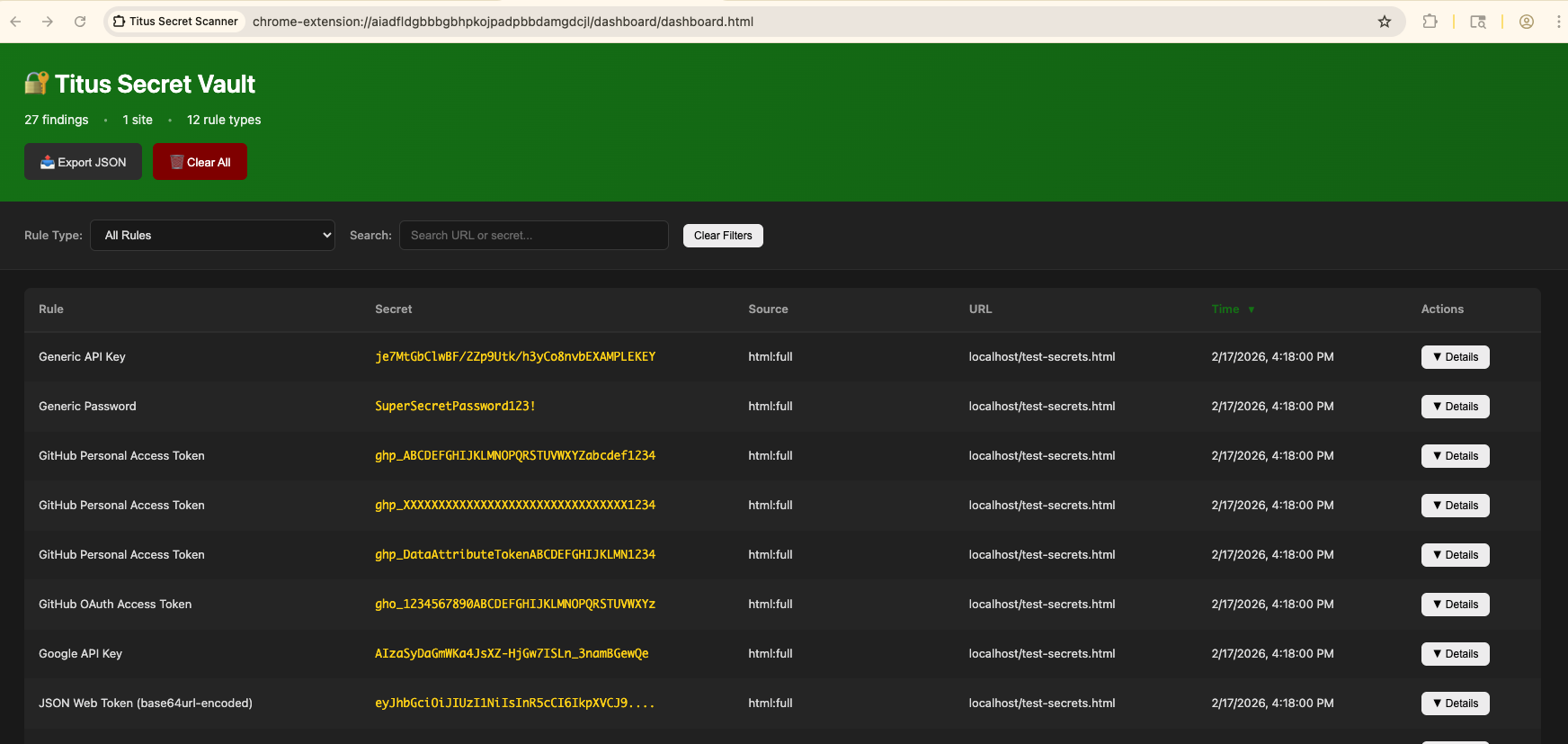


Titus 是一款高性能密钥扫描器,可检测源代码、文件和 git 历史中的凭据、API 密钥和令牌。它内置 487 条检测规则,覆盖数百种服务和凭据类型,规则源自 NoseyParker 和 Kingfisher。Titus 可作为 CLI、Go 库、Burp Suite 扩展和 Chrome 浏览器扩展运行——它们共享同一套检测引擎和规则集。
Titus 专为安全工程师、渗透测试人员和 DevSecOps 团队打造,将 Hyperscan/Vectorscan 加速的正则匹配与实时凭据验证相结合,可在整个代码库中查找并验证泄露的密钥。
从 Releases 页面下载预构建的二进制文件,或从源码构建:```bash make build
二进制文件将位于 `dist/titus`。

## 快速开始```bash
# Scan a file for secrets
titus scan path/to/file.txt

# Scan a directory for leaked credentials
titus scan path/to/directory

# Scan a public GitHub repository (no token needed)
titus scan github.com/org/repo

# Scan a public GitLab project (no token needed)
titus scan gitlab.com/namespace/project

# Scan git history for secrets in past commits
titus scan --git path/to/repo

# Scan a Docker / OCI image (pulled from a registry — no docker daemon required)
titus scan --docker alpine:latest

# Validate detected secrets against source APIs
titus scan path/to/code --validate
结果会写入数据存储(默认为 titus.ds)并打印到控制台。
直接通过 URL 扫描公共仓库——无需 API 令牌:```bash
titus scan github.com/kubernetes/kubernetes
titus scan gitlab.com/gitlab-org/cli
titus scan https://github.com/org/repo titus scan https://gitlab.com/namespace/project.git
对于组织范围或用户范围的扫描,请使用专用子命令:```bash
# Scan all public repos in a GitHub org
titus github --org kubernetes

# Scan all repos in a GitHub org with a token (private repos + higher rate limits)
titus github --org kubernetes --token $GITHUB_TOKEN

# Scan all repos for a GitHub user
titus github --user octocat

# Scan all projects in a GitLab group
titus gitlab scan --group mygroup --token $GITLAB_TOKEN

# Scan a single repo with git history (finds deleted secrets)
titus github owner/repo --git
对于公共仓库,令牌是可选的。设置 GITHUB_TOKEN 或 GITLAB_TOKEN(或使用 --token)以访问私有仓库并获得更高的 API 速率限制。
直接扫描容器镜像——无需 docker 守护进程,也无需 docker 二进制文件。Titus 通过 HTTPS 直接从任意 OCI 注册表拉取镜像(使用 ~/.docker/config.json 中的凭据),或从本地 docker save 压缩包或 OCI 镜像布局目录读取镜像。随后它会扫描镜像清单/配置元数据以及每一层中的每个常规文件,包括被后续层删除的底层文件(因为机密信息可能仍可从镜像历史中恢复)。```bash
titus scan --docker alpine:latest titus scan docker://ghcr.io/owner/repo:tag
titus scan --docker ./my-app.tar
titus scan --docker ./img/
身份验证使用您现有的 Docker / Podman 配置(`~/.docker/config.json`、`${XDG_RUNTIME_DIR}/containers/auth.json`)。需要重新登录的私有镜像仓库应首先使用 `docker login`(或 `podman login`,或 `crane auth login`)进行身份验证——titus 不会提示输入凭据。

### 查看扫描结果

使用 `report` 重新读取之前扫描的发现结果:```bash
# Human-readable summary of detected secrets
titus report

# JSON output for programmatic processing
titus report --format json

# SARIF output for CI/CD integration with GitHub Advanced Security
titus report --format sarif

# Report from a specific datastore
titus report --datastore path/to/titus.ds
你也可以在扫描时使用 --format 控制输出格式:```bash
titus scan path/to/code --format json
### 验证检测到的密钥

在扫描期间传递 `--validate` 以针对其源 API 检查检测到的密钥:```bash
titus scan path/to/code --validate
验证并发运行(默认 4 个 worker,可通过 --validate-workers 配置),并将每个发现标记为已确认、已否认或未知。
titus rules list
titus scan path/to/code --rules-include "aws,gcp"
titus scan path/to/code --rules-exclude "kingfisher.generic"
titus scan path/to/code --rules path/to/custom-rules.yaml
titus scan path/to/code --include-noisy
### 从二进制文件中提取机密

Titus 可以从二进制文件格式中提取文本,并扫描其中的机密内容:```bash
# Extract and scan all supported binary formats
titus scan path/to/files --extract=all

# Target specific formats
titus scan path/to/files --extract=xlsx,docx,pdf,zip
支持的格式包括 Office 文档(xlsx、docx、pptx、odp、ods、odt)、PDF、Jupyter notebooks、SQLite 数据库、电子邮件(eml、rtf)以及归档文件(zip、tar、tar.gz、jar、war、ear、apk、ipa、crx、xpi、7z)。归档文件会以可配置的深度和大小限制进行递归提取。```bash
titus scan path/to/files --extract=all
--extract-max-size 10MB
--extract-max-total 100MB
--extract-max-depth 5
对于 SQLite 数据库,Titus 会从所有表中提取文本(默认每张表 1000 行)。使用 `--sqlite-row-limit` 进行调整:```bash
# Full dump of all SQLite tables (no row limit)
titus scan path/to/files --extract=all --sqlite-row-limit 0

# Custom row limit per table
titus scan path/to/files --extract=all --sqlite-row-limit 5000
Titus 生成的每个发现都带有一个 0–100 的数值评分和一个严重性等级:
| 评分 | 严重性 |
|---|---|
| 0–20 | info |
| 21–40 | low |
| 41–60 | medium |
| 61–80 | high |
| 81–100 | critical |
评分从规则的 base_score 开始,并通过修饰符进行调整——修饰符是根据已知的凭据信息提高或降低评分的条件:```bash
titus scan path/to/code
titus scan path/to/code --score-scope
titus scan path/to/code --accessibility public # no penalty for public repos titus scan path/to/code --accessibility private # -25 penalty (default for local scans)
Titus 内置了针对 AWS 凭证、GitHub PAT 和 Slack 令牌的 YAML 评分器,以及基于 Go 的 SDK 评分器,当启用 `--score-scope` 时,这些评分器会执行实时 IAM 策略枚举(AWS)和仓库权限检查(GitHub 细粒度 PAT)。

完整参考请参见 [docs/scoring.md](https://github.com/praetorian-inc/titus/blob/main/docs/scoring.md):严重性层级、修饰符类型、内置评分器详情,以及如何编写自己的 YAML 或 Go 评分器。

## 用于机密检测的 Go 库

Titus 可以作为 Go 库导入,以便将机密检测添加到您自己的工具和流水线中。```bash
go get github.com/praetorian-inc/titus