# 简介
OWASP dep-scan 是一款新一代安全与风险审计工具,基于项目依赖的已知漏洞、安全公告和许可证限制进行检测。它支持本地仓库和容器镜像作为输入,非常适合与 ASPM/VM 平台集成,也适用于 CI 环境。
<img src="https://assets.kitploit.com/production/public/readmes/6282/1f4ac5f4ee45d7e9ba8026acc4ae2458bdf23f5e9119eb9f85536cf101d0e56f.png" width="200" height="auto" />
[](https://github.com/cdxgen/cdxgen) [](https://github.com/owasp-dep-scan/dep-scan/actions/workflows/pythonpublish.yml)
## 目录
- [功能特性](#features)
- [精确的可达数据流](#precise-reachable-data-flows)
- [可达性矩阵](#reachability-matrix)
- [Rust 可达性(通过 rusi)](#rust-reachability-via-rusi)
- [Go 可达性(通过 golem)](#go-reachability-via-golem)
- [.NET 可达性(通过 dosai)](#net-reachability-via-dosai)
- [JVM、JavaScript、Python 和 PHP 可达性(通过 atom)](#jvm-javascript-python-and-php-reachability-via-atom)
- [漏洞数据源](#vulnerability-data-sources)
- [Linux 发行版](#linux-distros)
- [快速开始](#quick-start)
- [本地扫描项目(Python 版本)](#scanning-projects-locally-python-version)
- [Homebrew(macOS 和 Linux)](#homebrew-macos-and-linux)
- [独立二进制文件(无需 Python 或 Node.js)](#standalone-binaries-no-python-or-nodejs-required)
- [本地扫描容器(Python 版本)](#scanning-containers-locally-python-version)
- [本地扫描项目(Docker 容器)](#scanning-projects-locally-docker-container)
- [服务器模式](#server-mode)
- [本地开发](#local-development)
- [文档(depscan.readthedocs.io)](https://depscan.readthedocs.io)
- [许可证](#license)
## 功能特性
- 扫描大多数应用代码(本地仓库、Linux 容器镜像、Kubernetes 清单和操作系统),识别已知 CVE 并进行优先级排序
- 对多种语言执行高级可达性分析(参见下方的[可达性矩阵](#reachability-matrix))
- 包漏洞扫描在本地执行,速度相当快。无需使用服务器
- 生成包含漏洞披露报告(VDR)信息的软件物料清单(SBOM)
- 生成通用安全公告框架(CSAF)2.0/2.1 VEX 文档(请查看 [CSAF Readme](https://github.com/owasp-dep-scan/dep-scan/blob/master/contrib/CSAF_README.md))
- 针对依赖混淆攻击和维护风险执行深度包风险审计(参见[风险审计文档](https://depscan.readthedocs.io/adv-usage#package-risk-audit))
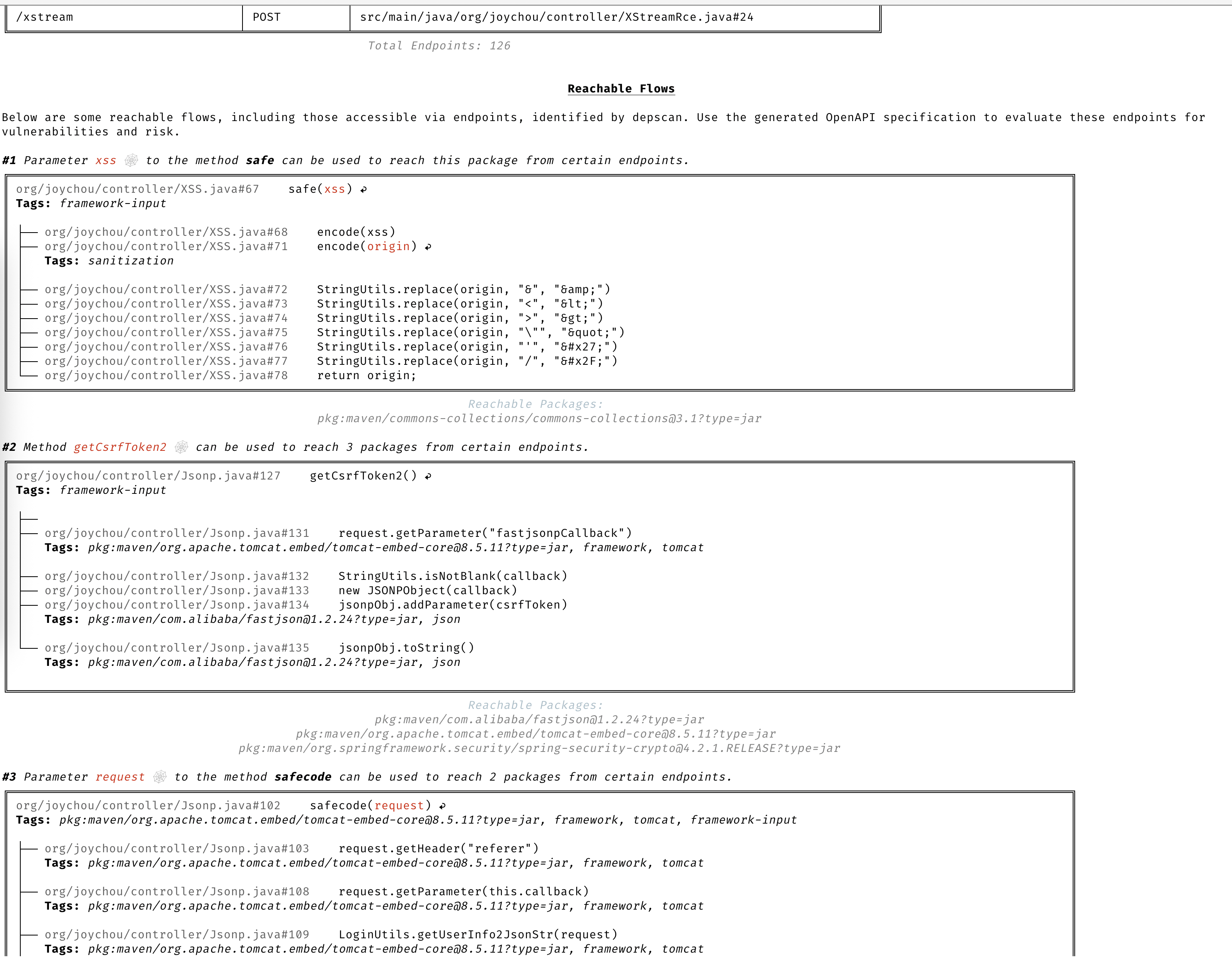
### 精确的可达数据流
基于完整上下文提供详细的数据流,用于识别应用程序中的可达路径和不可达路径。
### 可达性矩阵
dep-scan 通过四个切片器计算七种语言生态系统的可达性。如果存在漏洞的包的代码实际位于执行路径上,则标记为**可达**;而仅在 BOM 中声明但从未被调用的包则不会被标记。每个切片器都接入同一个共享的、以 purl 为键的可达性引擎,因此各语言的行为保持一致。可达性默认开启(`--reachability-analyzer FrameworkReachability`);`SemanticReachability` 还会额外归因已到达的服务、端点以及构建后(二进制/容器)可达性。
| 语言 / 生态系统 | 可达性引擎 | 默认分析器 |
| ---------------------------------- | ----------------------------------------------------- | ----------------------- |
| Java / JVM (Groovy, Kotlin, Scala) | [atom](https://github.com/AppThreat/atom) | `FrameworkReachability` |
| JavaScript / TypeScript | atom | `FrameworkReachability` |
| Python | atom | `FrameworkReachability` |
| PHP | atom | `FrameworkReachability` |
| Rust | [rusi](https://github.com/cdxgen/cdxgen-plugins-bin) | `FrameworkReachability` |
| Go | [golem](https://github.com/cdxgen/cdxgen-plugins-bin) | `FrameworkReachability` |
| .NET (C#, VB, F#, R) | [dosai](https://github.com/owasp-dep-scan/dosai) | `FrameworkReachability` |
关于可达性与优先级排序背后的概念,请阅读[可达性模型](https://depscan.readthedocs.io/concepts/reachability-model)和[优先级排序](https://depscan.readthedocs.io/concepts/prioritization)章节。关于各语言的完整示例,请参阅[语言指南](https://depscan.readthedocs.io/languages/rust-reachability)。关于合规性说明(VDR 和 CSAF VEX),请参阅 [VDR 指南](https://depscan.readthedocs.io/output/vdr-guide)和 [CSAF VEX 指南](https://depscan.readthedocs.io/output/vex-csaf-guide)。
在 `--profile research` 下,可达性默认开启,这也是 dep-scan 在开启可达性时所使用的配置。下面的命令足以让你快速上手;各语言指南涵盖了二进制解析、后端与网络安全、还原要求,以及在仓库内测试样例上的完整示例。
**Rust (rusi)。** cdxgen 运行 [rusi](https://github.com/cdxgen/cdxgen-plugins-bin) 并持久化其报告,dep-scan 会将其转换为共享流水线,因此一个实际被调用的 crate(例如针对 RUSTSEC-2020-0071 的 `time::now()`)会被判定为可达,而仅仅存在的 crate 则不会。请参阅 [Rust 可达性指南](https://depscan.readthedocs.io/languages/rust-reachability)。
```bash
depscan -i ./my-rust-app -o ./reports --profile research
```
**Go(golem)。** dep-scan 会直接为 Go 项目调用 [golem](https://github.com/cdxgen/cdxgen-plugins-bin)(需要 `go` 位于 `PATH` 中),当模块的函数位于被追踪的路径上时,将该模块标记为 Reachable。对于模块缓存已预热的不可信仓库,请使用 `--go-analyzer-network offline`。参见 [Go 可达性指南](https://depscan.readthedocs.io/languages/go-reachability)。
```bash
depscan -i ./my-go-app -o ./reports -t go
```
**.NET (dosai)。** cdxgen 运行 [dosai](https://github.com/owasp-dep-scan/dosai),它会为每个包输出明确的可达性判定(`PackageReachability`,包含 `ReachabilityKind` 和 `Confidence`),dep-scan 将其视为权威结论,因此实际被调用的 NuGet 包(例如在受控输入上调用 `JsonConvert.DeserializeObject`)会被判定为 Reachable。对已还原的目录树进行扫描以获取带版本的 purl。参见 [.NET 可达性指南](https://depscan.readthedocs.io/languages/dotnet-reachability)。
```bash
depscan -i ./my-dotnet-app -o ./reports -t dotnet
```
**JVM、JavaScript/TypeScript、Python 和 PHP(atom)。** 这四个生态系统共用 [atom](https://github.com/AppThreat/atom) 切片器,该切片器构建与语言无关的中间表示并执行静态切片。参见 [JVM、JS、Python 和 PHP 可达性指南](https://depscan.readthedocs.io/languages/jvm-js-python-php-reachability)。
```bash
depscan --profile research -t java -i ./my-java-app -o ./reports --explain
```
要超越框架前置可达性,进入端点、服务和构建后层级,请传入 `--reachability-analyzer SemanticReachability` 并配合指向生命周期 BOM 的 `--bom-dir`。参见[语义可达性指南](https://depscan.readthedocs.io/analyzers/semantic-reachability)。
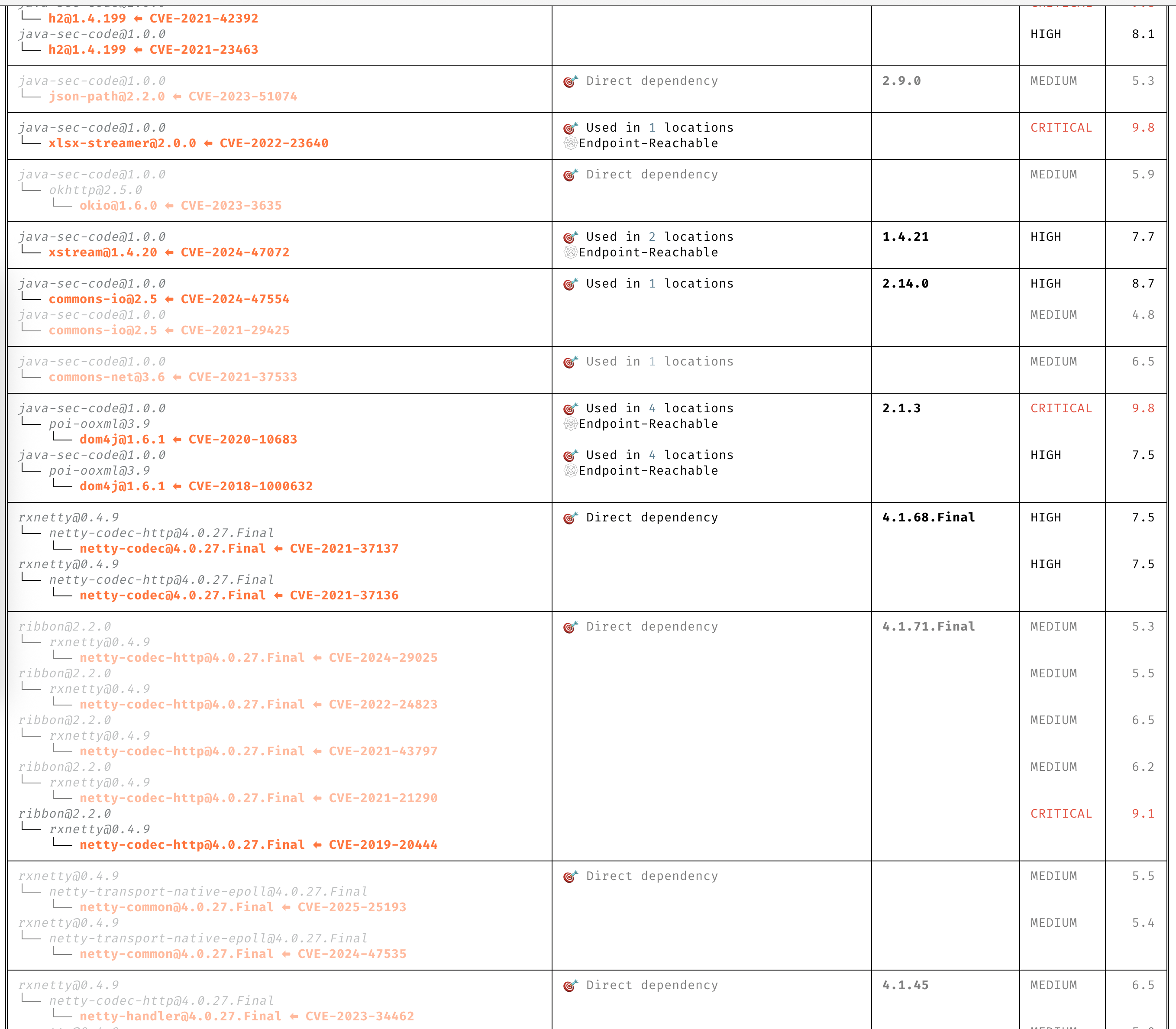
### 清晰洞察 CVE
无需通读描述即可清晰理解 CVE。
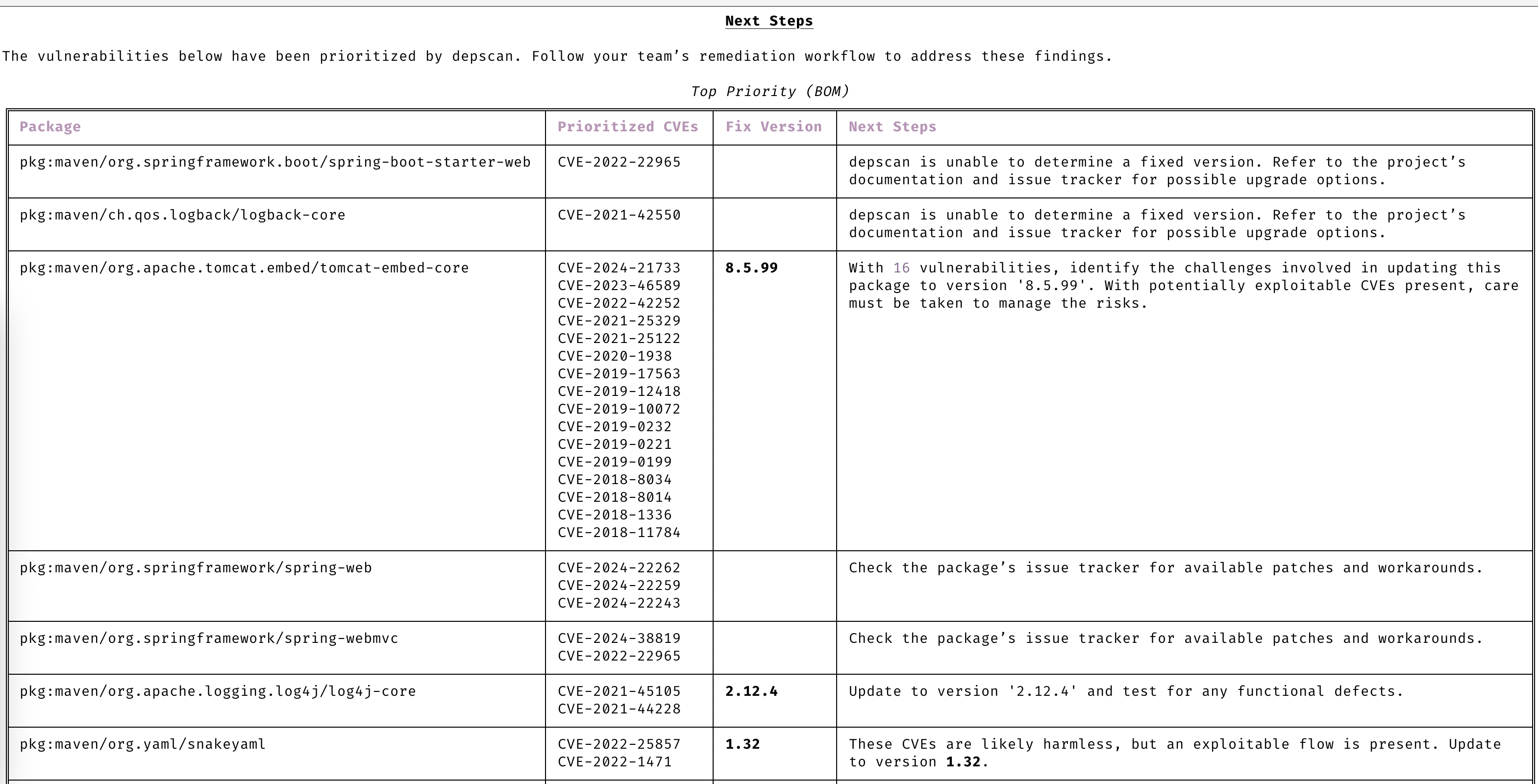
### 自动优先级排序
只关注需要你处理的 CVE。
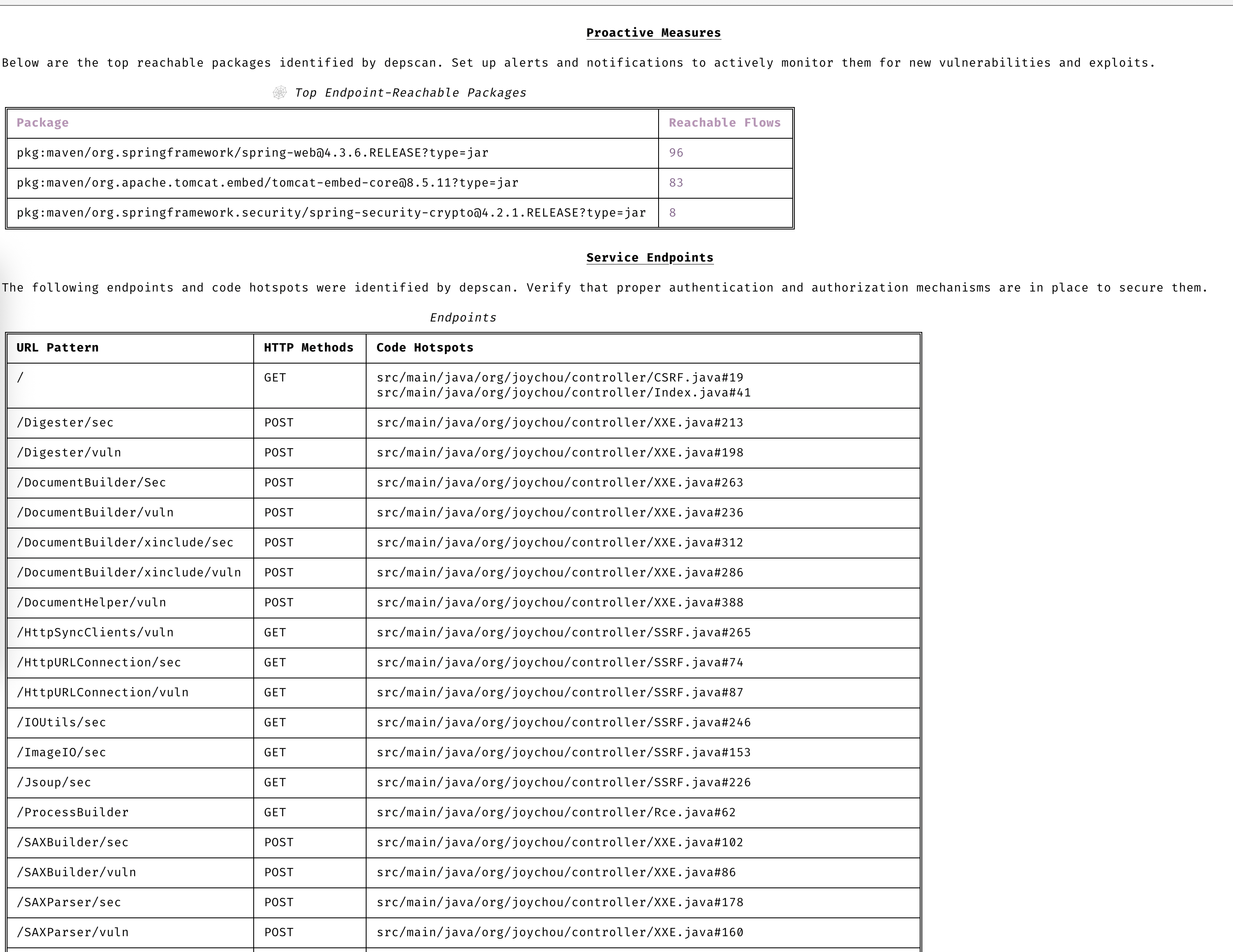
### 保持主动
通过高级漏洞与利用预测,始终领先一步。
### 漏洞数据源
- OSV
- NVD
- GitHub
- NPM
- Linux [vuln-list](https://github.com/appthreat/vuln-list)
### Linux 发行版
- AlmaLinux
- Debian
- Alpine
- Amazon Linux
- Arch Linux
- RHEL/CentOS
- Rocky Linux
- Ubuntu
- OpenSUSE/SLES
- Photon
- Chainguard
- Wolfi OS
## 快速开始
dep-scan 非常适合在持续集成(CI)期间使用,也可作为本地开发工具。
### 在本地扫描项目(Python 版本)
```bash
sudo npm install -g @cyclonedx/cdxgen
# Normal version recommended for most users (MIT)
pip install owasp-depscan
# For a full version with all extensions and server mode (Multiple Licenses)
pip install owasp-depscan[all]
```
这将安装两个命令:`cdxgen` 和 `depscan`。
你可以直接使用各种选项调用扫描命令。
```bash
cd <project to scan>
depscan --src $PWD --reports-dir $PWD/reports
```
完整选项列表如下:
```text
usage: depscan [-h] [--config CONFIG] [--no-banner] [-i SRC_DIR_IMAGE] [-o REPORTS_DIR] [--csaf]
[--profile {appsec,research,operational,threat-modeling,license-compliance,generic,machine-learning,ml,deep-learning,ml-deep,ml-tiny}]
[--lifecycle {pre-build,build,post-build} [{pre-build,build,post-build} ...]]
[--technique {auto,source-code-analysis,binary-analysis,manifest-analysis,hash-comparison,instrumentation,filename} [{auto,source-code-analysis,binary-analysis,manifest-analysis,hash-comparison,instrumentation,filename} ...]]
[--bom-engine {auto,CdxgenGenerator,CdxgenServerGenerator,CdxgenImageBasedGenerator,BlintGenerator} |
--vulnerability-analyzer {auto,VDRAnalyzer,LifecycleAnalyzer}] [--reachability-analyzer {off,FrameworkReachability,SemanticReachability}] [--no-suggest]
[--risk-audit] [--cdxgen-args CDXGEN_ARGS] [--private-ns PRIVATE_NS] [-t PROJECT_TYPE [PROJECT_TYPE ...]] [--bom BOM | --bom-dir BOM_DIR | --purl SEARCH_PURL]
[--report-template REPORT_TEMPLATE] [--report-name REPORT_NAME] [--deep] [--fuzzy-search] [--search-order {purl,pcu,cpe,cpu,url}] [--no-universal]
[--no-vuln-table] [--server] [--server-host SERVER_HOST] [--server-port SERVER_PORT] [--cdxgen-server CDXGEN_SERVER] [--debug] [-q | --explain] [-v]
Fully open-source security and license audit for application dependencies and container images based on known vulnerabilities and advisories.
options:
-h, --help show this help message and exit
--config CONFIG Path to the configuration file. Default: $PWD/.config/depscan.toml
--no-banner Do not display the logo and donation banner. Please make a donation to OWASP before using this argument.
-i, --src SRC_DIR_IMAGE
Source directory or container image or binary file
-o, --reports-dir REPORTS_DIR
Reports directory
--csaf Generate a OASIS CSAF VEX document
--profile {appsec,research,operational,threat-modeling,license-compliance,generic,machine-learning,ml,deep-learning,ml-deep,ml-tiny}
Profile to use while generating the BOM. For granular control, use the arguments --bom-engine, --vulnerability-analyzer, or --reachability-analyzer.
--lifecycle {pre-build,build,post-build} [{pre-build,build,post-build} ...]
Product lifecycle for the generated BOM. Multiple values allowed.
--technique {auto,source-code-analysis,binary-analysis,manifest-analysis,hash-comparison,instrumentation,filename} [{auto,source-code-analysis,binary-analysis,manifest-analysis,hash-comparison,instrumentation,filename} ...]
Analysis technique to use for BOM generation. Multiple values allowed.
--bom-engine {auto,CdxgenGenerator,CdxgenServerGenerator,CdxgenImageBasedGenerator,BlintGenerator}
BOM generation engine to use. Defaults to automatic selection based on project type and lifecycle.
--vulnerability-analyzer {auto,VDRAnalyzer,LifecycleAnalyzer}
Vulnerability analyzer to use. Defaults to automatic selection based on bom_dir argument.
--reachability-analyzer {off,FrameworkReachability,SemanticReachability}
Reachability analyzer to use. Default FrameworkReachability.
--no-suggest Disable suggest mode
--risk-audit Perform package risk audit (slow operation). Npm only.
--cdxgen-args CDXGEN_ARGS
Additional arguments to pass to cdxgen
--private-ns PRIVATE_NS
Private namespace to use while performing oss risk audit. Private packages should not be available in public registries by default. Comma separated
values accepted.
-t, --type PROJECT_TYPE [PROJECT_TYPE ...]
Override project types if auto-detection is incorrect. Multiple values supported.
--bom BOM Examine using the given Software Bill-of-Materials (SBOM) file in CycloneDX format. Use cdxgen command to produce one.
--bom-dir BOM_DIR Examine all the Bill-of-Materials (BOM) files in the given directory.
--purl SEARCH_PURL Scan a single package url.
--custom-data CUSTOM_DATA
Path to directory containing custom vulnerability data (JSON/YAML/TOML) to override/augment results.
--report-template REPORT_TEMPLATE
Jinja template file used for rendering a custom report
--report-name REPORT_NAME
Filename of the custom report written to the --reports-dir
--deep Perform deep scan by passing this --deep argument to cdxgen. Useful while scanning docker images and OS packages.
--fuzzy-search Perform fuzzy search by creating variations of package names. Use this when the input SBOM lacks a PURL.
--search-order {purl,pcu,cpe,cpu,url}
Attributes to use while searching for vulnerabilities. Default: PURL, CPE, URL (pcu).
--no-universal Depscan would attempt to perform a single universal scan instead of individual scans per language type.
--no-vuln-table Do not print the table with the full list of vulnerabilities. This can help reduce console output.
--server Run depscan as a server
--server-host SERVER_HOST
depscan server host
--server-port SERVER_PORT
depscan server port
--server-allowed-hosts [SERVER_ALLOWED_HOSTS ...]
List of allowed hostnames or IPs that can access the server (e.g., 'localhost 192.168.1.10'). If unspecified, no host allowlist is
enforced.
--server-allowed-paths [SERVER_ALLOWED_PATHS ...]
List of allowed filesystem paths that can be scanned by the server. Restricts `path` parameter in /scan requests.
--cdxgen-server CDXGEN_SERVER
cdxgen server url. Eg: http://cdxgen:9090
--debug Run depscan in debug mode.
-q, --quiet Makes depscan quiet.
--explain Makes depscan to explain the various analysis. Useful for creating detailed reports.
--explanation-mode {Endpoints,EndpointsAndReachables,NonReachables,LLMPrompts}
Style of explanation needed. Defaults to Endpoints and Reachables.
--annotate Include the generated text VDR report as an annotation. Defaults to true when explain is enabled; false otherwise.
-v, --version Display the version
```
### Homebrew(macOS 和 Linux)
Homebrew 从 [OWASP dep-scan tap](https://github.com/owasp-dep-scan/homebrew-tap) 安装[独立二进制文件](#standalone-binaries-no-python-or-nodejs-required),命令名为 `depscan`,并捆绑了 cdxgen,无需 Python 或 Node.js。`brew trust` 用于接受该 tap;当设置了 `HOMEBREW_REQUIRE_TAP_TRUST` 时,Homebrew 要求在从第三方 tap 加载 formula 之前先接受该 tap:
```bash
brew tap owasp-dep-scan/tap
brew trust --tap owasp-dep-scan/tap
brew install dep-scan
depscan --src $PWD --reports-dir $PWD/reports
```
### 独立二进制文件(无需 Python 或 Node.js)
每个 [GitHub release](https://github.com/owasp-dep-scan/dep-scan/releases) 都附带了预构建的单文件可执行程序。它们捆绑了匹配的 [cdxgen](https://github.com/cdxgen/cdxgen) SEA 二进制文件,因此无需安装 Python、Node.js 或 cdxgen 即可开箱即用地生成 BOM。
| 平台 | 架构 | 资源 |
| --------------------- | ------------- | --------------------------- |
| Linux (glibc) | x86_64 | `depscan-linux-amd64` |
| Linux (glibc) | arm64 | `depscan-linux-arm64` |
| Linux (musl / Alpine) | x86_64 | `depscan-linux-amd64-musl` |
| Linux (musl / Alpine) | arm64 | `depscan-linux-arm64-musl` |
| macOS | Apple silicon | `depscan-darwin-arm64` |
| macOS | Intel | `depscan-darwin-amd64` |
| Windows | x86_64 | `depscan-windows-amd64.exe` |
每个资源都有一个匹配的 `.sha256` 文件用于校验。
```bash
# Example: Linux x86_64
curl -LO https://github.com/owasp-dep-scan/dep-scan/releases/latest/download/depscan-linux-amd64
curl -LO https://github.com/owasp-dep-scan/dep-scan/releases/latest/download/depscan-linux-amd64.sha256
sha256sum -c depscan-linux-amd64.sha256
chmod +x depscan-linux-amd64
./depscan-linux-amd64 --src $PWD --reports-dir $PWD/reports
```
> [!NOTE]
> macOS 二进制文件目前未签名。首次运行时 macOS Gatekeeper 可能会阻止它们;使用 `xattr -d com.apple.quarantine ./depscan-darwin-arm64` 清除隔离属性(或在“系统设置”>“隐私与安全性”中允许该二进制文件)。
> [!NOTE]
> 漏洞数据库仍会在首次运行时下载。仅捆绑了 cdxgen,未捆绑漏洞数据库。使用 `depscan-vdb` 命令选择特定的数据库变体,例如使用 `depscan-vdb download --scope app` 获取更小的仅应用数据库。完整镜像矩阵请参阅[漏洞数据库指南](https://depscan.readthedocs.io/vulnerability-database)。
所有独立二进制文件都捆绑了 `blint`,但不包含其可选的 `nyxstone` 反汇编后端(该后端没有 wheel 包,也不支持 Windows)。因此,独立二进制文件中无法使用基于深度反汇编的二进制分析;如需使用,请安装 Python 包(`pip install owasp-depscan[all]`)。
### 在本地扫描容器(Python 版本)
扫描一个 Java 项目。
```bash
depscan --src <path> -o containertests -t java
```
扫描容器 `shiftleft/scan-slim` 的 `latest` 标签
```bash
depscan --src shiftleft/scan-slim -o containertests -t docker
```
在类型中包含 `license` 以执行许可证审计。
```bash
depscan --src shiftleft/scan-slim -o containertests -t docker license
```
你也可以使用 sha256 摘要来指定镜像
```bash
depscan --src redmine@sha256:a5c5f8a64a0d9a436a0a6941bc3fb156be0c89996add834fe33b66ebeed2439e -o containertests -t docker
```
你也可以使用 docker 或 podman save 命令保存容器镜像,并将归档文件传给 depscan 进行扫描。
```bash
docker save -o /tmp/scanslim.tar shiftleft/scan-slim:latest
# podman save --format oci-archive -o /tmp/scanslim.tar shiftleft/scan-slim:latest
depscan --src /tmp/scanslim.tar -o reports -t docker
```
有关更多示例,请参阅此仓库 GitHub action 工作流下的 docker 测试。
### 在本地扫描项目(Docker 容器)
可以使用 `ghcr.io/owasp-dep-scan/dep-scan` 容器镜像来执行扫描。
使用默认设置进行扫描
```bash
docker run --rm -v $PWD:/app ghcr.io/owasp-dep-scan/dep-scan depscan --src /app --reports-dir /app/reports
```
要使用基于自定义环境变量的配置进行扫描
```bash
docker run --rm \
-e VDB_HOME=/db \
-e GITHUB_TOKEN=<token> \
-v /tmp:/db \
-v $PWD:/app ghcr.io/owasp-dep-scan/dep-scan depscan --src /app --reports-dir /app/reports
```
在上面的示例中,`/tmp` 被挂载为容器内的 `/db`。随后该目录被指定为 `VDB_HOME`,用于缓存漏洞信息。这样数据库就可以被缓存并复用,从而提升性能。
### 服务器模式
dep-scan 和 cdxgen 可以以服务器模式运行。使用附带的 docker-compose 文件即可开始。
```bash
git clone https://github.com/owasp-dep-scan/dep-scan
docker compose up
```
随附的 compose 文件默认将 `DEPSCAN_SERVER_API_KEY` 设置为开发占位符,以便 dep-scan 服务能够绑定到 `0.0.0.0`。在将服务暴露到本地实验环境之外之前,请覆盖此值。
```bash
depscan --server --server-host 127.0.0.1 --server-port 7070
```
如果需要将 dep-scan 绑定到非本地地址,请先设置 API 密钥:
```bash
export DEPSCAN_SERVER_API_KEY="change-this-before-production"
depscan --server --server-host 0.0.0.0 --server-port 7070
```
> [!IMPORTANT]
> 如果没有 `DEPSCAN_SERVER_API_KEY`,或未通过 `DEPSCAN_SERVER_ALLOW_UNAUTHENTICATED_BIND=true` 显式选择加入,dep-scan 会拒绝绑定到非本地地址。
使用 `/scan` 端点执行扫描。
> [!NOTE]
> 在服务器模式下,`type` 参数是必填的。启用 API 密钥认证后,请使用 `X-API-Key` 或 `Authorization: Bearer <key>` 发送密钥。
- 扫描本地目录。
扫描 SBOM 文件(位于本地)。
```bash
curl \
-H 'X-API-Key: dev-only-change-me' \
--json '{"path": "/tmp/vulnerable-aws-koa-app/sbom_file.json", "type": "js"}' \
http://127.0.0.1:7070/scan
```
- 扫描 GitHub 仓库。
```bash
curl \
-H 'Authorization: Bearer dev-only-change-me' \
--json '{"url": "https://github.com/HooliCorp/vulnerable-aws-koa-app", "type": "js"}' \
http://127.0.0.1:7070/scan \
-o app.vdr.json
```
- 上传 SBOM 文件并基于该文件生成结果。
```bash
curl -X POST \
-H 'X-API-Key: dev-only-change-me' \
-H 'Content-Type: multipart/form-data' \
-F 'file=@/tmp/app/sbom_file.json' \
http://127.0.0.1:7070/scan?type=js
```
## 本地开发
请按照官方[文档](https://docs.astral.sh/uv/)安装配置 uv。
```shell
uv sync --all-extras --all-packages
uv run depscan --help
uv run pytest
uv run pyrefly check
```
类型检查使用 [pyrefly](https://pyrefly.org)(配置位于 `pyproject.toml` 中的 `[tool.pyrefly]`);该检查预期报告零错误。
### 本地 VDB 设置
```shell
vdb --clean
vdb --download-image
# To scan containers and OS images
# vdb --download-full-image
```
### 扫描本地 depscan
```shell
uv run depscan --config .config/depscan-dev.toml
```
这将自动使用本地配置文件 [file](https://github.com/owasp-dep-scan/dep-scan/blob/master/.config/depscan.toml) 中指定的配置。
## 文档
完整文档位于 [depscan.readthedocs.io](https://depscan.readthedocs.io)。主要页面:
- [支持的语言与可达性矩阵](https://depscan.readthedocs.io/supported-languages)
- [可达性分析](https://depscan.readthedocs.io/reachability-analysis)(中心页)
- [可达性模型](https://depscan.readthedocs.io/concepts/reachability-model)
- [dep-scan 如何确定优先级](https://depscan.readthedocs.io/concepts/prioritization)
- [SBOM 与证据](https://depscan.readthedocs.io/concepts/sbom-and-evidence)
- 语言指南:[Rust](https://depscan.readthedocs.io/languages/rust-reachability)、[Go](https://depscan.readthedocs.io/languages/go-reachability)、[.NET](https://depscan.readthedocs.io/languages/dotnet-reachability)、[JVM/JS/Python/PHP](https://depscan.readthedocs.io/languages/jvm-js-python-php-reachability)
- 分析器:[框架可达性](https://depscan.readthedocs.io/analyzers/framework-reachability)、[语义可达性](https://depscan.readthedocs.io/analyzers/semantic-reachability)
- 输出与合规:[VDR 指南](https://depscan.readthedocs.io/output/vdr-guide)、[CSAF VEX 指南](https://depscan.readthedocs.io/output/vex-csaf-guide)
- [通过环境变量进行自定义](https://depscan.readthedocs.io/env-var#customization-through-environment-variables)
- 高级用法:[GitHub 安全公告](https://depscan.readthedocs.io/adv-usage#github-security-advisory)、[建议模式](https://depscan.readthedocs.io/adv-usage#suggest-mode)、[包风险审计](https://depscan.readthedocs.io/adv-usage#package-risk-audit)、[实时操作系统扫描](https://depscan.readthedocs.io/adv-usage#live-os-scan)、[许可证扫描](https://depscan.readthedocs.io/adv-usage#license-scan)、[自定义报告](https://depscan.readthedocs.io/adv-usage#custom-reports)
## 许可证
MIT 许可证
本项目由 AppThreat Ltd 于 2023 年 8 月捐赠给 OWASP 基金会。
## 资助
本项目通过 [NGI Zero Core](https://nlnet.nl/core) 获得资助,该基金由 [NLnet](https://nlnet.nl) 设立,并得到欧盟委员会 [下一代互联网](https://ngi.eu) 计划的财政支持。了解更多信息,请访问 [NLnet 项目页面](https://nlnet.nl/project/OWASP-dep-scan)。
[<img src="https://assets.kitploit.com/production/public/readmes/6282/0a90ce2437c2c6d5609888b393ff1dd7f449dfc396d9a15484ddb51d849646a9.png" alt="NLnet foundation logo" width="20%" />](https://nlnet.nl)
[<img src="https://nlnet.nl/image/logos/NGI0_tag.svg" alt="NGI Zero Logo" width="20%" />](https://nlnet.nl/core)