CapTipper v0.3:http://www.omriher.com/2015/08/captipper-v03-is-out.html
CapTipper v0.2:http://www.omriher.com/2015/03/captipper-02-released.html
CapTipper v0.1:http://www.omriher.com/2015/01/captipper-malicious-http-traffic.html
CapTipper 是一款用于分析、探索和重建恶意HTTP流量的Python工具。
CapTipper 搭建一个与PCAP文件中服务器行为完全一致的Web服务器,
并包含内部工具及强大的交互式控制台,用于分析和检查发现的主机、对象及对话。
该工具为安全研究人员提供对文件的便捷访问以及对网络流的理解,
在研究漏洞利用、前置条件、版本、混淆、插件及Shellcode时非常有用。
将CapTipper喂入一个驱动下载式流量捕获(例如漏洞利用工具包)中,会显示用户请求的URI及响应的元数据。
此时用户可浏览 http://127.0.0.1/[主机]/[URI] 以在浏览器中收到响应。
此外,还会启动一个交互式Shell,用于使用各种命令进行更深层次的调查,例如:hosts、hexdump、info、ungzip、body、client、dump等……
文档:http://captipper.readthedocs.org
2020年10月2日更新:
CapTipper现已支持Python3,可在以下分支中找到:https://github.com/omriher/CapTipper/tree/python3_support
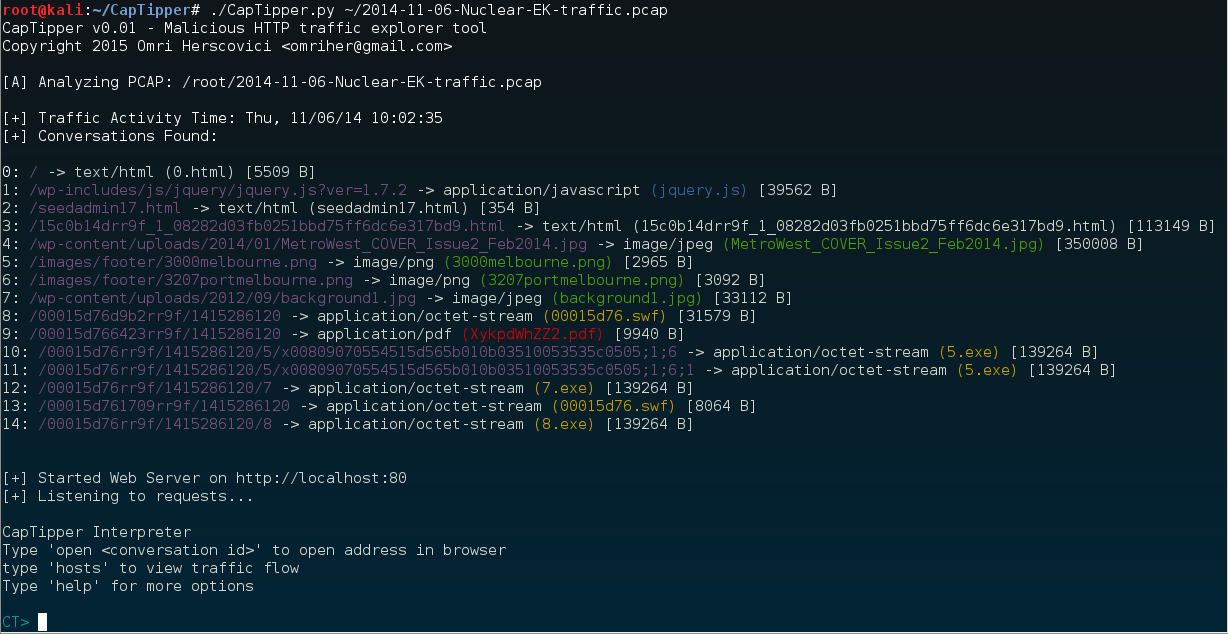
Usage: ./CapTipper.py <PCAP_file> [-p] [web_server_port=80]
让我们分析以下Nuclear EK驱动下载感染的PCAP文件:[2014-11-06-Nuclear-EK-traffic.pcap](http://malware-traffic-analysis.net/2014/11/06/2014-11-06-Nuclear-EK-traffic.pcap.zip)```sh
C:\CapTipper> CapTipper.py "C:\NuclearFiles\2014-11-06-Nuclear-EK-traffic.pcap"

CapTipper v0.1 - Malicious HTTP traffic explorer tool
Copyright 2015 Omri Herscovici <[email protected]>

[A] Analyzing PCAP: C:\NuclearFiles\2014-11-06-Nuclear-EK-traffic.pcap

[+] Traffic Activity Time: Thu, 11/06/14 17:02:35
[+] Conversations Found:

0: / -> text/html (0.html) [5509 B]
1: /wp-includes/js/jquery/jquery.js?ver=1.7.2 -> application/javascript (jquery.js) [39562 B]
2: /seedadmin17.html -> text/html (seedadmin17.html) [354 B]
3: /15c0b14drr9f_1_08282d03fb0251bbd75ff6dc6e317bd9.html -> text/html (15c0b14drr9f_1_08282d03fb0251bbd75ff6dc6e317bd9.html) [113149 B]
4: /wp-content/uploads/2014/01/MetroWest_COVER_Issue2_Feb2014.jpg -> image/jpeg (MetroWest_COVER_Issue2_Feb2014.jpg) [350008 B]
5: /images/footer/3000melbourne.png -> image/png (3000melbourne.png) [2965 B]
6: /images/footer/3207portmelbourne.png -> image/png (3207portmelbourne.png) [3092 B]
7: /wp-content/uploads/2012/09/background1.jpg -> image/jpeg (background1.jpg) [33112 B]
8: /00015d76d9b2rr9f/1415286120 -> application/octet-stream (00015d76.swf) [31579 B]
9: /00015d766423rr9f/1415286120 -> application/pdf (XykpdWhZZ2.pdf) [9940 B]
10: /00015d76rr9f/1415286120/5/x00809070554515d565b010b03510053535c0505;1;6 -> application/octet-stream (5.exe) [139264 B]
11: /00015d76rr9f/1415286120/5/x00809070554515d565b010b03510053535c0505;1;6;1 -> application/octet-stream (5.exe) [139264 B]
12: /00015d76rr9f/1415286120/7 -> application/octet-stream (7.exe) [139264 B]
13: /00015d761709rr9f/1415286120 -> application/octet-stream (00015d76.swf) [8064 B]
14: /00015d76rr9f/1415286120/8 -> application/octet-stream (8.exe) [139264 B]


[+] Started Web Server on http://localhost:80
[+] Listening to requests...

CapTipper Interpreter
Type 'open <conversation id>' to open address in browser
type 'hosts' to view traffic flow
Type 'help' for more options

CT>
初始化过程会以如下格式输出客户端与服务器之间发现的对话:
[ID] : 请求 URI -> 服务器响应类型 (文件名) [字节大小]
ID: 分配给特定对话的ID
请求 URI: GET请求中发送给服务器的URI
服务器响应类型: 服务器响应头中返回的content-type
文件名: 文件名可能来自以下几种情况:
字节大小: 响应体大小
初始化之后,会发生两件事:
该解释器包含用于进一步调查pcap中对象的内部工具。
在浏览器中打开URI只需输入'open'并附带对象ID即可。```sh CT> open 0 CT> log [2015-01-09T18:01:28.878000] 127.0.0.1 : GET / HTTP/1.1
* 这些命令中,除了 'open' 之外,其他命令实际上都不需要服务器运行。你可以通过输入 'server off' 或者在使用 CapTipper 时添加 -s 参数来关闭服务器。

现在,我们来看看在不使用浏览器的情况下能发现什么。
首先,我们可以使用 'hosts' 命令来鸟瞰整个流量情况。```sh
CT> hosts
Found Hosts:

 www.magmedia.com.au
 ├-- /   [0]
 ├-- /wp-includes/js/jquery/jquery.js?ver=1.7.2   [1]
 ├-- /wp-content/uploads/2014/01/MetroWest_COVER_Issue2_Feb2014.jpg   [4]
 ├-- /images/footer/3000melbourne.png   [5]
 ├-- /images/footer/3207portmelbourne.png   [6]
 └-- /wp-content/uploads/2012/09/background1.jpg   [7]


 pixeltouchstudios.tk
 └-- /seedadmin17.html   [2]


 grannityrektonaver.co.vu
 ├-- /15c0b14drr9f_1_08282d03fb0251bbd75ff6dc6e317bd9.html   [3]
 ├-- /00015d76d9b2rr9f/1415286120   [8]
 ├-- /00015d766423rr9f/1415286120   [9]
 ├-- /00015d76rr9f/1415286120/5/x00809070554515d565b010b03510053535c0505;1;6   [10]
 ├-- /00015d76rr9f/1415286120/5/x00809070554515d565b010b03510053535c0505;1;6;1   [11]
 ├-- /00015d76rr9f/1415286120/7   [12]
 ├-- /00015d761709rr9f/1415286120   [13]
 └-- /00015d76rr9f/1415286120/8   [14]
看起来 www.magmedia.com.au 是被入侵的站点。
结合这些信息以及我们在对话列表中获取的文件类型,grannityrektonaver.co.vu 似乎是感染主机。
那么 pixeltouchstudios.tk 是什么呢?
嗯,鉴于漏洞利用工具包的通常运作方式,这很可能是 TDS(流量分配系统)服务器。
让我们仔细看看。
我们可以通过输入 'head' 和 'body' 来打印页面的头部和正文:```sh CT> head 2 Displaying header of object 2 (seedadmin17.html):
HTTP/1.1 302 Found Server: nginx Date: Thu, 06 Nov 2014 15:02:38 GMT Content-Type: text/html; charset=iso-8859-1 Content-Length: 354 Connection: keep-alive Set-Cookie: ehihm=YocADE3AAIAAgCvjVtU_.vjVtUQAABAAAAr41bVAA-; expires=Fri, 06-Nov-2015 15:03:11 GMT; path=/; domain=pixeltouchstudios.tk Location: http://grannityrektonaver.co.vu/15c0b14drr9f_1_08282d03fb0251bbd75ff6dc6e317bd9.html
CT> body 2 Displaying body of object 2 (seedadmin17.html) [256 bytes]:
302 FoundThe document has moved here.
我们看到对象 2 返回了一个 302 重定向 到感染主机。
所以我们的假设很可能是正确的。
让我们通过输入 'info' 来获取关于对象 2 的更多信息:```sh CT> info 2 Info of conversation 2:
SERVER IP : 108.61.196.84:80 HOST : pixeltouchstudios.tk URI : /seedadmin17.html REFERER : http://www.magmedia.com.au/ RESULT NUM : 302 Found RESULT TYPE : text/html FILE NAME : seedadmin17.html LENGTH : 354 B
那个页面的引荐来源当然是 **magmedia.co.au**,但具体是什么重定向了我们?