____         _       __    ___              __
 / __ \ __ __ (_)____ / /__ / _ ) __ __ ____ / /__
/ /_/ // // // // __//  '_// _  |/ // // __//  '_/
\___\_\\_,_//_/ \__//_/\_\/____/ \_,_/ \__//_/\_\

Nextron Systems GmbH
本仓库的目标是提供一种简单、无害的方式来检查您的防病毒软件对勒索软件的防护能力。
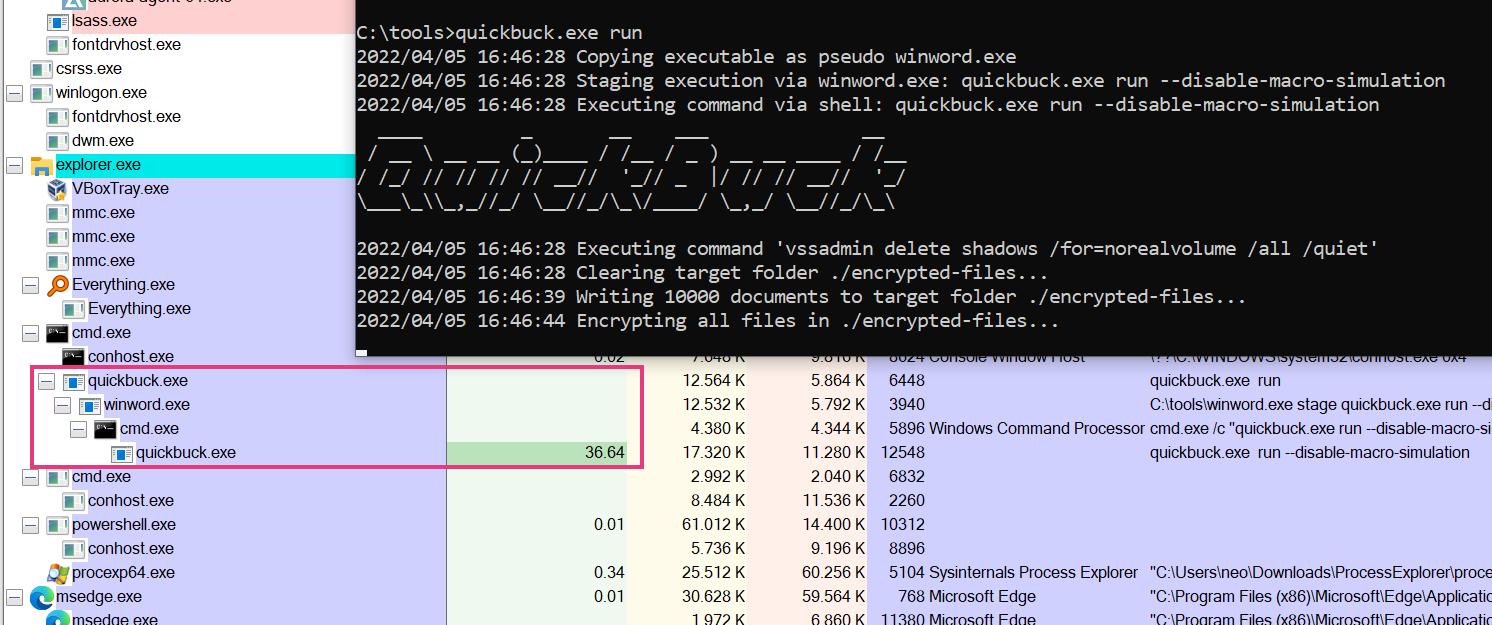
该工具模拟典型的勒索软件行为,例如:
勒索软件模拟器不会执行任何实际加密设备上已有文件或删除卷影副本的操作。然而,任何检测此类行为的防病毒产品仍有望触发警报。
上述每一步都可以通过命令行标志禁用。这样,即使防病毒软件已经检测到前面的步骤,您也可以检查其对后续步骤的响应。
Ransomware Simulator

Usage:
ransomware-simulator [command]

Examples:
ransomware-simulator run

Available Commands:
help        Help about any command
run         Run ransomware simulator

Flags:
-h, --help   help for ransomware-simulator

Use "ransomware-simulator [command] --help" for more information about a command.
Run command:
Run Ransomware Simulator

Usage:
ransomware-simulator run [flags]

Flags:
    --dir string                     Directory where files that will be encrypted should be staged (default "./encrypted-files")
    --disable-file-encryption        Don't simulate document encryption
    --disable-macro-simulation       Don't simulate start from a macro by building the following process chain: winword.exe -> cmd.exe -> ransomware-simulator.exe
    --disable-note-drop              Don't drop pseudo ransomware note
    --disable-shadow-copy-deletion   Don't simulate volume shadow copy deletion
-h, --help                           help for run
    --note-location string           Ransomware note location (default "C:\\Users\\neo\\Desktop\\ransomware-simulator-note.txt")