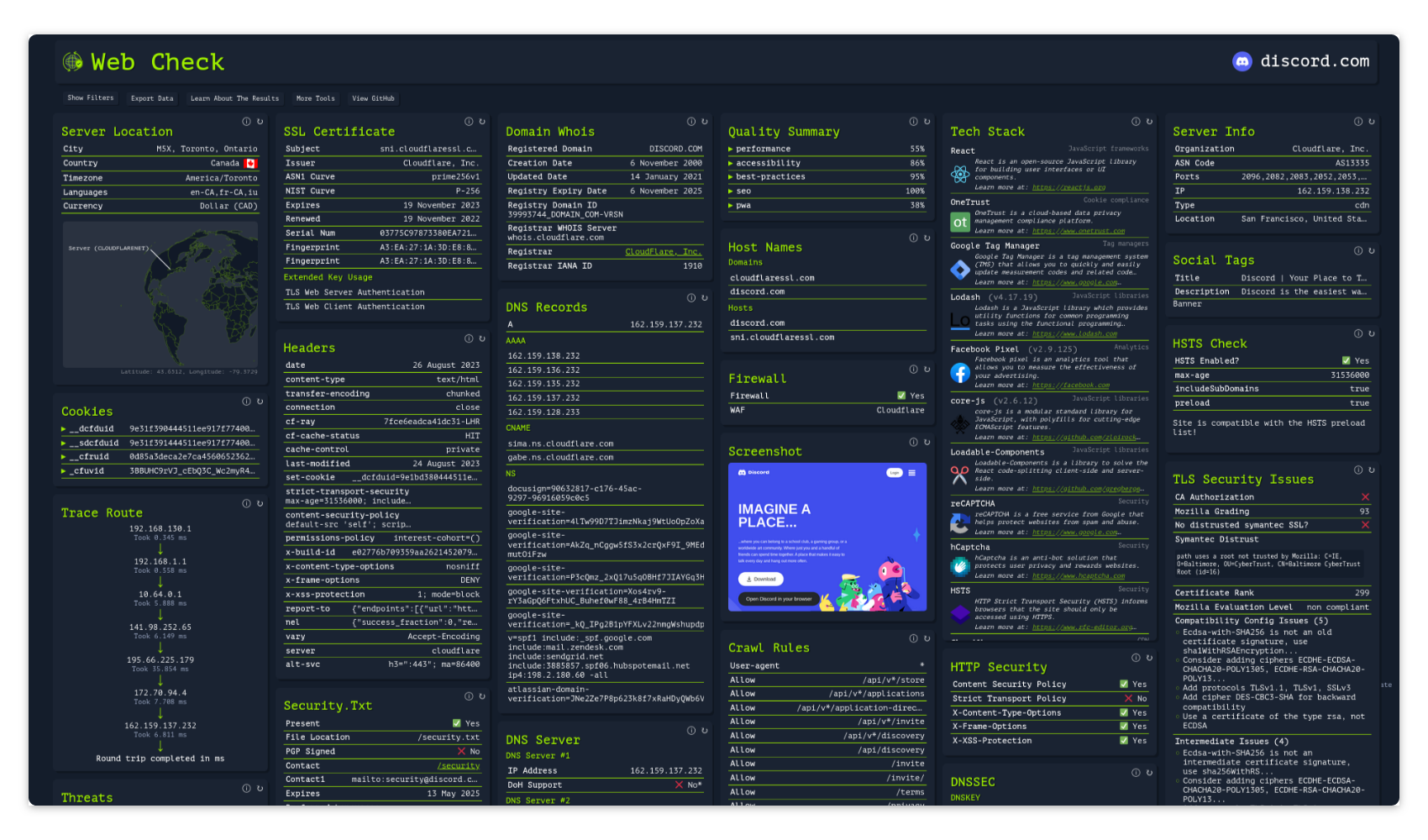
lissy93/web-check
🕵️♂️ 一站式OSINT工具,用于分析任意网站
<h1 align="center">Web-Check</h1>
<p align="center">
<img src="https://cdn.as93.net/logo/web-check/w256" width="96" /><br />
<b><i>面向任意网站的全面、按需开源情报</i></b>
<br />
<b>🌐 <a href="https://web-check.xyz/">web-check.xyz</a></b><br />
</p>
---
<p align="center">感谢以下支持者:</p>
<table align="center">
<tr>
<td align="center" width="33%">
<a href="https://nubela.co/?utm_source=github&utm_medium=sponsorship&utm_campaign=oss_sponsorships&utm_content=github_readme&utm_id=web_check_2026">
<img src="https://assets.kitploit.com/production/public/readmes/91/901c14352f2f8beafcaabd9875bd965be5613fe1467cfa11dd5fc16d3da19d74/5adcbfa8e4adbabc38c8fd34b4b2811505a703c79a17091cad8dbbe99fe223a2-display-v1.webp" width="260" alt="NinjaPear"><br>
<b>NinjaPear</b>
</a><br>
<sub>通过任意 URL 获取完整 B2B 资料的 API</sub>
</td>
<td align="center" width="33%">
<a href="https://www.hostg.xyz/aff_c?offer_id=48&aff_id=243972&url_id=6826">
<img src="https://assets.kitploit.com/production/public/readmes/91/c3bb6524a22d265dca2ad8badf0c1acac883d48e7fa5019682cf0b35c7724028/6a08a52b366071153a23775e25d9b5ee0807bb2dc4d4090e84c4fd3dd5e88b9c-display-v1.webp" width="260" alt="Hostinger"><br>
<b>Hostinger</b>
</a><br>
<sub>在 Hostinger 上一键部署 Web-Check</sub>
</td>
<td align="center" width="33%">
<a href="https://go.warp.dev/web-check">
<img src="https://raw.githubusercontent.com/warpdotdev/brand-assets/main/Github/Sponsor/Warp-Github-LG-02.png?raw=true" width="260" alt="Warp"><br>
<b>Warp</b>
</a><br>
<sub>为多 AI 智能体编码而构建</sub>
</td>
</tr>
</table>
#### 目录
- **[关于](#about)**
- [截图](#screenshot)
- [在线演示](#live-demo)
- [镜像](#mirror)
- [功能特性](#features)
- **[使用方法](#usage)**
- 部署
- [方案#1:Netlify](#deploying---option-1-netlify)
- [方案#2:Vercel](#deploying---option-2-vercel)
- [方案#3:Hostinger](#deploying---option-3-hostinger)
- [方案#4:Render](#deploying---option-4-render)
- [方案#5:Docker](#deploying---option-5-docker)
- [方案#6:源码](#deploying---option-6-from-source)
- [配置选项](#configuring)
- [开发者设置](#developing)
- **[社区](#community)**
- [贡献](#contributing)
- [缺陷](#reporting-bugs)
- [支持](#supporting)
- **[许可证](#license)**
---
## 关于
深入了解给定网站的内部运作机制:发现潜在攻击向量、分析服务器架构、查看安全配置,并了解网站正在使用哪些技术。
目标是帮助你轻松理解、优化并保护你的网站。
### 截图
<details>
<summary>展开截图</summary>
[](https://web-check.as93.net/)
</details>
[](https://github.com/Lissy93/web-check/tree/master/.github/screenshots)
### 在线演示
托管版本可访问:**[web-check.as93.net](https://web-check.as93.net)**
### 镜像
本仓库的源码已镜像至 CodeBerg,可访问:**[codeberg.org/alicia/web-check](https://codeberg.org/alicia/web-check)**
### 状态
构建与部署:[](https://app.netlify.com/sites/web-check/deploys)
[](https://vercel.com/as93/web-check/)
[](https://github.com/Lissy93/web-check/actions/workflows/docker.yml)
[](https://github.com/Lissy93/web-check/actions/workflows/deploy-aws.yml)
<br />
仓库管理与杂项:[](https://github.com/Lissy93/web-check/actions/workflows/mirror.yml)
[](https://github.com/Lissy93/web-check/actions/workflows/credits.yml)
### 功能特性
查看 **[web-check.xyz/about](https://web-check.xyz/about)** 获取完整的检查列表,以及每项检查的功能说明
---
## 使用方法
### 部署 - 选项 #1:Netlify
点击下方按钮,部署到 Netlify 👇
[](https://app.netlify.com/start/deploy?repository=https://github.com/lissy93/web-check)
### 部署 - 选项 #2:Vercel
点击下方按钮,部署到 Vercel 👇
[](https://vercel.com/new/clone?repository-url=https%3A%2F%2Fgithub.com%2Flissy93%2Fweb-check&project-name=web-check&repository-name=web-check-fork&demo-title=Web-Check%20Demo&demo-description=Check%20out%20web-check.xyz%20to%20see%20a%20live%20demo%20of%20this%20application%20running.&demo-url=https%3A%2F%2Fweb-check.xyz&demo-image=https%3A%2F%2Fraw.githubusercontent.com%2FLissy93%2Fweb-check%2Fmaster%2F.github%2Fscreenshots%2Fweb-check-screenshot10.png)
### 部署 - 选项 #3:Hostinger
在 Hostinger 上一键部署 Web-Check——已预配置,开箱即用 👇
<a href="https://www.hostg.xyz/aff_c?offer_id=48&aff_id=243972&url_id=6826"><img height="32" src="https://assets.hostinger.com/vps/deploy.svg"></a>
### 部署 - 选项 #4:Render
点击下方按钮,部署到 Render 👇
[](https://render.com/deploy?repo=https://github.com/Lissy93/web-check)
### 部署 - 选项 #5:Docker
运行 `docker run -p 3000:3000 lissy93/web-check`,然后打开 [`localhost:3000`](http://localhost:3000)
<details>
<summary>Docker 选项</summary>
你可以从以下位置获取 Docker 镜像:
- DockerHub:[`lissy93/web-check`](https://hub.docker.com/r/lissy93/web-check)
- GHCR:[`ghcr.io/lissy93/web-check`](https://github.com/Lissy93/web-check/pkgs/container/web-check)
- 或者克隆仓库并运行 `docker build -t web-check .` 自行构建镜像
</details>
### 部署 - 选项 #6:从源码部署
安装 [开发](#developing) 部分列出的先决条件,然后运行:
```bash
git clone https://github.com/Lissy93/web-check.git # Download the code from GitHub
cd web-check # Navigate into the project dir
yarn install # Install the NPM dependencies
yarn build # Build the app for production
yarn start # Start the app (API and GUI)
```
---
### 配置
默认情况下,无需任何配置。
但有一些可选的环境变量,你可以设置它们来启用一些额外的检查,或提高某些使用外部 API 的检查的速率限制。
**API 密钥与凭据**:
| 键 | 值 |
| ---------------------- | ----------------------------------------------------------------------------------------------------------------------------------------------------------------------------------------------------- |
| `GOOGLE_CLOUD_API_KEY` | 一个启用了 PageSpeed Insights 和 Safe Browsing API 的 Google API 密钥([在此获取](https://developers.google.com/speed/docs/insights/v5/get-started))。运行质量和 Safe Browsing 检查 |
| `SHODAN_API_KEY` | 一个 Shodan API 密钥([在此获取](https://account.shodan.io/))。运行主机名、服务器信息和漏洞检查 |
| `CLOUDMERSIVE_API_KEY` | 一个 Cloudmersive API 密钥([在此获取](https://account.cloudmersive.com/))。将 Cloudmersive 网站扫描添加到威胁检查中 |
| `TRANCO_API_KEY` | 一个 Tranco API 密钥([在此获取](https://tranco-list.eu/))。提高排名检查的 Tranco 速率限制 |
| `TRANCO_USERNAME` | 你的 Tranco 账户邮箱,与上面的密钥一起使用 |
| `GITHUB_TOKEN` | 一个 GitHub 令牌([在此获取](https://github.com/settings/tokens))。提高社交存在检查的 GitHub 速率限制 |
| `CERTSPOTTER_TOKEN` | 一个 CertSpotter API 令牌([在此获取](https://sslmate.com/certspotter/api/))。提高子域名检查的 CertSpotter 速率限制 |
**配置设置**:
| 键 | 值 |
| -------------------------- | -------------------------------------------------------------------------- |
| `PORT` | 运行 server.js 时用于提供 API 的端口(例如 `3000`) |
| `API_ENABLE_RATE_LIMIT` | 为 /api 端点启用速率限制(例如 `true`) |
| `PUBLIC_API_TIMEOUT_LIMIT` | API 请求的超时限制,以毫秒为单位(例如 `25000`) |
| `API_CORS_ORIGIN` | 启用 CORS,在此设置你允许的主机名(例如 `example.com`) |
| `API_DISABLED_CHECKS` | 要禁用的检查的逗号分隔列表(例如 `trace-route,ports`) |
| `API_ENABLED_CHECKS` | 如果设置,则仅运行这些检查(例如 `get-ip,ssl,dns,headers`) |
| `API_BLOCKED_HOSTS` | 绝不能扫描的主机(例如 `lan.example.com,192.168.0.0/16`) |
| `CHROME_PATH` | Chromium 可执行文件的路径(例如 `/usr/bin/chromium`) |
| `DISABLE_GUI` | 禁用 GUI,仅提供 API(例如 `false`) |
| `PUBLIC_API_ENDPOINT` | API 的端点,本地或远程(例如 `/api`) |
所有值都是可选的。
你可以将这些作为环境变量添加。可以直接放入项目根目录的 `.env` 文件中,或通过 Netlify / Vercel UI,或使用 --env 标志传递给 Docker 容器,或使用你自己的环境变量管理系统
请注意,以 `PUBLIC_` 为前缀的值会在构建时由前端读取,因此更改它们后需要重新构建
---
### 开发
1. 克隆仓库,`git clone [email protected]:Lissy93/web-check.git`
2. 进入该目录,`cd web-check`
3. 安装依赖:`yarn`
4. 启动开发服务器,使用 `yarn dev`
你需要安装 [Node.js](https://nodejs.org/en)(v22.23.4+ 或 v24.16+),以及 [yarn](https://yarnpkg.com/getting-started/install) 和 [git](https://git-scm.com/)。
部分检查还要求你的环境中安装 `chromium`、`traceroute` 和 `dns`。如果这些软件包不存在,这些任务将被直接跳过。
---
## 社区
### 贡献
非常欢迎任何形式的贡献,我们将不胜感激。
关于行为准则,请参阅 [Contributor Covenant](https://www.contributor-covenant.org/version/2/1/code_of_conduct/)。
要开始贡献,请 fork 该仓库,进行修改,添加、提交并推送代码,然后回到这里发起 pull request。如果你是 GitHub 或开源新手,[这份指南](https://www.freecodecamp.org/news/how-to-make-your-first-pull-request-on-github-3#let-s-make-our-first-pull-request-)或 [git 文档](https://docs.github.com/en/pull-requests/collaborating-with-pull-requests/proposing-changes-to-your-work-with-pull-requests/creating-a-pull-request)可能会帮助你入门,但如果你需要任何支持,欢迎随时联系我们。
[](https://github.com/Lissy93/web-check/compare)
### 报告 Bug
如果你发现某些功能未按预期工作,或想建议新功能,请在 GitHub 上提交工单。
对于 Bug,请概述复现所需的步骤,并包含相关信息,例如系统信息和产生的日志。
[](https://github.com/Lissy93/web-check/issues/new/choose)
### 支持
该应用将保持 100% 免费和开源。
但由于托管实例的流量较大,lambda 函数的使用成本约为每月 $25。
任何通过 GitHub Sponsorship 帮助承担费用的支持都将不胜感激。
正是得益于社区的支持,这个项目才得以免费向所有人开放 :)
[](https://github.com/sponsors/Lissy93)
### 贡献者
感谢以下用户为 Web-Check 做出的贡献
[](https://github.com/lissy93/web-check/graphs/contributors)
### 赞助者
衷心感谢这些在 GitHub 上赞助我的好心人,他们的支持帮助承担了保持 Web-Check 和我的其他项目对所有人免费所需的成本。如果你有能力,可以考虑通过 [在 GitHub 上赞助我](https://github.com/sponsors/Lissy93) 加入他们。
[](https://github.com/sponsors/lissy93)
---
## 许可证
> _**[Lissy93/Web-Check](https://github.com/Lissy93/web-check)** 基于 [MIT](https://github.com/Lissy93/web-check/blob/HEAD/LICENSE) 许可证授权 © [Alicia Sykes](https://aliciasykes.com) 2023 - 2026._<br>
> <sup align="right">有关信息,请参阅 <a href="https://tldrlegal.com/license/mit-license">TLDR Legal > MIT</a></sup>
<details>
<summary>展开许可证</summary>
```
The MIT License (MIT)
Copyright (c) Alicia Sykes <[email protected]>
Permission is hereby granted, free of charge, to any person obtaining a copy
of this software and associated documentation files (the "Software"), to deal
in the Software without restriction, including without limitation the rights
to use, copy, modify, merge, publish, distribute, sub-license, and/or sell
copies of the Software, and to permit persons to whom the Software is furnished
to do so, subject to the following conditions:
The above copyright notice and this permission notice shall be included in all
copies or substantial portions of the Software.
THE SOFTWARE IS PROVIDED "AS IS", WITHOUT WARRANTY OF ANY KIND, EXPRESS OR IMPLIED,
INCLUDING BUT NOT LIMITED TO THE WARRANTIES OF MERCHANT ABILITY, FITNESS FOR A
PARTICULAR PURPOSE AND NON INFRINGEMENT. IN NO EVENT SHALL THE AUTHORS OR COPYRIGHT
HOLDERS BE LIABLE FOR ANY CLAIM, DAMAGES OR OTHER LIABILITY, WHETHER IN AN ACTION
OF CONTRACT, TORT OR OTHERWISE, ARISING FROM, OUT OF OR IN CONNECTION WITH THE
SOFTWARE OR THE USE OR OTHER DEALINGS IN THE SOFTWARE.
```
[](https://app.fossa.com/projects/git%2Bgithub.com%2FLissy93%2Fweb-check?ref=badge_large&issueType=license)
</details>
<!-- License + Copyright -->
<p align="center">
<i>© <a href="https://aliciasykes.com">Alicia Sykes</a> 2026</i><br>
<i>Licensed under <a href="https://gist.github.com/Lissy93/143d2ee01ccc5c052a17">MIT</a></i><br>
<a href="https://github.com/lissy93"><img src="https://assets.kitploit.com/production/public/readmes/91/f559f5ee768d4fc8892570d558c5f1454b9fb5e4798ad90e57057db66da41bdc/6423c5c9cb35ff53e9935655e6413c24bf28790bc404f6bf96f03e3a7ac898b4-display-v1.webp" /></a><br>
<sup>感谢访问 :)</sup>
</p>
<!-- Dinosaurs are Awesome -->
<!--
. - ~ ~ ~ - .
.. _ .-~ ~-.
//| \ `..~ `.
|| | } } / \ \
(\ \\ \~^..' | } \
\`.-~ o / } | / \
(__ | / | / `.
`- - ~ ~ -._| /_ - ~ ~ ^| /- _ `.
| / | / ~-. ~- _
|_____| |_____| ~ - . _ _~_-_
-->