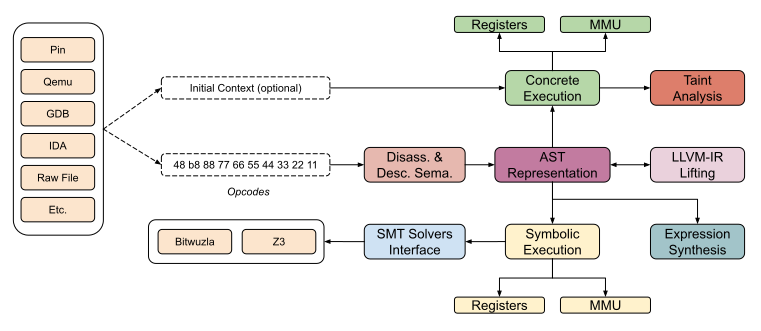
Triton 是一个动态二进制分析库。它提供了内部组件,允许您构建程序分析工具, 自动化逆向工程、进行软件验证或仅仅是模拟代码。

由于 Triton 是一个兼职性质的项目,如果不完全可靠,请不要责怪我们。提出问题 或 提交拉取请求 总是比嘲讽更好 =)。不过,您可以在推特上关注开发进展 @qb_triton。







from triton import *
Create the Triton context with a defined architecture
ctx = TritonContext(ARCH.X86_64)
Define concrete values (optional)
ctx.setConcreteRegisterValue(ctx.registers.rip, 0x40000)
Symbolize data (optional)
ctx.symbolizeRegister(ctx.registers.rax, 'my_rax')
Execute instructions
ctx.processing(Instruction(b"\x48\x35\x34\x12\x00\x00")) # xor rax, 0x1234 ctx.processing(Instruction(b"\x48\x89\xc1")) # mov rcx, rax
Get the symbolic expression
rcx_expr = ctx.getSymbolicRegister(ctx.registers.rcx) print(rcx_expr) (define-fun ref!8 () (_ BitVec 64) ref!1) ; MOV operation - 0x40006: mov rcx, rax
Solve constraint
ctx.getModel(rcx_expr.getAst() == 0xdead) {0: my_rax:64 = 0xcc99}
0xcc99 XOR 0x1234 is indeed equal to 0xdead
hex(0xcc99 ^ 0x1234) '0xdead'
## 使用 pip 安装

Triton 可以使用 `pip` 安装:```console
pip install triton-library
Triton 依赖于以下依赖项:```
### Linux 和 MacOS```console
$ git clone https://github.com/JonathanSalwan/Triton
$ cd Triton
$ mkdir build ; cd build
$ cmake ..
$ make -j3
$ sudo make install
默认情况下,LLVM和Bitwuzla不会被编译。如果你想体验Triton的全部功能,cmake编译命令如下:```console $ cmake -DLLVM_INTERFACE=ON -DCMAKE_PREFIX_PATH=$(llvm-config --prefix) -DBITWUZLA_INTERFACE=ON ..
#### MacOS M1 注意事项:

如果您遇到类似编译错误:```
Could NOT find PythonLibs (missing: PYTHON_LIBRARIES PYTHON_INCLUDE_DIRS)
尝试为您的特定Python版本指定PYTHON_EXECUTABLE、PYTHON_LIBRARIES和PYTHON_INCLUDE_DIRS:```console
cmake -DCMAKE_INSTALL_PREFIX=/opt/homebrew/
-DPYTHON_EXECUTABLE=/opt/homebrew/bin/python3
-DPYTHON_LIBRARIES=/opt/homebrew/Cellar/[email protected]/3.10.8/Frameworks/Python.framework/Versions/3.10/lib/libpython3.10.dylib
-DPYTHON_INCLUDE_DIRS=/opt/homebrew/opt/[email protected]/Frameworks/Python.framework/Versions/3.10/include/python3.10/
..
从这段代码片段中,你可以获取以下信息:```python
from sysconfig import get_paths
info = get_paths()
print(info)
如果 Python 自动补全不工作,请按照以下步骤操作:
/usr/lib/python3.13/)。您的 IDE 必须支持解析 .pyi 文件。
您可以使用 cmake 生成 libTriton 的 .sln 文件。```console
git clone https://github.com/JonathanSalwan/Triton.git cd Triton mkdir build cd build cmake -G "Visual Studio 14 2015 Win64"
-DBOOST_ROOT="C:/Users/jonathan/Works/Tools/boost_1_61_0"
-DPYTHON_INCLUDE_DIRS="C:/Python36/include"
-DPYTHON_LIBRARIES="C:/Python36/libs/python36.lib"
-DZ3_INCLUDE_DIRS="C:/Users/jonathan/Works/Tools/z3-4.6.0-x64-win/include"
-DZ3_LIBRARIES="C:/Users/jonathan/Works/Tools/z3-4.6.0-x64-win/bin/libz3.lib"
-DCAPSTONE_INCLUDE_DIRS="C:/Users/jonathan/Works/Tools/capstone-5.0.1-win64/include"
-DCAPSTONE_LIBRARIES="C:/Users/jonathan/Works/Tools/capstone-5.0.1-win64/capstone.lib" ..
你可以使用 setup.py 在 Windows 上生成调试版本的 triton.pyd。```console
> git clone https://github.com/JonathanSalwan/Triton.git
> cd Triton
> $env:COMPILER_DIR="C:/deps/llvm/llvm2116r/bin"
> $env:CMAKE_PREFIX_PATH="C:/deps/llvm/llvm-project-21.1.6.src/install/lib/cmake/llvm;C:/code/cxx-common-cmake/build/install"
> python_d -m build --wheel
> python_d -m pip install (Get-ChildItem .\dist\triton_library*)
然而,如果你更倾向于直接下载预编译的库,可以查看我们AppVeyor上的制品。 请注意,如果你使用AppVeyor的制品,可能需要安装用于Visual Studio 2012的Visual C++ Redistributable包。
vcpkg中的Triton端口由微软团队成员和社区贡献者保持最新。 vcpkg的网址是:https://github.com/Microsoft/vcpkg。你可以使用vcpkg依赖管理器下载并安装Triton:```console $ git clone https://github.com/Microsoft/vcpkg.git $ cd vcpkg $ ./bootstrap-vcpkg.sh # ./bootstrap-vcpkg.bat for Windows $ ./vcpkg integrate install $ ./vcpkg install triton
如果版本过时,请在 vcpkg 仓库上[创建 issue 或 pull request](https://github.com/Microsoft/vcpkg)。


# 贡献者

* [**Alberto Garcia Illera**](https://twitter.com/algillera) - Cruise Automation
* [**Alexey Vishnyakov**](https://vishnya.xyz/) - ISP RAS
* [**Black Binary**](https://github.com/black-binary) - n/a
* [**Christian Heitman**](https://github.com/cnheitman) - Quarkslab
* [**Daniil Kuts**](https://github.com/apach301) - ISP RAS
* [**Jessy Campos**](https://github.com/ek0) - n/a
* [**Matteo F.**](https://twitter.com/fvrmatteo) - n/a
* [**Pierrick Brunet**](https://github.com/pbrunet) - Quarkslab
* [**PixelRick**](https://github.com/PixelRick) - n/a
* [**Romain Thomas**](https://twitter.com/rh0main) - Quarkslab
* [**以及更多贡献者**](https://github.com/JonathanSalwan/Triton/graphs/contributors)


## 已经使用 Triton 的项目

### 工具