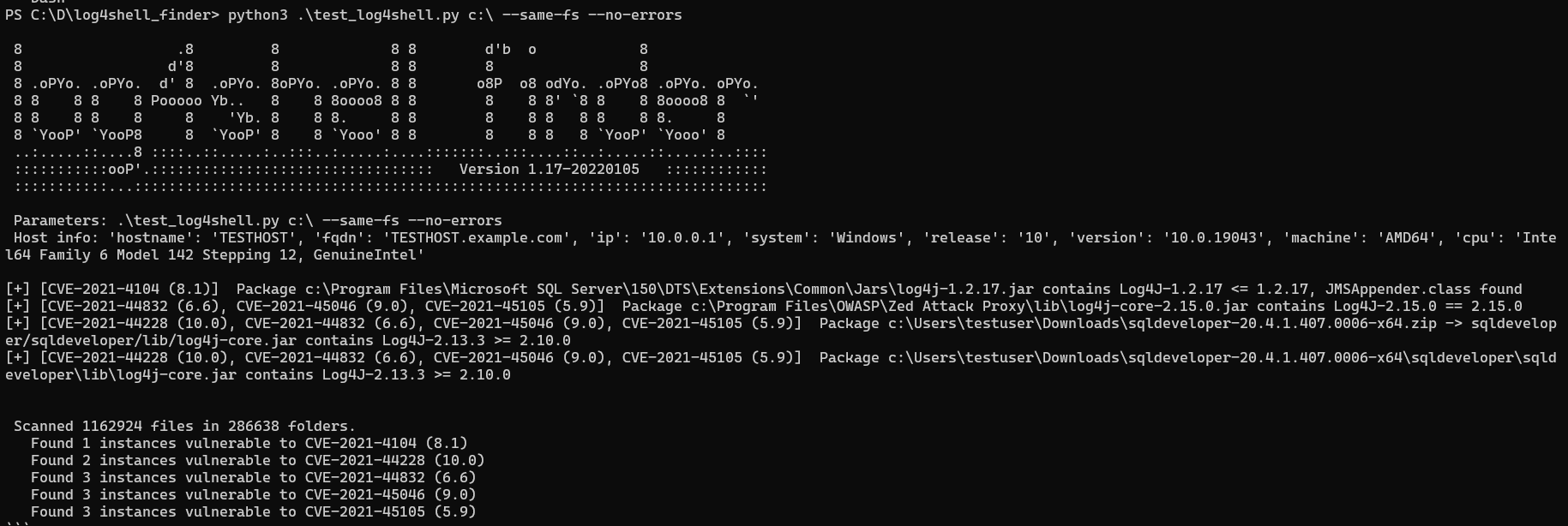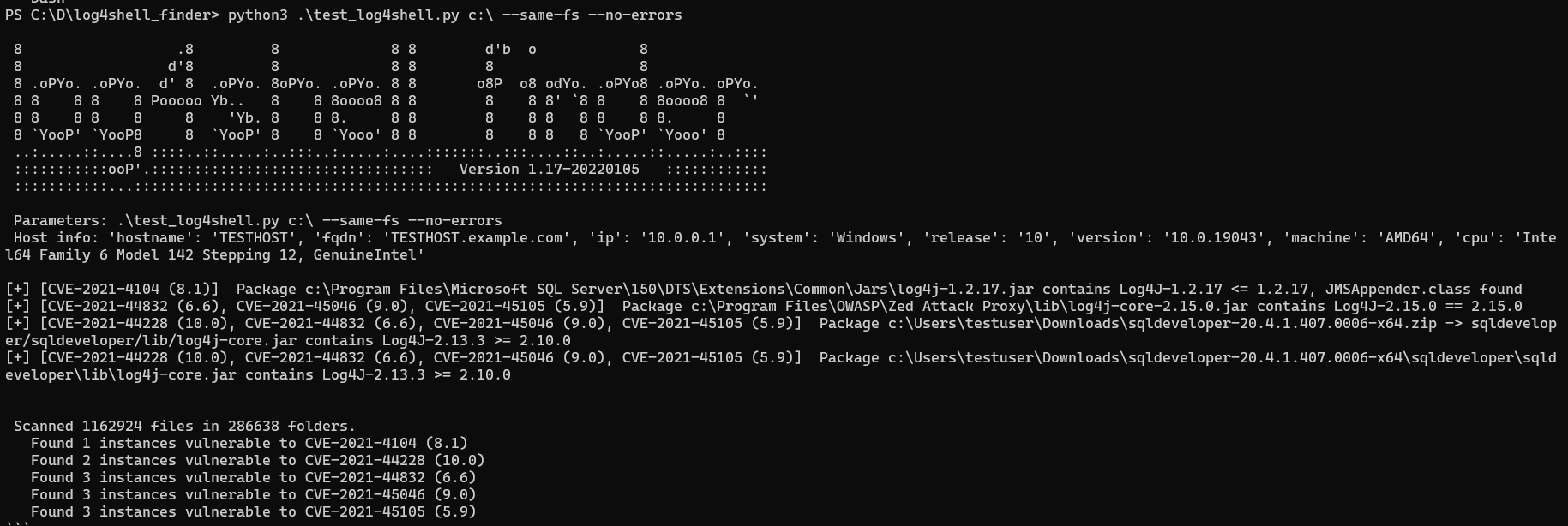
Python 移植版本,基于 https://github.com/mergebase/log4j-detector。log4j-detector 版权所有 (C) 2021 Mergebase Software Inc. https://mergebase.com/,采用 GPLv3 许可。
移植到 Python 的动机是提升性能、降低内存消耗并提高代码可读性。请参阅下面关于性能对比的部分。
而且它似乎是内存占用最低且扫描速度最快的工具
识别文件系统上存在漏洞的 log4j (1.x)、reload4j (1.2.18+) 和 log4j-core (2.x) 版本,涉及 CVE-2021-44228、 CVE-2021-45046 等众多漏洞——参见下表。 它能够发现嵌入在多层嵌套的大型应用程序中的实例。可在 Linux、Windows、Mac 或任何其他运行 Python 3.8+ 的地方使用。
能够正确检测可执行的 spring-boot jar/war 中的 log4j、混入 uber jars 的依赖、shaded jar,甚至文件系统上直接以未压缩形式存放的 exploded jar 文件(即 *.class)。 它还可以处理 shaded 类文件——扩展名为 .esclazz(elastic)和 .classdata(Azure)。
搜索的 Java 归档扩展名:.zip、.jar、.war、.ear、.aar、.jpi、.hpi、.rar、.nar、.wab、.eba、.ejb、.sar、.apk、.par、.kar
| 检测 | CVE | CVSSv3 | 严重性 | Java | 漏洞起始版本 | 受影响版本 | 修复版本 | 库 |
|---|---|---|---|---|---|---|---|---|
| 是 | CVE-2021-44228 | 10.0 | 严重 | 8 | 2.0-beta9 | 2.14.1 | 2.15.0 | log4jv2 |
| 是 | CVE-2017-5645 | 9.8 | 严重 | 7 | 2.0-alpha1 | 2.8.1 | 2.8.2 | log4jv2 |
| 是 | CVE-2019-17571 | 9.8 | 严重 | 1.2.0 | 1.2.17 | 无修复 | log4jv1 | |
| 是 | CVE-2021-45046 | 9.0 | 严重 | 7/8 | 2.0-beta9 | 2.15.0(不含 2.12.2) | 2.12.2/2.16.0 | log4jv2 |
| 是 | CVE-2022-23305 | 9.8 | 严重 | 1.2.0 | 1.2.17 | 无修复 / 1.2.18.1 | log4jv1, reload4j | |
| 是 | CVE-2022-23307 | 9.8 | 严重 | 1.2.0 | 1.2.17 | 无修复 / 1.2.18.1 | log4jv1, reload4j | |
| 是 | CVE-2022-23302 | 8.8 | 高危 | 1.0 | 1.2.17 | 无修复 / 1.2.18.1 | log4jv1, reload4j | |
| 是 | CVE-2021-4104 | 7.5 | 高危 | - | 1.0 | 1.2.17 | 无修复 | log4jv1 |
| 是 | CVE-2021-44832 | 6.6 | 中危 | 6/7/8 | 2.0-alpha7 | 2.17.0(不含 2.3.2/2.12.4) | 2.3.2/2.12.4/2.17.1 | log4jv2 |
| - | CVE-2021-42550 | 6.6 | 中危 | - | 1.0 | 1.2.7 | 1.2.8 | logback |
| 是 | CVE-2021-45105 | 5.9 | 中危 | 6/7/8 | 2.0-beta9 | 2.16.0(不含 2.12.3) | 2.3.1/2.12.3/2.17.0 | log4jv2 |
| - | CVE-2020-9488 | 3.7 | 低危 | 7/8 | 2.0-alpha1 | 2.13.1 | 2.12.3/2.13.2 | log4jv2 |
每个实例都会报告与其对应的 CVE 列表。对于每个 CVE,都会分析 log4j 库文件是否已应用推荐的缓解措施(例如移除了 JndiLookup.class 或 JMSAppender.class),如果已应用,则视为不存在漏洞。 对于包含 log4j-core 的 pom.properties 文件但没有实际字节码类的归档,会报告状态 STRANGE,这些通常是源码包,可以忽略。
警告
--fix功能为实验性功能,使用风险自负,使用前请务必备份 jar 文件。
--fix 参数会尝试将 JndiLookup.class 实例重命名为 JndiLookup.vulne,从而阻止该类被加载。在 Java 归档中,这是通过原地重命名完成的,无需重新压缩归档,速度极快。
提供适用于 Linux 64 位、MS Windows 64 位和 32 位的二进制文件——参见 Releases
支持的最低 Python 版本为 3.8。根据我的测试,Python 3.6 的 zip 实现无法打开测试数据中的许多
.jar文件。
log4shell-finder 针对高性能和低内存占用进行了优化。
更新于 2022 年 1 月 23 日,性能在一个包含 2005 个文件夹、26237 个文件的目录上测得。
运行时间减少一半,内存消耗减少 2/3,文件系统读取次数减少至少 90%
Command being timed: "./test_log4shell.py /home/hynek/war/ --exclude-dirs /mnt --same-fs"
User time (seconds): 17.68
System time (seconds): 1.20
Percent of CPU this job got: 127%
Elapsed (wall clock) time (h:mm:ss or m:ss): 0:14.47
Maximum resident set size (kbytes): 64144
File system inputs: 114424
Command being timed: "./log4j-finder.py /home/hynek/war/"
User time (seconds): 23.59
System time (seconds): 1.09
Percent of CPU this job got: 99%
Elapsed (wall clock) time (h:mm:ss or m:ss): 0:26.18
Maximum resident set size (kbytes): 38604
File system inputs: 142824
Command being timed: "java -jar log4j-detector-latest.jar /home/hynek/war"
User time (seconds): 30.56
System time (seconds): 1.39
Percent of CPU this job got: 113%
Elapsed (wall clock) time (h:mm:ss or m:ss): 0:28.26
Maximum resident set size (kbytes): 214116
File system inputs: 14416
Command being timed: "./log4j2-scan /home/hynek/war --scan-log4j1 --scan-zip"
User time (seconds): 52.05
System time (seconds): 25.32
Percent of CPU this job got: 88%
Elapsed (wall clock) time (h:mm:ss or m:ss): 1:27.86
Maximum resident set size (kbytes): 593080
File system inputs: 215416
all 参数自动检测所有本地磁盘--no-csv-header 用于省略 CSV 表头,便于更轻松地合并来自多台主机的结果--threads 参数,用于手动调整扫描线程数--cvs-clean 参数,在未检测到 log4j 库时向 CSV 输出写入 "CLEAN" 行--cvs-stats 参数,向 CSV 输出写入 "STATS" 行,包含运行时间(秒)以及扫描的文件和文件夹数量--fix 命令可能损坏 .jar 归档。以前的更改请参见发行说明
既可以从 Python 解释器运行,也可以使用 dist 文件夹中的 Windows/Linux 二进制文件。
请注意,请使用对整个文件系统具有访问权限(至少只读)的用户运行。log4shell-finder 只遍历它可以访问的文件夹,不会报告权限被拒绝的错误。
PS C:\D\log4shell_finder> python3 .\test_log4shell.py --help
usage:  Type "test_log4shell.py --help" for more information
        On Windows "test_log4shell.py c:\ d:\"
        On Linux "test_log4shell.py /"

Searches file system for vulnerable log4j version.

positional arguments:
  folders               List of folders or files to scan. Use "-" to read list of files from stdin. On MS Windows use "all" to scan all local drives.

optional arguments:
  -h, --help            show this help message and exit
  --exclude-dirs DIR [DIR ...]
                        Exclude given directories from search.
  -s, --same-fs         Don't scan mounted volumens.
  -j [FILE], --json-out [FILE]
                        Save results to json file.
  -c [FILE], --csv-out [FILE]
                        Save results to csv file.
  --csv-clean           Add CLEAN status line in case no entries found
  --csv-stats           Add STATS line into csv output.
  --no-csv-header       Don't write CSV header to the output file.
  -f, --fix             Fix vulnerable by renaming JndiLookup.class into JndiLookup.vulne.
  --threads [THREADS]   Specify number of threads to use for parallel processing, default is 6.
  --file-log [LOGFILE]  Enable logging to log file, default is log4shell-finder.log.
  --progress [SEC]      Report progress every SEC seconds, default is 10 seconds.
  --no-errors           Suppress printing of file system errors.
  --strange             Report also strange occurences with pom.properties without binary classes (e.g. source or test packages)
  -d, --debug           Increase verbosity, mainly for debugging purposes.
  -v, --version         show program's version number and exit
不需要任何额外的 Python 库。
二进制文件是使用以下命令生成的:
pip install pyinstaller
pyinstaller -F ./test_log4shell.py
如果要构建 32 位版本,请安装 32 位 Python 解释器,然后使用以下命令安装 pyinstaller:
C:\Users\User\AppData\Local\Programs\Python\Python38-32\python.exe -m pip install pyinstaller
然后执行: