面向你已有日志的本地优先威胁狩猎:Zeek、Pi-hole、syslog 或 systemd journal、CloudTrail。每次运行都会指出每个检测器背后的技术。无 agent、无守护进程、无黑盒——介于 grep 与 SIEM 之间。

介于 grep 与 SIEM 之间


sigwood 是一款面向自托管者的本地优先、命令行威胁狩猎工具。将它指向你已有的日志——Zeek、Pi-hole/dnsmasq、syslog 或 CloudTrail——它会分析日志中的内容,然后对其运行若干检测器:信标行为、可疑 DNS、端口扫描、批量外发传输、异常 TLS 配置、认证结构、罕见 syslog 事件、异常 CloudTrail 活动,以及你的 Pi-hole 已拦截的域名中的行为模式。
不是 SIEM。不是 agent。不是魔法。 无需部署——没有数据库、没有守护进程、没有网络、没有账户。安装它,将其指向一个日志目录,读取输出。它在你自己的机器上运行,处理静态日志,你的日志永远不必离开你的机器。
状态:稳定(
1.2.0)。 十个检测器均可正常工作并有测试覆盖; 1.0 意味着什么 说明了哪些接口现已固定、哪些尚未固定。 在人工审查下借助大量 AI 辅助构建; FAQ 说明了方式, 并且证据台账 记录了哪些内容已被测量、哪些尚未测量。欢迎反馈。
安装 · 手册 · 常见问题 · 契约 · 路线图 · 已知问题 · 模式 · 先前工作 · 安全
pipx install sigwood        # or: pip install sigwood in a venv - see Installation

sigwood /var/log/           # point it at a directory
sigwood /opt/zeek/dns.log   # or a single file
就是这样——无需任何配置。下面是一次运行所呈现的典型结果(仅为示意性输出,并非真实网络数据):
dns - 1 finding · 1 high
domain names that stand apart from the rest, including machine-generated-looking
names of the sort malware uses for disposable command domains, and large batches
of related lookups
────────────────────────────────────────────────────────────────────────────────
groups (1)
          names  entropy score  queries  clients
  high       16  2.10-1.85          418        1  k7x2p9qz3f.example

beacon - 2 findings · 2 medium
outbound connections that keep a regular rhythm
────────────────────────────────────────────────────────────────────────────────
medium  192.168.1.37  →  198.51.100.20:443/tcp    period=3.0m    rhythm=0.624   480 conns
medium  192.168.1.37  →  203.0.113.50:8443/tcp    period=10.0m   rhythm=0.606   144 conns

syslog - 1 finding · 1 medium
rare log patterns, and recorded reboots or administrative runs, so changes on a
machine do not disappear into routine logs
────────────────────────────────────────────────────────────────────────────────
privileged (1)
  medium  Accepted password for root from 198.51.100.20 port 51900 ssh2

-v explains why each finding surfaced
自上而下阅读,这就是一个故事:一台内部主机在一个一次性域名下进行高熵查询,按固定时间表呼叫两个外部 IP,并且其中一个相同 IP 发起了 root SSH 登录。一个发现意味着“对你的网络而言不寻常”,而不是“已知恶意”——它是一条值得查看的线索,而不是定论。添加 -v 可查看每个评分背后的证据以及深入排查的后续步骤。
只有 Pi-hole? 这本身就是一个完整的配置:
sigwood digest /var/log/pihole/pihole.log   # orient: what's in the log
sigwood /var/log/pihole/                    # hunt: DNS clustering over your queries
sigwood dnsblock /var/log/pihole/           # bonus: behavior in names Pi-hole blocked
常用的调用方式:
sigwood digest /var/log/messages     # orient first - a fast, factual profile of a file
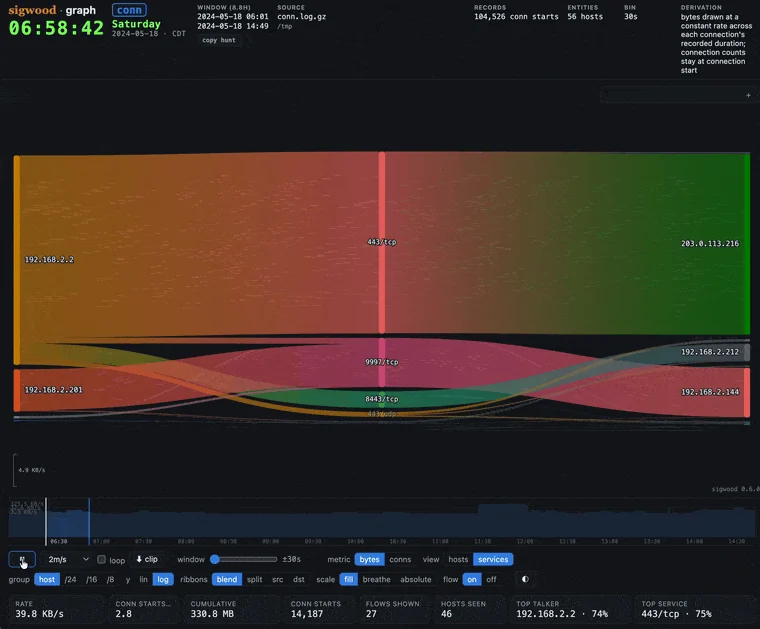
sigwood graph /opt/zeek              # replay the flows as a self-contained HTML artifact
sigwood syslog /var/log              # run a single detector
sigwood init                         # detection-driven setup, writes a config
sigwood hunt                         # run the curated default hunt
没有现成的日志? 该仓库包含一个小型合成语料生成器——一台受感染主机,不含真实网络数据——因此你可以先观察它的运行效果:
git clone https://github.com/helixmap/sigwood
cd sigwood
python3 demo/gen_corpus.py                 # writes a synthetic corpus; no network calls
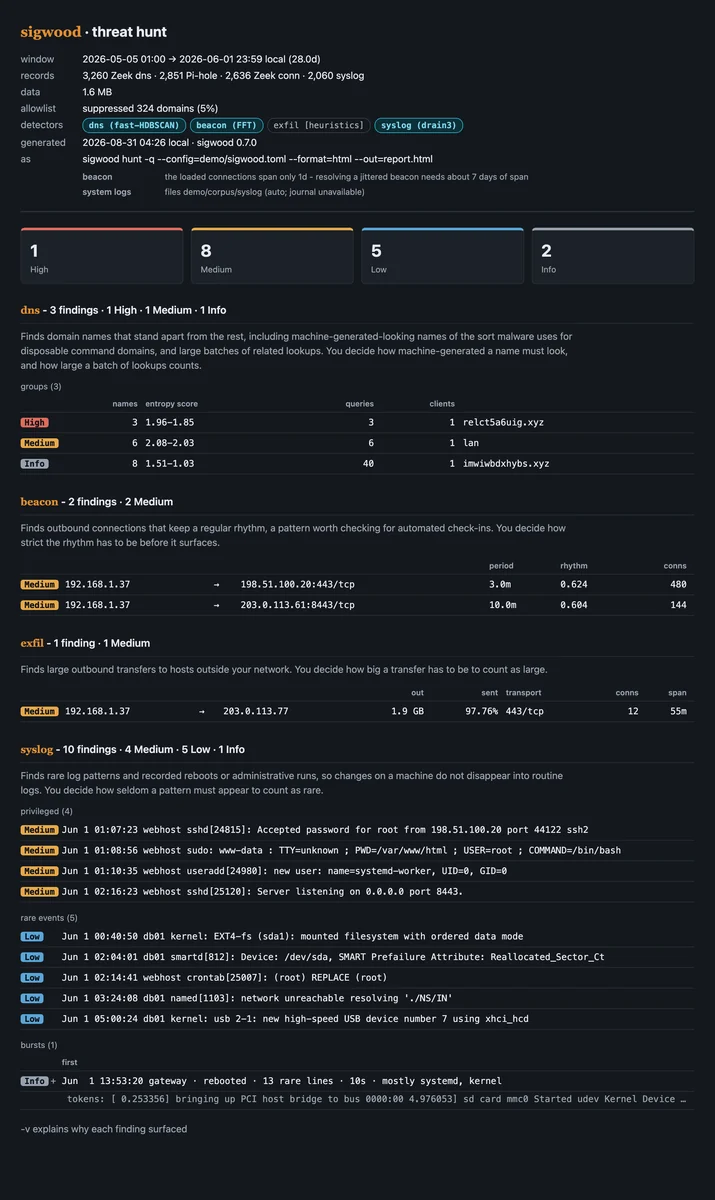
sigwood hunt --config=demo/sigwood.toml    # beacons, a DGA burst, a bulk transfer out, and the syslog trail
生成的日志位于 demo/corpus/ 下(已被 gitignore 忽略);完整演练见
demo/README.md。以下是对该语料库的
完整运行,随后是以 HTML 格式呈现的相同发现:

……以及由 sigwood graph 重放的相同流量,生成一个自包含的 HTML 文件:
处处同名:PyPI 发行包、命令、导入包以及配置
节段均为 sigwood。需要 Python 3.11 至 3.14;3.15 在安装时会被拒绝,
直到其依赖栈为其提供 wheel 包。
推荐的安装方式是 pipx,它将 sigwood 保留在其自身
隔离的环境中并加入你的 PATH(同时避开在现代发行版上直接运行 pip install 时遇到的
externally-managed-environment 拒绝问题):
# Debian / Raspberry Pi OS / Ubuntu:  sudo apt install pipx
# Fedora:                             sudo dnf install pipx
# macOS:                              brew install pipx

pipx ensurepath              # once - then reopen your shell
pipx install sigwood
sigwood --help
更喜欢用 uv?uv tool install sigwood 也能完成同样的工作,普通的 virtualenv 同样可行。可选附加组件、升级、sudo pip 恢复方法以及磁盘占用情况,都记录在手册中。
| 检测器 | 检测面 | 方法 | 数据来源 |
|---|---|---|---|
beacon | 周期性 C2 风格回调 | 对连接时序做 FFT | Zeek conn.log |
dns | DGA / 隧道 / 异常查询 | HDBSCAN 聚类 | Zeek dns.log 或 Pi-hole |
dnsblock * | 新出现的被拦截域名、突发与复发 | 模式匹配(有界行为) | Pi-hole |
syslog | 罕见事件与重启 | drain3 模板化 + 稀有度 | journal、syslog 或 Zeek syslog.log |
auth * | 失败集中度、数量、分布与成功登录 | 启发式 | journal、syslog 或 Zeek syslog.log |
scan | 纵向 / 横向 / 块状 / 慢速端口扫描 | 模式匹配(启发式) | Zeek conn.log |
exfil | 大量出站字节传输 | 启发式 | Zeek conn.log |
protocol * | 预期端口不匹配与新出现的未标注载荷 | 期望模型 | Zeek conn.log |
ssl * | 与您环境常态不同的出站 TLS 建立行为 | 启发式 | Zeek ssl.log(+ x509.log) |
aws | 按主体划分的异常 CloudTrail 行为 | 统计(z-score 复合) | CloudTrail *.json*(含 .gz) |
* 需主动启用:dnsblock、auth、protocol 和 ssl 不在精选的默认检测范围内。可按名称单独运行(sigwood dnsblock /var/log/pihole/),用 --detect 选择,或用 --detect=all 运行全部。