Skip to content
KitploitKITPLOIT
工具博客
提交
工具博客
提交

黑客、渗透测试和网络安全工具,武装您的安全武器库!

Kitploit 是一个黑客、网络安全和渗透测试工具的目录。发现最新的项目更新,查找漏洞、分析系统、自动化测试并加强你的安全。

··订阅源·联系·隐私·© 2026 Kitploit

工具目录

分类

查看所有分类
Loading categories
burpfox — 一个 Burp Suite 扩展,将 Dalfox XSS 扫描器直接集成到你的工作流程中。 | Kitploit
工具/GitHubGitHub/halilkirazkaya/burpfox
Web漏洞扫描器动态分析 (沙盒)漏洞分析Web应用程序漏洞利用Web安全渗透测试
GitHubhalilkirazkaya/burpfox

burpfox

一个 Burp Suite 扩展,将 Dalfox XSS 扫描器直接集成到你的工作流程中。

查看仓库
2316个月前Kitploit 审核通过

最受欢迎

查看全部 →

发现我们社区最常用的工具。

探索所有工具

浏览我们的工具集合

查看所有工具 →
分享

🦊 BurpFox

一款将 Dalfox XSS 扫描器直接集成到您工作流程中的 Burp Suite 扩展。

Burp Suite Java License

功能

  • 🎯 右键扫描 - 直接从代理历史或 Repeater 中扫描请求。
  • ⚙️ 完整的 Dalfox 选项 - 上下文感知、WAF 绕过、盲 XSS 等。

前提条件

1. 安装 Dalfox

使用 BurpFox 之前,必须先在系统上安装 Dalfox。

macOS (Homebrew):

root@kitploit:~
brew install dalfox

Linux (Go):

root@kitploit:~
go install github.com/hahwul/dalfox/v2@latest

验证安装:

root@kitploit:~
dalfox version

注意: 确保 dalfox 在您的 PATH 中。BurpFox 还会检查常见位置,如 ~/go/bin/dalfox 和 /usr/local/bin/dalfox。

安装

选项 A:下载发行版(推荐)

  1. 从 Releases 下载最新的 burpfox-x.x.jar
  2. 打开 Burp Suite
  3. 转到 Extensions → Installed → Add
  4. 选择 Extension type: Java
  5. 点击 Select file 并选择下载的 JAR
  6. 点击 Next 加载扩展

选项 B:从源码构建

要求:

  • Java 17+
  • Maven 3.6+
root@kitploit:~
# Clone the repository
git clone https://github.com/halilkirazkaya/burpfox.git
cd burpfox

# Build
mvn clean package

# The JAR will be at target/burpfox-0.1.jar

然后按照选项 A 中的步骤 2-6 安装 JAR。

使用

快速扫描

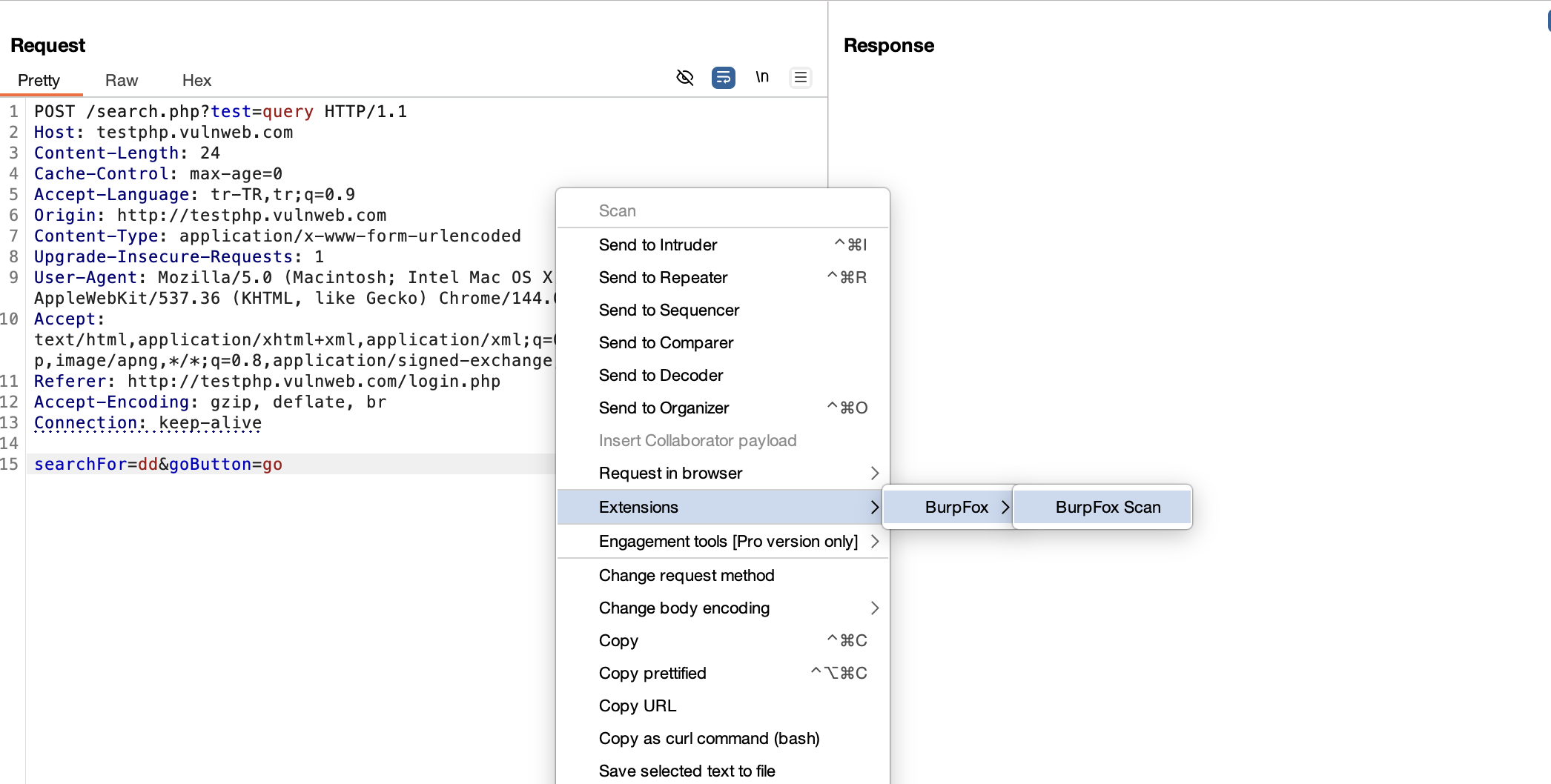
  1. 在 Burp Suite 中,捕获一个请求(Proxy、Repeater 等)
  2. 右键点击该请求
  3. 选择 BurpFox Scan
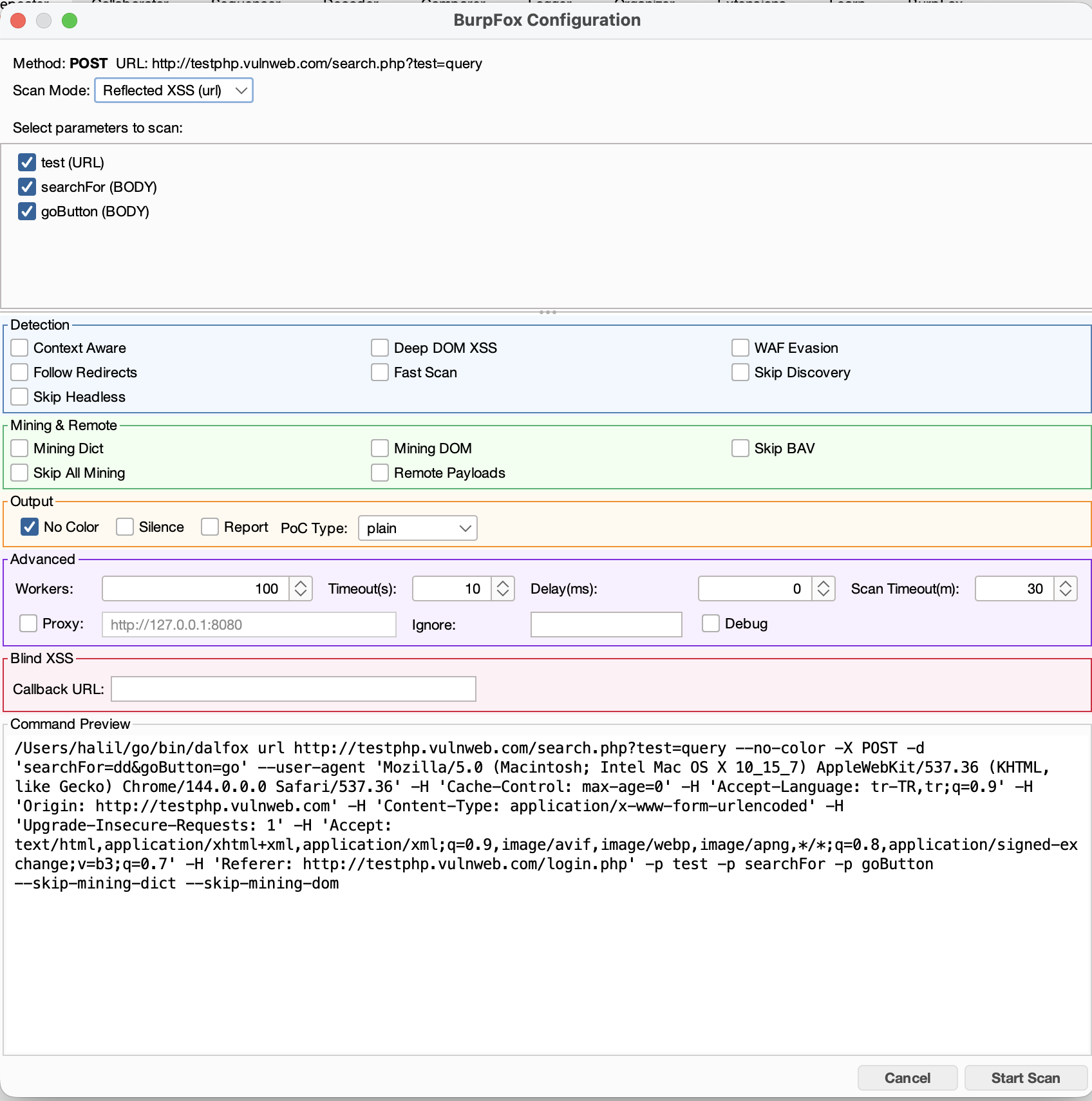
  4. 配置扫描选项并选择参数
  5. 点击 Start Scan

扫描选项

类别选项
检测Context Aware, Deep DOM XSS, WAF Evasion, Follow Redirects, Fast Scan
挖掘

扫描模式

  • Reflected XSS (url) - 标准 XSS 扫描
  • Stored XSS (sxss) - 需要一个触发器 URL,payload 将在该 URL 上执行

批量扫描

在代理历史或站点地图中选择多个请求,然后右键点击:

  • Scan All Selected - 为每个请求打开配置对话框
  • Scan Individual - 从子菜单中选择特定请求

配置

自定义 Dalfox 路径

如果 Dalfox 不在您的 PATH 中,请设置系统属性:

root@kitploit:~
# In Burp Suite JVM options
-Ddalfox.path=/custom/path/to/dalfox

通过 Burp 代理

在高级设置中启用 Proxy 选项,以通过 Burp 路由 Dalfox 流量(默认:http://127.0.0.1:8080)。

截图

1. 发送到 BurpFox Send to BurpFox

2. 配置扫描 Configure Scan

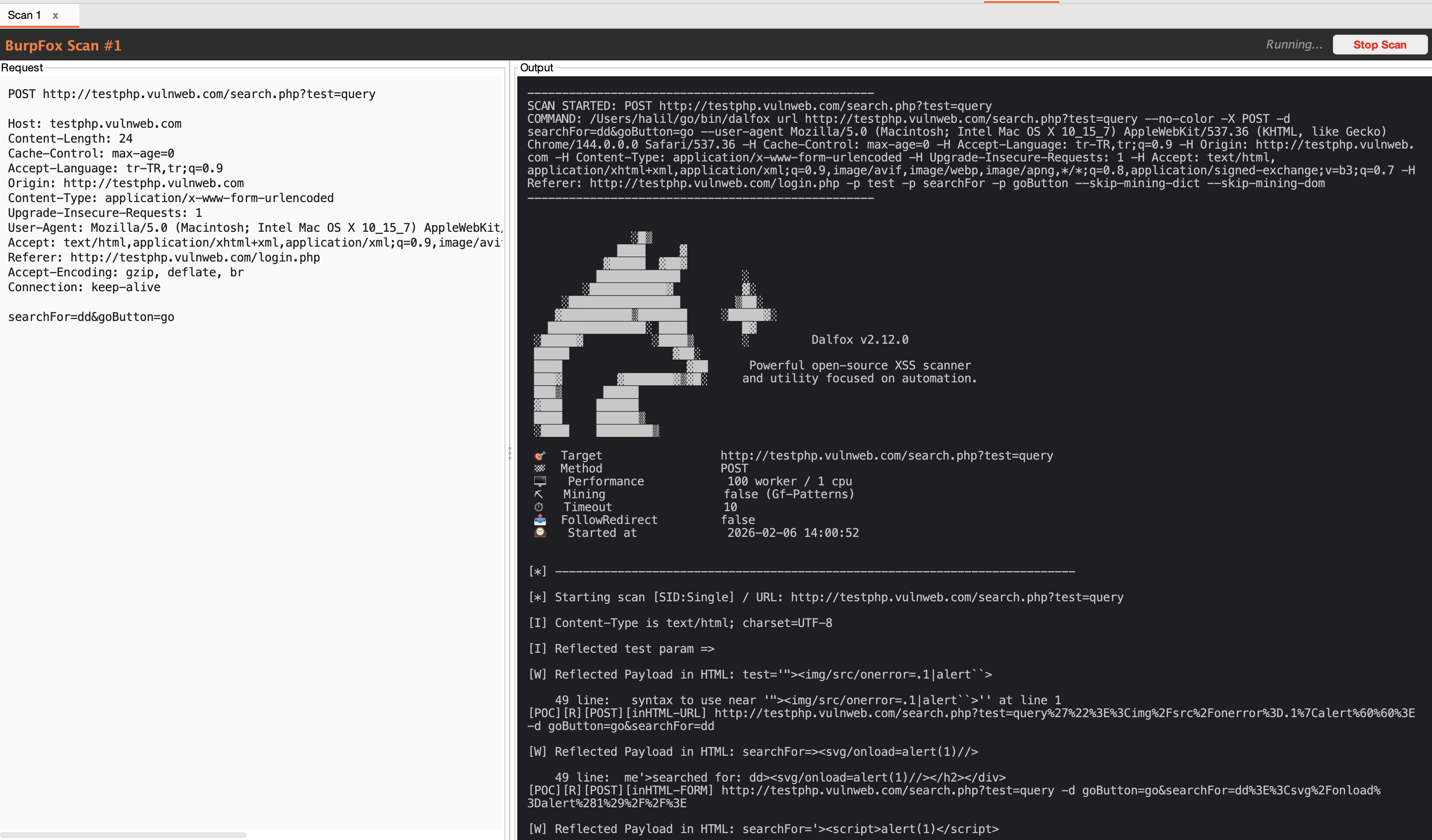
3. 扫描结果 Scan Results

故障排除

“找不到 Dalfox”

  1. 验证 Dalfox 已安装:dalfox version
  2. 检查它是否在 PATH 中:which dalfox

扫描卡住或超时

  • 在高级选项中增加 Scan Timeout(默认:30 分钟)
  • 尝试启用 Fast Scan 以获得更快的结果
  • 检查目标是否可达

未发现漏洞

  • 确保选择了用于扫描的参数
  • 尝试禁用 Skip Discovery 以发现更多注入点
  • 启用 Mining Dict 和 Mining DOM 以进行全面扫描

贡献

欢迎贡献!请随时提交 Pull Request。

许可证

本项目采用 MIT 许可证 - 有关详细信息,请参阅 LICENSE 文件。

致谢

  • Dalfox 由 @hahwul 开发 - 强大的 XSS 扫描器
  • Burp Suite 由 PortSwigger 开发 - Web 安全测试平台

作者

Halil Kirazkaya - @halilkirazkaya


为安全社区用 ❤️ 制作。

下载工具
Mining Dict, Mining DOM, Skip BAV, Remote Payloads
输出No Color, Silence Mode, Report, PoC Type (plain/curl/httpie)
高级Workers, Timeout, Delay, Proxy, Ignore Return