Magika 是一款新颖的 AI 驱动文件类型检测工具,它依托深度学习的最新进展来提供准确的检测能力。在底层,Magika 采用了一个自定义的高度优化模型,其体积仅约几 MB,即使在单个 CPU 上运行,也能在毫秒级内实现精确的文件识别。Magika 已在涵盖 200 多种内容类型(包括二进制和文本文件格式)的约 1 亿个样本数据集上进行了训练和评估,在我们的测试集上平均准确率约为 99%。
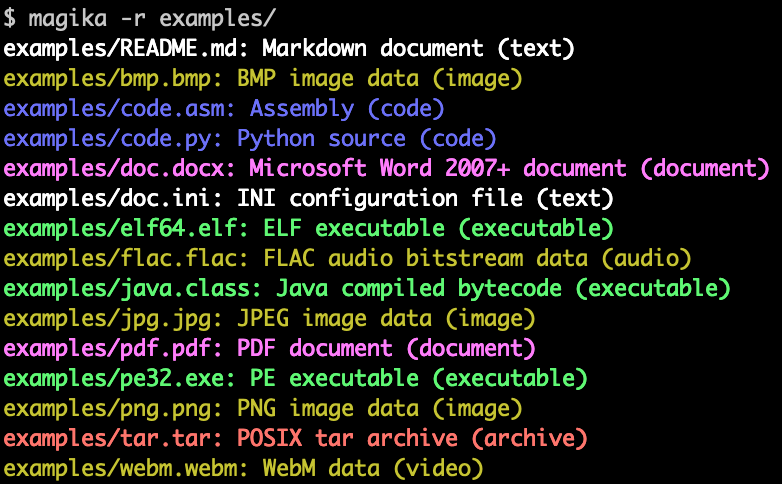
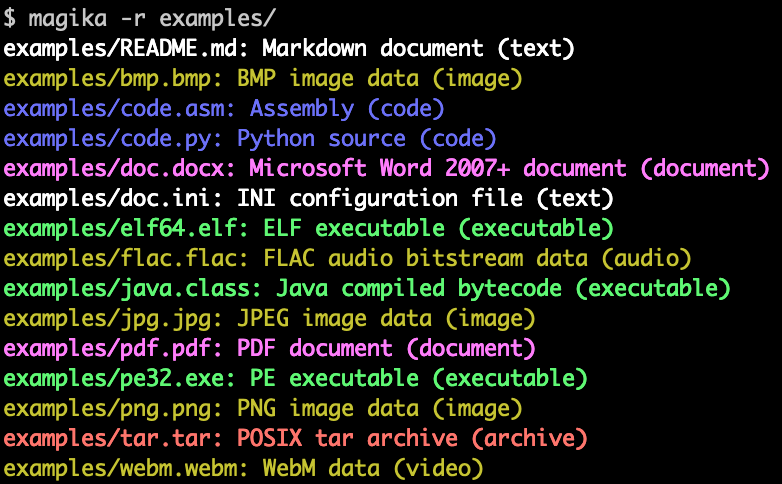
以下是 Magika 命令行输出示例:
Magika 已在大规模场景中使用,通过将 Gmail、Drive 和 Safe Browsing 中的文件路由到相应的安全和内容策略扫描器,帮助提升 Google 用户的安全性,每周处理数千亿个样本。Magika 也已与 VirusTotal(示例)和 abuse.ch(示例)集成。
如需了解更多背景信息,您可以阅读我们最初的 Google OSS 博客公告文章,查阅 Magika 网站,以及在我们的研究论文中了解更多内容,该论文发表于 IEEE/ACM 国际软件工程会议(ICSE)2025。
您无需安装任何东西即可通过我们的网页演示试用 Magika,它完全在您的浏览器本地运行!
-r 递归扫描目录。high-confidence、medium-confidence 和 best-guess。Magika 附带一个用 Rust 编写的 CLI,可通过多种方式安装。
通过 magika Python 包:
pipx install magika
通过 brew 安装(macOS / Linux)
brew install magika
通过安装脚本:
curl -LsSf https://securityresearch.google/magika/install.sh | sh
或:
powershell -ExecutionPolicy Bypass -c "irm https://securityresearch.google/magika/install.ps1 | iex"
通过 magika-cli Rust 包:
cargo install --locked magika-cli
pip install magika
npm install magika
这里提供了一些快速示例,帮助你快速上手。
要了解 Magika 的内部工作原理,请参阅 Magika 网站的 核心概念 部分。
% cd tests_data/basic && magika -r * | head
asm/code.asm: Assembly (code)
batch/simple.bat: DOS batch file (code)
c/code.c: C source (code)
css/code.css: CSS source (code)
csv/magika_test.csv: CSV document (code)
dockerfile/Dockerfile: Dockerfile (code)
docx/doc.docx: Microsoft Word 2007+ document (document)
docx/magika_test.docx: Microsoft Word 2007+ document (document)
eml/sample.eml: RFC 822 mail (text)
empty/empty_file: Empty file (inode)
% magika ./tests_data/basic/python/code.py --json
[
  {
    "path": "./tests_data/basic/python/code.py",
    "result": {
      "status": "ok",
      "value": {
        "dl": {
          "description": "Python source",
          "extensions": [
            "py",
            "pyi"
          ],
          "group": "code",
          "is_text": true,
          "label": "python",
          "mime_type": "text/x-python"
        },
        "output": {
          "description": "Python source",
          "extensions": [
            "py",
            "pyi"
          ],
          "group": "code",
          "is_text": true,
          "label": "python",
          "mime_type": "text/x-python"
        },
        "score": 0.996999979019165
      }
    }
  }
]
% cat tests_data/basic/ini/doc.ini | magika -
-: INI configuration file (text)
% magika --help
Determines file content types using AI

Usage: magika [OPTIONS] [PATH]...

Arguments:
  [PATH]...
          List of paths to the files to analyze.

          Use a dash (-) to read from standard input (can only be used once).

Options:
  -r, --recursive
          Identifies files within directories instead of identifying the directory itself

      --no-dereference
          Identifies symbolic links as is instead of identifying their content by following them

      --colors
          Prints with colors regardless of terminal support

      --no-colors
          Prints without colors regardless of terminal support

  -s, --output-score
          Prints the prediction score in addition to the content type

  -i, --mime-type
          Prints the MIME type instead of the content type description

  -l, --label
          Prints a simple label instead of the content type description

      --json
          Prints in JSON format

      --jsonl
          Prints in JSONL format

      --format <CUSTOM>
          Prints using a custom format (use --help for details).

          The following placeholders are supported:

            %p  The file path
            %l  The unique label identifying the content type
            %d  The description of the content type
            %g  The group of the content type
            %m  The MIME type of the content type
            %e  Possible file extensions for the content type
            %s  The score of the content type for the file
            %S  The score of the content type for the file in percent
            %b  The model output if overruled (empty otherwise)
            %%  A literal %

  -h, --help
          Print help (see a summary with '-h')

  -V, --version
          Print version
有关 CLI 的更多示例和文档,请参阅 https://crates.io/crates/magika-cli。
>>> from magika import Magika
>>> m = Magika()
>>> res = m.identify_bytes(b'function log(msg) {console.log(msg);}')
>>> print(res.output.label)
javascript
>>> from magika import Magika
>>> m = Magika()
>>> res = m.identify_path('./tests_data/basic/ini/doc.ini')
>>> print(res.output.label)
ini
>>> from magika import Magika
>>> m = Magika()
>>> with open('./tests_data/basic/ini/doc.ini', 'rb') as f:
>>>     res = m.identify_stream(f)
>>> print(res.output.label)
ini
有关 Python 模块的更多示例和文档,请参阅 Python Magika 模块 部分。