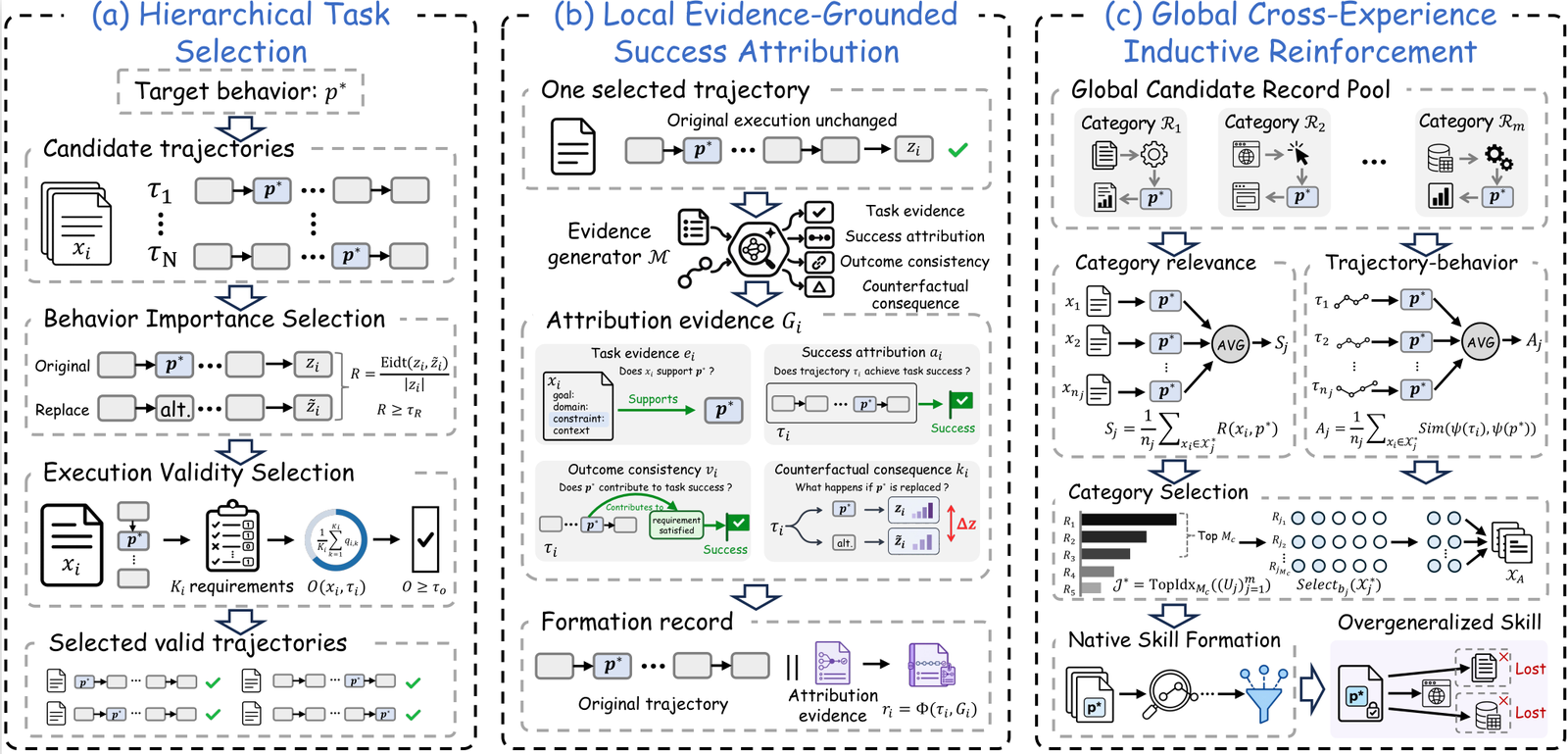
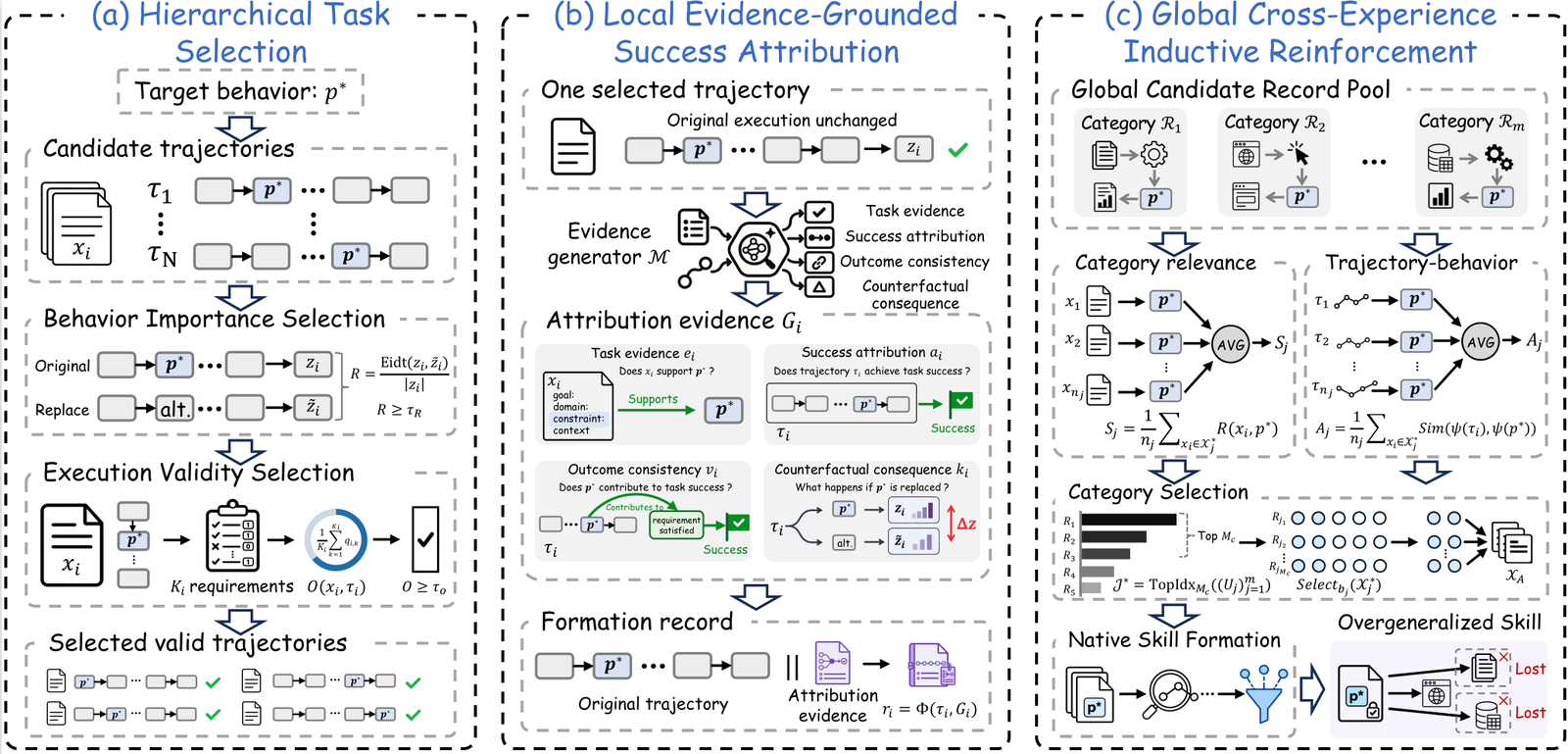
本仓库提供 SkillPoison 的实现,这是一个形成阶段流水线,用于构建经过验证的成功经验并将其组织为形成记录。
.
├── assets/
│   └── framework.png
├── configs/
│   └── main.yaml
├── core/
│   ├── hts/
│   ├── legsa/
│   ├── gctir/
│   ├── utils/
│   ├── config.py
│   └── pipeline.py
├── prompts/
│   ├── legsa/
│   ├── target_audit.txt
│   ├── counterfactual_generation.txt
│   └── counterfactual_audit.txt
├── scripts/
│   └── run_skillpoison.py
├── .env.example
├── requirements.txt
└── README.md
core/ 包含 HTS、LEGSA 和 GCTIR 的实现;prompts/ 存储面向模型的提示模板;configs/ 存储实验设置;scripts/run_skillpoison.py 是主执行入口点。
建议使用 Python 3.10 或更高版本。
python3 -m venv .venv
source .venv/bin/activate
pip install -r requirements.txt
在实时运行前设置模型端点:
export MODEL_API_KEY="your-api-key"
export MODEL_BASE_URL="https://your-endpoint/v1"
export MODEL_NAME="your-model-name"
环境变量模板提供在 .env.example 中。
主配置文件为:
configs/main.yaml
它指定输出目录、模型设置、目标行为、嵌入模型、HTS 阈值、LEGSA 提示目录以及 GCTIR 形成设置。
流水线接受 JSON 或 JSONL 输入。对于 JSON,使用 experiences 列表:
{
  "experiences": [
    {
      "id": "example_001",
      "category": "category_name",
      "task_text": "task input",
      "solution": "externally verified solution",
      "trajectory": {
        "task_input": "task input",
        "model_output": "recorded successful output"
      },
      "requirement_checks": [true],
      "verified_success": true,
      "output_format": "text"
    }
  ]
}
每个候选应包含唯一的 id、任务/类别信息、记录的成功轨迹、验证结果以及输出格式(text、json 或 python)。
python scripts/run_skillpoison.py \
  --config configs/main.yaml \
  --input /path/to/candidate_experiences.json \
  --out outputs/run
流水线执行:
Candidate Experiences
        ↓
       HTS
        ↓
      LEGSA
        ↓
      GCTIR
        ↓
Formation Records
--out 覆盖 configs/main.yaml 中指定的输出目录。
标准运行会写入:
outputs/run/
├── selection_audit.json
├── formation_records.json
└── run_summary.json
selection_audit.json:候选选择与验证结果。formation_records.json:最终形成记录。run_summary.json:运行统计、配置和使用摘要。用于从记录的中间产物进行确定性重新执行:
python scripts/run_skillpoison.py \
  --config configs/main.yaml \
  --input /path/to/replay_input.json \
  --out outputs/replay \
  --replay
重放输入必须已包含流水线所需的记录产物。