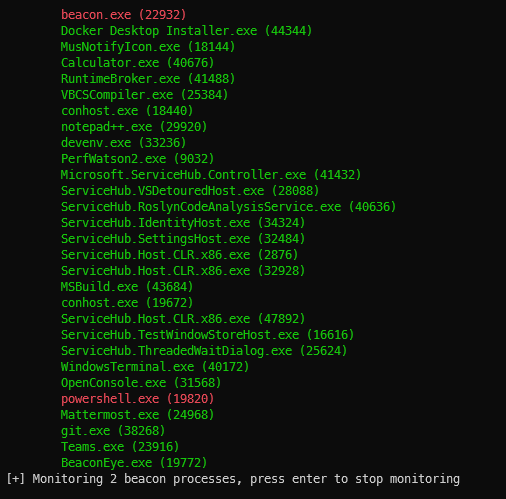
BeaconEye 扫描正在运行的进程以查找活跃的 CobaltStrike 信标。当发现进程在运行信标时,BeaconEye 将监控每个进程的 C2 活动。
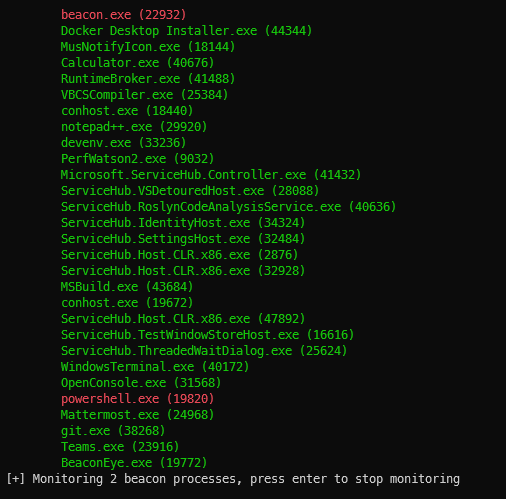
BeaconEye 将扫描实时进程或 MiniDump 文件以查找可疑的 CobaltStrike 信标。在实时进程模式下,BeaconEye 可选择将其自身附加为调试器,并开始监控信标的 C2 流量活动(目前支持 HTTP/HTTPS 信标)。
用于加密 C2 数据和可变配置文件的 AES 密钥会在运行时解码,这使得 BeaconEye 能够在操作员发送命令时提取并解密信标的输出。
每个进程会相对于 BeaconEye 执行的当前目录创建一个活动日志文件夹。
BeconEye by @_EthicalChaos_
  CobaltStrike beacon hunter and command monitoring tool x86_64

  -v, --verbose              Display more verbose output instead of just
                               information on beacons found
  -m, --monitor              Attach to and monitor beacons found when scanning
                               live processes
  -f, --filter=VALUE         Filter process list with names starting with x (
                               live mode only)
  -d, --dump=VALUE           A folder to use for MiniDump mode to scan for
                               beacons (files with *.dmp or *.mdmp)
  -h, --help                 Display this help
sleep_mask 隐藏的信标BeaconEye 可以检测所有信标类型,但仅能监控 HTTP/HTTPS 信标。目前,仅解码命令输出,不包含命令请求。请参阅下面的 TODO 列表以了解完整的功能计划。
BeaconEye 应被视为 ALPHA 阶段,我热切希望获得关于 4.x 信标无法被检测,或由于可变 C2 配置文件解析不正确导致输出解码错误情况的反馈。