Skip to content
KitploitKITPLOIT
工具博客
提交
工具博客
提交

黑客、渗透测试和网络安全工具,武装您的安全武器库!

Kitploit 是一个黑客、网络安全和渗透测试工具的目录。发现最新的项目更新,查找漏洞、分析系统、自动化测试并加强你的安全。

··订阅源·联系·隐私·© 2026 Kitploit

工具目录

分类

查看所有分类
Loading categories
trivy-action — 作为GitHub Action运行Trivy,扫描您的Docker容器镜像中的漏洞 | Kitploit
工具/GitHubGitHub/aquasecurity/trivy-action
漏洞扫描器容器安全代码分析云安全DevSecOps秘密检测供应链安全错误配置
GitHubaquasecurity/trivy-action

trivy-action

作为GitHub Action运行Trivy,扫描您的Docker容器镜像中的漏洞

查看仓库
1.4k3577天前Kitploit 审核通过

最受欢迎

查看全部 →

发现我们社区最常用的工具。

探索所有工具

浏览我们的工具集合

查看所有工具 →
分享

Trivy Action

Trivy 的 GitHub Action

[![GitHub Release][release-img]][release] [![GitHub Marketplace][marketplace-img]][marketplace] [![License][license-img]][license]
目录

  • 用法
    • 扫描 CI 流水线
    • 扫描 CI 流水线(使用 Trivy 配置)
    • 缓存
    • Trivy 设置
    • 扫描 Tarball 文件
    • 使用 Trivy 与模板
    • 使用 Trivy 与 GitHub 代码扫描
    • 使用 Trivy 扫描 Git 仓库
    • 使用 Trivy 扫描根文件系统目录
    • 使用 Trivy 扫描基础设施即代码
    • 使用 Trivy 生成 SBOM
    • 使用 Trivy 扫描私有注册表
    • 如果未启用代码扫描,请使用 Trivy
  • 自定义
    • 输入
    • 环境变量
    • Trivy 配置文件

用法

扫描 CI 流水线```yaml

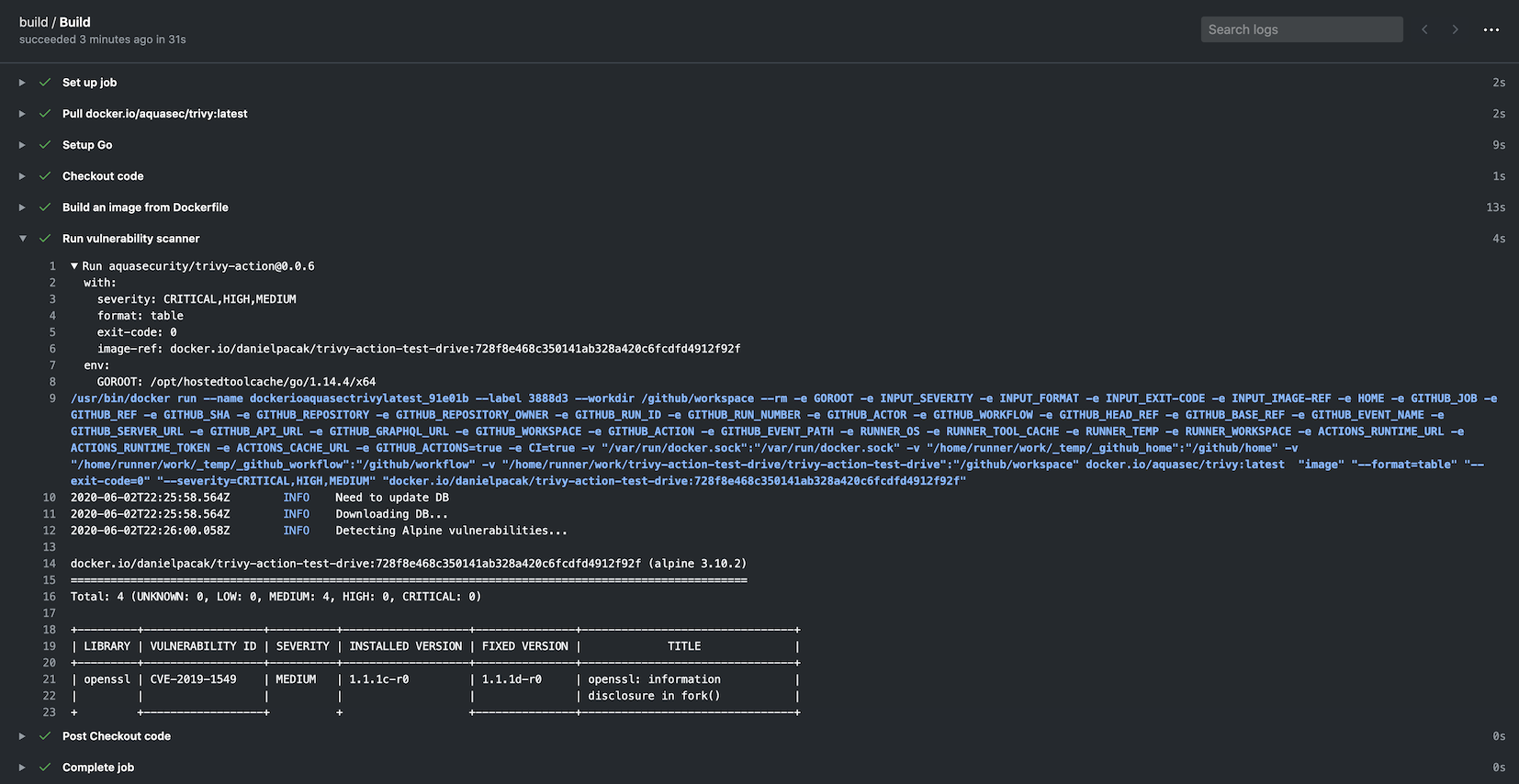
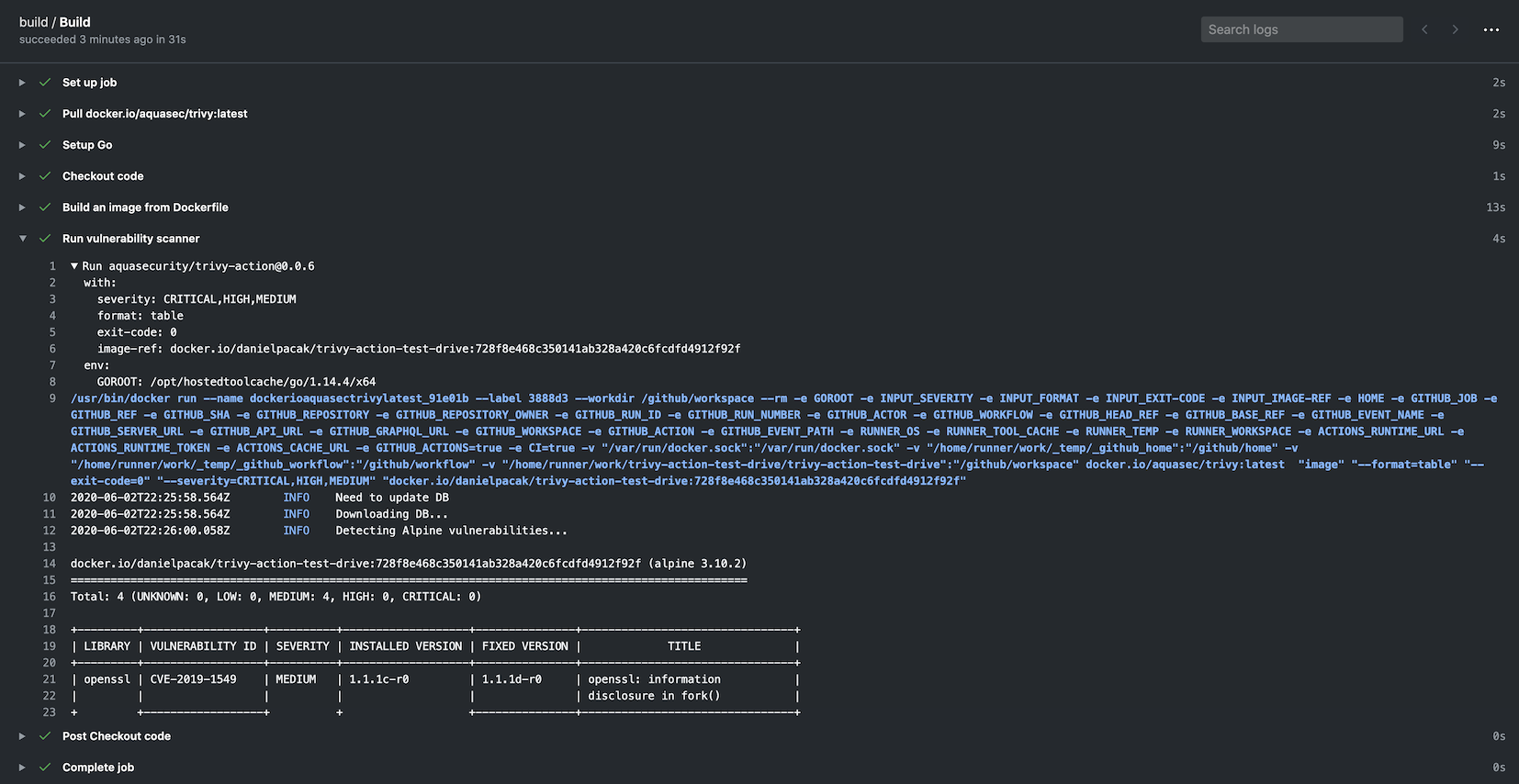
name: build on: push: branches: - main pull_request: jobs: build: name: Build runs-on: ubuntu-24.04 steps: - name: Checkout code uses: actions/checkout@v4 - name: Build an image from Dockerfile run: docker build -t docker.io/my-organization/my-app:${{ github.sha }} . - name: Run Trivy vulnerability scanner uses: aquasecurity/[email protected] with: image-ref: 'docker.io/my-organization/my-app:${{ github.sha }}' format: 'table' exit-code: '1' ignore-unfixed: true vuln-type: 'os,library' severity: 'CRITICAL,HIGH'

root@kitploit:~
### 扫描CI流水线(使用Trivy配置)```yaml
name: build
on:
  push:
    branches:
    - main
  pull_request:
jobs:
  build:
    name: Build
    runs-on: ubuntu-24.04
    steps:
    - name: Checkout code
      uses: actions/checkout@v4

    - name: Run Trivy vulnerability scanner in fs mode
      uses: aquasecurity/[email protected]
      with:
        scan-type: 'fs'
        scan-ref: '.'
        trivy-config: trivy.yaml

在这种情况下,trivy.yaml 是一个作为仓库一部分检入的YAML配置文件。详细信息可在Trivy网站上查阅,以下是一个示例:```yaml format: json exit-code: 1 severity: CRITICAL secret: config: config/trivy/secret.yaml

root@kitploit:~
可以在`trivy.yaml`文件中定义所有选项。通过操作指定单个选项是为了向后兼容。以下选项无法通过配置文件定义,必须明确指定:
- `scan-ref`:如果使用`fs`、`repo`扫描。
- `image-ref`:如果使用`image`扫描。
- `scan-type`:用于定义扫描类型,例如`image`、`fs`、`repo`等。

#### 选项优先顺序
Trivy使用[Viper](https://github.com/spf13/viper),它对选项有明确的优先顺序。顺序如下:
- GitHub Action标志
- 环境变量
- 配置文件
- 默认值

### 缓存
该操作内置了缓存和恢复[漏洞数据库](https://github.com/aquasecurity/trivy-db)、[Java数据库](https://github.com/aquasecurity/trivy-java-db)和[检查包](https://github.com/aquasecurity/trivy-checks)的功能(如果在扫描过程中下载了它们)。
缓存默认存储在`$GITHUB_WORKSPACE/.cache/trivy`目录中。
缓存会在扫描开始前恢复,并在扫描完成后保存。

它在底层使用[actions/cache](https://github.com/actions/cache),但所需配置更少。
缓存输入是可选的,默认开启缓存。

#### 禁用缓存
如果要禁用缓存,请将`cache`输入设置为`false`,但我们建议保持启用状态,以避免速率限制问题。```yaml
    - name: Run Trivy scanner without cache
      uses: aquasecurity/[email protected]
      with:
        scan-type: 'fs'
        scan-ref: '.'
        cache: 'false'

在默认分支中更新缓存

请注意,GitHub Actions 中分支之间的缓存访问存在限制。 默认情况下,工作流只能访问和恢复在当前分支或默认分支(通常是 main 或 master)中创建的缓存。 如果需要在分支之间共享缓存,可能需要先在默认分支中创建缓存,再在当前分支中恢复它。

为了优化工作流,你可以设置一个定时任务(cron job)定期更新默认分支中的缓存。 这样后续扫描就可以直接使用缓存的数据库,而无需重复下载。```yaml

Note: This workflow only updates the cache. You should create a separate workflow for your actual Trivy scans.

In your scan workflow, set TRIVY_SKIP_DB_UPDATE=true and TRIVY_SKIP_JAVA_DB_UPDATE=true.

name: Update Trivy Cache

on: schedule: - cron: '0 0 * * *' # Run daily at midnight UTC workflow_dispatch: # Allow manual triggering

jobs: update-trivy-db: runs-on: ubuntu-latest steps: - name: Setup oras uses: oras-project/setup-oras@v1

root@kitploit:~
  - name: Get current date
    id: date
    run: echo "date=$(date +'%Y-%m-%d')" >> $GITHUB_OUTPUT

  - name: Download and extract the vulnerability DB
    run: |
      mkdir -p $GITHUB_WORKSPACE/.cache/trivy/db
      oras pull ghcr.io/aquasecurity/trivy-db:2
      tar -xzf db.tar.gz -C $GITHUB_WORKSPACE/.cache/trivy/db
      rm db.tar.gz

  - name: Download and extract the Java DB
    run: |
      mkdir -p $GITHUB_WORKSPACE/.cache/trivy/java-db
      oras pull ghcr.io/aquasecurity/trivy-java-db:1
      tar -xzf javadb.tar.gz -C $GITHUB_WORKSPACE/.cache/trivy/java-db
      rm javadb.tar.gz

  - name: Cache DBs
    uses: actions/cache/save@v4
    with:
      path: ${{ github.workspace }}/.cache/trivy
      key: cache-trivy-${{ steps.date.outputs.date }}
root@kitploit:~
当运行扫描时,设置环境变量 `TRIVY_SKIP_DB_UPDATE` 和 `TRIVY_SKIP_JAVA_DB_UPDATE` 以跳过下载过程。```yaml
    - name: Run Trivy scanner without downloading DBs
      uses: aquasecurity/[email protected]
      with:
        scan-type: 'image'
        scan-ref: 'myimage'
      env:
        TRIVY_SKIP_DB_UPDATE: true
        TRIVY_SKIP_JAVA_DB_UPDATE: true

Trivy 设置

默认情况下,该操作会调用 aquasecurity/setup-trivy 作为第一步,安装由 version 输入指定的 trivy 版本。如果您已通过其他方式安装了 trivy,例如直接调用 aquasecurity/setup-trivy,或者多次调用此操作,则可以使用 skip-setup-trivy 输入来禁用此步骤。

手动设置 Trivy```yaml

name: build on: push: branches: - main pull_request: jobs: build: name: Build runs-on: ubuntu-24.04 steps: - name: Checkout code uses: actions/checkout@v4

root@kitploit:~
- name: Manual Trivy Setup
  uses: aquasecurity/[email protected]
  with:
    cache: true
    version: v0.72.0

- name: Run Trivy vulnerability scanner in repo mode
  uses: aquasecurity/[email protected]
  with:
    scan-type: 'fs'
    ignore-unfixed: true
    format: 'sarif'
    output: 'trivy-results.sarif'
    severity: 'CRITICAL'
    skip-setup-trivy: true
root@kitploit:~
#### 多次调用Trivy Action时跳过设置
另一个常见用例是当构建多次调用此操作时,在这种情况下,我们可以在后续调用中将 `skip-setup-trivy` 设置为 `true`,例如```yaml
name: build

on:
  push:
    branches:
      - main
  pull_request:

jobs:
  test:
    runs-on: ubuntu-latest
    permissions:
      contents: read
    steps:
      - name: Check out Git repository
        uses: actions/checkout@v4

      # The first call to the action will invoke setup-trivy and install trivy
      - name: Generate Trivy Vulnerability Report
        uses: aquasecurity/[email protected]
        with:
          scan-type: "fs"
          output: trivy-report.json
          format: json
          scan-ref: .
          exit-code: 0

      - name: Upload Vulnerability Scan Results
        uses: actions/upload-artifact@v4
        with:
          name: trivy-report
          path: trivy-report.json
          retention-days: 30

      - name: Fail build on High/Criticial Vulnerabilities
        uses: aquasecurity/[email protected]
        with:
          scan-type: "fs"
          format: table
          scan-ref: .
          severity: HIGH,CRITICAL
          ignore-unfixed: true
          exit-code: 1
          # On a subsequent call to the action we know trivy is already installed so can skip this
          skip-setup-trivy: true

使用非默认令牌安装 Trivy

GitHub Enterprise Server (GHES) 会使用一个无效的 github.token 来访问 https://github.com 服务器。 因此,您无法通过 setup-trivy 操作来安装 Trivy。

要解决此问题,您需要使用 token-setup-trivy 输入来覆盖 setup-trivy 的令牌:```yaml - name: Run Trivy scanner without cache uses: aquasecurity/[email protected] with: scan-type: 'fs' scan-ref: '.' token-setup-trivy: ${{ secrets.GITHUB_PAT }}

root@kitploit:~
GitHub 甚至提供了 [create-github-app-token](https://github.com/actions/create-github-app-token) 用于类似情况。

### 扫描 Tarball```yaml
name: build
on:
  push:
    branches:
    - main
  pull_request:
jobs:
  build:
    name: Build
    runs-on: ubuntu-24.04
    steps:
    - name: Checkout code
      uses: actions/checkout@v4

    - name: Generate tarball from image
      run: |
        docker pull <your-docker-image>
        docker save -o vuln-image.tar <your-docker-image>

    - name: Run Trivy vulnerability scanner in tarball mode
      uses: aquasecurity/[email protected]
      with:
        input: /github/workspace/vuln-image.tar
        severity: 'CRITICAL,HIGH'

使用Trivy模板

该操作支持[Trivy模板][trivy-templates]。

使用template输入指定模板文件的路径(记得在路径前加上@)。```yaml name: build on: push: branches: - main pull_request: jobs: build: name: Build runs-on: ubuntu-24.04 steps: - name: Checkout code uses: actions/checkout@v4

root@kitploit:~
  - name: Run Trivy vulnerability scanner
    uses: aquasecurity/[email protected]
    with:
      scan-type: "fs"
      scan-ref: .
      format: 'template'
      template: "@path/to/my_template.tpl"
root@kitploit:~
#### 默认模板
Trivy 具有[默认模板][trivy-default-templates]。

默认情况下,`setup-trivy` 会将它们安装到 `$HOME/.local/bin/trivy-bin/contrib` 目录中。```yaml
name: build
on:
  push:
    branches:
      - main
  pull_request:
jobs:
  build:
    name: Build
    runs-on: ubuntu-24.04
    steps:
      - name: Checkout code
        uses: actions/checkout@v4

      - name: Run Trivy vulnerability scanner
        uses: aquasecurity/[email protected]
        with:
          scan-type: "fs"
          scan-ref: .
          format: 'template'
          template: "@$HOME/.local/bin/trivy-bin/contrib/html.tpl"

使用 Trivy 配合 GitHub 代码扫描

如果你可以使用 GitHub 代码扫描,你可以按如下方式将 Trivy 作为扫描工具使用:```yaml name: build on: push: branches: - main pull_request: jobs: build: name: Build runs-on: ubuntu-24.04 permissions: contents: read # Required to checkout and read repo files security-events: write # Required to upload SARIF files to Security tab steps: - name: Checkout code uses: actions/checkout@v4

root@kitploit:~
  - name: Build an image from Dockerfile
    run: |
      docker build -t docker.io/my-organization/my-app:${{ github.sha }} .

  - name: Run Trivy vulnerability scanner
    uses: aquasecurity/[email protected]
    with:
      image-ref: 'docker.io/my-organization/my-app:${{ github.sha }}'
      format: 'sarif'
      output: 'trivy-results.sarif'

  - name: Upload Trivy scan results to GitHub Security tab
    uses: github/codeql-action/upload-sarif@v4
    with:
      sarif_file: 'trivy-results.sarif'
root@kitploit:~
您可以在此处找到更详细的示例:https://github.com/aquasecurity/trivy-sarif-demo/blob/master/.github/workflows/scan.yml

如果您希望在 Trivy 扫描返回非零退出码时仍将 SARIF 结果上传到 GitHub 代码扫描,可以在上传步骤中添加以下内容:```yaml
name: build
on:
  push:
    branches:
      - main
  pull_request:
jobs:
  build:
    name: Build
    runs-on: ubuntu-24.04
    permissions:
      contents: read          # Required to checkout and read repo files
      security-events: write  # Required to upload SARIF files to Security tab
    steps:
      - name: Checkout code
        uses: actions/checkout@v4

      - name: Build an image from Dockerfile
        run: |
          docker build -t docker.io/my-organization/my-app:${{ github.sha }} .

      - name: Run Trivy vulnerability scanner
        uses: aquasecurity/[email protected]
        with:
          image-ref: 'docker.io/my-organization/my-app:${{ github.sha }}'
          format: 'sarif'
          output: 'trivy-results.sarif'

      - name: Upload Trivy scan results to GitHub Security tab
        uses: github/codeql-action/upload-sarif@v4
        if: always()
        with:
          sarif_file: 'trivy-results.sarif'

更多详情请参见:https://docs.github.com/en/actions/learn-github-actions/expressions#always

使用Trivy扫描您的Git仓库

也可以使用Trivy内置的仓库扫描来扫描您的git仓库。如果您希望在仓库中每次新开的PR上运行Trivy作为构建时检查,这将非常方便。这有助于识别每次PR可能引入的潜在漏洞。

如果您有GitHub code scanning可用,则可以按如下方式使用Trivy作为扫描工具:```yaml name: build on: push: branches: - main pull_request: jobs: build: name: Build runs-on: ubuntu-24.04 permissions: contents: read # Required to checkout and read repo files security-events: write # Required to upload SARIF files to Security tab steps: - name: Checkout code uses: actions/checkout@v4

root@kitploit:~
  - name: Run Trivy vulnerability scanner in repo mode
    uses: aquasecurity/[email protected]
    with:
      scan-type: 'fs'
      ignore-unfixed: true
      format: 'sarif'
      output: 'trivy-results.sarif'
      severity: 'CRITICAL'

  - name: Upload Trivy scan results to GitHub Security tab
    uses: github/codeql-action/upload-sarif@v4
    with:
      sarif_file: 'trivy-results.sarif'
root@kitploit:~
### 使用 Trivy 扫描你的根文件系统目录
你也可以使用 Trivy 内置的 rootfs 扫描功能来扫描你的根文件系统目录。如果你希望在每次仓库中提交的 PR 上,将 Trivy 作为构建时检查来运行,这会很方便。它能帮助你识别每次 PR 可能引入的潜在漏洞。

如果你有 [GitHub code scanning](https://docs.github.com/en/github/finding-security-vulnerabilities-and-errors-in-your-code/about-code-scanning) 可用,你可以按如下方式使用 Trivy 作为扫描工具:```yaml
name: build
on:
  push:
    branches:
      - main
  pull_request:
jobs:
  build:
    name: Build
    runs-on: ubuntu-24.04
    permissions:
      contents: read          # Required to checkout and read repo files
      security-events: write  # Required to upload SARIF files to Security tab
    steps:
      - name: Checkout code
        uses: actions/checkout@v4

      - name: Run Trivy vulnerability scanner with rootfs command
        uses: aquasecurity/[email protected]
        with:
          scan-type: 'rootfs'
          scan-ref: 'rootfs-example-binary'
          ignore-unfixed: true
          format: 'sarif'
          output: 'trivy-results.sarif'
          severity: 'CRITICAL'

      - name: Upload Trivy scan results to GitHub Security tab
        uses: github/codeql-action/upload-sarif@v4
        with:
          sarif_file: 'trivy-results.sarif'

使用 Trivy 扫描基础设施即代码

你也可以使用 Trivy 内置的仓库扫描功能来扫描你的 IaC 仓库。 如果你希望在每次仓库新开 PR 时,将 Trivy 作为构建时检查来运行,这会非常方便。 这有助于你识别每个 PR 可能引入的潜在漏洞。

如果你有可用的 GitHub 代码扫描,可以按如下方式使用 Trivy 作为扫描工具:```yaml name: build on: push: branches: - main pull_request: jobs: build: name: Build runs-on: ubuntu-24.04 permissions: contents: read # Required to checkout and read repo files security-events: write # Required to upload SARIF files to Security tab steps: - name: Checkout code uses: actions/checkout@v4

root@kitploit:~
  - name: Run Trivy vulnerability scanner in IaC mode
    uses: aquasecurity/[email protected]
    with:
      scan-type: 'config'
      hide-progress: true
      format: 'sarif'
      output: 'trivy-results.sarif'
      exit-code: '1'
      severity: 'CRITICAL,HIGH'

  - name: Upload Trivy scan results to GitHub Security tab
    if: always()
    uses: github/codeql-action/upload-sarif@v4
    with:
      sarif_file: 'trivy-results.sarif'
root@kitploit:~
**注意**:如果你的Terraform配置包含私有模块,请配置Git以验证托管它们的仓库。
这可以通过在CI工作流中添加一个步骤来完成,该步骤设置访问权限,例如使用个人访问令牌(PAT)或SSH密钥:```yaml
- name: Configure Git for private modules
  run: |
    git config --global url."https://$GITHUB_USER:[email protected]/".insteadOf "https://github.com/"
  env:
    GITHUB_USER: ${{ github.actor }}
    PRIVATE_REPO_TOKEN: ${{ secrets.PRIVATE_REPO_TOKEN }}

这确保 Trivy 可以下载私有模块。

使用 Trivy 生成 SBOM

Trivy 可以生成一个 SBOM 并提交给类似 GitHub Dependency Graph 的消费者。

将 SBOM 发送到 GitHub 功能仅在您当前已在仓库中 启用 GitHub Dependency Graph 时可用。

为了将结果发送到 GitHub Dependency Graph,您需要创建一个 GitHub PAT 或使用 GitHub installation access token(也称为 GITHUB_TOKEN):```yaml

name: Generate SBOM on: push: branches: - main

GITHUB_TOKEN authentication, add only if you're not going to use a PAT

permissions: contents: write

jobs: generate-sbom: runs-on: ubuntu-latest steps: - name: Checkout code uses: actions/checkout@v4

root@kitploit:~
  - name: Run Trivy in GitHub SBOM mode and submit results to Dependency Graph
    uses: aquasecurity/[email protected]
    with:
      scan-type: 'fs'
      format: 'github'
      output: 'dependency-results.sbom.json'
      scan-ref: '.'
      github-pat: ${{ secrets.GITHUB_TOKEN }} # or ${{ secrets.github_pat_name }} if you're using a PAT
root@kitploit:~
扫描镜像时,您可能需要解析实际的输出JSON,因为GitHub依赖项并未显示所有详细信息,例如每个依赖项的文件路径。

您可以将报告上传为构件(artifact)并下载,例如使用 [upload-artifact action](https://github.com/actions/upload-artifact):```yaml
---
name: Generate SBOM
on:
  push:
    branches:
    - main

## GITHUB_TOKEN authentication, add only if you're not going to use a PAT
permissions:
  contents: write

jobs:
  generate-sbom:
    runs-on: ubuntu-latest
    steps:
      - name: Scan image in a private registry
        uses: aquasecurity/[email protected]
        with:
          image-ref: "private_image_registry/image_name:image_tag"
          scan-type: image
          format: 'github'
          output: 'dependency-results.sbom.json'
          github-pat: ${{ secrets.GITHUB_TOKEN }} # or ${{ secrets.github_pat_name }} if you're using a PAT
          severity: "MEDIUM,HIGH,CRITICAL"
          scanners: "vuln"
        env:
          TRIVY_USERNAME: "image_registry_admin_username"
          TRIVY_PASSWORD: "image_registry_admin_password"

      - name: Upload trivy report as a Github artifact
        uses: actions/upload-artifact@v4
        with:
          name: trivy-sbom-report
          path: '${{ github.workspace }}/dependency-results.sbom.json'
          retention-days: 20 # 90 is the default

使用Trivy扫描您的私有仓库

您也可以使用Trivy内置镜像扫描功能来扫描您的私有仓库。您只需要设置环境变量即可。

Docker Hub仓库

Docker Hub需要TRIVY_USERNAME和TRIVY_PASSWORD。 从公共仓库下载时无需设置环境变量。```yaml name: build on: push: branches: - main pull_request: jobs: build: name: Build runs-on: ubuntu-24.04 permissions: contents: read # Required to checkout and read repo files security-events: write # Required to upload SARIF results to the GitHub Security tab steps: - name: Checkout code uses: actions/checkout@v4

root@kitploit:~
  - name: Run Trivy vulnerability scanner
    uses: aquasecurity/[email protected]
    with:
      image-ref: 'docker.io/my-organization/my-app:${{ github.sha }}'
      format: 'sarif'
      output: 'trivy-results.sarif'
    env:
      TRIVY_USERNAME: Username
      TRIVY_PASSWORD: Password

  - name: Upload Trivy scan results to GitHub Security tab
    uses: github/codeql-action/upload-sarif@v4
    with:
      sarif_file: 'trivy-results.sarif'
root@kitploit:~
#### AWS ECR (Elastic Container Registry)
Trivy 使用 AWS SDK。你不需要安装 `aws` CLI 工具。
你可以使用 [AWS CLI 的环境变量][env-var]。

[env-var]: https://docs.aws.amazon.com/cli/latest/userguide/cli-configure-envvars.html%60%60%60yaml
name: build
on:
  push:
    branches:
      - main
  pull_request:
jobs:
  build:
    name: Build
    runs-on: ubuntu-24.04
    permissions:
      contents: read          # Required to checkout and read repo files
      security-events: write  # Required to upload SARIF files to Security tab
    steps:
      - name: Checkout code
        uses: actions/checkout@v4

      - name: Run Trivy vulnerability scanner
        uses: aquasecurity/[email protected]
        with:
          image-ref: 'aws_account_id.dkr.ecr.region.amazonaws.com/imageName:${{ github.sha }}'
          format: 'sarif'
          output: 'trivy-results.sarif'
        env:
          AWS_ACCESS_KEY_ID: key_id
          AWS_SECRET_ACCESS_KEY: access_key
          AWS_DEFAULT_REGION: us-west-2

      - name: Upload Trivy scan results to GitHub Security tab
        uses: github/codeql-action/upload-sarif@v4
        with:
          sarif_file: 'trivy-results.sarif'

GCR (Google Container Registry)

Trivy 使用 Google Cloud SDK。您无需安装 gcloud 命令。

如果您想使用目标项目的仓库,可以通过 GOOGLE_APPLICATION_CREDENTIALS 进行设置。```yaml name: build on: push: branches: - main pull_request: jobs: build: name: Build runs-on: ubuntu-24.04 permissions: contents: read # Required to checkout and read repo files security-events: write # Required to upload SARIF files to Security tab steps: - name: Checkout code uses: actions/checkout@v4

root@kitploit:~
  - name: Run Trivy vulnerability scanner
    uses: aquasecurity/[email protected]
    with:
      image-ref: 'docker.io/my-organization/my-app:${{ github.sha }}'
      format: 'sarif'
      output: 'trivy-results.sarif'
    env:
      GOOGLE_APPLICATION_CREDENTIALS: /path/to/credential.json

  - name: Upload Trivy scan results to GitHub Security tab
    uses: github/codeql-action/upload-sarif@v4
    with:
      sarif_file: 'trivy-results.sarif'
root@kitploit:~
#### 自托管
BasicAuth服务器需要 `TRIVY_USERNAME` 和 `TRIVY_PASSWORD`。
如果你想使用80端口,请使用NonSSL `TRIVY_NON_SSL=true````yaml
name: build
on:
  push:
    branches:
      - main
  pull_request:
jobs:
  build:
    name: Build
    runs-on: ubuntu-24.04
    permissions:
      contents: read          # Required to checkout and read repo files
      security-events: write  # Required to upload SARIF files to Security tab
    steps:
      - name: Checkout code
        uses: actions/checkout@v4

      - name: Run Trivy vulnerability scanner
        uses: aquasecurity/[email protected]
        with:
          image-ref: 'docker.io/my-organization/my-app:${{ github.sha }}'
          format: 'sarif'
          output: 'trivy-results.sarif'
        env:
          TRIVY_USERNAME: Username
          TRIVY_PASSWORD: Password

      - name: Upload Trivy scan results to GitHub Security tab
        uses: github/codeql-action/upload-sarif@v4
        with:
          sarif_file: 'trivy-results.sarif'

如果你没有启用代码扫描,可以使用 Trivy

也可以在 workflow 摘要中浏览扫描结果。

此步骤对于没有 GitHub Advanced Security 许可证的私有仓库尤其有用。```yaml

  • name: Run Trivy scanner uses: aquasecurity/[email protected] with: scan-type: config hide-progress: true output: trivy.txt

  • name: Publish Trivy Output to Summary run: | if [[ -s trivy.txt ]]; then { echo "### Security Output" echo "

    Click to expand" echo "" echo 'terraform' cat trivy.txt echo '' echo "
    " } >> $GITHUB_STEP_SUMMARY fi

root@kitploit:~
## 自定义配置

配置优先级:
- [输入参数](#inputs)
- [环境变量](#environment-variables)
- [Trivy 配置文件](#trivy-config-file)
- 默认值


### 输入参数

以下输入参数可作为 `step.with` 的键值使用:

| 名称                           | 类型    | 默认值                              | 描述                                                                                                                                                          |
|--------------------------------|---------|--------------------------------------|---------------------------------------------------------------------------------------------------------------------------------------------------------------|
| `scan-type`                    | 字符串  | `image`                              | 扫描类型,例如 `image` 或 `fs`                                                                                                                                |
| `input`                        | 字符串  |                                      | Tar 引用,例如 `alpine-latest.tar`                                                                                                                            |
| `image-ref`                    | 字符串  |                                      | 镜像引用,例如 `alpine:3.10.2`                                                                                                                                |
| `scan-ref`                     | 字符串  | `/github/workspace/`                 | 扫描引用,例如 `/github/workspace/` 或 `.`                                                                                                                    |
| `format`                       | 字符串  | `table`                              | 输出格式(`table`, `json`, `template`, `sarif`, `cyclonedx`, `spdx`, `spdx-json`, `github`, `cosign-vuln`)                                                   |
| `template`                     | 字符串  |                                      | 输出模板(`@$HOME/.local/bin/trivy-bin/contrib/gitlab.tpl`, `@$HOME/.local/bin/trivy-bin/contrib/junit.tpl`)                                                  |
| `tf-vars`                      | 字符串  |                                      | Terraform 变量文件路径                                                                                                                                        |
| `output`                       | 字符串  |                                      | 将结果保存到文件                                                                                                                                              |
| `exit-code`                    | 字符串  | `0`                                  | 发现指定漏洞时的退出码                                                                                                                                        |
| `ignore-unfixed`               | 布尔值 | false                               | 忽略未修补/未修复的漏洞                                                                                                                                       |
| `vuln-type`                    | 字符串  | `os,library`                         | 漏洞类型(os,library)                                                                                                                                        |
| `severity`                     | 字符串  | `UNKNOWN,LOW,MEDIUM,HIGH,CRITICAL`  | 要扫描并显示的漏洞严重级别                                                                                                                                     |
| `skip-dirs`                    | 字符串  |                                      | 要跳过遍历的目录列表,逗号分隔                                                                                                                                |
| `skip-files`                   | 字符串  |                                      | 要跳过遍历的文件列表,逗号分隔                                                                                                                                |
| `cache-dir`                    | 字符串  | `$GITHUB_WORKSPACE/.cache/trivy`   | 缓存目录。注意:此值无法通过 `trivy.yaml` 配置。                                                                                                              |
| `timeout`                      | 字符串  | `5m0s`                              | 扫描超时时间                                                                                                                                                 |
| `ignore-policy`                | 字符串  |                                      | 使用 OPA rego 语言筛选漏洞                                                                                                                                    |
| `hide-progress`                | 字符串  | `false`                              | 隐藏进度条和日志输出                                                                                                                                         |
| `list-all-pkgs`                | 字符串  |                                      | 无论是否存在漏洞,输出所有包                                                                                                                                  |
| `scanners`                     | 字符串  | `vuln,secret`                        | 逗号分隔列表,指定要检测的安全问题类型(`vuln`,`secret`,`misconfig`,`license`)                                                                                |
| `trivyignores`                 | 字符串  |                                      | 逗号分隔的相对路径列表,指向仓库中的一个或多个 `.trivyignore` 文件,或单个 `.trivyignore.yaml` 文件。                                                          |
| `trivy-config`                 | 字符串  |                                      | trivy.yaml 配置文件的路径                                                                                                                                     |
| `github-pat`                   | 字符串  |                                      | 用于将 SBOM 扫描结果发送到 GitHub 依赖关系图的身份验证令牌。可以是 GitHub 个人访问令牌 (PAT) 或 GITHUB_TOKEN。                                                  |
| `limit-severities-for-sarif`   | 布尔值 | false                               | 默认情况下,*SARIF* 格式会强制输出所有漏洞,无论配置的严重级别如何。若要覆盖此行为,请将此参数设置为 **true**。                                                   |
| `docker-host`                  | 字符串  |                                      | 默认设置为 `unix://var/run/docker.sock`,但可以更新以支持容器化基础设施值(需要 `unix:/` 或其他前缀)。                                                           |
| `version`                      | 字符串  | `v0.72.0`                            | 要使用的 Trivy 版本,例如 `latest` 或 `v0.72.0`                                                                                                                |
| `skip-setup-trivy`             | 布尔值 | false                               | 跳过调用 `setup-trivy` 操作安装 `trivy`                                                                                                                        |
| `token-setup-trivy`            | 布尔值 |                                      | 覆盖 `setup-trivy` 用于检出 `trivy` 仓库的 `github.token`                                                                                                      |

### 环境变量
你可以使用 [Trivy 环境变量][trivy-env] 来设置必要的选项(包括 [输入参数](#inputs) 未支持的标志,如 `--secret-config`)。

**注意** 在 Action 的某些旧版本中存在一个 bug,会导致一次 Action 调用中的输入参数泄露到后续的 Action 调用中。这可能会使多次调用 Action 的工作流(例如运行多次扫描,或对相同扫描使用不同输出格式)无法产生预期输出。你可以通过查看 GitHub Actions 步骤信息来判断是否受影响:如果 Actions 输出中显示的 `env` 部分包含了未显式设置的 `TRIVY_*` 环境变量,则可能受到此 bug 影响,应升级到最新 Action 版本。

### Trivy 配置文件
使用 `trivy-config` [输入参数](#inputs) 时,可以通过 [Trivy 配置文件][trivy-config] 设置选项(包括 [输入参数](#inputs) 未支持的标志,如 `--secret-config`)。

[release]: https://github.com/aquasecurity/trivy-action/releases/latest
[release-img]: https://img.shields.io/github/release/aquasecurity/trivy-action.svg?logo=github
[marketplace]: https://github.com/marketplace/actions/aqua-security-trivy
[marketplace-img]: https://img.shields.io/badge/marketplace-trivy--action-blue?logo=github
[license]: https://raw.githubusercontent.com/aquasecurity/trivy-action/master/LICENSE
[license-img]: https://img.shields.io/github/license/aquasecurity/trivy-action
[trivy-env]: https://aquasecurity.github.io/trivy/latest/docs/configuration/#environment-variables
[trivy-config]: https://aquasecurity.github.io/trivy/latest/docs/references/configuration/config-file/
[trivy-templates]: https://aquasecurity.github.io/trivy/latest/docs/configuration/reporting/#template
[trivy-default-templates]: https://aquasecurity.github.io/trivy/latest/docs/configuration/reporting/#template
下载工具