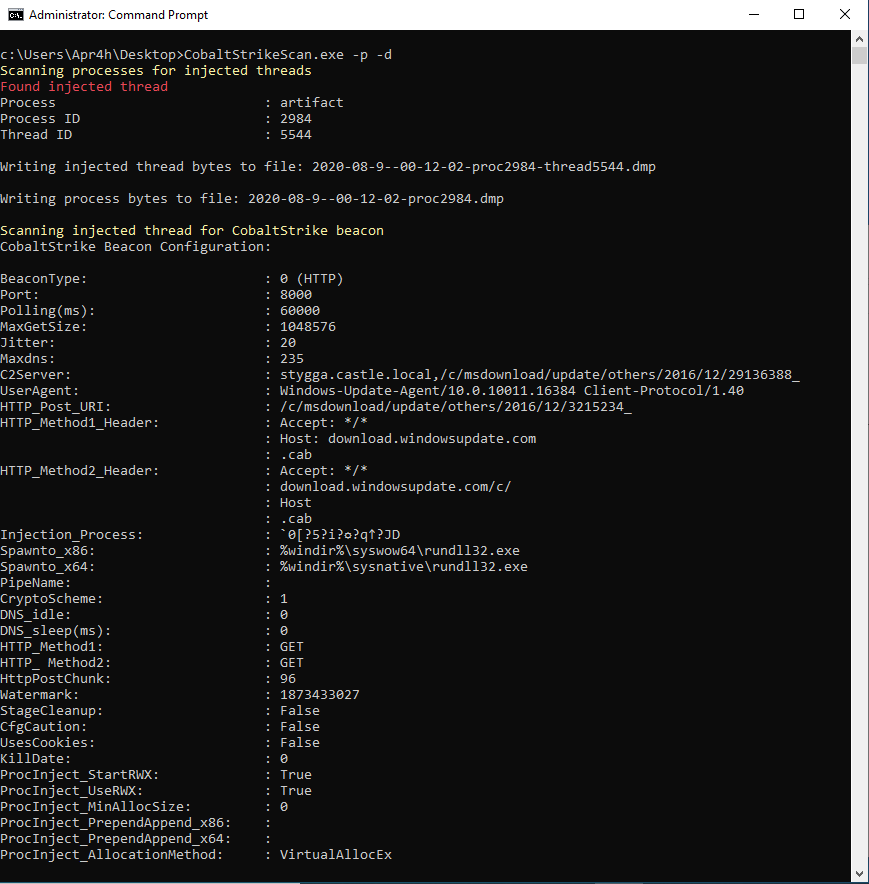
扫描文件或进程内存以检测Cobalt Strike信标并解析其配置。
CobaltStrikeScan 扫描Windows进程内存以查找DLL注入(经典注入或反射注入)的证据,并对目标进程内存执行YARA扫描,以检测Cobalt Strike v3和v4信标签名。
或者,CobaltStrikeScan可以对通过绝对或相对路径作为命令行参数提供的文件执行相同的YARA扫描。
如果在文件或进程中检测到Cobalt Strike信标,将解析该信标的配置并显示在控制台中。
CobaltStrikeScan包含GetInjectedThreads作为子模块。克隆CobaltStrikeScan时,请确保使用git clone --recursive https://github.com/Apr4h/CobaltStrikeScan.git,以便同时下载/克隆子模块的代码。
Costura.Fody配置为将CommandLine.dll和libyara.NET.dll嵌入到编译后的CobaltStrikeScan.exe程序集中。这样CobaltStrikeScan.exe将作为CobaltStrikeScan的静态、便携版本。为此,请确保在构建时将“活动解决方案平台”设置为x64。
本项目受以下研究/文章的启发:
  -d, --directory-scan          Scan all process/memory dump files in a directory for Cobalt Strike beacons

  -f, --scan-file               Scan a process/memory dump for Cobalt Strike beacons

  -i, --injected-threads        Scan running (64-bit) processes for injected threads and Cobalt Strike beacons

  -p, --scan-processes          Scan running processes for Cobalt Strike beacons

  -v, --verbose                 Write verbose output

  -w, --write-process-memory    Write process memory to file when injected threads are detected

  -h, --help                    Display Help Message

  --help                        Display this help screen.

  --version                     Display version information.