# readme2demo — 源自你的 README 的经过验证的教程与演示视频
[](https://github.com/alphacrack/readme2demo/actions/workflows/ci.yml)
[](https://github.com/alphacrack/readme2demo/blob/main/LICENSE)
[](https://github.com/alphacrack/readme2demo/blob/main/pyproject.toml)
<!-- HERO:START — scripts/self-demo.sh rewrites this block with a fresh self-run.
Run it locally (needs Docker + VHS + a model credential):
./scripts/self-demo.sh
It runs readme2demo on this very repo, following docs/step-by-step.md,
and drops the verified demo.gif in right here. -->
[](https://github.com/alphacrack/readme2demo/tree/main/examples/readme2demo)
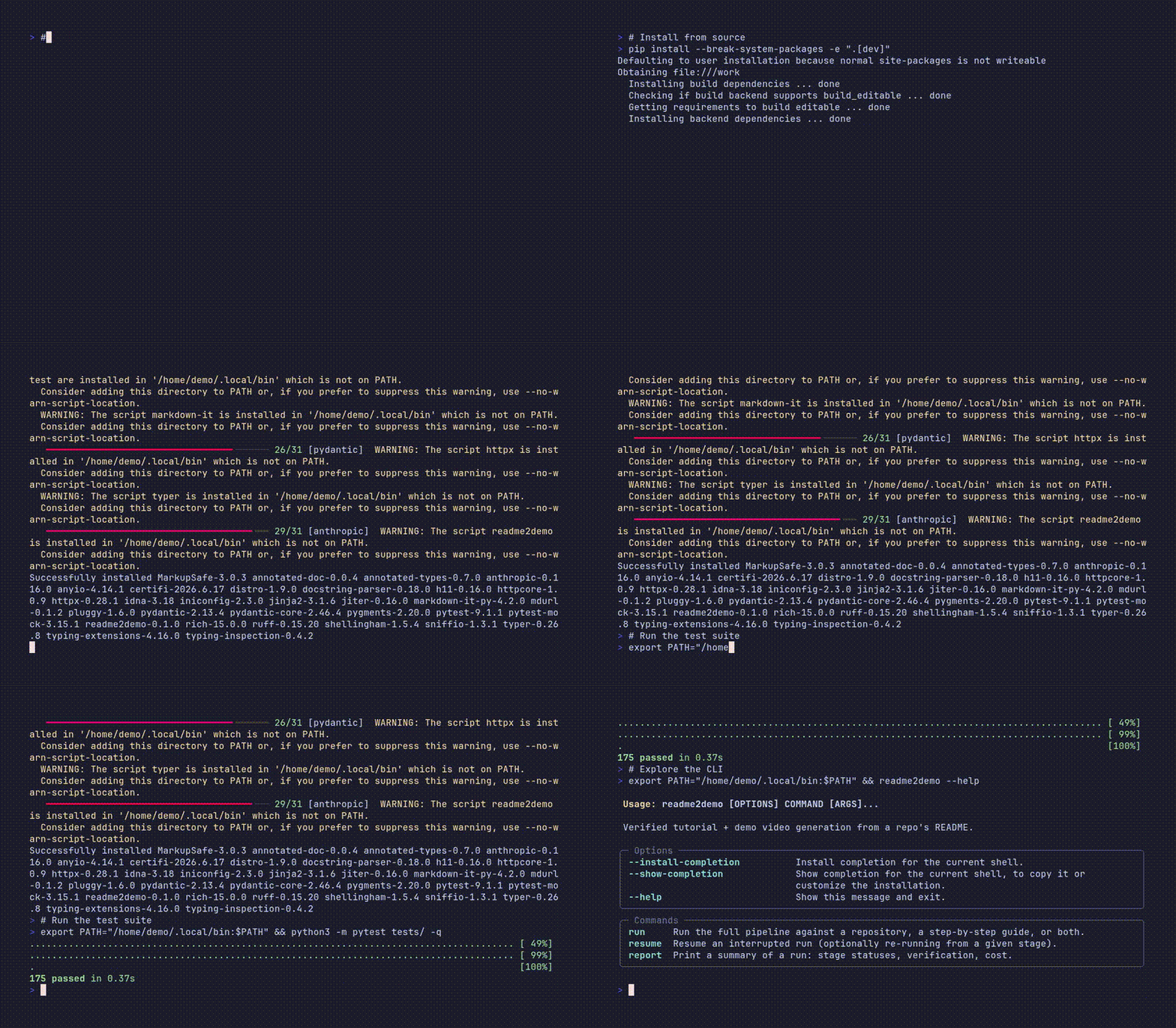
<sub>▶ readme2demo 生成自己的教程:AI 代理在沙箱中运行此仓库的 README,一个全新容器重放每一步,然后渲染演示。完整自运行输出请见 <a href="https://github.com/alphacrack/readme2demo/blob/main/examples/readme2demo">examples/readme2demo</a> · 针对另一个项目的运行请见 <a href="https://github.com/alphacrack/readme2demo/blob/main/examples/toolhive">examples/toolhive</a>。</sub>
<!-- HERO:END -->
**AI 验证的教程与演示视频生成器。** 指向一个仓库。AI 代理会读取 README 并在加固的 Docker 沙箱中实际运行它。只有在干净环境重放通过后,它才会渲染演示视频(VHS)并发布教程、分步指南和故障排除文档。
其价值不在于“AI 写教程”——而在于教程**在你看到之前已经运行了两次**。
**查看实际效果:** 浏览[已验证的示例运行](https://github.com/alphacrack/readme2demo/tree/main/examples) — 真实的教程、分步指南和演示视频,每个都在发布前于干净容器中独立重放。
## 工作原理
```
repo URL → ingest/plan → agent run (in Docker) → normalize transcript
→ distill minimal path → VERIFY replay in fresh container
→ generate tutorial.md + troubleshooting.md → render VHS video
```
完整架构请参见 [architecture/README.md](https://github.com/alphacrack/readme2demo/blob/main/architecture/README.md)。
## 要求
- Python ≥ 3.10, Docker
- 认证,选择以下之一:
- **你的 Claude 订阅(无需 API 密钥):** 本地 Claude Code 安装。规划器/蒸馏器/教程阶段通过 `--llm-backend claude-cli` (`claude -p`)在你的订阅上运行,沙箱内代理使用 `CLAUDE_CODE_OAUTH_TOKEN` 进行认证(创建一个:`claude setup-token`)。完全支持**自托管、单人操作**针对自己的仓库运行——Pro/Max 计划包含每月 Agent SDK 积分,可覆盖 `claude -p`。
- `ANTHROPIC_API_KEY` — 按量 API 计费;最适合规模化和并发,**如果你将 readme2demo 作为服务托管给他人则必须使用**(根据 Anthropic 条款,订阅认证可能无法支持多租户产品——参见 [ROADMAP.md](https://github.com/alphacrack/readme2demo/blob/main/ROADMAP.md))。添加 `--anthropic [model]` 可在 OpenHands 引擎上使用 Claude 模型运行沙箱代理,而不是 claude-code。
- **Google Gemini(`--gemini [model]`):** 单个 `GEMINI_API_KEY` 即可让整个会话脱离 Claude 运行——规划器/蒸馏器/教程阶段使用 Gemini,沙箱代理在 OpenHands 引擎上运行(也基于 Gemini)。没有内置模型名称(Google 会以 hard 404 淘汰旧模型):每次运行指定(`--gemini gemini-3.5-flash`)或一次性导出 `GEMINI_MODEL`。安装额外依赖:`pip install 'readme2demo[gemini]'`。
- **OpenAI(`--openai [model]`):** 与 Gemini 相同模式——单个 `OPENAI_API_KEY` 即可驱动阶段和 OpenHands 代理,没有内置模型名称(`--openai gpt-5.1` 或一次性导出 `OPENAI_MODEL`)。安装额外依赖:`pip install 'readme2demo[openai]'`。
- 可选:`LLM_API_KEY` + `LLM_MODEL` 用于 `--engine openhands`(实验性)并搭配任何其他 litellm 提供商——上述预设会自动填充它们。
```bash
# run on your Claude subscription (no API key) — supported for self-hosted runs
claude setup-token # interactive: approve in browser, then COPY the
# sk-ant-oat01-... token it prints (do NOT use $(...))
export CLAUDE_CODE_OAUTH_TOKEN=sk-ant-oat01-...
readme2demo run <repo-url> --llm-backend claude-cli
# run on metered API billing (scale, concurrency, or hosting for others)
export ANTHROPIC_API_KEY=sk-ant-...
readme2demo run <repo-url> # --llm-backend auto picks api
# run the whole session on Google Gemini (OpenHands agent + Gemini passes)
pip install 'readme2demo[gemini]'
docker build -t readme2demo/openhands:latest images/openhands # one-time: OpenHands sandbox image
export GEMINI_API_KEY=...
readme2demo run <repo-url> --gemini gemini-3.5-flash # model named per run
export GEMINI_MODEL=gemini-3.5-flash # ...or set once, then:
readme2demo run <repo-url> --gemini # bare flag reads GEMINI_MODEL
# run the whole session on OpenAI (OpenHands agent + OpenAI passes)
pip install 'readme2demo[openai]'
export OPENAI_API_KEY=sk-...
readme2demo run <repo-url> --openai gpt-5.1 # or export OPENAI_MODEL once
# run the OpenHands agent with a Claude model on API billing
export ANTHROPIC_API_KEY=sk-ant-...
readme2demo run <repo-url> --anthropic # uses the config model by default
```
## 安装
```bash
pip install -e ".[dev]"
docker build -t readme2demo/base:latest images/base/
docker build -t readme2demo/openhands:latest images/openhands/ # only for --engine openhands / --gemini / --openai / --anthropic
```
## 使用
```bash
readme2demo run https://github.com/example/tool
readme2demo run -gr https://github.com/example/tool # same, via the flag
readme2demo run -s my_guide.md # guide-only: no repo, your guide is self-contained
readme2demo run -gr https://github.com/example/tool -s my_guide.md # both: your guide drives everything
readme2demo run https://github.com/example/tool --gemini gemini-3.5-flash # run on Google Gemini (needs GEMINI_API_KEY; uses the OpenHands agent; bare --gemini reads GEMINI_MODEL)
readme2demo run https://github.com/example/tool --openai gpt-5.1 # run on OpenAI (needs OPENAI_API_KEY; uses the OpenHands agent; bare --openai reads OPENAI_MODEL)
readme2demo run https://github.com/example/tool --anthropic # OpenHands agent with a Claude model on ANTHROPIC_API_KEY
readme2demo run https://github.com/example/tool --allow-docker-socket # for tools that manage containers (SECURITY TRADEOFF: pierces sandbox isolation — trusted repos only)
readme2demo run https://github.com/example/tool --skip-video --budget-usd 3
readme2demo resume runs/tool-20260702-... --from-stage render
readme2demo report runs/tool-20260702-...
```
仓库是**可选的**:可以通过位置参数或 `-gr/--github-repo` 传递,通过 `-s/--step-by-step` 提供指南,或同时提供两者。至少需要其中一个。如果只有指南没有仓库,则不会克隆任何仓库——指南必须独立(安装已发布的包,或将所需内容克隆作为显式步骤);全新容器重放仍会验证每个命令。
输出位于 `runs/<run-id>/`:`tutorial.md`、`step_by_step.md`、`troubleshooting.md`、`commands.sh`、`demo.tape`、`demo.mp4`、`demo.gif`,以及包含阶段状态和总成本的 `manifest.json`。
## GitHub Action — 在 CI 中验证你的 README
当你的 README 停止工作时得到一个红色 X。仓库根目录的组合操作从自身的固定检出安装 readme2demo,构建沙箱镜像,针对你的仓库 URL 运行完整流水线,并在全新容器重放未通过时**使检查失败**:
```yaml
name: readme-check
on:
push:
branches: [main] # url mode tests the default branch HEAD — see the caveat below
paths: ["README.md"]
schedule:
- cron: "0 6 * * 1" # weekly: catch the world changing under an unchanged README
permissions:
contents: read
jobs:
verify-readme:
runs-on: ubuntu-latest
steps:
- uses: alphacrack/readme2demo@main # pin a tag or SHA once released
with:
anthropic-api-key: ${{ secrets.ANTHROPIC_API_KEY }}
skip-video: "true"
```
> **⚠ 仅限 URL 模式——尚未验证 PR 头部。** 该操作会克隆 `repo-url` 的**远程默认分支 HEAD**(默认:运行工作流的仓库);摄取仅接受 https URL,`--depth 1`,无 ref 固定。对于 `pull_request`,它会测试*基础*分支的 README —— 而不是 PR 的 —— 所以不要将其接入预期获得合并前判决的 PR。直到 [#74](https://github.com/alphacrack/readme2demo/issues/74)(本地路径摄取)落地前,`on: push` 到默认分支加 cron 是诚实的触发器;随它一起提供的 `repo-path` 输入用于真正的 PR 头部验证。
**成本:** 每次运行都会在您的 `ANTHROPIC_API_KEY` 上花费真实的代理费用——通常几美元,由 `budget-usd` 硬性限制(默认为 `"5"`;超过则中止运行)。`paths:` 过滤器加上 cron 可使费用与 README 变更量成比例,`skip-video: "true"` 可减少挂钟时间(渲染也不消耗 API 费用)。
检查失败有两种可区分的方式,记录在步骤日志中:**README 损坏**(流水线完成,干净环境重放失败——通过 `readme2demo report --json` 检测,因为 `readme2demo run` 在完成但未验证的运行上故意返回 0)和 **操作基础设施损坏**(非零流水线退出:预检、预算、Docker)。输出:`verified`(`"true"`/`"false"`)和 `run-dir`;`tutorial.md`、`step_by_step.md`、`verify.log`(以及视频开启时的 `demo.gif`)作为 `readme2demo-run` 工件上传。
## step_by_step.md — 视频的源文件
演示视频总是**从** `step_by_step.md` 构建:解析其步骤,每个演示安全、有根据的命令都会成为视频中的一个键入命令,步骤标题显示为屏幕上的注释。它有三种生成方式(按优先级顺序):
1. **你传入一份**:`readme2demo run <url> -s my_guide.md` — 注入到克隆中作为权威指南;规划器和代理遵循它,视频播放它。此处的 `<url>` 是可选的:`readme2demo run -s my_guide.md` 在空沙箱中仅运行指南。
2. **仓库自带一份**(根目录或 `docs/` 下的 `step_by_step.md` / `step-by-step.md`,不区分大小写):自动获得相同处理。
3. **两者都不存在**:流水线*生成*一份详细的 `step_by_step.md` —— 来自已验证的 `commands.sh` 的每条命令都作为带有实际捕获输出的编号步骤 —— 然后从中构建视频。随时可贡献回仓库。
设置步骤(克隆、安装、构建)会记录在指南中,但不出现在视频中 —— 视频针对已验证、已构建的工作树播放,展示效果。
每个教程都带有验证徽章:`✅ Verified on <date> · image <digest> · commit <sha>` —— 如果重放未通过,则显示醒目的 `⚠ UNVERIFIED`。未验证的输出绝不会被静默发布。
## 配置
CLI 标志 > `readme2demo.toml` > 默认值:
```toml
engine = "claude-code" # or "openhands"
model = "claude-sonnet-5" # planner/distiller/tutorial passes
max_turns = 60
budget_usd = 5.0
base_image = "readme2demo/base:latest"
skip_video = false
```
## 开发
```bash
python -m pytest tests/ -q # 175 unit tests, no docker/network needed
ruff check src/ tests/ # correctness lint (matches CI)
python -m pytest -m integration # requires docker + API keys (none yet)
```
## 安全模型
README 是不可信的代码。代理在加固容器*内部*运行(cap-drop ALL、no-new-privileges、内存/CPU/进程数限制、非 root)——该容器是权限边界。已知 MVP 权衡:API 密钥进入沙箱;请使用专用的低限额密钥。计划实现主机侧密钥注入出口代理(里程碑 4)。
完整威胁模型和私有漏洞报告:[SECURITY.md](https://github.com/alphacrack/readme2demo/blob/main/SECURITY.md)。
## 项目与社区
- [Examples](https://github.com/alphacrack/readme2demo/tree/main/examples) — 作为证据提交的已验证输出
- [Roadmap](https://github.com/alphacrack/readme2demo/blob/main/ROADMAP.md) — 项目发展方向(包括探索性的托管/SaaS 方向)
- [Contributing](https://github.com/alphacrack/readme2demo/blob/main/CONTRIBUTING.md) — 唯一不可协商的规则,以及如何开始
- [Security policy](https://github.com/alphacrack/readme2demo/blob/main/SECURITY.md) · [Code of Conduct](https://github.com/alphacrack/readme2demo/blob/main/CODE_OF_CONDUCT.md)
- [Architecture](https://github.com/alphacrack/readme2demo/blob/main/architecture/README.md) — 阶段边界与图表
MIT 许可。CLI 和验证流水线现为且将保持自由和开源。
## 贡献者
衷心感谢所有为 readme2demo 做出贡献的人!
[](https://github.com/alphacrack/readme2demo/graphs/contributors)
<a href="https://github.com/alphacrack/readme2demo/graphs/contributors">
<img src="https://contrib.rocks/image?repo=alphacrack/readme2demo" alt="贡献者" />
</a>