scopeblind-gateway v0.13.1
用于AI代理的Ed25519签名收据和Cedar策略。金融授权门(Legate)、证明包、3个IETF互联网草案。npx protect-mcp
protect-mcp
面向 AI 代理工具调用的故障关闭式 Cedar 策略门禁,外加签名回执。
protect-mcp 是一道位于 AI 代理工具调用之前的门禁。它会依据 Cedar 策略(与 AWS 用于 IAM 的同一种语言)评估每一次调用,在违反规则的调用运行之前将其拦截,并为每一次决策签署一份可离线验证的 Ed25519 回执。它在本地运行,不会将你的决策遥测数据发送到任何地方,并采用 MIT 许可证。
它的不同之处
- 默认故障关闭。 一旦出现任何策略错误、引擎缺失或评估失败,决策即为 DENY。门禁绝不会静默放行。存在一种用于影子发布的观察模式,但即便在该模式下,本应被拦截的调用也会被标记为
would_deny: true,因此失败绝不会悄无声息。 - 它能证明自身的克制。
serve --enforce和doctor会运行启动自检,除非能证明某个已知被禁止的操作确实被拒绝,否则拒绝启用门禁。无法证明其会拒绝的门禁不会启动。 - 每一次决策都是一份任何人都能验证的回执。 决策经过 Ed25519 签名,并可使用
@veritasacta/verify离线验证。无需信任任何厂商:数学不在乎由谁来运行它。
快速开始:从安装到第一个有用的证明```bash
1. Generate an Ed25519 keypair, config template, and sample policy.
npx protect-mcp init
2. Wrap any MCP server in shadow mode. Nothing is blocked yet; calls are logged.
npx protect-mcp wrap -- node your-mcp-server.js
3. Inspect the local-only dashboard: tool inventory, risk, approvals, receipts.
npx protect-mcp dashboard --open
4. Draft a reviewable policy from observed calls.
npx protect-mcp recommend --write
5. When reviewed, restart the wrapper in enforce mode with that policy.
npx protect-mcp --policy protect-mcp.recommended.json --enforce -- node your-mcp-server.js
对于 Claude Desktop,请先运行一次 dry-run 配置补丁,然后再应用它:```bash
npx protect-mcp wrap --claude-desktop
npx protect-mcp wrap --claude-desktop --write
npx protect-mcp dashboard --open
仪表盘绑定到 127.0.0.1,仅读取本地日志/回执文件,不会上传任何内容。仅当你明确需要托管的 ScopeBlind 仪表盘时,才使用 npx protect-mcp connect。
作为 MCP 服务器的网关
如果你更愿意将网关作为工具调用,而不是接入 Claude Code 钩子,可以将其作为 MCP 服务器运行:```bash npx protect-mcp mcp
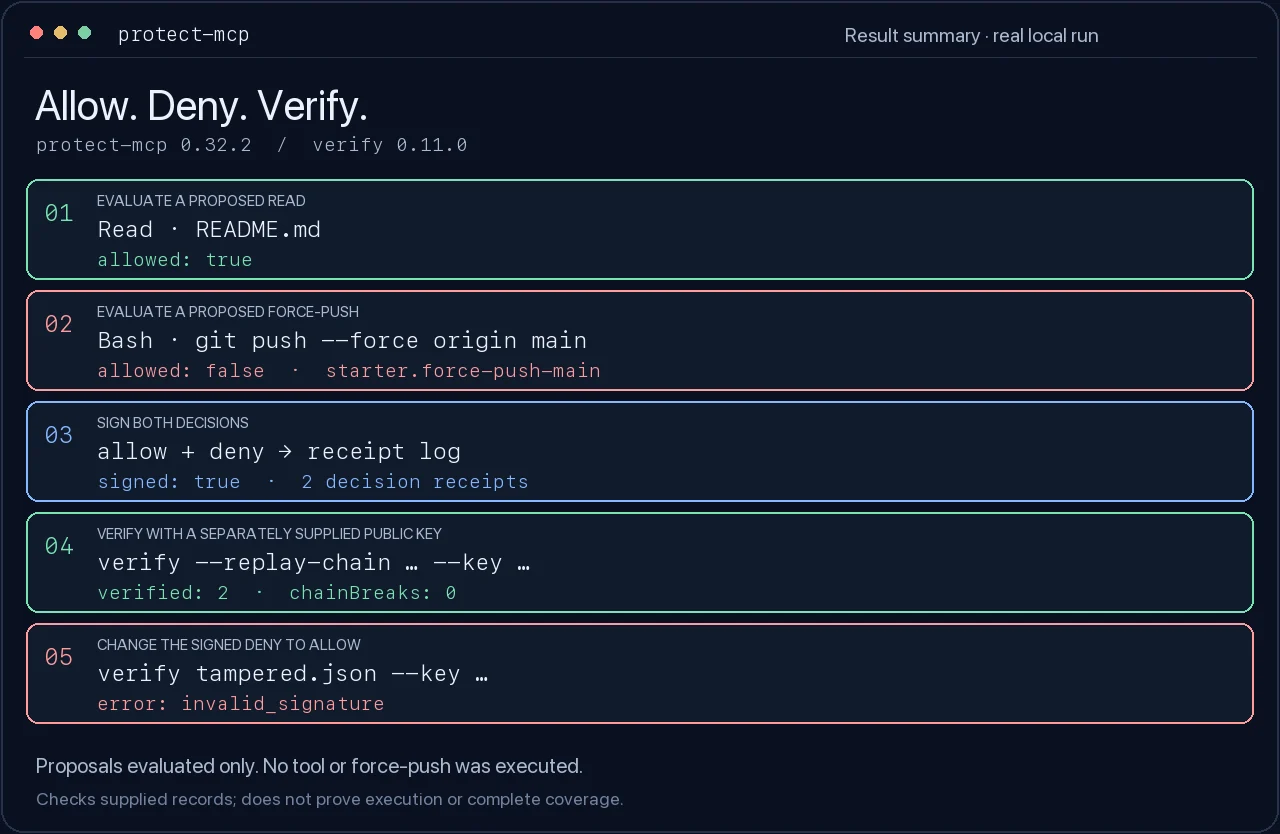
它通过 stdio 使用 MCP,并暴露四个只读工具,构成整个闭环:
- **`evaluate_action`**:根据内联 Cedar 策略对提议的工具调用进行判定,采用失败关闭(任何策略错误均为 DENY)。返回 `{ allowed, decision, reason, policy_digest }`。
- **`sign_decision`**:将判定转换为 Ed25519 签名回执(拒绝会签署 `gateway_restraint`,允许会签署 `decision_receipt`)。返回回执及其公钥;如果你不提供密钥,它会生成一个临时密钥。
- **`verify_receipt`**:使用公钥离线验证已签名回执。返回 `{ valid, error, type, kid, issuer }`。
- **`self_test`**:无需输入即可自证。一个已知被禁止的操作会被拒绝,然后一个已签名回执会完成往返验证,而一个被篡改的副本会验证失败。
将任意 MCP 主机指向它,例如 Claude Desktop:```json
{
"mcpServers": {
"protect-mcp": { "command": "npx", "args": ["-y", "protect-mcp", "mcp"] }
}
}
回执与网关在运行时签名的回执字节兼容,因此在此处生成的回执可通过 @veritasacta/verify 以及浏览器验证器进行同样的验证。
本地操作仪表板
protect-mcp dashboard 是操作员视图,用于从可见性过渡到强制执行:
- 工具清单: 每个观察到的工具、调用次数、高/中/低风险,以及活动策略是否具有精确规则、通配符回退规则或无规则。
- 策略覆盖: 一键本地策略编辑,用于
Require approval、Block或Observe。审查更改后重启包装器。 - 精确操作审批队列: 在人工批准、拒绝、编辑或接管之前,捕获精确的工具、操作、目标、脱敏载荷预览、载荷哈希、策略依据和原因。
- 回执链: 请求 ID 与签名回执哈希相关联,以便审计审查人员可以看到哪些决策具有加密证明。
- 审计导出: 当存在签名回执时,下载可离线验证的审计包。如果仅存在未签名的本地日志,仪表板会说明必须先启用签名。
对于实时桌面回退审批,请使用包装器打印的本地网关审批端点和 nonce 启动仪表板:```bash
npx protect-mcp dashboard --open
--approval-endpoint http://127.0.0.1:9876
--approval-nonce "$PROTECT_MCP_APPROVAL_NONCE"
`Approve` 在存在这些标志时会转发到本地实时网关。
`Deny`、`Edit` 和 `Take over` 会在本地记录为审批解决记录;在需要时将它们用作操作员指令并重新运行该工具。
### 付费边界 MVP:摘要锚定,而非数据上传
本地自签名收据保持免费且可离线验证。付费边界是独立证据,证明 ScopeBlind 在某个时间、以某个组织身份看到了收据摘要,而未接收原始提示、工具负载、输出、私钥或原始收据。```bash
# Create or refresh a local org identity and public-key directory.
npx protect-mcp registry init --org "Meridian Global Macro" --billing-account acct_meridian
# Local preview: writes a digest registry and shareable static verifier page.
npx protect-mcp registry anchor
# Hosted mode: uploads receipt digests only for independent anchoring.
SCOPEBLIND_TOKEN=... npx protect-mcp registry anchor \
--hosted \
--endpoint https://api.scopeblind.com \
--verifier-base https://legate.scopeblind.com
本地预览被刻意标记为 local-preview-not-independent。
托管模式仅锚定收据哈希、请求 ID、组织公钥和
计费元数据。它不会上传原始收据或敏感上下文。
杀手级演示:从影子到策略再到证明
protect-mcp killer-demo 生成一套完整的三分钟销售/演示包:```bash
npx protect-mcp killer-demo --dir ./scopeblind-demo
它创建模拟文件系统、GitHub、电子邮件和 PMS 活动;在影子模式下显示有风险的调用;应用策略包;对敏感的 PMS 预订要求审批;通过网关执行;写入签名回执;证明原始回执可验证;证明被篡改的回执验证失败;并创建一个选择性披露包,在隐藏敏感上下文的同时展示最小证明。
首先打开生成的 `DEMO-RUNBOOK.md`。然后运行打印出的仪表板命令,引导客户走完确切的流程。
### Selective Disclosure v0
承诺模式回执可以携带一个 `committed_fields_root`,而不是以明文暴露每个字段。之后,持有者可以仅披露选定的字段:```bash
npx protect-mcp verify-disclosure \
--receipt ./receipts/selective-disclosure.receipt.json \
--disclosure ./receipts/selective-disclosure.tool-only.json
验证器会检查父收据哈希、Ed25519 签名、承诺根, 以及每个披露字段的 Merkle 证明。随后它会说明哪些字段已被 披露,以及哪些已承诺字段仍保持隐藏。这是加盐承诺 披露,而非完全零知识,但它使隐私声明变得具体: 审计人员可以验证选定的事实,而无需接收完整的工具载荷或 敏感的桌面上下文。
对记录证明某项声明(位置盲证明)
你可以在不披露记录的情况下,对其证明一项 CLAIM。铸造一份针对 整条记录的已签名、位置盲证明,仅披露每项决策的 类别(收据摘要、裁决、能力标签),绝不披露你的工具 输入、输出或数据:```bash
"No action reached the network across the record":
npx protect-mcp claim --no net.egress
other predicates:
--only fs.read,fs.write all actions were confined to these capabilities
--no-verdict blocked no action was blocked
--count blocked how many were blocked
任何人都可以离线验证它,只看到类别,永远看不到内容:```bash
npx protect-mcp verify-claim claim-<id>.json
验证方会在披露集合上重新计算 Merkle 根,并独立重新计算谓词,因此发行方无法在给定披露内容的情况下对声明撒谎。添加 --anchor 可将声明的摘要记录到公开、仅追加的 ScopeBlind 透明日志中,这样不信任你的交易对手就能确认披露集合是完整的,且没有被悄悄重新裁剪(仅发送哈希值;记录保留在本地):```bash
npx protect-mcp claim --no net.egress --anchor
这是一个可问责、位置盲的证明,而非完整的零知识证明:它揭示的是形状,而非内容。
## 60 秒内试用(无需代理)
[](https://legate.scopeblind.com/record)
在 [legate.scopeblind.com/record](https://legate.scopeblind.com/record) 观看两分钟影片,然后针对你自己的副本重放:```bash
npx protect-mcp sample # seed a labeled sample record (8 decisions: 1 blocked, 2 payments)
npx protect-mcp record # open it: signatures verified in your browser
npx protect-mcp claim --payment-under 100 --anchor --output payments-under-100.json
npx protect-mcp verify-claim payments-under-100.json
npx protect-mcp anchor-record
将生成的 demo-tampered.jsonl 拖入记录页面,即可看到签名后的编辑被捕获。sample 拒绝触碰已存在的记录,因此请在空文件夹中运行它。当你准备好进行真实操作时,接入下面的门控,相同的命令将针对你 agent 自己的记录运行。
Claude Code hook 快速开始```bash
Generate hook config and a sample Cedar policy.
npx protect-mcp init-hooks
Serve the Claude Code hook gate in enforce mode. It runs a restraint self-test
first and refuses to start if it cannot prove it denies a forbidden vector.
npx protect-mcp serve --enforce --cedar ./cedar
一次性评估,即 PreToolUse 钩子调用它的方式。退出码 2 表示拒绝
(该工具被阻止);退出码 0 表示允许:```bash
npx protect-mcp evaluate --cedar ./cedar --tool Bash --input '{"command":"rm"}'
echo $? # 2 -> denied, fail-closed
npx protect-mcp evaluate --cedar ./cedar --tool Read --input '{"path":"README.md"}'
echo $? # 0 -> allowed
缺失或无法加载的策略会拒绝(退出码 2),除非你显式传入
--fail-on-missing-policy false。
Claude Code hooks
protect-mcp init-hooks 会为你写入一个 .claude/settings.json。若要手动接入
该门禁,你需要的两个动词是 evaluate(PreToolUse,在退出码 2 时阻断)
和 sign(PostToolUse,记录回执)。固定版本,以便 Claude Code
会话始终运行你测试过的门禁:```json
{
"hooks": {
"PreToolUse": [
{
"matcher": "",
"hooks": [
{
"type": "command",
"command": "npx [email protected] evaluate --cedar ./cedar --tool "$TOOL_NAME" --input "$TOOL_INPUT""
}
]
}
],
"PostToolUse": [
{
"matcher": "",
"hooks": [
{
"type": "command",
"command": "npx [email protected] sign --tool "$TOOL_NAME" --receipts ./receipts --key ./keys/gateway.json"
}
]
}
]
}
}
### 对策略决策本身进行签名
从 0.13.0 开始,`sign` 可以评估策略并将真实决策记录到回执中,而不是无条件允许。传入策略目录以及 hook 会传给 `evaluate` 的相同输入和上下文:```bash
npx [email protected] sign --cedar ./cedar --tool Bash \
--input '{"command":"rm -rf /"}' --context '{"command_pattern":"rm -rf"}' \
--receipts ./receipts --key ./keys/gateway.json
receipt payload 随后携带 decision(allow 或 deny)、reason
(cedar_allow 或 cedar_deny)以及 policy_digest(策略集的
acta-policy-digest-v1 摘要),并引用 draft-farley-acta-signed-receipts-03。
该命令将决策和摘要打印到 stdout。拒绝同样会被签名:receipt 是决策的记录,
而非继续执行的许可。
支持两种 Cedar action 模型。运行时门禁以工具作为资源来评估
Action::"MCP::Tool::call",这正是 cedar/ 中的策略所期望的,也是
sign --cedar 默认使用的。将工具命名为 action 的策略
(action == Action::"Bash"),例如 agent-governance-testvectors 中
发布的 conformance policy,需要使用 --action-model tool。evaluate
接受相同的标志。
evaluate 在拒绝时以退出码 2 退出,以便 Claude Code 阻止该工具调用,
在允许时以 0 退出。sign 是尽力而为的:当配置了密钥时,它会追加一条
Ed25519 签名的 receipt;如果没有可用的签名器,它会记录一条诚实的未签名
行("signed": false),而不是让工具失败。
在其他 agent 中使用(Codex、Cursor、Gemini、Hermes)
同样的 fail-closed 门禁可在任何支持工具钩子的 agent 中作为工具钩子运行。
添加 --format <host>,使该动词从 stdin 读取该 host 的钩子 payload,
并按该 host 的契约进行拒绝:```bash
the PreToolUse / before-tool command for each host
npx -y protect-mcp@latest evaluate --format codex --cedar ./cedar # OpenAI Codex npx -y protect-mcp@latest evaluate --format gemini --cedar ./cedar # Gemini CLI BeforeTool npx -y protect-mcp@latest evaluate --format cursor --cedar ./cedar # Cursor beforeShellExecution npx -y protect-mcp@latest evaluate --format hermes --cedar ./cedar # Hermes pre_tool_call
在工具后事件上,为每个事件搭配 `sign --format <host>` 以获取回执。重要的情况是 **Hermes**,它忽略钩子退出码并从 stdout 读取判定结果,因此 `--format hermes` 通过 `{"decision":"block"}` 拒绝,而不是退出码 2(原始的退出码 2 在那里会静默地失败开放)。如果不使用 `--format`,这些动词会像上面 Claude Code 部分那样读取 `--tool`/`--input` 标志。
## 编写策略
Cedar 策略位于你用 `--cedar` 指向的目录中。`forbid` 规则表示拒绝,`permit` 规则表示允许。要匹配工具输入中的某个值,请使用 `.contains()` 惯用法:```cedar
// Allow read-only tools.
permit(
principal,
action == Action::"MCP::Tool::call",
resource == Tool::"Read"
);
// Deny dangerous shell commands by matching the command against a list.
forbid(
principal,
action == Action::"MCP::Tool::call",
resource == Tool::"Bash"
) when {
["rm", "dd", "mkfs"].contains(context.command)
};
// Block destructive tools outright.
forbid(
principal,
action == Action::"MCP::Tool::call",
resource == Tool::"delete_file"
);
危险: 不要写
context.command in ["rm", "dd"]来将字符串与列表进行匹配。in用于实体层级,而非字符串成员判断。Cedar 会将此表达式视为类型错误,并静默丢弃整个forbid规则,这(在 fail-open 门控下)会留下一个残余的permit生效。这正是下方公告背后的确切缺陷。请改用[...].contains(context.command)。从 0.7.0 起,门控会因该错误而拒绝,而非放行,并且如果该模式被重新引入到已发布的策略中,CI 绊线测试会使构建失败。参见 GHSA-hm46-7j72-rpv9。
入门策略包
大多数团队不应在第一天就从零开始编写 Cedar。安装一个入门包,以影子模式运行,检查回执,然后收紧或强制执行:```bash npx protect-mcp policy-packs list npx protect-mcp policy-packs show secrets-safe npx protect-mcp policy-packs install filesystem-safe --dir ./cedar npx protect-mcp policy-packs install all --dir ./cedar npx protect-mcp serve --cedar ./cedar
内置策略包:
- `filesystem-safe`:破坏性文件操作和类似密钥的路径读取。
- `git-safe`:强制推送、硬重置、破坏性清理、仓库删除。
- `email-safe`:允许起草,阻止无人值守发送。
- `database-safe`:面向读取的数据库姿态,阻止写入/管理 SQL。
- `cloud-spend-safe`:明显的云支出创建和基础设施破坏。
- `secrets-safe`:常见的文件、环境变量、shell 和云密钥外泄。
- `finance-mandate-safe`:预订流程中的限制名单和集中度违规。
## 验证收据
收据经过签名,任何持有公钥的人都可以离线验证。无需
网络,无需供应商,无需信任 ScopeBlind:```bash
npx @veritasacta/verify ./receipts/receipts.jsonl --format jsonl
# Exit 0 = valid, non-zero = tampered or malformed
npx protect-mcp bundle --output audit.json 导出你的收据以及公钥的自包含、可离线验证的审计包。
安全
protect-mcp 0.7.0 在设计上采用失败即拒绝(fail closed)。在任何策略评估错误、引擎缺失或策略在评估时出错的情况下,决策为 DENY,而非允许。serve --enforce 和 doctor 会运行启动自检,在信任门禁之前证明其会拒绝一个已知被禁止的向量,若无法做到则拒绝启用。
受影响版本:0.5.x 和 0.6.x。 这些版本采用失败即放行(fail open,在评估错误时返回 ALLOW),并且无法针对固定引擎正确评估 Cedar,因此 forbid 规则可能无法拦截。请升级到 >= 0.7.0。
详情与修复方案:GHSA-hm46-7j72-rpv9。 如需报告漏洞,请参阅 SECURITY.md。
命令
| 命令 | 描述 |
|---|---|
serve | 启动 Claude Code 的 HTTP 钩子服务器(端口 9377)。--enforce 会先运行约束自检;--cedar <dir> 和 --policy <path> 用于选择策略。 |
init | 生成 Ed25519 密钥对(keys/gateway.json)、配置模板和示例策略。 |
sample | 植入一条明确标记的示例记录(8 个决策:一次被阻止的调用、两笔支付;kid sample-demo)以及一份被篡改的副本,以便在接入代理之前从头重放 record、claim、verify-claim 和 anchor-record。拒绝触碰已有记录;--force 可覆盖。 |
policy | 从终端查看和更改 Cedar 策略:policy list(按工具列出 permit / forbid / default-deny,以及门禁允许或拒绝它的频率)、policy show、policy allow <tool>、policy deny <tool>、policy path。运行中的 serve 会在更改时热重载。 |
wrap | 打印受保护的 MCP 命令或修补 Claude Desktop MCP 服务器。默认试运行;使用 --write 更新 Claude Desktop 配置。 |
dashboard | 在 127.0.0.1 上启动仅限本地的仪表板,显示工具清单、风险、策略覆盖、精确操作审批、收据链和审计导出。 |
recommend | 根据观察到的本地调用起草可审查的 JSON 策略。默认试运行;使用 --write 创建 protect-mcp.recommended.json。 |
registry | 创建组织身份、锚定收据摘要,并写入静态验证器页面。托管模式仅上传摘要。 |
record | 打开一个本地、可搜索的收据查看器(--live 会在代理运行时流式传输):在你的浏览器中针对你的网关密钥验证 Ed25519 签名、能力标签、溯源树以及一键签名导出。全部本地,不上传任何内容。 |
claim | 铸造一份对记录上谓词的已签名、位置盲证明(--no <cap> 包括 --no payment、--only <c1,c2>、--no-verdict <verdict>、--count <verdict>、--payment-under <cap>),仅披露决策类别。添加 --anchor 将声明摘要记录到公共透明度日志中;已注册的密钥以具名组织身份锚定。 |
anchor-record | 将记录的 Merkle 根 + 计数 + 时间范围检查点写入公共日志(对心跳友好:未变化时跳过)。后续声明的承诺若与某个已锚定检查点匹配,则可证明其覆盖截至该检查点的完整记录。 |
verify-claim | 离线验证声明包:签名、重新计算的 Merkle 根、独立重新计算的谓词,以及存在时的锚定附属文件(将锚定信封绑定到此确切声明,然后确认公共日志持有它)。--check-anchor 要求锚定;--offline 跳过日志跳转。 |
killer-demo | 生成一个完整的从影子模式到策略、到审批、到签名收据的演示包。 |
verify-disclosure | 验证 scopeblind.selective_disclosure.v0 包,并解释已披露与隐藏字段。 |
policy-packs | 列出、检查并安装入门 Cedar 策略包。 |
evaluate | 针对 Cedar 策略评估一次工具调用(PreToolUse 门禁)。退出码 2 = 拒绝(失败即拒绝),退出码 0 = 允许。 |
sign | 将一次工具调用签名为收据(PostToolUse)。尽力而为:若无密钥则记录一条诚实未签名行。 |
simulate | 针对已记录的决策日志试运行策略,查看它本会阻止什么。 |
demo | 启动一个用门禁包装的内置演示服务器,以便立即查看收据。 |
doctor | 检查你的设置(密钥、策略、Cedar 引擎、验证器)并运行约束自检。 |
bundle | 导出收据以及公钥的可离线验证审计包。 |
report | 根据决策日志和收据生成合规报告(Markdown 或 JSON)。 |
运行 npx protect-mcp --help 查看完整标志参考。
链接
MIT 许可。由 ScopeBlind 构建。