
ffuf v2.2.1
用 Go 编写的快速 Web 模糊测试器

ffuf - 更快地模糊测试,你这个傻瓜
一个用 Go 编写的快速 Web 模糊测试工具。
安装
-
从发布页面下载预编译二进制文件,解压并运行!
或
-
如果你在 Windows 上并使用 Scoop,可以通过以下命令安装 ffuf:
scoop install ffuf或
-
如果你在 Windows 上并使用 Winget,可以通过以下命令安装 ffuf:
winget install ffuf.ffuf或
-
如果你在 macOS 上并使用 homebrew,可以通过以下命令安装 ffuf:
brew install ffuf或
-
如果你安装了较新的 go 编译器:
go install github.com/ffuf/ffuf/v2@latest(同样的命令也适用于更新)或
-
git clone https://github.com/ffuf/ffuf ; cd ffuf ; go get ; go build
- ffuf 依赖 Go 1.20 或更高版本。
- 从检出版本进行的 go 构建会显示
git-<date>-<commit>而不是标签。即使你正好位于某个标签上,本地构建也不是官方发布,而且 Go 的内嵌构建信息只会提供提交哈希而不会提供标签名——因此我们会展示构建时所用的确切提交。权威的版本化二进制文件是发布页面上的那些。
示例用法
下面的用法示例仅展示了使用 ffuf 可以完成的最简单任务。
包含大量示例并详细介绍众多功能的更完整文档可在 ffuf wiki 中找到:https://github.com/ffuf/ffuf/wiki
如需更全面的文档、真实使用示例和技巧,请务必查看由 Michael Skelton(@codingo)撰写的优秀指南: "Everything you need to know about FFUF"。
你还可以针对在线主机练习 ffuf 扫描,其中包含不同的课程和用例:既可以在本地使用 docker 容器 https://github.com/adamtlangley/ffufme,也可以使用由 Adam Langley(@adamtlangley)创建的在线托管版本 http://ffuf.me。
典型目录发现
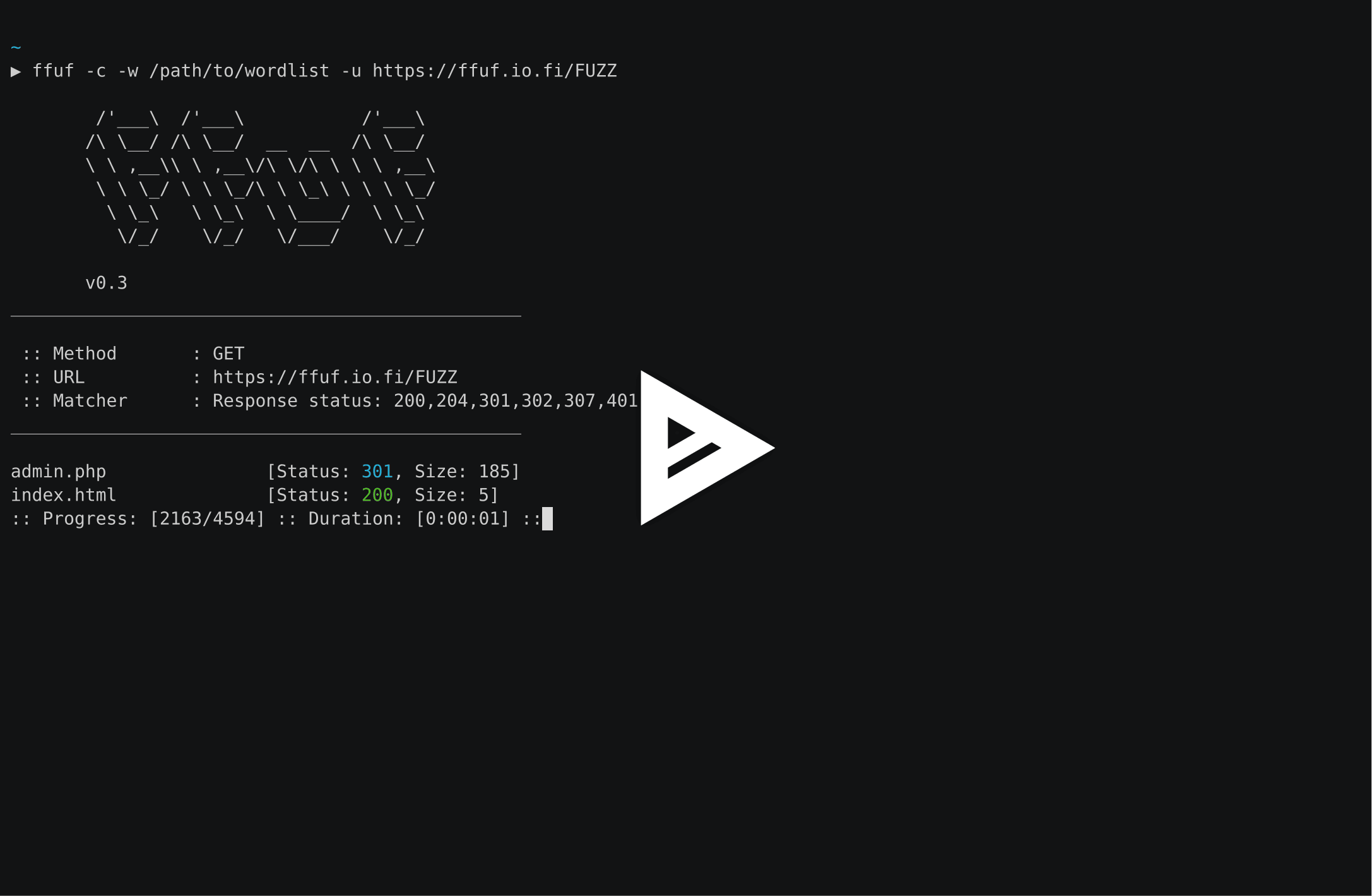
通过在 URL(-u)末尾使用 FUZZ 关键字:
ffuf -w /path/to/wordlist -u https://target/FUZZ
虚拟主机发现(无 DNS 记录)
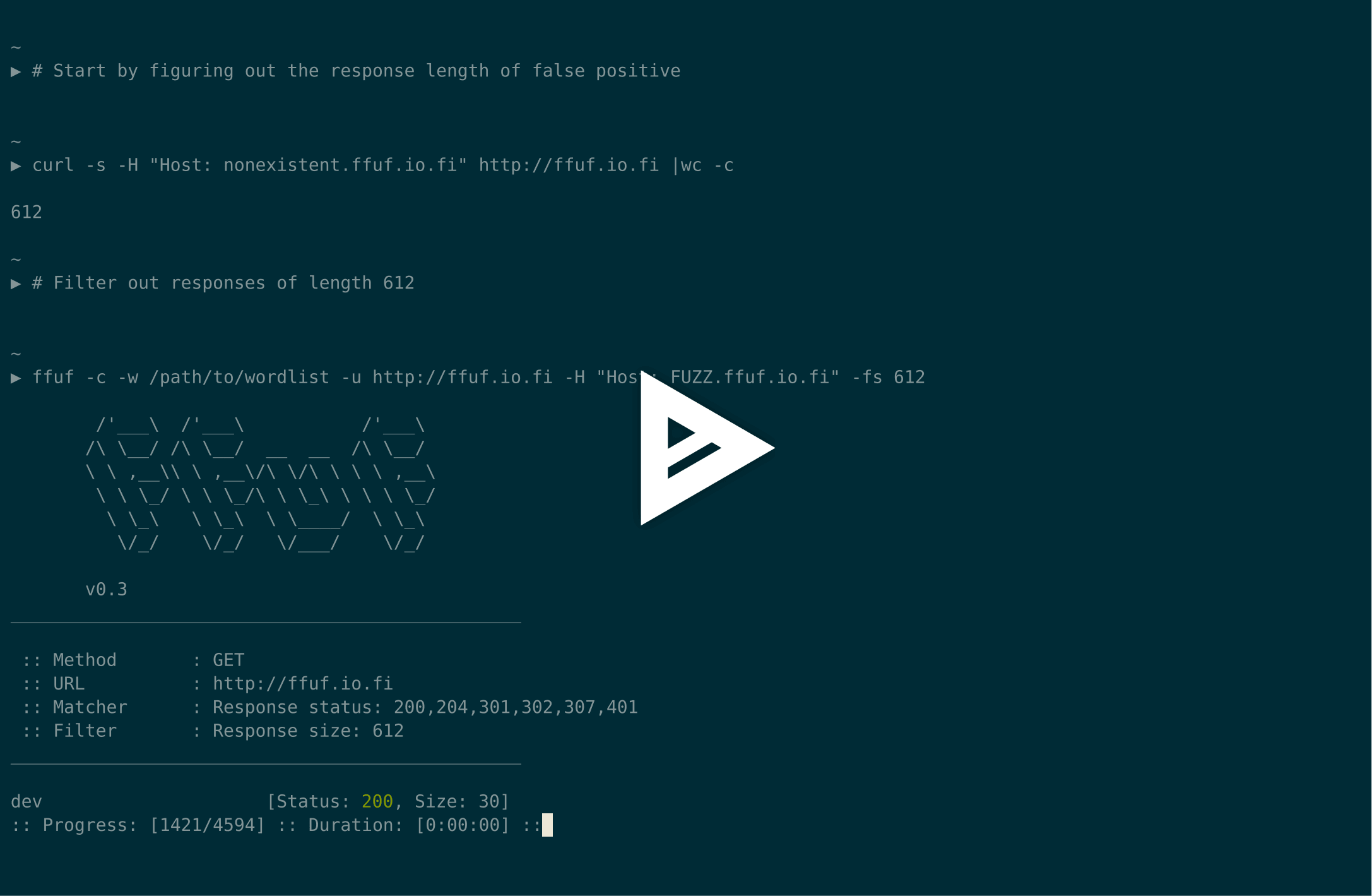
假设默认虚拟主机的响应大小为 4242 字节,我们可以在对 Host 请求头进行模糊测试时过滤掉所有该大小的响应(-fs 4242):
ffuf -w /path/to/vhost/wordlist -u https://target -H "Host: FUZZ" -fs 4242
GET 参数模糊测试
GET 参数名模糊测试与目录发现非常相似,通过将 FUZZ 关键字定义为 URL 的一部分来工作。这里同样假设无效 GET 参数名的响应大小为 4242 字节。
ffuf -w /path/to/paramnames.txt -u https://target/script.php?FUZZ=test_value -fs 4242
如果参数名已知,则可以用相同方式对参数值进行模糊测试。此示例假设错误的参数值会返回 HTTP 响应码 401。
ffuf -w /path/to/values.txt -u https://target/script.php?valid_name=FUZZ -fc 401
POST 数据模糊测试
这是一项非常直接的操作,同样使用 FUZZ 关键字。此示例仅对 POST 请求的一部分进行模糊测试。我们再次过滤掉 401 响应。
ffuf -w /path/to/postdata.txt -X POST -d "username=admin\&password=FUZZ" -u https://target/login.php -fc 401
最大执行时间
如果你不想让 ffuf 无限期运行,可以使用 -maxtime。它会在指定时间(秒)后停止__整个__进程。
ffuf -w /path/to/wordlist -u https://target/FUZZ -maxtime 60
使用递归时,你可以通过 -maxtime-job 控制__每个任务__的 maxtime。它会在指定时间(秒)后停止当前任务并继续下一个任务。当递归功能检测到子目录时,会创建新任务。
ffuf -w /path/to/wordlist -u https://target/FUZZ -maxtime-job 60 -recursion -recursion-depth 2
也可以同时使用这两个标志,限制每个任务的最大执行时间以及总体执行时间。如果不使用递归,那么这两个标志的行为相同。
使用外部变异器生成测试用例
在此示例中,我们将对通过 POST 发送的 JSON 数据进行模糊测试。Radamsa 用作变异器。
使用 --input-cmd 时,ffuf 会以位置号显示匹配项。该位置值将作为环境变量 $FFUF_NUM 提供给被调用者。我们将使用该位置值作为变异器的种子。文件 example1.txt 和 example2.txt 包含有效的 JSON 载荷。我们匹配所有响应,但过滤掉响应码 400 - Bad request:
ffuf --input-cmd 'radamsa --seed $FFUF_NUM example1.txt example2.txt' -H "Content-Type: application/json" -X POST -u https://ffuf.io.fi/FUZZ -mc all -fc 400
当然,为每个载荷调用变异器效率不高,因此我们也可以预先生成载荷,这里仍以 Radamsa 为例:
# Generate 1000 example payloads
radamsa -n 1000 -o %n.txt example1.txt example2.txt
# This results into files 1.txt ... 1000.txt
# Now we can just read the payload data in a loop from file for ffuf
ffuf --input-cmd 'cat $FFUF_NUM.txt' -H "Content-Type: application/json" -X POST -u https://ffuf.io.fi/ -mc all -fc 400
配置文件
运行 ffuf 时,它首先检查是否存在默认配置文件。ffufrc 文件的默认路径是
$XDG_CONFIG_HOME/ffuf/ffufrc。你可以在此文件中配置一个或多个选项,它们将应用于
之后的每个 ffuf 任务。可以在此处找到 ffufrc 文件的示例。
关于配置文件位置的更详细说明可以在 wiki 中找到: https://github.com/ffuf/ffuf/wiki/Configuration
命令行提供的配置选项会覆盖从默认 ffufrc 文件加载的选项。
注意:这不适用于可以多次提供的 CLI 标志,-H(请求头)标志就是这样的例子。
在这种情况下,命令行提供的 -H 值将_追加_到配置文件中的值之后。
此外,如果你希望针对不同用例使用大量配置文件,可以通过 -config 命令行标志指定配置文件路径来实现,该标志以配置文件路径作为参数。

用法
要为 ffuf 定义测试用例,请在 URL(-u)、请求头(-H)或 POST 数据(-d)中的任意位置使用关键字 FUZZ。
Fuzz Faster U Fool - v2.1.0
HTTP OPTIONS:
-H Header `"Name: Value"`, separated by colon. Multiple -H flags are accepted.
-X HTTP method to use
-b Cookie data `"NAME1=VALUE1; NAME2=VALUE2"` for copy as curl functionality.
-cc Client cert for authentication. Client key needs to be defined as well for this to work
-ck Client key for authentication. Client certificate needs to be defined as well for this to work
-d POST data
-http2 Use HTTP2 protocol (default: false)
-ignore-body Do not fetch the response content. (default: false)
-r Follow redirects (default: false)
-raw Do not encode URI (default: false)
-recursion Scan recursively. Only FUZZ keyword is supported, and URL (-u) has to end in it. (default: false)
-recursion-depth Maximum recursion depth. (default: 0)
-recursion-strategy Recursion strategy: "default" for a redirect based, and "greedy" to recurse on all matches (default: default)
-replay-proxy Replay matched requests using this proxy.
-sni Target TLS SNI, does not support FUZZ keyword
-timeout HTTP request timeout in seconds. (default: 10)
-u Target URL
-x Proxy URL (SOCKS5 or HTTP). For example: http://127.0.0.1:8080 or socks5://127.0.0.1:8080
GENERAL OPTIONS:
-V Show version information. (default: false)
-ac Automatically calibrate filtering options (default: false)
-acc Custom auto-calibration string. Can be used multiple times. Implies -ac
-ach Per host autocalibration (default: false)
-ack Autocalibration keyword (default: FUZZ)
-acs Custom auto-calibration strategies. Can be used multiple times. Implies -ac
-c Colorize output. (default: false)
-config Load configuration from a file
-json JSON output, printing newline-delimited JSON records (default: false)
-maxtime Maximum running time in seconds for entire process. (default: 0)
-maxtime-job Maximum running time in seconds per job. (default: 0)
-noninteractive Disable the interactive console functionality (default: false)
-p Seconds of `delay` between requests, or a range of random delay. For example "0.1" or "0.1-2.0"
-rate Rate of requests per second (default: 0)
-s Do not print additional information (silent mode) (default: false)
-sa Stop on all error cases. Implies -sf and -se. (default: false)
-scraperfile Custom scraper file path
-scrapers Active scraper groups (default: all)
-se Stop on spurious errors (default: false)
-search Search for a FFUFHASH payload from ffuf history
-sf Stop when > 95% of responses return 403 Forbidden (default: false)
-t Number of concurrent threads. (default: 40)
-v Verbose output, printing full URL and redirect location (if any) with the results. (default: false)
MATCHER OPTIONS:
-mc Match HTTP status codes, or "all" for everything. (default: 200-299,301,302,307,401,403,405,500)
-ml Match amount of lines in response
-mmode Matcher set operator. Either of: and, or (default: or)
-mr Match regexp
-ms Match HTTP response size
-mt Match how many milliseconds to the first response byte, either greater or less than. EG: >100 or <100
-mw Match amount of words in response
FILTER OPTIONS:
-fc Filter HTTP status codes from response. Comma separated list of codes and ranges
-fl Filter by amount of lines in response. Comma separated list of line counts and ranges
-fmode Filter set operator. Either of: and, or (default: or)
-fr Filter regexp
-fs Filter HTTP response size. Comma separated list of sizes and ranges
-ft Filter by number of milliseconds to the first response byte, either greater or less than. EG: >100 or <100
-fw Filter by amount of words in response. Comma separated list of word counts and ranges
INPUT OPTIONS:
-D DirSearch wordlist compatibility mode. Used in conjunction with -e flag. (default: false)
-e Comma separated list of extensions. Extends FUZZ keyword.
-enc Encoders for keywords, eg. 'FUZZ:urlencode b64encode'
-ic Ignore wordlist comments (default: false)
-input-cmd Command producing the input. --input-num is required when using this input method. Overrides -w.
-input-num Number of inputs to test. Used in conjunction with --input-cmd. (default: 100)
-input-shell Shell to be used for running command
-mode Multi-wordlist operation mode. Available modes: clusterbomb, pitchfork, sniper (default: clusterbomb)
-request File containing the raw http request
-request-proto Protocol to use along with raw request (default: https)
-w Wordlist file path and (optional) keyword separated by colon. eg. '/path/to/wordlist:KEYWORD'
OUTPUT OPTIONS:
-debug-log Write all of the internal logging to the specified file.
-o Write output to file
-od Directory path to store matched results to.
-of Output file format. Available formats: json, ejson, html, md, csv, ecsv (or, 'all' for all formats) (default: json)
-or Don't create the output file if we don't have results (default: false)
EXAMPLE USAGE:
Fuzz file paths from wordlist.txt, match all responses but filter out those with content-size 42.
Colored, verbose output.
ffuf -w wordlist.txt -u https://example.org/FUZZ -mc all -fs 42 -c -v
Fuzz Host-header, match HTTP 200 responses.
ffuf -w hosts.txt -u https://example.org/ -H "Host: FUZZ" -mc 200
Fuzz POST JSON data. Match all responses not containing text "error".
ffuf -w entries.txt -u https://example.org/ -X POST -H "Content-Type: application/json" \
-d '{"name": "FUZZ", "anotherkey": "anothervalue"}' -fr "error"
Fuzz multiple locations. Match only responses reflecting the value of "VAL" keyword. Colored.
ffuf -w params.txt:PARAM -w values.txt:VAL -u https://example.org/?PARAM=VAL -mr "VAL" -c
More information and examples: https://github.com/ffuf/ffuf
交互模式
在 ffuf 执行期间按 ENTER 键,进程会暂停,用户将进入类 shell 的交互模式:
entering interactive mode
type "help" for a list of commands, or ENTER to resume.
> help
available commands:
afc [value] - append to status code filter
fc [value] - (re)configure status code filter
afl [value] - append to line count filter
fl [value] - (re)configure line count filter
afw [value] - append to word count filter
fw [value] - (re)configure word count filter
afs [value] - append to size filter
fs [value] - (re)configure size filter
aft [value] - append to time filter
ft [value] - (re)configure time filter
rate [value] - adjust rate of requests per second (active: 0)
queueshow - show job queue
queuedel [number] - delete a job in the queue
queueskip - advance to the next queued job
restart - restart and resume the current ffuf job
resume - resume current ffuf job (or: ENTER)
show - show results for the current job
savejson [filename] - save current matches to a file
help - you are looking at it
>
在此模式下,可以重新配置过滤器、管理队列以及将当前状态保存到磁盘。
当(重新)配置过滤器时,它们会被事后应用,内存中所有本应被新添加过滤器过滤掉的误报匹配项都会被删除。
可以使用 show 命令打印匹配项的新状态,该命令会输出所有匹配项,就像它们被 ffuf 发现时一样。
由于“否定”匹配项不会存储到内存中,遗憾的是,放宽过滤器无法找回丢失的匹配项。对于这种情况,用户可以使用 restart 命令,它会重置状态并从开头重新启动当前任务。
贡献
欢迎提交错误报告、功能请求和拉取请求。请参阅 CONTRIBUTING.md 开始,并查看 wiki 的 Contributing 部分 了解架构和测试文档。
许可证
ffuf 以 MIT 许可证发布。请参阅 LICENSE。

