
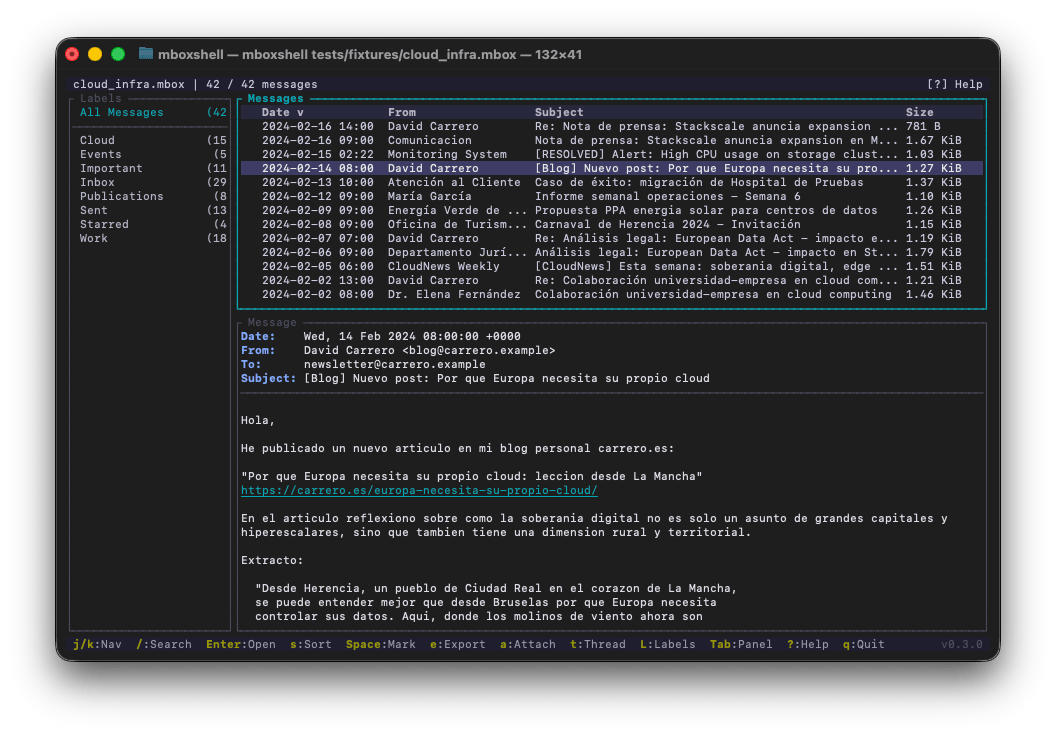
mboxshell v0.7.3
mboxShell。适用于任意大小 MBOX 文件的快速终端查看器。无需加载到内存,即可打开、搜索和导出 Gmail Takeout 备份(50GB+)中的电子邮件。使用 Rust 构建。
mboxShell
Fast terminal viewer for MBOX files of any size. Open, search and export emails from Gmail Takeout backups (50 GB+) without loading them into memory.


Why this project exists
When you export your email from Gmail using Google Takeout, you get one or more .mbox files that can weigh tens of gigabytes — plus one more mailbox per Google Group you own, which is easy to miss and can be larger than the Gmail export itself. There is no cross-platform terminal tool that lets you open, search and browse those files efficiently without loading them entirely into memory.
mboxShell was built to solve that problem: open a 50 GB MBOX in seconds, navigate hundreds of thousands of messages smoothly, search by sender, date or content, and export whatever you need. All from the terminal, with no GUI, no server, no external dependencies.
Use cases
- Browse Gmail backups (Google Takeout) with their original labels
- Read the groups you own, exported by Takeout as their own mailboxes — often the largest files in the archive
- Analyze mail archives on servers, during migrations or audits
- Search messages in MBOX files from any source (Thunderbird, Unix servers, etc.)
- Export messages to EML, CSV or plain text for further processing
- Extract attachments individually or in bulk
- Merge multiple MBOX files into one, removing duplicates
Also as a desktop app: Mbox Viewer Pro for Mac, Windows and Linux
Not a fan of the terminal? Mbox Viewer Pro is a desktop app by the same author, built on mboxShell's parsing engine, with a familiar mailbox-style interface to open, browse and search MBOX and EML files of any size without importing them into a mail client. Everything stays on your own computer: nothing is uploaded. It's available on:
- Mac — macOS 14 Sonoma or later, Universal Binary (native on Apple Silicon). Mac App Store or direct download.
- Windows — Windows 10/11 and Windows Server. Microsoft Store or direct download.
- Linux (beta) — native GTK 4 and libadwaita app. Packages for Ubuntu 24.04+ and Debian 13 (
.deb), Fedora 44+ (.rpm) and Flatpak, on x86_64 and ARM64. Download for Linux.
Without a licence it works as the free version, with mailboxes up to 1 GB and no time limit. If you'd rather stay in the terminal, mboxShell remains free and open source.
Also in your browser: Online Mbox Viewer
Need to peek at an MBOX file without installing anything? Try Online Mbox Viewer — a free, MIT-licensed web app by the same author. It opens and renders .mbox files entirely in your browser: nothing is uploaded to any server, so your email stays on your machine. Perfect for a quick look from any device. Source code at github.com/dcarrero/online-mbox-viewer.
Features
- Never loads the file into memory. Uses streaming I/O with a 1 MB buffer. A 100 GB MBOX uses roughly the same ~500 MB of RAM as a 1 GB one (only the metadata index lives in memory).
- Persistent indexing. The first open creates a binary index (
.mboxshell.idx) so subsequent opens take less than a second. - Full Gmail support. Detects and displays
X-Gmail-Labelsas virtual folders in a sidebar panel, letting you filter by Inbox, Sent, Starred, custom labels, etc. - Google Groups mailboxes. Reads the
topics.mboxfiles a Takeout archive ships for every group you own, names them after the group instead of the meaningless file name, shows the group as a virtual label, and threads conversations by the exactX-GM-THRIDid. - Correct encodings. Decodes RFC 2047 encoded-words, supports UTF-8, ISO-8859-1, Windows-1252, KOI8-R, and any charset recognized by
encoding_rs. - Conversation threading. Groups messages into threads using the JWZ algorithm (the same one used by Netscape/Mozilla), or the mailbox's own conversation id when it has one.
- Advanced search. Field-specific filtering (
from:,subject:,date:,body:,has:attachment,label:, etc.), date ranges, size filters, AND/OR operators, and negation. - Flexible export. Individual or bulk export to EML, CSV (Excel-compatible), plain text, HTML, a new MBOX or a Maildir. Decoded attachment extraction.
- Single binary. No runtime, no dependencies. A ~5 MB executable that runs on Linux, macOS and Windows.
- Full terminal UI. Keyboard navigation (vi-style), three layout modes, interactive search bar, configurable shortcuts.
- Bilingual. Interface available in English and Spanish, auto-detected from system locale.
Installation
Pre-built binaries (recommended)
Download the latest release for your platform from the Releases page:
| Platform | Binary |
|---|---|
| Linux x86_64 | mboxshell-linux-x86_64 |
| Linux ARM64 | mboxshell-linux-aarch64 |
| Linux RISC-V 64 | mboxshell-linux-riscv64 |
| FreeBSD x86_64 | mboxshell-freebsd-x86_64 |
| macOS Intel | mboxshell-macos-x86_64 |
| macOS Apple Silicon | mboxshell-macos-aarch64 |
| Windows x86_64 | mboxshell-windows-x86_64.exe |
| Windows ARM64 | mboxshell-windows-arm64.exe |
After downloading, make it executable and move it to your PATH:
# Linux / macOS
chmod +x mboxshell-*
sudo mv mboxshell-* /usr/local/bin/mboxshell

# Or place it in a user-local directory
mv mboxshell-* ~/.local/bin/mboxshell
On Windows, move mboxshell-windows-x86_64.exe to a folder in your PATH, or run it directly.
Build from source
Requirements: Rust 1.85 or later.
# Clone and build
git clone https://github.com/dcarrero/mboxshell.git
cd mboxshell
cargo build --release

# The binary is at target/release/mboxshell
# Install it system-wide:
sudo cp target/release/mboxshell /usr/local/bin/

# Or for the current user only:
cp target/release/mboxshell ~/.local/bin/
Cross-compiling for other platforms
# Add the target you need
rustup target add aarch64-apple-darwin      # macOS Apple Silicon
rustup target add x86_64-unknown-linux-gnu  # Linux x86_64
rustup target add aarch64-unknown-linux-gnu # Linux ARM64

# Build for a specific target
cargo build --release --target aarch64-apple-darwin
Install via Cargo
cargo install mboxshell                 # from crates.io
cargo binstall mboxshell                # or fetch the release binary, no compiling
cargo install --git https://github.com/dcarrero/mboxshell.git   # latest main
Package managers
Homebrew (macOS and Linux):
brew install dcarrero/tap/mboxshell
Installs the release binary together with shell completions and the man page; brew upgrade picks up new versions.
Scoop (Windows):
scoop bucket add dcarrero https://github.com/dcarrero/scoop-bucket
scoop install dcarrero/mboxshell
Nix / NixOS — mboxshell is in nixpkgs:
nix-shell -p mboxshell        # try it in a temporary shell
nix run nixpkgs#mboxshell     # or run it directly (flakes)
On NixOS, add mboxshell to environment.systemPackages. New releases reach nixpkgs unstable automatically, usually within a few days.