Windows 特权计划任务发现工具,兼具趣味与实用性。






TaskHound 用于搜寻 Windows 上以特权账户和存储凭据运行的计划任务。它通过 SMB 枚举任务、解析 XML,并通过与 BloodHound 的集成识别高价值的攻击机会。
有关背景故事/传说和详细解释,参见相关的博客文章——第1部分 和 第2部分。
git clone https://github.com/1r0BIT/TaskHound.git cd TaskHound python3 -m venv .venv && source .venv/bin/activate pip install -r requirements.txt && pip install .
taskhound -u homer.simpson -p 'Doh!123' -d thesimpsons.local -t moe.thesimpsons.local
taskhound -u homer.simpson -p 'Doh!123' -d thesimpsons.local --targets-file hosts.txt --threads 10
taskhound -u homer.simpson -p 'Doh!123' -d thesimpsons.local --dc-ip 10.0.0.1 --auto-targets --threads 20
taskhound -u homer.simpson -p 'Doh!123' -d thesimpsons.local --targets-file hosts.txt --laps --threads 10
taskhound --offline-disk /mnt/disk
> **认证支持**:TaskHound 支持大多数主流认证机制,包括密码、NTLM 哈希、Kerberos(也包括 ccache 缓存)以及 AES 密钥认证。

## 配置文件

TaskHound 支持使用 TOML 配置文件来持久化设置。在工作目录或 `~/.config/taskhound/` 下创建 `taskhound.toml`:```toml
[authentication]
username = "svc_taskhound"
domain = "THESIMPSONS.LOCAL"

[target]
dc_ip = "10.0.0.1"
threads = 10
timeout = 30

[bloodhound]
live = true
connector = "http://127.0.0.1:8080"
api_key = "${BH_API_KEY}"      # Use env vars for secrets
api_key_id = "${BH_API_KEY_ID}"
type = "bhce"

[bloodhound.opengraph]
enabled = true
output_dir = "./opengraph"

[laps]
enabled = true

[cache]
enabled = true
ttl = 86400  # 24 hours
优先级:CLI参数 > 环境变量 > 本地配置 > 用户配置 > 默认值
TaskHound的BOF已包含在 Adaptix扩展套件 的 SAR-BOF/taskhound/ 目录下。
TTTTT AAA SSS K K H H OOO U U N N DDDD T A A S K K H H O O U U NN N D D T AAAAA SSS KKK HHHHH O O U U N N N D D T A A S K K H H O O U U N NN D D T A A SSSS K K H H OOO UUU N N DDDD
by 0xr0BIT
[+] Connecting to BloodHound CE at http://127.0.0.1:8080 [+] BloodHound connection successful (API v2) [+] High Value target data loaded (42 users) [+] OpenGraph generation enabled (auto-upload active) [] Processing target: moe.thesimpsons.local [+] moe.thesimpsons.local: Connected via SMB [+] moe.thesimpsons.local: Local Admin Access confirmed [] moe.thesimpsons.local: Enumerating scheduled tasks (skipping \Microsoft) [+] moe.thesimpsons.local: Found 12 tasks (3 privileged, 2 with stored credentials)
┌──────────────────────────────────────────────────────────────────────────────┐ │ [TIER-0] moe.thesimpsons.local - \DuffBrewery\BackupJob │ ├──────────────────────────────────────────────────────────────────────────────┤ │ Enabled │ True │ │ RunAs │ THESIMPSONS\Administrator │ │ What │ C:\Scripts\backup_beer_recipes.ps1 │ │ Author │ THESIMPSONS\burns.monty │ │ Date │ 2025-06-15T02:30:00 │ │ Trigger │ Calendar (starts 2025-06-15 02:30, daily) │ │ Reason │ Tier 0 - Domain Admins membership │ │ Cred Validation │ CONFIRMED_VALID │ │ Pwd Analysis │ Password unchanged AND ran within schedule - confirmed │ └──────────────────────────────────────────────────────────────────────────────┘
┌──────────────────────────────────────────────────────────────────────────────┐ │ [PRIV] moe.thesimpsons.local - \KrustyBurger\InventorySync │ ├──────────────────────────────────────────────────────────────────────────────┤ │ Enabled │ True │ │ RunAs │ THESIMPSONS\svc_krusty │ │ What │ C:\KrustyApps\sync.exe --silent │ │ Author │ THESIMPSONS\carlson.carl │ │ Date │ 2025-03-10T08:00:00 │ │ Trigger │ Calendar (starts 2025-03-10 08:00, every 4 hours) │ │ Reason │ High Value match found in BloodHound │ │ Cred Validation │ DEFINITELY_STALE │ │ Pwd Analysis │ Password changed AFTER last run - credentials are stale │ └──────────────────────────────────────────────────────────────────────────────┘
╭─────────────────────────── SCAN COMPLETE ────────────────────────────────────╮ │ [+] Succeeded: 1 │ │ [-] Failed: 0 │ │ Total time: 2.34s │ │ Avg per target: 2340ms │ ╰──────────────────────────────────────────────────────────────────────────────╯
╭─────────────────────────── TASK SUMMARY ─────────────────────────────────────╮ │ Hostname Tier-0 Privileged Normal │ │ moe.thesimpsons.local 1 2 9 │ ╰──────────────────────────────────────────────────────────────────────────────╯
╭─────────────────────── BLOODHOUND OPENGRAPH ─────────────────────────────────╮ │ [+] Generated 3 nodes, 5 edges │ │ [+] Uploaded to BloodHound successfully │ │ [*] JSON saved to: ./opengraph/taskhound_data.json │ ╰──────────────────────────────────────────────────────────────────────────────╯
---

## BloodHound 集成

TaskHound 同时支持 **Legacy BloodHound**(Neo4j)和 **BloodHound Community Edition (BHCE)**,并具备自动格式检测功能。

### 实时连接```bash
# BHCE with API Key (recommended)
taskhound -u homer.simpson -p 'Doh!123' -d thesimpsons.local -t moe.thesimpsons.local \
  --bh-live --bhce --bh-connector http://127.0.0.1:8080 \
  --bh-api-key "YOUR_API_KEY" --bh-api-key-id "YOUR_KEY_ID"

# BHCE with username/password
taskhound -u homer.simpson -p 'Doh!123' -d thesimpsons.local -t moe.thesimpsons.local \
  --bh-live --bhce --bh-connector http://127.0.0.1:8080 \
  --bh-user admin --bh-password password

# Legacy BloodHound (Neo4j)
taskhound -u homer.simpson -p 'Doh!123' -d thesimpsons.local -t moe.thesimpsons.local \
  --bh-live --legacy --bh-connector bolt://127.0.0.1:7687 \
  --bh-user neo4j --bh-password password
如果无法实时连接,可使用以下Cypher查询导出高价值用户:
BHCE:```cypher MATCH (n) WHERE coalesce(n.system_tags, "") CONTAINS "admin_tier_0" OR n.highvalue = true MATCH p = (n)-[:MemberOf*1..]->(g:Group) RETURN p;
**旧版:**```cypher
MATCH (u:User {highvalue:true})
OPTIONAL MATCH (u)-[:MemberOf*1..]->(g:Group)
WITH u, properties(u) as all_props, collect(g.name) as groups
RETURN u.samaccountname AS SamAccountName, all_props, groups
然后使用:taskhound --bh-data exported_users.json ...
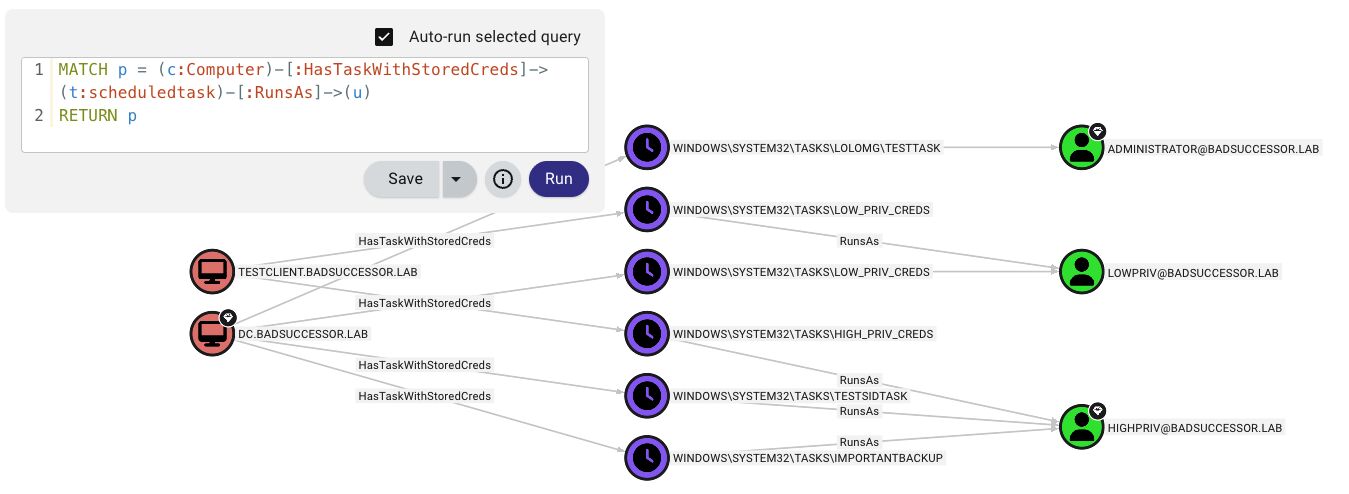
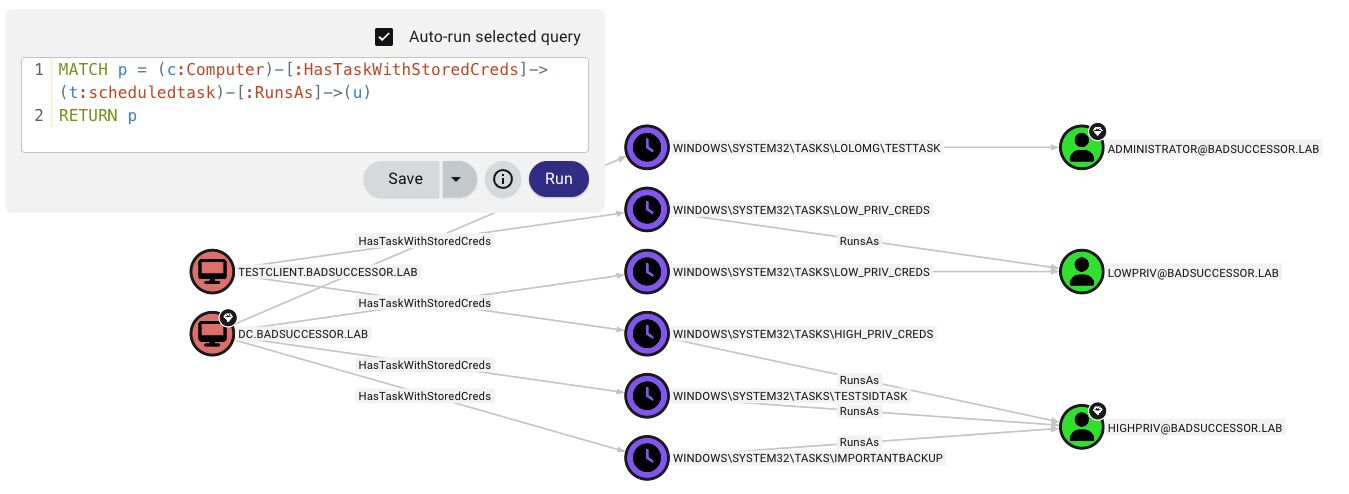
TaskHound 在 BloodHound CE 中创建自定义节点和边,用以可视化计划任务攻击路径。
你能得到什么:
ScheduledTask 包含 20 多项属性(凭据、触发器、密码分析、验证状态)HasTask、HasTaskWithStoredCreds、RunsAstaskhound -u homer.simpson -p 'Doh!123' -d thesimpsons.local -t moe.thesimpsons.local --bh-opengraph
taskhound -u homer.simpson -p 'Doh!123' -d thesimpsons.local -t moe.thesimpsons.local --bh-opengraph --bh-no-upload
> **注意**:OpenGraph 仅限 BHCE。旧版 BloodHound 不支持自定义节点类型。

---

## LAPS 集成

TaskHound 可以自动检索并使用 LAPS 密码进行每主机身份验证。支持 Windows LAPS(`msLAPS-Password`)和旧版 LAPS(`ms-Mcs-AdmPwd`),包括通过 MS-GKDI 加密的密码。```bash
# Basic LAPS - auto-retrieves passwords per target
taskhound -u homer.simpson -p 'Doh!123' -d thesimpsons.local --targets-file hosts.txt --laps --threads 10

# Custom local admin username
taskhound -u homer.simpson -p 'Doh!123' -d thesimpsons.local -t moe.thesimpsons.local --laps --laps-user localadmin

# LAPS with OPSEC mode (other noisy operations disabled)
taskhound -u homer.simpson -p 'Doh!123' -d thesimpsons.local -t moe.thesimpsons.local --laps --opsec --force-laps
支持的 LAPS 类型:
| 类型 | 属性 | 已加密 |
|---|---|---|
| Windows LAPS | msLAPS-Password | 否 |
| Windows LAPS |
TaskHound 使用 DPAPI 提取并解密存储的任务凭据。默认启用 DPAPI 数据收集。```bash
nxc smb moe.thesimpsons.local -u homer.simpson -p 'Doh!123' --lsa
taskhound -t moe.thesimpsons.local -u homer.simpson -p 'Doh!123' -d thesimpsons.local --dpapi-key 0x51e43225...
taskhound -t moe.thesimpsons.local -u homer.simpson -p 'Doh!123' -d thesimpsons.local
taskhound --offline ./output/raw_backups/moe.thesimpsons.local --dpapi-key 0x51e43225...
taskhound -t moe.thesimpsons.local -u homer.simpson -p 'Doh!123' -d thesimpsons.local --output-dir ./collected
taskhound -t moe.thesimpsons.local -u homer.simpson -p 'Doh!123' -d thesimpsons.local --no-loot
> **重要提示**:每个主机拥有唯一的 DPAPI_SYSTEM 密钥。对于多目标扫描,请先收集(默认),然后离线解密每个目标。

---

## 凭据验证

TaskHound 通过 RPC 查询任务执行历史并应用启发式规则,评估存储的任务密码是否仍然有效。此功能**默认启用**。```bash
# Credential validation is on by default, no flag needed
taskhound -u homer.simpson -p 'Doh!123' -d thesimpsons.local -t moe.thesimpsons.local

# Disable validation explicitly
taskhound -u homer.simpson -p 'Doh!123' -d thesimpsons.local -t moe.thesimpsons.local --no-validate-creds
Windows 任务计划程序仅记录成功的任务执行。身份验证失败(密码错误、帐户锁定等)会被静默忽略。任务只是不会运行。
关键洞察:Windows 在任务创建时验证凭据。如果尝试使用错误密码创建任务,会收到 ERROR_LOGON_FAILURE 且任务不会被创建。这意味着:如果存在一个包含已存储凭据的任务,那么该密码在任务创建时是有效的。
TaskHound 使用启发式方法来评估凭据有效性:
关键洞察:将 AD 中的 pwdLastSet 与任务计划程序中的 LastRunTime 进行比较,可以告诉我们密码是否在最后一次成功运行后发生了更改。对于从未运行的任务,将 pwdLastSet 与 task_creation_date 进行比较,可以告诉我们密码是否在任务使用有效凭据创建后发生了更改。
没有 AD 数据(例如,--no-ldap 且无 BloodHound):TaskHound 回退到仅 RPC 模式,仅使用返回码和最后运行时间。成功执行返回 LIKELY_VALID;如果从任务 XML 中已知触发间隔,则仍应用基于计划的陈旧性检测。
注意:使用
--opsec或--no-rpc时禁用。
TaskHound 支持多种输出格式以满足不同的使用场景。所有输出都使用 --output-dir(默认:./output)下的结构化目录布局。
taskhound -u homer.simpson -p 'Doh!123' -d thesimpsons.local -t moe.thesimpsons.local
taskhound -u homer.simpson -p 'Doh!123' -d thesimpsons.local --auto-targets -o plain,json,html
taskhound -u homer.simpson -p 'Doh!123' -d thesimpsons.local --auto-targets -o json
taskhound -u homer.simpson -p 'Doh!123' -d thesimpsons.local --auto-targets -o html --output-dir ./audit_results
taskhound -u homer.simpson -p 'Doh!123' -d thesimpsons.local --auto-targets -o plain,json,csv,html --output-dir ./full_audit
### 目录结构```
./output/                           # Base directory (--output-dir)
├── plain/                          # Plain text output
│   └── <hostname>/
│       └── tasks.txt
├── json/                           # JSON export
│   └── taskhound.json
├── csv/                            # CSV export
│   └── taskhound.csv
├── html/                           # HTML security reports
│   └── taskhound.html
├── opengraph/                      # BloodHound OpenGraph files
│   └── taskhound_data.json
└── raw_backups/                    # Raw collection (XML + DPAPI)
    └── <hostname>/
        ├── tasks/                  # Task XML files
        └── dpapi_loot/             # DPAPI credential blobs
HTML 输出生成一份专为蓝队评估设计的综合安全报告:
默认情况下,TaskHound 会保存原始 XML 任务文件和 DPAPI 凭据数据块,以供离线分析:```bash
taskhound -u homer.simpson -p 'Doh!123' -d thesimpsons.local -t moe.thesimpsons.local --no-backup
taskhound --offline ./output/raw_backups/moe.thesimpsons.local --dpapi-key 0x51e43225...
---

## 多线程扫描

对于大型环境,请使用带速率限制的并行扫描:```bash
# 20 parallel workers, max 5 targets/second
taskhound -u homer.simpson -p 'Doh!123' -d thesimpsons.local --auto-targets --threads 20 --rate-limit 5

# Auto-discover servers only (uses preset filter)
taskhound -u homer.simpson -p 'Doh!123' -d thesimpsons.local --auto-targets --ldap-filter servers --threads 20

# Include disabled computers and extend stale threshold to 90 days
taskhound -u homer.simpson -p 'Doh!123' -d thesimpsons.local --auto-targets --include-disabled --stale-threshold 90

# Target workstations only, disable stale filtering
taskhound -u homer.simpson -p 'Doh!123' -d thesimpsons.local --auto-targets --ldap-filter workstations --stale-threshold 0
默认情况下,--auto-targets 应用智能过滤以减少噪音和失败的连接:
| 过滤器 | 默认 | 覆盖 |
|---|---|---|
| 已禁用帐户 | 排除 | --include-disabled |
| 过期计算机(>60 天) |
数据源优先级: BloodHound(如果已配置)→ LDAP 备用
使用 BloodHound 时,TaskHound 以 include_properties=true 查询以实现高效的单查询枚举。如果 BloodHound 数据超过 7 天,则会显示警告;超过 30 天则会触发紧急警告。
过滤预设:
servers - 仅 Windows Server 操作系统workstations - 仅非服务器操作系统(raw LDAP) - 自定义 LDAP 过滤器(需要 LDAP 源)TaskHound 使用多层备用链将 SID 解析为可读名称:
taskhound -u localadmin -p 'L0c4lP@ss!' -d . -t moe.thesimpsons.local
--ldap-user homer.simpson --ldap-password 'Doh!123' --ldap-domain thesimpsons.local
taskhound -u homer.simpson -p 'Doh!123' -d thesimpsons.local -t moe.thesimpsons.local --gc-server 10.0.0.1
taskhound -u homer.simpson -p 'Doh!123' -d thesimpsons.local -t moe.thesimpsons.local --opsec
## 离线分析

在没有网络访问的情况下分析任务:```bash
# Previously collected XML backups
taskhound --offline ./backup/moe.thesimpsons.local

# Mounted disk image
taskhound --offline-disk /mnt/disk

# Mounted image with custom hostname
taskhound --offline-disk /mnt/disk --disk-hostname MOE
TaskHound 提供对网络操作的细粒度控制,以在隐蔽性与功能性之间取得平衡。
Default: BloodHound → Cache → LSARPC → LDAP → GC
--no-ldap: BloodHound → Cache → LSARPC
--no-rpc: BloodHound → Cache → LDAP → GC
--opsec: BloodHound → Cache (only)
### 默认行为

TaskHound **默认非常嘈杂** - 所有功能均已启用以获得最大可见性。这使其非常适合不关心OPSEC的审计和综合评估:

- **凭据保护检测** - 默认启用(使用 `--no-credguard` 禁用)
- **凭据验证** - 默认启用(使用 `--no-validate-creds` 禁用)
- **DPAPI掠夺** - 默认启用(使用 `--no-loot` 禁用)
- **LDAP解析** - 默认启用(使用 `--no-ldap` 禁用)
- **RPC操作** - 默认启用(使用 `--no-rpc` 禁用)

> [!WARNING]
> **凭据保护检查极易被检测到。** 由于现代Windows上默认停止了远程注册表服务,TaskHound将通过SCM远程**启动该服务**,执行检查,然后停止它(就像secretsdump一样)。这将使任何像样的SOC像圣诞树一样亮起。**如果希望在任务中避免这种情况,请务必使用 `--no-credguard`!**

说到任务:对于红队/隐蔽操作,请使用 `--opsec` 一次性禁用所有嘈杂功能。(或使用BOF)。

### 使用示例```bash
# Full OPSEC mode (disables: LDAP, RPC, looting, credguard, validation; forces sequential scanning)
taskhound -u user -p 'pass' -d corp.local -t target --opsec

# OPSEC with jitter (random 0-5 second delays between hosts)
taskhound -u user -p 'pass' -d corp.local --targets-file hosts.txt --opsec --jitter 5

# Disable LDAP only (keep LSARPC for SID resolution)
taskhound -u user -p 'pass' -d corp.local -t target --no-ldap

# Disable RPC only (keep LDAP for SID resolution)
taskhound -u user -p 'pass' -d corp.local -t target --no-rpc

# LAPS with OPSEC (force LAPS LDAP queries despite --opsec)
taskhound -u user -p 'pass' -d corp.local --laps --opsec --force-laps
--bh-live 导入域数据--opsec 标志 - 一次性禁用所有噪音操作--jitter 实现时间随机化 - 避免可预测的扫描模式--offline 离线分析TaskHound使用Rich进行格式化控制台输出,带有彩色表格和进度指示器。``` taskhound --help
<details>
<summary>点击展开完整用法</summary>```
Usage: taskhound [OPTIONS] [TARGETS]

AUTHENTICATION OPTIONS
  -u, --username        Username (required for online mode)
  -p, --password        Password (omit with -k for Kerberos/ccache)
  -d, --domain          Domain (required for online mode)
  --hashes              NTLM hashes (LM:NT or NT-only)
  -k, --kerberos        Use Kerberos authentication
  --aes-key             AES key for Kerberos (32 or 64 hex chars)

TARGET OPTIONS
  -t, --target          Single target or comma-separated list
  --targets-file        File with targets, one per line
  --dc-ip               Domain controller IP
  --ns, --nameserver    DNS nameserver for lookups
  --timeout             Connection timeout in seconds (default: 5)
  --threads             Parallel worker threads (default: 10)
  --rate-limit          Max targets per second (default: unlimited)
  --jitter SECONDS      Random delay (0-N seconds) between hosts (OPSEC, sequential only)
  --dns-tcp             Force DNS over TCP (for SOCKS proxies)
  --auto-targets        Auto-discover targets (BloodHound first, LDAP fallback)
  --ldap-filter         Filter for auto-targets: 'servers', 'workstations', or raw LDAP
  --include-dcs         Include Domain Controllers in auto-targets
  --include-disabled    Include disabled computer accounts
  --stale-threshold     Exclude computers inactive >N days (default: 60, 0=disable)

SCANNING OPTIONS
  --offline             Parse XMLs from directory
  --offline-disk        Analyze mounted Windows filesystem
  --disk-hostname       Override hostname for offline-disk
  --bh-data             BloodHound export file for HV detection
  --opsec               Stealth mode: --no-ldap --no-rpc --no-loot --no-credguard --no-validate-creds --threads 1
  --no-rpc              Disable RPC operations (LSARPC, CredGuard, validation)
  --include-ms          Include \Microsoft tasks
  --include-local       Include local system accounts
  --include-all         Include ALL tasks
  --unsaved-creds       Show tasks without stored credentials
  --no-credguard        Disable Credential Guard detection (default: enabled)
  --no-validate-creds   Disable credential validation (default: enabled)

BLOODHOUND OPTIONS
  --bh-live             Enable live BloodHound connection
  --bh-connector        BloodHound URI (default: http://127.0.0.1:8080)
  --bh-user             BloodHound username
  --bh-password         BloodHound password
  --bh-api-key          BloodHound API key
  --bh-api-key-id       BloodHound API key ID
  --bh-timeout          API query timeout (default: 120)
  --bhce                Use BHCE (Community Edition)
  --legacy              Use Legacy BloodHound (Neo4j)
  --bh-save             Save query results to file

OPENGRAPH OPTIONS (BHCE ONLY)
  --bh-opengraph        Generate OpenGraph JSON files (saves to {output_dir}/opengraph/)
  --bh-no-upload        Skip automatic upload
  --bh-force-icon       Force icon update
  --bh-icon             Icon name (default: clock)
  --bh-color            Icon color (default: #8B5CF6)
  --bh-allow-orphans    Create edges for missing nodes

DPAPI OPTIONS
  --no-loot             Disable DPAPI credential collection (default: enabled)
  --dpapi-key           DPAPI_SYSTEM userkey (hex format)

LDAP/SID RESOLUTION
  --no-ldap             Disable LDAP/GC operations
  --ldap-user           Alternative LDAP username
  --ldap-password       Alternative LDAP password
  --ldap-hashes         Alternative LDAP hashes
  --ldap-domain         Alternative LDAP domain
  --ldap-tier0          Enable LDAP-based Tier-0 detection
  --gc-server           Global Catalog server IP

LAPS OPTIONS
  --laps                Enable LAPS authentication
  --laps-user           Override local admin username
  --force-laps          Force LAPS in OPSEC mode

CACHE OPTIONS
  --cache-ttl           Cache TTL in seconds (default: 86400)
  --no-cache            Disable caching
  --clear-cache         Clear cache before run
  --cache-file          Cache file path

OUTPUT OPTIONS
  -o, --output          Output formats (comma-separated: plain,json,csv,html)
                        Default: plain
  --output-dir          Base output directory (default: ./output)
  --no-backup           Disable raw XML backup collection
  --no-summary          Disable summary table

  Output directory structure:
    ./output/
    ├── plain/<host>/tasks.txt    # Plain text output
    ├── json/taskhound.json       # JSON export
    ├── csv/taskhound.csv         # CSV export
    ├── html/taskhound.html       # HTML security report
    ├── opengraph/                # BloodHound OpenGraph files
    └── raw_backups/<host>/       # Raw XML + DPAPI files
        ├── tasks/                # Task XML files
        └── dpapi_loot/           # DPAPI credential blobs

MISC
  --verbose             Verbose output
  --debug               Debug output with stack traces
当咖啡因摄入和空闲时间都允许时:
以及所有为开源安全工具可及性做出贡献的人。
TaskHound 严格是一款审计和教育工具。仅在你拥有或获得明确授权的环境中使用。说真的,别当混蛋。
欢迎提交 PR。这大半是咖啡因驱动的氛围编码,所以别指望奇迹。
请负责任地使用。不提供任何担保。详情见 LICENSE。
| 功能 | 描述 |
|---|
| 第0层与高价值检测 | 自动识别以域管理员、企业管理员及其他特权账户运行的任务 |
| BloodHound 集成 | 连接实时 BHCE/传统实例,或导入导出数据以检测高价值用户 |
| OpenGraph 支持 | 将计划任务可视化为 BloodHound CE 中的攻击路径节点 |
| LAPS 集成 | 自动检索并使用 LAPS 密码(包括 Windows LAPS 和传统版本)以进行每台主机认证 |
| DPAPI 凭据提取 | 收集并解密包含存储任务凭据的 DPAPI 数据块 |
| 多线程扫描 | 支持并行目标处理,并针对大型环境进行速率限制 |
| 基于 LDAP 的第0层检测 | 通过组成员关系检测特权账户,无需 BloodHound |
| 凭据验证 | 通过 RPC 验证存储的任务密码是否仍然有效 |
| 离线分析 | 处理挂载的磁盘映像或先前收集的 XML 文件 |
| 多种输出格式 | 纯文本、JSON、CSV 及带有严重性评分的 HTML 安全报告 |
| SID 解析 | 通过 BloodHound → 缓存 → LSARPC → LDAP → GC 的多层解析 |
| 缓存 | 基于 SQLite 的持久缓存,用于 SID 查找和 LAPS 凭据 |
| 来源 | 检测方法 |
|---|
| BHCE | isTierZero、系统标签(admin_tier_0)、AdminSDHolder |
| Legacy | AdminSDHolder(admincount=1)、基于SID的检测 |
| LDAP | 组成员查询(--ldap-tier0) |
| Built-in | 已知第0层SID(域管理员、企业管理员等) |
msLAPS-EncryptedPassword| 是 (MS-GKDI) |
| 旧版 LAPS | ms-Mcs-AdmPwd | 否 |
| 状态 | 含义 |
|---|
CONFIRMED_VALID | 自任务创建以来密码未更改,且任务在预期计划内运行——凭据已验证有效 |
HIGH_CONFIDENCE_VALID | 自任务创建以来密码未更改,但触发时间未知(例如,启动触发器)——凭据很可能有效 |
LIKELY_VALID | 密码已更改但任务在计划内运行(凭据已更新),或任务成功运行(仅 RPC 模式) |
POSSIBLY_STALE | 任务应该已运行但尚未运行——可能表示凭据过时 |
DEFINITELY_STALE | 密码在最后一次成功运行后已更改——凭据肯定错误 |
NEVER_RAN_LIKELY_VALID | 任务从未运行,但密码自创建以来未更改——很可能有效(可能缺少批处理登录权限) |
NEVER_RAN_POSSIBLY_STALE | 任务从未运行,且密码在创建后已更改——很可能过时 |
NEVER_RAN_UNKNOWN | 任务从未运行,无 AD 上下文——创建时有效,当前状态未知 |
UNKNOWN | 无法确定(帐户被阻止等) |
| 格式 | 标志 | 描述 | 使用场景 |
|---|
| 纯文本 | -o plain | 人类可读的控制台输出(默认) | 交互式使用、快速审查 |
| JSON | -o json | 机器可读的结构化导出 | 自动化、数据分析、脚本编写 |
| CSV | -o csv | 兼容电子表格的导出 | 报告、筛选、Excel 分析 |
| HTML | -o html | 带有严重性评分的安全报告 | 蓝队审计、利益相关者报告 |
| 排除 |
--stale-threshold 0(禁用) |
| 域控制器 | 排除 | --include-dcs |
| 协议 | 操作 | 禁用标志 |
|---|
| SMB | 任务枚举(始终使用) | N/A |
| LDAP (389/636) | SID 解析、第0层检测、pwdLastSet | --no-ldap |
| 全局编录 (3268) | 跨域 SID 解析 | --no-ldap |
| LSARPC (SMB 管道) | 备用 SID 解析 | --no-rpc |
| 远程注册表 (SMB 管道) | Credential Guard 检测 | --no-credguard |
| 任务计划程序 RPC (SMB 管道) | 凭据验证 | --no-validate-creds |
| DPAPI 文件收集 (SMB) | DPAPI 凭据 Blob 收集 | --no-loot |