
chisel v1.13.0
基于HTTP的快速TCP/UDP隧道,采用SSH加密,支持反向端口转发、SOCKS5代理和客户端认证,用于安全的网络穿透和防火墙规避。
Chisel


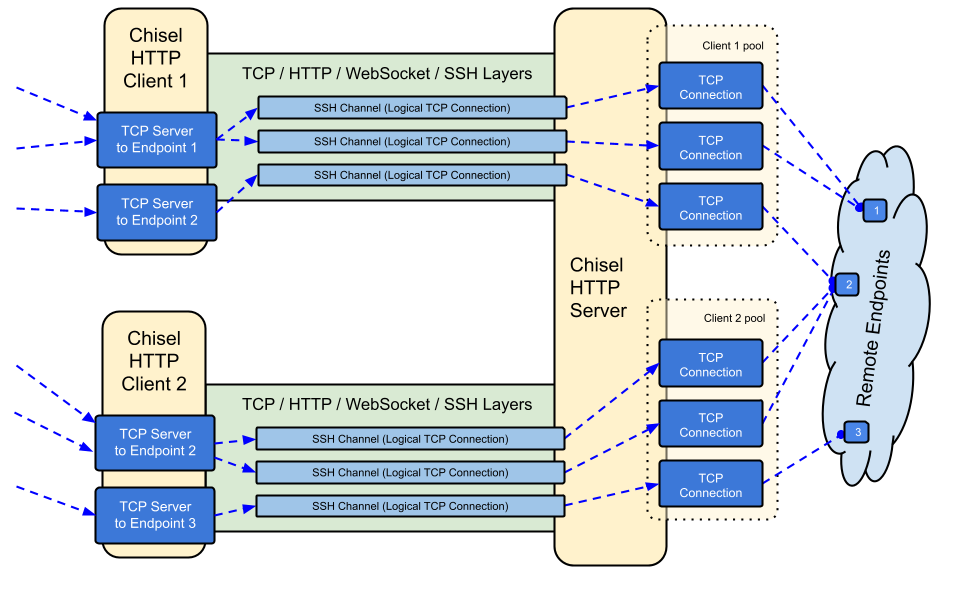
Chisel 是一个快速的 TCP/UDP 隧道,通过 HTTP 传输,并使用 SSH 进行安全保护。单一可执行文件同时包含客户端和服务端。使用 Go (golang) 编写。Chisel 主要用于穿透防火墙,但也可用于为你的网络提供安全的接入端点。
目录
特性
- 易于使用
- 高性能*
- 使用 SSH 协议(通过
crypto/ssh)的加密连接 - 认证连接;通过用户配置文件对客户端连接进行认证,通过指纹匹配对服务端连接进行认证。
- 客户端使用指数退避自动重连(可通过
--min/max-retry-interval调整);keepalive ping 会超时,因此静默失效的连接(休眠/唤醒、NAT 超时、服务器重启)会被检测并重新建立 - 客户端可以在一个 TCP 连接上创建多个隧道端点
- 客户端可以选择通过 SOCKS 或 HTTP CONNECT 代理
- 反向端口转发(连接通过服务端并从客户端出去)
- 服务端可选兼作反向代理
- 服务端可选允许 SOCKS5 连接(参见下方指南)
- 客户端可选允许来自反向端口转发的 SOCKS5 连接
- 客户端通过 stdio 连接,支持
ssh -o ProxyCommand,从而提供基于 HTTP 的 SSH
安装
二进制文件


参见最新版本,或立即使用 curl https://i.jpillora.com/chisel! | bash 下载并安装
二进制文件使用最新的 Go 版本构建,这设定了最低操作系统版本要求:Windows 10 / Server 2016、macOS 12、Linux 内核 3.2、FreeBSD 12.2。对于较旧的系统(例如 Windows 7),请使用 v1.8.1 版本或更早版本。
Docker


docker run --rm -it jpillora/chisel --help
镜像为多架构,并同时发布到 Docker Hub(jpillora/chisel)和 GitHub Container Registry(ghcr.io/jpillora/chisel)。
Fedora
该软件包由 Fedora 社区维护。如果您遇到与 RPM 使用相关的问题,请使用此问题跟踪器。
sudo dnf -y install chisel
来源
$ go install github.com/jpillora/chisel@latest
演示
你可以在几分钟内运行自己的演示服务器(旧的 Heroku 演示随着 Heroku 免费套餐的取消而消失)。example/fly.toml 将这个 chisel server 部署到 fly.io 的免费额度上:
$ chisel server --port $PORT --backend http://example.com
# listens on $PORT, proxies normal web requests to http://example.com
使用 fly launch --copy-config 从 example/ 目录部署它,然后通过隧道连接到服务器旁边运行的任何服务,例如:
$ chisel client https://<your-app>.fly.dev 3000
# connects to your chisel server,
# tunnels your localhost:3000 to the server's localhost:3000
在浏览器中访问你的应用 URL 会命中服务器的默认后端代理,并显示一份 example.com 的副本。
用法
$ chisel --help

  Usage: chisel [command] [--help]

  Version: X.Y.Z

  Commands:
    server - runs chisel in server mode
    client - runs chisel in client mode

  Read more:
    https://github.com/jpillora/chisel
$ chisel server --help

  Usage: chisel server [options]

  Options:

    --host, Defines the HTTP listening host – the network interface
    (defaults the environment variable HOST and falls back to 0.0.0.0).

    --port, -p, Defines the HTTP listening port (defaults to the environment
    variable PORT and falls back to port 8080).

    --key, (deprecated use --keygen and --keyfile instead)
    An optional string to seed the generation of a ECDSA public
    and private key pair. All communications will be secured using this
    key pair. Share the subsequent fingerprint with clients to enable detection
    of man-in-the-middle attacks (defaults to the CHISEL_KEY environment
    variable, otherwise a new key is generate each run).

    --keygen, A path to write a newly generated PEM-encoded SSH private key file.
    If users depend on your --key fingerprint, you may also include your --key to
    output your existing key. Use - (dash) to output the generated key to stdout.

    --keyfile, An optional path to a PEM-encoded SSH private key. When
    this flag is set, the --key option is ignored, and the provided private key
    is used to secure all communications. (defaults to the CHISEL_KEY_FILE
    environment variable). Since ECDSA keys are short, you may also set keyfile
    to the inline key string itself, exactly as printed by --keygen (a base64
    string with a "ck-" prefix); no extra base64 encoding is needed.

    --authfile, An optional path to a users.json file. This file should
    be an object with users defined like:
      {
        "<user:pass>": ["<addr-regex>","<addr-regex>"]
      }
    when <user> connects, their <pass> will be verified and then
    each of the remote addresses will be compared against the list
    of address regular expressions for a match. Patterns are NOT
    anchored by default: "10.0.0.1:80" also matches
    "210.0.0.1:8080", and "." matches any character. Anchor your
    patterns, e.g. "^10\.0\.0\.1:80$". The empty string ""
    matches every address. Addresses will
    always come in the form "<remote-host>:<remote-port>" for normal remotes,
    "R:<local-interface>:<local-port>" for reverse port forwarding
    remotes, and "socks" for SOCKS5 proxy access. Note that SOCKS5
    access previously bypassed this list; existing authfiles which
    should allow SOCKS5 must add an entry matching "socks" (the
    empty wildcard "" matches everything, including "socks"). This
    file will be automatically reloaded on change. Reloads apply
    to new connections and to new tunnels of connected clients;
    established tunnels are not interrupted.

    --auth, An optional string representing a single user with full
    access, in the form of <user:pass>. It is equivalent to creating an
    authfile with {"<user:pass>": [""]}. If unset, it will use the
    environment variable AUTH.

    --keepalive, An optional keepalive interval. Since the underlying
    transport is HTTP, in many instances we'll be traversing through
    proxies, often these proxies will close idle connections. You must
    specify a time with a unit, for example '5s' or '2m'. Defaults
    to '25s' (set to 0s to disable).

    --backend, Specifies another HTTP server to proxy requests to when
    chisel receives a normal HTTP request. Useful for hiding chisel in
    plain sight. --proxy is accepted as an alias for this flag.

    --socks5, Allow clients to access the internal SOCKS5 proxy. See
    chisel client --help for more information.

    --reverse, Allow clients to specify reverse port forwarding remotes
    in addition to normal remotes.

    --tls-key, Enables TLS and provides optional path to a PEM-encoded
    TLS private key. When this flag is set, you must also set --tls-cert,
    and you cannot set --tls-domain.

    --tls-cert, Enables TLS and provides optional path to a PEM-encoded
    TLS certificate. When this flag is set, you must also set --tls-key,
    and you cannot set --tls-domain.