jpillora/chisel
基于HTTP的快速TCP/UDP隧道,采用SSH加密,支持反向端口转发、SOCKS5代理和客户端认证,用于安全的网络穿透和防火墙规避。
# Chisel
[](https://godoc.org/github.com/jpillora/chisel) [](https://github.com/jpillora/chisel/actions?workflow=CI)
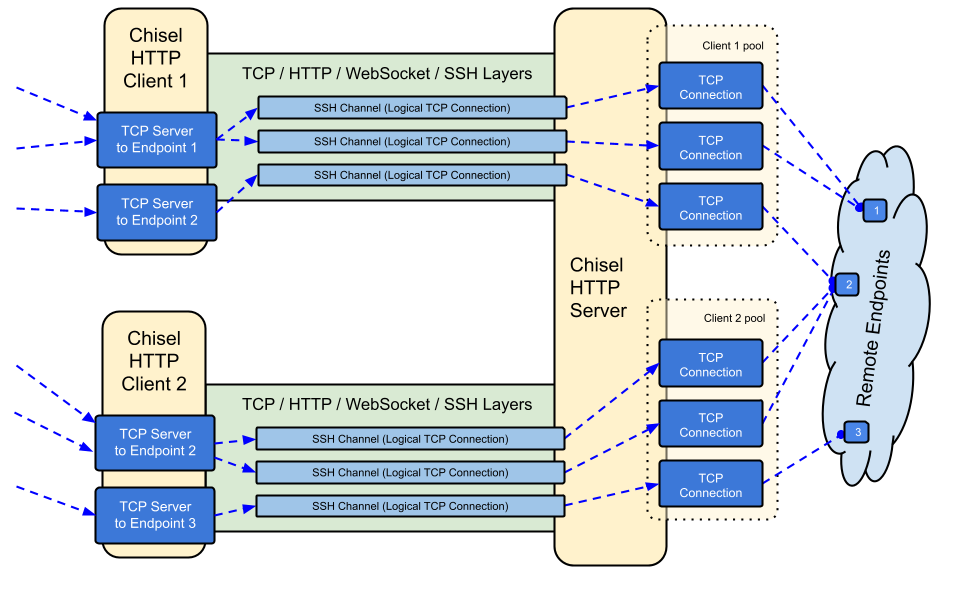
Chisel 是一个快速的 TCP/UDP 隧道,通过 HTTP 传输,并经由 SSH 加密。单个可执行文件同时包含客户端和服务器端。使用 Go (golang) 编写。Chisel 主要用于穿透防火墙,但也可以用来为你的网络提供安全端点。
## 目录
- [功能特性](#features)
- [安装](#install)
- [演示](#demo)
- [使用方法](#usage)
- [贡献](#contributing)
- [更新日志](#changelog)
- [许可证](#license)
## 功能特性
- 易于使用
- [高性能](https://github.com/jpillora/chisel/blob/master/test/bench/perf.md)\*
- [加密连接](#security),使用 SSH 协议(通过 `crypto/ssh`)
- [认证连接](#authentication);通过用户配置文件对客户端连接进行认证,通过指纹匹配对服务器连接进行认证。
- 客户端自动重连,采用[指数退避](https://github.com/jpillora/backoff)策略(可通过 `--min/max-retry-interval` 调整);心跳 ping 超时后,静默失效的连接(休眠/唤醒、NAT 超时、服务器重启)会被检测到并重新建立
- 客户端可以在单个 TCP 连接上创建多个隧道端点
- 客户端可以选择通过 SOCKS 或 HTTP CONNECT 代理
- 反向端口转发(连接通过服务器并从客户端发出)
- 服务器可选地兼作[反向代理](http://golang.org/pkg/net/http/httputil/#NewSingleHostReverseProxy)
- 服务器可选地允许 [SOCKS5](https://en.wikipedia.org/wiki/SOCKS) 连接(参见[下方指南](#socks5-guide))
- 客户端可选地允许通过反向端口转发接受 [SOCKS5](https://en.wikipedia.org/wiki/SOCKS) 连接
- 客户端连接支持 stdio,支持 `ssh -o ProxyCommand`,从而通过 HTTP 提供 SSH
## 安装
### 二进制文件
[](https://github.com/jpillora/chisel/releases) [](https://github.com/jpillora/chisel/releases)
参见[最新版本](https://github.com/jpillora/chisel/releases/latest),或使用 `curl https://i.jpillora.com/chisel! | bash` 立即下载并安装。
二进制文件使用最新的 Go 版本构建,因此设定了最低操作系统版本:Windows 10 / Server 2016、macOS 12、Linux 内核 3.2、FreeBSD 12.2。对于较旧系统(例如 Windows 7),请使用 [v1.8.1 版本](https://github.com/jpillora/chisel/releases/tag/v1.8.1)或更早版本。
### Docker
[](https://hub.docker.com/r/jpillora/chisel/) [](https://hub.docker.com/r/jpillora/chisel/tags)```sh
docker run --rm -it jpillora/chisel --help
```
镜像为多架构,并同时发布到 Docker Hub(`jpillora/chisel`)和 GitHub Container Registry(`ghcr.io/jpillora/chisel`)。
### Fedora
该软件包由 Fedora 社区维护。如果您在使用 RPM 时遇到问题,请使用此[问题跟踪器](https://bugzilla.redhat.com/buglist.cgi?bug_status=NEW&bug_status=ASSIGNED&classification=Fedora&component=chisel&list_id=11614537&product=Fedora&product=Fedora%20EPEL)。```sh
sudo dnf -y install chisel
```
### 源```sh
$ go install github.com/jpillora/chisel@latest
```
## 演示
你可以在几分钟内运行自己的演示服务器(旧的 Heroku 演示已随 Heroku 的免费套餐一起消失)。[`example/fly.toml`](https://github.com/jpillora/chisel/blob/master/example/fly.toml) 将此 `chisel server` 部署到 [fly.io](https://fly.io) 的免费额度上:```sh
$ chisel server --port $PORT --backend http://example.com
# listens on $PORT, proxies normal web requests to http://example.com
```
使用 `fly launch --copy-config` 从 `example/` 目录部署它,然后隧道连接到服务器旁运行的任何服务,例如:```sh
$ chisel client https://<your-app>.fly.dev 3000
# connects to your chisel server,
# tunnels your localhost:3000 to the server's localhost:3000
```
访问您应用的URL时,浏览器会命中服务器的默认后端代理,并显示 [example.com](http://example.com) 的副本。
## 使用方法
<!-- 手动渲染这些帮助文本,
或使用 https://github.com/jpillora/md-tmpl
通过 $ md-tmpl -w README.md -->
<!--tmpl,code=plain:echo "$ chisel --help" && go run main.go --help | sed 's#0.0.0-src (go1\..*)#X.Y.Z#' -->``` plain
$ chisel --help
Usage: chisel [command] [--help]
Version: X.Y.Z
Commands:
server - runs chisel in server mode
client - runs chisel in client mode
Read more:
https://github.com/jpillora/chisel
```
<!--/tmpl-->
<!--tmpl,code=plain:echo "$ chisel server --help" && go run main.go server --help | cat | sed 's#0.0.0-src (go1\..*)#X.Y.Z#' -->``` plain
$ chisel server --help
Usage: chisel server [options]
Options:
--host, Defines the HTTP listening host – the network interface
(defaults the environment variable HOST and falls back to 0.0.0.0).
--port, -p, Defines the HTTP listening port (defaults to the environment
variable PORT and falls back to port 8080).
--key, (deprecated use --keygen and --keyfile instead)
An optional string to seed the generation of a ECDSA public
and private key pair. All communications will be secured using this
key pair. Share the subsequent fingerprint with clients to enable detection
of man-in-the-middle attacks (defaults to the CHISEL_KEY environment
variable, otherwise a new key is generate each run).
--keygen, A path to write a newly generated PEM-encoded SSH private key file.
If users depend on your --key fingerprint, you may also include your --key to
output your existing key. Use - (dash) to output the generated key to stdout.
--keyfile, An optional path to a PEM-encoded SSH private key. When
this flag is set, the --key option is ignored, and the provided private key
is used to secure all communications. (defaults to the CHISEL_KEY_FILE
environment variable). Since ECDSA keys are short, you may also set keyfile
to the inline key string itself, exactly as printed by --keygen (a base64
string with a "ck-" prefix); no extra base64 encoding is needed.
--authfile, An optional path to a users.json file. This file should
be an object with users defined like:
{
"<user:pass>": ["<addr-regex>","<addr-regex>"]
}
when <user> connects, their <pass> will be verified and then
each of the remote addresses will be compared against the list
of address regular expressions for a match. Patterns are NOT
anchored by default: "10.0.0.1:80" also matches
"210.0.0.1:8080", and "." matches any character. Anchor your
patterns, e.g. "^10\.0\.0\.1:80$". The empty string ""
matches every address. Addresses will
always come in the form "<remote-host>:<remote-port>" for normal remotes,
"R:<local-interface>:<local-port>" for reverse port forwarding
remotes, and "socks" for SOCKS5 proxy access. Note that SOCKS5
access previously bypassed this list; existing authfiles which
should allow SOCKS5 must add an entry matching "socks" (the
empty wildcard "" matches everything, including "socks"). This
file will be automatically reloaded on change. Reloads apply
to new connections and to new tunnels of connected clients;
established tunnels are not interrupted.
--auth, An optional string representing a single user with full
access, in the form of <user:pass>. It is equivalent to creating an
authfile with {"<user:pass>": [""]}. If unset, it will use the
environment variable AUTH.
--keepalive, An optional keepalive interval. Since the underlying
transport is HTTP, in many instances we'll be traversing through
proxies, often these proxies will close idle connections. You must
specify a time with a unit, for example '5s' or '2m'. Defaults
to '25s' (set to 0s to disable).
--backend, Specifies another HTTP server to proxy requests to when
chisel receives a normal HTTP request. Useful for hiding chisel in
plain sight. --proxy is accepted as an alias for this flag.
--socks5, Allow clients to access the internal SOCKS5 proxy. See
chisel client --help for more information.
--reverse, Allow clients to specify reverse port forwarding remotes
in addition to normal remotes.
--tls-key, Enables TLS and provides optional path to a PEM-encoded
TLS private key. When this flag is set, you must also set --tls-cert,
and you cannot set --tls-domain.
--tls-cert, Enables TLS and provides optional path to a PEM-encoded
TLS certificate. When this flag is set, you must also set --tls-key,
and you cannot set --tls-domain.
--tls-domain, Enables TLS and automatically acquires a TLS key and
certificate using LetsEncrypt. Setting --tls-domain requires port 443.
You may specify multiple --tls-domain flags to serve multiple domains.
The resulting files are cached in the "$HOME/.cache/chisel" directory.
You can modify this path by setting the CHISEL_LE_CACHE variable,
or disable caching by setting this variable to "-". You can optionally
provide a certificate notification email by setting CHISEL_LE_EMAIL.
--tls-ca, a path to a PEM encoded CA certificate bundle or a directory
holding multiple PEM encode CA certificate bundle files, which is used to
validate client connections. The provided CA certificates will be used
instead of the system roots. This is commonly used to implement mutual-TLS.
--pid Generate pid file in current working directory
-v, Enable verbose logging
--help, This help text
Signals:
The chisel process is listening for:
a SIGINT or SIGTERM to begin a graceful shutdown
(a second signal forces an immediate exit),
a SIGUSR2 to print process stats, and
a SIGHUP to short-circuit the client reconnect timer
Version:
X.Y.Z
Read more:
https://github.com/jpillora/chisel
```
<!--/tmpl-->
<!--tmpl,code=plain:echo "$ chisel client --help" && go run main.go client --help | sed 's#0.0.0-src (go1\..*)#X.Y.Z#' -->``` plain
$ chisel client --help
Usage: chisel client [options] <server> <remote> [remote] [remote] ...
<server> is the URL to the chisel server.
<remote>s are remote connections tunneled through the server, each of
which come in the form:
<local-host>:<local-port>:<remote-host>:<remote-port>/<protocol>
■ local-host defaults to 0.0.0.0 (all interfaces).
■ local-port defaults to remote-port.
■ remote-port is required*.
■ remote-host defaults to 127.0.0.1 (server localhost).
■ protocol defaults to tcp.
which shares <remote-host>:<remote-port> from the server to the client
as <local-host>:<local-port>, or:
R:<local-interface>:<local-port>:<remote-host>:<remote-port>/<protocol>
which does reverse port forwarding, sharing <remote-host>:<remote-port>
from the client to the server's <local-interface>:<local-port>.
example remotes
3000
example.com:3000
3000:google.com:80
192.168.0.5:3000:google.com:80
socks
5000:socks
R:2222:localhost:22
R:socks
R:5000:socks
stdio:example.com:22
1.1.1.1:53/udp
When the chisel server has --socks5 enabled, remotes can
specify "socks" in place of remote-host and remote-port.
The default local host and port for a "socks" remote is
127.0.0.1:1080. Connections to this remote will terminate
at the server's internal SOCKS5 proxy. When the server also
has --authfile set, SOCKS5 access requires an entry matching
the token "socks" in the user's address list.
When the chisel server has --reverse enabled, remotes can
be prefixed with R to denote that they are reversed. That
is, the server will listen and accept connections, and they
will be proxied through the client which specified the remote.
Reverse remotes specifying "R:socks" will listen on the server's
default socks port (1080) and terminate the connection at the
client's internal SOCKS5 proxy.
When stdio is used as local-host, the tunnel will connect standard
input/output of this program with the remote. This is useful when
combined with ssh ProxyCommand. You can use
ssh -o ProxyCommand='chisel client chiselserver stdio:%h:%p' \
[email protected]
to connect to an SSH server through the tunnel.
Options:
--fingerprint, A *strongly recommended* fingerprint string
to perform host-key validation against the server's public key.
Fingerprint mismatches will close the connection.
Fingerprints are generated by hashing the ECDSA public key using
SHA256 and encoding the result in base64.
Fingerprints must be 44 characters containing a trailing equals (=).
Legacy MD5 colon fingerprints (deprecated) are still accepted,
but only in their full 16-octet form; truncated prefixes are
rejected.
--auth, An optional username and password (client authentication)
in the form: "<user>:<pass>". These credentials are compared to
the credentials inside the server's --authfile. defaults to the
AUTH environment variable.
--keepalive, An optional keepalive interval. Since the underlying
transport is HTTP, in many instances we'll be traversing through
proxies, often these proxies will close idle connections. You must
specify a time with a unit, for example '5s' or '2m'. Defaults
to '25s' (set to 0s to disable).
--max-retry-count, Maximum number of times to retry before exiting.
Defaults to unlimited.
--min-retry-interval, Minimum wait time before retrying after a
disconnection. Defaults to 1 second.
--max-retry-interval, Maximum wait time before retrying after a
disconnection. Defaults to 5 minutes.
--proxy, An optional HTTP CONNECT or SOCKS5 proxy which will be
used to reach the chisel server. Authentication can be specified
inside the URL. Credentials must be URL-encoded; for example a
"#" in the password must be written as "%23".
For example, http://admin:[email protected]:8081
or: socks://admin:[email protected]:1080
The socks://, socks5:// and socks5h:// schemes are equivalent:
DNS is always resolved by the proxy.
--header, Set a custom header in the form "HeaderName: HeaderContent".
Can be used multiple times. (e.g --header "Foo: Bar" --header "Hello: World")
--hostname, Optionally set the 'Host' header (defaults to the host
found in the server url).
--sni, Override the ServerName when using TLS (defaults to the
hostname).
--tls-ca, An optional root certificate bundle used to verify the
chisel server. Only valid when connecting to the server with
"https" or "wss". By default, the operating system CAs will be used.
--tls-skip-verify, Skip server TLS certificate verification of
chain and host name (if TLS is used for transport connections to
server). If set, client accepts any TLS certificate presented by
the server and any host name in that certificate. This only affects
transport https (wss) connection. Chisel server's public key
may be still verified (see --fingerprint) after inner connection
is established.
--tls-key, a path to a PEM encoded private key used for client
authentication (mutual-TLS).
--tls-cert, a path to a PEM encoded certificate matching the provided
private key. The certificate must have client authentication
enabled (mutual-TLS).
--pid Generate pid file in current working directory
-v, Enable verbose logging
--help, This help text
Signals:
The chisel process is listening for:
a SIGINT or SIGTERM to begin a graceful shutdown
(a second signal forces an immediate exit),
a SIGUSR2 to print process stats, and
a SIGHUP to short-circuit the client reconnect timer
Version:
X.Y.Z
Read more:
https://github.com/jpillora/chisel
```
<!--/tmpl-->
### 安全性
加密始终处于启用状态。当你启动 chisel 服务器时,它会生成一个内存中的 ECDSA 公钥/私钥对。公钥指纹(base64 编码的 SHA256)会在服务器启动时显示。服务器可以选择使用 `--keyfile` 选项指定一个密钥文件,而不是生成随机密钥。当客户端连接时,它们也会显示服务器的公钥指纹。客户端可以使用 `--fingerprint` 选项强制指定特定的指纹。旧版 MD5 指纹仍然被接受,但必须是完整的 16 字节冒号分隔形式——截断的前缀会被拒绝。更多信息请参阅上面的 `--help`。
服务器还会在认证之前限制入站 websocket 消息大小(`CHISEL_WS_READ_LIMIT`,默认 512 KiB),因此未经认证的对等方无法通过超大消息耗尽内存。该默认值远高于 `x/crypto/ssh` 的 256 KiB 最大传输数据包,因此任何有效的 SSH 数据包都不会被拒绝。只有 `0` 会禁用该限制;负值会回退到安全默认值。
### 认证
使用 `--authfile` 选项,服务器可以选择提供一个 `user.json` 配置文件来创建已接受用户的列表。客户端随后使用 `--auth` 选项进行认证。有关示例认证配置文件,请参阅 [users.json](https://github.com/jpillora/chisel/blob/master/example/users.json)。更多信息请参阅上面的 `--help`。
关于 authfile 行为的说明:
- 该文件会被监视并**实时重新加载**——包括通过重命名(vim)进行的编辑器保存以及 kubernetes configmap 更新。重新加载适用于新连接以及已连接客户端的新隧道;被移除的用户会立即失去对新隧道的访问权限,但已建立的隧道不会被中断。
- 地址模式是正则表达式,并且**不进行锚定**——请使用 `^` 和 `$` 进行锚定(服务器会在加载时警告未锚定的模式)。空字符串 `""` 匹配所有内容。
- SOCKS5 访问由匹配令牌 `socks` 的条目控制。**重大变更**:SOCKS5 之前完全绕过 authfile;使用 `--socks5` 和 `--authfile` 运行的服务器必须向应保留代理访问权限的用户授予 `socks`(通配符 `""` 条目仍然有效)。
- 没有冒号(`user:pass`)的认证字符串现在在服务器和客户端上都会导致**致命启动错误**——之前它们会静默禁用认证。
- `--auth` 用户会在 authfile 重新加载后保留,并在名称冲突时优先于文件用户。
在内部,这是通过 SSH 提供的 _Password_ 认证方法实现的。在此处了解更多关于 `crypto/ssh` 的信息:http://blog.gopheracademy.com/go-and-ssh/。会话打开/关闭(包含用户、源地址和远程地址)以及失败的登录尝试会以 info 级别记录。
### TLS 指南
最简单的安全设置是 `--tls-domain`,它会自动配置 LetsEncrypt 证书(需要端口 443 以及指向服务器的 DNS 记录):```sh
chisel server --port 443 --tls-domain chisel.example.com --auth user:pass
chisel client --auth user:pass https://chisel.example.com R:2222:localhost:22
```
要使用您自己的证书(自签名或内部 CA),请生成一对密钥/证书,并让双方指向正确的文件:```sh
chisel server --port 443 --tls-key key.pem --tls-cert cert.pem
chisel client --tls-ca ca.pem https://chisel.example.com 3000
```
对于双向 TLS,还需向服务器传递 `--tls-ca`,并向每个客户端传递 `--tls-cert`/`--tls-key`。请注意,TLS 从外部包裹 chisel 的传输层;内部 SSH 层仍会进行加密和认证,因此 `--fingerprint` 校验在有或没有 TLS 的情况下均可正常工作。
### 使用 Docker 的 SOCKS5 指南
1. 在终端中打印一个新的私钥
```sh
chisel server --keygen -
# 或保存到磁盘 --keygen /path/to/mykey
```
1. 启动你的 chisel 服务器
```sh
jpillora/chisel server --keyfile '<ck-base64 字符串或文件路径>' -p 9312 --socks5
```
1. 连接你的 chisel 客户端(使用服务器的指纹)
```sh
chisel client --fingerprint '<查看服务器输出>' <server-address>:9312 socks
```
1. 将你的 SOCKS5 客户端(例如操作系统/浏览器)指向:
```
<client-address>:1080
```
1. 现在你已通过 HTTP 获得一条加密、经过认证的 SOCKS5 连接
注意:如果服务器还使用了 `--authfile`,用户需要有一个与令牌 `socks` 匹配的条目才能使用代理(参见 [身份验证](#authentication))。
### 使用 Authfile 的反向 SOCKS
要让特定客户端充当 SOCKS 出口节点,请为其授予反向 SOCKS 监听器地址(`R:socks` 监听服务器的 `127.0.0.1:1080`):```json
{
"exituser:password": ["^R:127\\.0\\.0\\.1:1080$"]
}
```
# 使用
## 安装
```bash
go install github.com/chainreactors/gogo/v2@latest
```
## 快速开始
```bash
gogo -i 192.168.1.1/24 -p top2
```
## 帮助
```bash
gogo -h
```
## 示例
```bash
gogo -i 192.168.1.1/24 -p top2 -f active
``````sh
chisel server --reverse --authfile users.json
chisel client --auth exituser:password <server-address> R:socks
# server-side consumers point SOCKS5 clients at 127.0.0.1:1080,
# and their traffic exits via the chisel client's network
```
另请参阅分步[反向隧道示例](https://github.com/jpillora/chisel/blob/master/example/reverse-tunneling-authenticated.md)。
### 在 CDN(Cloudflare)后面运行
chisel 可运行在支持 WebSockets 的 CDN 之后。对于 Cloudflare:启用 WebSockets,将 DNS 记录设为代理(橙色云),并使用 `https://` 连接客户端。CDN 终止 TLS,但内部的 SSH 层意味着 `--fingerprint` 校验仍能端到端地验证你的 chisel 服务器——CDN 无法读取或修改隧道流量。将 `--keepalive` 保持为默认的 `25s`,以低于 CDN 的空闲超时时间;请注意,剥离 `Upgrade` 头的代理完全无法承载 chisel。
### 使用环境变量进行调优
较少使用的旋钮是环境变量,均以 `CHISEL_` 前缀读取(例如 `CHISEL_WS_TIMEOUT=10s`):
| 变量 | 侧 | 默认值 | 用途 |
| --------------- | ----------- | ------------------ | -------------------------------------------------- |
| `WS_TIMEOUT` | 客户端 | `45s` | websocket 握手超时 |
| `SSH_TIMEOUT` | 客户端 | `30s` | ssh 握手超时 |
| `CONFIG_TIMEOUT`| 服务器 | `10s` | 等待客户端的配置请求 |
| `SSH_WAIT` | 双方 | `35s` | 新隧道等待活动连接的时间 |
| `PING_TIMEOUT` | 双方 | keepalive 间隔 | keepalive ping 回复超时(若 `--keepalive 0` 则不发送 ping) |
| `DIAL_TIMEOUT` | 出口节点 | `30s` | 隧道目标的 tcp 拨号超时 |
| `WS_READ_LIMIT` | 双方 | `524288` | 入站 websocket 消息的最大字节数(0 = 无限制;负数 = 默认值) |
| `WS_BUFF_SIZE` | 双方 | go 默认值 | websocket 读写缓冲区大小 |
| `UDP_MAX_SIZE` | 双方 | `9012` | 最大 udp 数据包字节数 |
| `UDP_DEADLINE` | 出口节点 | `15s` | udp 流读取截止时间及空闲清理期限 |
| `UDP_MAX_CONNS` | 出口节点 | `100` | 每个隧道的最大并发 udp 流数 |
| `SHUTDOWN_GRACE`| 服务器 | `5s` | 关闭时 http 请求排空时间 |
`HOST`、`PORT`、`AUTH` 以及 `CHISEL_KEY`/`CHISEL_KEY_FILE` 已在上述 `--help` 文本中说明。
#### 注意事项
由于需要支持 WebSockets:
- IaaS 提供商均支持 WebSockets(除非在你前面强制加了一个不支持的 HTTP 代理,在这种情况下我认为你已被降级为 PaaS)
- PaaS 提供商对 WebSockets 的支持各不相同
- Heroku 完全支持
- Openshift 完全支持,但连接仅接受 8443 和 8080 端口
- Google App Engine 标准环境**不**支持(灵活环境支持)
## 贡献
- http://golang.org/doc/code.html
- http://golang.org/doc/effective_go.html
- `github.com/jpillora/chisel/share` 包含共享包
- `github.com/jpillora/chisel/server` 包含服务器包
- `github.com/jpillora/chisel/client` 包含客户端包
## 更新日志
- `1.0` - 初始版本
- `1.1` - 将简单的对称加密替换为 ECDSA SSH
- `1.2` - 添加 SOCKS5(服务器)和 HTTP CONNECT(客户端)支持
- `1.3` - 添加反向隧道支持
- `1.4` - 添加任意 HTTP 头支持
- `1.5` - 添加反向 SOCKS 支持(由 @aus 提供)
- `1.6` - 添加客户端 stdio 支持(由 @BoleynSu 提供)
- `1.7` - 添加 UDP 支持
- `1.8` - 迁移到 `scratch` Docker 镜像
- `1.9` - 升级到 Go 1.21。从 `--key` 种子切换到使用 `--key{gen,file}` 的 P256 密钥字符串(由 @cmenginnz 提供)
- `1.10` - 升级到 Go 1.22。在发布版本中添加 `.rpm`、`.deb` 和 `.apk`。修复错误的版本比较。
- `1.11` - 升级到 Go 1.25.1。更新所有依赖项。
- `1.12` - 可靠性与安全性改进:
- keepalive ping 现在会超时(`CHISEL_PING_TIMEOUT`),因此死连接会在睡眠/唤醒、NAT 超时和服务器重启后及时重连
- authfile 重新加载可应对编辑器重命名和 kubernetes configmap 替换,并实时应用于已连接的客户端(新隧道;已建立的隧道不会中断)
- **破坏性变更**:使用 `--socks5` + `--authfile` 时,SOCKS5 访问现在要求 authfile 中存在匹配 `socks` 的条目(通配符 `""` 条目仍可正常工作)
- **破坏性变更**:拒绝截断的旧版 MD5 指纹——`--fingerprint` 必须是完整的 SHA256 形式(或完整的 16 字节 MD5 冒号形式)
- **破坏性变更**:不含冒号的认证字符串(例如 `--auth user`)现在会在启动时导致致命错误,而不是静默禁用认证
- TCP 半关闭会通过隧道传播,无法到达的目标会拒绝隧道,而不是呈现死连接(`CHISEL_DIAL_TIMEOUT`,默认 30s)
- 在 SIGTERM 时优雅关闭,并排空 HTTP 请求(`CHISEL_SHUTDOWN_GRACE`);第二次信号强制退出
- UDP 出口节点在超过 100 个并发流时不再中断或泄漏(`CHISEL_UDP_MAX_CONNS`)
- 入站 websocket 消息在认证前进行大小限制(`CHISEL_WS_READ_LIMIT`)
- 当客户端在 SSH 握手与其配置请求之间断开连接时,服务器不再 panic(#608)
- 当 `--max-retry-count` 耗尽时,客户端以非零状态退出;新增 `--min-retry-interval`(默认 1s);`--proxy` 接受 `socks5://`
- `go install` 构建报告真实版本;会话和失败登录以 info 级别记录
- 发布二进制文件使用 Go 1.27.0 构建;`x/crypto/ssh` 更新至 v0.55.0 以解决 GO-2026-6303
- 发布版本现在提供 ko 构建的、基于 scratch 的多架构镜像,并附带 CA 根证书,发布到 GHCR 和 Docker Hub;发布分为两个阶段——打标签会构建一个草稿 GitHub 发布以及版本标签镜像,发布草稿会提升 Docker `latest` / `X` / `X.Y` 标签
### 升级到 1.12
从 1.11.x 或更早版本升级时,有四项更改可能需要采取行动:
1. **SOCKS5 + `--authfile`**(自 v1.11.7 起强制执行):需要保留代理访问权限的用户需要在 authfile 中添加匹配令牌 `socks` 的条目(通配符 `""` 仍可正常工作)。请参阅[认证](#authentication)。被拒绝的请求会在服务器端记录为 `Denied connection to socks (ACL)`。
2. **`--fingerprint`**:拒绝截断的旧版 MD5 指纹。请使用服务器和客户端打印的完整 SHA256 指纹(完整的 16 字节 MD5 冒号形式仍被接受,但已弃用)。
3. **`--auth`** 值必须是 `<user>:<pass>`——不含冒号的字符串现在会在启动时失败,而不是静默禁用认证。
4. **退出码**:带 `--max-retry-count` 的 `chisel client` 现在会在连接尝试耗尽时以非零状态退出;检查 `$?` 的脚本和 `Restart=on-failure` 的 systemd 单元会注意到这一变化。
## 许可证
[MIT](https://github.com/jpillora/chisel/blob/master/LICENSE) © Jaime Pillora