
Skip to content
KitploitKITPLOIT
도구익스플로잇블로그
Log in
제출
도구익스플로잇블로그
제출

해킹, 침투 테스트 및 사이버 보안 도구를 당신의 보안 무기고에!

Kitploit은 해킹, 사이버 보안 및 침투 테스트 도구 디렉토리입니다. 최신 프로젝트 업데이트를 발견하여 취약점을 찾고, 시스템을 분석하고, 테스트를 자동화하고, 보안을 강화하세요.

피드문의개인정보© 2026 Kitploit

도구 디렉토리

카테고리

모든 카테고리 보기
Loading categories
hackingtool — All-in-one penetration testing toolkit aggregating 185+ tools across 20 categories including information gathering, web & wireless attacks, phishing, exploitation, forensics, and cloud security. | Kitploit
도구/GitHubGitHub/z4nzu/hackingtool
Penetration Testing FrameworksPayload GenerationExploitationReverse EngineeringForensicsInformation GatheringPost-ExploitationPhishingWeb SecurityWireless SecurityPenetration TestingCloud SecurityRepository Deleted
GitHubz4nzu/hackingtool

hackingtool

All-in-one penetration testing toolkit aggregating 185+ tools across 20 categories including information gathering, web & wireless attacks, phishing, exploitation, forensics, and cloud security.


Kitploit의 최신 업데이트 확인 중 upstream 저장소를 찾을 수 없었습니다. 이 항목은 참고용으로 유지되지만 검색 결과에서는 제거되었습니다.
78.9k8.9k6767일 전Kitploit 검토 완료

인기

모두 보기 →

커뮤니티에서 가장 많이 사용되는 도구를 찾아보세요.

모든 도구 탐색

도구 컬렉션을 둘러보세요

모든 도구 보기 →
공유
요청한 언어로 콘텐츠를 사용할 수 없습니다. 영어 버전을 표시합니다.
HackingTool

AI-guided, all-in-one toolkit for authorized security testing

219 curated tools across 21 categories — recon, OSINT, web, wireless, phishing, forensics, post-exploitation and more — with an AI layer that turns plain English into the right tool and the exact command.

Built for penetration testers · red teamers · blue-team/SOC and DFIR analysts · OSINT researchers · bug-bounty hunters · CTF players · security researchers and students — all working legally, on systems they own or are authorised to test.


Sponsored by
WebVetted Intelligence - OSINT & Recon Platform

Go beyond manual recon. WebVetted turns an email, phone or username into a complete identity investigation with deep OSINT enrichment, breach intel, AI analysis, and an interactive identity graph.

Start an Investigation →


Z4nzu/hackingtool | Trendshift Z4nzu/hackingtool | Trendshift daily Z4nzu/hackingtool | Trendshift weekly


License Python Stars Forks Issues Last Commit Sponsor


Install Now  How to Use  Tool Catalog  Sponsor


Contents

  • Why hackingtool
  • Tool Categories
  • Installation
    • From source with pipx (recommended)
    • For development
    • Docker
    • Optional runtimes
  • Quick Commands
    • Command reference
  • Features
    • 🔎 /find — a tool for a need you don't have yet
    • 🎯 /goal — plan an objective, run it one step at a time
    • 🧠 Recommendations — say what you want in plain English
    • 🏷 Tags and search
    • ▶ Background panes (tmux)
    • ⚙ Settings and the AI layer
    • 📋 Headless engagements
  • Documentation
  • Contributing
  • Support & Sponsor
  • Social

Why hackingtool

  • 🧠 AI-guided workflow — describe what you want ("find subdomains of example.com") and it maps your intent to the right tools, hands you the exact documented command, plans an objective step by step, then summarizes findings and drafts an engagement report. Bring your own key or run a local model — nothing auto-executes and nothing is fabricated.
  • 🗂 219 curated tools, one interactive console — type to search every tool, then install and run across 21 categories without hunting down Git repos; a fixed tag taxonomy (63 tags in use) makes every tool discoverable.
  • 🔎 It knows what it doesn't have — /find searches your catalog first, then the GitHub API, and shows real maintained projects with the reason each was ranked.
  • 🛡 Safe by default — standard installs, no curl | bash, downloads pinned + SHA-256 verified, list-form subprocess, no forced sudo, and signed releases with an SBOM.
  • 🎯 For the whole spectrum — red team, blue team, OSINT, bug bounty, CTF/THM, forensics/IR — all on authorized targets only.
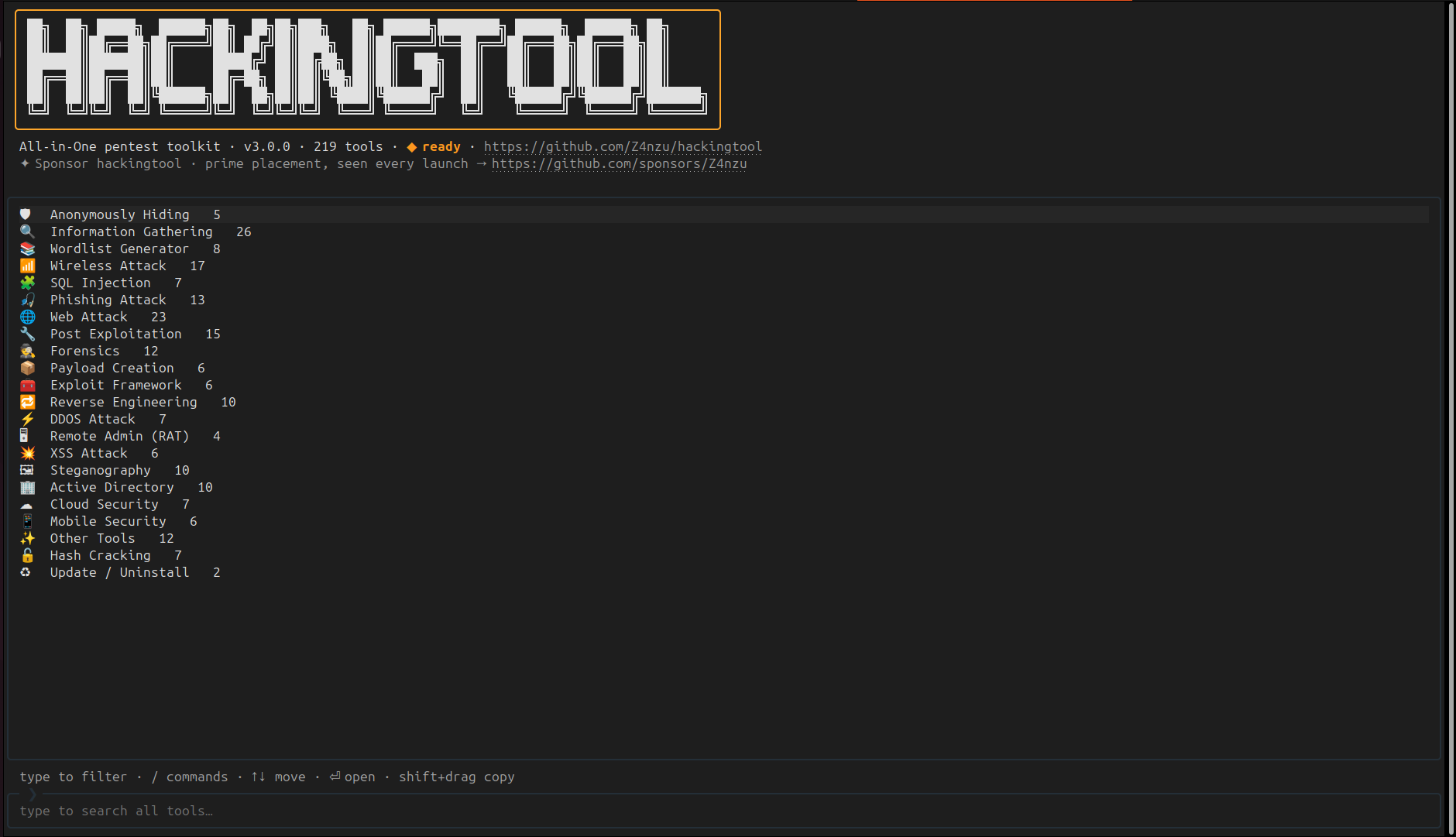
hackingtool interactive TUI: categories with live tool counts, type to search all tools, / opens the command palette
The interactive console on launch — browse categories, type to search every tool, and / opens the command palette.

Tool Categories

219 tools across 21 categories — the full list, with links and tags, is in docs/TOOLS.md.