
 yukselberkay/pmanager
안전한 오프라인 데이터베이스에서 비밀번호를 저장하고 검색하세요. 비밀번호가 이전에 유출되었는지 확인하여 표적화된 비밀번호 재사용 공격을 방지하세요.


안전한 오프라인 데이터베이스에 비밀번호를 저장하고 검색하세요. 표적형 비밀번호 재사용 공격을 방지하기 위해 비밀번호가 이전에 유출된 적이 있는지 확인하세요.
Pmanager는 ubuntu에서 "pkg-config" 및 "libssl-dev" 패키지에 의존합니다. 다음 명령으로 간단히 설치하세요
sudo apt install pkg-config libssl-dev -y
현재 OS에 맞는 바이너리 파일을 releases에서 다운로드한 후, 바이너리 위치를 PATH 환경 변수에 추가하면 바로 사용할 수 있습니다.
sudo apt update -y && sudo apt install curl
curl --proto '=https' --tlsv1.2 -sSf https://sh.rustup.rs | sh
sudo apt install build-essential -y
sudo apt install pkg-config libssl-dev libxcb-render0-dev libxcb-shape0-dev libxcb-xfixes0-dev git -y
git clone https://github.com/yukselberkay/pmanager
cd pmanager
make install
git clone https://github.com/yukselberkay/pmanager
cd pmanager
cargo build --release
git clone https://github.com/yukselberkay/pmanager
cd pmanager
cargo build --release
pmanager 0.9.7 이하 버전에서 생성된 데이터베이스는 고정된 salt와 고정된 암호화 nonce를 사용하므로 보호 수준이 심각하게 약화됩니다. 버전 0.10.0은 새로운 데이터베이스 형식을 도입하며, 마이그레이션되기 전까지 이전 데이터베이스를 열지 않습니다:
pmanager migrate
항목이 새 형식으로 변환되며, 선택적으로 동시에 새 마스터 비밀번호를 선택할 수 있습니다. 이전 파일은 데이터베이스 옆에 db.pmanager.v1.bak로 보관됩니다. 여전히 이전 방식으로 보호되므로, 모든 것이 정상적으로 작동하는지 확인한 후 삭제하십시오. 마이그레이션은 또한 이전 버전이 임시 디렉터리에 남겨둘 수 있었던 임시 파일들도 제거합니다.
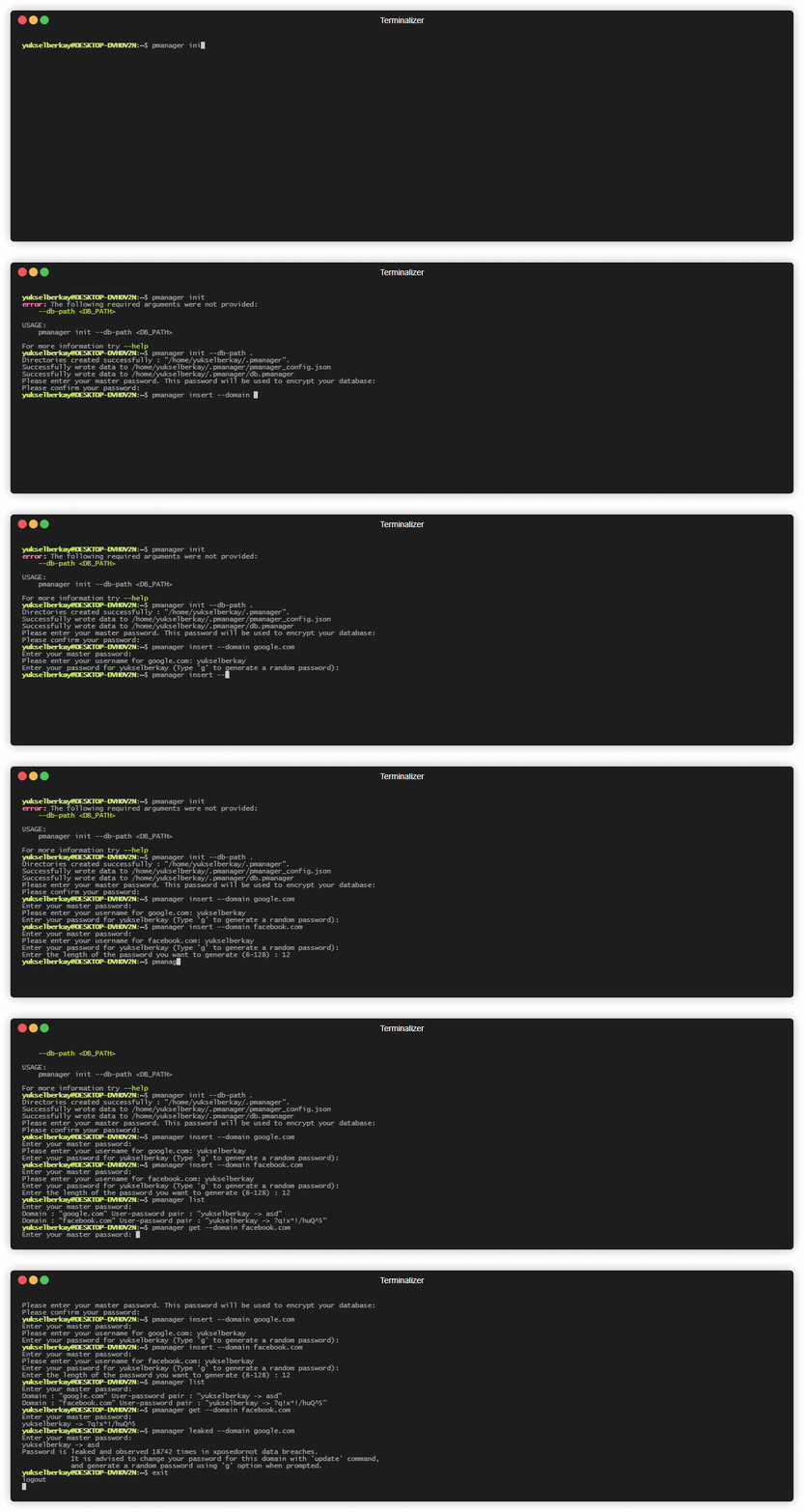
먼저 "init" 명령을 사용하여 데이터베이스를 초기화해야 합니다.
# Initializes the database in the home directory.
pmanager init --db-path ~
# Insert a new user and password pair to the database. The password is copied to the clipboard afterwards.
pmanager insert --domain github.com
# Get a specific record by domain. This command will first copy username and then password to clipboard.
pmanager get --domain github.com
# Copy only the password of a record to clipboard.
pmanager clip --domain github.com
# List every record in the database.
pmanager list
# Update a record by domain. Press enter to keep the current username or password.
pmanager update --domain github.com
# Deletes a record associated with domain from the database.
pmanager delete --domain github.com
# Check if a password in your database is leaked before.
pmanager leaked --domain github.com
# Upgrade a database created by pmanager 0.9.7 or older to the current format.
pmanager migrate
pmanager 0.10.0

USAGE:
    pmanager <SUBCOMMAND>

OPTIONS:
    -h, --help       Print help information
    -V, --version    Print version information

SUBCOMMANDS:
    clip      Copy password to clipboard by domain
    delete    Delete a key value pair from database
    get       Copy username and then password to clipboard by domain
    help      Print this message or the help of the given subcommand(s)
    init      Initialize pmanager
    insert    Insert a user password pair associated with a domain to database
    leaked    Check if a password associated with your domain is leaked
    list      Lists every record in the database
    migrate   Upgrade a database created by pmanager 0.9.7 or older to the current, more secure format
    update    Update a record from database







