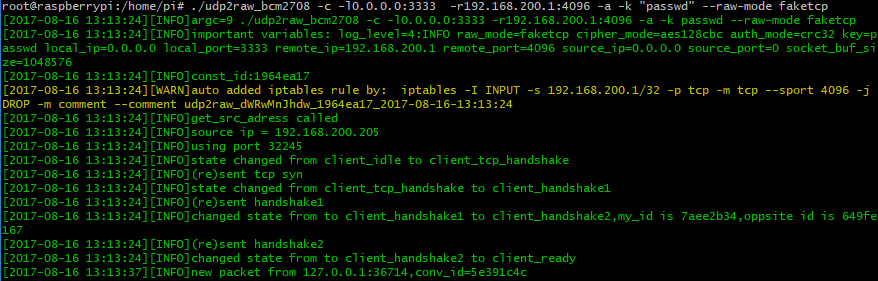

Raw Socket을 사용하여 UDP 트래픽을 암호화된 UDP/FakeTCP/ICMP 트래픽으로 변환하는 터널입니다. UDP 방화벽(또는 불안정한 UDP 환경)을 우회하는 데 도움을 줍니다.
Raw Socket을 사용하여 UDP 트래픽을 암호화된 FakeTCP/UDP/ICMP 트래픽으로 변환하는 터널입니다. UDP 방화벽(또는 불안정한 UDP 환경)을 우회하는 데 도움을 줍니다.
단독으로 사용할 경우 udp2raw는 UDP 트래픽만 터널링합니다. 그러나 udp2raw와 UDP 기반 VPN을 함께 사용하면 모든 트래픽(TCP/UDP/ICMP 포함)을 터널링할 수 있습니다. 현재 OpenVPN/L2TP/ShadowVPN 및 tinyfecVPN이 지원됩니다.
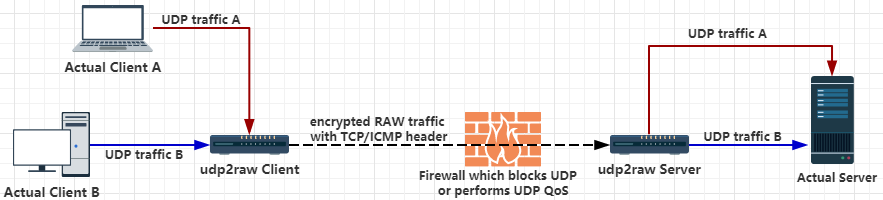
또는
root 계정 또는 cap_net_raw 권한이 있는 Linux 호스트(데스크탑 Linux, Android 폰/태블릿, OpenWRT 라우터, 라즈베리 파이 포함)
Windows 및 MacOS 사용자는 이 저장소의 udp2raw를 사용하세요.
ICMP/FakeTCP 헤더는 일부 ISP에서 UDP 차단, UDP QoS 또는 부적절한 UDP NAT 동작을 우회하는 데 도움을 줍니다. ICMP 헤더 모드에서 udp2raw는 ICMP 터널처럼 작동합니다.
UDP 헤더도 지원됩니다. UDP 헤더 모드에서는 일반 UDP 터널처럼 동작하며, 암호화, 재전송 방지 또는 연결 안정화와 같은 다른 기능을 활용할 수 있습니다.
FakeTCP 헤더 모드에서 udp2raw는 연결 설정 시 3-way 핸드셰이크를 시뮬레이션하고, 데이터 전송 중 seq와 ack_seq를 시뮬레이션합니다. 또한 MSS, sackOk, TS, TS_ack, wscale과 같은 몇 가지 TCP 옵션도 시뮬레이션합니다. 방화벽은 FakeTCP를 TCP 연결로 간주하지만, 본질적으로 UDP이므로 실시간/순서 무관 전달을 지원하며(일반 UDP와 동일), 혼잡 제어나 재전송이 없습니다. 따라서 OpenVPN 사용 시 TCP over TCP 문제가 발생하지 않습니다.
하트비트로 연결 장애를 감지합니다. 타임아웃 발생 시 클라이언트는 자동으로 포트 번호를 변경하고 재연결합니다. 재연결에 성공하면 이전 연결이 복구되고 기존의 모든 UDP 세션이 유효하게 유지됩니다.
예를 들어 udp2raw + OpenVPN을 사용하는 경우, 네트워크 케이블이 다시 연결되거나 WiFi 액세스 포인트가 변경되더라도 재연결 후 OpenVPN 연결이 끊어지지 않습니다.
멀티플렉싱 하나의 클라이언트가 여러 UDP 연결을 처리할 수 있으며, 모두 동일한 raw 연결을 공유합니다.
다중 클라이언트 하나의 서버가 여러 클라이언트를 가질 수 있습니다.
NAT 지원 세 가지 모드 모두 NAT 환경에서 작동합니다.
OpenVZ 지원 BandwagonHost VPS에서 테스트 완료.
빌드 용이 종속성이 없습니다. udp2raw를 크로스 컴파일하려면 툴체인을 다운로드하고 makefile을 수정하여 툴체인을 가리킨 후 make cross를 실행하면 됩니다. (참고: 데스크탑, 라즈베리파이, Android, 일부 Openwrt 라우터용 사전 컴파일된 바이너리는 릴리스에 포함되어 있습니다.)
Bypass UDP QoS Bypass UDP Blocking Bypass OpenVPN TCP over TCP problem OpenVPN over ICMP UDP to ICMP tunnel UDP to TCP tunnel UDP over ICMP UDP over TCP
https://github.com/wangyu-/udp2raw-tunnel/releases 에서 바이너리 릴리스를 다운로드하세요.
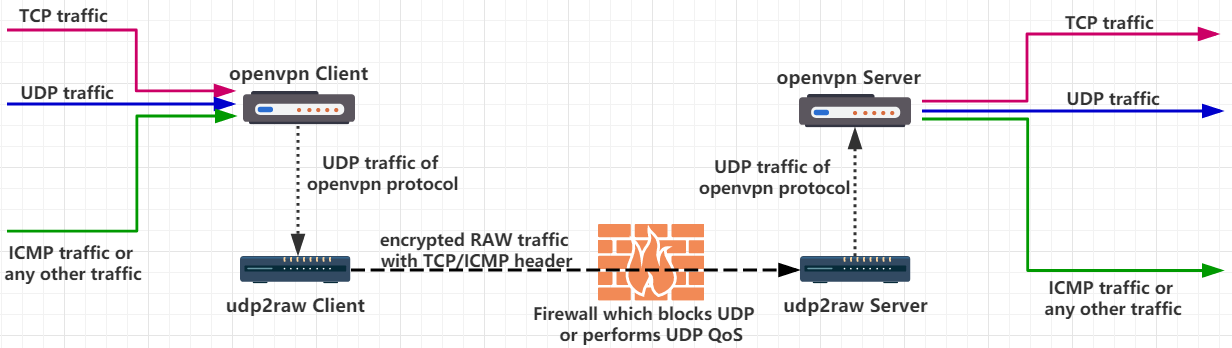
UDP가 차단되었거나 QoS가 적용되거나 지원이 불량하다고 가정합니다. 서버 IP가 44.55.66.77이고, udp 포트 7777에서 수신 중인 서비스가 있다고 가정합니다.
# 서버 측 실행:
./udp2raw_amd64 -s -l0.0.0.0:4096 -r 127.0.0.1:7777 -k "passwd" --raw-mode faketcp -a
# 클라이언트 측 실행
./udp2raw_amd64 -c -l0.0.0.0:3333 -r44.55.66.77:4096 -k "passwd" --raw-mode faketcp -a
(위 명령은 root로 실행해야 합니다. 더 나은 보안을 위해 몇 가지 추가 단계를 거쳐 udp2raw를 비-root로 실행할 수 있습니다. 자세한 내용은 이 링크를 확인하세요.)
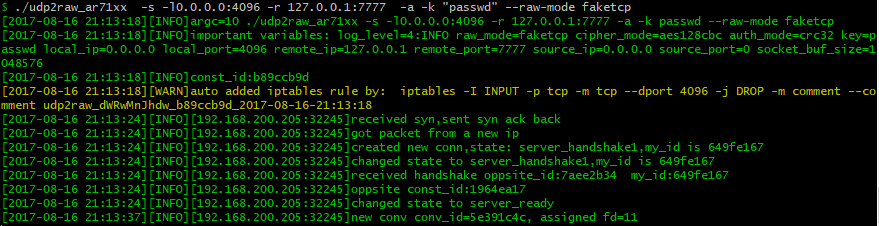
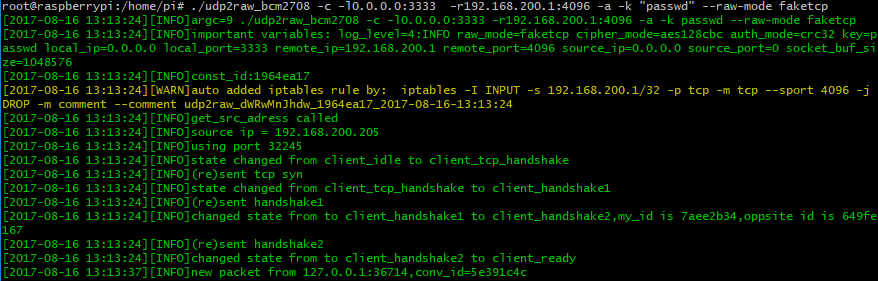
이제 클라이언트와 서버 간에 TCP 포트 4096을 통해 암호화된 raw 터널이 설정되었습니다. 클라이언트 측의 UDP 포트 3333에 연결하는 것은 서버 측의 포트 7777에 연결하는 것과 동일합니다. UDP 트래픽이 노출되지 않습니다.
Android에서 실행하려면 Android_Guide를 확인하세요.
-a 옵션은 자동으로 iptables 규칙(또는 여러 규칙)을 추가합니다. udp2raw는 이 iptables 규칙에 의존하여 안정적으로 작동합니다. -a를 잊지 마십시오(흔한 실수입니다). udp2raw가 iptables 규칙을 자동으로 추가하지 않도록 하려면 수동으로 추가하고(-g 옵션 참조) -a를 생략할 수 있습니다.
udp2raw-tunnel
git version:4623f878e0 build date:Nov 3 2024 23:15:46
repository: https://github.com/wangyu-/udp2raw-tunnel
usage:
run as client : ./this_program -c -l local_listen_ip:local_port -r server_address:server_port [options]
run as server : ./this_program -s -l server_listen_ip:server_port -r remote_address:remote_port [options]
common options,these options must be same on both side:
--raw-mode <string> available values:faketcp(default),udp,icmp and easy-faketcp
-k,--key <string> password to gen symetric key,default:"secret key"
--cipher-mode <string> available values:aes128cfb,aes128cbc(default),xor,none
--auth-mode <string> available values:hmac_sha1,md5(default),crc32,simple,none
-a,--auto-rule auto add (and delete) iptables rule
-g,--gen-rule generate iptables rule then exit,so that you can copy and
add it manually.overrides -a
--disable-anti-replay disable anti-replay,not suggested
--fix-gro try to fix huge packet caused by GRO. this option is at an early stage.
make sure client and server are at same version.
client options:
--source-ip <ip> force source-ip for raw socket
--source-port <port> force source-port for raw socket,tcp/udp only
this option disables port changing while re-connecting
other options:
--conf-file <string> read options from a configuration file instead of command line.
check example.conf in repo for format
--fifo <string> use a fifo(named pipe) for sending commands to the running program,
check readme.md in repository for supported commands.
--log-level <number> 0:never 1:fatal 2:error 3:warn
4:info (default) 5:debug 6:trace
--log-position enable file name,function name,line number in log
--disable-color disable log color
--disable-bpf disable the kernel space filter,most time its not necessary
unless you suspect there is a bug
--dev <string> bind raw socket to a device, not necessary but improves performance
--sock-buf <number> buf size for socket,>=10 and <=10240,unit:kbyte,default:1024
--force-sock-buf bypass system limitation while setting sock-buf
--seq-mode <number> seq increase mode for faketcp:
0:static header,do not increase seq and ack_seq
1:increase seq for every packet,simply ack last seq
2:increase seq randomly, about every 3 packets,simply ack last seq
3:simulate an almost real seq/ack procedure(default)
4:similiar to 3,but do not consider TCP Option Window_Scale,
maybe useful when firewall doesnt support TCP Option
--lower-level <string> send packets at OSI level 2, format:'if_name#dest_mac_adress'
ie:'eth0#00:23:45:67:89:b9'.or try '--lower-level auto' to obtain
the parameter automatically,specify it manually if 'auto' failed
--wait-lock wait for xtables lock while invoking iptables, need iptables v1.4.20+
--gen-add generate iptables rule and add it permanently,then exit.overrides -g
--keep-rule monitor iptables and auto re-add if necessary.implys -a
--hb-len <number> length of heart-beat packet, >=0 and <=1500
--mtu-warn <number> mtu warning threshold, unit:byte, default:1375
--clear clear any iptables rules added by this program.overrides everything
--retry-on-error retry on error, allow to start udp2raw before network is initialized
-h,--help print this help message
-a 및 -g이 프로그램은 raw 소켓을 통해 패킷을 전송합니다. FakeTCP 모드에서는 양쪽에서 Linux 커널 TCP 패킷 처리가 iptables 규칙에 의해 차단되어야 합니다. 그렇지 않으면 커널이 인식되지 않은 TCP 패킷에 대해 자동으로 RST를 보내 안정성/성능 문제가 발생합니다. -a 옵션을 사용하면 프로그램이 시작/종료 시 iptables 규칙을 자동으로 추가/삭제합니다. 또한 -g 옵션을 사용하여 iptables 규칙을 생성하고 수동으로 추가할 수 있습니다.
--cipher-mode 및 --auth-mode최대 보안을 위해 aes128cbc + hmac_sha1을 사용하는 것이 좋습니다. 라우터에서 프로그램을 실행하려는 경우, 대부분의 경우 방화벽의 패킷 검사를 속일 수 있지만 심각한 공격으로부터 보호할 수는 없는 xor + simple을 시도할 수 있습니다. none 모드는 디버깅 목적으로만 사용됩니다. cipher-mode 또는 auth-mode를 none으로 설정하는 것은 권장되지 않습니다.
--seq-modeFakeTCP 모드는 실제 TCP 연결처럼 100% 동작하지 않습니다. ISP는 시뮬레이션된 TCP 트래픽과 실제 TCP 트래픽을 구별할 수 있습니다(비용이 많이 들지만). seq-mode는 seq 증가 동작을 약간 변경하는 데 도움이 됩니다. 연결 문제가 발생하면 값을 변경해 보세요.
--lower-level--lower-level을 사용하면 OSI 레벨 2(링크 레벨)에서 패킷을 전송하여 로컬 iptables 규칙을 우회할 수 있습니다. udp2raw와 충돌하는 복잡한 iptables 규칙이 있고 iptables 규칙을 편집할 수 없거나(또는 게을러서) 편집하고 싶지 않은 경우 --lower-level이 매우 유용합니다. --lower-level auto를 시도하여 매개변수를 자동 감지하고, auto가 실패하면 수동으로 지정할 수 있습니다.
수동 형식 if_name#dest_mac_adress, 예: eth0#00:23:45:67:89:b9.
--keep-ruleiptables를 모니터링하고 필요한 경우 iptables 규칙(커널 TCP 처리를 차단하기 위한)을 자동으로 다시 추가합니다. 특히 iptables 규칙이 다른 프로그램에 의해 지워질 수 있는 경우(예: openwrt를 사용하는 경우 설정을 변경하고 커밋할 때마다 iptables 규칙이 지워지고 재구성될 수 있음) 유용합니다.
--conf-fileps 명령에서 비밀을 숨기기 위해 구성 파일에서 옵션을 로드할 수도 있습니다.
예를 들어, 위 서버 예제(시작하기 섹션)의 옵션을 구성 파일로 다시 작성합니다:
server.conf
-s
# You can add comments like this
# Comments MUST occupy an entire line
# Or they will not work as expected
# Listen address
-l 0.0.0.0:4096
# Remote address
-r 127.0.0.1:7777
-a
-k passwd
--raw-mode faketcp
-k 매개변수에 주의하십시오: 명령줄 모드에서는 비밀번호 주위의 따옴표가 셸에 의해 제거됩니다. 구성 파일에서는 따옴표를 제거하지 않습니다.
그런 다음 서버를 시작합니다:
./udp2raw_amd64 --conf-file server.conf
--fifo실행 중인 프로그램에 명령을 보내기 위해 fifo(이름 있는 파이프)를 사용합니다. 예: --fifo fifo.file.
클라이언트 측에서 echo reconnect >fifo.file를 사용하여 클라이언트를 강제로 재연결할 수 있습니다. 현재 서버에 대해 구현된 명령은 없습니다.
iperf3 TCP via OpenVPN + udp2raw (iperf3 UDP 모드는 다음 이슈에 언급된 버그로 인해 사용되지 않았습니다: https://github.com/esnet/iperf/issues/296 . 대신 OpenVPN을 통해 TCP 트래픽을 UDP로 패키징하여 성능을 테스트합니다. 자세한 내용은 응용을 참조하십시오.
iperf3 -c 10.222.2.1 -P40
iperf3 -c 10.222.2.1 -P40 -R
raw_mode: faketcp cipher_mode: xor auth_mode: simple

(역방향 속도도 비슷하여 업로드하지 않음)
raw_mode: faketcp cipher_mode: aes128cbc auth_mode: md5

(역방향 속도도 비슷하여 업로드하지 않음)
자세한 내용은 위키를 확인하세요: