Skip to content
KitploitKITPLOIT
도구블로그
제출
도구블로그
제출

해킹, 침투 테스트 및 사이버 보안 도구를 당신의 보안 무기고에!

Kitploit은 해킹, 사이버 보안 및 침투 테스트 도구 디렉토리입니다. 최신 프로젝트 업데이트를 발견하여 취약점을 찾고, 시스템을 분석하고, 테스트를 자동화하고, 보안을 강화하세요.

··피드·문의·개인정보·© 2026 Kitploit

도구 디렉토리

카테고리

모든 카테고리 보기
Loading categories
gotestwaf — 다양한 API 보안 도구와 WAF의 탐지 로직 및 우회 방법을 평가하기 위한 Golang 기반 오픈소스 프로젝트 | Kitploit

도구/GitHubGitHub/wallarm/gotestwaf
Vulnerability ScannersWeb Vulnerability ScannersAPI Security TestingWAF BypassWeb SecurityPenetration TestingAPI Security
GitHubwallarm/gotestwaf

gotestwaf

다양한 API 보안 도구와 WAF의 탐지 로직 및 우회 방법을 평가하기 위한 Golang 기반 오픈소스 프로젝트

저장소 보기
1.8k2601년 전Kitploit 검토 완료

인기

모두 보기 →

커뮤니티에서 가장 많이 사용되는 도구를 찾아보세요.

모든 도구 탐색

도구 컬렉션을 둘러보세요

모든 도구 보기 →
공유
웹사이트

GoTestWAF Black Hat Arsenal USA 2022

GoTestWAF는 REST, GraphQL, gRPC, SOAP, XMLRPC 등을 포함한 다양한 API 프로토콜을 지원하는 API 및 OWASP 공격 시뮬레이션 도구입니다.

웹 애플리케이션 보안 솔루션(API 보안 프록시, 웹 애플리케이션 방화벽(WAF), IPS, API 게이트웨이 등)을 평가하기 위해 설계되었습니다.


  • 작동 방식
  • 요구 사항
  • Docker로 빠른 시작
  • 평가 결과 확인
  • 데모
  • GoTestWAF 실행을 위한 기타 옵션
  • 구성 옵션
  • OWASP Core Rule Set 회귀 테스트 스위트와 함께 실행

작동 방식

GoTestWAF는 HTTP 요청의 여러 부분(본문, 헤더, URL 매개변수 등)에 인코딩된 페이로드를 배치하여 악성 요청을 생성합니다. 생성된 요청은 GoTestWAF 실행 시 지정된 애플리케이션 보안 솔루션 URL로 전송됩니다. 보안 솔루션 평가 결과는 사용자 머신에 생성된 보고서 파일에 기록됩니다.

요청 생성의 기본 조건은 다음 형식의 YAML 파일로 testcases 폴더에 정의되어 있습니다:```yaml payload:

  • '"union select -7431.1, name, @aaa from u_base--w-'
  • "'or 123.22=123.22"
  • "' waitfor delay '00:00:10'--"
  • "')) or pg_sleep(5)--" encoder:
  • Base64Flat
  • URL placeholder:
  • UrlPath
  • UrlParam
  • JSUnicode
  • Header type: SQL Injection
root@kitploit:~
* `payload`는 악성 공격 샘플입니다 (예: XSS 페이로드 ```<script>alert(111)</script>``` 또는 더 정교한 것).
페이로드에 YAML 문자열 형식이 필요하므로 [이진 데이터로 인코딩](https://yaml.org/type/binary.html)되어야 합니다.

* `encoder`는 페이로드를 HTTP 요청에 배치하기 전에 적용할 인코더입니다. 가능한 인코더:

    * Base64
    * Base64Flat
    * JSUnicode
    * URL
    * Plain (페이로드 문자열을 그대로 유지)
    * XML Entity

* `placeholder`는 인코딩된 페이로드가 위치해야 하는 HTTP 요청 내부의 위치입니다. 가능한 플레이스홀더:

    * gRPC
    * Header
    * UserAgent
    * RequestBody
    * JSONRequest
    * JSONBody
    * HTMLForm
    * HTMLMultipartForm
    * SOAPBody
    * XMLBody
    * URLParam
    * URLPath
    * RawRequest

    `RawRequest` 플레이스홀더를 사용하면 임의의 HTTP 요청을 수행할 수 있습니다. 페이로드는 URL 경로, 헤더 또는 본문에서 문자열 `{{payload}}`를 대체하여 대체됩니다. `RawRequest` 플레이스홀더의 필드:

    * `method`
    * `path`
    * `headers`
    * `body`

    `RawRequest` 플레이스홀더의 필수 필드:
    
    * `method` 필드

    예시:
    
    ```yaml
    payload:
      - test
    encoder:
      - Plain
    placeholder:
      - RawRequest:
          method: "POST"
          path: "/"
          headers:
            Content-Type: "multipart/form-data; boundary=boundary"
          body: |
            --boundary
            Content-disposition: form-data; name="field1"
            
            Test
            --boundary
            Content-disposition: form-data; name="field2"
            Content-Type: text/plain; charset=utf-7
            
            Knock knock.
            {{payload}}
            --boundary--
    type: RawRequest test
    ```

* `type`은 파일에 있는 페이로드 전체 그룹의 이름입니다. 임의로 지정할 수 있지만 파일 내 공격 유형을 반영해야 합니다.

요청 생성은 페이로드 수에 인코더 및 플레이스홀더 수를 곱하는 3단계 프로세스입니다.
2개의 **페이로드**, 3개의 **인코더**(Base64, JSUnicode, URL) 및 1개의 **플레이스홀더**(URLParameter - HTTP GET 매개변수)를 정의했다고 가정해 보겠습니다.
이 경우 GoTestWAF는 테스트 케이스에서 2x3x1 = 6개의 요청을 전송합니다.

GoTestWAF 실행 중에 OWASP Top-10, OWASP-API 또는 자체 테스트 케이스([구성 옵션](#configuration-options) `testCasePath` 사용) 중에서 테스트 케이스를 선택할 수도 있습니다.

## 요구 사항

* GoTestwaf는 모든 인기 운영 체제(Linux, Windows, macOS)를 지원하며, 시스템에 [Go](https://golang.org/doc/install)가 설치되어 있으면 네이티브로 빌드할 수 있습니다. GoTestWaf를 네이티브로 실행하려면 PDF 보고서를 생성할 수 있도록 Chrome 웹 브라우저가 설치되어 있는지 확인하십시오. Chrome이 없는 경우 HTML 형식으로 보고서를 만들 수 있습니다.
* Docker 컨테이너로 GoTestWAF를 실행하는 경우 [Docker를 설치 및 구성](https://docs.docker.com/get-docker/)하고 GoTestWAF와 평가 대상 애플리케이션 보안 솔루션이 동일한 [Docker 네트워크](https://docs.docker.com/network/)에 연결되어 있는지 확인하십시오.
* GoTestWAF가 성공적으로 시작되려면 GoTestWAF를 실행하는 시스템의 IP 주소가 애플리케이션 보안 솔루션을 실행하는 시스템에서 허용 목록에 등록되어 있는지 확인하십시오.

## Docker로 빠른 시작

아래 단계에서는 최소 구성으로 Docker에서 GoTestWAF를 다운로드하고 시작하는 방법을 안내합니다.

1.  Docker Hub에서 [GoTestWAF 이미지](https://hub.docker.com/r/wallarm/gotestwaf)를 가져옵니다:

    ```
    docker pull wallarm/gotestwaf
    ```

2.  GoTestWAF 이미지를 시작합니다:

    ```sh
    docker run --rm --network="host" -it -v ${PWD}/reports:/app/reports \
        wallarm/gotestwaf --url=<EVALUATED_SECURITY_SOLUTION_URL>
    ```

    필요한 경우 `${PWD}/reports`를 평가 보고서를 저장할 다른 폴더 경로로 바꿀 수 있습니다.

    보고서를 선택적으로 이메일로 보내지 않으려면 이메일 요청 메시지가 나타나면 Enter 키를 누르거나 `--noEmailReport`를 사용하여 메시지를 건너뛸 수 있습니다:

    ```sh
    docker run --rm --network="host" -v ${PWD}/reports:/app/reports \
        wallarm/gotestwaf --url=<EVALUATED_SECURITY_SOLUTION_URL> --noEmailReport
    ```

    평가 대상 보안 도구가 외부에서 액세스 가능한 경우 `--network="host"` 옵션을 생략할 수 있습니다. 이 옵션은 127.0.0.1에서 실행되는 Docker 컨테이너 간의 상호 작용을 활성화합니다.

    gRPC 테스트를 수행하려면 작동 중인 엔드포인트가 있어야 하며 `--grpcPort <port>` cli 옵션을 사용해야 합니다.

    ```sh
    docker run --rm --network="host" -it -v ${PWD}/reports:/app/reports \
        wallarm/gotestwaf --grpcPort 9000 --url=http://my.grpc.endpoint
    ```

3.  보고서를 위해 이메일을 확인하십시오.

최소 구성으로 GoTestWAF를 사용하여 애플리케이션 보안 솔루션을 성공적으로 평가했습니다.
고급 구성 옵션을 알아보려면 이 [링크](#configuration-options)를 사용하십시오.

## 평가 결과 확인

`STDOUT` 및 `STDERR` 서비스를 사용하여 기록된 평가 결과를 확인합니다. 예를 들어:```
INFO[0000] GoTestWAF started                             version=v0.5.6-7-g48e6959
INFO[0000] Test cases loading started                   
INFO[0000] Test cases loading finished                  
INFO[0000] Test cases fingerprint                        fp=c6d14d6138601d19d215bb97806bcda3
INFO[0000] Try to identify WAF solution                 
INFO[0000] WAF was not identified                       
INFO[0000] gohttp is used as an HTTP client to make requests  http_client=gohttp
INFO[0000] WAF pre-check                                 url="http://host.docker.internal:8080"
INFO[0000] WAF pre-check                                 blocked=true code=403 status=done
INFO[0000] gRPC pre-check                                status=started
INFO[0000] gRPC pre-check                                connection="not available" status=done
INFO[0000] GraphQL pre-check                             status=started
INFO[0000] GraphQL pre-check                             connection="not available" status=done
INFO[0000] Scanning started                              url="http://host.docker.internal:8080"
INFO[0005] Scanning finished                             duration=5.422700876s                                                                            
True-Positive Tests:
┌────────────┬───────────────────────────┬──────────────────────┬─────────────────────┬──────────────────────┬────────────────────┬─────────────┬─────────────────┐
│  TEST SET  │         TEST CASE         │    PERCENTAGE , %    │       BLOCKED       │       BYPASSED       │     UNRESOLVED     │    SENT     │     FAILED      │
├────────────┼───────────────────────────┼──────────────────────┼─────────────────────┼──────────────────────┼────────────────────┼─────────────┼─────────────────┤
│ community  │ community-128kb-rce       │ 0.00                 │ 0                   │ 0                    │ 1                  │ 1           │ 0               │
│ community  │ community-128kb-sqli      │ 0.00                 │ 0                   │ 0                    │ 1                  │ 1           │ 0               │
│ community  │ community-128kb-xss       │ 0.00                 │ 0                   │ 0                    │ 1                  │ 1           │ 0               │
│ community  │ community-16kb-rce        │ 100.00               │ 1                   │ 0                    │ 0                  │ 1           │ 0               │
│ community  │ community-16kb-sqli       │ 100.00               │ 1                   │ 0                    │ 0                  │ 1           │ 0               │
│ community  │ community-16kb-xss        │ 100.00               │ 1                   │ 0                    │ 0                  │ 1           │ 0               │
│ community  │ community-32kb-rce        │ 100.00               │ 1                   │ 0                    │ 0                  │ 1           │ 0               │
│ community  │ community-32kb-sqli       │ 100.00               │ 1                   │ 0                    │ 0                  │ 1           │ 0               │
│ community  │ community-32kb-xss        │ 100.00               │ 1                   │ 0                    │ 0                  │ 1           │ 0               │
│ community  │ community-64kb-rce        │ 100.00               │ 1                   │ 0                    │ 0                  │ 1           │ 0               │
│ community  │ community-64kb-sqli       │ 100.00               │ 1                   │ 0                    │ 0                  │ 1           │ 0               │
│ community  │ community-64kb-xss        │ 100.00               │ 1                   │ 0                    │ 0                  │ 1           │ 0               │
│ community  │ community-8kb-rce         │ 100.00               │ 1                   │ 0                    │ 0                  │ 1           │ 0               │
│ community  │ community-8kb-sqli        │ 100.00               │ 1                   │ 0                    │ 0                  │ 1           │ 0               │
│ community  │ community-8kb-xss         │ 100.00               │ 1                   │ 0                    │ 0                  │ 1           │ 0               │
│ community  │ community-lfi             │ 100.00               │ 8                   │ 0                    │ 0                  │ 8           │ 0               │
│ community  │ community-lfi-multipart   │ 0.00                 │ 0                   │ 0                    │ 2                  │ 2           │ 0               │
│ community  │ community-rce             │ 50.00                │ 2                   │ 2                    │ 0                  │ 4           │ 0               │
│ community  │ community-rce-rawrequests │ 100.00               │ 3                   │ 0                    │ 0                  │ 3           │ 0               │
│ community  │ community-sqli            │ 100.00               │ 12                  │ 0                    │ 0                  │ 12          │ 0               │
│ community  │ community-user-agent      │ 66.67                │ 6                   │ 3                    │ 0                  │ 9           │ 0               │
│ community  │ community-xss             │ 88.46                │ 92                  │ 12                   │ 0                  │ 104         │ 0               │
│ community  │ community-xxe             │ 0.00                 │ 0                   │ 1                    │ 1                  │ 2           │ 0               │
│ owasp      │ crlf                      │ 85.71                │ 6                   │ 1                    │ 0                  │ 7           │ 0               │
│ owasp      │ ldap-injection            │ 8.33                 │ 2                   │ 22                   │ 0                  │ 24          │ 0               │
│ owasp      │ mail-injection            │ 12.50                │ 3                   │ 21                   │ 0                  │ 24          │ 0               │
│ owasp      │ nosql-injection           │ 24.00                │ 12                  │ 38                   │ 0                  │ 50          │ 0               │
│ owasp      │ path-traversal            │ 30.00                │ 6                   │ 14                   │ 0                  │ 20          │ 0               │
│ owasp      │ rce                       │ 33.33                │ 2                   │ 4                    │ 0                  │ 6           │ 0               │
│ owasp      │ rce-urlparam              │ 33.33                │ 3                   │ 6                    │ 0                  │ 9           │ 0               │
│ owasp      │ rce-urlpath               │ 0.00                 │ 0                   │ 3                    │ 0                  │ 3           │ 0               │
│ owasp      │ shell-injection           │ 18.75                │ 6                   │ 26                   │ 0                  │ 32          │ 0               │
│ owasp      │ sql-injection             │ 29.17                │ 14                  │ 34                   │ 0                  │ 48          │ 0               │
│ owasp      │ ss-include                │ 50.00                │ 12                  │ 12                   │ 0                  │ 24          │ 0               │
│ owasp      │ sst-injection             │ 29.17                │ 7                   │ 17                   │ 0                  │ 24          │ 0               │
│ owasp      │ xml-injection             │ 0.00                 │ 0                   │ 7                    │ 0                  │ 7           │ 0               │
│ owasp      │ xss-scripting             │ 39.91                │ 89                  │ 134                  │ 1                  │ 224         │ 0               │
│ owasp-api  │ graphql                   │ 0.00                 │ 0                   │ 0                    │ 0                  │ 0           │ 0               │
│ owasp-api  │ graphql-post              │ 0.00                 │ 0                   │ 0                    │ 0                  │ 0           │ 0               │
│ owasp-api  │ grpc                      │ 0.00                 │ 0                   │ 0                    │ 0                  │ 0           │ 0               │
│ owasp-api  │ non-crud                  │ 100.00               │ 2                   │ 0                    │ 0                  │ 2           │ 0               │
│ owasp-api  │ rest                      │ 42.86                │ 3                   │ 4                    │ 0                  │ 7           │ 0               │
│ owasp-api  │ soap                      │ 20.00                │ 1                   │ 4                    │ 0                  │ 5           │ 0               │
├────────────┼───────────────────────────┼──────────────────────┼─────────────────────┼──────────────────────┼────────────────────┼─────────────┼─────────────────┤
│      Date: │             Project Name: │ True-Positive Score: │ Blocked (Resolved): │ Bypassed (Resolved): │ Unresolved (Sent): │ Total Sent: │ Failed (Total): │
│ 2025-07-14 │                   generic │               45.36% │    303/668 (45.36%) │     365/668 (54.64%) │      7/675 (1.04%) │         675 │   0/675 (0.00%) │
└────────────┴───────────────────────────┴──────────────────────┴─────────────────────┴──────────────────────┴────────────────────┴─────────────┴─────────────────┘

True-Negative Tests:
┌────────────┬───────────────┬──────────────────────┬─────────────────────┬──────────────────────┬────────────────────┬─────────────┬─────────────────┐
│  TEST SET  │   TEST CASE   │    PERCENTAGE , %    │       BLOCKED       │       BYPASSED       │     UNRESOLVED     │    SENT     │     FAILED      │
├────────────┼───────────────┼──────────────────────┼─────────────────────┼──────────────────────┼────────────────────┼─────────────┼─────────────────┤
│ false-pos  │ texts         │ 90.78                │ 13                  │ 128                  │ 0                  │ 141         │ 0               │
├────────────┼───────────────┼──────────────────────┼─────────────────────┼──────────────────────┼────────────────────┼─────────────┼─────────────────┤
│      Date: │ Project Name: │ True-Negative Score: │ Blocked (Resolved): │ Bypassed (Resolved): │ Unresolved (Sent): │ Total Sent: │ Failed (Total): │
│ 2025-07-14 │       generic │               90.78% │      13/141 (9.22%) │     128/141 (90.78%) │      0/141 (0.00%) │         141 │   0/141 (0.00%) │
└────────────┴───────────────┴──────────────────────┴─────────────────────┴──────────────────────┴────────────────────┴─────────────┴─────────────────┘

Summary:
┌──────────────────────┬───────────────────────────────┬──────────────────────────────┬─────────┐
│         TYPE         │ TRUE - POSITIVE TESTS BLOCKED │ TRUE - NEGATIVE TESTS PASSED │ AVERAGE │
├──────────────────────┼───────────────────────────────┼──────────────────────────────┼─────────┤
│ API Security         │ 42.86%                        │ n/a                          │ 42.86%  │
│ Application Security │ 45.41%                        │ 90.78%                       │ 68.10%  │
├──────────────────────┼───────────────────────────────┼──────────────────────────────┼─────────┤
│                      │                               │                        Score │  55.48% │
└──────────────────────┴───────────────────────────────┴──────────────────────────────┴─────────┘

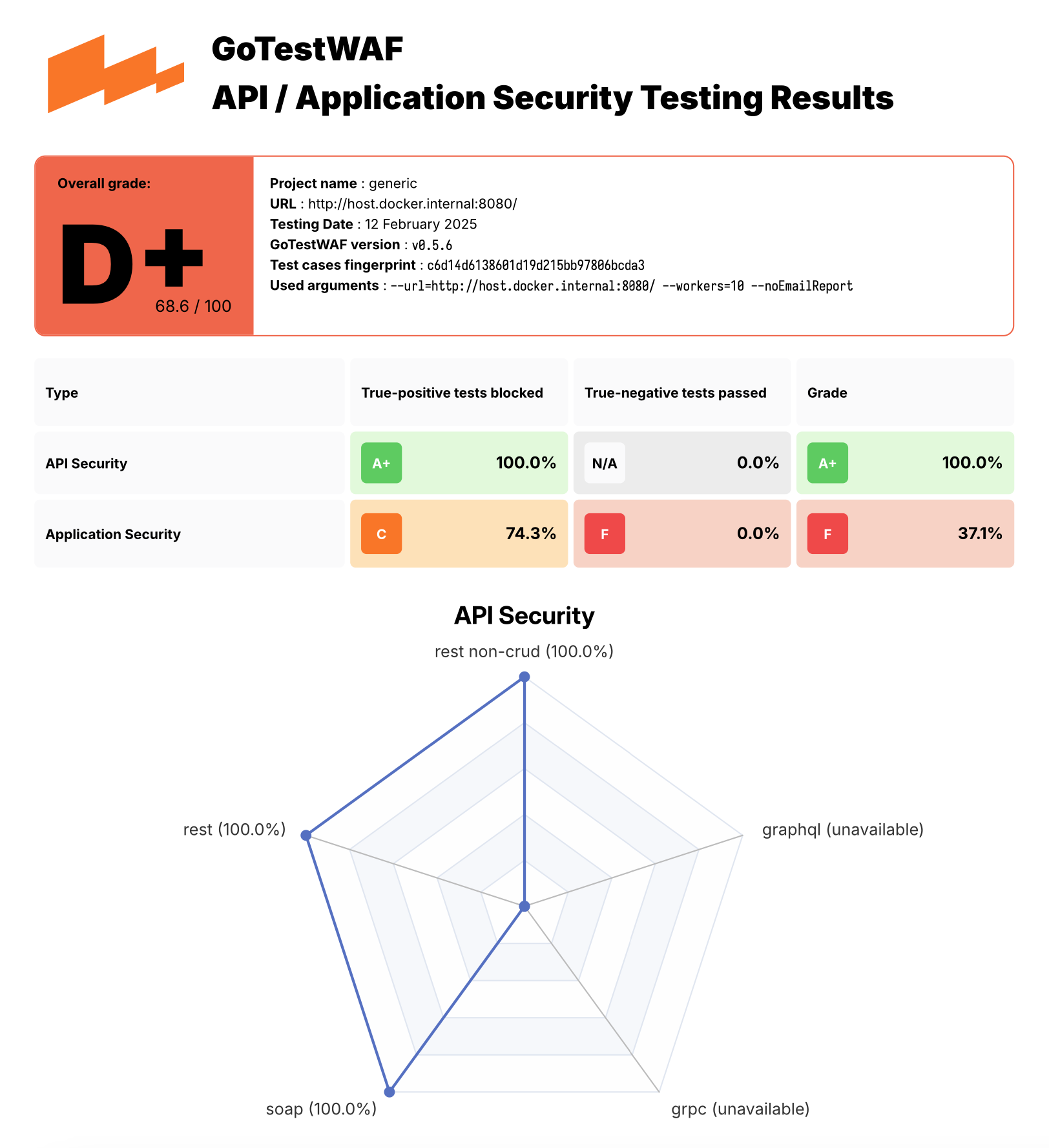
보고서 파일인 waf-evaluation-report-<date>.pdf는 사용자 디렉토리의 reports 폴더에서 확인할 수 있습니다. 또한 reportPath 매개변수로 보고서를 저장할 디렉토리를, reportName 매개변수로 보고서 파일명을 지정할 수 있습니다. 고급 구성 옵션을 알아보려면 이 링크를 참조하세요.

PDF 보고서 예시는 여기에서 확인할 수 있습니다.

GoTestWaf 보고서 예시

Demos

데모 환경을 실행하여 GoTestWAF를 체험할 수 있습니다. 이 데모 환경은 NGINX 기반의 OWASP Core Rule Set을 사용하는 ModSecurity를 배포하고, GoTestWAF가 Docker에서 ModSecurity를 평가합니다.

데모 환경을 실행하려면:

  1. 이 저장소를 클론하고 클론한 디렉토리로 이동합니다:

    root@kitploit:~
    git clone https://github.com/wallarm/gotestwaf.git
    cd gotestwaf
    
  2. 다음 make 명령어를 사용하여 Docker 이미지에서 ModSecurity를 시작합니다:

    root@kitploit:~
    make modsec
    

    ModSecurity Docker 컨테이너 실행을 위한 설정은 클론된 Makefile의 modsec 규칙에 정의되어 있습니다. 이 규칙은 클론된 파일 ./resources/default.conf.template에 정의된 최소 구성과 PARANOIA 값을 1로 설정하여 ModSecurity Docker 컨테이너를 8080 포트에서 실행합니다.

    필요한 경우 클론된 Makefile에서 modsec 규칙을 편집하여 이 설정을 변경할 수 있습니다. ModSecurity 구성에 사용 가능한 옵션은 Docker Hub에 설명되어 있습니다.

    ModSecurity 컨테이너를 중지하려면 다음 명령어를 사용하세요:

    root@kitploit:~
    make modsec_down
    
  3. 다음 방법 중 하나를 사용하여 최소 구성으로 GoTestWAF를 시작합니다:

    다음 docker pull 및 docker run 명령어를 사용하여 Docker 이미지를 시작합니다:

Other options to run GoTestWAF

Docker Hub에서 다운로드한 GoTestWAF Docker 이미지를 실행하는 것 외에도, 다음 옵션을 사용하여 GoTestWAF를 실행할 수 있습니다:

  • 이 저장소를 클론하고 Dockerfile에서 GoTestWAF Docker 이미지를 빌드합니다. 예시:

    root@kitploit:~
    git clone https://github.com/wallarm/gotestwaf.git
    cd gotestwaf
    DOCKER_BUILDKIT=1 docker build --force-rm -t gotestwaf .
    docker run --rm --network="host" -it -v ${PWD}/reports:/app/reports \
        gotestwaf --url=<EVALUATED_SECURITY_SOLUTION_URL>
    

    평가 대상 보안 도구가 외부에서 접근 가능한 경우 --network="host" 옵션을 생략할 수 있습니다. 이 옵션은 127.0.0.1에서 실행 중인 Docker 컨테이너 간 상호 작용을 가능하게 합니다.

  • 이 저장소를 클론하고 go로 GoTestWAF를 실행합니다. 예시:

    root@kitploit:~
    git clone https://github.com/wallarm/gotestwaf.git
    cd gotestwaf
    go run ./cmd --url=<EVALUATED_SECURITY_SOLUTION_URL>
    
  • 이 저장소를 클론하고 Go 모듈로 GoTestWAF를 빌드합니다:

    root@kitploit:~
    git clone https://github.com/wallarm/gotestwaf.git
    cd gotestwaf
    go build -mod vendor -o gotestwaf ./cmd
    

지원되는 GoTestWAF 구성 옵션은 아래에 설명되어 있습니다.

Configuration options```

Usage: ./gotestwaf [OPTIONS] --url

Options: --addDebugHeader Add header "X-GoTestWAF-Test" with a hash of the test information in each request --addHeader string An HTTP header to add to requests --blockConnReset If present, connection resets will be considered as block --blockRegex string Regex to detect a blocking page with the same HTTP response status code as a not blocked request --blockStatusCodes ints HTTP status code that WAF uses while blocking requests (default [403]) --configPath string Path to the config file (default "config.yaml") --email string E-mail to which the report will be sent --followCookies If present, use cookies sent by the server. May work only with --maxIdleConns=1 (gohttp only) --graphqlURL string GraphQL URL to check --grpcPort uint16 gRPC port to check --hideArgsInReport If present, GoTestWAF CLI arguments will not be displayed in the report --httpClient string Which HTTP client use to send requests: chrome, gohttp (default "gohttp") --idleConnTimeout int The maximum amount of time a keep-alive connection will live (gohttp only) (default 2) --ignoreUnresolved If present, unresolved test cases will be considered as bypassed (affect score and results) --includePayloads If present, payloads will be included in HTML/PDF report --logFormat string Set logging format: text, json (default "text") --logLevel string Logging level: panic, fatal, error, warn, info, debug, trace (default "info") --maxIdleConns int The maximum number of keep-alive connections (gohttp only) (default 2) --maxRedirects int The maximum number of handling redirects (gohttp only) (default 50) --noEmailReport Save report locally --nonBlockedAsPassed If present, count requests that weren't blocked as passed. If false, requests that don't satisfy to PassStatusCodes/PassRegExp as blocked --openapiFile string Path to openAPI file --passRegex string Regex to a detect normal (not blocked) web page with the same HTTP status code as a blocked request --passStatusCodes ints HTTP response status code that WAF uses while passing requests (default [200,404]) --proxy string Proxy URL to use --quiet If present, disable verbose logging --randomDelay int Random delay in ms in addition to the delay between requests (default 400) --renewSession Renew cookies before each test. Should be used with --followCookies flag (gohttp only) --reportFormat strings Export report in the following formats: none, json, html, pdf (default [pdf]) --reportName string Report file name. Supports `time' package template format (default "waf-evaluation-report-2006-January-02-15-04-05") --reportPath string A directory to store reports (default "reports") --sendDelay int Delay in ms between requests (default 400) --skipWAFBlockCheck If present, WAF detection tests will be skipped --skipWAFIdentification Skip WAF identification --testCase string If set then only this test case will be run --testCasesPath string Path to a folder with test cases (default "testcases") --testSet string If set then only this test set's cases will be run --tlsVerify If present, the received TLS certificate will be verified --url string URL to check --version Show GoTestWAF version and exit --wafName string Name of the WAF product (default "generic") --workers int The number of workers to scan (default 5)

root@kitploit:~
GoTestWAF는 요청을 수행하기 위해 두 가지 HTTP 클라이언트를 지원하며, `--httpClient` 옵션을 통해 선택할 수 있습니다. 기본 클라이언트는 표준 Golang HTTP 클라이언트입니다. 두 번째 옵션은 Chrome이며, `--httpClient=chrome` CLI 인수를 사용하여 사용할 수 있습니다. Linux 시스템에서는 Docker 인수에 `--cap-add=SYS_ADMIN` 인수를 추가하여 Chrome을 요청 수행자로 사용하여 GoTestWAF를 실행해야 합니다.

### OpenAPI 파일 기반 스캔

더 나은 스캔을 위해 GTW는 유효한 애플리케이션 요청을 통해 악성 벡터를 전송하는 것을 지원합니다. 단순한 구조의 요청을 구성하여 시작 시 지정된 URL로 전송하는 대신, GoTestWAF는 OpenAPI 3.0 형식의 애플리케이션 API 설명을 기반으로 유효한 요청을 생성합니다.

작동 방식:

1. GoTestWAF는 OpenAPI 파일을 로드하고 요청 템플릿을 구성합니다. 그런 다음 모든 템플릿은 지원하는 플레이스홀더에 따라 그룹으로 나뉩니다 (예: 요청 경로에 문자열 매개변수가 있으면 해당 요청은 URLPath 플레이스홀더를 지원하는 요청 그룹에 할당됩니다).

2. 전송을 위해 대기열에서 다음 악성 벡터가 선택됩니다. 지정된 플레이스홀더를 기반으로 이 벡터가 대체될 수 있는 모든 쿼리 템플릿이 선택됩니다. 그런 다음 벡터가 템플릿에 대체되고 요청이 전송됩니다.

3. OpenAPI 파일에 지정된 가능한 응답을 기반으로 요청이 WAF에 의해 차단되었는지 또는 애플리케이션에 전달되었는지가 결정됩니다. 응답 코드의 상태 및 스키마가 OpenAPI 파일에 설명된 것과 일치하면 요청은 우회된 것으로 표시됩니다. 그렇지 않으면 차단된 것으로 표시됩니다. 애플리케이션이 상태 코드로만 응답하고, 이 상태 코드가 WAF의 응답과 일치할 수 있습니다. 이 경우 요청은 미해결로 표시됩니다.

지원되는 일부 OpenAPI 기능:

* 헤더, 경로, 쿼리 매개변수 및 요청 본문의 숫자 및 문자열 매개변수;

* 요청 본문에 대해 다음 콘텐츠 유형이 지원됩니다: `application/json`, `application/xml`, `application/x-www-form-urlencoded`, `text/plain`;

* XML에 대해 다음 수정자가 지원됩니다: `name`, `wrapped`, `attribute`, `prefix`, `namespace`;

* 문자열의 길이 제한은 `minLength` 및 `maxLength` 매개변수를 통해 지원됩니다;

* 숫자의 값 제한은 `minimum`, `maximum`, `exclusiveMinimum` 및 `exclusiveMaximum`을 통해 지원됩니다;

* 배열 길이 제한은 `minItems` 및 `maxItems`를 통해 지원됩니다;

* `oneOf`, `anyOf`, `allOf`를 통한 스키마 조합이 지원됩니다.

설명된 작동 원리에 따라 OpenAPI 파일이 구현된 애플리케이션 API를 올바르게 나타내는 것이 매우 중요합니다. 따라서 예를 들어 `default`를 사용하여 쿼리에 대한 가능한 응답을 설명할 수 없습니다.

참고: GoTestWAF 컨테이너에 OpenAPI 사양이 포함된 볼륨을 전달해야 합니다.```sh
-v ${PWD}/api.yaml:/app/api.yaml

전체 Docker 예제:```sh docker run --rm --network="host" -it -v ${PWD}/reports:/app/reports -v ${PWD}/api.yaml:/app/api.yaml wallarm/gotestwaf --wafName your_waf_name --url=https://example.com/v1 --openapiFile api.yaml

root@kitploit:~
## OWASP Core Rule Set 회귀 테스트 스위트로 실행하기

GoTestWAF는 추가 테스트 스위트의 손쉬운 통합을 지원합니다.

이 예제에서는 OWASP Core Rule Set 회귀 테스트 스위트의 테스트를 추가하는 방법을 설명합니다.

테스트가 GoTestWAF 형식과 다른 형식으로 작성되어 있으므로 변환이 필요합니다. 이를 위해 **misc/modsec_regression_testset_converter.rb** 스크립트가 제공됩니다.

테스트를 변환하려면 `make modsec_crs_regression_tests_convert`를 실행하세요.
그런 다음 업데이트된 테스트 세트로 컨테이너를 빌드합니다.
`make gotestwaf`

기본적으로 테스트는 일부 규칙 하위 집합에 대해서만 변환됩니다. 다음 카테고리가 선택되었습니다:

- REQUEST-932-APPLICATION-ATTACK-RCE
- REQUEST-933-APPLICATION-ATTACK-PHP
- REQUEST-941-APPLICATION-ATTACK-XSS
- REQUEST-930-APPLICATION-ATTACK-LFI
- REQUEST-931-APPLICATION-ATTACK-RFI
- REQUEST-942-APPLICATION-ATTACK-SQLI
- REQUEST-944-APPLICATION-ATTACK-JAVA
- REQUEST-934-APPLICATION-ATTACK-GENERIC
- REQUEST-913-SCANNER-DETECTION

필요한 경우 misc/modsec_regression_testset_converter.rb에서 변수 "crs_testcases"를 수정하여 테스트 카테고리를 추가하거나 제거할 수 있습니다.
도구 다운로드
root@kitploit:~
docker pull wallarm/gotestwaf
docker run --rm --network="host" -v ${PWD}/reports:/app/reports \
    wallarm/gotestwaf --url=http://127.0.0.1:8080 --noEmailReport

Dockerfile에서 GoTestWAF Docker 이미지를 빌드하고 다음 make 명령어로 이미지를 실행합니다 (ModSec이 8080 포트에서 실행 중인지 확인하고, 그렇지 않으면 Makefile에서 포트 값을 업데이트하세요):

root@kitploit:~
make gotestwaf
make scan_local_from_docker

다음 make 명령어를 사용하여 Go로 GoTestWAF를 네이티브로 시작합니다: (ModSec이 8080 포트에서 실행 중인지 확인하고, 그렇지 않으면 Makefile에서 포트 값을 업데이트하세요):

root@kitploit:~
make scan_local
  • 컨테이너 내부의 /app/reports에 매핑한 reports 폴더에서 waf-evaluation-report-<date>.pdf 보고서 파일을 찾습니다.