 usbarmory/gotee
Go 신뢰 실행 환경 (TEE)

GoTEE 프레임워크는 TamaGo 기반 유니커널을 권한(privileged) 및 비권한(unprivileged) 모드로 동시에 인스턴스화하며, 각 유니커널은 모니터 모드와 커스텀 시스템 콜을 통해 서로 상호작용합니다.
이러한 기능을 통해 GoTEE는 TamaGo 기반 TEE(Trusted Execution Environment)를 구현하여, ARM TrustZone Secure World 또는 RISC-V Supervisor Execution Environment 내 베어 메탈 실행에 Go의 메모리 안전성, 편의성 및 기능을 제공합니다.
GoTEE는 GoTEE API를 구현하는 순수 Go, Rust 또는 C 기반 프리스탠딩 Trusted Applet뿐만 아니라, Linux처럼 ARM TrustZone Normal World 또는 RISC-V S-모드에서 실행할 수 있는 모든 운영 체제도 감독할 수 있습니다.
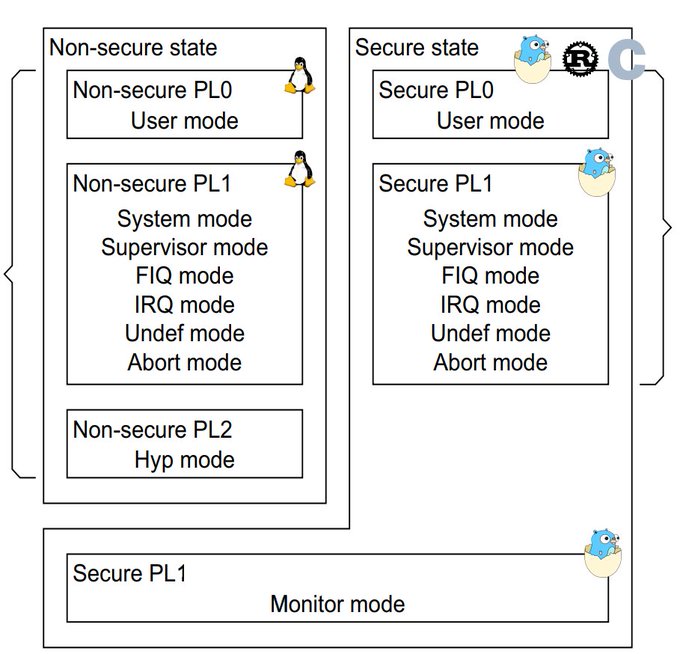
ARM 사용자 모드, TrustZone Normal World 또는 RISC-V Supervisor Mode를 위한 격리된 실행 컨텍스트
Trusted OS 구현을 위한 API (Syscall, JSON-RPC 및 예외 처리기)

튜토리얼을 포함한 주요 문서는 프로젝트 위키에서 확인할 수 있습니다.
패키지 API 문서는 pkg.go.dev에서 확인할 수 있습니다.
다음 표는 현재 지원되는 SoC와 보드를 요약합니다.
| SoC | 보드 | SoC 패키지 | 보드 패키지 |
|---|---|---|---|
| NXP i.MX6ULZ | USB armory Mk II | imx6ul | usbarmory/mk2 |
| NXP i.MX6ULL | MCIMX6ULL-EVK | imx6ul | mx6ullevk |
| SiFive FU540 | QEMU sifive_u | fu540 | qemu/sifive_u |
TEE 용어에서 권한이 있는 유니커널은 일반적으로 Trusted OS라고 하며, 권한이 없는 유니커널은 Trusted Applet을 나타냅니다.
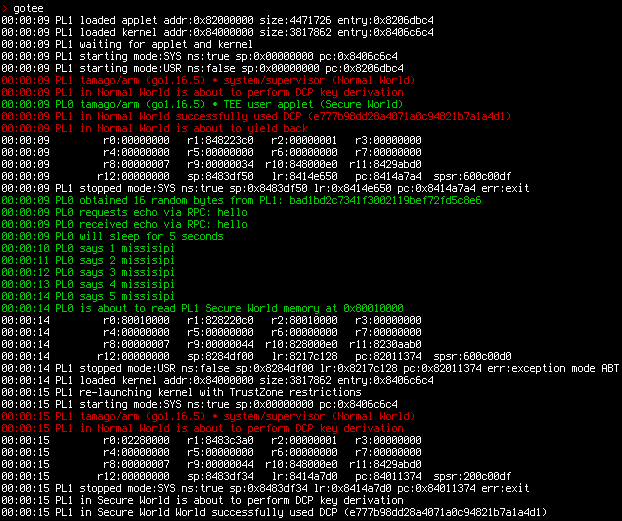
GoTEE 예제는 Trusted OS, Trusted Applet 및 Main OS로 동작하는 Go 유니커널의 동시 실행을 보여줍니다.
[!WARNING] Main OS는 Linux 등 '리치(rich)' OS라면 무엇이든 될 수 있으며, TamaGo는 단지 자체 완결형 예제를 위해 사용됩니다. Trusted Applet도 마찬가지로, 사용자 모드에서 실행되고 GoTEE API를 구현할 수 있는 모든 베어 메탈 애플리케이션이 될 수 있으며, 예를 들어 프리스탠딩 C 또는 Rust 프로그램이 있습니다.
빌드 시
trusted_applet_go를trusted_applet_rust로 대체하면 Rust 예제를 사용할 수 있습니다.
예제의 Trusted OS/애플릿 조합은 서로 다른 권한 수준에서 세 개의 TamaGo 유니커널이 동시에 실행되는 것을 기본적으로 테스트합니다:
Main OS는 모니터 콜로 제어권을 반환합니다.
Trusted Applet은 5초간 대기한 후 Trusted OS 메모리 읽기를 시도하며, 이로 인해 슈퍼바이저가 처리하는 예외가 발생하여 Trusted Applet이 종료됩니다.
Trusted OS와 Trusted Applet 간 통신을 위해 GoTEE syscall 인터페이스가 구현되어 있습니다.
USB armory Mk II에서 실행하면 예제 애플리케이션은 Ethernet over USB(ECM 프로토콜, Linux 및 macOS 호스트 지원)를 통해 SSH로 접근할 수 있습니다:
$ ssh [email protected]
tamago/arm • TEE security monitor (Secure World system/monitor)

allgptr                                          # memory forensics of applet goroutines
csl                                              # show config security levels (CSL)
csl             <periph> <slave> <hex csl>       # set config security level (CSL)
dbg                                              # show ARM debug permissions
exit, quit                                       # close session
gotee                                            # TrustZone example w/ TamaGo unikernels
help                                             # this help
linux           <uSD|eMMC>                       # boot NonSecure USB armory Debian base image
lockstep        <fault %>                        # tandem applet example w/ fault injection
peek            <hex offset> <size>              # memory display (use with caution)
poke            <hex offset> <hex value>         # memory write   (use with caution)
reboot                                           # reset device
sa                                               # show security access (SA)
sa              <id> <secure|nonsecure>          # set security access (SA)
stack                                            # stack trace of current goroutine
stackall                                         # stack trace of all goroutines

>
예제는 gotee 명령으로 실행할 수 있으며, 실제 하드웨어 주변장치를 사용하여 TrustZone 제한이 적용되기 전과 후의 동작을 보여주기 위해 Main OS를 두 번 생성합니다.
또한 linux 명령을 사용하여 USB armory Debian 베이스 이미지를 비보안(Non-secure) 메인 OS로 실행할 수 있습니다.
[!NOTE] 비보안 운영은 USB armory Debian 베이스 이미지 릴리스 20211129 이상만 지원됩니다.
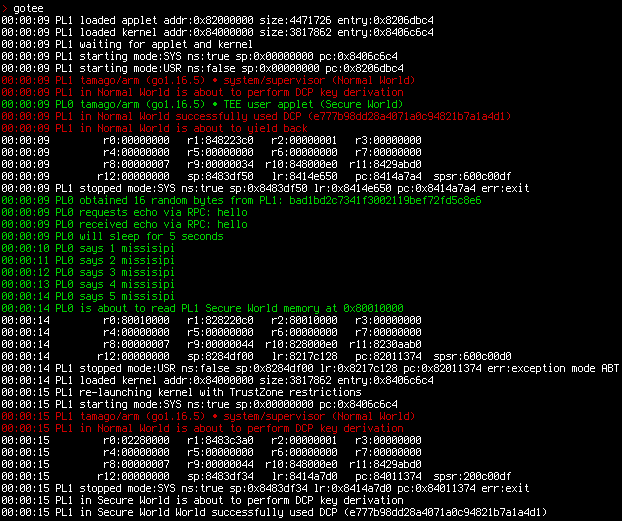
예제는 QEMU 에뮬레이션에서도 실행할 수 있습니다.
[!NOTE] 에뮬레이션 실행은 QEMU가 TrustZone/PMP를 완전히 지원하지 않으므로 부분적인 테스트만 수행합니다.
