Skip to content
KitploitKITPLOIT
도구블로그
제출
도구블로그
제출

해킹, 침투 테스트 및 사이버 보안 도구를 당신의 보안 무기고에!

Kitploit은 해킹, 사이버 보안 및 침투 테스트 도구 디렉토리입니다. 최신 프로젝트 업데이트를 발견하여 취약점을 찾고, 시스템을 분석하고, 테스트를 자동화하고, 보안을 강화하세요.

··피드·문의·개인정보·© 2026 Kitploit

도구 디렉토리

카테고리

모든 카테고리 보기
Loading categories
trufflehog — 유출된 자격 증명을 찾고, 검증하고, 분석합니다. | Kitploit
도구/GitHubGitHub/trufflesecurity/trufflehog
Vulnerability ScannersDynamic Analysis (Sandboxing)Code AnalysisCloud SecurityDevSecOpsSecret DetectionThreat IntelligenceSupply Chain SecurityIncident Response
GitHubtrufflesecurity/trufflehog

trufflehog

유출된 자격 증명을 찾고, 검증하고, 분석합니다.

27.4k2.5k24시간 43분 전Kitploit 검토 완료

인기

모두 보기 →

커뮤니티에서 가장 많이 사용되는 도구를 찾아보세요.

모든 도구 탐색

도구 컬렉션을 둘러보세요

모든 도구 보기 →
공유
저장소 보기웹사이트

GoReleaser Logo

TruffleHog

유출된 자격 증명을 찾습니다.


Go Report Card 라이선스 전체 탐지기


🔎 현재 스캔 중

...그리고 더 많은

TruffleHog와 그 기능 및 성능에 대해 더 알아보려면 제품 페이지를 방문하세요.

🌐 TruffleHog Enterprise

Git, Jira, Slack, Confluence, Microsoft Teams, Sharepoint (그 외) 등의 자격 증명을 지속적으로 모니터링하는 데 관심이 있으신가요? 저희는 도움이 될 수 있는 엔터프라이즈 제품을 제공합니다! 자세한 내용은 https://trufflesecurity.com/trufflehog-enterprise에서 확인하세요.

저희는 엔터프라이즈 제품의 수익을 커뮤니티 전체가 혜택을 볼 수 있는 더 멋진 오픈소스 프로젝트에 자금을 지원하는 데 사용합니다.

TruffleHog란 무엇인가? 🐽

TruffleHog는 가장 강력한 비밀 발견, 분류, 검증 및 분석 도구입니다. 여기서 비밀(secret)이란 한 컴퓨터가 다른 컴퓨터에 인증하기 위해 사용하는 자격 증명을 의미합니다. 여기에는 API 키, 데이터베이스 비밀번호, 개인 암호화 키 등이 포함됩니다.

발견 🔍

TruffleHog는 Git, 채팅, 위키, 로그, API 테스트 플랫폼, 객체 스토리지, 파일 시스템 등 다양한 곳에서 비밀을 찾을 수 있습니다.

분류 📁

TruffleHog는 800가지 이상의 비밀 유형을 분류하여 해당 비밀이 속한 특정 정체성(identity)에 매핑합니다. AWS 비밀인가요? Stripe 비밀인가요? Cloudflare 비밀인가요? Postgres 비밀번호인가요? SSL 개인 키인가요? 때로는 겉으로 보기에는 구분하기 어렵기 때문에 TruffleHog는 발견한 모든 것을 분류합니다.

검증 ✅

TruffleHog가 분류할 수 있는 모든 비밀에 대해 로그인을 시도하여 해당 비밀이 유효한지(live) 여부를 확인할 수 있습니다. 이 단계는 현재 활성 위험이 있는지 여부를 알기 위해 중요합니다.

분석 🔬

가장 흔히 유출되는 약 20가지의 자격 증명 유형에 대해, TruffleHog는 비밀이 로그인 가능한지 확인하기 위해 하나의 요청을 보내는 대신, 비밀에 대해 알아낼 수 있는 모든 정보를 얻기 위해 여러 요청을 보낼 수 있습니다. 누가 생성했나요? 어떤 리소스에 접근할 수 있나요? 해당 리소스에 대해 어떤 권한을 가지고 있나요?

📢 커뮤니티에 참여하세요

질문이 있으신가요? 피드백이 있으신가요? Slack 또는 Discord에 참여하여 저희와 함께하세요.

Slack 커뮤니티에 가입하세요

비밀 스캔 Discord에 참여하세요

📺 데모

GitHub 스캔 데모```bash docker run --rm -it -v "$PWD:/pwd" trufflesecurity/trufflehog:latest github --org=trufflesecurity

root@kitploit:~
# :floppy_disk: 설치

여러 옵션을 사용할 수 있습니다:

### MacOS 사용자```bash
brew install trufflehog

Docker:

Docker 엔진이 실행 중인지 확인한 후 다음 명령을 실행하세요:

    Unix```bash

docker run --rm -it -v "$PWD:/pwd" trufflesecurity/trufflehog:latest github --repo https://github.com/trufflesecurity/test_keys

root@kitploit:~
####     Windows 명령 프롬프트```bash
docker run --rm -it -v "%cd:/=\%:/pwd" trufflesecurity/trufflehog:latest github --repo https://github.com/trufflesecurity/test_keys

    Windows PowerShell```bash

docker run --rm -it -v "${PWD}:/pwd" trufflesecurity/trufflehog github --repo https://github.com/trufflesecurity/test_keys

root@kitploit:~
####     M1 and M2 Mac```bash
docker run --platform linux/arm64 --rm -it -v "$PWD:/pwd" trufflesecurity/trufflehog:latest github --repo https://github.com/trufflesecurity/test_keys

바이너리 릴리스```bash

Download and unpack from https://github.com/trufflesecurity/trufflehog/releases

root@kitploit:~
### 소스에서 컴파일```bash
git clone https://github.com/trufflesecurity/trufflehog.git
cd trufflehog; go install

설치 스크립트 사용하기```bash

curl -sSfL https://raw.githubusercontent.com/trufflesecurity/trufflehog/main/scripts/install.sh | sh -s -- -b /usr/local/bin

root@kitploit:~
### 설치 스크립트 사용, 체크섬 서명 확인 (cosign 설치 필요)```bash
curl -sSfL https://raw.githubusercontent.com/trufflesecurity/trufflehog/main/scripts/install.sh | sh -s -- -v -b /usr/local/bin

설치 스크립트를 사용하여 특정 버전 설치하기```bash

curl -sSfL https://raw.githubusercontent.com/trufflesecurity/trufflehog/main/scripts/install.sh | sh -s -- -b /usr/local/bin

root@kitploit:~
# :closed_lock_with_key: 아티팩트 검증

모든 아티팩트에 체크섬이 적용되며, 결과 체크섬 파일은 cosign을 사용하여 서명됩니다.

서명을 검증하려면 다음 도구가 필요합니다:

- [Cosign](https://docs.sigstore.dev/cosign/system_config/installation/)

검증 단계는 다음과 같습니다:

1. 원하는 아티팩트 파일과 다음 파일들을 [릴리즈 페이지](https://github.com/trufflesecurity/trufflehog/releases)에서 다운로드합니다.

   - trufflehog\_{version}\_checksums.txt
   - trufflehog\_{version}\_checksums.txt.pem
   - trufflehog\_{version}\_checksums.txt.sig

2. 서명을 검증합니다:   ```shell
   cosign verify-blob <path to trufflehog_{version}_checksums.txt> \
   --certificate <path to trufflehog_{version}_checksums.txt.pem> \
   --signature <path to trufflehog_{version}_checksums.txt.sig> \
   --certificate-identity-regexp 'https://github\.com/trufflesecurity/trufflehog/\.github/workflows/.+' \
   --certificate-oidc-issuer "https://token.actions.githubusercontent.com"
  1. 서명이 유효한 것으로 확인되면, 다운로드한 아티팩트와 SHA256 해시가 일치하는지 확인할 수 있습니다: ```shell sha256sum --ignore-missing -c trufflehog_{version}_checksums.txt
    root@kitploit:~

다운로드한 파일 버전으로 {version}을 바꾸세요.

또는 설치 스크립트를 사용하는 경우, 서명 검증을 수행하려면 -v 옵션을 전달하세요. 이는 설치 스크립트를 실행하기 전에 Cosign binary가 설치되어 있어야 합니다.

🚀 빠른 시작

1: 검증된 비밀만 리포지토리 스캔

명령어:```bash trufflehog git https://github.com/trufflesecurity/test_keys --results=verified

root@kitploit:~
예상 출력:```
🐷🔑🐷  TruffleHog. Unearth your secrets. 🐷🔑🐷

Found verified result 🐷🔑
Detector Type: AWS
Decoder Type: PLAIN
Raw result: AKIAYVP4CIPPERUVIFXG
Line: 4
Commit: fbc14303ffbf8fb1c2c1914e8dda7d0121633aca
File: keys
Email: counter <[email protected]>
Repository: https://github.com/trufflesecurity/test_keys
Timestamp: 2022-06-16 10:17:40 -0700 PDT
...

2: GitHub 조직에서 검증된 비밀만 스캔하기```bash

trufflehog github --org=trufflesecurity --results=verified

root@kitploit:~
## 3: GitHub 조직 스캔 (보관된 저장소 제외)```bash
trufflehog github --org=trufflesecurity --exclude-archived

4: GitHub 저장소에서 확인된 비밀만 스캔하고 JSON 출력 얻기

명령:```bash trufflehog git https://github.com/trufflesecurity/test_keys --results=verified --json

root@kitploit:~
예상 출력:```
{"SourceMetadata":{"Data":{"Git":{"commit":"fbc14303ffbf8fb1c2c1914e8dda7d0121633aca","file":"keys","email":"counter \[email protected]\u003e","repository":"https://github.com/trufflesecurity/test_keys","timestamp":"2022-06-16 10:17:40 -0700 PDT","line":4}}},"SourceID":0,"SourceType":16,"SourceName":"trufflehog - git","DetectorType":2,"DetectorName":"AWS","DecoderName":"PLAIN","Verified":true,"Raw":"AKIAYVP4CIPPERUVIFXG","Redacted":"AKIAYVP4CIPPERUVIFXG","ExtraData":{"account":"595918472158","arn":"arn:aws:iam::595918472158:user/canarytokens.com@@mirux23ppyky6hx3l6vclmhnj","user_id":"AIDAYVP4CIPPJ5M54LRCY"},"StructuredData":null}
...

5: GitHub 저장소와 Issues 및 Pull Requests 스캔```bash

trufflehog github --repo=https://github.com/trufflesecurity/test_keys --issue-comments --pr-comments

root@kitploit:~
## 6: 높은 신뢰도의 결과를 위해 S3 버킷 스캔 (확인됨 + 알 수 없음)```bash
trufflehog s3 --bucket=<bucket name> --results=verified,unknown

7: IAM 역할을 사용하여 S3 버킷 스캔```bash

trufflehog s3 --role-arn=

root@kitploit:~
## 8: 도커에서 SSH 인증을 사용하여 Github 리포지토리 스캔```bash
docker run --rm -v "$HOME/.ssh:/root/.ssh:ro" trufflesecurity/trufflehog:latest git ssh://github.com/trufflesecurity/test_keys

9: 개별 파일 또는 디렉터리 스캔```bash

trufflehog filesystem path/to/file1.txt path/to/file2.txt path/to/dir

root@kitploit:~
## 10: 로컬 git 저장소 스캔

git 저장소를 클론하세요. 예를 들어 [test keys](https://github.com/trufflesecurity/trufflehog/blob/HEAD/[email protected]:trufflesecurity/test_keys.git) 저장소입니다.```bash
git clone [email protected]:trufflesecurity/test_keys.git

trufflehog를 git 저장소 외부의 상위 디렉토리에서 실행하세요.```bash trufflehog git file://test_keys --results=verified,unknown

root@kitploit:~
로컬 스캔에서 악성 git 구성으로부터 보호하기 위해 (CVE-2025-41390 참조), TruffleHog는 스캔 전에 로컬 git 저장소를 임시 디렉터리에 복제합니다. 이는 [Git의 보안 모범 사례](https://git-scm.com/docs/git#_security)를 따릅니다. 저장소를 복제할 사용자 정의 경로를 지정하려면 (tmp 대신) `--clone-path` 플래그를 사용할 수 있습니다. 로컬 복제 과정을 생략하고 저장소를 직접 스캔하려면 (신뢰할 수 있는 저장소에만 해당) `--trust-local-git-config` 플래그를 사용할 수 있습니다.

## 11: GCS 버킷에서 확인된 비밀만 스캔```bash
trufflehog gcs --project-id=<project-ID> --cloud-environment --results=verified

12: Docker 이미지에서 검증된 비밀만 스캔하기

여러 이미지를 스캔하려면 --image 플래그를 여러 번 사용하세요.```bash

to scan from a remote registry

trufflehog docker --image trufflesecurity/secrets --results=verified

to scan from the local docker daemon

trufflehog docker --image docker://new_image:tag --results=verified

to scan from an image saved as a tarball

trufflehog docker --image file://path_to_image.tar --results=verified

root@kitploit:~
## 13: CI에서 스캔

`--since-commit` 플래그를 사람들이 병합하는 기본 브랜치(예: "main")로 설정합니다. `--branch` 플래그를 PR의 브랜치 이름(예: "feature-1")으로 설정합니다. 사용 중인 CI/CD 플랫폼에 따라 이 값을 동적으로 가져올 수 있습니다(예: [Circle CI의 CIRCLE_BRANCH](https://circleci.com/docs/variables/) 및 [Travis CI의 TRAVIS_PULL_REQUEST_BRANCH](https://docs.travis-ci.com/user/environment-variables/)). 저장소가 복제되고 CI/CD 워크플로 중에 대상 브랜치가 이미 체크아웃된 경우 `--branch HEAD`로 충분합니다. `--fail` 플래그는 유효한 자격 증명이 발견되면 183 오류 코드를 반환합니다.```bash
trufflehog git file://. --since-commit main --branch feature-1 --results=verified,unknown --fail

14: Postman 워크스페이스 스캔하기

--workspace-id, --collection-id, --environment 플래그를 여러 번 사용하여 여러 대상을 스캔합니다.```bash trufflehog postman --token= --workspace-id=

root@kitploit:~
## 15: Jenkins 서버 스캔```bash
trufflehog jenkins --url https://jenkins.example.com --username admin --password admin

16: Elasticsearch 서버 스캔

로컬 클러스터 스캔

TruffleHog로 로컬 클러스터에 인증하는 방법은 두 가지입니다: (1) 사용자 이름 및 비밀번호, (2) 서비스 토큰.

사용자 이름과 비밀번호로 로컬 클러스터에 연결```bash

trufflehog elasticsearch --nodes 192.168.14.3 192.168.14.4 --username truffle --password hog

root@kitploit:~
#### 서비스 토큰을 사용하여 로컬 클러스터에 연결```bash
trufflehog elasticsearch --nodes 192.168.14.3 192.168.14.4 --service-token ‘AAEWVaWM...Rva2VuaSDZ’

Elastic Cloud 클러스터 스캔

Elastic Cloud에서 클러스터를 스캔하려면 Cloud ID와 API 키가 필요합니다.```bash trufflehog elasticsearch
--cloud-id 'search-prod:dXMtY2Vx...YjM1ODNlOWFiZGRlNjI0NA=='
--api-key 'MlVtVjBZ...ZSYlduYnF1djh3NG5FQQ=='

root@kitploit:~
## 17. GitHub 저장소에서 포크 간 객체 참조 및 삭제된 커밋 스캔하기

다음 명령은 GitHub 저장소에서 삭제 및 숨겨진 커밋을 열거한 다음 해당 커밋에서 비밀을 스캔합니다. 이는 알파 릴리스 기능입니다.```bash
trufflehog github-experimental --repo https://github.com/<USER>/<REPO>.git --object-discovery

일반적인 TruffleHog 출력 외에도 --object-discovery 플래그는 $HOME/.trufflehog 디렉토리에 valid_hidden.txt와 invalid.txt 파일을 생성합니다. 이 파일들은 커밋 열거 중 상태를 추적하고 사용자에게 숨겨진 커밋과 삭제된 커밋의 전체 목록(valid_hidden.txt)을 제공하는 데 사용됩니다. 스캔 후 이 파일들을 자동으로 제거하려면 --delete-cached-data 플래그를 추가하세요.

참고: 이 방법을 사용하여 리포지토리에서 모든 유효한 커밋을 열거하는 데는 리포지토리 크기에 따라 20분에서 몇 시간 정도 걸립니다. 열거에 걸리는 시간을 알 수 있도록 진행 표시줄을 추가했습니다. 실제 비밀 검색은 매우 빠르게 실행됩니다.

Cross Fork Object References에 대한 자세한 내용은 블로그 게시물을 읽어보세요.

18. Hugging Face 스캔

Hugging Face 모델, 데이터셋, 스페이스 또는 버킷 스캔```bash

trufflehog huggingface
--model <model_id>
--dataset <dataset_id>
--space <space_id>
--bucket <bucket_id>

root@kitploit:~
### 허깅페이스 조직 또는 사용자에 속한 모든 모델, 데이터셋, 스페이스 및 버킷 스캔```bash
trufflehog huggingface --org <orgname> --user <username>

(선택 사항) 조직 또는 사용자를 스캔할 때 --skip-all-models, --skip-all-datasets, --skip-all-spaces, --skip-all-buckets으로 전체 리소스 클래스를 건너뛰거나 --ignore-models <model_id>, --ignore-datasets <dataset_id>, --ignore-spaces <space_id>, --ignore-buckets <bucket_id>로 특정 리소스를 건너뛸 수 있습니다.

토론 및 PR 댓글 스캔```bash

trufflehog huggingface --model <model_id> --include-discussions --include-prs

root@kitploit:~
## 19. 표준 입력 스캔```bash
aws s3 cp s3://example/gzipped/data.gz - | gunzip -c | trufflehog stdin

❓ FAQ

  • 🐷🔑🐷 TruffleHog. Unearth your secrets. 🐷🔑🐷만 보이고 프로그램이 종료됩니다. 무슨 문제인가요?
    • 비밀이 감지되지 않았다는 뜻입니다.
  • GitHub 조직을 스캔할 때 스캔 시간이 오래 걸리는 이유는 무엇인가요?
    • 인증되지 않은 GitHub 스캔에는 속도 제한이 있습니다. 속도 제한을 개선하려면 --token 플래그와 함께 개인 액세스 토큰을 포함하세요.
  • 개인 키가 확인되었다고 하는데, 무엇을 의미하나요?
    • 확인된 결과는 TruffleHog가 해당 서비스의 API를 통해 자격 증명을 테스트하여 유효함을 확인했다는 의미입니다. 개인 키의 경우, 키가 SSH 또는 SSL 인증에 실제로 사용될 수 있음을 확인했습니다. 자세한 내용은 Driftwood 블로그 게시물을 참조하세요. 블로그 게시물
  • 특정 비밀을 쉽게 무시할 수 있는 방법이 있나요?
    • 스캔 대상 소스가 줄 번호를 지원한다면, 비밀이 포함된 줄에 trufflehog:ignore 주석을 추가하여 해당 비밀을 무시할 수 있습니다.

📰 v3의 새로운 기능

TruffleHog v3는 Go로 완전히 재작성되었으며, 많은 강력한 새 기능이 추가되었습니다.

  • 700개가 넘는 자격 증명 탐지기를 추가했으며, 각각의 API에 대한 능동적 검증을 지원합니다.
  • 또한 GitHub, GitLab, Docker, 파일시스템, S3, GCS, Circle CI 및 Travis CI 스캔을 기본 지원합니다.
  • Driftwood 기술을 사용하여 수백만 GitHub 사용자와 수십억 개의 TLS 인증서에 대해 개인 키를 즉시 검증합니다.
  • 바이너리, 문서 및 기타 파일 형식 스캔
  • GitHub Action 및 pre-commit 훅으로 사용 가능

자격 증명 검증이란 무엇인가요?

감지된 모든 잠재적 자격 증명에 대해, 해당 자격 증명이 속할 것으로 예상되는 API에 대한 프로그래밍 방식의 검증을 꼼꼼히 구현했습니다. 검증은 오탐을 제거하고 세 가지 결과 상태를 제공합니다:

  • verified (확인됨): API 테스트를 통해 자격 증명이 유효하고 활성 상태임을 확인함
  • unverified (미확인): 자격 증명이 감지되었지만 유효성이 확인되지 않음 (유효하지 않거나 만료되었거나 검증이 비활성화되었을 수 있음)
  • unknown (알 수 없음): 네트워크 또는 API 오류 등으로 인해 검증 시도가 실패함

예를 들어, AWS 자격 증명 탐지기는 AWS API에 대해 GetCallerIdentity API 호출을 수행하여 AWS 자격 증명이 활성 상태인지 확인합니다.

📝 사용법

TruffleHog는 스캔하려는 각 데이터 소스에 대해 서브 명령어를 제공합니다:

  • git
  • github
  • gitlab
  • huggingface
  • docker
  • s3
  • filesystem (파일 및 디렉토리)
  • syslog
  • circleci
  • travisci
  • gcs (Google Cloud Storage)
  • postman
  • jenkins
  • elasticsearch
  • stdin
  • multi-scan

각 서브 명령어에는 --help 플래그를 사용하여 확인할 수 있는 옵션이 있습니다:``` $ trufflehog git --help usage: TruffleHog [] [ ...]

TruffleHog is a tool for finding credentials.

Flags: -h, --[no-]help Show context-sensitive help (also try --help-long and --help-man). --log-level=0 Logging verbosity on a scale of 0 (info) to 5 (trace). Can be disabled with "-1". --[no-]profile Enables profiling and sets a pprof and fgprof server on :18066. -j, --[no-]json Output in JSON format. --[no-]json-legacy Use the pre-v3.0 JSON format. Only works with git, gitlab, and github sources. --[no-]github-actions Output in GitHub Actions format. --concurrency=12 Number of concurrent workers. --[no-]no-verification Don't verify the results. --results=RESULTS Specifies which type(s) of results to output: verified (confirmed valid by API), unknown (verification failed due to error), unverified (detected but not verified), filtered_unverified (unverified but would have been filtered out). Defaults to verified,unverified,unknown. --[no-]no-color Disable colorized output --[no-]allow-verification-overlap Allow verification of similar credentials across detectors --[no-]filter-unverified Only output first unverified result per chunk per detector if there are more than one results. --filter-entropy=FILTER-ENTROPY Filter unverified results with Shannon entropy. Start with 3.0. --config=CONFIG Path to configuration file. --[no-]print-avg-detector-time Print the average time spent on each detector. --[no-]no-update Don't check for updates. --[no-]fail Exit with code 183 if results are found. --[no-]fail-on-scan-errors Exit with non-zero error code if an error occurs during the scan. --verifier=VERIFIER ... Set custom verification endpoints. --[no-]custom-verifiers-only Only use custom verification endpoints. --detector-timeout=DETECTOR-TIMEOUT Maximum time to spend scanning chunks per detector (e.g., 30s). --archive-max-size=ARCHIVE-MAX-SIZE Maximum size of archive to scan. (Byte units eg. 512B, 2KB, 4MB) --archive-max-depth=ARCHIVE-MAX-DEPTH Maximum depth of archive to scan. --archive-timeout=ARCHIVE-TIMEOUT Maximum time to spend extracting an archive. --include-detectors="all" Comma separated list of detector types to include. Protobuf name or IDs may be used, as well as ranges. --exclude-detectors=EXCLUDE-DETECTORS Comma separated list of detector types to exclude. Protobuf name or IDs may be used, as well as ranges. IDs defined here take precedence over the include list. --[no-]no-verification-cache Disable verification caching --[no-]force-skip-binaries Force skipping binaries. --[no-]force-skip-archives Force skipping archives. --[no-]skip-additional-refs Skip additional references. --user-agent-suffix=USER-AGENT-SUFFIX Suffix to add to User-Agent. --[no-]version Show application version.

Commands: help [...] Show help.

git []

root@kitploit:~
Find credentials in git repositories.

github [] Find credentials in GitHub repositories.

github-experimental --repo=REPO [] Run an experimental GitHub scan. Must specify at least one experimental sub-module to run: object-discovery.

gitlab --token=TOKEN [] Find credentials in GitLab repositories.

filesystem [] [...] Find credentials in a filesystem.

s3 [] Find credentials in S3 buckets.

gcs [] Find credentials in GCS buckets.

syslog --format=FORMAT [] Scan syslog

circleci --token=TOKEN Scan CircleCI

docker [] Scan Docker Image

travisci --token=TOKEN Scan TravisCI

postman [] Scan Postman

elasticsearch [] Scan Elasticsearch

jenkins --url=URL [] Scan Jenkins

huggingface [] Find credentials in HuggingFace datasets, models and spaces.

stdin Find credentials from stdin.

multi-scan Find credentials in multiple sources defined in configuration.

json-enumerator [...] Find credentials from a JSON enumerator input.

analyze Analyze API keys for fine-grained permissions information.

root@kitploit:~
예를 들어, `git` 저장소를 스캔하려면, 다음으로 시작합니다.```
trufflehog git https://github.com/trufflesecurity/trufflehog.git

Configuration

TruffleHog는 --config 플래그를 통해 제공되는 구성 파일에서 사용자 정의 정규식 탐지기와 여러 소스를 정의하는 것을 지원합니다. 정규식 탐지기는 모든 하위 명령어와 함께 사용할 수 있지만, 구성에 정의된 소스는 multi-scan 하위 명령어에만 사용됩니다.

소스 구성 형식은 Truffle Security의 소스 구성 문서 페이지에서 확인할 수 있습니다.

예시 GitHub 소스 구성 및 옵션 참조:```yaml sources:

  • connection: '@type': type.googleapis.com/sources.GitHub repositories:
    • https://github.com/trufflesecurity/test_keys.git unauthenticated: {} name: example config scan type: SOURCE_TYPE_GITHUB verify: true
root@kitploit:~
`sources` 키 아래에 여러 연결을 정의할 수 있으며(위 참조), TruffleHog는 모든 소스를 동시에 스캔합니다.

## S3

S3 소스는 IAM 사용자 외에도 스캔을 위해 IAM 역할을 수임(assume)하는 것을 지원합니다. 이를 통해 사용자는 각 계정에 대해 하드코딩된 자격 증명에 의존하지 않고 여러 AWS 계정을 스캔할 수 있습니다.

TruffleHog가 초기에 사용하는 IAM ID는 수임하려는 각 IAM 역할의 [신뢰 정책](https://aws.amazon.com/blogs/security/how-to-use-trust-policies-with-iam-roles/)에서 보안 주체(principal)로서 `AssumeRole` 권한을 가지고 있어야 합니다.

로컬로 설정된 자격 증명 또는 EC2 인스턴스에 있는 경우 인스턴스 메타데이터를 사용하여 특정 버킷을 스캔하려면:```bash
trufflehog s3 --bucket=<bucket-name>

특정 역할을 가정하여 특정 버킷을 스캔하려면:```bash trufflehog s3 --bucket= --role-arn=

root@kitploit:~
여러 역할을 별도의 인수로 전달할 수 있습니다. 다음 명령은 각 역할이 S3 API에서 나열할 권한이 있는 모든 버킷을 스캔하려고 시도합니다:```bash
trufflehog s3 --role-arn=<iam-role-arn-1> --role-arn=<iam-role-arn-2>

Exit Codes:

  • 0: 오류 없음 및 결과 없음.
  • 1: 오류 발생. 소스가 스캔을 완료하지 않았을 수 있습니다.
  • 183: 오류 없으나 결과 발견. --fail 플래그가 사용된 경우에만 반환됩니다.

:octocat: TruffleHog GitHub 액션

일반 사용법```

on: push: branches: - main pull_request:

jobs: test: runs-on: ubuntu-latest steps: - name: Checkout code uses: actions/checkout@v4 with: fetch-depth: 0 - name: Secret Scanning uses: trufflesecurity/trufflehog@main with: extra_args: --results=verified,unknown

root@kitploit:~
위 예제 구성에서는 모든 PR과 `main` 브랜치로의 푸시에서 활성 비밀을 스캔하고 있습니다. 참조된 커밋의 코드 변경 사항만 스캔됩니다. 전체 브랜치를 스캔하려면 아래의 "고급 사용법" 섹션을 참조하세요.

### 얕은 복제

TruffleHog를 독립형 워크플로우에 통합하고 TruffleHog와 함께 다른 CI/CD 도구를 실행하지 않는 경우, [얕은 복제](https://git-scm.com/docs/git-clone#Documentation/git-clone.txt---depthltdepthgt)를 사용하여 워크플로우 속도를 높이는 것을 권장합니다. 다음은 이를 수행하는 예시입니다:```
...
      - shell: bash
        run: |
          if [ "${{ github.event_name }}" == "push" ]; then
            echo "depth=$(($(jq length <<< '${{ toJson(github.event.commits) }}') + 2))" >> $GITHUB_ENV
            echo "branch=${{ github.ref_name }}" >> $GITHUB_ENV
          fi
          if [ "${{ github.event_name }}" == "pull_request" ]; then
            echo "depth=$((${{ github.event.pull_request.commits }}+2))" >> $GITHUB_ENV
            echo "branch=${{ github.event.pull_request.head.ref }}" >> $GITHUB_ENV
          fi
      - uses: actions/checkout@v3
        with:
          ref: ${{env.branch}}
          fetch-depth: ${{env.depth}}
      - uses: trufflesecurity/trufflehog@main
        with:
          extra_args: --results=verified,unknown
...

이벤트 유형(푸시 또는 PR)에 따라 존재하는 커밋 수를 계산합니다. 그런 다음 2를 더하여 코드 변경 전의 기준 커밋을 참조할 수 있도록 합니다. 해당 정수 값을 체크아웃 액션의 fetch-depth 플래그와 관련 브랜치에 전달합니다. 이제 체크아웃 프로세스가 훨씬 짧아집니다.

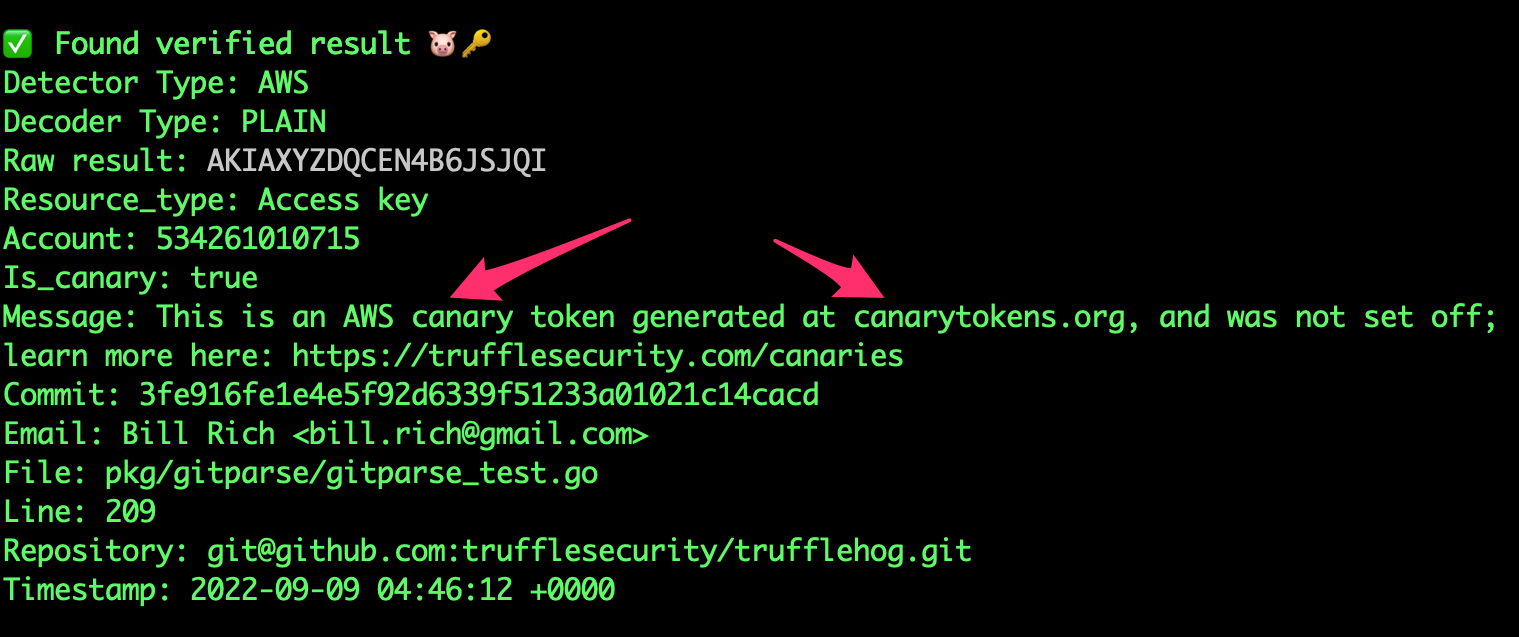
카나리 탐지

TruffleHog는 https://canarytokens.org/를 정적으로 탐지합니다.

image

고급 사용법```yaml

  • name: TruffleHog uses: trufflesecurity/trufflehog@main with:

    Repository path

    path:

    Start scanning from here (usually main branch).

    base:

    Scan commits until here (usually dev branch).

    head: # optional

    Extra args to be passed to the trufflehog cli.

    extra_args: --log-level=2 --results=verified,unknown

    Scan with a specific TruffleHog version (default: latest).

    version:

    Docker image to pull. Override to use a registry mirror (default: ghcr.io/trufflesecurity/trufflehog).

    image:
root@kitploit:~
특정 `base` 및 `head` 참조(reference)를 지정하려면 `base` 인수(TruffleHog CLI의 `--since-commit` 플래그)와 `head` 인수(TruffleHog CLI의 `--branch` 플래그)를 사용할 수 있습니다. 기본 동작이 작동하지 않는 매우 특정한 사용 사례에만 이러한 인수를 사용하는 것을 권장합니다.

#### 고급 사용법: 전체 브랜치 스캔```
- name: scan-push
        uses: trufflesecurity/trufflehog@main
        with:
          base: ""
          head: ${{ github.ref_name }}
          extra_args: --results=verified,unknown

TruffleHog GitLab CI

예제 사용법```yaml

stages:

  • security

security-secrets: stage: security allow_failure: false image: alpine:latest variables: SCAN_PATH: "." # Set the relative path in the repo to scan before_script: - apk add --no-cache git curl jq - curl -sSfL https://raw.githubusercontent.com/trufflesecurity/trufflehog/main/scripts/install.sh | sh -s -- -b /usr/local/bin script: - trufflehog filesystem "$SCAN_PATH" --results=verified,unknown --fail --json | jq rules: - if: '$CI_PIPELINE_SOURCE == "merge_request_event"'

root@kitploit:~
위의 예시 파이프라인에서는 모든 저장소 디렉토리와 파일에서 실시간 비밀을 스캔하고 있습니다. 이 작업은 파이프라인 소스가 병합 요청 이벤트인 경우에만 실행되며, 즉 새로운 병합 요청이 생성될 때 트리거됩니다.

## Pre-commit Hook

TruffleHog는 자격 증명이 컴퓨터를 떠나기 전에 유출되는 것을 방지하기 위해 사전 커밋 훅에서 사용할 수 있습니다.

자세한 내용은 [사전 커밋 훅 문서](https://github.com/trufflesecurity/trufflehog/blob/HEAD/PreCommit.md)를 참조하십시오.

## Custom Regex Detector (alpha)

TruffleHog는 사용자 정의 정규 표현식의 탐지 및 검증을 지원합니다.
탐지를 위해서는 적어도 하나의 **정규 표현식**과 **키워드**가 필요합니다.
**키워드**는 탐지할 정규식 안이나 주변에 나타나는 고정된 리터럴 문자열 식별자입니다. 검증에 최대한의 유연성을 제공하기 위해, 정규식 일치 항목을 포함하는 웹훅이 사용됩니다.

TruffleHog는 정규식 일치 항목을 포함하는 JSON POST 요청을 구성된 웹훅 엔드포인트로 전송합니다. 엔드포인트가 `200 OK` 응답 상태 코드로 응답하면 비밀이 검증된 것으로 간주됩니다. 네트워크/API 오류로 인해 검증에 실패하면 결과는 알 수 없음으로 표시됩니다.

사용자 정의 탐지기는 몇 가지 다른 필터링 메커니즘을 지원합니다: 엔트로피, 전체 일치 항목을 대상으로 하는 정규식, 캡처된 비밀을 대상으로 하는 정규식, 그리고 비밀에 대해 확인되는 제외 단어 목록(캡처 그룹이 있으면 캡처 그룹, 캡처 그룹이 없으면 전체 일치). 사용자 정의 탐지기에 여러 `regex`가 설정되어 있는 경우(이 예에서는 `hogID` 및 `hogToken`), 필터는 각 정규식에 적용됩니다. 이러한 필터를 사용하는 사용자 정의 탐지기의 예는 [여기](https://github.com/trufflesecurity/trufflehog/blob/HEAD/examples/generic_with_filters.yml)에 있습니다.

**참고:** 이 기능은 알파 단계이며 변경될 수 있습니다.

### Regex Detector Example
[여기](https://github.com/trufflesecurity/trufflehog/blob/HEAD/pkg/custom_detectors/CUSTOM_DETECTORS.md)에 검증 서버와 함께 사용자 정의 정규식 탐지기를 설정하는 방법이 나와 있습니다.

## Generic JWT Detection

TruffleHog는 찾은 일반 JWT의 하위 집합에 대한 탐지 및 검증을 지원합니다. 구체적으로, JWT가 HMAC 대신 공개키 암호화를 사용하고 공개 키를 얻을 수 있는 경우 TruffleHog는 JWT가 활성 상태인지 여부를 확인할 수 있습니다.

## :mag: Analyze

TruffleHog는 자격 증명에 대한 심층 분석을 실행하여 해당 권한과 액세스 권한이 있는 리소스를 확인할 수 있도록 지원합니다.```bash
trufflehog analyze

❤️ 기여자

이 프로젝트는 기여해주신 모든 분들 덕분에 존재합니다. [기여하기].

💻 기여

기여는 대환영입니다! 먼저 기여 가이드라인을 확인해주세요.

TruffleHog v2에 대한 기여는 더 이상 받지 않지만, 해당 코드는 v2 브랜치에서 확인할 수 있습니다.

새 비밀 탐지기 추가

새 비밀 탐지기 추가를 시작하기 위한 문서와 도구를 게시했습니다. 함께 탐지 기능을 개선해봅시다!

라이브러리로 사용

현재 trufflehog는 활발히 개발 중이며, 현재 시점에서 공개 API의 안정성은 보장할 수 없습니다.

라이선스 변경

v3.0부터 TruffleHog는 AGPL 3 라이선스로 배포되며, LICENSE에 포함되어 있습니다. TruffleHog v3.0은 이전 코드베이스를 전혀 사용하지 않지만, 명령줄 인터페이스에서 하위 호환성을 유지하기 위해 노력했습니다. 이전 릴리스 이전의 작업은 이 저장소의 히스토리와 이전 패키지 릴리스 및 태그에서 GPL 2.0으로 계속 사용할 수 있습니다. 향후 기여를 수락하려면 완료된 CLA가 필요합니다.

도구 다운로드