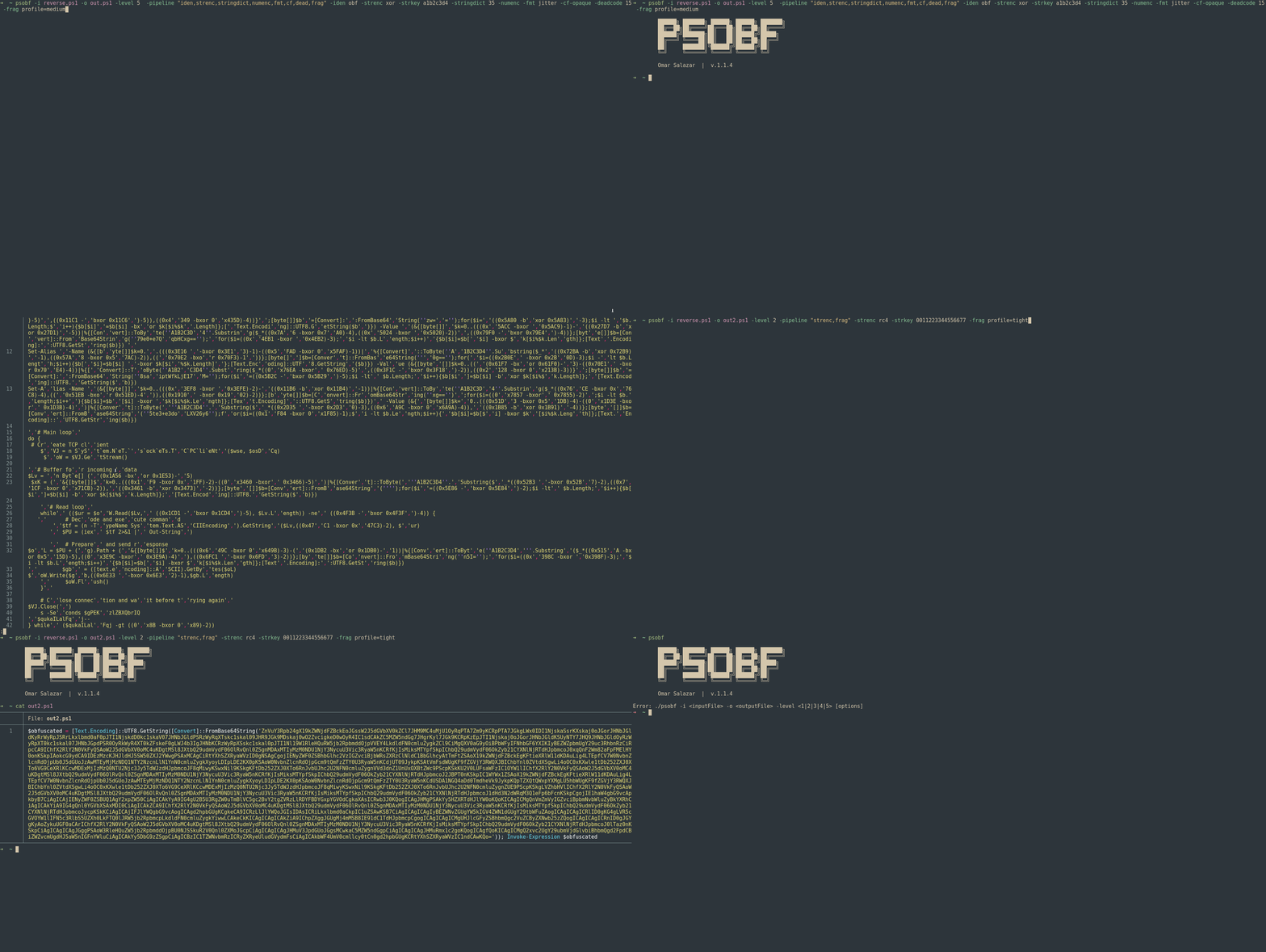

PowerShell 난독화 도구
이 도구는 코드를 변환하여 분석 및 정적 시그니처를 방해하는 것을 목표로 하며, 실험실 및 승인된 Red Team/Pentesting 작업에 유용합니다.
6단계의 난독화 수준과 변환/파이프라인 아키텍처를 지원하며, 문자열 토큰화, 간단한 리터럴 암호화, 숫자 마스킹, 식별자 변형, 포맷 "지터", 제어 흐름 미화, 데드 코드 삽입, 조각화 프로파일 및 결정론적 프로파일과 같은 기술을 중첩할 수 있습니다.
⚠️ 책임 있는 사용: 이 도구는 연구 및 승인된 테스트 전용입니다. 악의적인 목적으로 사용하지 마십시오.```powershell
./psobf -h
██████╗ ███████╗ ██████╗ ██████╗ ███████╗
██╔══██╗██╔════╝██╔═══██╗██╔══██╗██╔════╝
██████╔╝███████╗██║ ██║██████╔╝█████╗
██╔═══╝ ╚════██║██║ ██║██╔══██╗██╔══╝
██║ ███████║╚██████╔╝██████╔╝██║
╚═╝ ╚══════╝ ╚═════╝ ╚═════╝ ╚═╝
Omar Salazar
v.2.0.0
Usage: psobf -i -o -level <1|2|3|4|5|6> [options]
Obfuscation Levels: 1 - Char join encoding 2 - Base64 encoding 3 - Base64 encoding (alternate) 4 - GZip + Base64 compression 5 - Script fragmentation 6 - AES-256 CTR encryption (NEW in 2.0.0)
Transform Pipeline Options (use with -pipeline): iden - Identifier morphing (use with -iden obf) strenc - String encryption (use with -strenc xor|rc4) stringdict - String tokenization (use with -stringdict N) numenc - Number encoding fmt - Format jitter (use with -fmt jitter) cf - Control flow obfuscation (use with -cf-opaque, -cf-shuffle) dead - Dead code injection (use with -deadcode N) hexenc - Hex string encoding (NEW) alias - Cmdlet alias substitution (NEW) unicode - Unicode character encoding (NEW) antidebug - Anti-debugging/VM detection (NEW) iexobf - Invoke-Expression obfuscation (NEW)
Examples:
psobf -i script.ps1 -o out.ps1 -level 2
psobf -i script.ps1 -o out.ps1 -level 6 -profile heavy
psobf -i script.ps1 -o out.ps1 -level 4 -pipeline "iden,alias,hexenc,antidebug,iexobf" -iden obf
psobf -i script.ps1 -o out.ps1 -level 4 -pipeline "strenc" -strenc rc4 -strkey 0011223344556677
## 기능
<h1 align="center">
<img src="https://assets.kitploit.com/production/public/readmes/6598/11956ab9f65e8dc1b0460652042c601f70d28bb67e9fd6f0a89813ed5369997f.gif" alt="psobf" width="700px"></a>
<br>
</h1>
<h1 align="center">
<img src="https://raw.githubusercontent.com/taurusomar/psobf/HEAD/static/poc2.gif" alt="psobf" width="700px"></a>
<br>
</h1>
---
## 설치```bash
go install github.com/TaurusOmar/psobf/v2/cmd/[email protected]
psobf -i input.ps1 -o out.ps1 -level 1..6 [options] psobf -h # full help
## 기능
<h1 align="center">
<img src="https://assets.kitploit.com/production/public/readmes/6598/11956ab9f65e8dc1b0460652042c601f70d28bb67e9fd6f0a89813ed5369997f.gif" alt="psobf" width="700px"></a>
<br>
</h1>
<h1 align="center">
<img src="https://raw.githubusercontent.com/taurusomar/psobf/HEAD/static/poc2.gif" alt="psobf" width="700px"></a>
<br>
</h1>
---
## 설치```bash
go install github.com/TaurusOmar/psobf/cmd/[email protected]
psobf -i input.ps1 -o out.ps1 -level 1..6 [options] psobf -h # full help
---
## 전체 플래그 참조
| 플래그 | 타입 / 값 | 기본값 | 설명 | 예시 | | |
| ------------- | ----------------- | ---------------: | ------------------------------------------- | ------------------------------------------------------------ | ------------------------------- | ---------------------- |
| `-i` | string | — | 입력 PS1 (파이프에서 읽으려면 `-stdin`을 사용하세요) | `-i script.ps1` | | |
| `-o` | string | `obfuscated.ps1` | 출력 (`-stdout`을 사용하여 STDOUT으로 작성) | `-o out.ps1` | | |
| `-level` | 1..6 | 1 | 최종 패커 (레벨 참조) | `-level 4` | | |
| `-noexec` | bool | false | 페이로드만 생성 (`Invoke-Expression` 없음) | `-noexec` | | |
| `-stdin` | bool | false | STDIN에서 PS 읽기 | `-stdin` | | |
| `-stdout` | bool | false | 결과를 STDOUT으로 작성 | `-stdout` | | |
| `-seed` | int64 | random | 재현 가능한 난수성 | `-seed 42` | | |
| `-q` | bool | false | 조용함 (배너 없음) | `-q` | | |
| `-pipeline` | csv | — | 순서대로 적용할 변환 | `-pipeline "iden,strenc,stringdict,numenc,fmt,cf,dead,frag"` | | |
| `-iden` | `keep`/`obf` | `keep` | 식별자 변형 (변수 및 함수) | `-iden obf` | | |
| `-strenc` | `off`/`xor`/`rc4` | `off` | 문자열 리터럴 암호화 | `-strenc rc4` | | |
| `-strkey` | hex | — | `-strenc`의 키 | `-strkey 0011223344556677` | | |
| `-stringdict` | 0..100 | 0 | 긴 문자열 토큰화; 리터럴당 % 확률 | `-stringdict 40` | | |
| `-numenc` | bool | false | 숫자를 산술 PS 표현식으로 인코딩 | `-numenc` | | |
| `-fmt` | `off`/`jitter` | `off` | 공백/줄 바꿈 무작위화 | `-fmt jitter` | | |
| `-cf-opaque` | bool | false | `if(1 -eq 1){...}`로 감싸기 | `-cf-opaque` | | |
| `-cf-shuffle` | bool | false | **함수 블록** 재정렬 | `-cf-shuffle` | | |
| `-deadcode` | 0..100 | 0 | 데드 코드 삽입 확률 | `-deadcode 20` | | |
| `-frag` | \`profile=tight | medium | loose\` | — | 단편화 프로필 (레벨 5) | `-frag profile=medium` |
| `-minfrag` | int | 10 | 최소 단편 크기 (레벨 5) | `-minfrag 8` | | |
| `-maxfrag` | int | 20 | 최대 단편 크기 (레벨 5) | `-maxfrag 16` | | |
| `-profile` | \`light | balanced | heavy\` | — | 파이프라인/시드 등의 사전 설정 | `-profile heavy` |
| `-fuzz` | int | 0 | N개 변형 생성 (다른 시드) | `-fuzz 5` | | |
| `-poly` | int | 0 | 변환당 다형성 변형 | `-poly 3` | | |
> **파이프라인**은 최종 **`-level`** 패킹 **전에** 실행됩니다.
---
## 샘플 입력 스크립트 (안전)
예제를 안전하게 유지하기 위해 다음을 사용합니다:```powershell
Write-Host "Hello, World!"
$answer = 42
function Greet($name) { Write-Host ("Hi, " + $name) }
Greet "Ada"
다음은 출력(스니펫)의 형태를 보여줍니다. 실제 페이로드는 다를 수 있습니다.
psobf -i sample.ps1 -o out.ps1 -level 1
**출력 (스니펫):**```powershell
$obfuscated = $([char[]](87,114,105,116,101,45,72,111,115,116,32,34,72,101,108,108,111,44,32,87,111,114,108,100,33,34,10,36,97,110,115,119,101,114,32,61,32,52,50,10,102,117,110,99,116,105,111,110,32,71,114,101,101,116,40,36,110,97,109,101,41,32,123,32,87,114,105,116,101,45,72,111,115,116,32,40,34,72,105,44,32,34,32,43,32,36,110,97,109,101,41,32,125,10,71,114,101,101,116,32,34,65,100,97,34,10) -join ''); Invoke-Expression $obfuscated
psobf -i sample.ps1 -o out.ps1 -level 2
**출력 (스니펫):**```powershell
$obfuscated = [Text.Encoding]::UTF8.GetString([Convert]::FromBase64String('V3JpdGUtSG9zdCAiSGVsbG8sIFdvcmxkISIKJGFuc3dlciA9IDQyCmZ1bmN0aW9uIEdyZWV0KCRuYW1lKSB7IFdyaXRlLUhvc3QgKCJIaSwgIiArICRuYW1lKSB9CkdyZWV0ICJBZGEiCg==')); Invoke-Expression $obfuscated
psobf -i sample.ps1 -o out.ps1 -level 3
**출력 (스니펫):**```powershell
$e = [Convert]::FromBase64String('V3JpdGUtSG9zdCAiSGVsbG8sIFdvcmxkISIKJGFuc3dlciA9IDQyCmZ1bmN0aW9uIEdyZWV0KCRuYW1lKSB7IFdyaXRlLUhvc3QgKCJIaSwgIiArICRuYW1lKSB9CkdyZWV0ICJBZGEiCg=='); $obfuscated = [Text.Encoding]::UTF8.GetString($e); Invoke-Expression $obfuscated
psobf -i sample.ps1 -o out.ps1 -level 4
**출력 (스니펫):**```powershell
$compressed = 'H4sIAAAAAAAA/wovyixJ1fXILy5RUPJIzcnJ11EIzy/KSVFU4lJJzCsuTy1SsFUwMeJKK81LLsnMz1NwL0pNLdFQyUvMTdVUqFZA0q+h5JGpo6CkoK0Ala3lAitWUHJMSVTiAgQAAP//m+Ey2GoAAAA='; $bytes = [Convert]::FromBase64String($compressed); $ms = New-Object IO.MemoryStream(,$bytes); $gz = New-Object IO.Compression.GzipStream($ms,[IO.Compression.CompressionMode]::Decompress); $sr = New-Object IO.StreamReader($gz); $obfuscated = $sr.ReadToEnd(); Invoke-Expression $obfuscated
psobf -i sample.ps1 -o out.ps1 -level 5
**출력 (스니펫):**```powershell
$fragments = @('Write-Host "Hello',', World!"
$','answer = 42','
function G','reet($name)',' { Write-Ho','st ("Hi, " ','+ $name) }
','Greet "Ada"','
'); $script = $fragments -join ''; Invoke-Expression $script
psobf -i sample.ps1 -o out.ps1 -level 6
**출력 (스니펫):**```powershell
$k=[Convert]::FromBase64String('...base64key...');$iv=[Convert]::FromBase64String('...base64iv...');$e=[Convert]::FromBase64String('...base64ciphertext...');$a=New-Object Security.Cryptography.AesManaged;$a.Key=$k;$a.IV=$iv;$d=$a.CreateDecryptor();$bytes=$d.TransformFinalBlock($e,0,$e.Length);$dec=[Text.Encoding]::UTF8.GetString($bytes);Invoke-Expression $dec
-noexec를 사용하여 페이로드를 실행 없이 검사하세요.
-iden)__$로 보호하세요.명령어```bash psobf -i sample.ps1 -o out.ps1 -level 4 -pipeline "iden" -iden obf -seed 11
**출력 (스니펫)**```powershell
$WguE = 42
function QhZy($Chx){ Write-Host ("Hi, " + $Chx) }
QhZy "Ada"
-strenc xor|rc4)문자열 리터럴만 암호화합니다 (API 변조 없음). 런타임에 적시에 복호화합니다. 플래그: -strenc xor|rc4, -strkey .
명령어```bash psobf -i sample.ps1 -o out.ps1 -level 4 -pipeline "strenc" -strenc xor -strkey a1b2c3d4 -seed 42
**출력 (스니펫)**```powershell
$b=[Convert]::FromBase64String('EwAB...'); for($i=0;$i -lt $b.Length;$i++){$b[$i]=$b[$i] -bxor 0xA1}; [Text.Encoding]::UTF8.GetString($b)
명령```bash psobf -i sample.ps1 -o out.ps1 -level 2 -pipeline "strenc" -strenc rc4 -strkey 0011223344556677 -seed 7
**출력 (스니펫)**```powershell
function __decGWREVT($k,[byte[]]$d){ $s=0..255; $j=0; for($i=0;$i -lt 256;$i++){ $j=($j+$s[$i]+$k[$i%$k.Length])%256; $t=$s[$i];$s[$i]=$s[$j];$s[$j]=$t } $i=0;$j=0; for($x=0;$x -lt $d.Length;$x++){ $i=($i+1)%256;$j=($j+$s[$i])%256; $t=$s[$i];$s[$i]=$s[$j];$s[$j]=$t; $d[$x]=$d[$x] -bxor $s[($s[$i]+$s[$j])%256] } [Text.Encoding]::UTF8.GetString($d) }
...
( __decGWREVT ([byte[]](0..(8-1)|%{[Convert]::ToByte('0011223344556677'.Substring($_*2,2),16)})) ([Convert]::FromBase64String('m7m7...')) )
-stringdict)긴 문자열을 $D 배열로 토큰화하고 런타임에 재구성합니다. 반복되는 시그니처를 줄입니다.
Flag: -stringdict <0..100>
명령```bash psobf -i sample.ps1 -o out.ps1 -level 3 -pipeline "stringdict" -stringdict 40 -seed 1
**출력 (스니펫)**```powershell
$D=@('Hello',', World','!','Hi, ', 'Ada');
Write-Host ($D[0]+$D[1]+$D[2])
function Greet($name){ Write-Host ($D[3] + $name) }
Greet $D[4]
-numenc)일반 숫자를 동등한 산술/비트 연산식으로 대체합니다 (문자열 외부).
명령어```bash psobf -i sample.ps1 -o out.ps1 -level 2 -pipeline "numenc" -numenc -seed 1337
**출력 (스니펫)**```powershell
$answer = ((0x2A -bxor 0x00)+0)
주의: 2>&1과 같은 리다이렉션은 동일하게 유지되어야 합니다. 소스에 따옴표가 없는 리다이렉션이 있고 문제가 발생하는 경우, -numenc를 비활성화하거나 해당 리다이렉션을 소스의 문자열로 캡슐화하세요.
-fmt)간격과 줄바꿈을 무작위화합니다.
명령어```bash psobf -i sample.ps1 -o out.ps1 -level 2 -pipeline "fmt" -fmt jitter -seed 20
**출력 (스니펫)**```powershell
Write-Host "Hello, World!"
$answer=42
function Greet($name) { Write-Host ("Hi, "+$name) }
Greet "Ada"
-cf-opaque, -cf-shuffle)-cf-opaque: 전체 스크립트를 절대 거짓이 되지 않는 분기로 감쌉니다.-cf-shuffle: 함수 블록(단일 문장이 아님)의 순서를 재배열합니다. 스크립트에 함수가 정의된 경우에만 변경 사항을 확인할 수 있습니다.명령어```bash psobf -i sample.ps1 -o out.ps1 -level 4 -pipeline "cf" -cf-opaque -cf-shuffle -seed 77
**출력 (스니펫)**```powershell
if(1 -eq 1){
function Greet($name){ Write-Host ("Hi, " + $name) }
Write-Host "Hello, World!"
$answer = 42
Greet "Ada"
}
-deadcode)무효 함수, 0회 반복 루프, 무해한 문자열 등을 주입합니다. 확률에 의해 제어됩니다. 플래그: -deadcode <0..100> (스니펫 주입 확률).
명령어```bash psobf -i sample.ps1 -o out.ps1 -level 4 -pipeline "dead" -deadcode 25 -seed 5
**출력 (스니펫)**```powershell
function __dummyzQJxJk { return }
for($i=0;$i -lt 0;$i++){Start-Sleep -Milliseconds 0}
$x='canary';$y=$x+$x|Out-Null
Write-Host "Hello, World!"
...
-frag, -minfrag, -maxfrag)레벨 5(문자열 조각 + 런타임 결합)에만 영향을 미칩니다.
프로필:
profile=tight → 작은 조각(≈6–10)profile=medium → 중간 조각(≈10–18)profile=loose → 큰 조각(≈14–28)또는 -minfrag / -maxfrag로 조정합니다.
명령어```bash
psobf -i sample.ps1 -o out.ps1 -level 5 -frag profile=loose -seed 9
psobf -i sample.ps1 -o out.ps1 -level 5 -minfrag 8 -maxfrag 16 -seed 9
**출력 (조각)**```powershell
$fragments=@('Write-Host "Hello,',' World!"',"`n", '$answer = 42',"`n",'function Greet($','name){ Write-Host ("Hi, "+$name)}',"`n",'Greet "Ada"');
$script=$fragments -join ''; Invoke-Expression $script
hexenc)문자열 리터럴을 16진수로 인코딩합니다.```bash psobf -i sample.ps1 -o out.ps1 -level 2 -pipeline "hexenc" -seed 42
**출력 (일부):**```powershell
[Text.Encoding]:https://raw.githubusercontent.com/taurusomar/psobf/HEAD/:UTF8.GetString(%5BConvert%5D::FromHexString(%2748656C6C6F%27))
alias)PowerShell cmdlet을 해당 짧은 별칭으로 대체합니다.```bash psobf -i sample.ps1 -o out.ps1 -level 2 -pipeline "alias" -seed 42
**출력 (스니펫):**```powershell
# Write-Host → echo/write/outright
# Get-ChildItem → dir/ls/gci
# ForEach-Object → foreach/%
unicode)문자열 문자를 [char]0xNNNN 형식으로 변환합니다.```bash
psobf -i sample.ps1 -o out.ps1 -level 2 -pipeline "unicode" -seed 42
**출력 (스니펫):**```powershell
"H[char]0x0065[char]0x006C[char]0x006Co"
antidebug)샌드박스/VM/디버거 탐지 스니펫을 주입합니다.```bash psobf -i sample.ps1 -o out.ps1 -level 4 -pipeline "antidebug" -seed 42
**출력 (스니펫):**```powershell
if($env:COMPUTERNAME -match '^(SANDBOX|MALWARE|VIRUS)'){ exit }
if((Get-WmiObject Win32_ComputerSystem).Model -match '^(VirtualBox|VMware)'){ exit }
# ... original script ...
iexobf)Invoke-Expression을 대체 형식으로 대체합니다.```bash
psobf -i sample.ps1 -o out.ps1 -level 2 -pipeline "iexobf" -seed 42
**출력 (스니펫):**```powershell
# Invoke-Expression → IEX or .
. $code # instead of Invoke-Expression $code
프리셋은 편리한 시작점입니다. 명시적으로 전달하는 플래그는 프리셋을 재정의합니다. 명시적으로 전달하는 모든 플래그는 프로필보다 우선합니다.
-seed N → 주어진 구성에 대한 결정론적 출력-seed → 암호학적 시드 기반 무작위성-fuzz N → N개 변종 생성 (out.ps1.v1.ps1, out.ps1.v2.ps1, …), 다양성 테스트에 유용예시```bash psobf -i sample.ps1 -o out.ps1 -level 4 -profile heavy -fuzz 3
---
## STDIN/STDOUT 및 `-noexec`
* **파이프 입력/출력** ```bash
cat sample.ps1 | psobf -stdin -stdout -level 2 > out.ps1
목표는 승인된 환경에서의 연구를 위해 아티팩트를 다양화하고 안정적인 시그니처를 줄이는 것입니다.
2. **최대 다양성 (포맷 + 파편화 + 데드 코드)**```bash
psobf -i sample.ps1 -o out.ps1 -level 5 \
-pipeline "fmt,frag,dead" -fmt jitter -frag profile=loose -deadcode 15 \
-fuzz 5
4. **정적 IOCs 줄이기 (숫자 + 사전)**```bash
psobf -i sample.ps1 -o out.ps1 -level 2 -pipeline "numenc,stringdict" -numenc -stringdict 35 -seed 9
---
## 모범 사례 및 방어 노트
* 빌드 시마다 **`-strkey`** 및 **`-seed`**를 교체하세요.
* 레이어를 결합하는 것이 좋습니다: `-strenc` + `-stringdict` + `-fmt jitter` + 조각화.
* 탐지 테스트를 위해 변종군을 생성하려면 `-fuzz`를 사용하세요.
* 깨끗하고 정상적인 기준선을 유지하고, 변환 전후에 샌드박스에서 기능적 동등성을 확인하세요.
* 스크립트가 미묘한 PS 구문(예: 리디렉션)에 의존하는 경우, 따옴표 안에 두거나 `-numenc`를 비활성화하세요.
---
## 아키텍처 다이어그램```
┌──────────────┐
│ input.ps1 │
└──────┬───────┘
│ read (-i / -stdin)
▼
┌──────────────┐
│ Pipeline │ order you choose
│ iden │ rename vars/funcs
│ strenc │ XOR/RC4 literals
│ stringdict │ tokenize + rejoin
│ numenc │ numeric masking
│ fmt │ whitespace jitter
│ cf │ opaque/shuffle
│ dead │ harmless noise
└──────┬───────┘
│ mutated script
▼
┌──────────────┐
│ Level 1..5 │ final packing
└──────┬───────┘
│ + Invoke-Expression (unless -noexec)
▼
┌──────────────┐
│ out.ps1 │
└──────────────┘
psobf -i sample.ps1 -o out.ps1 -level 2 -seed 123
psobf -i sample.ps1 -o out.ps1 -level 4 -pipeline "strenc" -strenc rc4 -strkey 0011223344556677
psobf -i sample.ps1 -o out.ps1 -level 3 -pipeline "stringdict,numenc" -stringdict 40 -numenc
psobf -i sample.ps1 -o out.ps1 -level 5
-pipeline "iden,strenc,stringdict,numenc,fmt,cf,dead,frag"
-iden obf -strenc xor -strkey a1b2c3d4 -stringdict 35 -numenc
-fmt jitter -cf-opaque -deadcode 15 -frag profile=medium -seed 777
psobf -i sample.ps1 -o out.ps1 -level 6 -profile heavy -seed 999
psobf -i sample.ps1 -o out.ps1 -level 4 -pipeline "antidebug,alias,hexenc" -seed 42
psobf -i sample.ps1 -o out.ps1 -level 6
-pipeline "iden,alias,hexenc,unicode,antidebug,iexobf,strenc"
-iden obf -strenc rc4 -strkey 0011223344556677 -seed 42
psobf -i sample.ps1 -o payload.txt -level 4 -noexec
---
## 법적 고지
이 프로젝트는 **교육적** 및 **인가된** 테스트 목적으로만 사용해야 합니다. 사용에 대한 모든 책임은 본인에게 있습니다. 작성자와 기여자는 직·간접적 손해에 대해 어떠한 책임도 지지 않습니다.