 stamparm/maltrail
Real-time malicious traffic detection system using public blacklists, static malware trails, and heuristic analysis to identify threats across DNS, HTTP, and IP traffic.







Maltrail is a network traffic detection system that identifies communication with known malicious
infrastructure and reports selected traffic anomalies. It matches domains, URLs, IP addresses,
IP:port pairs, and User-Agent values observed on the network against a set of indicators called
trails.
A detection is recorded as a single event containing the source, destination, protocol, matched trail, classification, and trail source:
"2026-08-07 09:14:22.117034" gw 10.13.13.2 57809 1.1.1.1 53 UDP DNS malware.bakewithdavid.com "asyncrat (malware)" (static)
Maltrail is designed for indicator-based network monitoring. Its heuristic detections supplement trail matching, but it is not a replacement for endpoint telemetry or a general-purpose intrusion prevention system.
PACKET_FANOUT capture workers.maltrail-sensor -T and optional Prometheus metrics.Maltrail has two independently deployable processes that can run on the same host or on separate hosts: the sensor detects suspicious traffic, while the server stores and exposes events for reporting and API access.
flowchart LR
    Traffic(("<b>Network traffic</b>"))

    subgraph Maltrail ["Maltrail System"]
        direction LR
        Sensor["<b>Sensor</b><br/>Rust / libpcap<br/>Capture & detection<br/>Trail matching & heuristics"]
        Logs[("<b>Event logs</b><br/>LOG_DIR")]
        Server["<b>Server</b><br/>Python<br/>Event intake & access<br/>Reporting UI & API"]
    end

    Browser(("<b>Browser</b><br/>Reporting interface"))
    Syslog["<b>Syslog / SIEM</b><br/>CEF"]
    Logstash["<b>Logstash</b><br/>JSON"]

    Traffic --> Sensor
    Sensor -->|local events| Logs
    Sensor -->|remote events / LOG_SERVER| Server
    Server -->|stores remote events| Logs
    Logs -->|reads daily logs| Server
    Sensor -->|SYSLOG_SERVER| Syslog
    Sensor -->|LOGSTASH_SERVER| Logstash
    Server <-->|HTTP / SSE| Browser
The sensor captures network traffic, performs trail matching and heuristic analysis, and produces
events. It can write events locally to LOG_DIR, send them to a remote Maltrail server through
LOG_SERVER, or do both. It can also emit CEF over syslog with SYSLOG_SERVER and JSON to
Logstash with LOGSTASH_SERVER.
The server accepts remote events, stores them in the event logs, reads locally available daily logs, and provides the HTTP API and browser-based reporting interface. The sensor does not depend on the reporting interface and can be deployed independently when events are forwarded to another system.
Maltrail includes a browser-based reporting interface for exploring detected traffic, with live updates, field-aware search, retro hunting, geographic views, triage, sensor status, saved views and export.
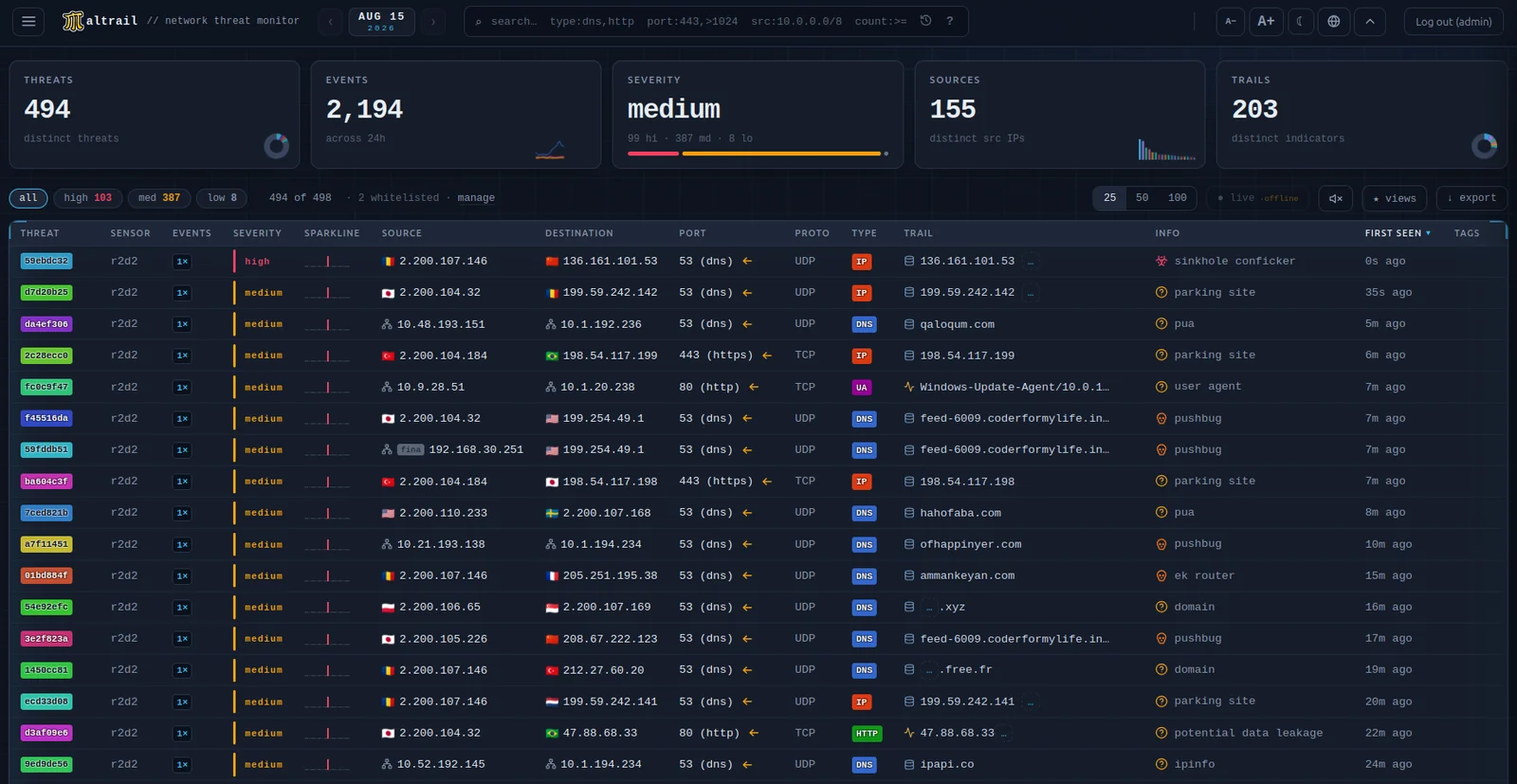
The interface is served by server.py at HTTP_ADDRESS:HTTP_PORT. It is plain JavaScript with a
single third-party runtime dependency (PapaParse, for CSV parsing) and no build step. One day is
viewed at a time, selected with a date picker that also acts as an event-density grid over the
available daily logs. Events are streamed from /events and aggregated in the browser into
threats — one row per distinct (source, trail) — shown in a sortable grid with a detail panel.
| Feature | Notes |
|---|---|
| Live mode | Appended events arrive over Server-Sent Events (/live) and are merged into the current view. When SSE is unavailable, or the stream cannot serve the session, the interface falls back to polling byte ranges of the daily log. New high-severity threats can raise desktop and audible alerts; both can be muted |
| Search | Field-aware queries support src:, dst:, port:, proto:, type:, trail:, info:, family:, tag:, uid:, sev:, dir: and status: selectors, plus exclusions, wildcards, CIDR matching and numeric comparisons. Active filters appear as removable chips |
| Retro hunt | /hunt searches all retained daily logs for one indicator rather than only the selected day. Searches are bounded by configurable limits; an optional per-day sidecar index accelerates the sweep and makes /counts exact |
| World map | /geo shows per-country event density for the selected day using the external endpoint of each event. Unattributable events remain unmapped rather than being guessed. HOME_LAT / HOME_LON can be set to draw origin arcs |
| Triage | Per-threat status (new / investigating / resolved / false positive), free-text notes, tags and hiding. Whitelist rules and OSINT pivots are available from the row context menu |
| Sensor status | /sensors shows which sensors are reporting, the version each runs and how long ago it last checked in |
| Saved views | Named filter presets |
| Export | The current filtered view as CSV, JSON, or defanged indicators |
| Appearance | Dark and light themes, with discrete text-size steps |
Search terms separated by spaces are combined as AND. Prefix a term with - to exclude it, use
* for wildcards, use CIDR notation such as src:10.0.0.0/8, and use numeric ranges or comparisons
such as port:>1024 and count:>=100. family:interlock also includes interlock-1 and
interlock-2, the shards in which that feed dump arrives.
Retro hunts are bounded by a day limit, a wall-clock budget and a sample cap. If the time budget cuts a day short, that day is reported separately rather than counted as a completed day. Only lines that can contain the indicator are parsed, so a day of non-matching lines is read at disk speed.
