
AI 기반 분석, 윤리적 준수 프레임워크 및 전문 보고 기능을 갖춘 고급 SQL 인젝션 스캐너
프로덕션 준비 완료된 SQL 인젝션 스캐너 — 6가지 탐지 방법, AI 기반 수정, SARIF 출력, CI/CD 통합.
빠른 시작 · 문서 · Docker · AI 분석 · GitHub에서 별표
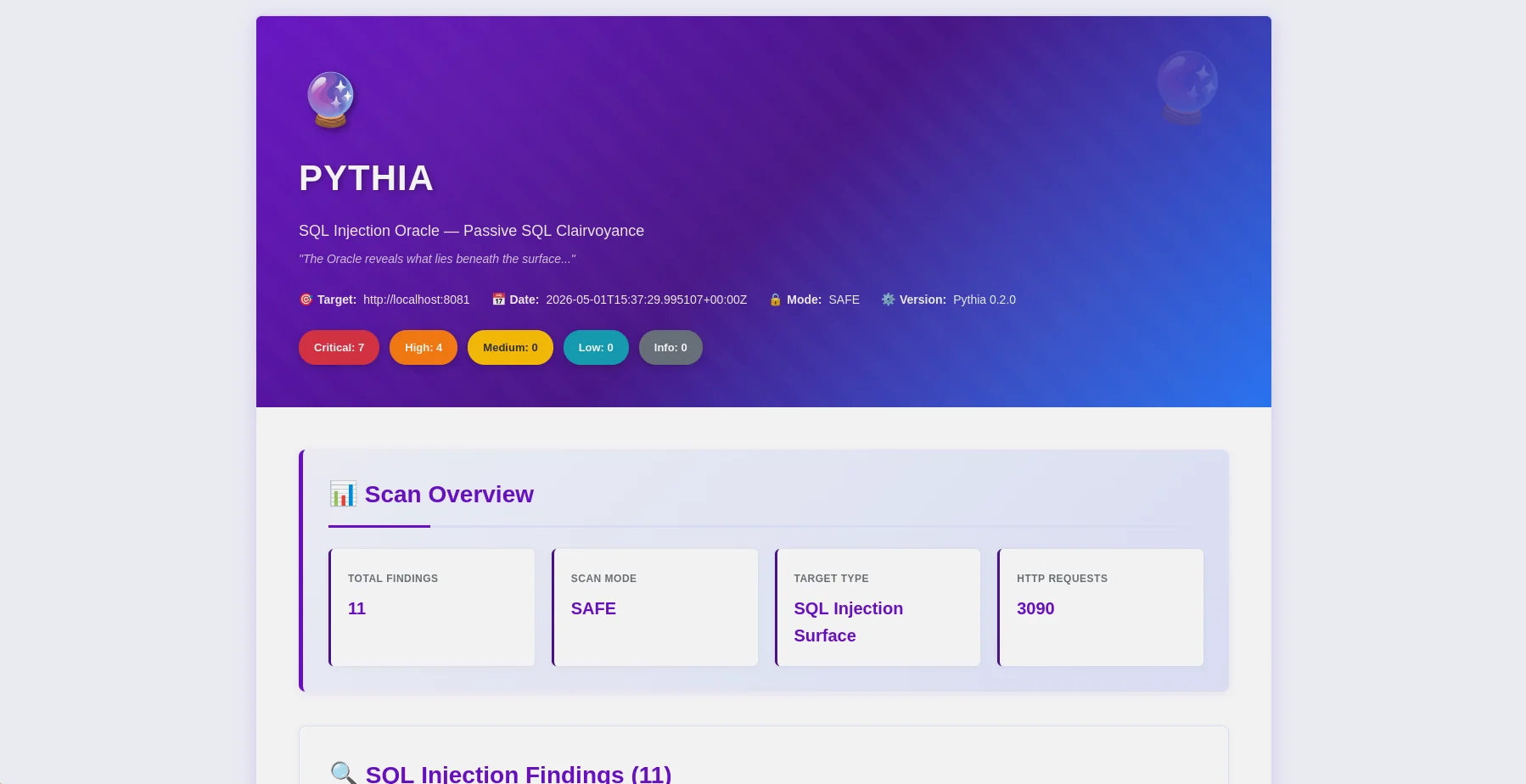
HTML 보고서 — 심각도 배지와 OWASP 매핑이 포함된 발견 항목 개요 |
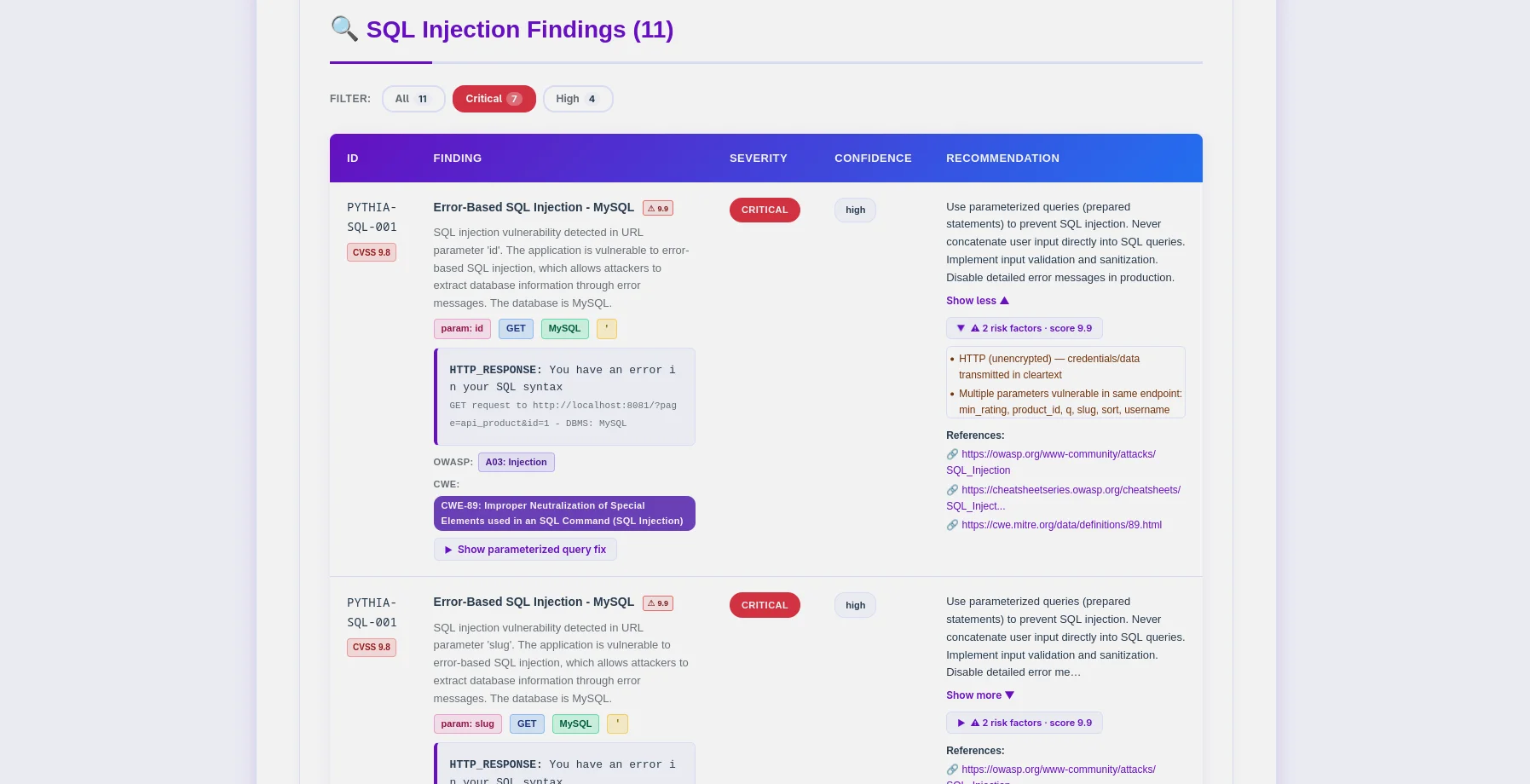
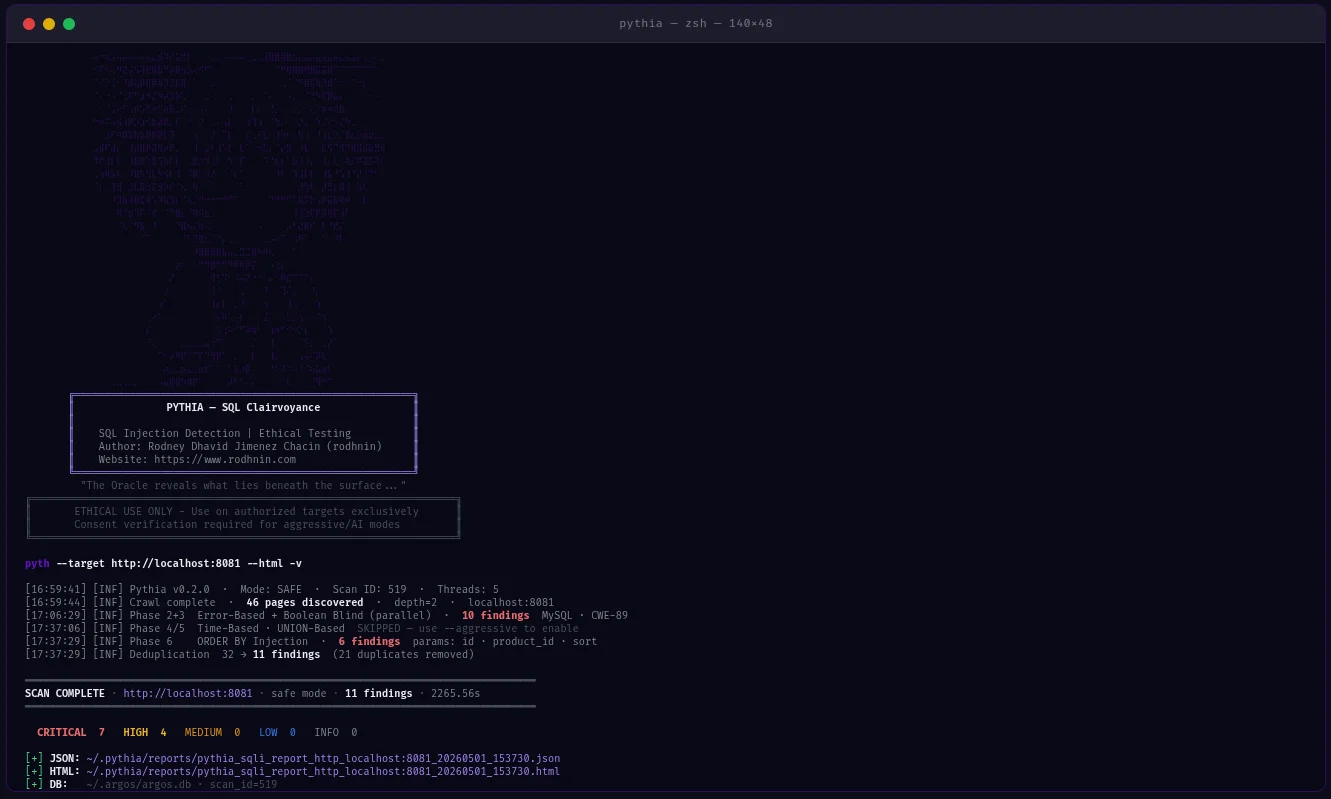
발견 항목 표 — PYTHIA-SQL 코드, DBMS 탐지, CWE-89 매핑 |
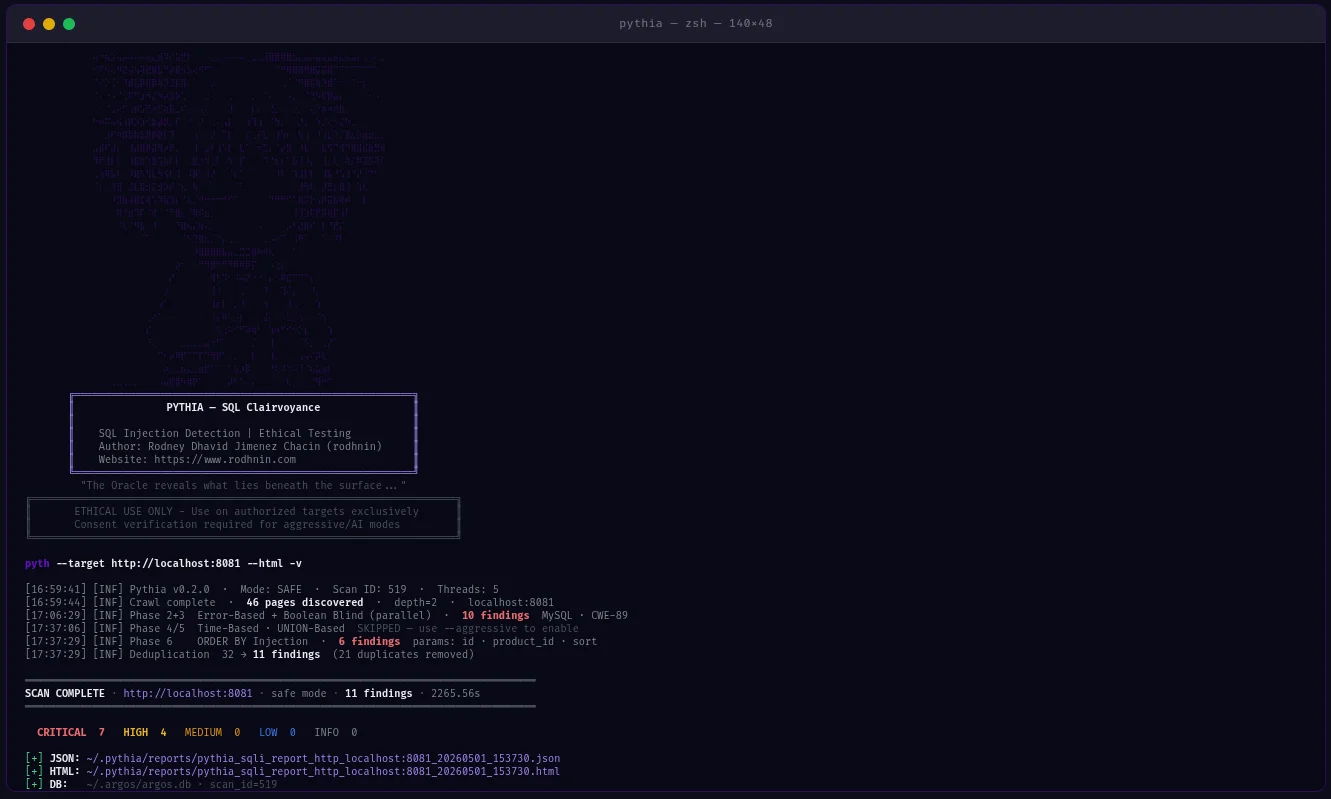
Pythia는 윤리를 최우선으로 하는 프로덕션 준비 완료된 SQL 인젝션 탐지 스캐너입니다. 침투 테스터, 보안 연구원, DevSecOps 엔지니어를 위해 설계되었으며, 6가지 탐지 방법으로 SQL 인젝션 취약점을 식별하고 CI/CD 파이프라인에 직접 통합됩니다.
--fail-on, --sarif, --diff 플래그~/.argos/argos.db)python -m pyth --target http://example.com/products?id=1 --html
- **14 Finding Codes**: DBMS별 (MySQL, PostgreSQL, MSSQL, Oracle, SQLite) + 기술별
- **DBMS Fingerprinting**: 자동 데이터베이스 유형 및 버전 탐지
- **WAF Bypass**: 공격 모드에서 170개 이상의 우회 페이로드 (hex, URL 인코딩, 인라인 주석, 대소문자 변형)
- **Session-Variable Detection**: DVWA-high 스타일 인증 패턴을 위한 POST→GET 체인
- **Smart Crawler**: 팝업/onclick 추출 (`--js`), sitemap, robots.txt를 사용한 BFS
- **False Positive Hardening**: SequenceMatcher 유사도 점수 + 다중 페이로드 확인
### CI/CD 통합```bash
# Pipeline-friendly: exit 10 if high+ findings found
python -m pyth --target https://staging.app.com --aggressive --fail-on high
echo $? # 0=clean, 10=findings found, 1=error
# SARIF for GitHub Security / GitLab SAST
python -m pyth --target https://app.com --aggressive --sarif > results.sarif
# Compare vs last scan — show what's new, what's fixed
python -m pyth --target https://app.com --aggressive --diff last --html
python -m pyth --target https://api.example.com/v1/users
--auth-header "Authorization: Bearer eyJhbGc..."
--auth-header "X-API-Key: sk-prod-xxx"
--aggressive --html
여러 헤더를 위해 `--auth-header`를 여러 번 전달하세요.
### AI 기반 분석
AI 제공자를 명령줄에서 선택하세요:
| 제공자 | 최적 용도 | 속도 | 비용 | 개인정보 보호 |
| -------------------------------- | --------------------------------- | ---------- | ----------- | ------------ |
| **OpenAI gpt-4o-mini** (기본) | 프로덕션 품질, 저비용 | 빠름 | ~$0.02/scan | 표준 |
| **Anthropic Claude** | 개인정보 보호 중심, 코드 수정 | 빠름 | ~$0.06/scan | 향상됨 |
| **Ollama (로컬)** | 완전한 개인정보 보호 | 느림 (CPU) | 무료 | 100% 오프라인 |```bash
# Standard analysis
python -m pyth --target http://example.com --use-ai --ai-tone technical --html
# Agent mode: AI queries NVD for real CVEs (no API key for NVD)
python -m pyth --target http://example.com --use-ai --ai-agent --html
# Multi-provider comparison
python -m pyth --target http://example.com --use-ai \
--ai-compare "openai:gpt-4o-mini,anthropic:claude-3-5-haiku-20241022" --html
# With budget cap
python -m pyth --target http://example.com --use-ai --ai-budget 0.05 --html
JSON 보고서 (기계 판독 가능, v0.2.0 스키마)```json { "tool": "pythia", "version": "0.2.0", "target": "http://localhost:8081", "mode": "aggressive", "summary": { "total": 26, "critical": 18, "high": 6, "medium": 2 }, "findings": [ { "id": "PYTHIA-SQL-001", "title": "Error-Based SQL Injection (MySQL/MariaDB)", "severity": "critical", "confidence": "high", "parameter": "id", "vector": "GET", "dbms": "MySQL 8.0.32", "cvss": 9.8, "contextual_score": 9.9, "risk_factors": ["no_ssl", "pii_detected"], "payload": "' OR '1'='1' --", "owasp": { "id": "A03", "name": "Injection" }, "cwe": { "id": "CWE-89", "name": "SQL Injection" }, "detection_method": "error-based" } ], "notes": { "scan_duration_seconds": 87.3, "requests_sent": 342, "rate_limit_applied": "5.0 req/s", "false_positive_disclaimer": "..." }, "diff": null }
**HTML Reports** (사용자 친화적)
- 필터 바: 심각도, OWASP 카테고리, 탐지 방법, DBMS
- 발견 항목별 OWASP/CWE/CVE 배지 (외부 참조로 클릭 가능)
- CVSS 기본 + 상황별 점수 (색상 코드 포함)
- 페이로드 시각화가 포함된 확장 가능한 증거 섹션
- AI 분석 탭 (표준 / 에이전트 / 비교)
- 차이 섹션 (신규/수정/지속 발견)
- Oracle 테마 (보라색 `#6a11cb`) — 편집 없이 클라이언트에 전달 가능
### 발견 코드
모든 코드 → **OWASP A03 Injection** / **CWE-89 SQL Injection**
| 코드 | 유형 | DBMS / 벡터 | 모드 |
| ---------------- | ------------------ | ---------------------------- | ---------- |
| `PYTHIA-SQL-001` | Error-Based | MySQL / MariaDB | Safe |
| `PYTHIA-SQL-002` | Error-Based | PostgreSQL | Safe |
| `PYTHIA-SQL-003` | Error-Based | MSSQL | Safe |
| `PYTHIA-SQL-004` | Error-Based | Oracle | Safe |
| `PYTHIA-SQL-005` | Error-Based | SQLite | Safe |
| `PYTHIA-SQL-010` | Boolean Blind | 모든 DBMS | Safe |
| `PYTHIA-SQL-011` | Boolean Blind | 헤더 인젝션을 통해 | Safe |
| `PYTHIA-SQL-020` | Time-Based | MySQL SLEEP() | Aggressive |
| `PYTHIA-SQL-021` | Time-Based | MSSQL WAITFOR | Aggressive |
| `PYTHIA-SQL-022` | Time-Based | PostgreSQL pg_sleep() | Aggressive |
| `PYTHIA-SQL-030` | UNION-Based | GET/POST parameter | Aggressive |
| `PYTHIA-SQL-031` | UNION-Based | 쿠키를 통해 | Aggressive |
| `PYTHIA-SQL-040` | Second-Order | 저장 → 검색 패턴 | Aggressive |
| `PYTHIA-SQL-050` | ORDER BY Injection | 숫자 정렬 파라미터 | Aggressive |
---
## 검증 및 테스트
Pythia v0.2.0은 통제된 Docker 기반 취약 애플리케이션을 사용하여 **경험적으로 검증**되었습니다.
### QA 결과 (2026년 5월)
| 대상 | 모드 | 발견 수 | 참고 사항 |
| ----------------------- | ---------------------------------- | ---------------- | ---------------------------------------------- |
| **PHP Lab** (8081) | `--aggressive` | **26개 발견** | 모든 4가지 기법 + second-order + ORDER BY |
| **Flask Lab** (8082) | `--js --aggressive` | **18개 발견** | Session-var + second-order + ORDER BY |
| **DVWA Low** | `--no-crawl --aggressive` | 4/4 기법 | PYTHIA-SQL-001/010/020/030 |
| **DVWA Medium** | `--no-crawl --aggressive` | 4/4 기법 | POST 폼, 모든 기법 |
| **DVWA High** | `--js --max-pages 2 --aggressive` | 4/4 기법 | Session-variable POST→GET 체인 |
| **오탐지 테스트** | `--aggressive` | **0개 발견** | 정적 URL — 오탐지 없음 확인 |
**주요 검증 사항:**
- ✅ 14개 발견 코드 모두 작동
- ✅ DVWA high (session-variable 패턴) — 완전 4/4 일치
- ✅ 2차 인젝션 탐지 (PYTHIA-SQL-040)
- ✅ ORDER BY 인젝션 탐지 (PYTHIA-SQL-050)
- ✅ 정적 URL에서 오탐지 0건
- ✅ `--fail-on` 종료 코드 (0/10/1) 정확
- ✅ SARIF 2.1.0 출력 검증 완료
- ✅ `--diff last` 비교 작동
- ✅ `--auth-header`가 모든 요청에 헤더 전달
---
## 빠른 시작
### 사전 요구 사항
- **Python 3.11+** (3.12 권장)
- **pip** (Python 패키지 관리자)
- **Docker** (선택 사항, 취약 랩용)
### 설치
**1. 저장소 복제**```bash
git clone https://github.com/rodhnin/pythia-sql-clairvoyance.git
cd pythia-sql-clairvoyance
2. 가상 환경 생성 및 활성화```bash python3 -m venv .venv source .venv/bin/activate
**3. 의존성 설치**```bash
python -m pip install --upgrade pip
python -m pip install -r requirements.txt
4. API 키 구성 (클라우드 AI 사용 시)```bash export OPENAI_API_KEY="sk-..." export ANTHROPIC_API_KEY="sk-ant-..."
**5. 설치 확인**```bash
python -m pyth --version
# Output: Pythia v0.2.0
python -m pyth --target "http://testphp.vulnweb.com/artists.php?artist=1"
python -m pyth --target "http://testphp.vulnweb.com/artists.php?artist=1" --html
python -m pyth --gen-consent example.com python -m pyth --verify-consent http --domain example.com --token verify-abc123 python -m pyth --target http://example.com --aggressive --html
보고서는 `~/.pythia/reports/`에 저장됩니다.
---
## 사용 가이드
### CLI 플래그 참조```
Scan Options:
--target URL Target URL to scan
--safe Safe mode (default): error-based + boolean-blind
--aggressive Aggressive mode: all 6 techniques + WAF bypass payloads
Auth:
--cookie COOKIE Session cookie string
--auth-header HEADER Custom HTTP header (pass multiple times for multiple headers)
--auto-csrf Automatically detect and include CSRF tokens
Crawler:
--max-depth N Max crawl depth (default: 2)
--max-pages N Max pages to crawl (default: 100)
--no-robots Ignore robots.txt
--no-crawl Skip BFS crawl, test target URL only
--js JS-aware popup/onclick URL extraction
Output:
--report-dir DIR Output directory for reports (default: ~/.pythia/reports/)
--html Generate HTML report
--db Save findings to database
--diff SCAN_ID Compare vs previous scan (use "last" for most recent)
--sarif Output SARIF 2.1.0 to stdout (logs redirect to stderr)
--fail-on SEVERITY Exit 10 if findings found at this severity or higher
CI/CD:
--fail-on SEVERITY Exit codes: 0=clean, 10=findings found, 1=error
Logging:
-v / -vv / -vvv Verbosity levels
-q Quiet mode (errors only)
--log-file FILE Log to file
--log-json Structured JSON logging
--no-color Disable colored output
AI:
--use-ai Enable AI analysis
--ai-tone TONE Analysis tone: technical, non_technical, both
--api-key-env VAR Environment variable name for API key
--ai-provider NAME AI provider: openai, anthropic, ollama
--ai-model MODEL Model name (e.g. gpt-4o-mini, claude-3-5-haiku-20241022)
--ai-stream Stream AI output token by token
--ai-compare LIST Compare providers (e.g. "openai,anthropic" or "openai:gpt-4o-mini,anthropic:claude-3-5-haiku-20241022")
--ai-agent Agent mode: NVD CVE lookup + iterative analysis
--ai-budget AMOUNT Cost cap per scan in USD
Consent:
--gen-consent DOMAIN Generate consent token for domain
--verify-consent METHOD Verify consent: http or dns
--domain DOMAIN Domain for consent verification
--token TOKEN Consent token value
Advanced:
--rate N Request rate limit (default: 2.0 safe, 5.0 aggressive)
--timeout N HTTP timeout in seconds (default: 10)
--user-agent STRING Custom User-Agent
--no-verify-ssl Disable SSL verification
--threads N Worker threads (default: 5)
--version Show version and exit
python -m pyth --target "http://example.com/search?q=test"
python -m pyth --target "http://example.com/products?id=1" --html
python -m pyth --target "http://example.com/api/users?id=1" -vv
python -m pyth --target "http://example.com/api/users?id=1" --no-crawl
### CI/CD 통합```bash
# Exit 10 if high or critical findings exist (blocks pipeline)
python -m pyth \
--target https://staging.myapp.com \
--aggressive \
--fail-on high
# SARIF output for GitHub Security tab
python -m pyth \
--target https://staging.myapp.com \
--aggressive \
--sarif > results.sarif
# Compare vs last scan to see what changed
python -m pyth \
--target https://staging.myapp.com \
--aggressive \
--diff last \
--html
python -m pyth
--target https://api.example.com/v1/products
--aggressive
--auth-header "Authorization: Bearer eyJhbGc..."
--html
python -m pyth
--target https://api.example.com/v1/users
--aggressive
--auth-header "Authorization: Bearer eyJhbGc..."
--auth-header "X-API-Key: sk-prod-xxx"
--html
python -m pyth
--target "http://localhost:8080/vulnerabilities/sqli/?id=1&Submit=Submit"
--no-crawl
--aggressive
--cookie "PHPSESSID=abc123; security=low"
### JS 인식 크롤링```bash
# Extract popup/onclick URLs for complex navigation patterns
python -m pyth \
--target http://localhost:8082 \
--js \
--aggressive \
--html
# DVWA high: session-variable form (needs popup URL extraction)
python -m pyth \
--target "http://localhost:8080/vulnerabilities/sqli/" \
--js \
--max-pages 2 \
--aggressive \
--cookie "PHPSESSID=abc123; security=high"
--js 플래그는 onclick 속성에서 정규식을 사용하여 추출합니다 — Playwright 의존성이 필요 없습니다.
python -m pyth --gen-consent example.com
python -m pyth --verify-consent http
--domain example.com
--token verify-a3f9b2c1d8e4
python -m pyth
--target http://example.com
--aggressive
--html -v
---
## Docker 배포
Pythia는 두 가지 Docker 배포 옵션을 제공합니다:
1. **스캐너 이미지**: Pythia를 원샷 스캔을 위한 Docker 이미지로 빌드합니다.
2. **테스트 랩**: 안전한 테스트를 위한 취약한 애플리케이션 (DVWA, PHP, Flask)
### 빠른 시작```bash
cd docker
./deploy.sh
절대로 테스트 랩을 공용 인터넷에 노출하지 마세요 — 로컬 테스트 전용!```bash
sudo docker compose -f docker/compose.testing.yml up -d
python -m pyth --target http://localhost:8081 --aggressive --html
sudo docker compose -f docker/compose.testing.yml down
---
## AI 기반 분석
Pythia는 **LangChain v1.0.0**을 사용하며 여러 AI 제공자를 지원합니다.
### 두 가지 분석 모드
- **기술적**: Prepared statements, 매개변수화된 쿼리, 입력 검증 코드 (PHP/PDO, Python/SQLAlchemy, Node.js/pg, Java/PreparedStatement)
- **경영진**: 이해관계자와 경영진을 위한 평이한 언어의 위험 평가
### 제공자 전환```bash
# CLI flags (v0.2.0) — no YAML editing required
python -m pyth --target http://example.com --use-ai --ai-provider anthropic --ai-model claude-3-5-haiku-20241022 --html
python -m pyth --target http://example.com --use-ai --ai-provider ollama --ai-model llama3.2 --html
YAML config (config/default.yaml) can still be used as fallback. CLI flags take priority.
For complete AI integration guide, see docs/AI_INTEGRATION.md
~/.pythia/ ├── reports/ │ ├── pythia_sqli_report_localhost_20260318_143022.json │ └── pythia_sqli_report_localhost_20260318_143022.html ~/.argos/ ├── argos.db # Shared Argos Suite database ├── costs.json # AI cost tracking (shared) └── logs/ └── pythia.log # Scan logs
### 심각도 매핑
- **CRITICAL (9.0-10.0)**: 오류 기반, 시간 기반, UNION 기반, 2차 주입 (확인된 익스플로잇)
- **HIGH (7.0-8.9)**: Boolean-blind (신뢰도 높음), ORDER BY 주입
- **MEDIUM (4.0-6.9)**: Boolean-blind (신뢰도 중간)
- **LOW (0.1-3.9)**: 잠재적 SQLi (결론적 증거 부족)
### 종료 코드
| 코드 | 의미 |
| ------ | ------------------------------------------------------------------------------ |
| `0` | 스캔 완료, `--fail-on` 임계값에 해당하는 발견 사항 없음 (또는 `--fail-on` 미사용) |
| `1` | 기술적 오류 (연결, 시간 초과, 데이터베이스) |
| `10` | `--fail-on` 심각도 임계값 이상의 발견 사항 있음 |
| `130` | 사용자 취소 (Ctrl+C) |
---
## 데이터베이스 영속성
**Argos 생태계와 공유**되는 SQLite 데이터베이스 (`~/.argos/argos.db`):
- **스캔 기록**: 날짜, 기간, 발견 건수, 탐지 방법
- **발견 사항 저장소**: 검색 가능한 SQL 인젝션 취약점 데이터베이스
- **검증된 도메인**: 만료 추적이 포함된 동의 토큰
- **AI 비용**: 스캔당 비용 추적 (v0.2.0 신규)```bash
# Query recent Pythia scans
sqlite3 ~/.argos/argos.db "SELECT * FROM scans WHERE tool='pythia' ORDER BY scan_id DESC LIMIT 10"
# Find critical SQL injections
sqlite3 ~/.argos/argos.db "SELECT * FROM findings WHERE severity='critical' AND scan_id IN (SELECT scan_id FROM scans WHERE tool='pythia')"
# View AI cost summary
sqlite3 ~/.argos/argos.db "SELECT provider, model, ROUND(SUM(cost_usd),4) FROM ai_costs WHERE tool='pythia' GROUP BY provider, model"
pythia-sql-clairvoyance/ ├── pyth/ │ ├── checks/ │ │ ├── crawler.py # BFS web crawler (JS-aware with --js) │ │ ├── error_based.py # PYTHIA-SQL-001..005 │ │ ├── boolean_blind.py # PYTHIA-SQL-010..011 │ │ ├── time_based.py # PYTHIA-SQL-020..022 │ │ ├── union_based.py # PYTHIA-SQL-030..031 │ │ ├── second_order.py # PYTHIA-SQL-040 │ │ ├── order_injection.py # PYTHIA-SQL-050 │ │ ├── waf_bypass.py # WAF bypass payloads (aggressive only) │ │ └── forms.py # Form analysis │ ├── core/ │ │ ├── ai.py # AI integration + AICostTracker │ │ ├── config.py # Config loader │ │ ├── consent.py # Consent token system │ │ ├── cve_lookup.py # NVD CVE API client │ │ ├── db.py # ArgosDB (shared SQLite) │ │ ├── diff.py # Diff reports │ │ ├── http_client.py # Rate-limited HTTP session │ │ ├── logging.py # Structured logging + secret redaction │ │ ├── owasp.py # OWASP/CWE mapper │ │ ├── report.py # Report generation (JSON + HTML + SARIF) │ │ └── risk_scoring.py # Contextual CVSS scoring │ ├── cli.py # CLI argument parser (35+ flags) │ ├── scanner.py # Main scan orchestrator │ └── init.py # version = "0.2.0" ├── config/ │ ├── default.yaml │ └── prompts/ # AI prompt templates ├── db/migrate.sql # Shared DB schema ├── schema/report.schema.json # JSON Schema Draft 2020-12 ├── templates/report.html.j2 # HTML template (oracle purple theme) ├── docker/ # Docker deployment + vulnerable labs └── docs/ ├── AI_INTEGRATION.md ├── CONSENT.md ├── DATABASE_GUIDE.md ├── ETHICS.md ├── REPORT_FORMAT.md ├── ROADMAP.md └── TESTING_GUIDE.md
## 로드맵
### v0.1.0 — 초기 릴리스 (2025년 11월)
**상태:** 릴리스됨
- 4가지 탐지 방법, AI 수정, 동의 시스템, HTML+JSON 보고서, SQLite 영속성
### v0.2.0 — 완전 동등성 및 엔터프라이즈 기능 (2026년 5월)
**상태:** 릴리스됨
- 6가지 탐지 방법 (second-order + ORDER BY 추가)
- 14개의 DBMS별 발견 코드
- CI/CD 통합 (`--fail-on`, `--sarif`, `--diff`)
- 인증 헤더, JS 인식 크롤링, WAF 우회 페이로드
- AI: 스트리밍, 비교, 에이전트 (NVD CVE 조회), 비용 추적, `--ai-provider`/`--ai-model` 플래그
- 모든 발견에 OWASP/CWE/CVSS/문맥적 위험 점수
- 오탐지 강화 (유사도 점수, 다중 페이로드 확인)
- DVWA 높은 보안 동등성 (세션 변수 체인)
### v0.3.0 — Pytest Suite 및 개발자 도구 (2026년 3분기)
**계획됨:**
- 모든 14개 발견 코드를 포함하는 40개 이상의 pytest 테스트
- 대화형 설정 관리 (`python -m pyth config set`)
- 데이터베이스 CLI (`python -m pyth db scans list`)
- 인증된 스캔 중 세션 만료 감지
- 다중 사이트 배치 스캔 (`--targets targets.txt`)
### v0.4.0 — 지능 및 자동화 (2027년 1분기)
**계획됨:**
- ML 기반 이상 탐지
- 자동화된 읽기 전용 익스플로잇 (영향 증명)
- 스캔 결과 분석을 위한 AI 채팅 인터페이스
자세한 기능 설명은 [docs/ROADMAP.md](https://github.com/rodhnin/pythia-sql-clairvoyance/blob/HEAD/docs/ROADMAP.md)를 참조하세요.
---
## 윤리 및 법률
### 황금률
**소유하고 있거나 명시적 서면 허가를 받은 시스템만 스캔하세요.**
### 동의 시행
| 모드 | 테스트 | 동의 필요 | 속도 제한 |
| --------------- | -------------------------- | ---------------- | ---------- |
| **안전** | 오류 기반, Boolean 블라인드 | 아니요 | 2.0 요청/초 |
| **공격적** | 모든 6가지 기법 | 예 | 5.0 요청/초 |
| **AI 분석** | 수정 가이드 | 예 | 해당 없음 |
### 법적 체계
- 미국: 컴퓨터 사기 및 남용 법률 (CFAA)
- 영국: 컴퓨터 오용 법률 1990
- EU: 지침 2013/40/EU
- 국제: 다양한 사이버 범죄 법률
완전한 윤리 지침은 [docs/ETHICS.md](https://github.com/rodhnin/pythia-sql-clairvoyance/blob/HEAD/docs/ETHICS.md)를 참조하세요.
---
## 기여하기
버그 보고, 기능 요청, 문서 개선, 코드 기여 등 모든 기여를 환영합니다.
### 기여 방법
1. 리포지토리 포크
2. 기능 브랜치 생성 (`git checkout -b feature/amazing-feature`)
3. 변경 사항을 만들고 테스트 작성
4. 변경 사항 커밋
5. 브랜치로 푸시하고 풀 리퀘스트 열기
### 개발 환경 설정```bash
git clone https://github.com/YOUR-USERNAME/pythia-sql-clairvoyance.git
cd pythia-sql-clairvoyance
python -m pip install -r requirements.txt
python -m pip install pytest black flake8 mypy
black pyth/
flake8 pyth/
pytest tests/
이 프로젝트는 MIT 라이선스에 따라 라이선스가 부여됩니다. 자세한 내용은 LICENSE 파일을 참조하세요.
중요: 이 도구는 승인된 보안 테스트 전용입니다.
Pythia를 사용함으로써 다음을 인정하고 동의합니다:
Rodney Dhavid Jimenez Chacin (rodhnin)
| 탐지 방법 | 설명 | 필요한 모드 |
|---|
| 오류 기반 | 응답의 SQL 오류 (MySQL, PostgreSQL, MSSQL, Oracle, SQLite) | 안전 |
| 부울 기반 블라인드 | TRUE/FALSE 조건으로 인한 응답 차이 | 안전 |
| 시간 기반 블라인드 | SLEEP/WAITFOR 페이로드로 인한 응답 지연 | 공격적 |
| UNION 기반 | UNION SELECT를 통한 데이터 추출 | 공격적 |
| 2차 인젝션 | 저장→검색 인젝션 패턴 (POST→GET 체인) | 공격적 |
| ORDER BY 인젝션 | 숫자 정렬 매개변수 인젝션 | 공격적 |
| 문서 | 설명 |
|---|
| AI_INTEGRATION.md | 완전한 AI 설정 가이드 (프로바이더, 스트리밍, 에이전트, 비용 추적) |
| CONSENT.md | 동의 토큰 시스템 기술 세부 사항 |
| DATABASE_GUIDE.md | SQLite 스키마 v1.1, 쿼리, ai_costs 테이블 |
| ETHICS.md | 법적 프레임워크 및 윤리 지침 |
| REPORT_FORMAT.md | 전체 JSON 스키마, SARIF, diff 형식 |
| ROADMAP.md | 기능 기록 및 개발 계획 |
| TESTING_GUIDE.md | Docker 랩 설정 및 v0.2.0 테스트 시나리오 |