projectdiscovery/httpx
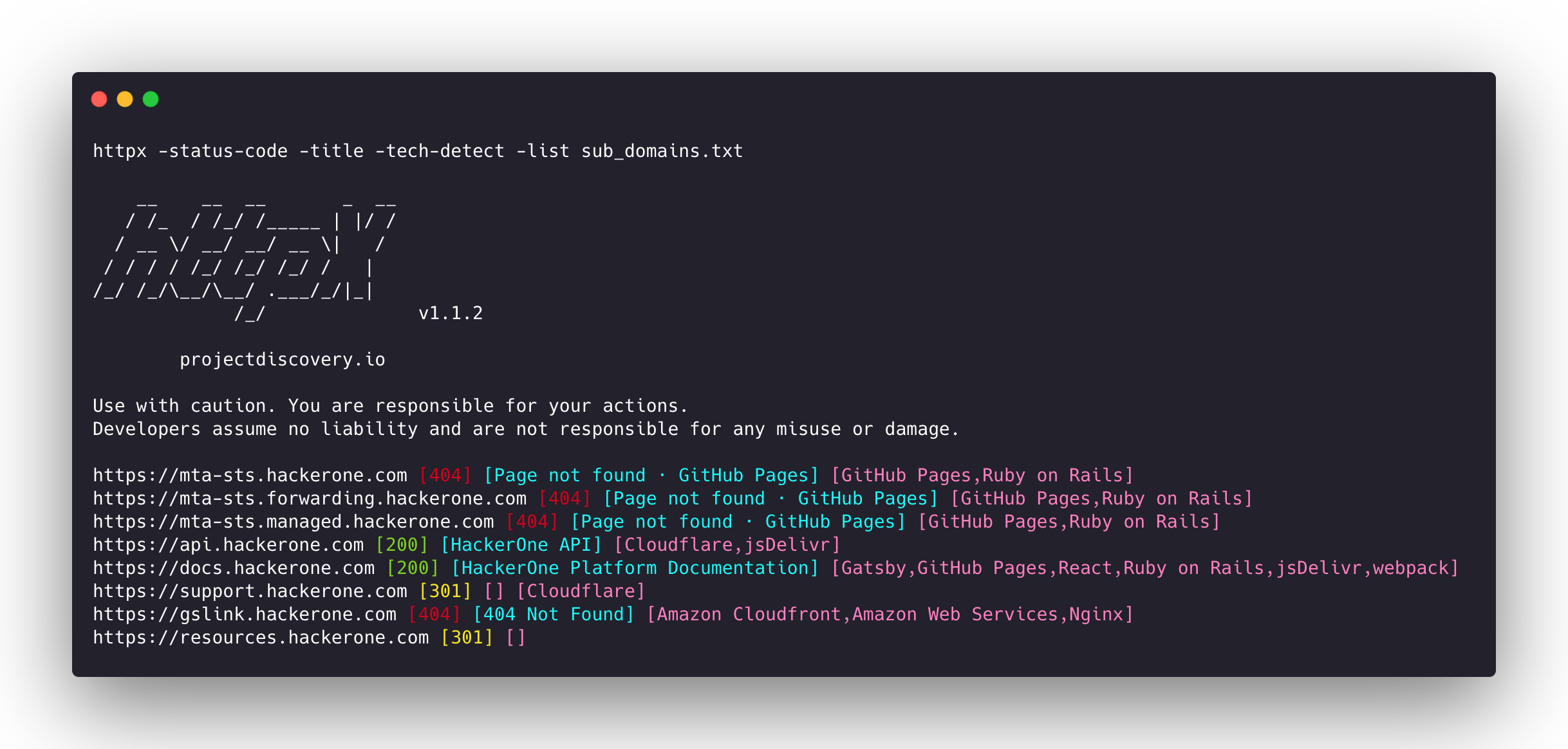
빠르고 다중 프로브를 사용하는 HTTP 툴킷으로, 정찰 및 정보 수집을 위한 도구입니다. TLS, CSP, 헤더, 기술 스택, CDN을 검사합니다. 매처, 필터 및 JSON 출력을 지원하여 자동화된 보안 테스트에 사용됩니다.
<h1 align="center">
  <img src="https://assets.kitploit.com/production/public/readmes/405/4dc5206927fe161f6f2bb22d21326c0518dc3d5cb655fda1739b30b6bd29dec9.png" alt="httpx" width="200px">
  <br>
</h1>

<p align="center">
<a href="https://opensource.org/licenses/MIT"><img src="https://img.shields.io/badge/license-MIT-_red.svg"></a>
<a href="https://goreportcard.com/badge/github.com/projectdiscovery/httpx"><img src="https://goreportcard.com/badge/github.com/projectdiscovery/httpx"></a>
<a href="https://github.com/projectdiscovery/httpx/releases"><img src="https://img.shields.io/github/release/projectdiscovery/httpx"></a>
<a href="https://hub.docker.com/r/projectdiscovery/httpx"><img src="https://img.shields.io/docker/pulls/projectdiscovery/httpx.svg"></a>
<a href="https://twitter.com/pdiscoveryio"><img src="https://img.shields.io/twitter/follow/pdiscoveryio.svg?logo=twitter"></a>
<a href="https://discord.gg/projectdiscovery"><img src="https://img.shields.io/discord/695645237418131507.svg?logo=discord"></a>
</p>

<p align="center">
  <a href="#features">기능</a> •
  <a href="#installation-instructions">설치</a> •
  <a href="#usage">사용법</a> •
  <a href="https://docs.projectdiscovery.io/tools/httpx/">문서</a> •
  <a href="#notes">참고사항</a> •
  <a href="https://discord.gg/projectdiscovery">Discord 참여</a>
</p>

`httpx`는 [retryablehttp](https://github.com/projectdiscovery/retryablehttp-go) 라이브러리를 사용하여 여러 프로브를 실행할 수 있는 빠르고 다목적 HTTP 툴킷입니다. 스레드 수를 늘려도 결과 신뢰성을 유지하도록 설계되었습니다.

# 기능

<h1 align="center">
  <img src="https://assets.kitploit.com/production/public/readmes/405/844a8c468c1b9ef257f46c2bf9f9efe0d2e5b1b676a3ac5be70918d44c9e7403.png" alt="httpx" width="700px">
  <br>
</h1>

- 기여하기 쉬운 단순하고 모듈화된 코드 베이스.
- 여러 요소를 프로브할 수 있는 빠르고 완전히 구성 가능한 플래그.
- 여러 HTTP 기반 프로브 지원.
- 기본적으로 https에서 http로의 스마트 자동 폴백.
- 호스트, URL 및 CIDR을 입력으로 지원.
- WAF 처리 등을 위한 재시도, 백오프 등 에지 케이스 처리.

### 지원되는 프로브

| 프로브          | 기본 확인 | 프로브         | 기본 확인 |
|-----------------|---------------|----------------|---------------|
| URL             | true          | IP             | true          |
| Title           | true          | CNAME          | true          |
| Status Code     | true          | Raw HTTP       | false         |
| Content Length  | true          | HTTP2          | false         |
| TLS Certificate | true          | HTTP Pipeline  | false         |
| CSP Header      | true          | Virtual host   | false         |
| Line Count      | true          | Word Count     | true          |
| Location Header | true          | CDN            | false         |
| Web Server      | true          | Paths          | false         |
| Web Socket      | true          | Ports          | false         |
| Response Time   | true          | Request Method | true          |
| Favicon Hash    | false         | Probe  Status  | false         |
| Body Hash       | true          | Header  Hash   | true          |
| Redirect chain  | false         | URL Scheme     | true          |
| JARM Hash       | false         | ASN            | false         |

# 설치 방법

`httpx`를 성공적으로 설치하려면 **go >=1.25.0**이 필요합니다. 다음 명령을 실행하여 리포지토리를 가져오세요:

```sh
go install -v github.com/projectdiscovery/httpx/cmd/httpx@latest
```

httpx 설치에 대한 자세한 내용은 https://docs.projectdiscovery.io/tools/httpx/install 를 참조하세요.

| :exclamation:  **면책 조항**  |
|---------------------------------|
| **이 프로젝트는 활발히 개발 중입니다**. 릴리스에 따라 주요 변경 사항이 발생할 수 있습니다. 업데이트 전에 변경 로그를 검토하세요. |
| 이 프로젝트는 주로 독립형 CLI 도구로 사용하기 위해 구축되었습니다. **서비스로 실행하면 보안 위험이 발생할 수 있습니다.** 주의하여 사용하고 추가 보안 조치를 취하는 것이 좋습니다. |

# 사용법

```sh
httpx -h
```

이 명령은 도구의 도움말을 표시합니다. 아래는 지원되는 모든 스위치입니다.

```console
httpx is a fast and multi-purpose HTTP toolkit that allows running multiple probes using the retryablehttp library.

Usage:
  ./httpx [flags]

Flags:
INPUT:
   -l, -list string              input file containing list of hosts to process
   -rr, -request string          file containing raw request
   -u, -target string[]          input target host(s) to probe
   -im, -input-mode string       mode of input file (burp)

PROBES:
   -sc, -status-code                      display response status-code
   -cl, -content-length                   display response content-length
   -ct, -content-type                     display response content-type
   -location                              display response redirect location
   -favicon                               display mmh3 hash for '/favicon.ico' file
   -hash string                           display response body hash (supported: md5,mmh3,simhash,sha1,sha256,sha512)
   -jarm                                  display jarm fingerprint hash
   -rt, -response-time                    display response time
   -lc, -line-count                       display response body line count
   -wc, -word-count                       display response body word count
   -title                                 display page title
   -bp, -body-preview                     display first N characters of response body (default 100)
   -server, -web-server                   display server name
   -td, -tech-detect                      display technology in use based on wappalyzer dataset
   -cff, -custom-fingerprint-file string  path to a custom fingerprint file for technology detection
   -method                                display http request method
   -ws, -websocket                        display server using websocket
   -ip                                    display host ip
   -cname                                 display host cname
   -extract-fqdn, -efqdn                  get domain and subdomains from response body and header in jsonl/csv output
   -asn                                   display host asn information
   -cdn                                   display cdn/waf in use (default true)
   -probe                                 display probe status

HEADLESS:
   -ss, -screenshot                 enable saving screenshot of the page using headless browser
   -system-chrome                   enable using local installed chrome for screenshot
   -ho, -headless-options string[]  start headless chrome with additional options
   -esb, -exclude-screenshot-bytes  enable excluding screenshot bytes from json output
   -ehb, -exclude-headless-body     enable excluding headless header from json output
   -no-screenshot-full-page         disable saving full page screenshot
   -st, -screenshot-timeout value   set timeout for screenshot in seconds (default 10s)
   -sid, -screenshot-idle value     set idle time before taking screenshot in seconds (default 1s)
   -jsc, -javascript-code string[]  execute JavaScript code after navigation

MATCHERS:
   -mc, -match-code string            match response with specified status code (-mc 200,302)
   -ml, -match-length string          match response with specified content length (-ml 100,102)
   -mlc, -match-line-count string     match response body with specified line count (-mlc 423,532)
   -mwc, -match-word-count string     match response body with specified word count (-mwc 43,55)
   -mfc, -match-favicon string[]      match response with specified favicon hash (-mfc 1494302000)
   -ms, -match-string string[]        match response with specified string (-ms admin)
   -mr, -match-regex string[]         match response with specified regex (-mr admin)
   -mcdn, -match-cdn string[]         match host with specified cdn provider (cloudfront, fastly, google, etc.)
   -mrt, -match-response-time string  match response with specified response time in seconds (-mrt '< 1')
   -mdc, -match-condition string      match response with dsl expression condition

EXTRACTOR:
   -er, -extract-regex string[]   display response content with matched regex
   -ep, -extract-preset string[]  display response content matched by a pre-defined regex (url,ipv4,mail)

FILTERS:
   -fc, -filter-code string               filter response with specified status code (-fc 403,401)
   -fpt, -filter-page-type string[]       filter response with specified page type (e.g. -fpt login,captcha,parked)
   -fep, -filter-error-page               [DEPRECATED: use -fpt] filter response with ML based error page detection
   -fd, -filter-duplicates                filter out near-duplicate responses (only first response is retained)
   -fl, -filter-length string             filter response with specified content length (-fl 23,33)
   -flc, -filter-line-count string        filter response body with specified line count (-flc 423,532)
   -fwc, -filter-word-count string        filter response body with specified word count (-fwc 423,532)
   -ffc, -filter-favicon string[]         filter response with specified favicon hash (-ffc 1494302000)
   -fs, -filter-string string[]           filter response with specified string (-fs admin)
   -fe, -filter-regex string[]            filter response with specified regex (-fe admin)
   -fcdn, -filter-cdn string[]            filter host with specified cdn provider (cloudfront, fastly, google, etc.)
   -frt, -filter-response-time string     filter response with specified response time in seconds (-frt '> 1')
   -fdc, -filter-condition string         filter response with dsl expression condition
   -strip                                 strips all tags in response. supported formats: html,xml (default html)
   -lof, -list-output-fields              list of fields to output (comma separated)
   -eof, -exclude-output-fields string[]  exclude output fields output based on a condition

RATE-LIMIT:
   -t, -threads int              number of threads to use (default 50)
   -rl, -rate-limit int          maximum requests to send per second (default 150)
   -rlm, -rate-limit-minute int  maximum number of requests to send per minute

MISCELLANEOUS:
   -pa, -probe-all-ips        probe all the ips associated with same host
   -p, -ports string[]        ports to probe (nmap syntax: eg http:1,2-10,11,https:80)
   -path string               path or list of paths to probe (comma-separated, file)
   -tls-probe                 send http probes on the extracted TLS domains (dns_name)
   -csp-probe                 send http probes on the extracted CSP domains
   -tls-grab                  perform TLS(SSL) data grabbing
   -pipeline                  probe and display server supporting HTTP1.1 pipeline
   -http2                     probe and display server supporting HTTP2
   -vhost                     probe and display server supporting VHOST
   -ldv, -list-dsl-variables  list json output field keys name that support dsl matcher/filter

UPDATE:
   -up, -update                 update httpx to latest version
   -duc, -disable-update-check  disable automatic httpx update check

OUTPUT:
   -o, -output string                     file to write output results
   -oa, -output-all                       filename to write output results in all formats
   -sr, -store-response                   store http response to output directory
   -srd, -store-response-dir string       store http response to custom directory
   -ob, -omit-body                        omit response body in output
   -csv                                   store output in csv format
   -csvo, -csv-output-encoding string     define output encoding
   -j, -json                              store output in JSONL(ines) format
   -irh, -include-response-header         include http response (headers) in JSON output (-json only)
   -irr, -include-response                include http request/response (headers + body) in JSON output (-json only)
   -irrb, -include-response-base64        include base64 encoded http request/response in JSON output (-json only)
   -include-chain                         include redirect http chain in JSON output (-json only)
   -store-chain                           include http redirect chain in responses (-sr only)
   -svrc, -store-vision-recon-cluster     include visual recon clusters (-ss and -sr only)
   -pr, -protocol string                  protocol to use (unknown, http11, http2, http3)
   -fepp, -filter-error-page-path string  path to store filtered error pages (default "filtered_error_page.json")
   -rdb, -result-db                       store results in database
   -rdbc, -result-db-config string        path to database config file
   -rdbt, -result-db-type string          database type (mongodb, postgres, mysql)
   -rdbcs, -result-db-conn string         database connection string (env: HTTPX_DB_CONNECTION_STRING)
   -rdbn, -result-db-name string          database name (default "httpx")
   -rdbtb, -result-db-table string        table/collection name (default "results")
   -rdbbs, -result-db-batch-size int      batch size for database inserts (default 100)
   -rdbor, -result-db-omit-raw            omit raw request/response data from database

CONFIGURATIONS:
   -config string                   path to the httpx configuration file (default $HOME/.config/httpx/config.yaml)
   -r, -resolvers string[]          list of custom resolver (file or comma separated)
   -allow string[]                  allowed list of IP/CIDR's to process (file or comma separated)
   -deny string[]                   denied list of IP/CIDR's to process (file or comma separated)
   -sni, -sni-name string           custom TLS SNI name
   -random-agent                    enable Random User-Agent to use (default true)
   -auto-referer                    set the Referer header to the current URL
   -H, -header string[]             custom http headers to send with request
   -http-proxy, -proxy string       proxy (http|socks) to use (eg http://127.0.0.1:8080)
   -unsafe                          send raw requests skipping golang normalization
   -resume                          resume scan using resume.cfg
   -fr, -follow-redirects           follow http redirects
   -maxr, -max-redirects int        max number of redirects to follow per host (default 10)
   -fhr, -follow-host-redirects     follow redirects on the same host
   -rhsts, -respect-hsts            respect HSTS response headers for redirect requests
   -vhost-input                     get a list of vhosts as input
   -x string                        request methods to probe, use 'all' to probe all HTTP methods
   -body string                     post body to include in http request
   -s, -stream                      stream mode - start elaborating input targets without sorting
   -sd, -skip-dedupe                disable dedupe input items (only used with stream mode)
   -ldp, -leave-default-ports       leave default http/https ports in host header (eg. http://host:80 - https://host:443
   -ztls                            use ztls library with autofallback to standard one for tls13
   -no-decode                       avoid decoding body
   -tlsi, -tls-impersonate          enable experimental client hello (ja3) tls randomization
   -no-stdin                        Disable Stdin processing
   -hae, -http-api-endpoint string  experimental http api endpoint
   -sf, -secret-file string         path to secret file for authentication

DEBUG:
   -health-check, -hc        run diagnostic check up
   -debug                    display request/response content in cli
   -debug-req                display request content in cli
   -debug-resp               display response content in cli
   -version                  display httpx version
   -stats                    display scan statistic
   -profile-mem string       optional httpx memory profile dump file
   -silent                   silent mode
   -v, -verbose              verbose mode
   -si, -stats-interval int  number of seconds to wait between showing a statistics update (default: 5)
   -nc, -no-color            disable colors in cli output
   -tr, -trace               trace

OPTIMIZATIONS:
   -nf, -no-fallback                  display both probed protocol (HTTPS and HTTP)
   -nfs, -no-fallback-scheme          probe with protocol scheme specified in input
   -maxhr, -max-host-error int        max error count per host before skipping remaining path/s (default 30)
   -e, -exclude string[]              exclude host matching specified filter ('cdn', 'private-ips', cidr, ip, regex)
   -retries int                       number of retries
   -timeout int                       timeout in seconds (default 10)
   -delay value                       duration between each http request (eg: 200ms, 1s) (default -1ns)
   -rsts, -response-size-to-save int  max response size to save in bytes (default 50000000)
   -rstr, -response-size-to-read int  max response size to read in bytes (default 50000000)

CLOUD:
   -auth                           configure projectdiscovery cloud (pdcp) api key (default true)
   -ac, -auth-config string        configure projectdiscovery cloud (pdcp) api key credential file
   -pd, -dashboard                 upload / view output in projectdiscovery cloud (pdcp) UI dashboard
   -tid, -team-id string           upload asset results to given team id (optional)
   -aid, -asset-id string          upload new assets to existing asset id (optional)
   -aname, -asset-name string      assets group name to set (optional)
   -pdu, -dashboard-upload string  upload httpx output file (jsonl) in projectdiscovery cloud (pdcp) UI dashboard
```

# httpx 실행

httpx 실행에 대한 자세한 내용은 https://docs.projectdiscovery.io/tools/httpx/running 를 참조하세요.

### `httpx`를 라이브러리로 사용하기
`httpx`는 `Option` 구조체의 인스턴스를 생성하고 CLI에서 지정했을 것과 동일한 옵션으로 채운 후 라이브러리로 사용할 수 있습니다. 유효성 검사가 완료되면 구조체를 러너 인스턴스(프로그램 종료 시 닫힘)에 전달하고 `RunEnumeration` 메서드를 호출해야 합니다. 이를 수행하는 최소한의 예제는 [examples](https://github.com/projectdiscovery/httpx/blob/dev/examples) 폴더에 있습니다.

# 참고사항

- 기본적으로 `httpx`는 **HTTPS** 스키마로 프로브하고 **HTTPS**에 연결할 수 없는 경우에만 **HTTP**로 폴백합니다.
- Burp Suite XML 내보내기는 `-l burp-export.xml -im burp`를 사용하여 입력으로 사용할 수 있습니다.
- `-no-fallback` 플래그를 사용하여 **HTTP**와 **HTTPS** 결과를 모두 프로브하고 표시할 수 있습니다.
- 포트에 대해 사용자 정의 스키마를 정의할 수 있습니다(예: `-ports http:443,http:80,https:8443`).
- 사용자 정의 리졸버는 `protocol:resolver:port` 형식의 여러 프로토콜(**doh|tcp|udp**)을 지원합니다(예: `udp:127.0.0.1:53`).
- 비밀 파일은 `-sf secrets.yaml`을 통해 도메인 기반 인증에 사용할 수 있습니다. 지원되는 인증 유형: `BasicAuth`, `BearerToken`, `Header`, `Cookie`, `Query`. 예:
  ```yaml
  id: example-auth
  info:
    name: Example Auth Config
  static:
    - type: Header
      domains:
        - api.example.com
      headers:
        - key: X-API-Key
          value: secret-key-here
    - type: BasicAuth
      domains-regex:
        - ".*\\.internal\\.com$"
      username: admin
      password: secret
  ```
- 다음 플래그는 특정 사용 사례에 사용되며 다른 프로브와 함께 기본값으로 실행하지 않아야 합니다:
   - `-ports`
   - `-path`
   - `-vhost`
   - `-screenshot`
   - `-csp-probe`
   - `-tls-probe`
   - `-favicon`
   - `-http2`
   - `-pipeline`
   - `-tls-impersonate`

# 감사의 말

프로빙 기능은 [@tomnomnom/httprobe](https://github.com/tomnomnom/httprobe) 작업에서 영감을 받았습니다 ❤️

--------

<div align="center">

`httpx`는 [projectdiscovery](https://projectdiscovery.io) 팀이 💙로 제작했으며 [MIT 라이선스](https://github.com/projectdiscovery/httpx/blob/dev/LICENSE.md)에 따라 배포됩니다.

<a href="https://discord.gg/projectdiscovery"><img src="https://assets.kitploit.com/production/public/readmes/405/d0624f94cb9ea6401be5a089bb694bc963c47fa82aa3b758c893e3b0bbfdf663.png" width="300" alt="Join Discord"></a>

</div>