
Skip to content
KitploitKITPLOIT
도구블로그
제출
도구블로그
제출

해킹, 침투 테스트 및 사이버 보안 도구를 당신의 보안 무기고에!

Kitploit은 해킹, 사이버 보안 및 침투 테스트 도구 디렉토리입니다. 최신 프로젝트 업데이트를 발견하여 취약점을 찾고, 시스템을 분석하고, 테스트를 자동화하고, 보안을 강화하세요.

··피드·문의·개인정보·© 2026 Kitploit

도구 디렉토리

카테고리

모든 카테고리 보기
Loading categories
ptcpdump — 네트워크 트래픽을 캡처하고 프로세스, 컨테이너, Kubernetes 파드 메타데이터를 자동으로 주석 처리하는 eBPF 기반 패킷 분석기로, tcpdump 호환 필터링과 PcapNG 출력을 지원합니다. | Kitploit
도구/GitHubGitHub/mozillazg/ptcpdump
Packet Sniffing & AnalysisContainer SecurityDynamic Analysis (Sandboxing)Network ForensicsForensicsNetwork SecurityDigital ForensicsCloud Security
GitHubmozillazg/ptcpdump

ptcpdump

네트워크 트래픽을 캡처하고 프로세스, 컨테이너, Kubernetes 파드 메타데이터를 자동으로 주석 처리하는 eBPF 기반 패킷 분석기로, tcpdump 호환 필터링과 PcapNG 출력을 지원합니다.


저장소 보기
1.3k673개월 전Kitploit 검토 완료

인기

모두 보기 →

커뮤니티에서 가장 많이 사용되는 도구를 찾아보세요.

모든 도구 탐색

도구 컬렉션을 둘러보세요

모든 도구 보기 →
공유

ptcpdump

amd64-e2e arm64-e2e Release Coveralls English | 中文

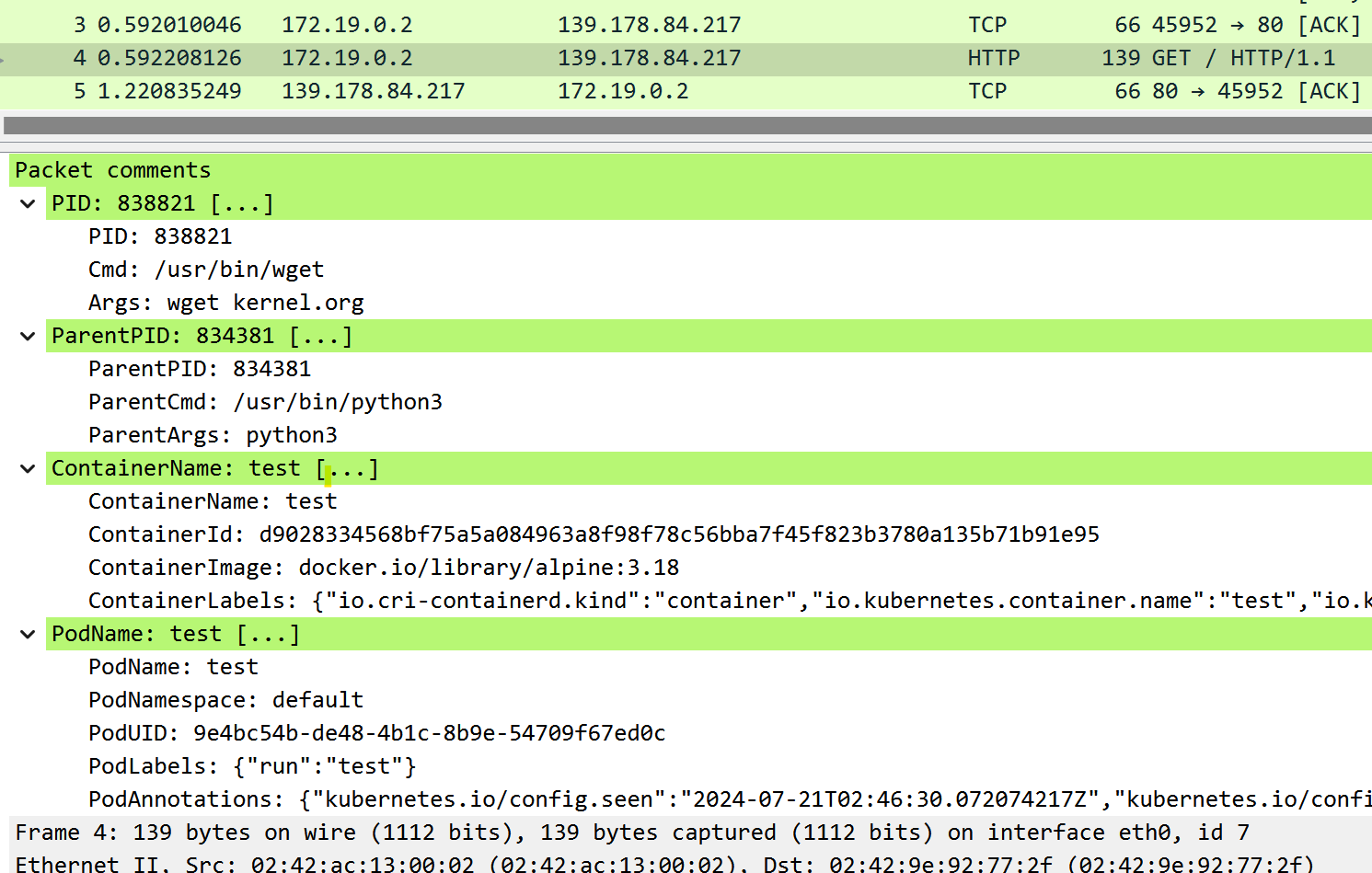
ptcpdump는 eBPF로 구동되는 tcpdump 호환 패킷 분석기로, 감지 가능한 경우 패킷에 프로세스/컨테이너/파드 메타데이터를 자동으로 주석 처리합니다. jschwinger233/skbdump에서 영감을 받았습니다.
목차

  • 기능
  • 설치
    • 요구 사항
  • 사용법
    • 예시 명령어
    • 예시 출력
    • Docker로 실행하기
    • 백엔드
    • 플래그
  • tcpdump와 비교
  • 개발
    • 의존성
    • 빌드
  • 관련 프로젝트
    • Flownix

기능

  • 🔍 프로세스/컨테이너/파드 인식 패킷 캡처.
  • 📦 필터: --pid (프로세스), --pname (프로세스 이름), --container-id (컨테이너), --pod-name (파드).
  • 🎯 tcpdump 호환 플래그 (-i, -w, -c, -s, -n, -C, -W, -A 등).
  • 📜 tcpdump처럼 pcap-filter(7) 구문 지원.
  • 🌳 tcpdump 스타일 출력 + 프로세스/컨테이너/파드 컨텍스트.
  • 📑 상세 모드에서는 프로세스와 컨테이너/파드의 자세한 메타데이터를 보여줍니다.
  • 💾 메타데이터가 포함된 PcapNG (Wireshark 호환).
  • 🌐 네트워크 네임스페이스 간 캡처 (--netns).

설치

x86_64 및 arm64용 정적 링크 실행 파일을 릴리스 페이지에서 다운로드할 수 있습니다.

요구 사항

Linux 커널 >= 5.2 (BPF 및 BTF 지원으로 컴파일).

ptcpdump는 선택적으로 debugfs가 필요합니다. /sys/kernel/debug에 마운트되어 있어야 합니다. 폴더가 비어 있는 경우 다음 명령으로 마운트할 수 있습니다:

root@kitploit:~
mount -t debugfs none /sys/kernel/debug

다음 커널 구성이 필요합니다. 모듈로 빌드하는 것도 가능합니다.

🔝

사용법

예시 명령어

tcpdump처럼 필터링:

root@kitploit:~
sudo ptcpdump -i eth0 tcp
sudo ptcpdump -i eth0 -A -s 0 -n -v tcp and port 80 and host 10.10.1.1
sudo ptcpdump -i any -s 0 -n -v -C 100MB -W 3 -w test.pcapng 'tcp and port 80 and host 10.10.1.1'
sudo ptcpdump -i eth0 'tcp[tcpflags] & (tcp-syn|tcp-fin) != 0'

여러 인터페이스:

root@kitploit:~
sudo ptcpdump -i eth0 -i lo

프로세스 또는 사용자로 필터링:

root@kitploit:~
sudo ptcpdump -i any --pid 1234 --pid 233 -f
sudo ptcpdump -i any --pname curl
sudo ptcpdump -i any --uid 1000

대상 프로그램을 실행하여 프로세스 기준으로 캡처:

root@kitploit:~
sudo ptcpdump -i any -- curl ubuntu.com

컨테이너 또는 파드로 필터링:

root@kitploit:~
sudo ptcpdump -i any --container-id 36f0310403b1
sudo ptcpdump -i any --container-name test
sudo ptcpdump -i any --pod-name test.default

PcapNG 형식으로 데이터 저장:

root@kitploit:~
sudo ptcpdump -i any -w demo.pcapng
sudo ptcpdump -i any -w - port 80 | tcpdump -n -r -
sudo ptcpdump -i any -w - port 80 | tshark -r -

다른 네트워크 네임스페이스의 인터페이스 캡처:

root@kitploit:~
sudo ptcpdump -i lo --netns /run/netns/foo --netns /run/netns/bar
sudo ptcpdump -i any --netns /run/netns/foobar
sudo ptcpdump -i any --netns /proc/26/ns/net

🔝

예시 출력

기본:

root@kitploit:~
09:32:09.718892 vethee2a302f wget.3553008 In IP 10.244.0.2.33426 > 139.178.84.217.80: Flags [S], seq 4113492822, win 64240, length 0, ParentProc [python3.834381], Container [test], Pod [test.default]
09:32:09.718941 eth0 wget.3553008 Out IP 172.19.0.2.33426 > 139.178.84.217.80: Flags [S], seq 4113492822, win 64240, length 0, ParentProc [python3.834381], Container [test], Pod [test.default]

-q 사용:

root@kitploit:~
09:32:09.718892 vethee2a302f wget.3553008 In IP 10.244.0.2.33426 > 139.178.84.217.80: tcp 0, ParentProc [python3.834381], Container [test], Pod [test.default]
09:32:09.718941 eth0 wget.3553008 Out IP 172.19.0.2.33426 > 139.178.84.217.80: tcp 0, ParentProc [python3.834381], Container [test], Pod [test.default]

-v 사용:

root@kitploit:~
13:44:41.529003 eth0 In IP (tos 0x4, ttl 45, id 45428, offset 0, flags [DF], proto TCP (6), length 52)
    139.178.84.217.443 > 172.19.0.2.42606: Flags [.], cksum 0x5284, seq 3173118145, ack 1385712707, win 118, options [nop,nop,TS val 134560683 ecr 1627716996], length 0
    Process (pid 553587, cmd /usr/bin/wget, args wget kernel.org)
    User (uid 1000)
    ParentProc (pid 553296, cmd /bin/sh, args sh)
    Container (name test, id d9028334568bf75a5a084963a8f98f78c56bba7f45f823b3780a135b71b91e95, image docker.io/library/alpine:3.18, labels {"io.cri-containerd.kind":"container","io.kubernetes.container.name":"test","io.kubernetes.pod.name":"test","io.kubernetes.pod.namespace":"default","io.kubernetes.pod.uid":"9e4bc54b-de48-4b1c-8b9e-54709f67ed0c"})
    Pod (name test, namespace default, UID 9e4bc54b-de48-4b1c-8b9e-54709f67ed0c, labels {"run":"test"}, annotations {"kubernetes.io/config.seen":"2024-07-21T12:41:00.460249620Z","kubernetes.io/config.source":"api"})

출력에 포함할 컨텍스트를 제한하려면 --context 사용:

root@kitploit:~
# --context=process
09:32:09.718892 vethee2a302f wget.3553008 In IP 10.244.0.2.33426 > 139.178.84.217.80: Flags [S], seq 4113492822, win 64240, length 0

# -v --context=process
13:44:41.529003 eth0 In IP (tos 0x4, ttl 45, id 45428, offset 0, flags [DF], proto TCP (6), length 52)
    139.178.84.217.443 > 172.19.0.2.42606: Flags [.], cksum 0x5284, seq 3173118145, ack 1385712707, win 118, options [nop,nop,TS val 134560683 ecr 1627716996], length 0
    Process (pid 553587, cmd /usr/bin/wget, args wget kernel.org)

# -v --context=process,parentproc,container,pod
# or -v --context=process --context=parentproc --context=container --context=pod
13:44:41.529003 eth0 In IP (tos 0x4, ttl 45, id 45428, offset 0, flags [DF], proto TCP (6), length 52)
    139.178.84.217.443 > 172.19.0.2.42606: Flags [.], cksum 0x5284, seq 3173118145, ack 1385712707, win 118, options [nop,nop,TS val 134560683 ecr 1627716996], length 0
    Process (pid 553587, cmd /usr/bin/wget, args wget kernel.org)
    ParentProc (pid 553296, cmd /bin/sh, args sh)
    Container (name test, id d9028334568bf75a5a084963a8f98f78c56bba7f45f823b3780a135b71b91e95, image docker.io/library/alpine:3.18, labels {"io.cri-containerd.kind":"container","io.kubernetes.container.name":"test","io.kubernetes.pod.name":"test","io.kubernetes.pod.namespace":"default","io.kubernetes.pod.uid":"9e4bc54b-de48-4b1c-8b9e-54709f67ed0c"})
    Pod (name test, namespace default, UID 9e4bc54b-de48-4b1c-8b9e-54709f67ed0c, labels {"run":"test"}, annotations {"kubernetes.io/config.seen":"2024-07-21T12:41:00.460249620Z","kubernetes.io/config.source":"api"})

-A 사용:

root@kitploit:~
14:44:34.457504 ens33 curl.205562 Out IP 10.0.2.15.39984 > 139.178.84.217.80: Flags [P.], seq 2722472188:2722472262, ack 892036871, win 64240, length 74, ParentProc [bash.180205]
E..r.,@[email protected].
.....T..0.P.E..5+g.P.......GET / HTTP/1.1
Host: kernel.org
User-Agent: curl/7.81.0
Accept: */*

-x 사용:

root@kitploit:~
14:44:34.457504 ens33 curl.205562 Out IP 10.0.2.15.39984 > 139.178.84.217.80: Flags [P.], seq 2722472188:2722472262, ack 892036871, win 64240, length 74, ParentProc [bash.180205]
        0x0000:  4500 0072 de2c 4000 4006 6fbf 0a00 020f
        0x0010:  8bb2 54d9 9c30 0050 a245 a0fc 352b 6707
        0x0020:  5018 faf0 ecfe 0000 4745 5420 2f20 4854
        0x0030:  5450 2f31 2e31 0d0a 486f 7374 3a20 6b65
        0x0040:  726e 656c 2e6f 7267 0d0a 5573 6572 2d41
        0x0050:  6765 6e74 3a20 6375 726c 2f37 2e38 312e
        0x0060:  300d 0a41 6363 6570 743a 202a 2f2a 0d0a
        0x0070:  0d0a

-X 사용:

root@kitploit:~
14:44:34.457504 ens33 curl.205562 Out IP 10.0.2.15.39984 > 139.178.84.217.80: Flags [P.], seq 2722472188:2722472262, ack 892036871, win 64240, length 74, ParentProc [bash.180205]
        0x0000:  4500 0072 de2c 4000 4006 6fbf 0a00 020f  E..r.,@[email protected].....
        0x0010:  8bb2 54d9 9c30 0050 a245 a0fc 352b 6707  ..T..0.P.E..5+g.
        0x0020:  5018 faf0 ecfe 0000 4745 5420 2f20 4854  P.......GET / HT
        0x0030:  5450 2f31 2e31 0d0a 486f 7374 3a20 6b65  TP/1.1..Host: ke
        0x0040:  726e 656c 2e6f 7267 0d0a 5573 6572 2d41  rnel.org..User-A
        0x0050:  6765 6e74 3a20 6375 726c 2f37 2e38 312e  gent: curl/7.81.
        0x0060:  300d 0a41 6363 6570 743a 202a 2f2a 0d0a  0..Accept: */*..
        0x0070:  0d0a                                     ..

🔝

Docker로 실행하기

ptcpdump의 Docker 이미지는 https://quay.io/repository/ptcpdump/ptcpdump 에 공개되어 있습니다.

root@kitploit:~
docker run --privileged --rm -t --net=host --pid=host \
  -v /sys/fs/cgroup:/sys/fs/cgroup:ro \
  -v /var/run:/var/run:ro \
  -v /run:/run:ro \
  quay.io/ptcpdump/ptcpdump:latest ptcpdump -i any -c 2 tcp

🔝

백엔드

ptcpdump는 --backend 플래그를 통해 패킷 캡처에 사용할 특정 eBPF 기술을 지정할 수 있습니다.

이 플래그를 지정하지 않으면 기본값은 tc입니다.

  • 호스트에서 curl http://1.1.1.1 실행:
  • --backend tc:

    root@kitploit:~
    $ sudo ptcpdump -i any --backend tc host 1.1.1.1
    
    12:11:28.009276 ens33 curl.402475 Out IP 10.0.2.15.48448 > 1.1.1.1.80: Flags [S], seq 615672474, win 64240, options [mss 1460,sackOK,TS val 2168208063 ecr 0,nop,wscale 7], length 0, ParentProc [bash.321004]
    12:11:28.113779 ens33 curl.402475 In IP 1.1.1.1.80 > 10.0.2.15.48448: Flags [S.], seq 1810787293, ack 615672475, win 64240, options [mss 1460], length 0, ParentProc [bash.321004]
    12:11:28.113852 ens33 curl.402475 Out IP 10.0.2.15.48448 > 1.1.1.1.80: Flags [.], seq 615672475, ack 1810787294, win 64240, length 0, ParentProc [bash.321004]
    12:11:28.114216 ens33 curl.402475 Out IP 10.0.2.15.48448 > 1.1.1.1.80: Flags [P.], seq 615672475:615672545, ack 1810787294, win 64240, length 70, ParentProc [bash.321004]
    12:11:28.115383 ens33 curl.402475 In IP 1.1.1.1.80 > 10.0.2.15.48448: Flags [.], seq 1810787294, ack 615672545, win 64240, length 0, ParentProc [bash.321004]
    12:11:28.534486 ens33 curl.402475 In IP 1.1.1.1.80 > 10.0.2.15.48448: Flags [P.], seq 1810787294:1810787680, ack 615672545, win 64240, length 386, ParentProc [bash.321004]
    12:11:28.534751 ens33 curl.402475 Out IP 10.0.2.15.48448 > 1.1.1.1.80: Flags [.], seq 615672545, ack 1810787680, win 63854, length 0, ParentProc [bash.321004]
    12:11:28.536982 ens33 curl.402475 Out IP 10.0.2.15.48448 > 1.1.1.1.80: Flags [F.], seq 615672545, ack 1810787680, win 63854, length 0, ParentProc [bash.321004]
    12:11:28.538160 ens33 curl.402475 In IP 1.1.1.1.80 > 10.0.2.15.48448: Flags [.], seq 1810787680, ack 615672546, win 64239, length 0, ParentProc [bash.321004]
    12:11:28.642291 ens33 curl.402475 In IP 1.1.1.1.80 > 10.0.2.15.48448: Flags [FP.], seq 1810787680, ack 615672546, win 64239, length 0, ParentProc [bash.321004]
    12:11:28.642511 ens33 curl.402475 Out IP 10.0.2.15.48448 > 1.1.1.1.80: Flags [.], seq 615672546, ack 1810787681, win 63854, length 0, ParentProc [bash.321004]
    

🔝

플래그

root@kitploit:~
Usage:
  ptcpdump [flags] [expression] [-- command [args]]

Examples:
  sudo ptcpdump -i any tcp
  sudo ptcpdump -i eth0 -i lo
  sudo ptcpdump -i eth0 --pid 1234 port 80 and host 10.10.1.1
  sudo ptcpdump -i any --pname curl -A
  sudo ptcpdump -i any --container-id 36f0310403b1
  sudo ptcpdump -i any --container-name test
  sudo ptcpdump -i any -- curl ubuntu.com
  sudo ptcpdump -i any -w ptcpdump.pcapng
  sudo ptcpdump -i any -w - | tcpdump -n -r -
  sudo ptcpdump -i any -w - | tshark -r -
  ptcpdump -r ptcpdump.pcapng

Expression: see "man 7 pcap-filter"

Flags:
  -S, --absolute-tcp-sequence-numbers                Print absolute, rather than relative, TCP sequence numbers.
  --backend string                               Specify the backend to use for capturing packets. Possible values are "tc", "cgroup-skb", "tp-btf" and "socket-filter" (default "tc")
  --container-id string                          Filter by container id (only TCP and UDP packets are supported)
  --container-name string                        Filter by container name (only TCP and UDP packets are supported)
  --containerd-address string                    Address of containerd service (default "/run/containerd/containerd.sock")
  --context strings                              Specify which context information to include in the output (default [process,thread,parentproc,user,container,pod])
  --count                                        Print only on stdout the packet count when reading capture file instead of parsing/printing the packets
  --cri-runtime-address string                   Address of CRI container runtime service (default: uses in order the first successful one of [/var/run/dockershim.sock, /var/run/cri-dockerd.sock, /run/crio/crio.sock, /run/containerd/containerd.sock])
  --delay-before-handle-packet-events duration   Delay some durations before handle packet events
  -Q, --direction string                             Choose send/receive direction for which packets should be captured. Possible values are 'in', 'out' and 'inout' (default "inout")
  --disable-reverse-match                        Disable reverse match for TCP and UDP packets.
  --docker-address string                        Address of Docker Engine service (default "/var/run/docker.sock")
  --embed-keylog-to-pcapng -- CMD [ARGS]         Write TLS Key Log file to this path (experimental: only support unstripped Go binary and must combined with -- CMD [ARGS])
  --event-chan-size uint                         Size of event chan (default 20)
  --exec-events-worker-number uint               Number of worker to handle exec events (default 50)
  -F, --expression-file string                       Use file as input for the filter expression. An additional expression given on the command line is ignored.
  -W, --file-count uint                              Used in conjunction with the -C option, this will limit the number of files created to the specified number, and begin overwriting files from the beginning, thus creating a 'rotating' buffer.
  -C, --file-size fileSize                           Before writing a raw packet to a savefile, check whether the file is currently larger than file_size and, if so, close the current savefile and open a new one. Savefiles after the first savefile will have the name specified with the -w flag, with a number after it, starting at 1 and continuing upward.
  -f, --follow-forks                                 Trace child processes as they are created by currently traced processes when filter by process
  -h, --help                                         help for ptcpdump
  -i, --interface strings                            Interfaces to capture (default [lo])
  --kernel-btf string                            specify kernel BTF file (default: uses in order the first successful one of [/sys/kernel/btf/vmlinux, /var/lib/ptcpdump/btf/vmlinux, /var/lib/ptcpdump/btf/vmlinux-$(uname -r), /var/lib/ptcpdump/btf/$(uname -r).btf, download BTF file from https://mirrors.openanolis.cn/coolbpf/btf/ and https://github.com/aquasecurity/btfhub-archive/]
    -D, --list-interfaces                              Print the list of the network interfaces available on the system
  --log-level string                             Set the logging level ("debug", "info", "warn", "error", "fatal") (default "warn")
  --micro                                        Shorthands for --time-stamp-precision=micro
  --nano                                         Shorthands for --time-stamp-precision=nano
  --netns strings                                Path to an network namespace file or name (default [/proc/self/ns/net])
  -n, --no-convert-addr count                        Don't convert addresses (i.e., host addresses, port numbers, etc.) to names
  -#, --number                                       Print an optional packet number at the beginning of the line
  --oneline                                      Print parsed packet output in a single line
  --pid uints                                    Filter by process IDs (only TCP and UDP packets are supported) (default [])
  --pname string                                 Filter by process name (only TCP and UDP packets are supported)
  --pod-name string                              Filter by pod name (format: NAME.NAMESPACE, only TCP and UDP packets are supported)
  --print                                        Print parsed packet output, even if the raw packets are being saved to a file with the -w flag
  -A, --print-data-in-ascii                          Print each packet (minus its link level header) in ASCII
  -x, --print-data-in-hex count                      When parsing and printing, in addition to printing the headers of each packet, print the data of each packet in hex
  -X, --print-data-in-hex-ascii count                When parsing and printing, in addition to printing the headers of each packet, print the data of each packet in hex and ASCII
  -t, --print-timestamp count                        control the format of the timestamp printed in the output
  -q, --quiet                                        Quiet output. Print less protocol information so output lines are shorter
  -r, --read-file string                             Read packets from file (which was created with the -w option). e.g. ptcpdump.pcapng
  -c, --receive-count uint                           Exit after receiving count packets
  -s, --snapshot-length uint32                       Snarf snaplen bytes of data from each packet rather than the default of 262144 bytes (default 262144)
  --time-stamp-precision string                  When capturing, set the time stamp precision for the capture to the format (default "micro")
  --uid uints                                    Filter by user IDs (only TCP and UDP packets are supported) (default [])
  -v, --verbose count                                When parsing and printing, produce (slightly more) verbose output
  --version                                      Print the ptcpdump and libpcap version strings and exit
  -w, --write-file string                            Write the raw packets to file rather than parsing and printing them out. They can later be printed with the -r option. Standard output is used if file is '-'. e.g. ptcpdump.pcapng
  --write-keylog-file -- CMD [ARGS]              Write TLS Key Log file to this path (experimental: only support unstripped Go binary and must combined with -- CMD [ARGS])

🔝

tcpdump와 비교| 옵션 | tcpdump | ptcpdump |

|---------------------------------------------------|---------|--------------------------| | expression | ✅ | ✅ | | -i interface, --interface=interface | ✅ | ✅ | | -w x.pcapng | ✅ | ✅ (with process info) | | -w x.pcap | ✅ | ✅ (without process info) | | -w - | ✅ | ✅ | | -r x.pcapng, -r x.pcap | ✅ | ✅ | | -r - | ✅ | ✅ | | --pid process_id | | ✅ | | --pname process_name | | ✅ | | --uid user_id | | ✅ | | --container-id container_id | | ✅ | | --container-name container_name | | ✅ | | --pod-name pod_name.namespace | | ✅ | | -f, --follow-forks | | ✅ | | -- command [args] | | ✅ | | --netns path_to_net_ns | | ✅ | | --print | ✅ | ✅ | | -A | ✅ | ✅ | | -B bufer_size, --buffer-size=buffer_size | ✅ | | | -c count | ✅ | ✅ | | --count | ✅ | ✅ | | -C *file_size | ✅ | ✅ | | -d | ✅ | | | -dd | ✅ | | | -ddd | ✅ | | | -D, --list-interfaces | ✅ | ✅ | | -e | ✅ | | | -f | ✅ | ⛔ | | -F file | ✅ | ✅ | | -G rotate_seconds | ✅ | | | -h, --help | ✅ | ✅ | | -H | ✅ | | | -I, --monitor-mode | ✅ | | | --immediate-mode | ✅ | | | -j , --time-stamp-type= | ✅ | | | --time-stamp-precision= | ✅ | ✅ | | -J, --list-time-stamp-types | ✅ | | | --micro | ✅ | ✅ | | --nano | ✅ | ✅ | | -K, --dont-verify-checksums | ✅ | | | -l | ✅ | | | -L, --list-data-link-types | ✅ | | | -m | ✅ | | | -M | ✅ | | | -n | ✅ | ✅ | | -N | ✅ | | | -#, --number | ✅ | ✅ | | -O, --no-optimize | ✅ | | | -p, --no-promiscuous-mode | ✅ | ⛔ | | -q | ✅ | ✅ | | -Q , --direction= | ✅ | ✅ | | -S, --absolute-tcp-sequence-numbers | ✅ | ✅ | | -s , --snapshot-length= | ✅ | ✅ | | -T | ✅ | | | -t | ✅ | ✅ | | -tt | ✅ | ✅ | | -ttt | ✅ | ✅ | | -tttt | ✅ | ✅ | | -ttttt | ✅ | ✅ | | -u | ✅ | | | -U, --packet-buffered | ✅ | | | -y , --linktype= | ✅ | | | -v | ✅ | ✅ | | -vv | ✅ | ⭕ | | -vvv | ✅ | ⭕ | | -V | ✅ | | | --version | ✅ | ✅ | | -W | ✅ | ✅ | | -x | ✅ | ✅ | | -xx | ✅ | ✅ | | -X | ✅ | ✅ | | -XX | ✅ | ✅ | | -z | ✅ | | | -Z , --relinquish-privileges= | ✅ | |

🔝

개발하기

의존성

시스템에 다음 의존성이 설치되어 있는지 확인하세요:

  • Go >= 1.23
  • Clang/LLVM >= 14
  • Bison >= 3.8
  • Lex/Flex >= 2.6
  • GCC
  • GNU make
  • autoconf
  • libelf

Debian/Ubuntu 시스템에서는 다음 명령으로 대부분을 설치할 수 있습니다:

root@kitploit:~
sudo apt-get update
sudo apt-get install -y build-essential clang llvm bison flex \
     make autoconf libelf-dev

빌드하기

ptcpdump 빌드는 두 가지 주요 단계로 구성됩니다: eBPF 바이트코드 생성 (eBPF 코드를 수정하지 않을 경우 선택 사항) 및 Go 애플리케이션 컴파일입니다.

1. eBPF 프로그램 빌드 (선택 사항)

이 단계에서는 bpf/ 디렉터리에 있는 C eBPF 코드를 여러 대상 아키텍처(amd64, arm64, arm)용 바이트코드로 컴파일합니다. 생성된 바이트코드는 최종 ptcpdump Go 실행 파일에 포함됩니다. 이 단계는 eBPF 소스 코드를 수정하거나 사전 생성된 파일이 없는 경우에만 실행하면 됩니다.

  • 네이티브 빌드: 로컬에 Clang/LLVM이 설치되어 있어야 합니다.

    root@kitploit:~
    make build-bpf
    
  • Docker 사용: 필요한 C 빌드 도구 체인이 로컬에 없을 때 사용합니다. 사전 구성된 개발 이미지를 활용합니다.

    root@kitploit:~
    make build-bpf-via-docker
    

2. ptcpdump 실행 파일 빌드

eBPF 바이트코드가 생성되었는지 확인한 후 (또는 사전 생성된 것을 사용하여) 기본 Go 애플리케이션을 컴파일할 수 있습니다.

  • 정적 빌드 (권장): 이 방식은 ptcpdump와 모든 의존성을 함께 빌드하며, 번들된 libpcap(lib/libpcap 서브모듈)을 포함하여 최종 실행 파일에 정적으로 연결합니다. 그 결과 외부 라이브러리 의존성이 없는 휴대용 바이너리가 생성됩니다. 이것이 기본이자 권장되는 방법입니다.

    • 네이티브 빌드: 이 명령은 먼저 번들된 libpcap이 컴파일되었는지 확인한 다음 정적 ptcpdump 실행 파일을 빌드합니다.

      root@kitploit:~
      # This first builds libpcap, then builds ptcpdump statically
      make build
      
    • Docker 사용: 개발 컨테이너 내부에서 정적 실행 파일을 빌드합니다.

      root@kitploit:~
      make build-via-docker
      
  • 동적 빌드: 이 방식은 ptcpdump를 시스템에 설치된 libpcap 라이브러리에 동적으로 연결하여 빌드합니다. 시스템에 미리 libpcap 개발 패키지가 설치되어 있어야 합니다(예: Debian/Ubuntu의 libpcap-dev, Fedora/CentOS의 libpcap-devel). 결과물은 더 작은 실행 파일이지만 대상 시스템에 이 필요합니다.

최종 실행 파일은 프로젝트 루트 디렉터리에 생성됩니다 (예: ./ptcpdump).

🔝

관련 프로젝트

Flownix

Flownix는 Linux 시스템을 위한 그래픽 기반 실시간 흐름(flow) 네트워크 트래픽 분석기입니다. ptcpdump 바이너리를 사용하여 패킷을 캡처하고, 각 흐름에 대한 상세 메타데이터를 추출하여 SQLite에 저장하며, 깔끔하고 반응형인 Dash 웹 인터페이스로 모든 것을 시각화합니다.

flownix overview 1 flownix overview 2

저장소: VISION-183/flownix

🔝

도구 다운로드
  • 🚀 커널 공간 BPF 필터링 (오버헤드 낮음, CPU 사용량 감소).
  • ⚡ 컨테이너 런타임 통합 (Docker, containerd).
  • 옵션백엔드비고
    CONFIG_BPF=y공통필수
    CONFIG_BPF_SYSCALL=y공통필수
    CONFIG_DEBUG_INFO=y공통필수
    CONFIG_DEBUG_INFO_BTF=y공통필수
    CONFIG_KPROBES=y공통필수
    CONFIG_KPROBE_EVENTS=y공통필수
    CONFIG_TRACEPOINTS=y공통필수
    CONFIG_PERF_EVENTS=y공통필수
    CONFIG_NET=y공통필수
    CONFIG_NET_SCHED=ytc필수
    CONFIG_NET_CLS_BPF=ytc필수
    CONFIG_NET_ACT_BPF=ytc필수
    CONFIG_NET_SCH_INGRESS=ytc필수
    CONFIG_CGROUPS=ycgroup-skb필수
    CONFIG_CGROUP_BPF=ycgroup-skb필수
    CONFIG_FILTER=ysocket-filter필수
    CONFIG_BPF_TRAMPOLINE=ytp-btf필수
    CONFIG_SECURITY=y공통선택 (권장)
    CONFIG_BPF_TRAMPOLINE=y공통선택 (권장)
    CONFIG_SOCK_CGROUP_DATA=y공통선택 (권장)
    CONFIG_BPF_JIT=y공통선택 (권장)
    CONFIG_CGROUP_BPF=ytc, tp-btf, socket-filter선택 (권장)
    CONFIG_CGROUPS=ytc, tp-btf, socket-filter선택 (권장)

    zgrep $OPTION /proc/config.gz를 사용하여 옵션 활성화 여부를 확인할 수 있습니다.

    tccgroup-skbsocket-filtertp-btf
    eBPF 프로그램 유형BPF_PROG_TYPE_SCHED_CLSBPF_PROG_TYPE_CGROUP_SKBBPF_PROG_TYPE_SOCKET_FILTERBPF_PROG_TYPE_TRACING
    L2 데이터✅❌✅✅
    네트워크 네임스페이스 간❌✅❌✅
    커널 버전5.2+5.2+5.4+5.5+
    cgroup v2권장필수권장권장
  • --backend cgroup-skb:

    root@kitploit:~
    $ sudo ptcpdump -i any --backend cgroup-skb host 1.1.1.1
    
    12:11:28.009182 ens33 curl.402475 Out IP 10.0.2.15.48448 > 1.1.1.1.80: Flags [S], seq 615672474, win 64240, options [mss 146063 ecr 0,nop,wscale 7], length 0, Thread [curl.402475], ParentProc [bash.321004]
    12:11:28.113815 ens33 curl.402475 In IP 1.1.1.1.80 > 10.0.2.15.48448: Flags [S.], seq 1810787293, ack 615672475, win 64240, gth 0, ParentProc [bash.321004]
    12:11:28.113849 ens33 curl.402475 Out IP 10.0.2.15.48448 > 1.1.1.1.80: Flags [.], seq 615672475, ack 1810787294, win 64240, ash.321004]
    12:11:28.114212 ens33 curl.402475 Out IP 10.0.2.15.48448 > 1.1.1.1.80: Flags [P.], seq 615672475:615672545, ack 1810787294, hread [curl.402475], ParentProc [bash.321004]
    12:11:28.115409 ens33 curl.402475 In IP 1.1.1.1.80 > 10.0.2.15.48448: Flags [.], seq 1810787294, ack 615672545, win 64240, lsh.321004]
    12:11:28.534596 ens33 curl.402475 In IP 1.1.1.1.80 > 10.0.2.15.48448: Flags [P.], seq 1810787294:1810787680, ack 615672545, ParentProc [bash.321004]
    12:11:28.534738 ens33 curl.402475 Out IP 10.0.2.15.48448 > 1.1.1.1.80: Flags [.], seq 615672545, ack 1810787680, win 63854, ash.321004]
    12:11:28.536967 ens33 curl.402475 Out IP 10.0.2.15.48448 > 1.1.1.1.80: Flags [F.], seq 615672545, ack 1810787680, win 63854,.402475], ParentProc [bash.321004]
    12:11:28.538189 ens33 curl.402475 In IP 1.1.1.1.80 > 10.0.2.15.48448: Flags [.], seq 1810787680, ack 615672546, win 64239, lsh.321004]
    12:11:28.642419 ens33 curl.402475 Out IP 10.0.2.15.48448 > 1.1.1.1.80: Flags [.], seq 615672546, ack 1810787681, win 63854, ash.321004]
    
  • --backend socket-filter:

    root@kitploit:~
    $ sudo ptcpdump -i any --backend socket-filter host 1.1.1.1
    
    12:11:28.009426 ens33 curl.402475 Out IP 10.0.2.15.48448 > 1.1.1.1.80: Flags [S], seq 615672474, win 64240, options [mss 146063 ecr 0,nop,wscale 7], length 0, ParentProc [bash.321004]
    12:11:28.113762 ens33 curl.402475 In IP 1.1.1.1.80 > 10.0.2.15.48448: Flags [S.], seq 1810787293, ack 615672475, win 64240, gth 0, ParentProc [bash.321004]
    12:11:28.113861 ens33 curl.402475 Out IP 10.0.2.15.48448 > 1.1.1.1.80: Flags [.], seq 615672475, ack 1810787294, win 64240, ash.321004]
    12:11:28.114503 ens33 curl.402475 Out IP 10.0.2.15.48448 > 1.1.1.1.80: Flags [P.], seq 615672475:615672545, ack 1810787294, arentProc [bash.321004]
    12:11:28.115335 ens33 curl.402475 In IP 1.1.1.1.80 > 10.0.2.15.48448: Flags [.], seq 1810787294, ack 615672545, win 64240, lsh.321004]
    12:11:28.534424 ens33 curl.402475 In IP 1.1.1.1.80 > 10.0.2.15.48448: Flags [P.], seq 1810787294:1810787680, ack 615672545, ParentProc [bash.321004]
    12:11:28.534825 ens33 curl.402475 Out IP 10.0.2.15.48448 > 1.1.1.1.80: Flags [.], seq 615672545, ack 1810787680, win 63854, ash.321004]
    12:11:28.537088 ens33 curl.402475 Out IP 10.0.2.15.48448 > 1.1.1.1.80: Flags [F.], seq 615672545, ack 1810787680, win 63854,bash.321004]
    12:11:28.538153 ens33 curl.402475 In IP 1.1.1.1.80 > 10.0.2.15.48448: Flags [.], seq 1810787680, ack 615672546, win 64239, lsh.321004]
    12:11:28.642247 ens33 curl.402475 In IP 1.1.1.1.80 > 10.0.2.15.48448: Flags [FP.], seq 1810787680, ack 615672546, win 64239,bash.321004]
    12:11:28.642537 ens33 curl.402475 Out IP 10.0.2.15.48448 > 1.1.1.1.80: Flags [.], seq 615672546, ack 1810787681, win 63854, ash.321004]
    
  • --backend tp-btf:

    root@kitploit:~
    $ sudo ptcpdump -i any --backend tp-btf host 1.1.1.112:11:28.009353 ens33 curl.402475 Out IP 10.0.2.15.48448 > 1.1.1.1.80: Flags [S], seq 615672474, win 64240, options [mss 146063 ecr 0,nop,wscale 7], length 0, ParentProc [bash.321004]
    12:11:28.113739 ens33 In IP 1.1.1.1.80 > 10.0.2.15.48448: Flags [S.], seq 1810787293, ack 615672475, win 64240, options [mss
    12:11:28.113857 ens33 curl.402475 Out IP 10.0.2.15.48448 > 1.1.1.1.80: Flags [.], seq 615672475, ack 1810787294, win 64240, ash.321004]
    12:11:28.114225 ens33 curl.402475 Out IP 10.0.2.15.48448 > 1.1.1.1.80: Flags [P.], seq 615672475:615672545, ack 1810787294, arentProc [bash.321004]
    12:11:28.115242 ens33 In IP 1.1.1.1.80 > 10.0.2.15.48448: Flags [.], seq 1810787294, ack 615672545, win 64240, length 0
    12:11:28.534245 ens33 In IP 1.1.1.1.80 > 10.0.2.15.48448: Flags [P.], seq 1810787294:1810787680, ack 615672545, win 64240, l
    12:11:28.534768 ens33 curl.402475 Out IP 10.0.2.15.48448 > 1.1.1.1.80: Flags [.], seq 615672545, ack 1810787680, win 63854, ash.321004]
    12:11:28.537038 ens33 curl.402475 Out IP 10.0.2.15.48448 > 1.1.1.1.80: Flags [F.], seq 615672545, ack 1810787680, win 63854,bash.321004]
    12:11:28.538129 ens33 In IP 1.1.1.1.80 > 10.0.2.15.48448: Flags [.], seq 1810787680, ack 615672546, win 64239, length 0
    12:11:28.642088 ens33 In IP 1.1.1.1.80 > 10.0.2.15.48448: Flags [FP.], seq 1810787680, ack 615672546, win 64239, length 0
    12:11:28.642523 ens33 curl.402475 Out IP 10.0.2.15.48448 > 1.1.1.1.80: Flags [.], seq 615672546, ack 1810787681, win 63854, ash.321004]
    
    • docker 컨테이너에서 curl http://1.1.1.1 실행:
    • --backend tc:

      root@kitploit:~
      $ sudo ptcpdump -i any --backend tc host 1.1.1.1
      
      12:20:31.336397 veth1d387b0 curl.405939 In IP 172.17.0.4.38670 > 1.1.1.1.80: Flags [S], seq 3064539219, win 64240, options [mss 1460,sackOK,TS val 1731159046 ecr 0,nop,wscale 7], length 0, ParentProc [bash.405653], Container [musing_banach]
      12:20:31.336533 docker0 curl.405939 In IP 172.17.0.4.38670 > 1.1.1.1.80: Flags [S], seq 3064539219, win 64240, options [mss 1460,sackOK,TS val 1731159046 ecr 0,nop,wscale 7], length 0, ParentProc [bash.405653], Container [musing_banach]
      12:20:31.336794 ens33 Out IP 10.0.2.15.38670 > 1.1.1.1.80: Flags [S], seq 3064539219, win 64240, options [mss 1460,sackOK,TS val 1731159046 ecr 0,nop,wscale 7], length 0
      12:20:31.468027 ens33 In IP 1.1.1.1.80 > 10.0.2.15.38670: Flags [S.], seq 488132001, ack 3064539220, win 64240, options [mss 1460], length 0
      12:20:31.467769 docker0 curl.405939 Out IP 1.1.1.1.80 > 172.17.0.4.38670: Flags [S.], seq 488132001, ack 3064539220, win 64240, options [mss 1460], length 0, ParentProc [bash.405653], Container [musing_banach]
      12:20:31.467781 veth1d387b0 curl.405939 Out IP 1.1.1.1.80 > 172.17.0.4.38670: Flags [S.], seq 488132001, ack 3064539220, win 64240, options [mss 1460], length 0, ParentProc [bash.405653], Container [musing_banach]
      12:20:31.468025 veth1d387b0 curl.405939 In IP 172.17.0.4.38670 > 1.1.1.1.80: Flags [.], seq 3064539220, ack 488132002, win 64240, length 0, ParentProc [bash.405653], Container [musing_banach]
      12:20:31.468042 docker0 curl.405939 In IP 172.17.0.4.38670 > 1.1.1.1.80: Flags [.], seq 3064539220, ack 488132002, win 64240, length 0, ParentProc [bash.405653], Container [musing_banach]
      12:20:31.468061 ens33 Out IP 10.0.2.15.38670 > 1.1.1.1.80: Flags [.], seq 3064539220, ack 488132002, win 64240, length 0
      12:20:31.468089 veth1d387b0 curl.405939 In IP 172.17.0.4.38670 > 1.1.1.1.80: Flags [P.], seq 3064539220:3064539291, ack 488132002, win 64240, length 71, ParentProc [bash.405653], Container [musing_banach]
      12:20:31.468093 docker0 curl.405939 In IP 172.17.0.4.38670 > 1.1.1.1.80: Flags [P.], seq 3064539220:3064539291, ack 488132002, win 64240, length 71, ParentProc [bash.405653], Container [musing_banach]
      12:20:31.468110 ens33 Out IP 10.0.2.15.38670 > 1.1.1.1.80: Flags [P.], seq 3064539220:3064539291, ack 488132002, win 64240, length 71
      12:20:31.468464 ens33 In IP 1.1.1.1.80 > 10.0.2.15.38670: Flags [.], seq 488132002, ack 3064539291, win 64240, length 0
      12:20:31.468535 docker0 curl.405939 Out IP 1.1.1.1.80 > 172.17.0.4.38670: Flags [.], seq 488132002, ack 3064539291, win 64240, length 0, ParentProc [bash.405653], Container [musing_banach]
      12:20:31.468558 veth1d387b0 curl.405939 Out IP 1.1.1.1.80 > 172.17.0.4.38670: Flags [.], seq 488132002, ack 3064539291, win 64240, length 0, ParentProc [bash.405653], Container [musing_banach]
      12:20:31.575461 ens33 In IP 1.1.1.1.80 > 10.0.2.15.38670: Flags [P.], seq 488132002:488132388, ack 3064539291, win 64240, length 386
      12:20:31.575576 docker0 curl.405939 Out IP 1.1.1.1.80 > 172.17.0.4.38670: Flags [P.], seq 488132002:488132388, ack 3064539291, win 64240, length 386, ParentProc [bash.405653], Container [musing_banach]
      12:20:31.575613 veth1d387b0 curl.405939 Out IP 1.1.1.1.80 > 172.17.0.4.38670: Flags [P.], seq 488132002:488132388, ack 3064539291, win 64240, length 386, ParentProc [bash.405653], Container [musing_banach]
      12:20:31.575877 veth1d387b0 curl.405939 In IP 172.17.0.4.38670 > 1.1.1.1.80: Flags [.], seq 3064539291, ack 488132388, win 63854, length 0, ParentProc [bash.405653], Container [musing_banach]
      12:20:31.575890 docker0 curl.405939 In IP 172.17.0.4.38670 > 1.1.1.1.80: Flags [.], seq 3064539291, ack 488132388, win 63854, length 0, ParentProc [bash.405653], Container [musing_banach]
      12:20:31.575916 ens33 Out IP 10.0.2.15.38670 > 1.1.1.1.80: Flags [.], seq 3064539291, ack 488132388, win 63854, length 0
      12:20:31.577079 veth1d387b0 curl.405939 In IP 172.17.0.4.38670 > 1.1.1.1.80: Flags [F.], seq 3064539291, ack 488132388, win 63854, length 0, ParentProc [bash.405653], Container [musing_banach]
      12:20:31.577107 docker0 curl.405939 In IP 172.17.0.4.38670 > 1.1.1.1.80: Flags [F.], seq 3064539291, ack 488132388, win 63854, length 0, ParentProc [bash.405653], Container [musing_banach]
      12:20:31.577146 ens33 Out IP 10.0.2.15.38670 > 1.1.1.1.80: Flags [F.], seq 3064539291, ack 488132388, win 63854, length 0
      12:20:31.577736 ens33 In IP 1.1.1.1.80 > 10.0.2.15.38670: Flags [.], seq 488132388, ack 3064539292, win 64239, length 0
      12:20:31.577761 docker0 curl.405939 Out IP 1.1.1.1.80 > 172.17.0.4.38670: Flags [.], seq 488132388, ack 3064539292, win 64239, length 0, ParentProc [bash.405653], Container [musing_banach]
      12:20:31.577773 veth1d387b0 curl.405939 Out IP 1.1.1.1.80 > 172.17.0.4.38670: Flags [.], seq 488132388, ack 3064539292, win 64239, length 0, ParentProc [bash.405653], Container [musing_banach]
      12:20:31.687029 ens33 In IP 1.1.1.1.80 > 10.0.2.15.38670: Flags [FP.], seq 488132388, ack 3064539292, win 64239, length 0
      12:20:31.687166 docker0 curl.405939 Out IP 1.1.1.1.80 > 172.17.0.4.38670: Flags [FP.], seq 488132388, ack 3064539292, win 64239, length 0, ParentProc [bash.405653], Container [musing_banach]
      12:20:31.687214 veth1d387b0 curl.405939 Out IP 1.1.1.1.80 > 172.17.0.4.38670: Flags [FP.], seq 488132388, ack 3064539292, win 64239, length 0, ParentProc [bash.405653], Container [musing_banach]
      12:20:31.687398 veth1d387b0 curl.405939 In IP 172.17.0.4.38670 > 1.1.1.1.80: Flags [.], seq 3064539292, ack 488132389, win 63854, length 0, ParentProc [bash.405653], Container [musing_banach]
      12:20:31.687413 docker0 curl.405939 In IP 172.17.0.4.38670 > 1.1.1.1.80: Flags [.], seq 3064539292, ack 488132389, win 63854, length 0, ParentProc [bash.405653], Container [musing_banach]
      12:20:31.687453 ens33 Out IP 10.0.2.15.38670 > 1.1.1.1.80: Flags [.], seq 3064539292, ack 488132389, win 63854, length 0
      
    • --backend cgroup-skb:

      root@kitploit:~
      $ sudo ptcpdump -i any --backend cgroup-skb host 1.1.1.1
      
      12:20:31.336108 45@4026533097 curl.405939 Out IP 172.17.0.4.38670 > 1.1.1.1.80: Flags [S], seq 3064539219, win 64240, options [mss 1460,sackOK,TS val 1731159046 ecr 0,nop,wscale 7], length 0, Thread [curl.405939], ParentProc [bash.405653], Container [musing_banach]
      12:20:31.467819 45@4026533097 curl.405939 In IP 1.1.1.1.80 > 172.17.0.4.38670: Flags [S.], seq 488132001, ack 3064539220, win 64240, options [mss 1460], length 0, ParentProc [bash.405653], Container [musing_banach]
      12:20:31.467876 45@4026533097 curl.405939 Out IP 172.17.0.4.38670 > 1.1.1.1.80: Flags [.], seq 3064539220, ack 488132002, win 64240, length 0, ParentProc [bash.405653], Container [musing_banach]
      12:20:31.468072 45@4026533097 curl.405939 Out IP 172.17.0.4.38670 > 1.1.1.1.80: Flags [P.], seq 3064539220:3064539291, ack 488132002, win 64240, length 71, Thread [curl.405939], ParentProc [bash.405653], Container [musing_banach]
      12:20:31.468681 45@4026533097 curl.405939 In IP 1.1.1.1.80 > 172.17.0.4.38670: Flags [.], seq 488132002, ack 3064539291, win 64240, length 0, ParentProc [bash.405653], Container [musing_banach]
      12:20:31.575750 45@4026533097 curl.405939 In IP 1.1.1.1.80 > 172.17.0.4.38670: Flags [P.], seq 488132002:488132388, ack 3064539291, win 64240, length 386, ParentProc [bash.405653], Container [musing_banach]
      12:20:31.575848 45@4026533097 curl.405939 Out IP 172.17.0.4.38670 > 1.1.1.1.80: Flags [.], seq 3064539291, ack 488132388, win 63854, length 0, ParentProc [bash.405653], Container [musing_banach]
      12:20:31.576982 45@4026533097 curl.405939 Out IP 172.17.0.4.38670 > 1.1.1.1.80: Flags [F.], seq 3064539291, ack 488132388, win 63854, length 0, Thread [curl.405939], ParentProc [bash.405653], Container [musing_banach]
      12:20:31.577843 45@4026533097 curl.405939 In IP 1.1.1.1.80 > 172.17.0.4.38670: Flags [.], seq 488132388, ack 3064539292, win 64239, length 0, ParentProc [bash.405653], Container [musing_banach]
      12:20:31.687357 45@4026533097 curl.405939 Out IP 172.17.0.4.38670 > 1.1.1.1.80: Flags [.], seq 3064539292, ack 488132389, win 63854, length 0, ParentProc [bash.405653], Container [musing_banach]
      
    • --backend socket-filter:

      root@kitploit:~
      $ sudo ptcpdump -i any --backend socket-filter host 1.1.1.1
      
      12:20:31.336456 docker0 curl.405939 In IP 172.17.0.4.38670 > 1.1.1.1.80: Flags [S], seq 3064539219, win 64240, options [mss 1460,sackOK,TS val 1731159046 ecr 0,nop,wscale 7], length 0, ParentProc [bash.405653], Container [musing_banach]
      12:20:31.336818 ens33 Out IP 10.0.2.15.38670 > 1.1.1.1.80: Flags [S], seq 3064539219, win 64240, options [mss 1460,sackOK,TS val 1731159046 ecr 0,nop,wscale 7], length 0
      12:20:31.467700 ens33 In IP 1.1.1.1.80 > 10.0.2.15.38670: Flags [S.], seq 488132001, ack 3064539220, win 64240, options [mss 1460], length 0
      12:20:31.467776 docker0 curl.405939 Out IP 1.1.1.1.80 > 172.17.0.4.38670: Flags [S.], seq 488132001, ack 3064539220, win 64240, options [mss 1460], length 0, ParentProc [bash.405653], Container [musing_banach]
      12:20:31.467784 veth1d387b0 curl.405939 Out IP 1.1.1.1.80 > 172.17.0.4.38670: Flags [S.], seq 488132001, ack 3064539220, win 64240, options [mss 1460], length 0, ParentProc [bash.405653], Container [musing_banach]
      12:20:31.468030 docker0 curl.405939 In IP 172.17.0.4.38670 > 1.1.1.1.80: Flags [.], seq 3064539220, ack 488132002, win 64240, length 0, ParentProc [bash.405653], Container [musing_banach]
      12:20:31.468066 ens33 Out IP 10.0.2.15.38670 > 1.1.1.1.80: Flags [.], seq 3064539220, ack 488132002, win 64240, length 0
      12:20:31.468092 docker0 curl.405939 In IP 172.17.0.4.38670 > 1.1.1.1.80: Flags [P.], seq 3064539220:3064539291, ack 488132002, win 64240, length 71, ParentProc [bash.405653], Container [musing_banach]
      12:20:31.468122 ens33 Out IP 10.0.2.15.38670 > 1.1.1.1.80: Flags [P.], seq 3064539220:3064539291, ack 488132002, win 64240, length 71
      12:20:31.468461 ens33 In IP 1.1.1.1.80 > 10.0.2.15.38670: Flags [.], seq 488132002, ack 3064539291, win 64240, length 0
      12:20:31.468552 docker0 curl.405939 Out IP 1.1.1.1.80 > 172.17.0.4.38670: Flags [.], seq 488132002, ack 3064539291, win 64240, length 0, ParentProc [bash.405653], Container [musing_banach]
      12:20:31.468565 veth1d387b0 curl.405939 Out IP 1.1.1.1.80 > 172.17.0.4.38670: Flags [.], seq 488132002, ack 3064539291, win 64240, length 0, ParentProc [bash.405653], Container [musing_banach]
      12:20:31.575416 ens33 In IP 1.1.1.1.80 > 10.0.2.15.38670: Flags [P.], seq 488132002:488132388, ack 3064539291, win 64240, length 386
      12:20:31.575601 docker0 curl.405939 Out IP 1.1.1.1.80 > 172.17.0.4.38670: Flags [P.], seq 488132002:488132388, ack 3064539291, win 64240, length 386, ParentProc [bash.405653], Container [musing_banach]
      12:20:31.575623 veth1d387b0 curl.405939 Out IP 1.1.1.1.80 > 172.17.0.4.38670: Flags [P.], seq 488132002:488132388, ack 3064539291, win 64240, length 386, ParentProc [bash.405653], Container [musing_banach]
      12:20:31.575889 docker0 curl.405939 In IP 172.17.0.4.38670 > 1.1.1.1.80: Flags [.], seq 3064539291, ack 488132388, win 63854, length 0, ParentProc [bash.405653], Container [musing_banach]
      12:20:31.575928 ens33 Out IP 10.0.2.15.38670 > 1.1.1.1.80: Flags [.], seq 3064539291, ack 488132388, win 63854, length 0
      12:20:31.577085 docker0 curl.405939 In IP 172.17.0.4.38670 > 1.1.1.1.80: Flags [F.], seq 3064539291, ack 488132388, win 63854, length 0, ParentProc [bash.405653], Container [musing_banach]
      12:20:31.577153 ens33 Out IP 10.0.2.15.38670 > 1.1.1.1.80: Flags [F.], seq 3064539291, ack 488132388, win 63854, length 0
      12:20:31.577733 ens33 In IP 1.1.1.1.80 > 10.0.2.15.38670: Flags [.], seq 488132388, ack 3064539292, win 64239, length 0
      12:20:31.577770 docker0 curl.405939 Out IP 1.1.1.1.80 > 172.17.0.4.38670: Flags [.], seq 488132388, ack 3064539292, win 64239, length 0, ParentProc [bash.405653], Container [musing_banach]
      12:20:31.577778 veth1d387b0 curl.405939 Out IP 1.1.1.1.80 > 172.17.0.4.38670: Flags [.], seq 488132388, ack 3064539292, win 64239, length 0, ParentProc [bash.405653], Container [musing_banach]
      12:20:31.687015 ens33 In IP 1.1.1.1.80 > 10.0.2.15.38670: Flags [FP.], seq 488132388, ack 3064539292, win 64239, length 0
      12:20:31.687206 docker0 curl.405939 Out IP 1.1.1.1.80 > 172.17.0.4.38670: Flags [FP.], seq 488132388, ack 3064539292, win 64239, length 0, ParentProc [bash.405653], Container [musing_banach]
      12:20:31.687223 veth1d387b0 curl.405939 Out IP 1.1.1.1.80 > 172.17.0.4.38670: Flags [FP.], seq 488132388, ack 3064539292, win 64239, length 0, ParentProc [bash.405653], Container [musing_banach]
      12:20:31.687409 docker0 curl.405939 In IP 172.17.0.4.38670 > 1.1.1.1.80: Flags [.], seq 3064539292, ack 488132389, win 63854, length 0, ParentProc [bash.405653], Container [musing_banach]
      12:20:31.687464 ens33 Out IP 10.0.2.15.38670 > 1.1.1.1.80: Flags [.], seq 3064539292, ack 488132389, win 63854, length 0
      
    • --backend tp-btf:

      root@kitploit:~
      $ sudo ptcpdump -i any --backend tp-btf host 1.1.1.112:20:31.336316 eth0@4026533097 curl.405939 Out IP 172.17.0.4.38670 > 1.1.1.1.80: Flags [S], seq 3064539219, win 64240, options [mss 1460,sackOK,TS val 1731159046 ecr 0,nop,wscale 7], length 0, ParentProc [bash.405653], Container [musing_banach]
      12:20:31.336382 veth1d387b0 curl.405939 In IP 172.17.0.4.38670 > 1.1.1.1.80: Flags [S], seq 3064539219, win 64240, options [mss 1460,sackOK,TS val 1731159046 ecr 0,nop,wscale 7], length 0, ParentProc [bash.405653], Container [musing_banach]
      12:20:31.336443 docker0 curl.405939 In IP 172.17.0.4.38670 > 1.1.1.1.80: Flags [S], seq 3064539219, win 64240, options [mss 1460,sackOK,TS val 1731159046 ecr 0,nop,wscale 7], length 0, ParentProc [bash.405653], Container [musing_banach]
      12:20:31.336801 ens33 Out IP 10.0.2.15.38670 > 1.1.1.1.80: Flags [S], seq 3064539219, win 64240, options [mss 1460,sackOK,TS val 1731159046 ecr 0,nop,wscale 7], length 0
      12:20:31.467682 ens33 In IP 1.1.1.1.80 > 10.0.2.15.38670: Flags [S.], seq 488132001, ack 3064539220, win 64240, options [mss 1460], length 0
      12:20:31.467773 docker0 curl.405939 Out IP 1.1.1.1.80 > 172.17.0.4.38670: Flags [S.], seq 488132001, ack 3064539220, win 64240, options [mss 1460], length 0, ParentProc [bash.405653], Container [musing_banach]
      12:20:31.467783 veth1d387b0 curl.405939 Out IP 1.1.1.1.80 > 172.17.0.4.38670: Flags [S.], seq 488132001, ack 3064539220, win 64240, options [mss 1460], length 0, ParentProc [bash.405653], Container [musing_banach]
      12:20:31.467811 eth0@4026533097 curl.405939 In IP 1.1.1.1.80 > 172.17.0.4.38670: Flags [S.], seq 488132001, ack 3064539220, win 64240, options [mss 1460], length 0, ParentProc [bash.405653], Container [musing_banach]
      12:20:31.468005 eth0@4026533097 curl.405939 Out IP 172.17.0.4.38670 > 1.1.1.1.80: Flags [.], seq 3064539220, ack 488132002, win 64240, length 0, ParentProc [bash.405653], Container [musing_banach]
      12:20:31.468022 veth1d387b0 curl.405939 In IP 172.17.0.4.38670 > 1.1.1.1.80: Flags [.], seq 3064539220, ack 488132002, win 64240, length 0, ParentProc [bash.405653], Container [musing_banach]
      12:20:31.468029 docker0 curl.405939 In IP 172.17.0.4.38670 > 1.1.1.1.80: Flags [.], seq 3064539220, ack 488132002, win 64240, length 0, ParentProc [bash.405653], Container [musing_banach]
      12:20:31.468063 ens33 Out IP 10.0.2.15.38670 > 1.1.1.1.80: Flags [.], seq 3064539220, ack 488132002, win 64240, length 0
      12:20:31.468078 eth0@4026533097 curl.405939 Out IP 172.17.0.4.38670 > 1.1.1.1.80: Flags [P.], seq 3064539220:3064539291, ack 488132002, win 64240, length 71, ParentProc [bash.405653], Container [musing_banach]
      12:20:31.468085 veth1d387b0 curl.405939 In IP 172.17.0.4.38670 > 1.1.1.1.80: Flags [P.], seq 3064539220:3064539291, ack 488132002, win 64240, length 71, ParentProc [bash.405653], Container [musing_banach]
      12:20:31.468091 docker0 curl.405939 In IP 172.17.0.4.38670 > 1.1.1.1.80: Flags [P.], seq 3064539220:3064539291, ack 488132002, win 64240, length 71, ParentProc [bash.405653], Container [musing_banach]
      12:20:31.468112 ens33 Out IP 10.0.2.15.38670 > 1.1.1.1.80: Flags [P.], seq 3064539220:3064539291, ack 488132002, win 64240, length 71
      12:20:31.468446 ens33 In IP 1.1.1.1.80 > 10.0.2.15.38670: Flags [.], seq 488132002, ack 3064539291, win 64240, length 0
      12:20:31.468543 docker0 curl.405939 Out IP 1.1.1.1.80 > 172.17.0.4.38670: Flags [.], seq 488132002, ack 3064539291, win 64240, length 0, ParentProc [bash.405653], Container [musing_banach]
      12:20:31.468562 veth1d387b0 curl.405939 Out IP 1.1.1.1.80 > 172.17.0.4.38670: Flags [.], seq 488132002, ack 3064539291, win 64240, length 0, ParentProc [bash.405653], Container [musing_banach]
      12:20:31.468668 eth0@4026533097 curl.405939 In IP 1.1.1.1.80 > 172.17.0.4.38670: Flags [.], seq 488132002, ack 3064539291, win 64240, length 0, ParentProc [bash.405653], Container [musing_banach]
      12:20:31.575358 ens33 In IP 1.1.1.1.80 > 10.0.2.15.38670: Flags [P.], seq 488132002:488132388, ack 3064539291, win 64240, length 386
      12:20:31.575586 docker0 curl.405939 Out IP 1.1.1.1.80 > 172.17.0.4.38670: Flags [P.], seq 488132002:488132388, ack 3064539291, win 64240, length 386, ParentProc [bash.405653], Container [musing_banach]
      12:20:31.575617 veth1d387b0 curl.405939 Out IP 1.1.1.1.80 > 172.17.0.4.38670: Flags [P.], seq 488132002:488132388, ack 3064539291, win 64240, length 386, ParentProc [bash.405653], Container [musing_banach]
      12:20:31.575732 eth0@4026533097 curl.405939 In IP 1.1.1.1.80 > 172.17.0.4.38670: Flags [P.], seq 488132002:488132388, ack 3064539291, win 64240, length 386, ParentProc [bash.405653], Container [musing_banach]
      12:20:31.575855 eth0@4026533097 curl.405939 Out IP 172.17.0.4.38670 > 1.1.1.1.80: Flags [.], seq 3064539291, ack 488132388, win 63854, length 0, ParentProc [bash.405653], Container [musing_banach]
      12:20:31.575870 veth1d387b0 curl.405939 In IP 172.17.0.4.38670 > 1.1.1.1.80: Flags [.], seq 3064539291, ack 488132388, win 63854, length 0, ParentProc [bash.405653], Container [musing_banach]
      12:20:31.575883 docker0 curl.405939 In IP 172.17.0.4.38670 > 1.1.1.1.80: Flags [.], seq 3064539291, ack 488132388, win 63854, length 0, ParentProc [bash.405653], Container [musing_banach]
      12:20:31.575920 ens33 Out IP 10.0.2.15.38670 > 1.1.1.1.80: Flags [.], seq 3064539291, ack 488132388, win 63854, length 0
      12:20:31.577059 eth0@4026533097 curl.405939 Out IP 172.17.0.4.38670 > 1.1.1.1.80: Flags [F.], seq 3064539291, ack 488132388, win 63854, length 0, ParentProc [bash.405653], Container [musing_banach]
      12:20:31.577074 veth1d387b0 curl.405939 In IP 172.17.0.4.38670 > 1.1.1.1.80: Flags [F.], seq 3064539291, ack 488132388, win 63854, length 0, ParentProc [bash.405653], Container [musing_banach]
      12:20:31.577082 docker0 curl.405939 In IP 172.17.0.4.38670 > 1.1.1.1.80: Flags [F.], seq 3064539291, ack 488132388, win 63854, length 0, ParentProc [bash.405653], Container [musing_banach]
      12:20:31.577148 ens33 Out IP 10.0.2.15.38670 > 1.1.1.1.80: Flags [F.], seq 3064539291, ack 488132388, win 63854, length 0
      12:20:31.577704 ens33 In IP 1.1.1.1.80 > 10.0.2.15.38670: Flags [.], seq 488132388, ack 3064539292, win 64239, length 0
      12:20:31.577764 docker0 curl.405939 Out IP 1.1.1.1.80 > 172.17.0.4.38670: Flags [.], seq 488132388, ack 3064539292, win 64239, length 0, ParentProc [bash.405653], Container [musing_banach]
      12:20:31.577774 veth1d387b0 curl.405939 Out IP 1.1.1.1.80 > 172.17.0.4.38670: Flags [.], seq 488132388, ack 3064539292, win 64239, length 0, ParentProc [bash.405653], Container [musing_banach]
      12:20:31.577835 eth0@4026533097 curl.405939 In IP 1.1.1.1.80 > 172.17.0.4.38670: Flags [.], seq 488132388, ack 3064539292, win 64239, length 0, ParentProc [bash.405653], Container [musing_banach]
      12:20:31.686955 ens33 In IP 1.1.1.1.80 > 10.0.2.15.38670: Flags [FP.], seq 488132388, ack 3064539292, win 64239, length 0
      12:20:31.687183 docker0 curl.405939 Out IP 1.1.1.1.80 > 172.17.0.4.38670: Flags [FP.], seq 488132388, ack 3064539292, win 64239, length 0, ParentProc [bash.405653], Container [musing_banach]
      12:20:31.687218 veth1d387b0 curl.405939 Out IP 1.1.1.1.80 > 172.17.0.4.38670: Flags [FP.], seq 488132388, ack 3064539292, win 64239, length 0, ParentProc [bash.405653], Container [musing_banach]
      12:20:31.687316 eth0@4026533097 curl.405939 In IP 1.1.1.1.80 > 172.17.0.4.38670: Flags [FP.], seq 488132388, ack 3064539292, win 64239, length 0, ParentProc [bash.405653], Container [musing_banach]
      12:20:31.687369 eth0@4026533097 curl.405939 Out IP 172.17.0.4.38670 > 1.1.1.1.80: Flags [.], seq 3064539292, ack 488132389, win 63854, length 0, ParentProc [bash.405653], Container [musing_banach]
      12:20:31.687388 veth1d387b0 curl.405939 In IP 172.17.0.4.38670 > 1.1.1.1.80: Flags [.], seq 3064539292, ack 488132389, win 63854, length 0, ParentProc [bash.405653], Container [musing_banach]
      12:20:31.687404 docker0 curl.405939 In IP 172.17.0.4.38670 > 1.1.1.1.80: Flags [.], seq 3064539292, ack 488132389, win 63854, length 0, ParentProc [bash.405653], Container [musing_banach]
      12:20:31.687457 ens33 Out IP 10.0.2.15.38670 > 1.1.1.1.80: Flags [.], seq 3064539292, ack 488132389, win 63854, length 0
      
    tstamp_type
    tstamp_type
    tstamp_precision
    module
    secret
    direction
    direction
    snaplen
    snaplen
    type
    datalinktype
    datalinktype
    file
    filecont
    postrotate-command
    user
    user
    libpcap
    root@kitploit:~
     # Ensure libpcap development package is installed first
     # e.g., sudo apt-get install libpcap-dev
     make build-dynamic-link

